
A practical look at workflow agents, migration, and the path forward for existing supervisor agents
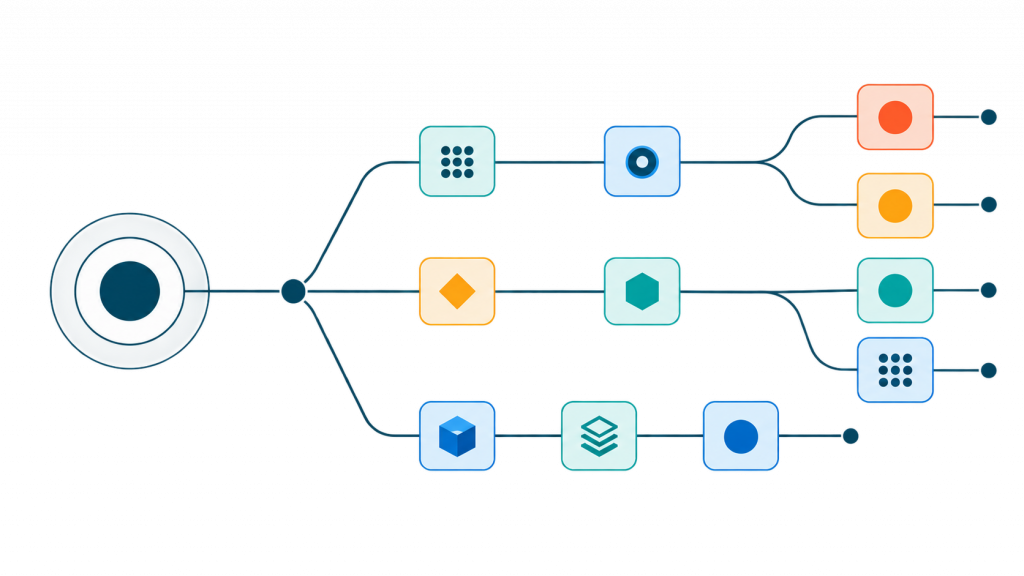
Agent orchestration is becoming more visible, structured, and adaptable in Oracle AI Agent Studio. With the move toward Workflow Agents, teams can design execution paths explicitly, test individual branches, run independent operations in parallel, and use Code nodes for deterministic processing.
For organizations already using Supervisor Agents, this evolution does not mean starting over. The migration path is designed to preserve existing behavior while moving orchestration into a Workflow that teams can inspect and improve.
Here is what is changing, why it matters, and how to approach the transition.
What is changing?
Workflow Agents are becoming the foundation for the next generation of agent development in AI Agent Studio. New agent orchestration can be built as a Workflow Agent rather than beginning with a Supervisor.
Workflows support the building blocks needed for sophisticated agentic applications, including:
- Agents and large language models
- Tools and business-object functions
- Code
- Conditions and switch logic
- Loops
- Parallel execution
- Multi-node composition
The important point is that the underlying capabilities of the Supervisor pattern are not disappearing. They can be represented within a Workflow, but with the control flow made explicit.
Why move to Workflow Agents?
A Supervisor Agent dynamically delegates work. That flexibility is useful, but the orchestration can be difficult to see and control. In a Workflow, execution is represented as a graph, allowing teams to understand and modify what happens at every stage.
This explicit approach offers several advantages.
Greater control
The execution path is visible rather than hidden inside dynamic delegation. Teams can define when a branch runs, how information moves between nodes, and what should happen under different conditions.
Easier testing
Branches and paths can be validated independently. Instead of treating orchestration as a black box, developers can inspect intermediate results, test key scenarios, and isolate problems more quickly.
Better performance
Independent calls do not always need to run one after another. A Workflow can execute them in parallel, reducing the cumulative latency that comes with serial processing.
Imagine three unrelated data-retrieval operations. In a serial design, the total wait time is roughly the sum of all three calls. In a parallel design, the calls can run at the same time, so overall latency is driven primarily by the slowest call.
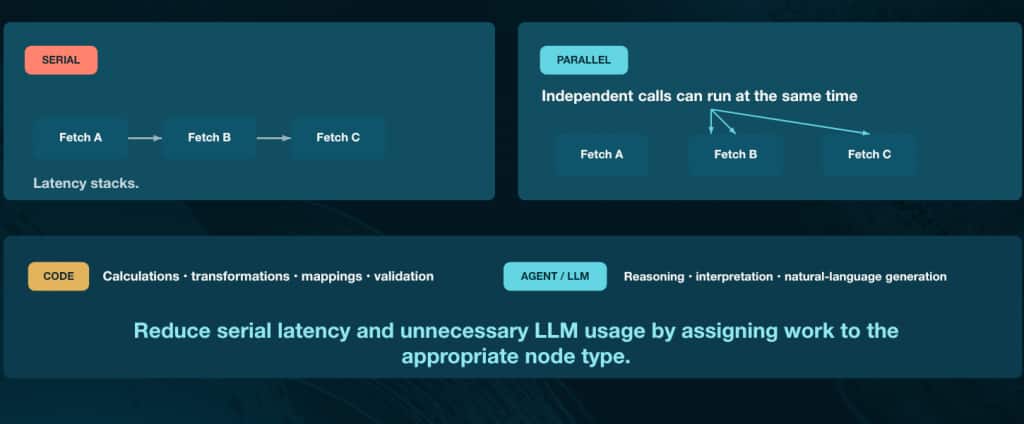
Parallel paths reduce stacked latency, while Code nodes handle deterministic processing without unnecessary LLM calls.
More efficient use of AI
Not every task requires an LLM. Calculations, transformations, mappings, and validation are often deterministic and can be handled in Code nodes. Agent or LLM nodes can then focus on reasoning, interpretation, and natural-language generation.
Assigning each task to the right node type can reduce unnecessary model calls and token usage while making outcomes more predictable.
Improved maintainability
Each node in a Workflow can have a clear responsibility. This makes the orchestration easier to understand, update, troubleshoot, and extend. Branching, loops, parallel paths, and multi-node patterns can be composed without losing sight of how the system operates.
What happens to the Supervisor pattern?
The Supervisor pattern still has a place in the Workflow model. A Multi Agent node can contain a supervisor that dynamically routes requests to specialized worker agents.
In other words, Supervisor behavior is preserved, but it now runs inside a Multi Agent node as part of a larger, explicit Workflow. Teams retain dynamic routing where it adds value while gaining visibility and control around it.
A practical migration path
The transition can be understood in three stages: convert, inspect, and refine.
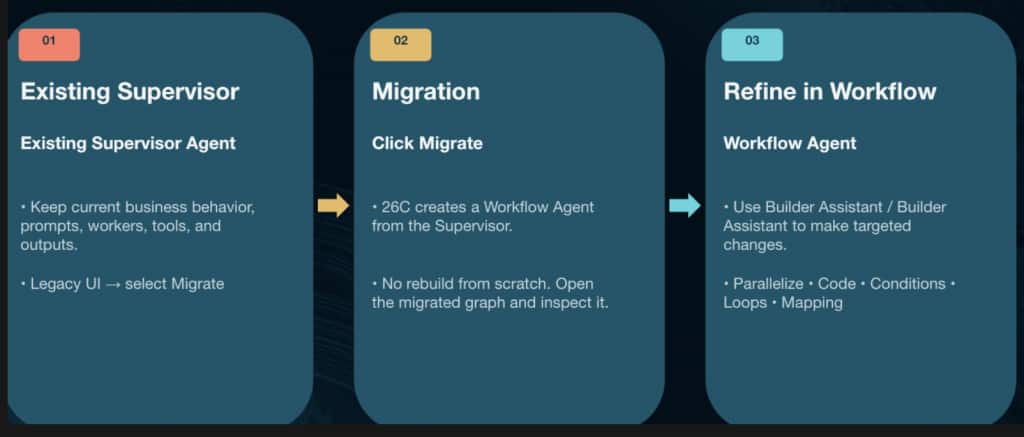

1. Convert the existing Supervisor
Begin in the existing Agent Studio experience, locate the Supervisor Agent, and select Migrate. AI Agent Studio creates a Workflow Agent from the Supervisor, carrying forward its existing business behavior, prompts, workers, tools, and outputs.
This is a conversion, not a rebuild from scratch.
2. Inspect the migrated Workflow
Open the new Workflow and review the graph that was created. Confirm that the worker structure and expected behavior have been preserved. Examine the nodes, edges, dependencies, and data flow before making changes.
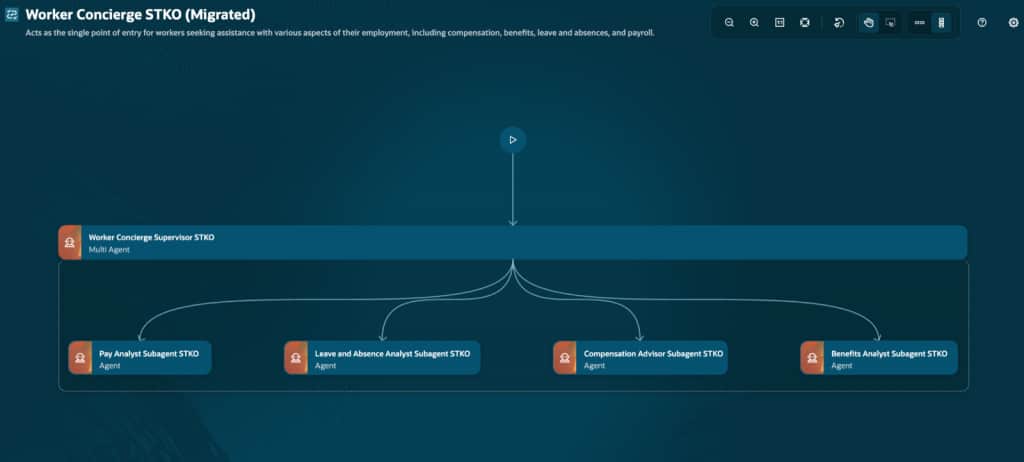
A migrated Workflow makes the Supervisor and its specialized worker structure visible in the graph.
The migrated graph should be treated as a starting point. Its first job is to represent the existing Supervisor behavior clearly; optimization comes next.
3. Refine the orchestration
Once the Workflow is understood, use Builder Assistant to make targeted improvements. For example, you might ask it to:
- Run independent calls in parallel
- Move a calculation into a Code node
- Add a loop to process each item in a collection
- Correct a mapping between nodes
- Introduce conditions or switch logic
Review each change in the graph. Check the branches and dependencies, confirm that the updated design matches the intended business behavior, and validate the Workflow before moving to the next improvement.
Test and iterate—one change at a time
Migration should not be treated as a single click followed by immediate retirement of the original implementation. A safer approach is incremental:
- Preserve the current behavior.
- Migrate the Supervisor.
- Inspect the generated Workflow.
- Make one focused improvement.
- Test the relevant scenarios.
- Compare the results with the existing behavior.
- Repeat until the Workflow is stable.
This sequence makes it easier to understand the effect of each change. It also creates a natural validation trail as the orchestration evolves.
When the design is functionally sound, clean up the graph so that its structure is easy for others to follow. A readable Workflow is easier to maintain than one whose logic is technically correct but visually confusing.
A useful division of labor between nodes
One of the most valuable design decisions is choosing the right node for each kind of work.
Use Agent or LLM nodes for tasks that require:
- Reasoning
- Interpretation
- Judgment based on context
- Natural-language generation
Use Code nodes for tasks that require:
- Calculations
- Data transformations
- Field mappings
- Deterministic validation
Use parallel paths when operations are independent, and use conditions, switches, or loops when the flow depends on data or must repeat across a collection.
This separation can improve speed, reduce token consumption, and make the system easier to troubleshoot.
The bigger picture
The move from Supervisor to Workflow is more than a user-interface change. It represents a shift from largely implicit delegation to observable orchestration.
Workflow Agents make it possible to see how an agentic application operates, decide where dynamic reasoning is truly needed, and optimize the rest of the execution path. They also provide a practical bridge for current Supervisor implementations: preserve what works, migrate it, inspect it, and improve it deliberately.
For teams preparing for the transition, the best place to begin is with an existing Supervisor Agent that is well understood. Migrate it, compare the resulting Workflow with the current behavior, and identify one concrete opportunity—such as parallel execution, deterministic Code, or improved mapping—to test the new model.
The destination is not simply a converted agent. It is an orchestration that is clearer, faster, easier to validate, and ready to evolve.
New to Oracle AI Agent Studio?
Check out the Fusion AI Agent Studio Learning Path — a full blog series from zero to production-grade AI agents, with deep dives on every agent pattern, node type, and tool integration.