
Blog 15 · Keep these handy
When an ATLAS run doesn’t go the way you expected, the cause is usually in one of three places: your setup, the test data, or the agent itself. Find what you’re seeing below, see why it happens, and copy the request that gets you moving again.
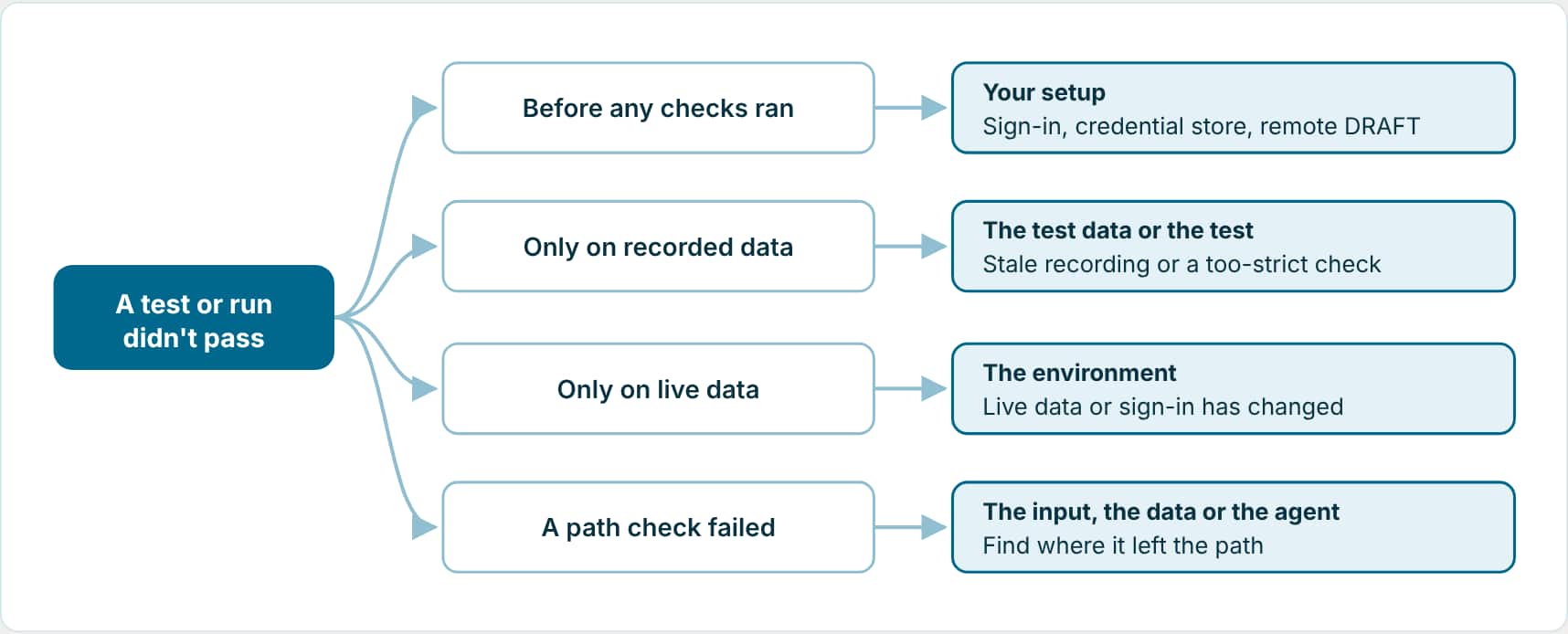
Start with where it failed
Before the run: setup and access
You see
The assistant stops and asks you to sign in
Why: a command needs your Fusion credentials.
What to do: run the sign-in command it shows you in your own terminal, or explicitly allow it to pass a password you give it for that one step. Passwords are never written to files or logs.
Ask
Show me the exact sign-in command to run in my own terminal, then continue from where you stopped.
You see
Every test fails before any checks run, with a credential-store error
Why: it’s your machine, not your agent. In one real suite all 16 tests failed with “Failed to store encryption passphrase in Windows Credential Manager”. The CLI couldn’t reach the operating system’s credential store from inside the assistant’s sandbox.
Ask
Rerun the same command outside the sandbox. If it then needs me to sign in, show me the command to run.
You see
Remote DRAFT mismatch
Why: your local workflow and the DRAFT on the server are different. Align them before recording or running live. The assistant asks before it overwrites anything on the server.
Ask
Show me how my local workflow differs from the remote DRAFT. Don't overwrite anything until I confirm.
During the run: tests and data
You see
Zero tests found
Why: the workflow code, the test name or a tag filter doesn’t match. Filtering by several tags needs all of them unless you ask for any one.
Ask
No tests were found. Check the workflow code, test names and tag filters, tell me which tests match, and run tests that have any of the tags I listed.
You see
A test says needs-model-test-data, or its data is pending
Why: the test exists but its data isn’t ready yet.
Ask
Finish preparing the compacted or generated data for the tests that are pending, or record it live, then run them.
You see
A scenario is unable to generate
Why: ATLAS couldn’t build a trustworthy test with the input or data it had.
Ask
For each scenario marked unable to generate, tell me what you tried and what's missing. I'll supply it, then retry.
You see
A conversation step failed and the later steps were skipped
Why: later steps depend on the earlier state. Output and judge failures don’t stop later steps; runtime and resume failures do.
Ask
Which step in this conversation test diverged first, and why?
Reading the results
You see
Every test passed, but nothing checked the answers
Why: the suite ran in deterministic mode, so the judge never scored the model-written answers. A green suite like that only proves the agent took the right path.
Ask
Rerun the tests for this workflow with hybrid evaluation so the judge runs, and show me the judge scores.
You see
File mode fails, but live mode passes
Why: the recorded data may be stale, the workflow may have changed, or an assertion is too strict.
Ask
This test fails on recorded data but passes live. Tell me whether the data is stale, the workflow changed, or an assertion is too strict, and refresh or update the test.
You see
Live mode fails, but file mode passes
Why: the environment is different from when the data was recorded, or sign-in or remote data has changed.
Ask
This test passes on recorded data but fails live. Show me what's different in the live run.
You see
A path assertion failed
Why: the run took a different branch than the test expected. The fix may be the input, the replay data, or the workflow itself.
Ask
Show me the first node where the run left the expected path, and the input or replay value that sent it there.
You see
A report looks out of date
Why: the report files haven’t caught up with the latest results.
Ask
Refresh the report files for this workflow without rerunning it.
Still stuck? Ask for a triage.
One request sorts every problem in a suite by cause and suggests the smallest safe fix for each.
Triage
Show me every failing, pending-judge, and unable-to-generate test for Project Initiation Assistant. Group them by cause, link each report, and recommend the smallest safe fix.
Key takeaways
- Where a test failed tells you where to look: setup, test data, environment, or the agent.
- A fully green suite in deterministic mode hasn’t checked any answers. Run with the judge.
- You don’t need to dig through files: describe what you see and ask the assistant for the first point where things went wrong.