
Blog 14 · Keep these handy
With ATLAS, your request is the whole interface. A clear request gets you the right tests the first time; a vague one gets you a conversation. Here are ready-to-use requests, grouped by what you’re trying to do. Copy one, swap in your own workflow or app name, and send it to your coding assistant.
What makes a good request
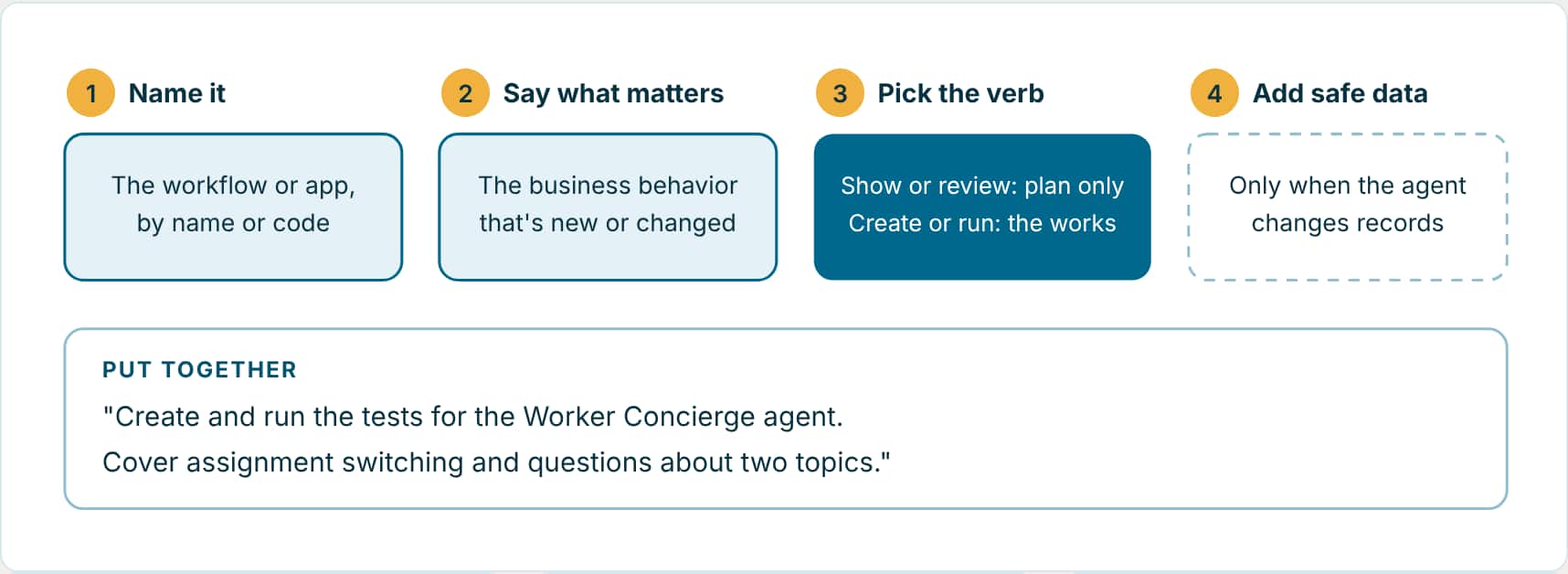
Swap the names: The examples name sample workflows and apps. Replace them with your own workflow or app name, or its code.
Preview first: Not sure what a request will do? Add “don’t create or run anything yet” and you’ll get the plan without any changes.
Say what’s off limits: “Keep all changes local” or “don’t change the workflow” are part of the request. The assistant follows them.
1. See what’s missing
Use these when you want the plan before anything changes.
Review coverage only
Review the test coverage for my Opportunity Management workflow. Tell me which important business scenarios are missing, but do not create or run tests yet.
New workflow, full coverage
This is a brand new workflow. Identify every scenario it needs, create and run all the tests, and show me Validation and Insights.
2. Create and run tests
Use these when you’re ready for real tests and results.
Create and run workflow tests
Create and run the missing tests for my workflow. Cover listing, filtering, creating, updating, no-results, errors, and out-of-scope requests. Use safe replay data where possible and keep all changes local.
Run existing tests
Run the existing tests for Help Ticket Resolver against the published workflow.
3. Get the data right
Use these when a path needs special data, or sensitive fields have to stay out of your tests.
Mixed data strategy
Use real recorded data for the normal manager path. For the missing manager, missing evaluation, and missing ratings paths, use small generated data that forces each fallback message.
Mask sensitive fields
Create a reusable HCM profile that masks PersonId, national identifiers, passport numbers, employee names, and email addresses. Apply it during future recordings and validate file replay.
4. Tighten the checks
Use these when a test passes but doesn’t prove enough.
Exact route check
For the billing ticket route, verify the workflow returned exactly "Route to Billing Support" and prove that the technical and general return paths did not run.
Rewrite a judge
Replace the judge criteria for this custom test with my requirements: compare both workers, identify the lower rating accurately, preserve the badge text, and reject unsupported performance claims.
5. Test conversations
Use these for follow-up questions and multi-turn tests.
Context follow-up
Add a follow-up step that refers to the selected topic as "that one". Verify the response keeps the earlier selection without repeating the topic name in the new message.
Exact first message
Use this exact message for the first step without shortening or rewriting it: "Review order 58321, compare the requested and promised dates, and explain which fulfillment constraint needs attention before I contact the customer."
6. Test an Agentic App
Use these for a single panel, or the whole app and the agents behind it.
Test a panel
Test the Opportunity Details panel and its backing workflow. Verify that the panel opens, returns the correct information, and displays the expected layout. Create or update the needed tests and provide a concise report.
Whole app
Run the complete app sync for Manager Coaching Workspace. Complete each backing workflow's tests, validate every top-level panel, and show the consolidated results.
7. After a change, or when tests fail
Use these to sort out failures and repair tests without weakening them.
Triage
Show me every failing, pending-judge, and unable-to-generate test for Project Initiation Assistant. Group them by cause, link each report, and recommend the smallest safe fix.
Repair one test
Repair the active-request-conflict test. Try a materially different scenario-specific input, keep its scenario identity, and do not change the workflow unless the observed behavior proves the workflow is wrong.
8. Optimize models and cost
Use these once your tests are stable.
Model cost check
Compare lower-cost model options for the formatting nodes in this workflow. Do not change the saved workflow. Recommend a model only if the relevant tests still pass.
Budget a test
Set a maximum of 20 AI units for this test. Fail it when the limit is exceeded and warn me when AI-unit evidence is unavailable.
Key takeaways
- Name the workflow or app, say what matters, and choose the verb on purpose: “show” and “review” change nothing, “create” and “run” do the work.
- Say what’s off limits, such as “keep all changes local” or “don’t change the workflow”. It’s part of the request.
- Start with the plan when you’re unsure, then ask for the tests.
Part 14 of the ATLAS learning path.
Previous: Cost guardrails and ATLAS recommendations
Next: Troubleshooting
Back to the Learning Path for ATLAS