
Blog 6 · Hands-on
Every test carries the data it needs. Here’s how that data gets into a test, what it looks like in the file, and the three ways you can supply your own values.
Key terms in this post
- Compacted data: Real recorded data trimmed to the rows and fields the workflow uses, when the full response is too big to store.
- Generated data: Small, made-up data for paths that are hard to reach with live data, such as an empty team or a missing record.
- Baseline replay: Reusing another test’s recorded data, for example for a different app stage that reads the same records.
- Masking: Replacing sensitive values in recorded data with consistent stand-ins before tests are committed.
Other terms are defined in the ATLAS glossary.
How recording works
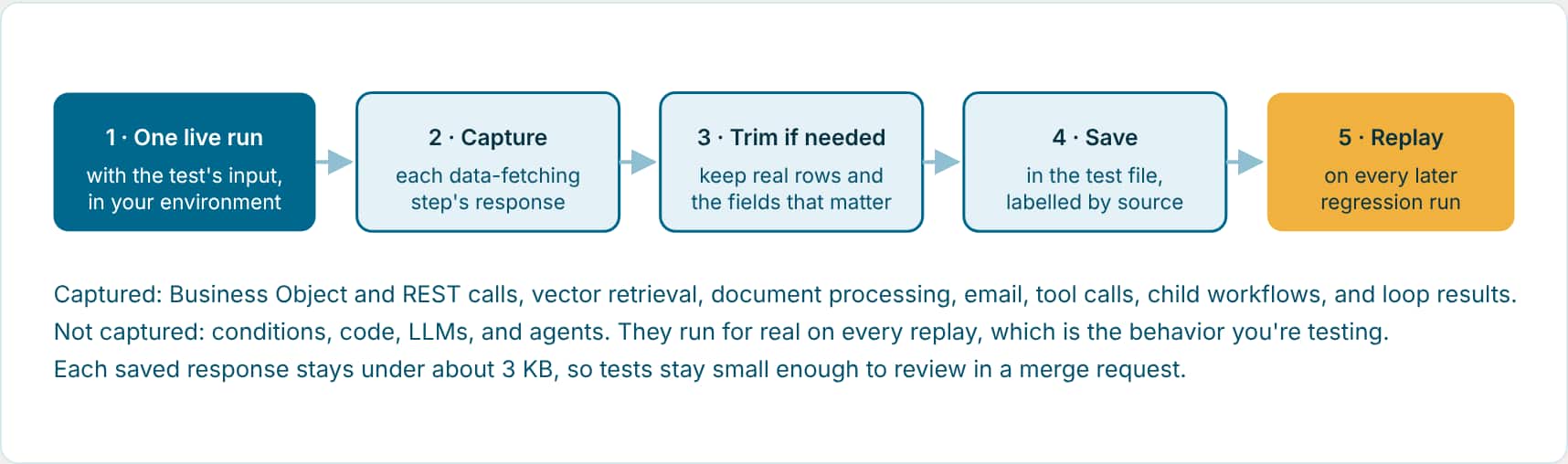
If a real response is too big to store, the assistant trims it: it keeps two to five representative real rows and only the fields the workflow reads in its prompts, code, checks, and judge rubric, then fixes the record counts to match. If Fusion itself cut the response short during the run, ATLAS won’t save the partial data. It asks you to reduce the data in the test environment or increase the debug size instead.
What it looks like in the test file
These excerpts come from the Team Health workflow’s tests. Values are shortened.
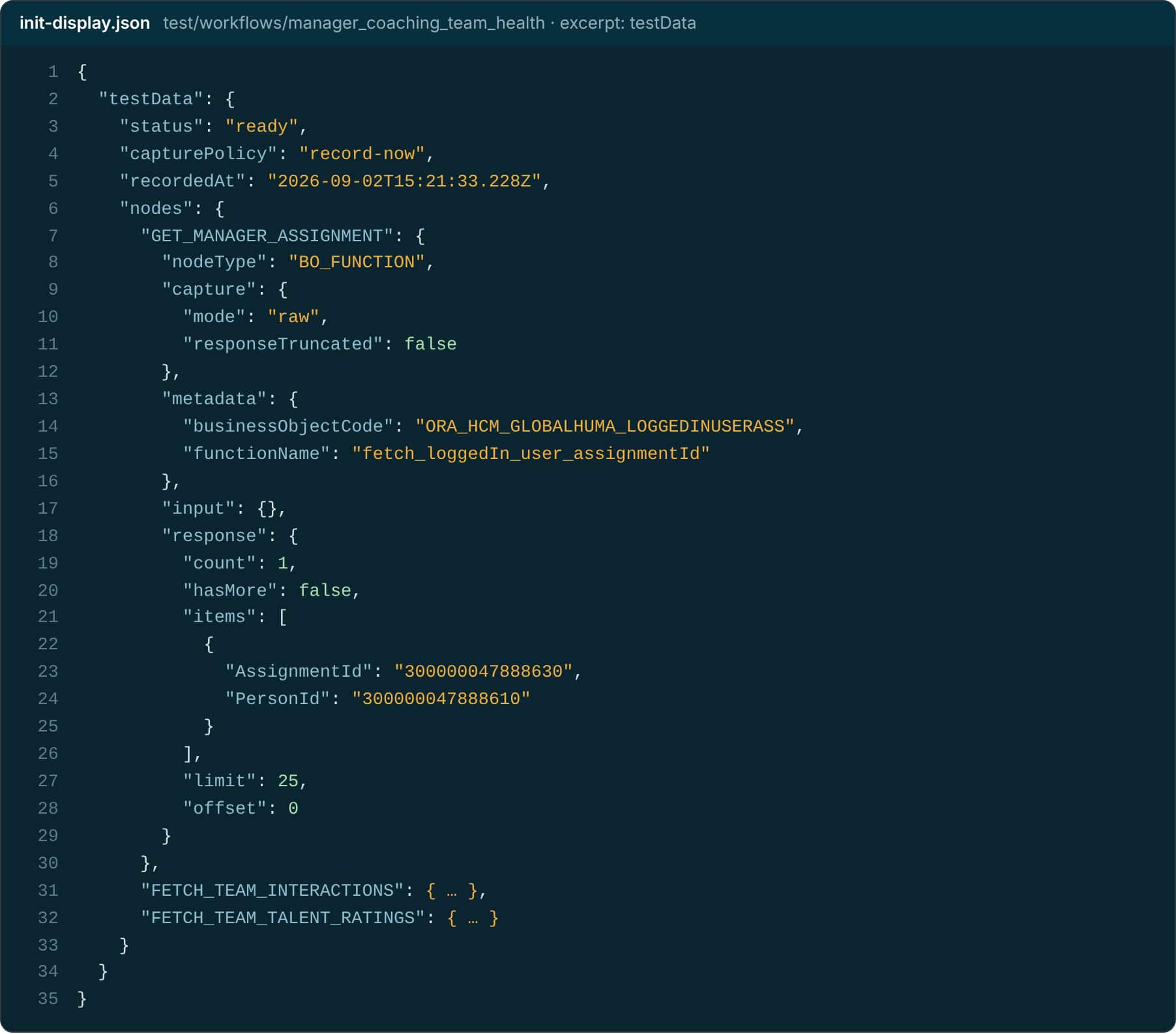
Example: init-display.json · recorded live
"testData": {
  "status": "ready",
  "capturePolicy": "record-now",
  "nodes": {
    "GET_MANAGER_ASSIGNMENT": {
      "nodeType": "BO_FUNCTION",
      "capture": { "mode": "raw" },
      "response": {
        "count": 1, "hasMore": false,
        "items": [{ "AssignmentId": "3000…",
                    "PersonId": "3000…" }]
      } } } }
Example: team-health-is-unavailable…json · generated
"testData": {
  "status": "ready",
  "capturePolicy": "model-generated",
  "generationPrompt": "…returns the exact
    no-manager-assignment message…",
  "nodes": {
    "GET_MANAGER_ASSIGNMENT": {
      "capture": { "mode": "model-generated" },
      "response": {
        "count": 0, "hasMore": false,
        "items": []
      } } } }
The second test needs no special environment: an empty response from the assignment lookup is all it takes to send the workflow down its “no manager” path. That is how fallbacks get tested reliably.
Four ways data gets into a test
| Approach | Use it when | In the Team Health suite |
|---|---|---|
| Record now | The environment has realistic data for the path. | init-display: recorded live, three Business Object responses saved as-is. |
| Reuse a baseline | Another test already recorded the same data. | init-actions, init-communications, query, summary reuse the InitDisplay recording. |
| Generate | The path is hard to reach live: empty lists, missing records, rare branches. | Both fallback tests use small generated responses. |
| Record later | You know the test you want but don’t yet have safe data or access. | The test is created with empty data and recorded when you’re ready. |
| Label in the file | Meaning |
|---|---|
raw | The full real response, stored exactly as captured. |
model-compacted | Real data trimmed to fit. Marked as truncated so nobody mistakes it for the complete response. |
model-generated | Made up on purpose for a branch, empty state, or hard-to-reach path. |
Bring your own data
You can supply your own values at three levels. Whatever you provide takes priority over anything ATLAS would choose, and it’s kept on future syncs.
- 1 · Inputs · The request itself: An exact chat message, REST parameters, record IDs, app context, or extra chat context. Messages you write are kept word for word.
- 2 · Records · What gets recorded: Point the test at specific safe records in a test environment: a known manager, order, or opportunity.
- 3 · Responses · What a step returns: Describe or paste the response one step should return. Only the steps that steer the branch change; the rest of the recording stays real.
Your own input
Run the sync plan for Requisition Details. For InitDisplay, use OraAppContext with requisitionId 300100681458328 and issue Stagnant, then record and preserve that input on later syncs.
Your own records
Create tests for the revenue update and delete paths. Use this safe test opportunity number and revenue record ID. Do not use production data. Run the focused suite and summarize the results.
Your own response
Show which recordable step's data controls the no-ratings branch. Keep the rest of the recording, and make only that step return an empty list of ratings.
Example: How that last request is stored: only the branch-steering step is overridden
"testDataOverrides": {
  "GET_TEAM_PERFORMANCE_RATINGS": { "response": { "items": [] } }
},
"pathAssertions": {
  "mustExecute":    ["GET_TEAM_PERFORMANCE_RATINGS", "NO_RATINGS_RETURN"],
  "mustNotExecute": ["BUILD_TEAM_PERFORMANCE_DASHBOARD"]
},
"assertions": { "equals": "No team performance ratings found for the selected period." }
What a replay does and doesn’t prove
- It doesn’t recheck the live connection: A recorded-data run proves the agent behaves on known data. It doesn’t prove the Business Object, REST service or retrieval still answers today. Keep a live run in your routine for that.
- A missing response stops the run: If a test needs a saved response it doesn’t have, the replay stops before that data call instead of quietly reaching out to Fusion. Record the missing data or generate it.
- A replayed child is a boundary: When a parent replays the result of a child workflow or a whole loop, the parent’s test doesn’t exercise what happens inside. Give the child, or one representative pass through the loop, its own tests. In Blog 8, the Person Data Assistant is that kind of boundary.
- Trimmed data must still add up: If a team of 12 is cut to 3 to keep a test small, every related response has to agree: the same IDs, counts that match, child records that belong to those 3, and loop inputs for exactly 3. Otherwise the model is reasoning over a story that contradicts itself.
Keep it safe
- Nonproduction for writes: Recording runs the workflow for real. Anything that creates, updates, deletes, or sends should be recorded in a test environment with safe records, and the assistant asks before it changes data. Replays never repeat the action.
- No secrets in tests: Test inputs and data are committed to source control. Use sanitized or synthetic identifiers, never passwords or tokens.
- Mask sensitive fields: Name the fields, and ATLAS replaces each value with a consistent stand-in across every related test, so joins and routes still work.
Masking covers recorded data, not attached files.
If a test needs an original document, such as a PDF a workflow reads, the file is kept with the test. Recording uploads the original; replay uses what the reader step extracted. Masking applies to the recorded data, not to the bytes of that file, so only attach documents that are safe to commit.
Ask
Create a reusable HCM masking profile for PersonId, employee names, and email addresses. Apply it to future recordings and validate file replay.
When the data is the problem
| You see | What it means and what to do |
|---|---|
| Test data is pending | The test was created to record later. Ask the assistant to record it now, or to generate the data. |
| Needs model test data | A real response was too big. Ask the assistant to finish trimming it and apply it to the test. |
| A response was cut short | Fusion returned partial data. Reduce the data in the test environment or raise the debug size, then record again. |
| Fails on recorded data, passes live | The saved data is stale or the workflow changed. Ask the assistant to refresh the recording or update the test. |
| Passes on recorded data, fails live | The environment’s data differs from what was recorded. That’s an environment finding, not a test bug. |
Key takeaways
- Recording runs once against live data, captures only the data-fetching steps, and saves small real responses in the test.
- Use recorded data for real paths, baselines for shared data, and generated data for paths that are hard to reach live.
- You can supply your own inputs, records, or step responses, and ATLAS changes only what you specify.
Part 6 of the ATLAS learning path.
Previous: Review your test reports
Next: Build or pull
Back to the Learning Path for ATLAS