
As enterprise automation matures, the ability to orchestrate AI-driven intelligence across fragmented systems is becoming a core architectural requirement. Fusion AI Agents can be invoked directly from any external application beyond the native Fusion interface giving developers the flexibility to embed agent-powered workflows into their own systems and portals.
This guide walks through the integration flow: authenticating your application, invoking an Agent Team, and polling for results.
At the heart of this integration is the Invoke Async API, a asynchronous pattern designed for the realities of AI workloads. The below highlights the flow
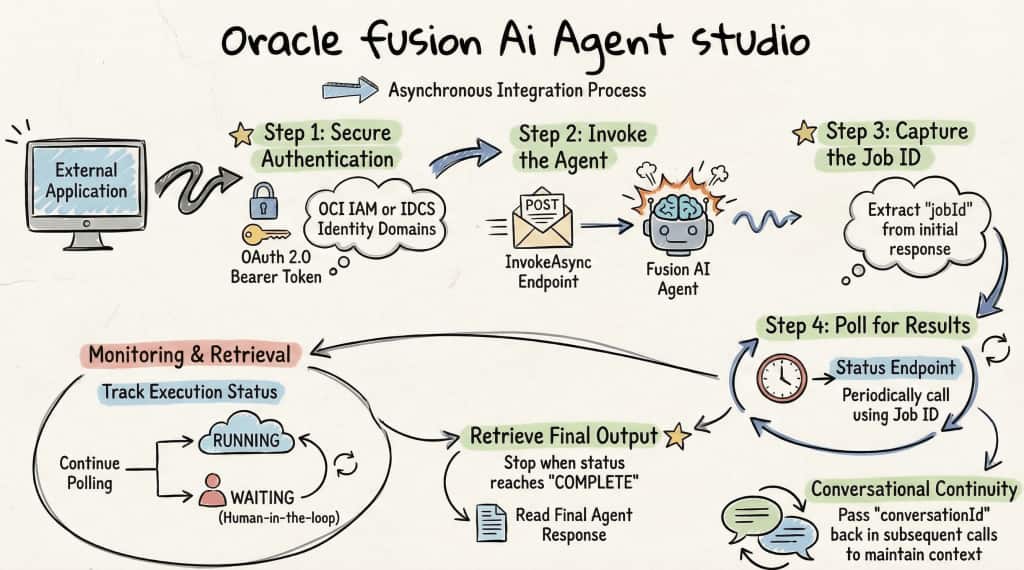
Step 1: Authentication
All API interactions require a valid OAuth 2.0 bearer token. The access tokens can be obtained through any supported grant type, such as client credentials, password, SAML2, JWT, authorization code, device code, or refresh tokens. If your environment is on OCI IAM / IDCS, follow the standard OAuth configuration as documented in the official Oracle references below:
- OCI IAM Identity Domains API — OAuth Runtime Tokens REST Endpoints
- Fusion Applications Identity Domain OAuth Setup — REST APIs for Common Features in FA
We’re currently working on a blog covering OAuth 2.0 authentication, token generation, and user assertion. Stay tuned!
The Asynchronous Execution Pattern
AI Agents are not instantaneous. They may need to reason over complex prompts, query large document repositories, call external APIs, or wait for human-in-the-loop responses. To accommodate this “Invoke then Poll” asynchronous pattern is followed.
Step 2: Invoke the Agent
Initiate the agent session by posting to the InvokeAsync endpoint. The request body carries the user prompt, agent teams configuration, and any custom parameters your integration requires.
Endpoint:
POST https://{pod_host}/api/fusion-ai/orchestrator/agent/v1/{agent_team_code}/invokeAsyncSample Request Body
{
  "conversational": true,
  "conversationId": null,
  "version": 13,
  "status": "PUBLISHED",
  "message": "Compare M1000034 of org IMO and M1000040 of Org SBI",
  "invocationMode": "END_USER",
  "parameters": {
    "Param1": "ABC",
    "Param2": "123"
  }
}
Sample Response
{
    "input": "{\"workflowCode\":\"PRODUCT_COMPARISON_ADVISOR_COE\",\"message\":\"Compare M1000034 of org IMO and M1000040 of Org SBI?\",\"conversational\":true,\"conversationId\":\"eb6f8427-5e13-4dd2-8fa9-ef3887f19385\",\"jobId\":\"c73c1580-70cc-4f62-93c0-48d9484d8b8b\",\"invocationMode\":\"END_USER\",\"version\":13,\"status\":\"PUBLISHED\",\"parameters\":{},\"refreshCache\":false,\"useInternalConfig\":false,\"workflowId\":\"300000029907702\"}",
    "output": null,
    "error": null,
    "followUpQuestions": [],
    "jobId": "c73c1580-70cc-4f62-93c0-48d9484d8b8b",
    "conversationId": "eb6f8427-5e13-4dd2-8fa9-ef3887f19385",
    "traceId": "0000000000000000322418a3c9ceb65d",
    "status": "RUNNING",
    "supportingChunks": [],
    "citations": [],
    "nodes": [],
    "waitingToolCode": null,
    "workflowCode": "PRODUCT_COMPARISON_ADVISOR_COE",
    "workflowName": null,
    "architecture": null,
    "workflowVersion": 13,
    "workflowStatus": "PUBLISHED",
    "startDate": 1773341443081,
    "endTime": 0,
    "createDate": "2026-03-12T18:50:43.081+0000",
    "endDate": "1970-01-01T00:00:00.000+0000",
    "timeTaken": 0,
    "inputTokenCount": 0,
    "outputTokenCount": 0,
    "waitingNodeDetails": null
}
Step 3: Capture the jobId
The jobId in the response will be used to poll for results.
To continue a conversation across multiple turns, pass the conversationId from a previous response. Setting it to null starts a new session.
Step 4: Poll for Results
Once you have a jobId, poll the status endpoint for result
Endpoint:
GET https://{pod_host}/api/fusion-ai/orchestrator/agent/v1/{agent_team_code}/status/{jobId}Sample Response
The ‘output’ field in the response has the Final response of Agent Team along with other attributes.
{
    "input": "{\"workflowCode\":\"PRODUCT_COMPARISON_ADVISOR_COE\",\"message\":\"Compare M1000034 of org IMO and M1000040 of Org SBI?\",\"conversational\":true,\"conversationId\":\"eb6f8427-5e13-4dd2-8fa9-ef3887f19385\",\"jobId\":\"c73c1580-70cc-4f62-93c0-48d9484d8b8b\",\"invocationMode\":\"END_USER\",\"version\":13,\"status\":\"PUBLISHED\",\"parameters\":{},\"refreshCache\":false,\"useInternalConfig\":false,\"workflowId\":\"300000029907702\"}",
    "output": "Here’s a concise comparison between M1000034 (Org IMO) and M1000040 (Org SBI)............",
    "error": null,
    "followUpQuestions": [],
    "jobId": "c73c1580-70cc-4f62-93c0-48d9484d8b8b",
    "conversationId": "eb6f8427-5e13-4dd2-8fa9-ef3887f19385",
    "traceId": "0000000000000000322418a3c9ceb65d",
    "status": "COMPLETE",
    "supportingChunks": [],
    "citations": [],
    "nodes": [],
    "waitingToolCode": null,
    "workflowCode": "PRODUCT_COMPARISON_ADVISOR_COE",
    "workflowName": null,
    "architecture": null,
    "workflowVersion": 13,
    "workflowStatus": "PUBLISHED",
    "startDate": 1773341443159,
    "endTime": 1773341469930,
    "createDate": "2026-03-12T18:50:43.159+0000",
    "endDate": "2026-03-12T18:51:09.930+0000"
}
Continue polling while status is RUNNING or WAITING. When the status is WAITING, the agent may be expecting a human approval. Handle this case explicitly in your integration logic.
Stop polling when status is COMPLETE or ERROR, then read the output or error field accordingly.
To retrieve detailed debug information(similar to executing from debug window). Use the below in the requests
POST: Use invocationMode=ADMIN in the request body parameter
GET: Use /api/fusion-ai/orchestrator/agent/v1//status/?invocationMode=ADMIN
The below table provides descriptions of the fields in the request body and the response
| Field | Description |
|---|---|
| conversational | Set to true |
| conversationId | Pass the Id from response to resume a conversation, otherwise new conversation will be started. |
| invocationMode | ADMIN or END_USER |
| status | PUBLISHED or DRAFT |
| parameters | Json object with key value pair. “parameters”: { “param1”: “value”, “param2″: “value” } |
| Field | Description |
|---|---|
| input | Request sent in invokeAsync method |
| output | Final response of Agent Team |
| progressMessage | If set to true, this will contain progress messages while request is in progress. |
| error | If execution fails, this field will have error desciption. |
| followUpQuestions | Contains list of follow-up questions, If enabled |
| jobId | JobId |
| conversationId | Conversation identifier |
| traceId | Internal id for execution used for debugging issues |
| status | Status of execution (RUNNING, WAITING, COMPLETE and ERROR) |
| supportingChunks | Return supporting chunks of Document Tool |
| citations | Return citations of Document Tool |
| nodes | List of high steps performed in execution(available in ADMIN mode) Workflow Agent Team = Node Details Supervisor = Agents. |
| startDate & endTime | Start & End of execution in epoch format in UTC time |
| createDate & endDate | Start & End of execution in ISO format in UTC time |
Bringing It Together
Integrating Fusion AI Agents into external applications is a significant step toward an autonomous enterprise architecture. By exposing agent capabilities through a well-defined invokeAsync API, it is possible for any external system, custom portals, third-party apps to harness AI-driven intelligence without requiring users to be inside Fusion Application.