
As enterprise AI solutions mature, the biggest wins often come from reuse and composition: building small, well-governed components (agents and workflows) and assembling them into larger automations. In Oracle AI Studio, you can do this by adding nodes that call embedded agents or dispatch execution to agent teams—including both workflow-based teams and hierarchical (supervisor-style) teams.
This post explains the core concepts and practical mechanics: which node to use, what can be embedded, how to pass inputs, and how to read outputs reliably.
Key concepts: what you can call from a workflow
Oracle AI Studio supports calling other published assets from within a workflow using two node types:
- Agent node: calls a published worker agent (managed from the Agents tab). Use this to embed a single specialist capability inside your workflow.
- Workflow node: calls a published agent team, which can be either:
- a published workflow, or
- a hierarchical agent team (often described as a supervisor-style orchestration).
In both cases, the thing you want to call must be published before it can be selected and invoked.


When to embed an agent vs. dispatch to a team
A useful way to choose:
Embed a worker agent (Agent node) when:
- You want a single well-defined capability (e.g., “summarize”, “classify”, “extract fields”, “draft response”).
- You expect to reuse that capability in multiple workflows.
- You want clean boundaries and simpler testing.
Dispatch to an agent team (Workflow node) when:
- You want to reuse an entire sub-process (multi-step workflow).
- You want a hierarchical team to route work across multiple specialized agents.
- You’re building a modular, “system-of-systems” automation.
Constraints: what cannot be embedded
Oracle AI Studio imposes guardrails on what can be called from an embedded workflow or agent team:
- You cannot add workflows that include human approval nodes.
- You also can’t embed workflows that have wait nodes.
Passing inputs to embedded agents and teams
Calling a component is only useful if you can pass it the right inputs. Oracle AI Studio supports passing values as variables or messages. Messages are interpreted as if the user had typed the input. Variables are specific values.
- For a called workflow team: inputs appear when the called workflow exposes them via a webhook trigger with variables
- For a called agent team or agent: inputs appear when the called team/agent defines Input Variables.
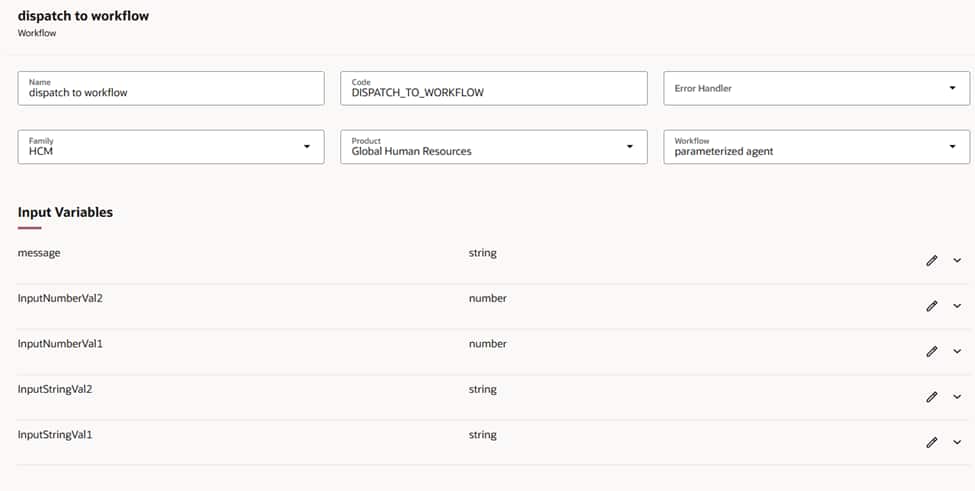
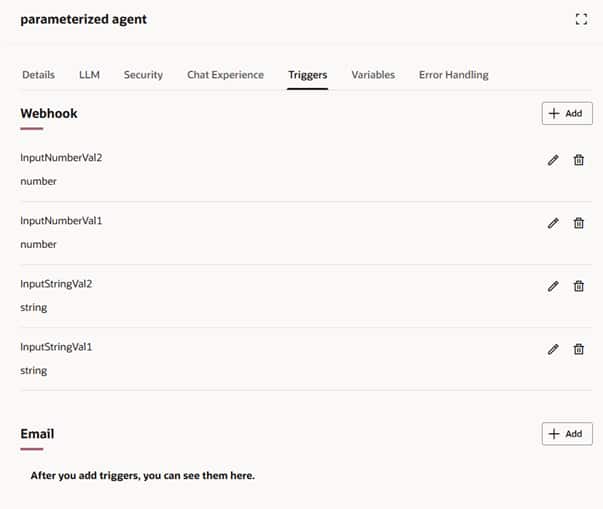
Best practice: treat each agent or team as a productized API:
- Keep input names stable and clearly documented.
- Prefer strongly-typed and validated variables where possible.
- Version your “contract” if changes are expected.
Outputs: what comes back and how to reference it
Once an Agent node or Workflow node runs:
- The final output is passed to the next node automatically.
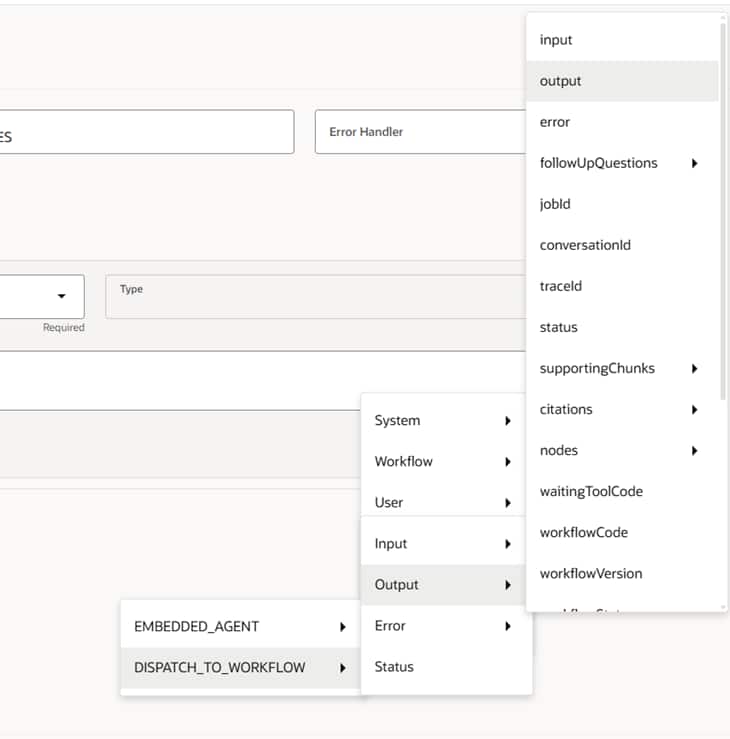
- The node output is a JSON object, and it often includes metadata in addition to the business result you care about.
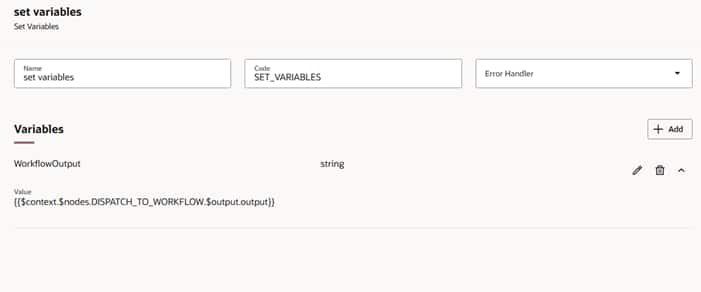
To use the result downstream (e.g., decisioning, transformation, writing back to a system), reference the embedded node’s output like so:
- $context.$nodes.<NODE>.$output.output
This is a typical “gotcha”: don’t assume the top-level node output is only your final payload—treat it as structured JSON and pull the correct field for the final answer you need.
Putting it into practice: composition patterns that scale
Pattern 1: “Skill agent” embedded everywhere
Build and publish a worker agent for a single function (e.g., PII redaction, ticket classification). Then embed it with an Agent node wherever needed. This reduces duplication and makes governance easier.
Pattern 2: Reusable subflow dispatched as a workflow team
Build a complete sub-process as a workflow (enrichment → validation → response drafting), publish it, then call it via a Workflow node from multiple orchestrations.
Pattern 3: Hierarchical team for routing and coordination
When work needs coordination (triage, tool selection, multiple specialist agents), encapsulate that logic in a hierarchical team, publish it, and dispatch to it from an intake workflow using a Workflow node.
Example architecture
Scenario: Customer support automation
- Intake workflow
- Receives ticket
- Normalizes fields (customer tier, product, severity)
- Dispatch step (Workflow node)
- Calls a published hierarchical agent team (“Support Triage Team”)
- Passes inputs via exposed Input Variables
- Decision + action
- Reads the classification/draft from $context.$nodes.<DispatchNode>.$output.output
- Routes to self-service response, escalation, or case enrichment
This gives you clean modularity: the triage intelligence is reusable and independently evolvable, while the intake and integration logic stays stable.
Closing thoughts
Oracle AI Studio’s Agent and Workflow nodes make composable automation “built in, not bolted on”—letting you embed worker agents for targeted tasks and dispatch to published workflows or hierarchical teams for complex orchestration. The essentials are straightforward and summarized below.
Summary checklist
- Use Agent node to embed published worker agents.
- Use Workflow node to dispatch to published agent teams (workflow-based or hierarchical).
- Ensure called components are published before embedding.
- You can’t embed workflows containing human approvals or wait nodes.
- Pass inputs via webhook trigger variables (workflow) or Input Variables (agent/team).
- Treat outputs as JSON and reference the correct nested result (e.g., $context.$nodes.<NODE>.$output.output).
For further details, you can start with the What’s New for 26A documentation
Good luck with your implementation.