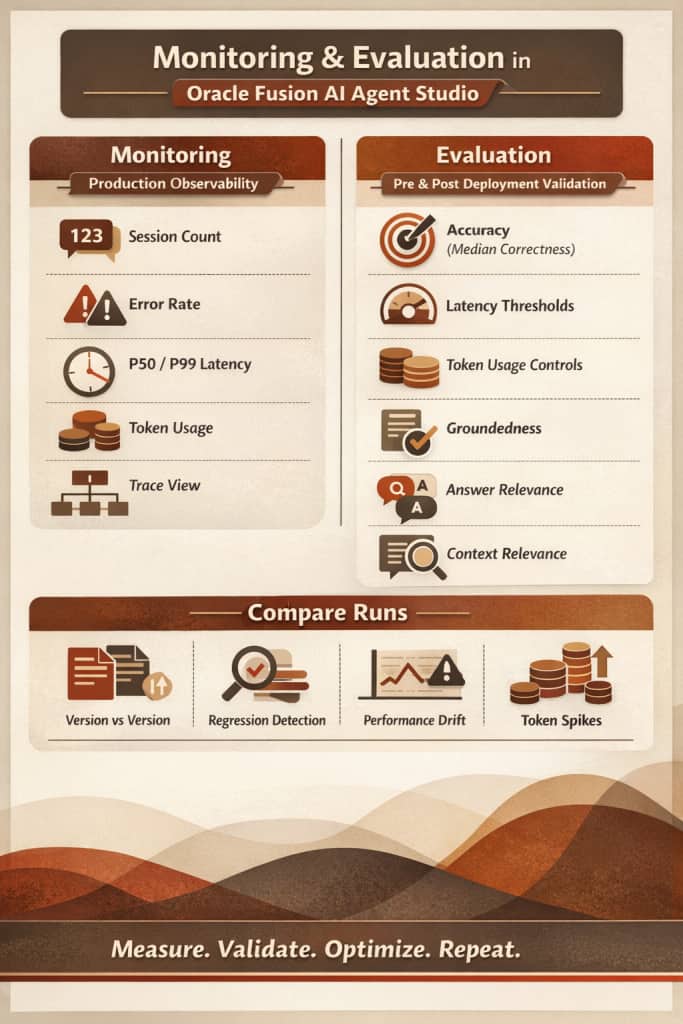
In today’s enterprise AI landscape, building intelligent agents is only the first step. The real value of AI comes from how well those agents perform over time, how reliably they respond, and how efficiently they consume resources.
With Oracle Fusion AI Agent Studio, organizations gain deep visibility into agent behavior using industry-standard metrics such as Accuracy, Latency, and Token Usage — enabling data-driven optimization at scale.
Let’s explore how Monitoring and Evaluation work together to unlock actionable insights.
In this blog, we’ll walk through:
- Why Monitoring and Evaluation Matter?
- Prerequisites for enabling the monitoring and evaluation
- How to access the monitoring?
- Monitoring and Evaluation Metrics
- What “Evaluation” means in Agent Studio
- How to use evaluations to iteratively improve agents
Why Monitoring and Evaluation Matter?
AI agents operate in dynamic enterprise environments. Prompts evolve. Models get updated. Business processes change. Testing autonomous systems requires a shift away from traditional software validation because these tools do not produce identical results every time. Unlike standard programs that follow a fixed input-output logic, artificial intelligence agents are non-deterministic and may take various paths to achieve a successful result.
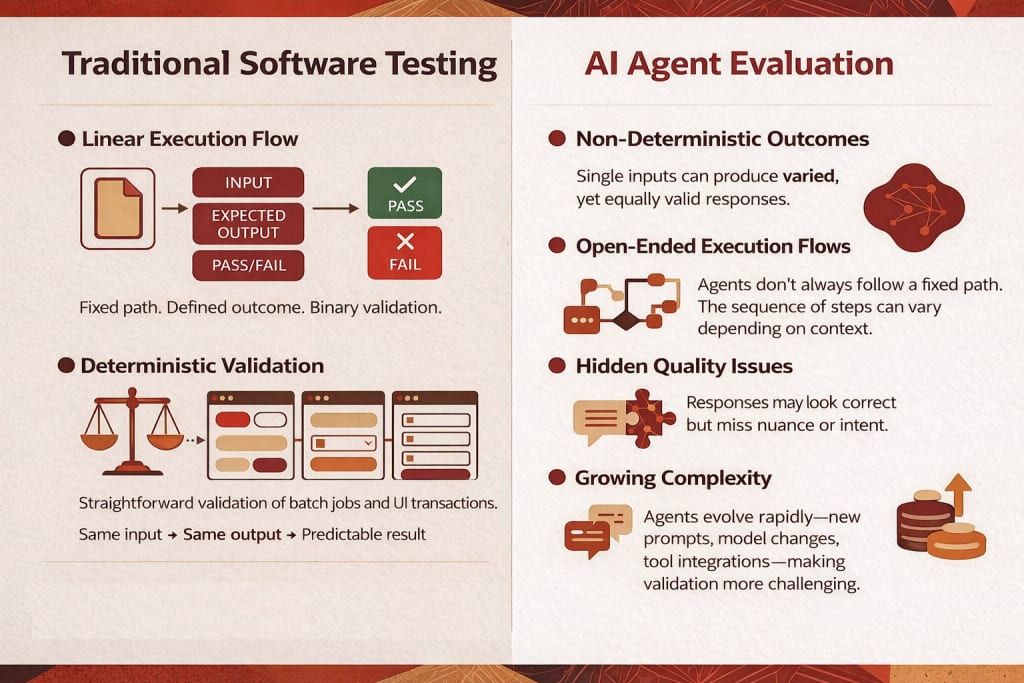
Without structured monitoring and evaluation:
- Latency can silently increase
- Token usage can spike unexpectedly
- Accuracy can regress after a model update
- RAG responses can become ungrounded
so Continuous monitoring becomes essential for tracking performance and ensuring that specific quality bars are met in real-world production. Monitoring tracks performance and provides insight into how agents behave in production.
Prerequisites
Before viewing Monitoring and Evaluation data, you must run the scheduled process:
Steps:
- Go to Navigator > Tools > Scheduled Processes
- Click Schedule New Process
- Leave the type as Job
- Search for and select Aggregate AI Agent Usage and Metrics
- Run the process
This process aggregates the metrics displayed in the Monitoring and Evaluation tab.
It can be scheduled to run on a recurring basis, for example once a day.
Access Monitoring
- Go to Navigator > Tools > AI Agent Studio
- Open the Monitoring and Evaluation tab
- Select the Monitoring subtab
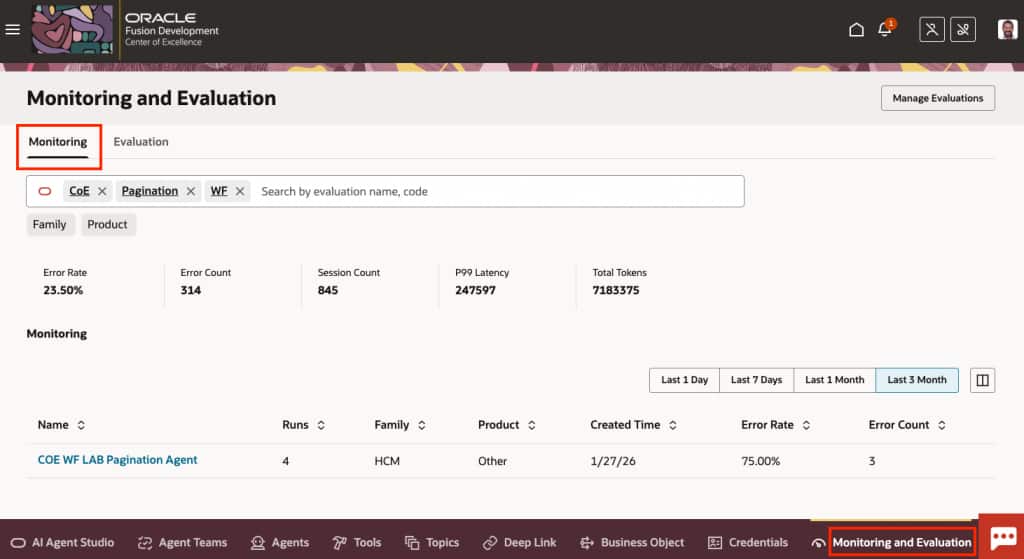
What the Monitoring Tab Displays
- Aggregated metrics for all agent runs over a selected time frame
- All supervisor agent runs, including agents in draft status
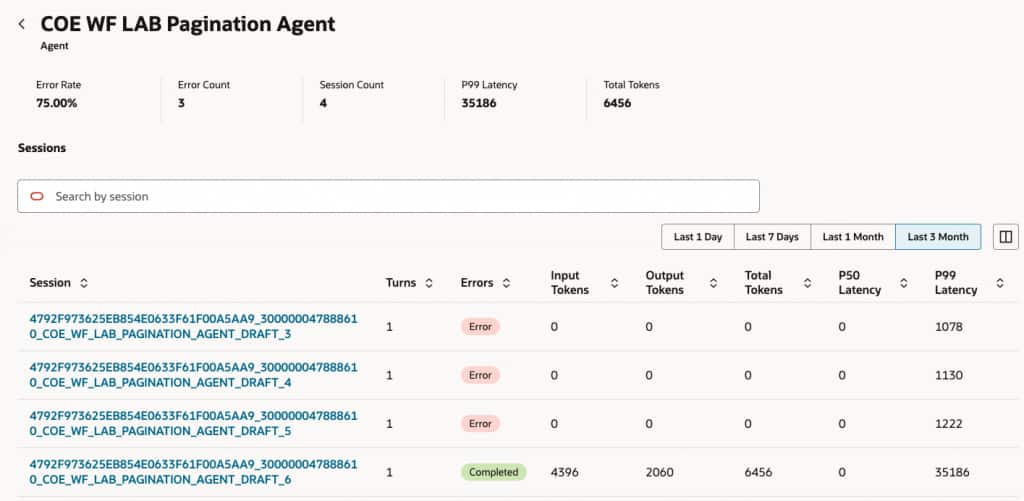
When you select an agent:
- Each row represents a single session
- Displays number of turns (back-and-forth messages)
- Shows session completion status (successful or error)
- Shows number of tokens used
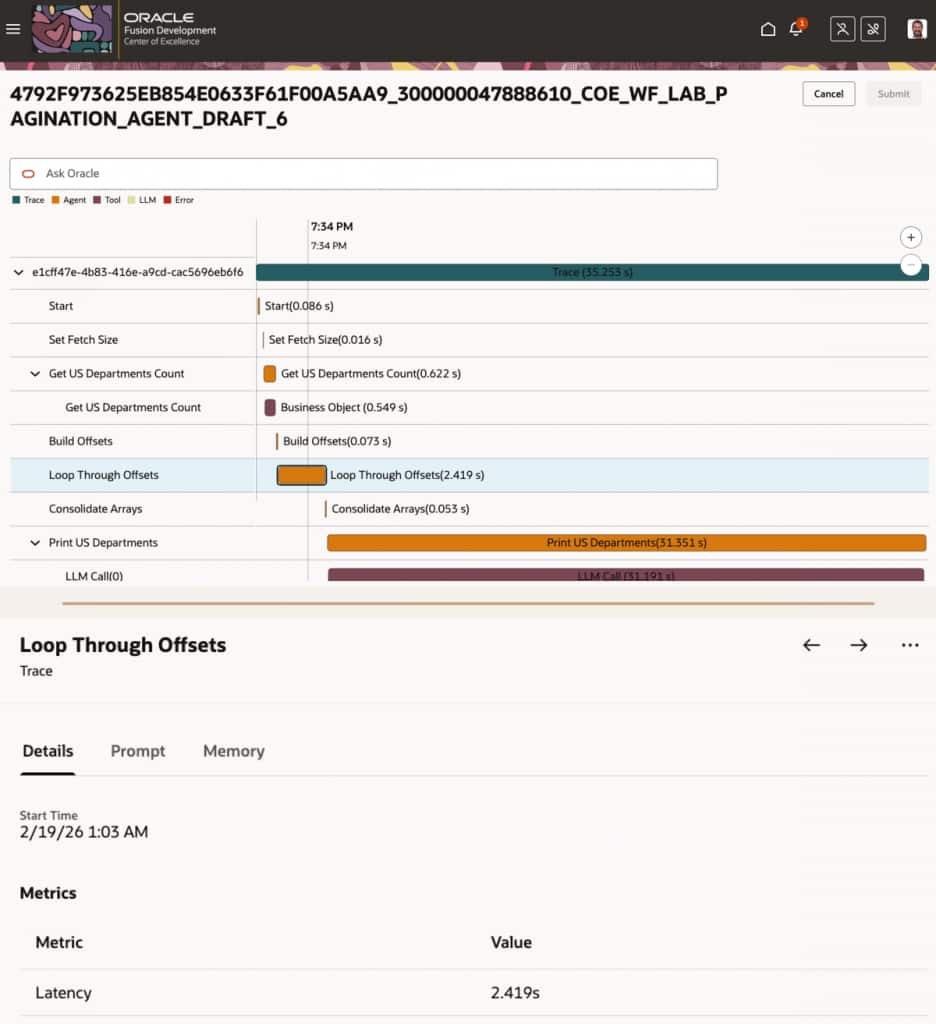
Selecting a session opens a detailed trace view, which provides:
- Step-by-step conversation timeline
- Tools invoked
- Duration of each step
- Metrics captured per step
Monitoring and Evaluation Metrics
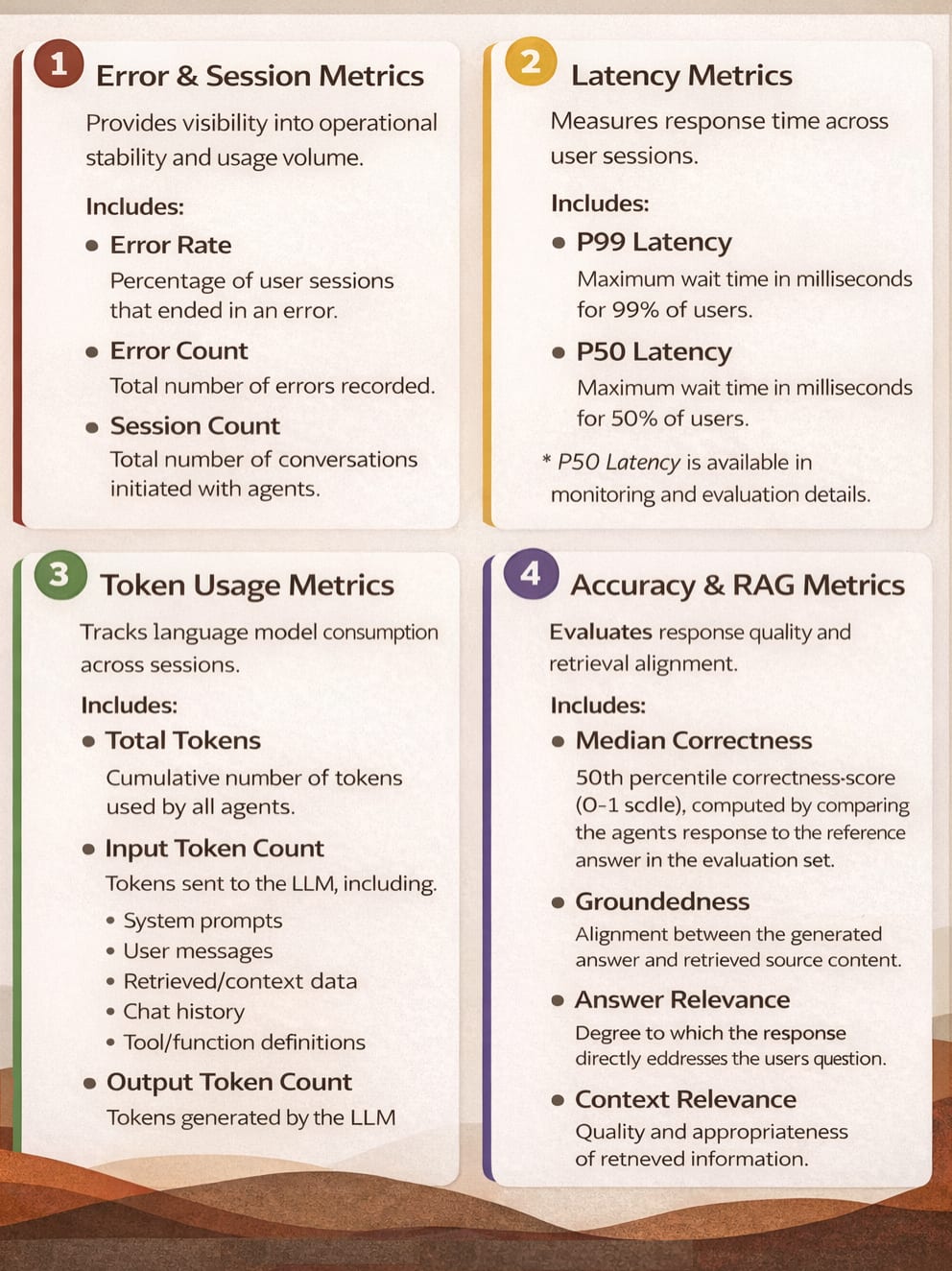
The following metrics are available across Monitoring and Evaluation:
What Is Evaluation in Agent Studio?
Monitoring tells you what is happening.
Evaluation tells you how good it is.
Evaluation in Agent Studio is a structured way to assess agent accuracy against defined expectations and business outcomes. Evaluation ensures agents meet defined standards for:
- Accuracy
- Latency
- Token Usage
Evaluation sets are specific to each agent. An agent can have multiple evaluation sets.
How to Evaluate AI Agents in Oracle Fusion AI Agent Studio?
Evaluation Capabilities
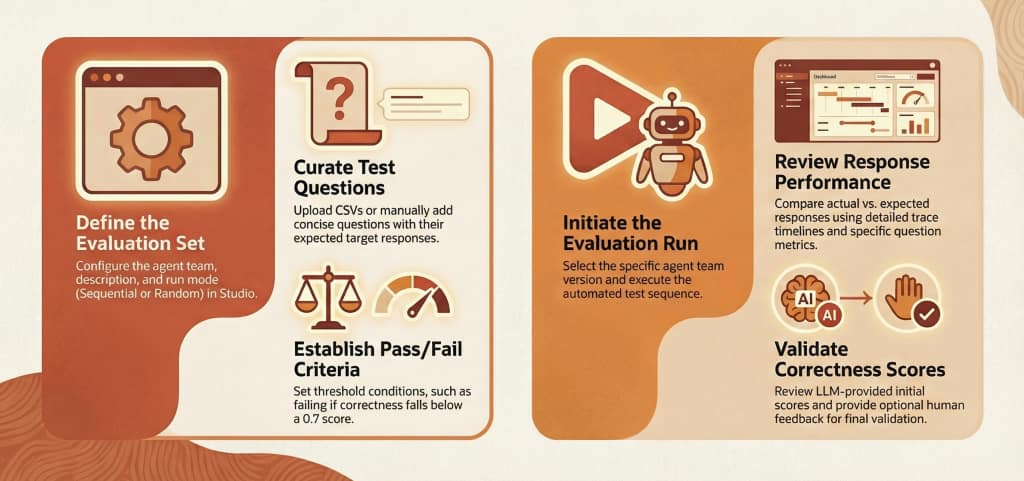
Oracle Fusion AI Agent Studio provides structured evaluation capabilities to validate AI agents against defined standards for Accuracy, Latency, and Token Usage.
Key capabilities include:
- Evaluation Sets – Define test questions, expected responses, and measurable success criteria per agent team.
- Configurable Run Modes – Execute evaluations sequentially or randomly based on conversational requirements.
- Accuracy Measurement – Assess responses using Median Correctness (0–1 scale) with optional human validation.
- Latency Tracking – Validate responsiveness using P50 and P99 latency metrics.
- Token Usage Analysis – Monitor total, input, and output token consumption.
- RAG Metrics – Measure Groundedness, Answer Relevance, and Context Relevance when document tool evaluation is enabled.
- Run Comparison – Compare evaluation runs side-by-side to detect regressions or improvements.
These capabilities ensure agents can be systematically validated before and after deployment.
AI agents improve fastest when treated as living systems, not one-time deployments.
Bringing It All Together
Monitoring and Evaluation in Oracle Fusion AI Agent Studio are not optional add-ons—they are core to operating AI at enterprise scale.
With built-in visibility into:
- Agent health and usage
- Error rates and failure patterns
- Token consumption and optimization opportunities
- Structured evaluation and benchmarking
Teams can move from “Is the agent working?” to “Is the agent delivering value?”
That shift is what transforms AI agents from experiments into trusted digital coworkers.