
One of the realities of operating any platform is that the maintenance never really stops.
Security fixes need applying, operating systems and application software need updating, firmware needs applying. Hardware components eventually need replacing. Capacity requirements change over time. None of that is particularly unusual. The interesting question is how much impact those activities have on the applications and workloads running on the platform.
Traditionally, Exadata infrastructure maintenance and application availability have been closely linked. If a KVM host needed to be taken out of service, the VMs and application workloads running on it inevitably became part of the maintenance plan. Sometimes that meant stopping applications entirely. More often it meant carefully planning around application availability, reduced performance, coordinating outage windows, and negotiating with business owners.
In many environments, those conversations take longer than the maintenance itself.
Exadata VM Live Migration isn’t another high availability technology. Instead, it complements Exadata’s existing availability capabilities by addressing a different problem. Oracle Real Application Clusters, Transparent Application Continuity, Active Data Guard, and the broader Maximum Availability Architecture protect applications during failures and planned maintenance. Live Migration reduces the operational impact of maintaining the infrastructure underneath them by allowing a running Exadata VM to be migrated between KVM hosts with minimal disruption.
Over the past several Exadata releases, we’ve steadily reduced the operational impact of planned platform maintenance. Capabilities such as Exadata Live Update reduce downtime for supported software maintenance, while VM Live Migration addresses another common maintenance scenario by reducing the impact of taking a KVM host out of service.
Why Exadata VM Live Migration is unique
VM live migration itself isn’t new. Hypervisors have supported it for years. What’s different in Exadata is that the virtual machine isn’t just running an application. It’s running an Oracle Database that is tightly integrated with Exadata’s architecture, actively communicating with storage servers and, where applicable, other database servers over Exadata’s RDMA over Converged Ethernet (RoCE) fabric.
RDMA and the RDMA fabric is one of the defining characteristics of Exadata. It enables Oracle Database to perform extremely low-latency OLTP reads by accessing XRMEM on the storage servers directly over RDMA, while also providing the high-speed interconnect used by Oracle RAC Cache Fusion to exchange blocks between database instances. These capabilities allow Exadata to deliver the low-latency, predictable performance that mission-critical databases depend on.
Moving a virtual machine in this environment is therefore much more than relocating a guest operating system between hypervisors. The challenge is preserving an active Exadata database execution environment while the virtual machine moves—maintaining the RDMA communication paths that underpin database performance and cluster operation without turning planned infrastructure maintenance into a database performance event.
That’s what makes Exadata VM Live Migration different and unique. It isn’t simply about moving virtual machines. It’s about moving a live Oracle Database that continues to behave like a database on Exadata throughout the migration, allowing infrastructure maintenance to take place without sacrificing the performance characteristics that customers chose Exadata for in the first place.
That’s the problem Exadata VM Live Migration solves.
Put another way, Exadata VM Live Migration isn’t really about moving virtual machines. It’s about moving infrastructure maintenance out of the application’s critical path.
This isn’t intended to be another feature overview or a step-by-step guide. The product documentation already covers those topics well. Instead, I want to look at where Live Migration fits into the broader Exadata maintenance story, why the capability exists, and the engineering principles that determine where it can be used successfully.
A familiar maintenance window
Let’s make this concrete with an example.
It’s time for your monthly Exadata maintenance cycle and it includes firmware updates for your X11M KVM hosts.
The update itself isn’t particularly interesting. The engineering work is well understood. The real question is what to do about the workloads currently running on that host.
A traditional maintenance plan probably looks familiar:
- Coordinate with application owners
- Schedule a maintenance window
- Relocate or stop services where possible
- Shut down the virtual machines on the first KVM host
- Perform the firmware update
- Restart the KVM host
- Restart the virtual machines
- Reconnect the applications
- Move on to the next KVM host
None of those steps are especially difficult. But the operational overhead comes from the dependency between the infrastructure and the workloads running above it.
Live Migration changes that relationship.
If another compatible KVM host is available, the running VMs can be migrated before maintenance begins. Once those workloads have moved, the original KVM host can be updated and returned to service.
The firmware still needs updating.
The hardware still needs maintaining.
We’ve decoupled infrastructure maintenance from application availability.
Moving execution, not data
One of the easiest misconceptions is to assume that Live Migration moves everything.
It doesn’t.
Live Migration moves the VM’s execution environment. Its operating system, memory and execution state move from one compatible KVM host to another.
The application’s data doesn’t move.
I make this distinction because VM storage and database storage are different concepts and are therefore addressed differently.
For VMs, their filesystems must reside on Exascale volumes.
This shared storage is one of the key architectural enablers for Live Migration. Because the VM’s filesystem already resides on storage that is accessible from both KVM hosts, only the VM’s execution environment needs to move. The storage is already where it needs to be.
But what if you’re running VMs backed by non-Exascale local disk images (images on the KVM hosts local storage)? Exadata System Software 26ai adds the ability to migrate those VM filesystems onto Exascale volumes, allowing them to take advantage of Live Migration.
The database is a different story.
Whether your database files reside in ASM or on Exascale storage is largely orthogonal to Live Migration. The database continues accessing its storage over the RDMA network fabric regardless of which compatible KVM host is currently hosting the VM.
That’s one of the reasons Live Migration fits naturally into the Exadata architecture. The execution environment moves. The database continues accessing its storage exactly as it did before.
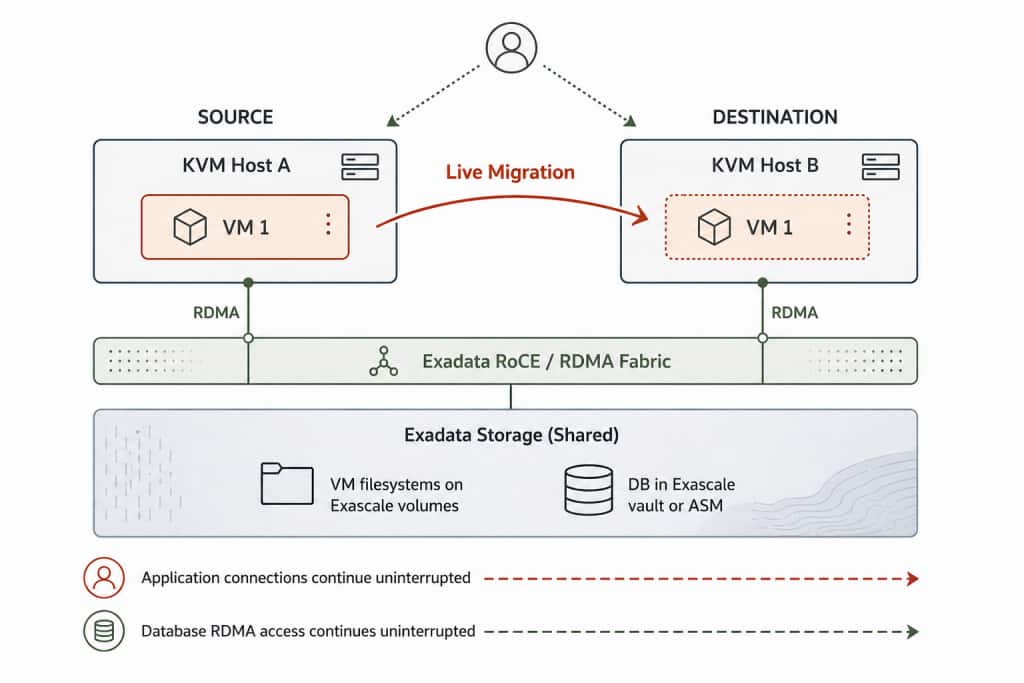
Figure 1. Live Migration moves the execution environment, not the data
Understanding the operating boundaries
One of the first questions I usually hear after demonstrating Live Migration is:
“Can I move a VM to any KVM host?”
It’s exactly the right question.
The answer is no, but the interesting part is why.
Earlier we looked at the distinction between moving a VM’s execution environment and moving its data. That same principle explains almost every compatibility requirement.
A running VM can only move to another KVM host that already provides an equivalent execution environment and already has access to everything the VM needs to continue running.
That has implications for the hardware, the network, the operating system, and the VM’s storage.
Hardware compatibility
The destination KVM host must be capable of continuing execution as though the VM had never moved.
For that reason, Live Migration is supported between KVM hosts of the same hardware generation and CPU configuration.
For example:
- X10M → X10M
- X11M → X11M
- One-socket → One-socket
- Two-socket → Two-socket
This isn’t about limiting where a VM can run. It’s about ensuring that execution continues in a compatible environment after migration.
Network compatibility
The destination KVM host must also be part of the same RDMA-enabled Exadata fabric.
In practice, that means both KVM hosts must be connected to the same RoCE network. In multi-rack environments, the racks must be configured as a single multi-rack deployment. You can’t move a VM between separate Exadata deployments each with their own independent RoCE network.
Operating system compatibility
The underlying operating system also forms part of the execution environment.
Live Migration therefore requires the source and destination KVM hosts to be running the same underlying operating system version. For example, Oracle Linux 8.
Notice that this refers to the underlying operating system, not necessarily the Exadata System Software version.
Storage compatibility
Finally, the destination KVM host must already have access to the VM’s filesystem.
This is why VM filesystems must reside on Exascale volumes and why both KVM hosts must belong to the same Exascale cluster.
Without shared access to the VM’s filesystem, there is nothing for the destination KVM host to resume executing after the migration completes.
Once these conditions have been met, performing the migration itself is straightforward using the supported Exadata management tools OEDACLI or migratevm.
oedacli> migrate guest hostname=exadpm01vm01 mode=live srchost=exadpm01kvm01 tgthost=exadpm01kvm02
or
$ migratevm exadpm01vm01 exadpm01kvm02
What about offline migration?
It’s worth pointing out that Exadata also provides a path for migrating VMs between KVM hosts offline as well to enable scenarios such as from moving a VM from an X8M to an X11M KVM host. Before Exascale volumes, this could be achieved by stopping the VM, copying its contents and configuration between the source and target, and restarting the VM on its new host.
With Exascale, just as with Live Migration, volumes make the process much easier, and faster! OEDACLI and migratevm include an OFFLINE mode that does the “heavy” lifting for you! You can read more about offline mode in one of our previous posts.
Offline migration allows you to change the execution environment of the host albeit with a small impact to the application.
Changing what needs to stop
Infrastructure maintenance isn’t going away.
What’s changing is our expectation that applications must always be impacted while that maintenance takes place.
VM Live Migration complements capabilities such as Live Update by addressing a different part of the maintenance lifecycle. Together they reflect a broader direction in Exadata engineering: reducing the application impact of maintenance.
VM Live Migration isn’t another high availability technology. It’s an operational capability that complements Oracle RAC, Transparent Application Continuity, Active Data Guard, and the broader Maximum Availability Architecture by reducing the impact of planned infrastructure maintenance.
What Live Migration changes isn’t the maintenance itself.
Live Migration doesn’t eliminate maintenance. It changes what maintenance needs to impact.
The next time a KVM host requires an update, the first question may no longer be:
“When will I impact the application the least?”
It may simply be:
“Where will I move the database VM?”
That’s a subtle change in mindset, but a significant change in how Exadata deployments can be operated.