
NetSuite allows you to have access to different accounts with several roles. To access the SDN developer account, you are required to “switch to the correct account” specially, if you are currently logged in to your APC-SDN Partner role in the NetSuite, Inc. (Production) account or to a different account such as sandbox or NetSuite customer account.
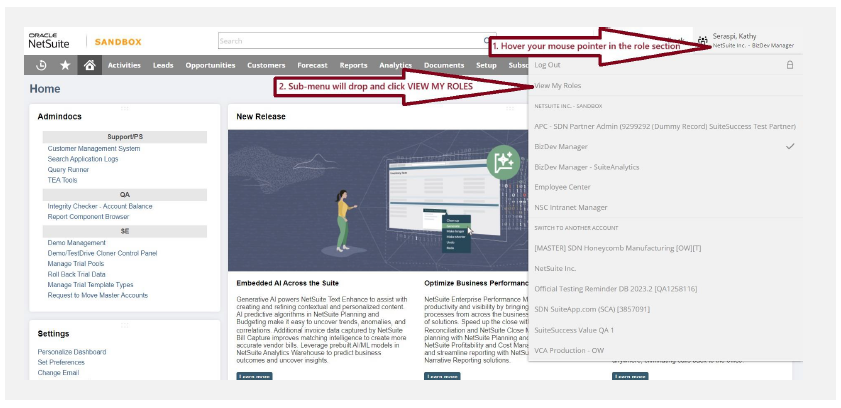
- To switch to another account when you are logged in to NetSuite, hover your mouse pointer at the role section (upper right-hand corner of your browser).
- Sub-menu will drop and click on View My Roles.
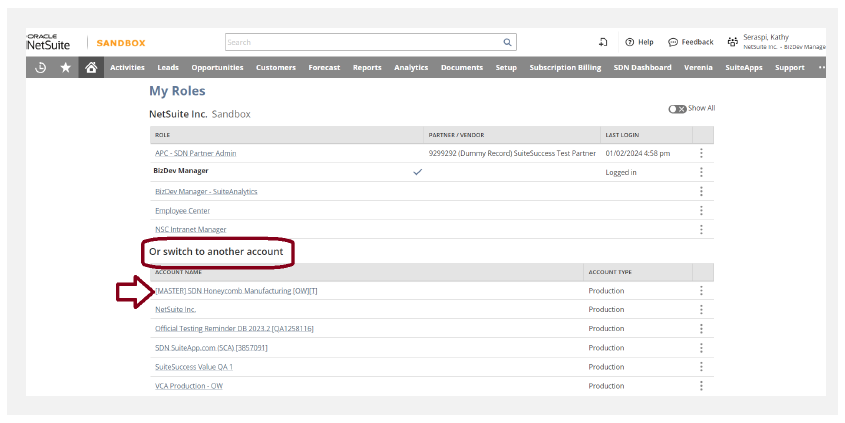
- This will show all the roles and accounts that your log in has.
- Scroll down to see the “Or switch to another account”.
- Choose the correct SDN Developer Account that you need to log into. Choose the Administrator role. Note that SDN accounts are in Production type
Reminders
- If you cannot find the account that you need to log in to, it only means that you are not yet a user/administrator of that account.
- To have access to a certain SDN account, reach out to the current administrators and they are the only ones who can add you.
- SDN does not have access to your accounts hence, we cannot add you as user or administrator.