
SuiteApps that automate business processes in an external application often require the integration of data from an external system into NetSuite. This integration can be a one-time process, such as data migration, or it can involve continuous data transfers triggered by specific events or scheduled timelines. The first step in this process is data mapping, which involves matching data fields between systems to ensure efficient synchronization while maintaining data integrity and format.
An external system may need to retrieve the list of custom forms available for a specific record type in NetSuite for various purposes, including obtaining the list of fields and settings associated with these forms. Forms in NetSuite are used to input information into the database. Each record type has a standard form that can be customized to fit specific business requirements and workflows. Depending on the record type, fields, subtabs, sublist, and buttons can be modified by rearranging them, renaming them, hiding them, disabling them, setting them as read-only or making them mandatory.
The REST API, SuiteScript, and SuiteQL can be used to extract certain metadata from a NetSuite record to create a data mapping table between NetSuite and an external system. This blog post will explain how this can be achieved with each of these methods, their pros and cons, using the example use case below.
Use Case: Retrieve all custom forms, sublists, and fields in the vendor bill record to create a field mapping table for an integration between NetSuite and an external system.
The vendor bill record has the following custom forms available for selection:

The following custom fields are applied to these different custom forms, with these fields having the following properties:

Using the REST Metadata End Point
The REST API’s metadata endpoint provides a programmatic way to retrieve record type definitions for standard and custom-defined records. By running a GET request on a given record type, you can obtain all the body fields, available values for enum fields, sublists, subrecords, and sublist fields for that sublist or subrecord.
For example, you can obtain the vendor bill JSON Schema description by running the following request:
SET-HEADER Accept: application/schema+json
GET https://demo123.suitetalk.api.netsuite.com/services/rest/record/v1/metadata-catalog/vendorbill
The following is an example of an intentionally shortened response including only the custom form and custom fields of the example use case of the previous request to obtain the vendor bill’s JSON Schema record metadata.
{
  "customForm": {
    "type": "object",
    "properties": {
      "id": {
        "title": "Internal identifier",
        "type": "string",
        "enum": ["101", "102", "103", "50"]
      },
      "refName": {
        "title": "Reference Name"
      }
    }
  },
  "custbody_preapprover": {
    "type": "object",
    "properties": {
      "id": {
        "title": "Internal identifier"
      },
      "refName": {
        "title": "Reference Name"
      },
      "externalId": {
        "title": "External identifier"
      },
      "links": {
        "title": "Links",
        "type": "array",
        "readOnly": true,
        "items": {
          "$ref": "/services/rest/record/v1/metadata-catalog/nsLink"
        }
      }
    }
  },
  "cseg_phys_location": {
    "type": "object",
    "properties": {
      "id": {
        "title": "Internal identifier"
      },
      "refName": {
        "title": "Reference Name"
      },
      "externalId": {
        "title": "External identifier"
      },
      "links": {
        "title": "Links",
        "type": "array",
        "readOnly": true,
        "items": {
          "$ref": "/services/rest/record/v1/metadata-catalog/nsLink"
        }
      }
    }
  },
  "custbody_batch_proc_job": {
    "type": "object",
    "properties": {
      "id": {
        "title": "Internal identifier"
      },
      "refName": {
        "title": "Reference Name"
      },
      "externalId": {
        "title": "External identifier"
      },
      "links": {
        "title": "Links",
        "type": "array",
        "readOnly": true,
        "items": {
          "$ref": "/services/rest/record/v1/metadata-catalog/nsLink"
        }
      }
    }
  },
  "custbody_internal_notes": {
    "title": "Internal Notes",
    "type": "string",
    "nullable": true,
    "x-ns-custom-field": true
  },
  "custcol_priority": {
    "type": "object",
    "properties": {
      "id": {
        "title": "Internal identifier"
      },
      "refName": {
        "title": "Reference Name"
      },
      "externalId": {
        "title": "External identifier"
      },
      "links": {
        "title": "Links",
        "type": "array",
        "readOnly": true,
        "items": {
          "$ref": "/services/rest/record/v1/metadata-catalog/nsLink"
        }
      }
    }
  }
}
- All standard and custom fields are returned regardless of whether they are applied to the default custom form or not (e.g cseg_phys_location, custbody_internal_notes, custcol_priority are not applied to custom form #101, refer to Table 2 for details)
- Available values for select and multiselect fields are only returned if the field is an enum field (e.g customform) and only the internal Ids are returned.
Pros
- Intuitive and easy-to-use API with simple access to records’ metadata, structure and the properties of different fields: their name, type, format, and attributes.
- Can be used to generate API client libraries or client stubs. The metadata in Swagger (OpenAPI 3.0) format returns links to related resources and how to interact with these through REST web services. Whereas, the JSON Schema format only describes the internal structures of a resource (e.g fields, sublists or subrecords).
- Can retrive select and multiple select fields that source from custom records and custom segments.
- Can retrieve field types and type formats (e.g type: integer (int64), boolean, string, etc).
- Can retrieve enum field values.
Cons
- Cannot retrieve Legacy Tax fields, only SuiteTax.
- Cannot determine if a field is mandatory in a custom form.
- Cannot determine if a field has been configured with a default value (e.g., formula or sourcing).
- Cannot determine the display type of a field (e.g., in-line, disabled, hidden).
- Cannot obtain the script ID of a field that is of the type List/Record (e.g., custom list, custom
- record, custom segment, custom transaction).
- Cannot determine the default custom form of the record type.
- Cannot determine if a field has been applied to custom forms.
- Additional REST API call needs to be made to the record or query service to obtain the available values of a List/Record and Multiple Select fields.
Using SuiteScript
The N/record module can be used to create an instance of a record in dynamic mode using the method record.create to determine whether a sublist is visible and whether a body or sublist field is applied to the custom form, hidden or set to mandatory for the given record type. A dynamic record mimics the behavior of a record in the user interface, enabling programmatic access to the available values (both labels and IDs) of a given field. The record’s body fields and sublists are sourced, calculated, and validated in real-time.
The code snippets below will demonstrate how record metadata that can be retrieved using the SuiteScript N/record module with the methods listed below using the vendor bill use case as an example.

First, an instance of the target record is created in dynamic mode:
const getDynamicModeRecord = (recordType) => {
  try {
    return record.create({
      type: record.Type[recordType],
      isDynamic: true
    });
  } catch (e) {
    throw e;
  }
};
Option 1 – Using Record.toJSON()
The dynamic record object’s metadata is extracted using Record.toJSON().
const rec = getDynamicModeRecord('VENDOR_BILL');
rec.toJSON();
The output below has been intentionally shortened to show the output from Record.toJSON().
{
  "type": "vendorbill",
  "isDynamic": true,
  "fields": {
    "customform": 101,
    "approvalstatus": "2",
    "intercotransaction": "",
    "custbody_internal_notes": "Intercompany Transaction",
    "transactionnumber": "To Be Generated"
    // Additional fields go here
  },
  "sublists": {
    "item": {
      "currentline": {
        "#": "1"
        // Additional lines go here
      }
    }
    // Additional sublists go here
  }
}
- All standard fields are returned regardless of whether they are applied to the custom form or not (e.g paired intercompany transaction has not been set to be visible in custom form #101)
- The body and sublists fields are returned with their initial values (when applicable). The value returned in the property “customform” corresponds to the default form set for the given record type.
- For transaction records, the initial subsidiary value will correspond to the current’s user subsidiary if an entity or subsidiary value is not provided in the defaultValues parameter when the record is created in dynamic.
- Custom body and column fields that are applied to the custom form that have not been set to be “hidden” are not returned.
- Custom body and column fields with a display type set to “hidden” are returned even if they are not applied to the form (e.g “custbody_internal_notes” is only applied to custom form ID# 103)
Record.toJSON can be used to quickly obtain the record’s metadata and initial values, but additional logic is required to extract individual body and sublist fields properties, this will be demonstrated below in the next code snippet.
Option 2 – Using N/Record Methods
Note: NetSuite loads the util Object(N/util) by default for all script types
const getAllRecordFields = (rec) => {
  return {
    fields: getRecordBodyFields(rec),
    sublists: Object.fromEntries(
      rec.getSublists().map(sublistId => [
        sublistId,
        getRecordSublistFields(rec, sublistId)
      ])
    )
  };
};

const getRecordBodyFields = (rec) => {
  return rec
    .getFields()
    .filter(fieldId => !isSystemField(fieldId))
    .map(fieldId => getFieldObject(rec, { fieldId }))
    .filter(b => b && b.label !== '')
    .map(f => getFieldProperties(rec, f))
    .reduce((o, i) => ((o[i.id] = i), o), {});
};

const getRecordSublistFields = (rec, sublistId) => {
  return rec
    .getSublistFields({ sublistId })
    .filter(fieldId => !isSystemField(fieldId))
    .map(fieldId => getFieldObject(rec, { sublistId, fieldId, line: 0 }))
    .filter(o => o && o.label !== '')
    .map(f => getFieldProperties(rec, f))
    .reduce((o, i) => ((o[i.id] = i), o), {});
};

const getFieldProperties = (rec, field) => {
  return field.error
    ? field
    : ['id', 'label', 'type', 'isMandatory'].reduce((p, c) => {
        p[c] = field[c];
        return c === 'type' && (p[c] === 'select' || p[c] === 'multiselect')
          ? util.extend(p, { values: field.getSelectOptions() })
          : p;
      }, { initialValue: rec.getValue({ fieldId: field.id }) });
};

const getFieldObject = (rec, opts) => {
  try {
    return opts.sublistId ? rec.getSublistField(opts) : rec.getField(opts);
  } catch (error) {
    return { id: opts.fieldId, error };
  }
};

const isSystemField = (fieldId) => ['_', 'ns', 'pp', 'sys_id', 'wf'].some(id => fieldId.startsWith(id));
- System fields are filtered out with the function isSystemField. These will throw an unexpected error if Record.field.getField or Sublist.field.getSublistField is used on them.
- Fields without a label are filtered out, as a lack of label indicates that the field is not visible or is read-only (e.g system fields).
- The properties of the NetSuite record (body and sublist) fields are extracted with the function getFieldProperties.
- Record.getField and Record.getSublistField are used to obtain the NetSuite field object.
- The available values for select and multiselect fields are extracted using Field.getSelectOptions. Note
- that only the first 1,000 available options are returned.
- The values of dependent and sourced fields are not returned unless, the field they depend on or source from, has been initialized with a default value.
- Record.getValue is used to read the field’s initial value. Some non-sourced and non-dependent fields may return a default value if one is assigned to them either by the system or in the field settings (e.g., custom fields).
The output below has been intentionally shortened to include only the fields of the example use case.
{
  "fields": {
    "custbody_internal_notes": {
      "initialValue": "Intercompany Transaction",
      "id": "custbody_internal_notes",
      "label": "Internal Notes",
      "type": "textarea",
      "isMandatory": false
    },
    "custbody_preapprover": {
      "initialValue": "",
      "id": "custbody_preapprover",
      "label": "Pre-Approver",
      "type": "select",
      "values": [],
      "isMandatory": true
    },
    "customform": {
      "initialValue": "101",
      "id": "customform",
      "label": "Custom Form",
      "type": "select",
      "values": [
        { "value": "102", "text": "APAC Vendor Bill" },
        { "value": "101", "text": "EMEA Vendor Bill" },
        { "value": "103", "text": "I/C Vendor Bill" },
        { "value": "50", "text": "Standard Vendor Bill" }
      ]
    },
    "custbody_batch_proc_job": {
      "initialValue": "",
      "id": "custbody_batch_proc_job",
      "label": "Batch Processing Job",
      "type": "select",
      "values": [],
      "isMandatory": false
    },
    "cseg_physical_location": {
      "initialValue": "",
      "id": "cseg_physical_location",
      "label": "Physical Location",
      "type": "select",
      "values": [
        { "value": "1", "text": "Amsterdam" },
        { "value": "2", "text": "Brno" },
        { "value": "3", "text": "Barcelona" },
        { "value": "4", "text": "London" }
      ],
      "isMandatory": true
    }
  },
  "sublists": {
    "item": ["N elements..."],
    "expense": ["N elements..."]
  }
}
- The custom body and column fields that are applied to the custom form are returned unlike with Record.toJSON(). For example, “custbody_preapprover” and “custbody_batch_proc_job” are both applied to custom form #101 but “custcol_priority” is not hence why is not returned in the sublist fields.
- All standard fields and list/record type fields are returned even if they are not applied to the form. For example, cseg_physical_location is not applied to custom form #101.
- Custom body and column fields with the display type set to hidden are returned even if they are not applied to the custom form. For example, “custbody_internal_notes” is not applied to custom form #101.
- Available values can be retrieved for non-sourced and non-dependent fields. The field “custbody_preapprover” did not return any values because its been configured to filter these using the subsidiary field and the latter has not been defined on the record yet.
Pros
- The dynamic record does not need to be saved.
- Can retrieve both Legacy and SuiteTax fields.
- Can determine whether fields are mandatory in a custom form.
- Can retrieve body and sublists fields.
Cons
- Risk of undesired execution of logic from SuiteFlow customizations deployed on the given record type. Record.create will trigger all beforeLoad (create) and entry events applicable to the given execution context (e.g RESTlet). This is default behavior and cannot be toggled on/off with any system preference.
- Limited to record types that are supported in record.create and dynamic mode.
Using SuiteScript FAQ
Where can I find the list of records and standard fields available in SuiteScript?
The SuiteScript Record Browser.
Why wasn’t Field.isDisplay included if the property is available in both client and server scripts?
According to the property description in the documentation, Field.isDisplay returns true if the field is visible on the record form or false if it is not. However, it is not intended to determine the initial visibility of the field but rather to change its visibility and be used in the same script to determine its value. The code sample provided in the documentation sets the value of a custom body field to false during pageInit to hide the field from the custom form. If this value were to be read by another client event function in the same script (e.g., fieldChanged), the property description usage for this field would be applicable in this context.
Note that Field.isVisible is a read-only property that returns true if the field is visible on the record form, or false otherwise. This property can be used to determine the initial visibility of the field, but it is only available in client scripts through the N/currentRecord module.
What if I need to determine whether a field is disabled or set as read-only in a custom form?
The properties Field.isDisabled and Field.isReadOnly are only available in client scripts through the N/currentRecord module so you would need to incorporate client scripting into your record field mapping customization to make use of these.
What if I need to retrieve the name instead of the ID of a field type? (e.g Name: Decimal Number | ID: FLOAT, Name: List/Record | ID: SELECT, etc.)
Consider using SuiteQL for this purpose. You may run a query against scriptFieldType to retrieve the list of field type id/name value pairs and incorporate a JavaScript function into your script to find the matching type for each field using on the results returned by the query.
What if one of my select fields has more than 1,000 options available for selection and I need to retrieve all the values available for it?
Consider using SuiteQL for this purpose. Running a query against that specific record type can retrieve this information, provided the record type is listed in the Records Catalog. Be aware that certain values for both custom and standard fields may depend on fields associated with a record selected on another field within the same custom form. Information is sourced in the custom field only when the record is created or if the specific fields involved have their value changed prior to record.save. You may use the defaultValues parameter in record.create to provide default values for fields in the new record, obtaining initial values and available options for certain select and multiselect fields.
Referring back to the vendor bill use case example, the field “custbody_pre_approver” was configured to filter results by the subsidiary header field and display only employees belonging to that subsidiary with an email address assigned to their record. This field did not return any values in the sample outputs provided because the values depend on the subsidiary field value. If a default value for this field were provided, it would return a different output. Refer to the code sample below for details.
record.create({
  type: record.Type.VENDOR_BILL,
  defaultValues: {
    subsidiary: 8
  },
  isDynamic: true
});
The output below has been intentionally shortened to include only the “custbody_pre_approver” field attributes.
{
  "fields": {
    "custbody_preapprover": {
      "initialValue": "",
      "id": "custbody_preapprover",
      "label": "Pre-Approver",
      "type": "select",
      "values": [
        { "value": "128", "text": "Julian Henderson" }
      ],
      "isMandatory": true
    }
  }
}
What if my record type is not supported in record.create but it is in record.transform?
The method `record.transform` requires a value for the parameter “fromId,” which corresponds to the internal ID of an existing record instance being transformed. You may experiment with `record.transform` using the sample code provided in this blog post by passing the internal ID of a purchase order in the system that is pending receipt. Refer to the code sample below for an example.
record.transform({
  fromType: record.Type.PURCHASE_ORDER,
  fromId: 'PURCHASE_ORDER_INTERNAL_ID',
  toType: record.Type.ITEM_RECEIPT,
  isDynamic: true
});
Using SuiteQL
While it is not possible to extract the metadata of a transaction record type by querying the Transaction table directly, you can extract the list of custom fields (e.g., body and sublist) applied to a given record type by querying the CustomField record. However, custom fields of the type List/Record sourced from Custom Segments are not included in the results and require a join with the CustomSegment record to be included. These queries will be covered in more detail below using the same vendor bill example use case.
Retrieving Custom Fields
The following query retrieves the list of custom body and sublist fields applied to the vendor bill record. A Cross Join with the ScriptRecordType is used to obtain the script ID, the identifier of record types in all APIs, for List/Record types that source from both standard and custom NetSuite record types because this value is not accessible through the CustomField record. Only the record type label and corresponding internal ID values are.
Note: Multiple Select fields are included in section Retrieving All Custom Body and Sublist Fields.
SELECT DISTINCT
    CustomField.fieldType AS fieldType,
    CustomField.scriptId AS id,
    CustomField.name AS label,
    COALESCE(
        CustomField.fieldValueType,
        CASE
            WHEN CustomField.fieldValueType = 'List/Record'
            THEN CustomField.fieldValueType
            ELSE ScriptRecordType.name
        END
    ) AS type,
    (
        CASE
            WHEN CustomField.fieldValueType <> 'List/Record' THEN ''
            ELSE ScriptRecordType.skey
        END
    ) AS listRecord,
    CustomField.isMandatory AS isMandatory
FROM
    CustomField
CROSS JOIN
    ScriptRecordType
WHERE
    (CustomField.fieldType IN ('BODY', 'COLUMN'))
    AND (BUILTIN.MNFILTER(CustomField.visibleOnTransactions, 'MN_INCLUDE', 'DF', 'TRUE', 'VendBill') = 'T')
    AND (
        CASE
            WHEN CustomField.fieldValueType <> 'List/Record' THEN 1
            WHEN CustomField.fieldValueType = 'List/Record'
                 AND BUILTIN.DF(CustomField.fieldValueTypeRecord) = ScriptRecordType.name
            THEN 1
        END
    ) = 1
ORDER BY
    fieldType ASC,
    id ASC;
Outputs
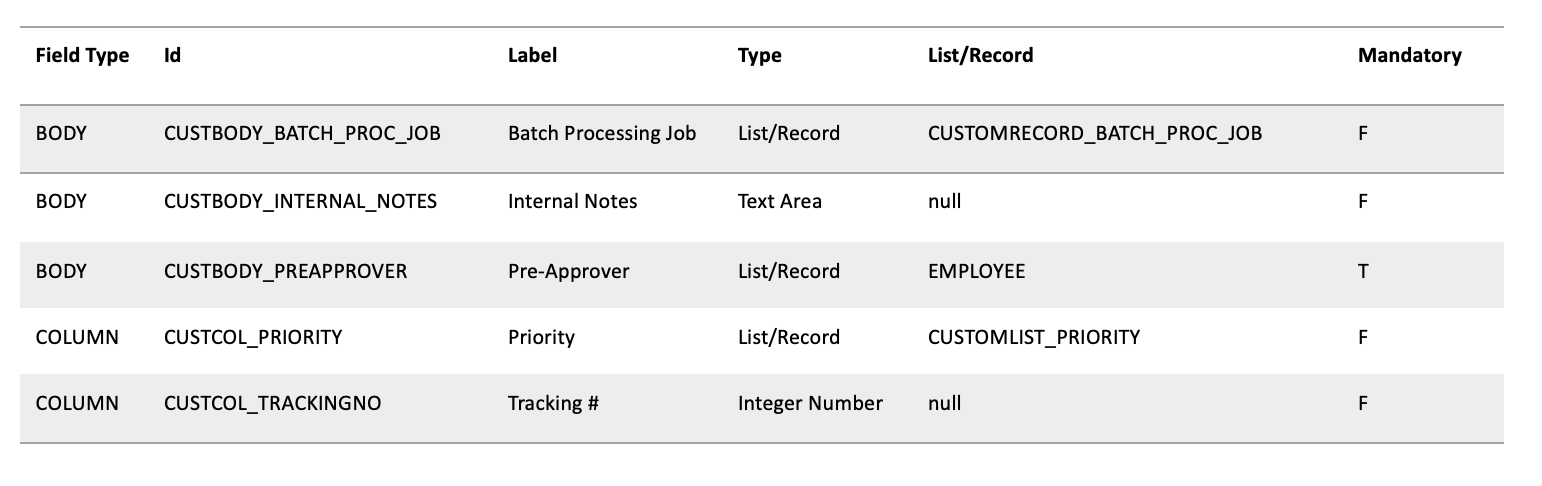
Note that the CROSS JOIN used in this query leverages ScriptRecordType to find the script ID of standard record types (refer to the SuiteQL FAQ section for details). It is possible that certain record types will not match due to a mismatch between the value returned by BUILTIN.DF(CustomField.fieldValueTypeRecord) and ScriptRecordType.name. For example, the legacy tax code record will not return a match because the display name returned by fieldValueTypeRecord is “Tax Code,” while the name for this record type in ScriptRecordType is “Sales Tax Item.” Please make sure to test and validate your outputs thoroughly and adjust accordingly if you implement this query in your solution to ensure all expected results are returned.
Retrieving Custom Segment Fields
The following query retrieves the list of custom segment fields in vendor bills. Field properties (e.g., fieldType and isMandatory) are not exposed in the CustomSegmentField record, and it is not possible to determine whether the field is applied to the header or sublist of the given record type.
SELECT
    CustomSegment.scriptId AS scriptId,
    CustomSegment.name AS label,
    'List/Record' AS type,
    'CUSTOMRECORD_' || CustomSegment.scriptId AS listRecord
FROM
    CustomSegmentField
INNER JOIN
    CustomSegment ON CustomSegmentField.customSegment = CustomSegment.internalId
LEFT OUTER JOIN
    CustomRecordType ON CustomSegment.RecordType = CustomRecordType.InternalId
WHERE
    CustomSegment.IsInactive <> 'T'
    AND BUILTIN.MNFILTER(
        CustomSegmentField.visibleOnTransactions,
        'MN_INCLUDE', 'DF', 'TRUE', 'VendBill'
    ) = 'T';
Outputs

Retrieving All Custom Body and Sublist Fields
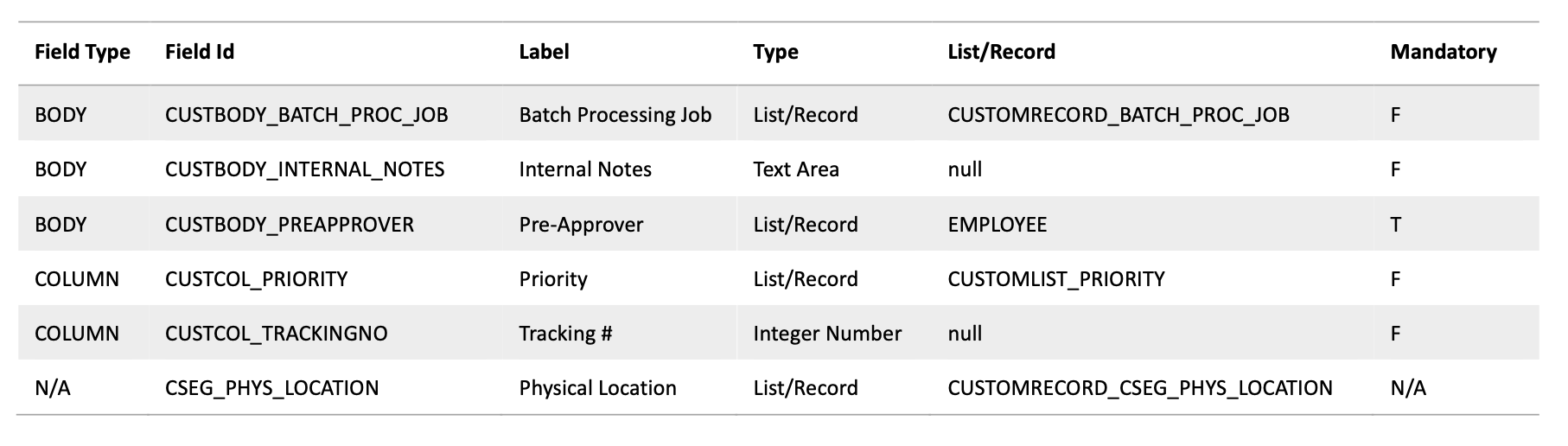
The following query combines previous queries to retrieve all custom body and sublist fields applied to the vendor bill record, including custom fields sourced from custom records. The UNION clause merges the results of both queries. The value ‘N/A’ indicates that the field is not available for the field in reference.
SELECT DISTINCT
    CustomField.fieldType AS fieldType,
    CustomField.scriptId AS id,
    CustomField.name AS label,
    COALESCE(
        CustomField.fieldValueType,
        CASE
            WHEN CustomField.fieldValueType = 'List/Record'
            THEN CustomField.fieldValueType
            ELSE ScriptRecordType.name
        END
    ) AS type,
    (
        CASE
            WHEN CustomField.fieldValueType <> 'List/Record' THEN ''
            ELSE ScriptRecordType.skey
        END
    ) AS listRecord,
    CustomField.isMandatory AS isMandatory
FROM
    CustomField
CROSS JOIN
    ScriptRecordType
WHERE
    CustomField.fieldType IN ('BODY', 'COLUMN')
    AND BUILTIN.MNFILTER(
        CustomField.visibleOnTransactions,
        'MN_INCLUDE', 'DF', 'TRUE', 'VendBill'
    ) = 'T'
    AND (
        CASE
            WHEN CustomField.fieldValueType <> 'List/Record' THEN 1
            WHEN CustomField.fieldValueType = 'List/Record'
                 AND BUILTIN.DF(CustomField.fieldValueTypeRecord) = ScriptRecordType.name
            THEN 1
        END
    ) = 1
ORDER BY
    fieldType ASC,
    id ASC;
Outputs
Pros
-
SuiteQL queries can be used in SuiteScript (N/query module), the REST API Query end point and SuiteAnalytics Connect.
-
Can retrieve multiple record type fields in a single query. The BUILTIN.MNFILTER function used in the sample queries can be used to create an expression that includes fields in other transaction types. You may also use the GROUP BY function to group the results by transaction type.
Cons
-
Cannot be used to retrieve standard fields only custom ones.
-
Potential risk of record types not being matched in the CROSS JOIN to the ScriptRecordType due to
-
record type name differences.
-
Cannot determine default values or available options for List/Record and Multiple Select fields. A separate query to the record type in reference would be required to retrieve these values.
-
Cannot determine to which sublist type a COLUMN field is applied to.
-
Limited field properties available for List/Record and Multiple Select fields that source from Custom Segments.
-
Cannot retrieve custom form values available for the given record type nor determine is a field is applied to these.
-
Limited field properties available for List/Record and Multiple Select fields that source from Custom Segments.
-
Cannot determine the field type (body or sublist) for List/Record and Multiple Select fields that source from Custom Segments.
-
The CROSS JOIN is the least performant join type because it returns all possible combinations of rows from both tables, regardless of whether they match. It is called a cross join because it combines the results of the queries in a “cross” manner, meaning that the results of one query are combined with those of another. The reasons behind the usage of this join in the sample queries are further explained in the SuiteQL FAQ.
Using SuiteQL FAQ
Where can I find the list of records and fields available in SuiteQL?
The Record’s Catalog.
Would these queries work in the REST API Query Endpoint?
The sample queries provided in this blog post can be used in both REST API Query end point and the SuiteScript N/query module.
What about SuiteAnalytics Connect?
CROSS JOIN is not supported in SuiteAnalytics Connect but a FULL OUTER JOIN can be used to simulate one.
Is the CROSS JOIN to the ScriptRecordType necessary?
It is not if you only wish to obtain non-standard List/Record and MultiSelect fields.
Why not use the recordType field instead of a CROSS JOIN?
The Records Catalog includes the field recordType in the CustomField Definition and CustomRecordType as a regular join for this field using the join pair CustomField.recordtype = CustomRecordType.internalid. However, CustomRecordType is used to map custom records, not standard records.
Moreover, that join pair is meant for retrieving custom record fields where CustomField.fieldType = 'RECORD'. The join pair CustomField.fieldValueTypeRecord = CustomRecordType.internalId should be used for other field types (e.g., BODY, COLUMN, SCRIPT, ENTITY, ITEM, etc.).
Why can’t I just use BUILTIN.DF(CustomField.fieldValueTypeRecord)to get the Script ID of a standard record?
You could, if the standard records in the account have not been renamed. BUILTIN.DF returns the display value of a field. For example, if the Department record has been renamed to Cost Center in an account and a field has been configured to sources from it, BUILTIN.DF(CustomField.fieldValueTypeRecord) will return Cost Center. Now, let’s say you intend to use the result of that query to obtain the available options for every List/Record and Multiple Select field returned in the results. You will encounter an error when attempting to extract the values for the record type “Cost Center” because Record Renaming does not change the record’s name, only the display name/label.
Why a CROSS JOIN and not a LEFT JOIN ?
The internal ID returned by the field fieldValueType in the CustomField record does not correspond to the internal ID of the ScriptRecordType record. In other words, the ScriptRecordType is not the source of the values displayed in the List/Record type field fieldValueType. The source record for that field is not exposed, which is why BUILTIN.DF(CustomField.fieldValueTypeRecord) = ScriptRecordType.name is used for matching rows between the CustomField and ScriptRecordType.