
Key Takeaways
Start with the control loop, not production architecture. A first run should prove that Kubernetes accepts an Oracle Database custom resource and that Oracle Database Operator for Kubernetes reconciles it into observable resources, status, events, and logs.
Use one release tag and one installation path consistently. This walkthrough uses the Oracle Database Operator for Kubernetes
v2.1.0release tag, the manifest-based installation path, and a supportedSingleInstanceDatabasesample from the same release-tagged repository.Treat storage, image access, secrets, and webhooks as first-class prerequisites. Common first-run blockers include missing storage classes, Oracle Container Registry access problems, cert-manager issues, RBAC, and secrets in the wrong namespace.
A healthy demo is not a production approval. A successful first run gives platform engineers and DBAs enough evidence to continue evaluation, not enough evidence to certify backup, recovery, HA, security, performance, or operating support.
Platform teams evaluating databases on Kubernetes usually start with a practical question: will an operator improve the operating model, or will it add another controller, webhook, CRD set, and upgrade path to maintain?
Oracle Database Operator for Kubernetes extends the Kubernetes API with custom resources and controllers for supported Oracle Database lifecycle management tasks. In platform terms, it lets you express database intent as Kubernetes API objects, then inspect how the operator reconciles that intent into related resources such as pods, services, persistent volume claims, events, and status.
This article gives you a lean first run. You will install or verify the operator using the manifest-based path, apply one supported SingleInstanceDatabase sample, validate reconciliation with kubectl, troubleshoot common first-run failures, and clean up the evaluation namespace. The goal is to prove the control loop in a test environment, not to certify the database workload, storage design, backup process, or operating model for production.
This walkthrough uses the Oracle Database Operator for Kubernetes v2.1.0 release tag for install files, CRDs, samples, and API fields. The v2.1.0 manifest currently references the floating operator image container-registry.oracle.com/database/operator:latest. For a disposable first run, that follows the release manifest. For reproducible or long-lived environments, verify the resolved image version or pin an approved image tag or digest according to your platform policy.
Start by proving the operator control loop
The operator model changes where database lifecycle intent lives. Instead of starting with hand-written pods, services, PVCs, and one-off scripts, a platform engineer applies a custom resource such as SingleInstanceDatabase. The Kubernetes API stores that desired state. Oracle Database Operator for Kubernetes watches the resource and reconciles related Kubernetes objects.
That gives platform engineers and DBAs a shared inspection surface. You can inspect the custom resource, status fields, conditions, events, operator logs, pods, services, PVCs, and referenced secrets. Those are familiar Kubernetes signals, but the object being reconciled represents database intent rather than a generic workload.
That distinction matters. The operator can make supported lifecycle tasks easier to express and inspect, but it does not move every database decision into Kubernetes. DBAs and platform teams still own recovery goals, backup validation, patch policy, storage engineering, security posture, capacity planning, performance, and production runbooks.
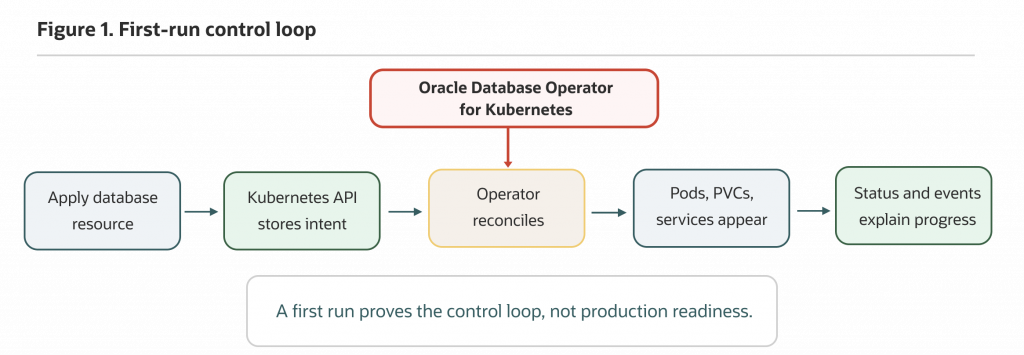
Figure 1. Oracle Database Operator for Kubernetes turns database intent into a Kubernetes reconciliation loop. A first evaluation should prove that loop before production architecture decisions.
For this first run, success means your cluster accepts a supported Oracle Database custom resource, the operator reacts to it, related Kubernetes resources appear, and status, events, or logs explain progress or failure. That is enough for a first pass. It is not enough for production approval.
Operators can make stateful workloads look deceptively simple. A pod appears, a PVC binds, and a status field moves forward. Those are useful first-run signals. By themselves, they do not prove backup readiness, security compliance, performance, high availability, or operational supportability.
Check the prerequisites before installing anything
Use a non-production Kubernetes cluster and a Linux/Bash shell with kubectl, git, and curl installed. You need cluster administrator or equivalent permissions for this walkthrough because the default manifest-based installation creates CRDs, RBAC, webhooks, and operator resources.
Start with basic cluster checks:
kubectl version
kubectl get nodes
kubectl get storageclass
kubectl version confirms that your client can reach the API server. kubectl get nodes tells you whether the cluster has schedulable nodes. kubectl get storageclass shows whether dynamic persistent storage is available. If the cluster has no default storage class, choose an explicit storage class for the sample manifest later in the walkthrough.
A local cluster can prove the API and reconciliation path, but many local defaults are too small for Oracle Database images and persistent volumes. The SingleInstanceDatabase sample in this article requests a 50Gi persistent volume claim. If your cluster has no suitable storage class, or if quotas prevent a 50Gi PVC, fix that before applying the database sample.
Also confirm image access early. The sample used in this article pulls an Oracle Database Free Lite image from Oracle Container Registry. Depending on your organization’s policy and network setup, you may need registry login, license acceptance, egress allow rules, image pull secrets, or an approved private registry mirror.
If your organization requires image scanning or mirroring, complete that process before the demo. Treat an ImagePullBackOff as an image access problem until you have ruled out registry, network, policy, and pull-secret causes.
Create a dedicated namespace for the database resource
Keep the database evaluation separate from the operator installation. The default operator namespace is oracle-database-operator-system. The sample database resource in this article will live in oracle-db-operator-demo.
Create the demo namespace:
kubectl create namespace oracle-db-operator-demoThis separation makes inspection and cleanup easier. It also makes the scope visible: the operator runs in its own system namespace, while the database custom resource lives in a namespace that represents the evaluation workload.
This walkthrough uses the default cluster-scoped installation path, which means the operator can watch resources across namespaces. That scope is broader than the demo namespace and should be approved by the platform team. If your platform requires namespace-scoped installation, do not mix that model into this walkthrough. Follow the namespace-scoped installation instructions for your selected operator release from start to finish, including the required namespace role bindings and WATCH_NAMESPACE configuration.
Install or verify cert-manager first
Oracle Database Operator for Kubernetes uses admission and conversion webhooks with TLS certificates, so cert-manager must be healthy before you apply database resources.
First, check whether your cluster already has cert-manager:
kubectl get namespace cert-manager
kubectl get pods -n cert-manager
kubectl get crds | grep -i cert-manager
If cert-manager is already installed and managed by your platform team, use that installation. Confirm that it is approved for your cluster and compatible with the operator release you are evaluating. Do not install a second copy into a shared cluster.
If this is a disposable lab cluster and cert-manager is not installed, use cert-manager v1.16.2 for this v2.1.0 walkthrough:
kubectl apply -f https://github.com/cert-manager/cert-manager/releases/download/v1.16.2/cert-manager.yaml
kubectl get pods -n cert-manager
Wait for the cert-manager deployments to become available:
kubectl wait --for=condition=Available deployment/cert-manager
  -n cert-manager
  --timeout=180s

kubectl wait --for=condition=Available deployment/cert-manager-webhook
  -n cert-manager
  --timeout=180s

kubectl wait --for=condition=Available deployment/cert-manager-cainjector
  -n cert-manager
  --timeout=180s
In a shared or production-like cluster, do not install cert-manager from this article. Use the cert-manager installation approved by your platform team.
If the cert-manager pods do not move toward Running, inspect the namespace events before continuing:
kubectl get events -n cert-manager --sort-by=.lastTimestampKeep cert-manager troubleshooting separate from database troubleshooting. Admission webhook and certificate problems are much easier to isolate before database resources are involved.
Install Oracle Database Operator for Kubernetes from a release tag
Install the operator from a release tag rather than from the default branch so the installation manifests, samples, and API fields come from the same repository version.
Clone the v2.1.0 repository tag:
git clone --branch v2.1.0 --depth 1 https://github.com/oracle/oracle-database-operator.git
cd oracle-database-operator
For the default cluster-scoped path, apply the cluster role binding and operator manifest:
kubectl apply -f rbac/cluster-role-binding.yaml
kubectl apply -f oracle-database-operator.yaml
The release-tagged manifest is the right starting point for this first run, but remember that it references container-registry.oracle.com/database/operator:latest for the controller image. If your platform requires repeatable builds, image attestations, or explicit rollback targets, resolve and pin the approved operator image before using the manifest in a long-lived environment.
Wait for the operator deployment to roll out:
kubectl rollout status deployment/oracle-database-operator-controller-manager
  -n oracle-database-operator-system
  --timeout=300s
The project README also links to an OperatorHub installation path for environments that standardize on Operator Lifecycle Manager. For this first run, stay with one path so troubleshooting remains clear.
Confirm that the operator and CRDs are present
Before applying a database resource, confirm both parts of the operator model: the Kubernetes API extension and the controller workload.
Check the operator namespace:
kubectl get pods -n oracle-database-operator-system
kubectl get deployments -n oracle-database-operator-system
You should see the operator controller manager deployment in oracle-database-operator-system. Pods may take a short time to become ready while images pull and webhook certificates settle.
Next, confirm that the Oracle Database custom resources are registered with the Kubernetes API:
kubectl get crds | grep -i 'database.oracle.com'
kubectl api-resources --api-group=database.oracle.com
kubectl api-resources | grep -i 'singleinstance'
CRDs prove the Kubernetes API server recognizes the custom resource type. A running operator workload proves the controller is available to watch and reconcile resources. You need both. CRDs alone do not prove reconciliation works.
For this first run, verify that singleinstancedatabases appears as an API resource. That tells you Kubernetes can accept the custom resource kind used by the sample.
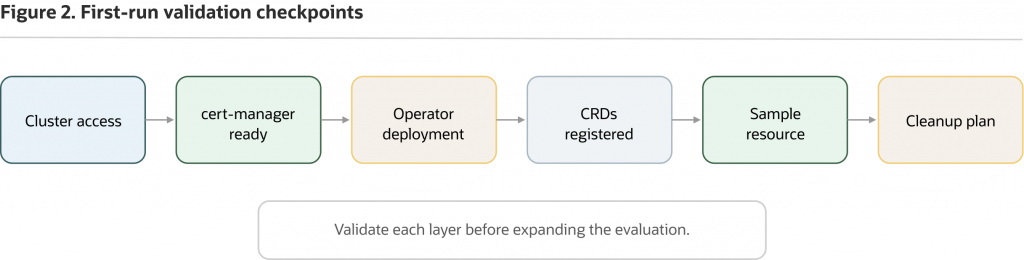
Figure 2. A first run is complete when you can validate each checkpoint and explain what the operator handled versus what the platform still owns. It is not a production-readiness checklist.
Create the admin password secret
The SingleInstanceDatabase sample expects an admin password secret named freedb-admin-secret with the key oracle_pwd. Create it in the same namespace where the database custom resource will live:
kubectl create secret generic freedb-admin-secret
  -n oracle-db-operator-demo
  --from-literal=oracle_pwd='<choose-a-strong-password>'
The angle-bracket placeholder is not part of the password. Replace the entire quoted value with a demo password that satisfies your organization’s password policy.
Confirm the secret exists without printing its value:
kubectl get secret freedb-admin-secret -n oracle-db-operator-demoCommand-line literal secrets are acceptable for a scoped demo only. For production, use your approved secret-management approach, such as a vault-backed workflow or another platform-approved secret delivery pattern. The first-run point is simple: the custom resource references a Kubernetes Secret, and the password should not be embedded in the database manifest or exposed in logs, screenshots, or terminal captures.
Apply one supported SingleInstanceDatabase sample
Use the release-tagged sample manifest instead of building a custom resource from memory. Download the v2.1.0 Free Lite sample:
curl -L -o singleinstancedatabase_free-lite.yaml
  https://raw.githubusercontent.com/oracle/oracle-database-operator/v2.1.0/config/samples/sidb/singleinstancedatabase_free-lite.yaml
Before applying it, edit the file. The release-tagged sample uses metadata.namespace: default and spec.persistence.storageClass: "oci-bv". Change the namespace to oracle-db-operator-demo, and change the storage class to one that exists in your evaluation cluster.
The relevant fields should look like this after editing:
apiVersion: database.oracle.com/v4
kind: SingleInstanceDatabase
metadata:
  name: freedb-lite-sample
  namespace: oracle-db-operator-demo
spec:
  edition: free
  adminPassword:
    secretName: freedb-admin-secret
  image:
    pullFrom: container-registry.oracle.com/database/free:latest-lite
  persistence:
    size: 50Gi
    storageClass: "<your-storage-class>"
    accessMode: "ReadWriteOnce"
  replicas: 1
If your cluster requires credentials for Oracle Container Registry or for an internal mirror, add the image pull secret field supported by the SingleInstanceDatabase API for the operator release you are using, or follow your platform’s approved registry-mirroring process before applying the resource. The release sample shown here does not include a pull secret by default, so an otherwise correct manifest can still fail with ImagePullBackOff if registry access is not ready.
The sample requests 50Gi and uses ReadWriteOnce. The oci-bv storage class in the raw sample is appropriate for OCI Block Volume on Oracle Kubernetes Engine, but it will fail in clusters where that class does not exist.
The sample also uses the floating database image tag latest-lite. That is acceptable only for a tightly scoped evaluation where your team understands the reproducibility and security tradeoff. For retained, shared, or production-like environments, use a platform-approved, scanned, and pinned image tag or digest according to your release policy.
Before applying the manifest, check the fields you changed:
grep -E 'namespace:|storageClass:|pullFrom:' singleinstancedatabase_free-lite.yamlApply the edited manifest:
kubectl apply -f singleinstancedatabase_free-lite.yamlThe expected API acceptance message looks similar to this:
singleinstancedatabase.database.oracle.com/freedb-lite-sample createdAt this point, you have expressed database intent through Kubernetes. API acceptance does not mean the database is ready. The next checks show whether the operator observes and reconciles that intent.
Validate reconciliation through status, events, and resources
Successful reconciliation is more than a running pod. Look for an accepted custom resource, operator activity, related Kubernetes resources, and useful status or events.
Start with the custom resource:
kubectl get singleinstancedatabase -n oracle-db-operator-demo
kubectl describe singleinstancedatabase freedb-lite-sample -n oracle-db-operator-demo
kubectl get confirms that the resource exists in the demo namespace. kubectl describe gives you the operator-facing story: status, conditions, and events associated with the resource.
Now inspect the related Kubernetes resources:
kubectl get pvc,pod,svc -n oracle-db-operator-demo
kubectl get events -n oracle-db-operator-demo --sort-by=.lastTimestamp
A healthy path should show a PVC, a database pod, and a service appearing as reconciliation proceeds. The events stream is often more useful than a raw pod list because it tells you whether the cluster is scheduling the pod, provisioning storage, pulling the image, or waiting on another dependency.
Check the concise status field:
kubectl get singleinstancedatabase freedb-lite-sample
  -n oracle-db-operator-demo
  -o "jsonpath={.status.status}{'n'}"
For SIDB, when .status.status returns Healthy, the database is open for connections. For this article, treat Healthy as an operator-reported first-run readiness signal, not as production validation.
You can also inspect the connect string fields when the operator reports them:
kubectl get singleinstancedatabase freedb-lite-sample
  -n oracle-db-operator-demo
  -o "jsonpath={.status.connectString}{'n'}"
kubectl get singleinstancedatabase freedb-lite-sample
-n oracle-db-operator-demo
-o "jsonpath={.status.pdbConnectString}{'n'}"If the status is still progressing, keep watching events. Oracle Database images can be large, volume provisioning can take time, and database initialization is not instantaneous. A first-run evaluation is successful when the signals are explainable, not when every step finishes quickly.
Troubleshoot first-run failures in the smallest scope possible
Common first-run failures are platform prerequisites surfacing through normal Kubernetes signals. Start with the part of the system that failed, and avoid changing the manifest until you know what the cluster is reporting.
If the operator pod is not running, start in the operator namespace:
kubectl get pods -n oracle-database-operator-system
kubectl describe pod <operator-pod-name> -n oracle-database-operator-system
kubectl logs -n oracle-database-operator-system <operator-pod-name> --all-containers=true
Likely causes include cert-manager readiness, RBAC problems, image pull issues, resource pressure, or webhook certificate problems. When admission fails or custom resources cannot be created, check cert-manager and webhook resources:
kubectl get pods -n cert-manager
kubectl get certificates -n oracle-database-operator-system
kubectl get validatingwebhookconfiguration | grep -i oracle
kubectl get mutatingwebhookconfiguration | grep -i oracle
If CRDs are missing, stop before applying the sample:
kubectl get crds | grep -i 'database.oracle.com'
kubectl api-resources --api-group=database.oracle.com
Missing CRDs usually mean the manifest did not apply successfully, the installing user lacked cluster-level permissions, or the files do not match the release you intended to install.
If reconciliation stalls after the custom resource is accepted, inspect the database namespace:
kubectl describe pod <database-pod-name> -n oracle-db-operator-demo
kubectl get events -n oracle-db-operator-demo --sort-by=.lastTimestamp
kubectl get pvc -n oracle-db-operator-demo
kubectl describe pvc <claim-name> -n oracle-db-operator-demo
A PVC stuck in Pending points toward storage class, quota, access mode, capacity, or provisioner issues. An ImagePullBackOff points toward registry access, image name, image tag, network egress, license acceptance, or pull-secret requirements. A missing secret or wrong key often appears through custom resource status, events, or pod startup errors.
Confirm the secret exists in the same namespace and exposes the expected key without printing the secret value:
kubectl get secret freedb-admin-secret -n oracle-db-operator-demo
kubectl describe secret freedb-admin-secret -n oracle-db-operator-demo
kubectl describe singleinstancedatabase freedb-lite-sample -n oracle-db-operator-demo
kubectl describe secret shows metadata and key sizes, not the decoded password. Do not run commands that decode or print the Secret value in screenshots, shared logs, or tickets.
Operator logs are useful when status and events do not explain enough:
kubectl logs -n oracle-database-operator-system
  deployment/oracle-database-operator-controller-manager
  --all-containers=true
If deployment-level logs are not enough, inspect pods directly:
kubectl get pods -n oracle-database-operator-system
kubectl logs -n oracle-database-operator-system <operator-pod-name> --all-containers=true
The practical default is to inspect status, events, PVCs, image pulls, secrets, RBAC, and operator logs before editing the custom resource. Random manifest changes can hide the real platform dependency that failed.
Clean up the evaluation resources
Clean up the database resource before deleting the namespace when possible:
kubectl delete -f singleinstancedatabase_free-lite.yaml
kubectl delete namespace oracle-db-operator-demo
Then confirm the namespace is gone or terminating:
kubectl get namespace oracle-db-operator-demoCheck whether any persistent volumes or retained storage still need attention:
kubectl get pv
kubectl get pvc -A | grep oracle-db-operator-demo || true
Storage cleanup depends on your storage class reclaim policy and whether dynamic or static provisioning was used. A namespace deletion may remove namespaced PVC objects, but the underlying persistent volume behavior depends on the storage backend and reclaim policy. Do not assume that all data-bearing resources are gone until you have checked the PVs and the backing storage system.
Keep operator uninstall separate from this first-run cleanup. If custom resource instances still exist, operator-managed resources may have finalizers that need the operator to complete cleanup.
Decide what the first run tells you
A first run is successful only if your team can explain what happened. You should be able to identify the CRD you applied, the namespace containing the database resource, the namespace containing the operator, the related Kubernetes resources that appeared, and where status, conditions, events, and logs live.
You should also be able to answer practical ownership questions. Which storage class did the database use? Which secret did the resource reference? Which image did the cluster try to pull? Did the PVC bind? Did a service appear? Did the operator write status? If the run failed, did the failure point to storage, image access, webhook admission, RBAC, secret handling, scheduling, or database initialization?
That is the operating-model value of the first run: it turns a vague success or failure into specific Kubernetes and database-operator signals that platform teams and DBAs can review together.
The first run proves the control loop. It does not prove backup and restore, HA, Data Guard, RAC, patching, upgrades, observability, network policy, security compliance, cost efficiency, or production SLOs. Those are separate decisions.
Compare the operator path with practical alternatives
Oracle Database Operator for Kubernetes is most relevant when Oracle Database is already the required database engine and your team wants to test whether Kubernetes custom resources and reconciliation improve the operating model for supported Oracle Database scenarios.
This evaluation is not a claim that every database belongs in Kubernetes. If the application can use a managed Oracle Database service, evaluate that path because managed services can shift many infrastructure and database administration tasks to the provider, depending on service tier and configuration. For many teams, that operating model is the stronger alternative when the organization values service-level ownership over platform-level control.
Manual Kubernetes resources are also a valid baseline. A hand-written StatefulSet, service, PVC, secret, and DBA script can teach you what Oracle Database needs from the cluster. The operator should earn its place by improving repeatability, inspection, and operational handoff, not by hiding the underlying dependencies.
If your application can choose another database engine, evaluate that path on its own terms. The operator path should be judged against the workload, the required database engine, the platform team’s Kubernetes maturity, and the operating responsibilities your organization is willing to own.
First-run questions platform teams usually ask
Is Oracle Database Operator for Kubernetes a replacement for DBA ownership?
No. Oracle Database Operator for Kubernetes can automate supported lifecycle tasks through Kubernetes, but DBAs and platform teams still need to define storage, backup, recovery, security, observability, upgrade, and support runbooks.
Does a successful first run prove production readiness?
No. A successful first run proves the operator model and basic reconciliation path in one environment. Production readiness requires separate validation for storage, backup and recovery, security, monitoring, failure handling, upgrades, and support boundaries.
What should I inspect first when reconciliation stalls?
Start with the custom resource status, namespace events, operator logs, PVC state, image pull status, secrets, and RBAC errors. These signals usually show whether the issue is schema validation, permissions, registry access, storage, namespace mismatch, or cluster capacity.
Should the first evaluation cover every custom resource?
No. The first evaluation should cover only the resource needed for a lean control-loop test. After that, study the custom resource model in depth and evaluate additional topologies or lifecycle operations only when the next operating question is clear.
Continue only when the next question is clear
If your first run succeeded, continue by studying the custom resource model in more depth. The next useful question is not “can I apply another YAML file?” It is “what belongs in spec, what should I expect in status, and how does reconciliation change the way platform teams and DBAs collaborate?”
If the first run failed, keep the environment small and inspect prerequisites, image access, storage class behavior, secrets, events, webhooks, RBAC, and operator logs before expanding scope. Common first-run failures are easier to solve before you add more resources or topology choices.
If your platform team cannot support storage, security, observability, backup, recovery, upgrades, and runbook ownership, treat the demo as a learning exercise rather than production evidence. A successful first run means the team has enough evidence to evaluate the next layer, not enough evidence to declare the platform production-ready.