
This is article 8 of 8 in my Oracle AI Database Skills series.
Key Takeaways
- Three receipts from independent sources — result rows, a session tag in
V$SESSION, and a row in the audit trail or MCP log — prove what happened without relying on the chat transcript. Trust is easier to defend when independent sources tell the same story. - Oracle’s existing controls — VPD, Data Redaction, TDE, Unified Auditing, network ACLs — apply to AI-assisted actions without modification. There is no separate AI trust layer to build; the database you already operate is the control plane.
EXEMPT ACCESS POLICYbypasses VPD for any session that holds it. Assign that privilege intentionally, audit who has it, and treat it as a deliberate design decision rather than a routine grant.- Turning the mini-demo into a runbook — documenting the connection name, restrict level,
SHOWSQLstep, and the three receipts — converts a one-time proof into repeatable operational practice that the whole team can follow.
When you put an AI assistant in front of enterprise data, “we intended to be safe” is not enough. Security teams want receipts. They will ask three blunt questions: Who acted? Over what scope? Under which policies? If your answer is a shrug or a log row that says “user: ai-service,” your rollout will stall.
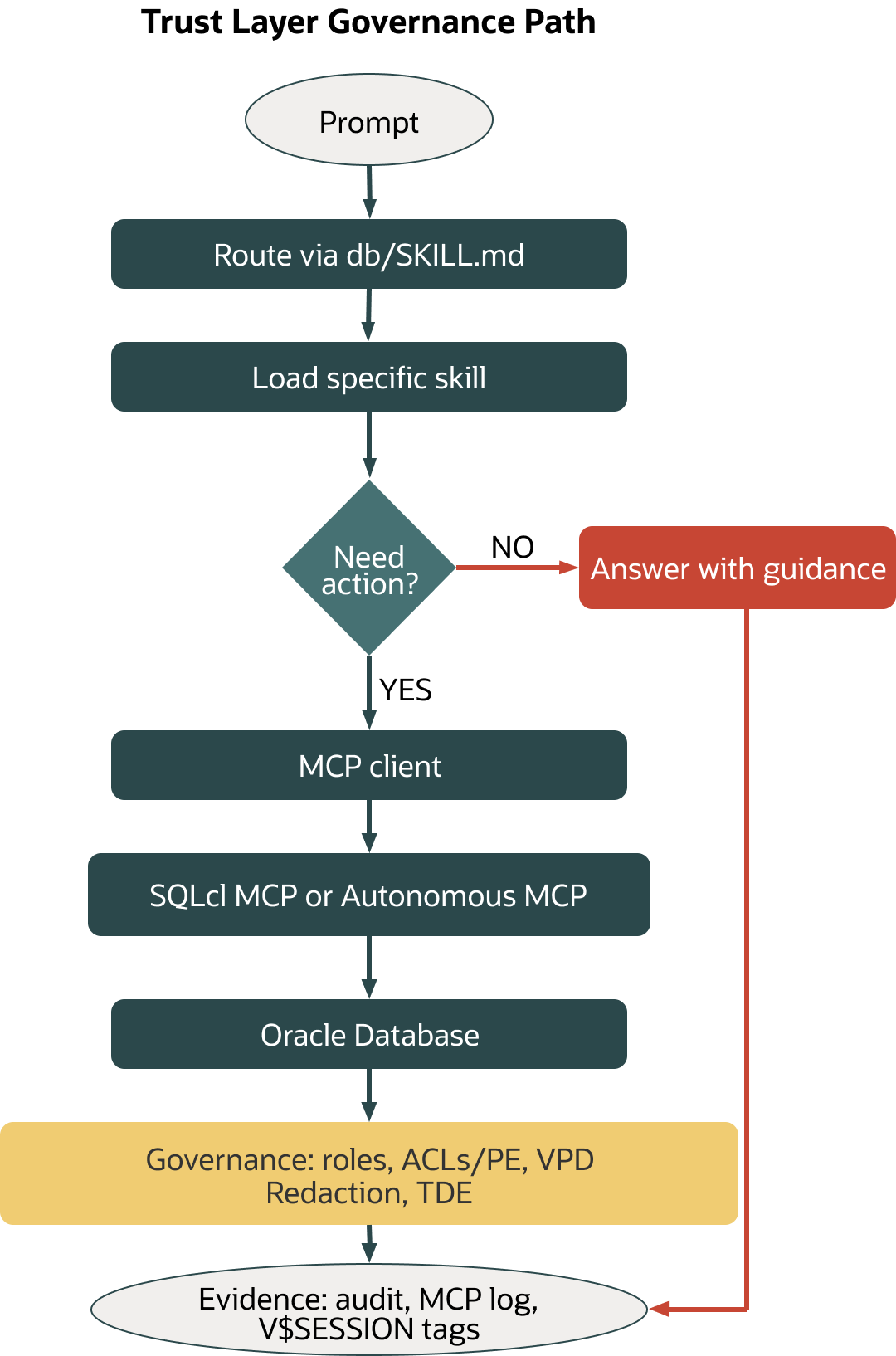
Oracle gives you a procedural way to answer those questions. Route assistants using a repository “skills” convention (for example, a db/SKILL.md index you maintain) so they discover only the next relevant instruction. Let them act only through a bounded MCP (Model Context Protocol) surface – SQLcl MCP on a workstation or the Managed MCP Server on Autonomous Database. Keep Oracle governance in the path: database users and roles; outbound Network ACLs and Private Endpoints; Select AI profiles with enforced object scope; VPD and Data Redaction for runtime policy; TDE for at rest protection; and Unified Auditing (plus DBTOOLS$MCP_LOG) for traceability. Wire those pieces together deliberately and every assistant action becomes something you can prove, not just something you hope was safe.
Version scope
- Identity, auditing, VPD, Data Redaction, and TDE apply to Oracle Database 19c and later.
- SQLcl MCP requires SQLcl 25.2+; confirm restrict-level defaults on your installed version (see SQLcl 25.4 docs for current defaults).
- Select AI profiles and
SHOWSQLare available on Oracle Database 26ai and on Autonomous Database where Select AI is enabled; confirm attribute names and required roles for your target release in current documentation. - On Autonomous Database, direct access to
UNIFIED_AUDIT_TRAILcan be restricted by service configuration; useDBTOOLS$MCP_LOGwhere appropriate.
References: SQLcl MCP restrict levels (25.4), Using/Monitoring MCP, Select AI and DBMS_CLOUD_AI, Autonomous MCP, VPD, DBMS_REDACT, TDE, Unified Auditing (links in Further reading).
Why governance is the trust layer
Assistants are good at surprising you. That’s useful in exploration and dangerous in production. The practical way to keep surprises tolerable is to shrink the decision surface and add proof points at each hop.
Routing is the first shrink. Use a progressive discovery pattern. Instead of handing the assistant your entire repo, maintain a small index file (for example, db/SKILL.md) that links to the next needed skill. Load only that next file. This is a repository convention you implement, not a built-in Oracle feature.
Action comes next—and only through a surface with defined verbs. SQLcl MCP exposes a small tool set over stdio (list-connections, connect, disconnect, run-sql, run-sqlcl) and favors saved connections instead of inline credentials (see Using the SQLcl MCP Server). In SQLcl 25.4 documentation, the default restrict level is the most restrictive (level 4); verify this on your installed version and set it explicitly if needed (see SQLcl MCP restrict levels in Further reading).
Finally, let the database do what it’s built to do: govern. Identities and roles decide who you are; Network ACLs and Private Endpoints set where you can call; Select AI profiles with enforce_object_list pin the objects an NL2SQL call is allowed to touch; VPD filters rows at query time; Data Redaction masks sensitive values; TDE protects data at rest; and Unified Auditing records what actually happened. These aren’t add-ons; they’re the operating environment.
Identity and least privilege you can defend
Give each assistant a real database identity—per assistant or per capability—and default to read-only while you explore. With SQLcl MCP, avoid credential sprawl by saving connections and having the assistant connect by name, not by password (see “Preparing Your Environment” in SQLcl docs). The MCP server’s surface area is intentionally small, and restrict levels let you disallow risky paths such as arbitrary shell access. In SQLcl 25.4 docs, the default restrict level is most restrictive (level 4); check your installed version and set it explicitly if needed (see SQLcl MCP restrict levels).
Two habits make your audit trail readable. First, tag sessions. Use DBMS_APPLICATION_INFO.SET_MODULE/SET_ACTION after you connect; SQLcl MCP also sets identifiable MODULE/ACTION values that show up in V$SESSION and in audit rows (see SQLcl MCP “Using” and “Monitoring”). Second, name connections clearly so a human reviewer can reconstruct intent later. If a person must review production actions, include their initials in the connection name or in the module/action tag and correlate as you go. Note that querying V$SESSION requires appropriate privileges (for example, SELECT_CATALOG_ROLE or a direct grant on V_$SESSION).
On Autonomous Database (Serverless), the Managed MCP Server gives you a per-database endpoint governed by your database’s identities, roles, network policy, and auditing (see Autonomous Database MCP docs). Enablement requires appropriate OCI permissions and follows the procedure in the Autonomous Database “Use MCP Server” docs; in many tenancies this involves setting a free-form tag (key adb$feature, value JSON {"name":"mcp_server","enable":true}), but the exact key/value and UI can vary by region and service version. Choose a public posture or a Private Endpoint for isolation. Authentication is via OAuth or a short-lived bearer token; treat tokens like database passwords and confirm current token lifetimes in documentation.
The network path is part of your security posture
When Select AI reaches an external provider, outbound connectivity must be explicitly permitted. On self-managed databases, create database Network ACL entries for approved hosts. On Autonomous, use Private Endpoints and VCN rules to keep your blast radius small and your audit scope clean (see Autonomous Database ACL/VCN/Private Endpoint docs). The goal is simple: if data can’t leave the VCN except by policy, you can prove it didn’t.
Data minimization and enforceable scope
The fastest way to make NL2SQL safe enough to try in a mixed-sensitivity schema is to reduce the surface area. Select AI Profiles bind reasoning to specific objects: pin the provider, credential, and model; list the allowed objects; and set "enforce_object_list": true so generated SQL can’t wander to tables you didn’t name (see Select AI and DBMS_CLOUD_AI docs). Attribute names and boolean formats can vary by release; match the names and types shown in your target version’s docs. That simple move—paired with a least-privilege user—prevents most of the early “oops” moments.
Inspection comes next. SELECT AI SHOWSQL turns NL2SQL into a human-in-the-loop conversation: ask a question, inspect the candidate SQL, nudge it if needed, then run it intentionally (see Select AI examples). When you need narrative only—say you’re brainstorming a KPI definition—use DBMS_CLOUD_AI.DISABLE_DATA_ACCESS to block sending table data to the LLM. Data-dependent features (including certain RAG/narration/synthetic flows) will return an error until you re-enable data access; check your release docs for exact behavior (DBMS_CLOUD_AI package).
Row-level policy and masking push the same discipline deeper into runtime. VPD (via DBMS_RLS) attaches predicates that filter rows per user, context, or session attribute; it works with ordinary SQL and with generated SQL because enforcement happens in the engine. Data Redaction (DBMS_REDACT) masks sensitive columns at query time; even if a careless prompt tries to dump a column, the runtime policy wins. Remember that users with EXEMPT ACCESS POLICY can bypass VPD; design policies and auditing with that in mind (see VPD and Data Redaction docs).
Encryption and key posture you can explain in a review
At rest, Transparent Data Encryption (TDE) removes a class of risk from the conversation. It encrypts tablespaces or columns so that stolen media or mishandled backups don’t expose readable data. For most teams, the “receipt” here is straightforward: document that TDE is enabled for production databases, the keystore location and protection method, and the key-management process (including rotation cadence and audit hooks). This won’t solve every problem, but it makes risk discussions faster and clearer (see TDE overview docs).
Traceability you can hand to auditors
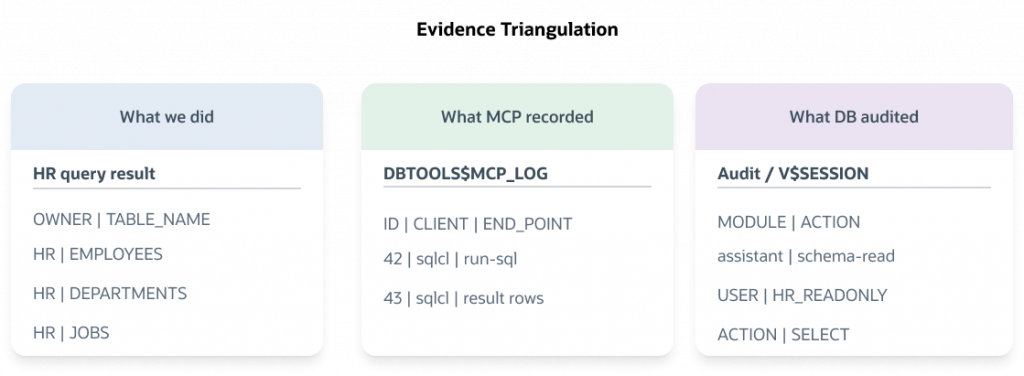
When the review board asks “what happened, exactly,” you should be able to tell one story that matches from three angles and lines up in time. Session identity and tags provide the first angle: V$SESSION shows MODULE and ACTION, so you can corroborate user context and timing (requires appropriate privileges). Unified Auditing adds the second angle: a durable record of who touched what and when, based on policies you configure for sensitive tables or operations. On managed services where direct access to unified audit views may be restricted, the SQLcl MCP activity log (DBTOOLS$MCP_LOG) provides a third path: model details, endpoint type, and messages from the MCP side. The overlap is intentional. Trust is easier to defend when independent sources tell the same story (see Unified Auditing and SQLcl MCP Monitoring docs).
Mini demo: prove scope → govern → audit
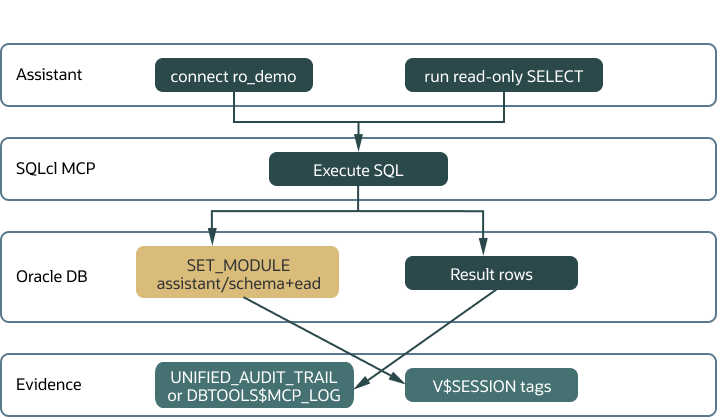
In about fifteen minutes on a non-production database, you can gather three receipts: a concrete result set from a scoped query, an audit or MCP log entry that corroborates the action, and a V$SESSION tag that ties the session back to the assistant. The point isn’t to show everything Oracle can do; it’s to practice the muscle memory of route → act → govern → evidence.
Prerequisites
- Oracle Database 19c+ (self-managed or Autonomous Database). For the Select AI step, use Oracle Database 26ai or an Autonomous Database with Select AI enabled.
- SQLcl 25.2+ installed locally.
- A read-only database user with
SELECTon a demo schema (for example, HR). Ensure this user can see the demo objects via grants; otherwiseALL_TABLESwon’t list HR objects. - For Select AI steps, ensure the calling user has privileges to execute
DBMS_CLOUD_AIand to create/use AI Profiles (see DBMS_CLOUD_AI/Select AI docs for role/grant details). - Ensure the provider credential referenced by your profile (for example,
GENAI_CRED) already exists and is configured for your chosen provider. Follow the credential-creation steps in the Select AI/DBMS_CLOUD_AI docs for your environment. - Optional: Unified Auditing enabled and privilege to query
UNIFIED_AUDIT_TRAIL. On managed services, this may be restricted; useDBTOOLS$MCP_LOGinstead. - Optional (for
V$SESSION): privileges to readV$SESSION(for example,SELECT_CATALOG_ROLEor a direct grant onV_$SESSION).
1) Save a least-privilege connection in SQLcl
Avoid putting raw credentials into prompts or MCP envelopes.
sql /nolog
conn -save ro_demo -savepwd ro_user/ro_password@//host:1521/service
Security note: -savepwd stores credentials for reuse. Use this only on a trusted workstation and follow your organization’s secrets policies.
2) Start SQLcl MCP with a conservative posture
Recent docs (SQLcl 25.4) describe the default restrict level as most restrictive (level 4). Verify on your version and set it explicitly if needed.
# default
sql -mcp

# example of explicitly setting a restrict level (check your version/flags)
# sql -mcp --restrict-level 4
3) Option A — Prove scope via MCP tools
Connect with the saved connection, tag the session for later correlation, then query. Tagging must occur in an active session.
{"tool":"list-connections","arguments":{}}
{"tool":"connect","arguments":{"connection_name":"ro_demo"}}
{"tool":"run-sql","arguments":{"sql":"BEGIN DBMS_APPLICATION_INFO.SET_MODULE('assistant','schema-read'); END;"}}
{"tool":"run-sql","arguments":{"sql":"SELECT owner, table_name FROM all_tables WHERE owner='HR' ORDER BY table_name FETCH FIRST 5 ROWS ONLY"}}
3 alt) Option B — Show generated SQL, but only for allowed objects (Select AI)
Note: This step assumes you are on Oracle Database 26ai or an Autonomous Database with Select AI enabled, that your user has privileges to execute DBMS_CLOUD_AI and create/use profiles, and that a provider credential named GENAI_CRED already exists and is bound to your intended provider (see docs in Further reading). If not, create or reference an appropriate credential first.
BEGIN
  DBMS_CLOUD_AI.CREATE_PROFILE(
    profile_name => 'HR_RO',
    attributes   => '{
      "provider": "oci",
      "credential_name": "GENAI_CRED",
      "object_list": [ { "owner": "HR", "name": "EMPLOYEES" } ],
      "enforce_object_list": true
    }');
END;
/
EXEC DBMS_CLOUD_AI.SET_PROFILE('HR_RO');
-- Tag the session for traceability (run after you are connected)
BEGIN
  DBMS_APPLICATION_INFO.SET_MODULE('assistant','hr-ro-showsql');
END;
/
-- Inspect the candidate SQL without running it
SELECT AI SHOWSQL 'list the 3 most recent employees hired';
-- Optional: disable data access to limit to reasoning-only features
EXEC DBMS_CLOUD_AI.DISABLE_DATA_ACCESS;
If the generated SQL references objects outside your profile’s object_list with "enforce_object_list": true, the call will be rejected. Attribute names and boolean formats can vary by release; match what your version’s docs show. If you disable data access, features that require data will return an error until you re-enable it.
4) Show evidence
If you have Unified Auditing access:
SELECT event_timestamp, dbusername, action_name, object_schema, object_name
FROM   unified_audit_trail
ORDER  BY event_timestamp DESC
FETCH FIRST 10 ROWS ONLY;
If not, use the SQLcl MCP activity log:
-- Object presence, schema, and columns vary by version and setup; consult docs.
SELECT *
FROM   DBTOOLS$MCP_LOG
FETCH FIRST 10 ROWS ONLY;
Note: Access to DBTOOLS$MCP_LOG may be restricted by schema/role in your environment. If the object is not visible, consult the SQLcl MCP Monitoring docs for the expected owner, grants, and pruning guidance.
Optionally, confirm your tag:
SELECT module, action
FROM   v$session
WHERE  module = 'assistant'
FETCH FIRST 5 ROWS ONLY;
You should leave with three receipts that line up in time: result rows from the HR query demonstrating scoped access; either audit rows or MCP log rows corroborating who did what and when; and a V$SESSION row with MODULE='assistant' and a matching ACTION. If you used Select AI, keep the SHOWSQL text that proves enforced object scope.
Small policy add-ons (optional; non-prod only)
To see runtime policy in action, attach a simple VPD policy (this requires creating a policy function first; test the predicate separately):
-- Example: attach policy after creating HR_SEC_PKG.F_REGION_PREDICATE(schema_name, object_name) RETURN VARCHAR2
-- Ensure the calling user is not granted EXEMPT ACCESS POLICY, which bypasses VPD.
BEGIN
  DBMS_RLS.ADD_POLICY(
    object_schema   => 'HR',
    object_name     => 'EMPLOYEES',
    policy_name     => 'HR_REGION_FILTER',
    policy_function => 'HR_SEC_PKG.F_REGION_PREDICATE',
    statement_types => 'SELECT',
    policy_type     => DBMS_RLS.CONTEXT_SENSITIVE);
END;
/
Or add Data Redaction to a sensitive column to see masking in real time (minimal working example using FULL redaction; choose function types and parameters to match application behavior):
-- Minimal, non-production demo using a common sample schema/column.
-- Requires privileges to execute DBMS_REDACT and to add a policy on the target table.
BEGIN
  DBMS_REDACT.ADD_POLICY(
    object_schema => 'HR',
    object_name   => 'EMPLOYEES',
    column_name   => 'EMAIL',
    policy_name   => 'HR_EMAIL_REDACT_ALWAYS',
    function_type => DBMS_REDACT.FULL,
    expression    => '1=1'  -- apply to all sessions for demo
  );
END;
/
Caution: Substitute an appropriate table/column if HR is not available. Test application behavior—FULL redaction replaces values and can affect app logic. Users granted `EXEMPT REDACTION POLICY` can bypass redaction.
What can go wrong – and how to fix it
“I can’t see UNIFIED_AUDIT_TRAIL on Autonomous.” That’s expected in many managed postures. Use DBTOOLS$MCP_LOG for your demo and work with your DBA on a unified audit policy and an access pathway that fits your tenancy. When you move to production, confirm where audit data is stored and how your team retrieves it (see Unified Auditing docs).
“Restrict levels don’t match the blog example.” SQLcl evolves. In SQLcl 25.4 docs, the default is most restrictive (level 4). Check the defaults on your installed version and configure them explicitly so you’re not relying on memory (see SQLcl restrict levels).
“My VPD policy didn’t fire.” Users with EXEMPT ACCESS POLICY can bypass VPD. Confirm that your policy function compiles, that any application context is set, and that you attached the policy to the base table(s) the query actually hits rather than to a view the optimizer can bypass (see VPD docs).
“Select AI tried to reach a provider and failed.” On self-managed estates, add outbound ACLs for the hostnames you intend to call; on Autonomous, verify Private Endpoint setup and security list rules (see Autonomous ACL/VCN docs; Select AI external-call examples).
“We masked the column but the audit shows object names only.” That’s normal—audits capture action metadata, not full result sets. If you need extra forensic detail for sensitive operations, add Fine-Grained Auditing (FGA) for targeted captures or instrument at the application layer (see Unified Auditing and FGA docs).
Make it a runbook, not a one-off
Treat “route → act → trust” as change control. Give assistants dedicated least-privilege users or roles and require SQLcl MCP to use saved connections with a verified restrict level at startup. Validate the network path for any assistant that can call outside the database by explicit policy—ACL entries, VCN rules, or a Private Endpoint. Narrow Select AI with profiles and enforce_object_list, start with SHOWSQL, and switch off data access when you only need narrative reasoning. Confirm your TDE posture in production and capture key-management audit hooks. And set DBMS_APPLICATION_INFO early so your team can tie sessions to intent while a unified audit policy or DBTOOLS$MCP_LOG preserves the durable record.
Conclusion: bring receipts to every AI/database conversation
Enterprise AI earns trust one verified action at a time. Oracle’s advantage is not that it hides your database behind a magic assistant; it’s that the database you already trust can stay in charge while the assistant works. Route using a repository “skills” convention (for example, a db/SKILL.md index you control) so the model asks better, context-specific questions. Act only through SQLcl MCP or the Managed MCP Server so you know which verbs were allowed. Enforce scope and policy with Select AI profiles, VPD, and Redaction. Prove what happened with Unified Auditing and DBTOOLS$MCP_LOG.
Run the mini demo in a sandbox and stash three receipts—result rows, an audit or MCP log row, and a V$SESSION tag—into your team wiki. From there, expand the same pattern to the workflows that matter. When someone asks, “How do you know the assistant didn’t touch X?” you’ll be able to show the answer on one page.
Further reading
- SQLcl MCP Server:
- Autonomous Database MCP (enable via tag; endpoint; auth; Private Endpoint):
- Select AI and AI Profiles (SHOWSQL, object scoping, DISABLE_DATA_ACCESS; DBMS_CLOUD_AI):
- Security controls:
- Auditing: