
Oracle Machine Learning Workflow, part of the Oracle Machine Learning user interface on Oracle Autonomous AI Database Serverless, helps you build machine learning pipelines visually—without writing code. With a drag-and-drop canvas, guided configuration, and built-in validation, you can move from data preparation to model training, evaluation, prediction, and deployment in a single workflow. OML Workflow gives you a no-code path for common machine learning pipeline tasks, while still complementing the code-first flexibility of OML Notebooks and OML APIs.
Fully integrated into the Oracle Machine Learning (OML) application, OML Workflow complements OML Notebooks, OML AutoML UI, OML Monitoring, and OML Services to deliver an end-to-end, visual approach to building and deploying machine learning workflows on your data in Autonomous AI Database.
Why this matters
Organizations want to accelerate AI adoption while maintaining security, managing governance, and controlling costs. Until now, many Autonomous AI Database users created ML pipelines by coding in Python, SQL, or R. These approaches are powerful, but they can take time and require specialized coding skills. OML Workflow addresses these challenges with a visual canvas and guided experience, so teams can:
- Move quickly from idea to ML model
- Reduce reliance on coding when creating common tasks
- Operationalize projects by easily deploying models to OML Services or using in-database models directly from SQL queries
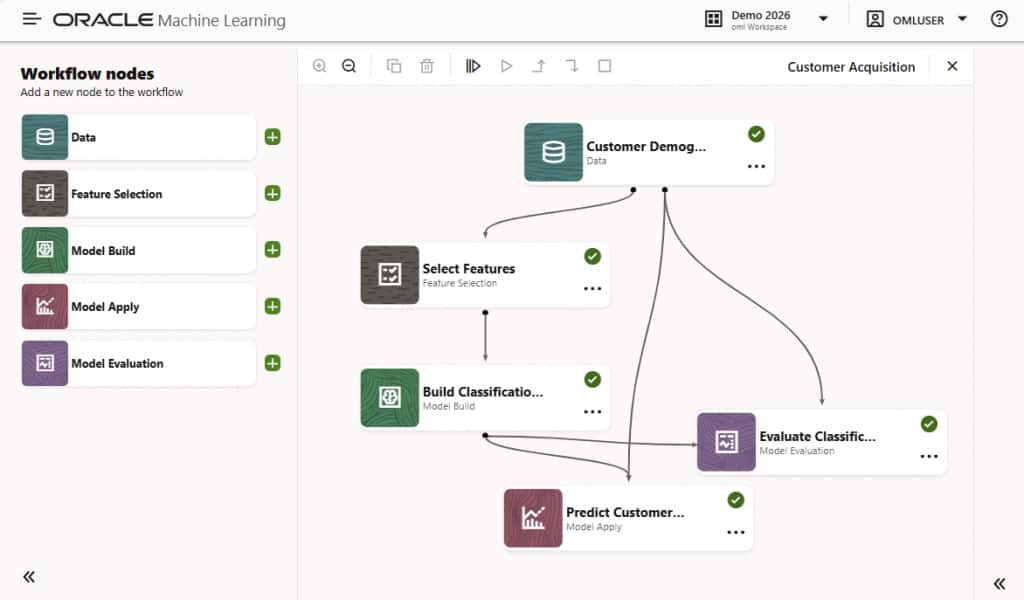
Figure 1: Example of a machine learning workflow for classification
What you can do today
OML Workflow focuses on visual composition and running of machine learning pipelines. You can:
- Build visually: Create end-to-end machine learning workflows by dragging nodes onto a canvas and connecting them into a pipeline as depicted in Figure 1.
- Configure with guidance: Use node-level settings, defined inputs and outputs, and built-in validation across linked steps.
- Prepare data and select features: Work with database tables and views, compute statistics and correlations, split data, and use automated feature selection.
- Train, predict, and evaluate models: Use build, apply, and evaluation nodes to train models, generate predictions, and compare quality metrics in one flow.
- Run where your data lives: Execute workflows using OML in your Autonomous AI Database environment.
- Deploy downstream: Publish selected models to OML Services for real-time inference, monitoring, and lifecycle management, or use in-database models directly from SQL.
A quick example: from data to deployed model
Imagine a customer acquisition use case where you have customer demographic data and a target column indicating whether each customer accepted an affinity, or frequent buyer, card. Your workflow would be:
- Start with a Data node to source your customer table.
- Split the data, for example 80% for training and 20% for testing.
- Select to compute descriptive statistics.
- Select to compute data correlation using Pearson, Kendall, or Spearman metrics, with results shown in Figure 2.
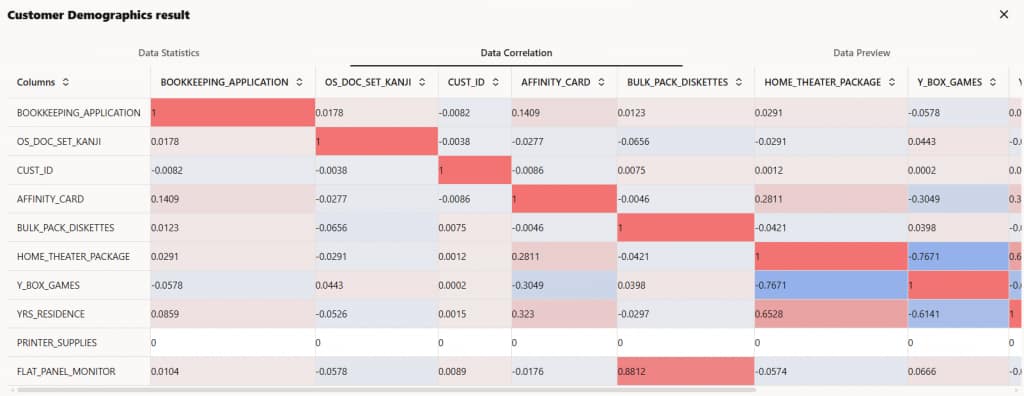
Figure 2: Correlation results on the customer demographics data
- Add a Feature Selection node to focus on the most predictive attributes.
- Add a Model Build node to train a classification model.
- Add a Model Evaluation node to assess each model’s quality metrics, like balanced accuracy score and confusion matrix, with results shown in Figure 3.
- Add a Model Apply node to make predictions using the models you select in the workflow and review results.
- Alternatively, publish your selected model(s) to OML Services for real-time inference and to enable monitoring. Or use the in-database model immediately from SQL queries.
All steps are visually represented and validated, helping teams move from exploration to production.
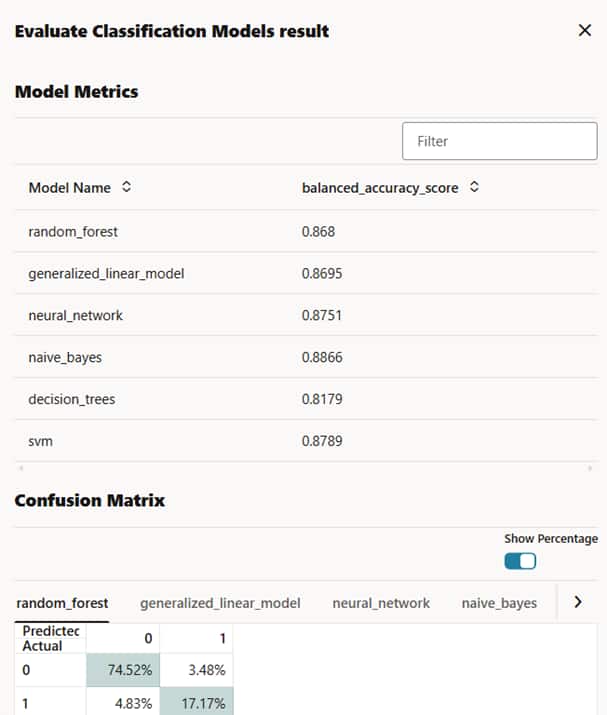
Figure 3: Model evaluation results showing each model’s metrics and confusion matrix
Built for enterprise use on Oracle Autonomous AI Database
OML Workflow inherits the enterprise strengths of Autonomous AI Database and the Oracle Machine Learning platform:
- Security and governance: Build within Oracle’s enterprise-grade security, role-based access, and data governance model.
- Performance and scale: Keep data in the database and use OML execution to train, evaluate, and apply models efficiently.
- Automatic updates and patching: Benefit from automated patching and updates, including the latest features and security enhancements.
Additionally, OML Workflow extends and complements what you can already do with OML on Autonomous AI Database:
- OML Notebooks provides code-first exploration and customization using SQL, PL/SQL, R, and Python APIs. You can prepare and explore datasets, script custom solutions with OML APIs, and use packages from the R and Python ecosystems.
- OML AutoML supports automated classification and regression modeling from a no-code user interface and Python API.
- OML Monitoring supports a no-code user interface for data and model monitoring to track drift over time and its potential impact on model quality.
- OML Services supports model deployment, monitoring, bias detection, and lifecycle management using REST. OML Workflow connects naturally to OML Services to streamline production deployment.
Try OML workflow in your existing Autonomous AI Database instance or create an Always Free instance to explore Oracle Machine Learning.
Resources
For more information, see: