
A TypeScript example of vector search, metadata filtering, MMR, and grounded answers with OracleVS.
Companion application: Oracle LangChain.js RAG
This runnable TypeScript sample shows how LangChain.js connects to Oracle AI Database through OracleVS, from document loading and metadata-filtered retrieval to a grounded answer.
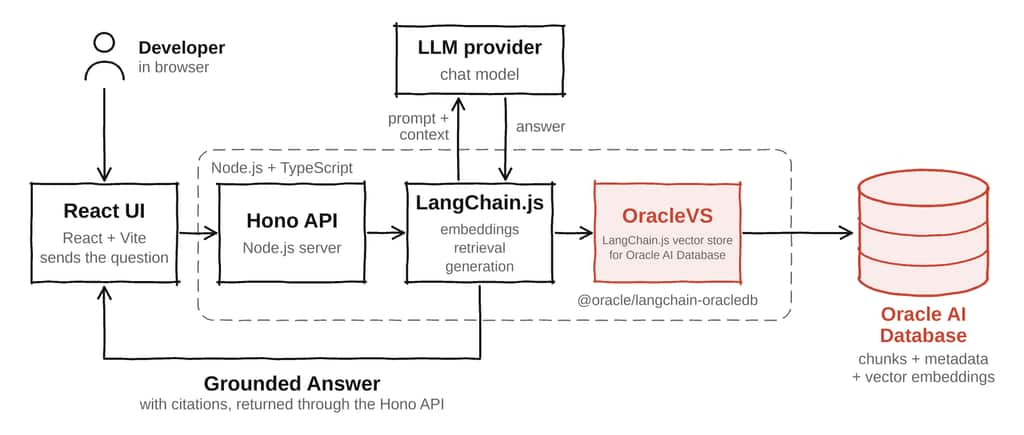
The React frontend sends questions to a Hono API, where LangChain.js and OracleVS retrieve evidence from Oracle AI Database using similarity search, metadata filters, or MMR. The optional LLM step generates a grounded answer; without an API key, the application returns an extractive answer.
Key takeaways
- A TypeScript application can use Oracle AI Database as its LangChain.js vector store through OracleVS.
- The app keeps document chunks, native vector embeddings, and JSON metadata in one Oracle table.
- Similarity search, distance scores, metadata filters, and MMR are alternative retrieval decisions over the same store.
- The Hono API keeps retrieval and answer generation separate, so the system can run with or without an LLM key.
- The Oracle Table view lets developers inspect the table, columns, row count, vector index metadata, and query-vector preview.
- The same LangChain.js interfaces can be used from JavaScript or TypeScript; this application uses TypeScript for the service and package boundaries.
Why this integration matters
A RAG application needs more than a vector similarity function. It needs a durable corpus, source attribution, metadata boundaries, operational controls, and a way to inspect why a result was selected. When those concerns are spread across unrelated systems, a developer has to join vector results back to the records that govern them.
Oracle AI Database provides a database-native retrieval layer where application text, vector embeddings, JSON metadata, relational data, and database controls can live together. OracleVS keeps the application code in the LangChain.js programming model while the database remains the system of record for the retrieved material.
That combination is useful for developer assistants and agent workflows. A category, product, tenant, audience, source, or priority filter can restrict which chunks are eligible before an answer is assembled. The application can then show the selected evidence and the database state instead of presenting a generated answer as an unexplained result.
How the pieces fit together
| Layer | Role |
| React + Vite web app | Collects the question, category, top K, and retrieval mode. Displays traces, evidence, answers, and Oracle inspection. |
| Hono API | Exposes status, corpus, inspect, seed, reset, and ask endpoints for the browser UI. |
| LangChain.js core package | Loads Markdown, creates Document chunks, embeds text, runs retrieval, formats evidence, and prepares answers. |
| OracleVS | The LangChain vector-store implementation from @oracle/langchain-oracledb. |
| Oracle AI Database | Stores source text, native vectors, JSON metadata, and optional vector-index metadata in one table. |
What the integration gives the developer
LangChain.js supplies the application-facing abstractions for documents, embeddings, vector-store retrieval, metadata filters, MMR, and optional answer generation. Oracle AI Database supplies durable storage, native VECTOR data, JSON metadata, distance search, and database inspection. The app makes this boundary visible instead of hiding it behind a single assistant response.
| Integration layer | LangChain.js capability | Implementation in this application |
| Knowledge base | Document | Markdown files in samples/knowledge-base become section-level Documents with metadata. |
| Embeddings | Embeddings | DemoEmbeddings provides a deterministic 12-dimensional TypeScript embedding for repeatable local runs. |
| Vector store | OracleVS | OracleVS.fromDocuments from @oracle/langchain-oracledb stores chunks in the LC_JS_RAG_DEMO table. |
| Similarity | similaritySearchWithScore | Oracle vector distance ranks the nearest chunks and returns their scores to the UI. |
| Metadata filters | Retriever filter | The optional category predicate narrows which chunks are eligible before ranking. |
| Diversity | maxMarginalRelevanceSearch | MMR uses k, fetchK, and lambda: 0.5 to balance relevance with less redundant context. |
| Generation | ChatOpenAI | An optional chat model produces a cited answer from retrieved context; without a key, the app uses an extractive fallback. |
| Inspection | Application and SQL | The Oracle Table view exposes row count, columns, vector-index metadata, and a query-vector preview. |
The important boundary is explicit: LangChain.js orchestrates document conversion, embeddings, retrieval, and answer preparation; Oracle AI Database stores and searches the vectors and metadata. The application makes that boundary observable in the UI.
The connection model
The app uses the Node.js Oracle Database driver through a connection pool. The pool is created in the database package and passed to OracleVS. This keeps credentials, wallet settings, connection targets, and session lifecycle in the normal Node.js data-access layer instead of mixing them into retrieval code.
The application supports two deployment targets. For local development, use Oracle AI Database Free, which provides AI Vector Search for experimentation, with a regular connect string such as localhost:1521/FREEPDB1. Autonomous AI Database uses a service alias or TCPS descriptor and normally adds wallet settings. The LangChain retrieval code stays the same; only the database connection configuration changes.
Before running the application, use a dedicated schema with:
- permission to create and drop its own demonstration tables;
- permission to insert into and select from those tables;
- permission to create the optional HNSW vector index when `ORACLE_CREATE_VECTOR_INDEX=true`.
Retrieval still works when vector-index creation is disabled.
# .env
ORACLE_USER=<database-user>
ORACLE_PASSWORD=<database-password>
ORACLE_CONNECT_STRING=localhost:1521/FREEPDB1
ORACLE_TABLE_NAME=LC_JS_RAG_DEMO
ORACLE_CREATE_VECTOR_INDEX=false

# Optional for Autonomous AI Database mTLS
ORACLE_WALLET_LOCATION=<path-to-unzipped-wallet>
ORACLE_WALLET_PASSWORD=<wallet-password>

# Optional: enables the generated grounded answer
OPENAI_API_KEY=<optional-api-key>
Loading the knowledge base
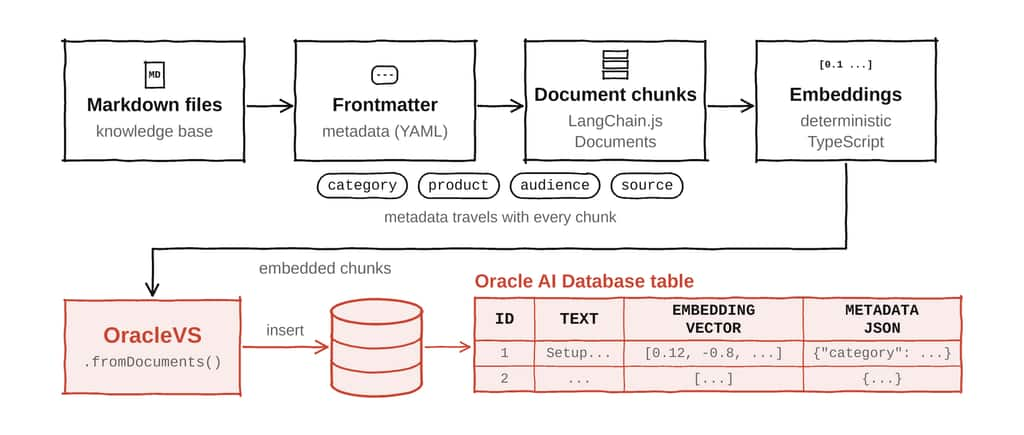
The seed command reads Markdown files from samples/knowledge-base. Each file contains frontmatter such as title, source, category, product, priority, audience, and tags. The core package splits the Markdown body at section headings and turns each section into a LangChain Document.
new Document({
  pageContent: `${title} - ${section}\n\n${sectionContent}`,
  metadata: {
    title,
    source,
    category,
    product,
    priority,
    audience,
    tags,
    section,
    chunk,
  },
});
This metadata is part of the retrieval surface. It gives the API enough information to display source evidence, apply a category filter, and explain why a chunk was included in the context sent to the answer step.
Storing vectors with OracleVS
The database package uses `OracleVS.fromDocuments` to create the vector-store table and insert the document chunks. It supplies the pool, table name, distance strategy, vector format, and the `query` option. Here, `query` is only a sample string used during initialization: OracleVS sends it through the configured embeddings model to determine the embedding dimension before creating the vector column. It is not the user’s search question and does not affect retrieval results.
const vectorStore = await OracleVS.fromDocuments(documents, embeddings, {
  client: pool,
  tableName: config.tableName,
  query: "Oracle AI Database LangChain.js RAG",
  distanceStrategy: DistanceStrategy.COSINE,
  format: VectorElementFormat.FLOAT32,
  description: "LangChain.js RAG sample app table for Oracle AI Database",
});
The sample uses DemoEmbeddings, a deterministic TypeScript Embeddings implementation with a 12-dimensional vector. This keeps local development runs reproducible and makes the integration testable without requiring an external embedding service. In a production application, the same LangChain.js interface can be replaced with OpenAI, OCI Generative AI, Oracle-backed embeddings, or another compatible provider. The table must be re-embedded when the vector dimension or embedding space changes.
When requested through ORACLE_CREATE_VECTOR_INDEX=true, the seed path can create an HNSW vector index. The index is an Oracle database optimization, not a requirement for the LangChain.js API. The application exposes the index result in its seed summary and Oracle Table view.
Retrieval beyond the nearest vector
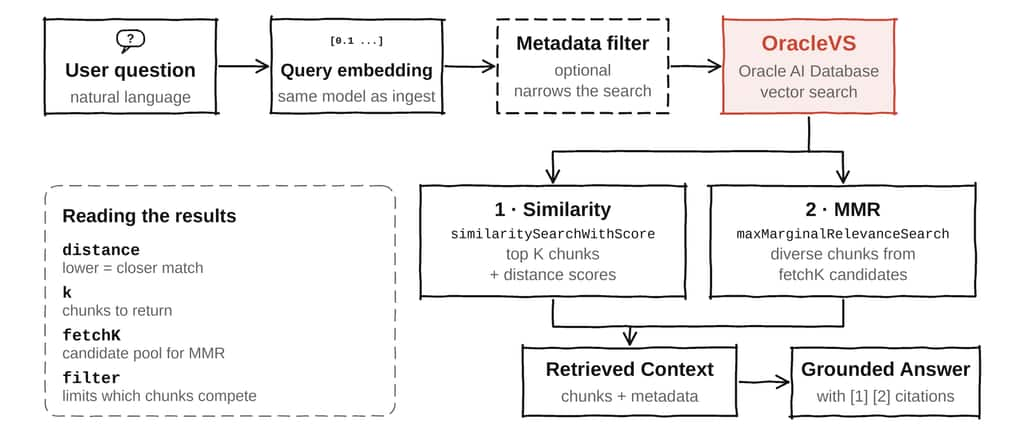
The ask endpoint supports two retrieval modes over the same OracleVS table. Similarity search with scores is the baseline: it returns the closest chunks and their distance values. MMR starts with a wider candidate pool and balances query relevance with diversity so the context does not contain several near-duplicate chunks.
const retrieved =
  retrievalMode === "mmr"
    ? await vectorStore.maxMarginalRelevanceSearch(question, {
        k,
        fetchK,
        lambda: 0.5,
        filter,
      })
    : await vectorStore.similaritySearchWithScore(question, k, filter);
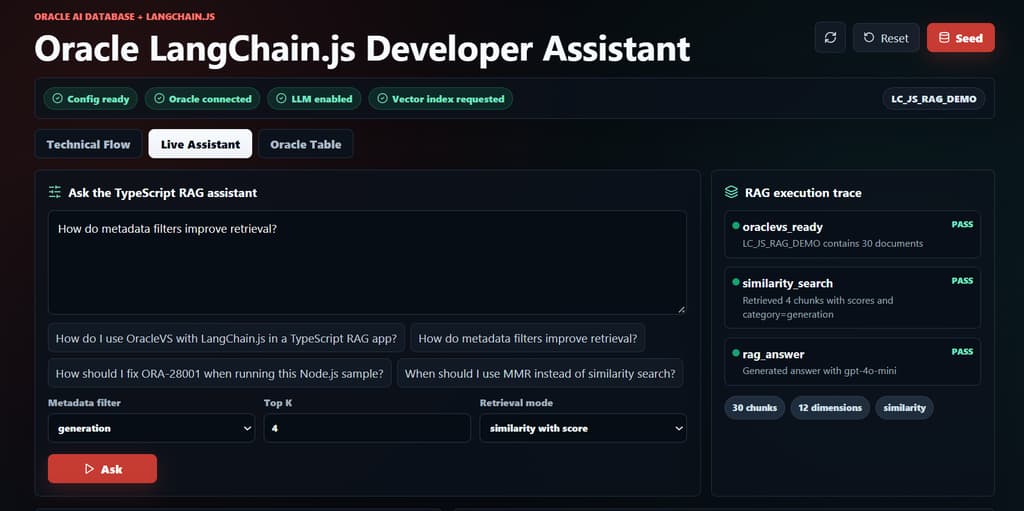
The UI exposes retrieval mode, top K, fetch K for MMR, and the category filter. This makes the retrieval decision visible rather than hiding it behind a single assistant response.
Metadata as a retrieval contract
The application converts a selected category into a LangChain.js filter before it calls OracleVS. The filter is optional; when no category is selected, all eligible chunks compete in the vector search.
const filter =
  category && category !== "all"
    ? { category: { $eq: category } }
    : undefined;
A category filter is only a small demonstration of a broader design pattern. Production metadata may include tenant_id, product, source_system, document_type, region, freshness, access_scope, workflow_state, or priority. Metadata filtering is a retrieval boundary, not a replacement for application authentication or database privileges.
Grounded answers and the LLM boundary
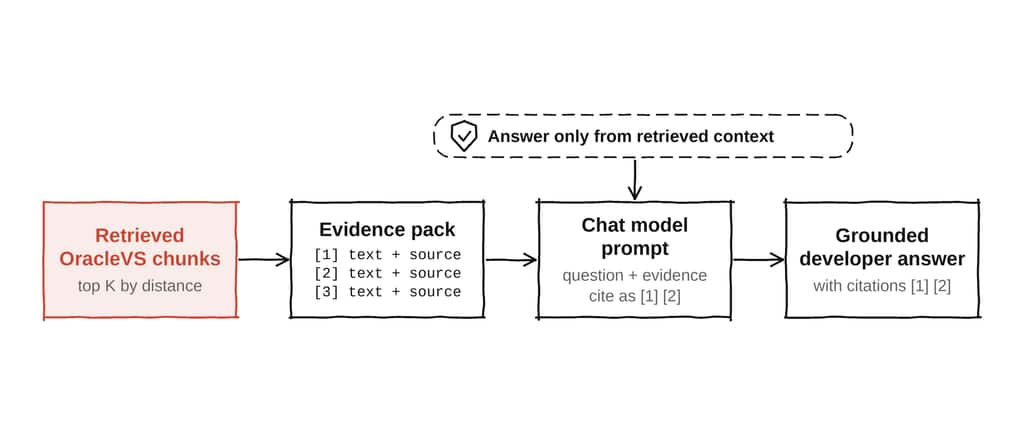
After retrieval, the API converts each Document into an evidence record containing its rank, title, section, source, metadata, optional tags, and distance. That evidence pack is the boundary between retrieval and generation. The answer step receives retrieved OracleVS context rather than the entire database or an unrestricted prompt.
if (!apiKey) {
  return {
    usedLlm: false,
    answer:
      `No OPENAI_API_KEY is configured, so the assistant returned ` +
      `a grounded extractive answer.\n\n` +
      `Top OracleVS context:\n${context}`,
  };
}

const response = await chat.invoke([
  new SystemMessage(
    "Answer only from the retrieved OracleVS context and cite source chunks."
  ),
  new HumanMessage(`Question: ${question}\n\nRetrieved context:\n${context}`),
]);
With OPENAI_API_KEY configured, ChatOpenAI generates the developer answer with temperature 0 and source-rank citations. Without the key, the app still returns an extractive answer from the retrieved evidence. This keeps the Oracle and LangChain integration runnable during local development while making the LLM step explicit and optional.
Inspecting the Oracle table
The Oracle Table view makes the vector store concrete. It shows the configured table name, row count, columns, vector-index metadata when available, and a preview of the query vector after a question is asked. This gives developers a way to connect a LangChain.js method call to the database objects it uses.
| Stored element | Database role |
| Document text | Source context used in the retrieved evidence. |
| JSON metadata | Filterable fields such as category, product, source, priority, and audience. |
| VECTOR column | Embedding values used for distance-based retrieval. |
| Optional vector index | HNSW or another supported index for larger corpora and lower-latency search. |
SELECT column_name, data_type
FROM user_tab_columns
WHERE table_name = :tableName
ORDER BY column_id;

SELECT index_name, index_type
FROM user_indexes
WHERE table_name = :tableName
ORDER BY index_name; 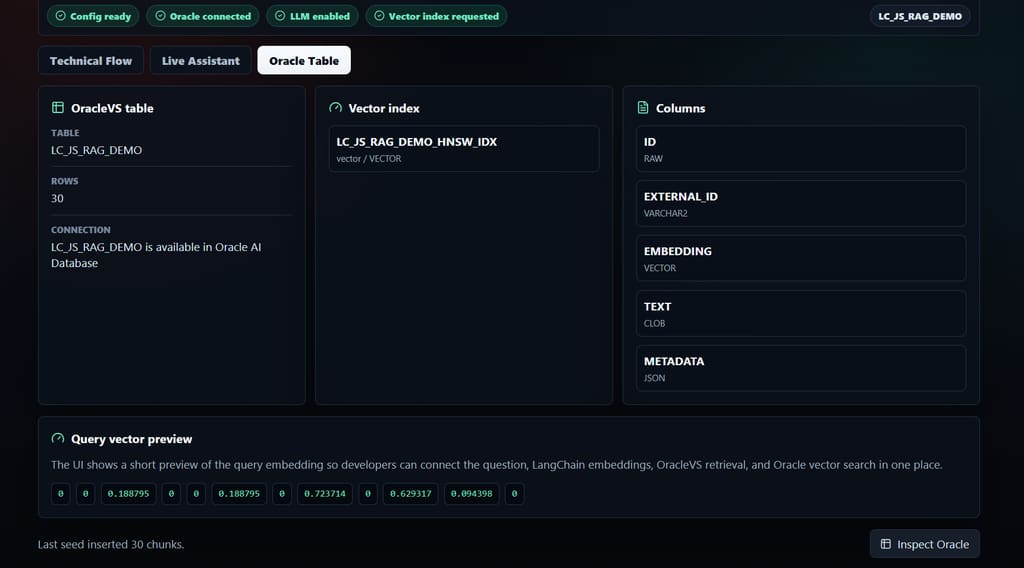
What the application demonstrates end to end
The app is intentionally more than a chat screen. It exposes the lifecycle that a developer needs to understand when moving from a proof of concept to a service:
- The status endpoint checks configuration, Oracle connectivity, LLM availability, and vector-index settings.
- The seed command runs a table preflight, resets the demo table, loads Markdown chunks, creates OracleVS rows, and optionally creates an HNSW index.
- The ask endpoint selects similarity or MMR retrieval, applies an optional metadata filter, computes a query vector, formats evidence, and returns a grounded answer.
- The trace exposes the LangChain.js call, retrieval mode, top K, fetch K, filter, distance strategy, and representative Oracle vector-search SQL.
- The Oracle inspection endpoint reads the row count, columns, and indexes directly from Oracle data dictionary views.
Run the application locally
The repository is a pnpm workspace. Use the canonical ORACLE_* environment variables from .env.example, then run the database check and seed before starting the two local development processes.
pnpm install
cp .env.example .env

pnpm db:check
pnpm seed

# Terminal 1
pnpm dev:api

# Terminal 2
pnpm dev
Open http://localhost:5173 in a browser after both processes are running.
The container path is also available for a single-origin deployment: build the Docker image, pass the same .env values, expose port 8787, and open http://localhost:8787. For a local database running on the host, the container must use the host address exposed by the container runtime rather than localhost.
TypeScript and JavaScript positioning
The application is written in TypeScript so the frontend, Hono API, shared response types, database helpers, and retrieval package can share explicit contracts. The integration itself is not TypeScript-only. The same @oracle/langchain-oracledb imports and LangChain.js vector-store methods are available from JavaScript when a team prefers direct Node.js execution.
The important distinction is between language choice and application boundary. JavaScript and TypeScript can both call OracleVS. The application still benefits from keeping the Oracle connection layer, retrieval options, evidence shape, and API response types explicit as the system grows.
Operational notes
- Create one pool per service process and close it during graceful shutdown. The request path should reuse the pool rather than create a new pool for every question.
- Keep the demo table name separate from production tables. The seed command drops and recreates the configured demo table, so it must not point at a production table.
- Use compatible embeddings for ingestion and query retrieval. Changing dimensions or embedding spaces requires re-embedding the stored documents.
- Treat vector-index creation as an environment decision. The app remains useful without an index, while larger corpora and latency requirements may justify HNSW or another supported index.
- Keep metadata fields stable and intentional. They should explain the corpus and support the filters the application actually needs.
Conclusion
This application shows why LangChain.js and Oracle AI Database work well together in a TypeScript service. LangChain.js provides the familiar abstractions for Documents, embeddings, vector stores, retrieval modes, and chat models. Oracle AI Database supplies a durable and inspectable data layer for the text, vectors, metadata, indexes, and operational controls behind those abstractions.
The result is a RAG workflow that a developer can run in a browser, trace through a Node.js API, inspect in an Oracle table, and extend toward a production service without introducing a separate vector database just for retrieval.
FAQ
Does the app require an LLM key? No. Without OPENAI_API_KEY, it returns a grounded extractive answer. With the key, it uses ChatOpenAI to generate a cited developer response.
Does the app require a vector index? No. The retrieval path works without one. The seed flow can request an HNSW index when the database environment supports it.
Can the app use Autonomous AI Database? Yes. Supply the Autonomous service alias or TCPS descriptor and the wallet settings required by the environment. The LangChain retrieval code does not change.
Why use metadata filters? They restrict which chunks are eligible before the answer context is assembled. This is useful for product, tenant, source, audience, priority, and workflow boundaries.
When should I choose MMR? Choose MMR when ordinary similarity search returns several near-duplicate chunks and the answer benefits from broader, more diverse context.
References
- Application source: https://github.com/oracle-devrel/oracle-ai-developer-hub/tree/main/apps/oracle-langchain-js-rag
- Oracle LangChain JavaScript integration guide: https://docs.oracle.com/en/database/oracle/oracle-database/26/aintg/langchain-oracledb-integration-guide/langchain-javascript.html
- Oracle AI Vector Search User’s Guide: https://docs.oracle.com/en/database/oracle/oracle-database/26/vecse/
- Oracle AI Database Free: https://www.oracle.com/database/free/
- Create Vector Indexes and Hybrid Vector Indexes: https://docs.oracle.com/en/database/oracle/oracle-database/26/vecse/create-vector-indexes-and-hybrid-vector-indexes.html
- Node.js package configuration: https://nodejs.org/api/packages.html