
A practical developer guide to storing, searching, filtering, updating, deleting, and inspecting Mem0 memories with Oracle AI Database as the vector store.
Companion notebook: Mem0 Python Memory with Oracle AI Database
Key Takeaways
- Mem0 Python can use Oracle AI Database as the durable vector store for application memory.
- The core setup uses mem0ai, python oracledb, and Memory.from_config with the oracledb provider.
- User scope, agent scope, and metadata filters make retrieval useful for real applications, not just vector demos.
- The notebook proves add, search, filter, update, delete, memory-aware response assembly, Oracle table inspection, and raw payload inspection in one runnable flow.
- The same pattern can sit behind a chatbot, agent, REST API, support assistant, or workflow service.
A useful application memory layer needs more than a place to put embeddings. It needs a way to store memory records, retrieve the right ones, filter them by application context, update them when facts change, and delete them when they should no longer be used.
That is the developer problem this article covers. The goal is not to make a broad article about memory as a concept. The goal is to show how Mem0 Python can use Oracle AI Database as the backing store for durable application memory.
Mem0 provides the Python memory API. Oracle AI Database provides the durable vector-backed storage layer. The Oracle oracledb provider connects the two, so a Python application can add memories, search them later, filter on JSON payload metadata, update and delete records, and inspect what was persisted.
The companion notebook uses two sample users, one sample agent, a few explicit memories, metadata categories, update and delete operations, and direct Oracle inspection. That keeps the storage path visible without turning the tutorial into a full chatbot implementation.
In this article, application memory means structured, retrievable context that an application can use across requests. It is not the same as chat history. Chat history is a sequence of messages. Application memory is a curated record that should be searchable, scoped, updated, and deleted.
That distinction matters because most applications do not need every old message. They need the right facts at the right time.
A good way to think about application memory is as a small record with three jobs. It stores the fact the application may need later, it carries scope so the fact belongs to the right user, agent, or workflow, and it carries metadata so retrieval can be narrowed without guessing. The vector helps find similar meaning. The payload helps the application keep control.
The Developer Pattern
The pattern is straightforward. A Python application calls Mem0. Mem0 creates or receives a memory record. The Oracle provider stores each memory as a row in an Oracle table, with the embedding in a vector column and the memory text plus metadata inside a JSON payload. The vector is for similarity. The JSON payload is for application context and debugging.
The application needs both. Similarity helps find records that mean something close to the query. The payload keeps the record tied to user identity, agent identity, category, source, and other fields the application can reason about.
Later, the application searches that table through the Mem0 API and uses the returned memories as context.
That path is useful because it separates memory operations from model calls. The application does not need to keep every prior message in the prompt. It can retrieve a scoped set of records and pass only the useful context to the next step. This also reduces prompt noise. Instead of sending a long transcript and hoping the model finds the useful part, the application retrieves a smaller set of memory records that already passed scope and metadata filters.
The same pattern works for different kinds of applications. A customer support assistant can remember prior case context. A coding assistant can remember project conventions. A recommendation workflow can remember user preferences. A REST API can retrieve relevant memory before calling a model or assembling a response.
This is also why the memory layer should sit outside the prompt. Prompts are useful for immediate context, but they are not a durable system of record. A database-backed memory layer gives the application a place to keep reusable context and decide when that context should participate in a request.
Architecture
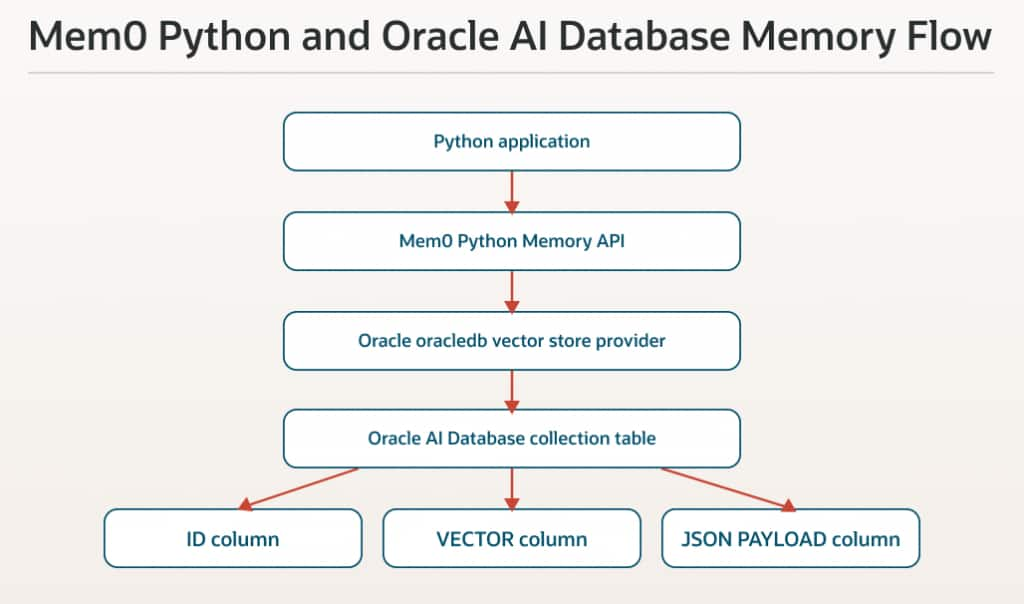
The architecture has four moving parts. The Python application owns the user request and the application rules. Mem0 owns the memory API. The Oracle oracledb provider maps the Mem0 vector store operations to Oracle AI Database. Oracle stores the durable table with the vector column and JSON payload.
The application code does not need to write vector SQL directly for every operation. It uses Mem0 methods such as add, search, update, and delete. At the same time, the storage is still visible in Oracle, so the developer can inspect rows, payloads, and counts when debugging.
The notebook keeps this architecture local and repeatable. It loads connection values from the environment, creates the Mem0 configuration, writes sample memories, runs scoped retrieval, and then checks the Oracle table. Each step is small enough to understand, but together they show the actual application path.
Conceptually, there are two retrieval steps happening together. The vector comparison finds records that are close in meaning to the query. The structured filters decide which records are allowed to be considered in the first place. Both steps matter. Similarity without scope can return the wrong user’s context. Scope without similarity can return too much data.
Retrieval scope is the first relevance boundary in a memory system. Before asking whether a memory is semantically relevant, the application should narrow the search to the records that belong to the current user, agent, tenant, project, or workflow.
In the notebook, the main retrieval scope is user_id. The agent example uses agent_id. In a real application, retrieval scope might include user id, tenant id, agent id, project id, or workflow id. These filters help select the relevant memory set, while application-level authorization should still be handled by the surrounding application.
Configure Mem0 with Oracle AI Database
The first important step is the Mem0 configuration. The vector store provider is set to oracledb. The collection name maps to the Oracle table used for the memory collection. The connection parameters come from the notebook environment, not from hard-coded secrets.
from mem0 import Memory

config = {
    "vector_store": {
        "provider": "oracledb",
        "config": {
            "collection_name": "MEM0_PY_MEMORY_DEMO",
            "embedding_model_dims": 32,
            "connection_params": {
                "user": ORACLE_USER,
                "password": ORACLE_PASSWORD,
                "dsn": ORACLE_DSN,
            },
            "distance_metric": "COSINE",
            "do_create_index": False,
        },
    },
}

memory = Memory.from_config(config)
This configuration is the contract between Mem0 and Oracle AI Database. Mem0 needs to know which vector store provider to use, how to connect to Oracle, what collection to write to, and how large each embedding vector will be. If those values are wrong, the memory API may still look simple, but the storage path will fail.
The important rule is that the embedding dimension in the Mem0 configuration must match the embedding model. If the model returns 1536-dimensional vectors, use 1536. If it returns another dimension, configure that value. A mismatch here will break the storage path.
The notebook uses a deterministic local embedder so the tutorial can run without external model credits. In production, the same configuration pattern applies, but the embedding provider and dimension should match the approved provider for that environment.
Add Scoped Memories
The tutorial adds explicit memories for two sample users. The records live in the same Oracle collection, but each memory carries a user id. That user id becomes part of the retrieval filter later.
This scope is the first thing that makes the example feel like application memory instead of a generic vector search demo. A real application needs to keep memory tied to the right user, agent, tenant, account, or workflow.
memory.add(
    "User A prefers vegetarian pasta for weekday dinners.",
    user_id="user_a",
    metadata={"category": "food", "source": "profile"},
    infer=False,
)
The notebook uses infer=False. That means Mem0 stores the provided text directly as the memory. This keeps the example predictable and makes the output easy to verify.
There is also a design choice here. Explicit memories are easier to test because the application decides exactly what gets stored. Inferred memories are more flexible because they can be extracted from natural conversation. Most production systems eventually need a policy for both: when to store explicit application facts and when to let a model propose memories.
In another application, you may want Mem0 to infer memories from conversation messages. That is a valid path, but it introduces an extraction step and usually a model dependency.
That separation is useful when designing a real app. First prove that explicit memories can be written, retrieved, updated, and deleted. Once the storage path is reliable, add extraction logic if the product needs it. This keeps failures easier to diagnose because storage issues and extraction issues are not mixed together from the start.
Search with User Scope and Metadata
After the notebook adds memories, it searches for records related to User A. The filter keeps retrieval inside the correct user scope. That matters because the collection can hold records for more than one user.
The workflow then filters by metadata. Metadata is where application context becomes useful. Category, source, tenant, product, agent id, workflow name, or retention class can all become retrieval controls.
movie_results = memory.search(
    "What movies does this user like?",
    top_k=5,
    filters={
        "user_id": "user_a",
        "category": "movie",
    },
)
The notebook output shows one movie-related memory for User A. That is the point. The application is not asking for similar text across the whole table. It is asking for useful memory inside the correct scope and category.
Metadata filtering also makes search behavior easier to explain. If a result appears, the developer can see which filters allowed it. If a result is missing, the developer can inspect the stored payload and check whether it was saved under the expected scope or category.
Pure semantic search is not enough for most application memory. You usually need semantic search plus filters that come from the application domain. Mem0 gives the Python API. Oracle stores the vector and the JSON payload that those filters use.
This also makes the application easier to reason about. If a result appears that should not have appeared, the developer can check the query, the filters, and the stored payload. If no result appears, the developer can check whether the memory was stored under the expected user id and category.
The broader idea is that metadata turns memory into an application feature. A support tool might filter by account id and product area. A coding assistant might filter by repository and branch. A workflow engine might filter by run id and task type. The fields are different, but the pattern is the same.
Add Agent-Scoped Memory
The current notebook also adds one agent-scoped memory. This is separate from User A and User B. Instead of using user_id, the memory is stored with agent_id.
This matters because not every memory belongs to an end user. Some memory belongs to an assistant, workflow, support bot, or agent runtime. For example, an application may want a support agent to remember an operating instruction such as how to summarize retrieved memory before suggesting the next action.
agent_id = "support_agent"

memory.add(
    "Support agent should summarize retrieved memories before suggesting the next action.",
    agent_id=agent_id,
    metadata={"category": "agent_instruction", "source": "system"},
    infer=False,
)

agent_results = memory.search(
    "How should the support agent use retrieved memories?",
    top_k=3,
    filters={"agent_id": agent_id},
)
This step keeps the tutorial practical without making it larger than it needs to be. It shows that the same Oracle-backed collection can hold different scopes, as long as the application searches with the right filters.
In production, this pattern can extend to run_id, tenant id, project id, account id, or any other scope field your application needs. The main rule is to be explicit. The memory layer should not guess which records are allowed for a request.
Build a Memory-Aware Answer
The notebook builds a small memory-aware answer from retrieved memories instead of hard-coding the final response. That is a useful change because it shows the flow more honestly.
The application asks a question, retrieves User A memories, groups them by category, and then uses the retrieved facts to assemble a response. This is still a tutorial response, not a full chatbot, but it proves the important application step: the answer is based on retrieved memory records.
The notebook retrieves User A food, movie, and travel memories, then turns those retrieved rows into a dinner-and-movie suggestion. The output includes the memories used and labels the response source as generated from retrieved Mem0 memories in the cell.
Update and Delete Memory Records
Memory needs lifecycle control. Memory is not automatically truth. It is application state. Like any other state, it can become stale, duplicated, incomplete, or wrong. Update and delete operations are what keep memory from becoming a pile of old assumptions.
A record may become more specific. A preference may change. A user may ask for something to be removed. A workflow may decide that older memory should no longer participate in retrieval.
The notebook updates one User A movie preference and deletes one User B food preference. These are small operations, but they prove that the memory layer is not append-only.
memory.update(
    movie_memory_id,
    text="User A likes optimistic science fiction movies about space exploration.",
    metadata={"category": "movie", "source": "updated_chat"},
)

memory.delete(user_b_food_id)
After the update, a movie search returns the revised memory text. After the delete, User B search results drop from two to one. Those checks are simple, but they are exactly the checks a developer wants before trusting the pattern in a larger application.
In production, the policy around update and delete may be stricter. Some records may need versioning. Some deletes may be driven by retention rules. Some updates may require review. The notebook gives the basic operations that those policies build on.
Lifecycle control is especially important because memory can become stale. A stored preference is useful only while it is still true. An old decision can be harmful if the project has moved on. Update and delete operations give the application a way to keep memory aligned with current state instead of treating every stored record as permanent truth.
Inspect What Oracle Stores
The notebook inspects the Oracle table directly. This is useful because developers should be able to see what was stored, not only what the SDK returned.
The table contains an id, a vector, and a JSON payload. This is a useful split. The id gives the application something stable to update or delete. The vector supports similarity search. The payload carries the fields that make the memory understandable to the application and to the developer debugging it.
The payload includes fields such as user_id, agent_id, category, and memory text. That makes the stored records understandable during development and debugging.
Oracle table exists: True
Table rows: 5
Columns:
- ID: VARCHAR2
- VECTOR: VECTOR
- PAYLOAD: JSON
The sample rows show one agent instruction, User A food, movie, and travel memories, plus one remaining User B movie memory after the delete. That is the expected final state.
This kind of inspection is one reason the database-backed pattern is practical. If retrieval looks wrong, you can check whether the row exists, whether the metadata was stored correctly, and whether the lifecycle operation changed the table as expected.
Inspect One Raw Memory Payload
The notebook then goes one level deeper and prints one raw JSON payload for the updated User A movie memory.
This replaces the older final proof section. Instead of ending with a summary dictionary, the notebook now ends the core flow by showing what Oracle actually persisted for one memory row. That is more useful for a developer tutorial because it connects the Python API result to the database record.
The raw payload shows fields such as category, source, user id, role, memory text, hash, created timestamp, updated timestamp, and lemmatized text. Those fields explain why direct inspection is valuable. The vector column is what supports similarity search, but the JSON payload is what makes the record understandable and debuggable.
This is also a good troubleshooting pattern. If an application retrieves the wrong memory, inspect the payload. Check whether the scope field is correct. Check whether the category was saved as expected. Check whether the text was updated. Check whether the memory id is the one your application is trying to update or delete.
How to Move This from Demo to Production
Before using the same pattern in a live application, I would make a few changes.
- Use a production embedding provider and set embedding_model_dims to the correct vector dimension.
- Store database credentials in a secret manager, wallet configuration, or managed connection profile.
- Use an application-managed Oracle connection pool when the service already manages database connections.
- Define scope fields carefully, such as user id, agent id, tenant id, workflow id, project id, or account id.
- Decide which metadata fields are required for filtering and debugging.
- Enable and tune Oracle vector indexes for larger collections.
- Define retention, update, and delete policy before memory grows.
- Log memory operations enough to debug unexpected retrieval results.
- Keep cleanup operations explicit. The notebook includes optional cleanup, but leaves demo rows available by default so reviewers can inspect the final table.
These are normal application engineering concerns. The useful part is that the notebook gives a small, working base that can be hardened rather than invented from scratch.
Use this pattern when a Python application needs durable memory that can be retrieved later with scope and metadata. That can be a chatbot, a support assistant, a workflow service, a coding assistant, or a REST API that needs context before building a response.
The application should treat memory retrieval as a deliberate step. Search the correct scope. Apply the metadata filters that matter. Review the returned memories. Then pass the useful context to the next model call, response builder, or workflow action.
Durable application memory is not just a table of vectors. It is a controlled retrieval path that the application can reason about.
Conclusion
Mem0 Python with Oracle AI Database gives developers a practical path for durable application memory. Mem0 handles the memory API. Oracle AI Database stores the vectors and JSON payloads. The application gets scoped retrieval, metadata filtering, lifecycle operations, and a storage layer that can be inspected.
The companion notebook keeps the workflow focused. It configures the Oracle provider, adds user-scoped and agent-scoped memories, filters by metadata, updates and deletes records, builds a response from retrieved memory, and checks what Oracle stored. From there, the same pattern can move behind an agent, assistant, chatbot, REST API, or workflow service.
Frequently Asked Questions
What Python packages does this use?
The notebook uses mem0ai, oracledb, and python dotenv.
Does the notebook require OpenAI?
No. This notebook was verified with mem0ai==2.1.0 and uses a deterministic local embedder registered through Mem0’s embedder factory for the tutorial run. The memory writes use infer=False, so Mem0 stores the provided memory text directly and does not make an external LLM extraction call. The final memory-aware answer is also assembled by notebook code from retrieved memories, not by an external model. A production application can replace the local embedder with the approved embedding and LLM providers for that environment.
Why does the notebook use infer=False?
infer=False stores the provided text directly as a memory. That keeps the tutorial predictable and makes the storage path easy to verify.
Where are the memories stored?
Mem0 stores the memory id, vector, and JSON payload in an Oracle table. In the notebook, the collection is MEM0_PY_MEMORY_DEMO.
Can multiple users share the same collection?
Yes. The notebook stores User A and User B in the same collection and uses user id filters to retrieve the right records.
Can memory be scoped to an agent instead of a user?
Yes. The notebook adds one memory with agent_id=”support_agent” and searches it with an agent filter. This is useful when the memory belongs to an assistant, workflow, or agent runtime rather than an end user.
Why not just keep everything in chat history?
Chat history is useful for short sessions, but it is not a durable memory system. It is hard to filter, hard to update, and hard to delete selectively. Memory records are smaller, scoped, and easier to retrieve.
What makes this different from plain vector search?
Plain vector search finds similar text. Application memory also needs scope, metadata, lifecycle operations, and inspection. The vector is only one part of the system.
Can I filter by metadata?
Yes. The notebook filters by category. Applications can use metadata fields to narrow retrieval by user, agent, tenant, category, source, workflow, or other domain values.
Should I create a vector index?
For a small tutorial, exact search without index creation is fine. For larger collections, configure Oracle vector indexes such as HNSW or IVF and tune them for the workload.
What changes before production?
Use a production embedder, secure credentials, define scope fields, tune indexing, and set policy for updates, deletes, retention, and audit logging.