
Oracle Autonomous AI Database includes managed MCP and A2A servers that put Oracle Select AI Agent Framework-defined tools and agents within reach of compatible clients. The MCP Server gives assistants and developer environments a standard way to discover and call database-backed tools. The A2A Server gives compatible applications a standard way to discover and invoke in-database agents. You can enable either endpoint from your Oracle Cloud Infrastructure (OCI) Tool configuration and copy its access URL to use in AI clients.
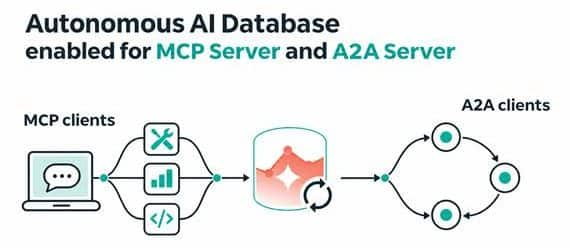
Figure 1. Oracle Autonomous AI Database connects MCP clients to tools and A2A clients to agents.
These protocols cover two different connections. MCP is the path from an AI client to a tool. A2A is the path from one agent or application to another agent. With both available as built-in Autonomous AI Database capabilities, you can choose the connection pattern that fits each part of an AI workflow.
Expose database tools through MCP
The Oracle Autonomous AI Database MCP Server enables MCP-compatible clients to discover and connect to tools created with the Oracle Select AI Agent Framework. Those tools can give an AI assistant, IDE, or agent framework a defined way to carry out database-backed tasks or interact with accessible cloud services. A standards-based endpoint can help reduce the need for each client to build its own database integration.
Because the MCP Server is a built-in, fully managed, multi-tenant capability in Autonomous AI Database, you do not need to deploy separate MCP server infrastructure. Access to tools can be managed using supported identity, authorization, and auditing capabilities, together with applicable database access controls.
Expose agents through A2A
The Oracle Autonomous AI Database A2A Server enables A2A-compatible clients to discover and invoke agents created with the Oracle Select AI Agent Framework. This gives an external application or agent a standard way to call a database-backed agent team as part of a larger multi-agent workflow.
The A2A Server is also a built-in, fully managed, multi-tenant capability, so you can expose those agents without deploying a separate A2A server. Supported identity, authorization, auditing, and database access controls can help organizations manage access to agents and associated database resources.
Enable the servers from Tool configuration
For an existing database, open its details page in the Oracle Cloud Infrastructure Console and follow these steps:
- Select the Tool configuration tab.
- Choose Edit.
- Switch on the status toggle for Agent-to-Agent (A2A) Server, Model Context Protocol (MCP) Server, or both.
- Choose Apply to save the configuration.
You can enable the servers independently. Turning one on or off does not change the status of the other. When a server is enabled, the Tool configuration page displays its server access URL with a Copy control. Use the MCP URL with an MCP-compatible client and the A2A URL with an A2A-compatible client.
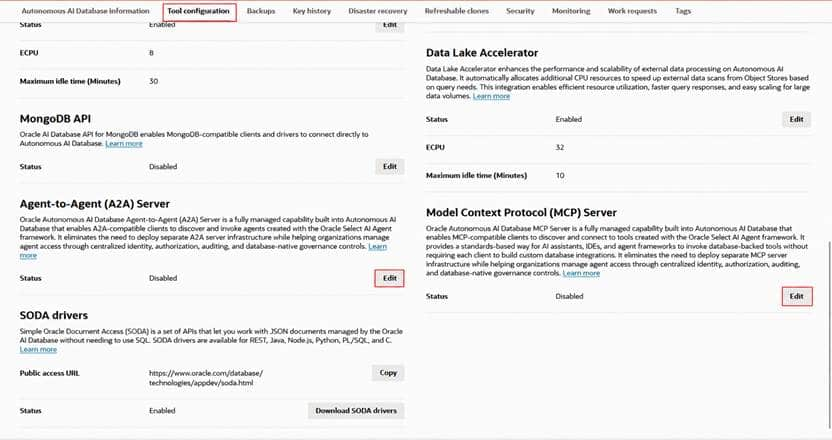
Figure 2. The Tool configuration page lists A2A and MCP Server status. Select Edit for either the A2A Server or MCP Server to open its status toggle.
The endpoint is only one part of the connection. Configure the compatible client with the copied URL, then meet the database privileges, identity, network, and tool or agent requirements for your environment. The MCP and A2A guides cover those setup details.