
Use skills to build OKafka apps with Oracle AI Database
Key Takeaways
- OKafka is a Kafka Java API for Oracle AI Database Transactional Event Queues. OKafka implements standard Kafka Java interfaces to create topics, produce, and consume messages directly in the database.
- This agent skill helps you write Kafka Java for Oracle AI Database Transactional Event Queues’ OKafka library.
- The skill encodes Oracle-specific additions to the Kafka Java API: authentication, using transactions, serialization, and database-specific topic behavior.
- Good agent skills raises the team baseline: better first pass code, fewer manual corrections, and improved integrations with Oracle AI Database.
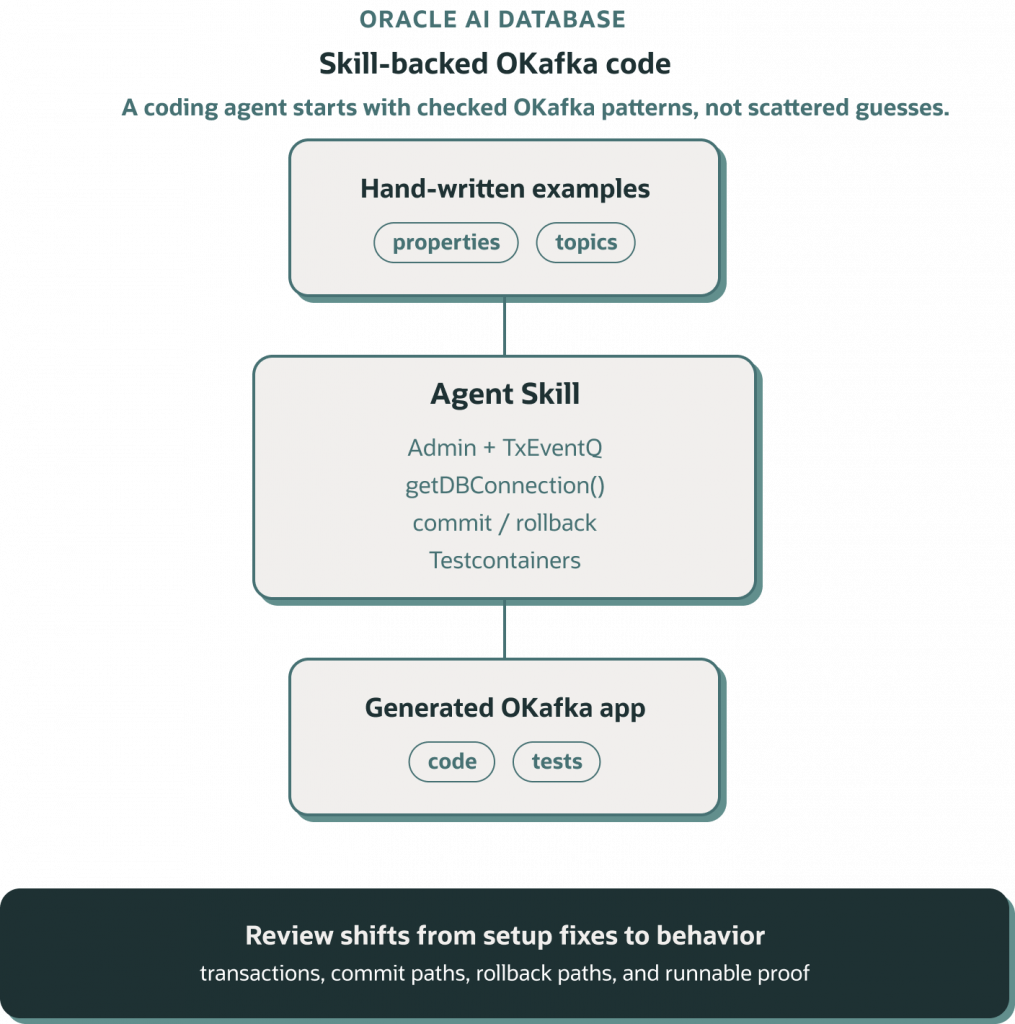
In my own work, I found most coding agents weren’t generating high-quality code for Oracle AI Database’s Kafka Java API (OKafka). You can get results, but they’re not idiomatic, and miss subtleties. This is why I created the okafka-java-code oracle agent skill, based off my hand-written Kafka Java API examples.
Agent skills can greatly enhance code generation for Oracle AI Database apps, and this skill encapsulates solutions to the problems I kept hand-coding: how to authenticate with OKafka, how to use transactions, how to create topics, and how to use Oracle-specific serialization.
To install the skill, point your agents at this GitHub link:
https://github.com/anders-swanson/oracle-database-code-samples/tree/main/skills/okafka-java-codeWhat’s in the skill
This is a standard agent skill, with markdown references to code snippets implemented by my samples:
skills/okafka-java-code
├── agent-skill-okafka-java-api.md
├── agents
│   └── openai.yaml
├── references
│   ├── authentication-and-properties.md
│   ├── dependencies.md
│   ├── oson-serialization.md
│   ├── producer-consumer.md
│   ├── testing-and-troubleshooting.md
│   ├── topics-and-admin.md
│   └── transactions.md
└── SKILL.md
Each reference markdown file covers specific areas of OKafka Java code: initializing OKafka classes, serialization, authentication, testing, and transactional workloads.
Let’s try using the skill to generate an app
Start by installing the OKafka Java Code skill and see what you can generate.
I used the Oracle agent skill to generate an app with a transactional producer and consumer, and a Testcontainers test. The app was generated in one shot with Codex and GPT 5.5-high and is almost identical to code I’d write myself. Transactional workflows are handled by calling getDBConnection on the producer and consumer, producing and consuming messages in the same database transaction as insert and updates.
The generated app creates a transactional event flow around Oracle AI Database Transactional Event Queues:
- TopicAdmin creates the topic through Kafka
Adminwith OKafka’sAdminClient. - OkafkaProperties builds base properties and adds producer or consumer settings in separate methods.
- TransactionalEventProducer sends a record and writes to
produced_eventsthroughproducer.getDBConnection()beforecommitTransaction(). - TransactionalEventConsumer writes consumed records through
consumer.getDBConnection()and callscommitSync()only after the database work succeeds. - TransactionalEventsIT starts an Oracle AI Database Free container with Testcontainers, applies the OKafka grants, creates a topic, and verifies producer commit, producer abort, and consumer rollback behavior.
This producer method is the kind of output I wanted to nudge agent stoward:
private void publish(BusinessEvent event, boolean failAfterDatabaseWrite) throws Exception {
    producer.beginTransaction();
    try {
        producer.send(new ProducerRecord<>(topic, event.id(), event.payload())).get();
        insertProducedEvent(producer.getDBConnection(), event);
        if (failAfterDatabaseWrite) {
            throw new IllegalStateException("Simulated failure before producer commit");
        }
        producer.commitTransaction();
    } catch (InterruptedException exception) {
        Thread.currentThread().interrupt();
        abortAndRethrow(exception);
    } catch (Exception exception) {
        abortAndRethrow(exception);
    }
}
You can see the transaction boundary, the Kafka send, the database write, and the abort path in one place.
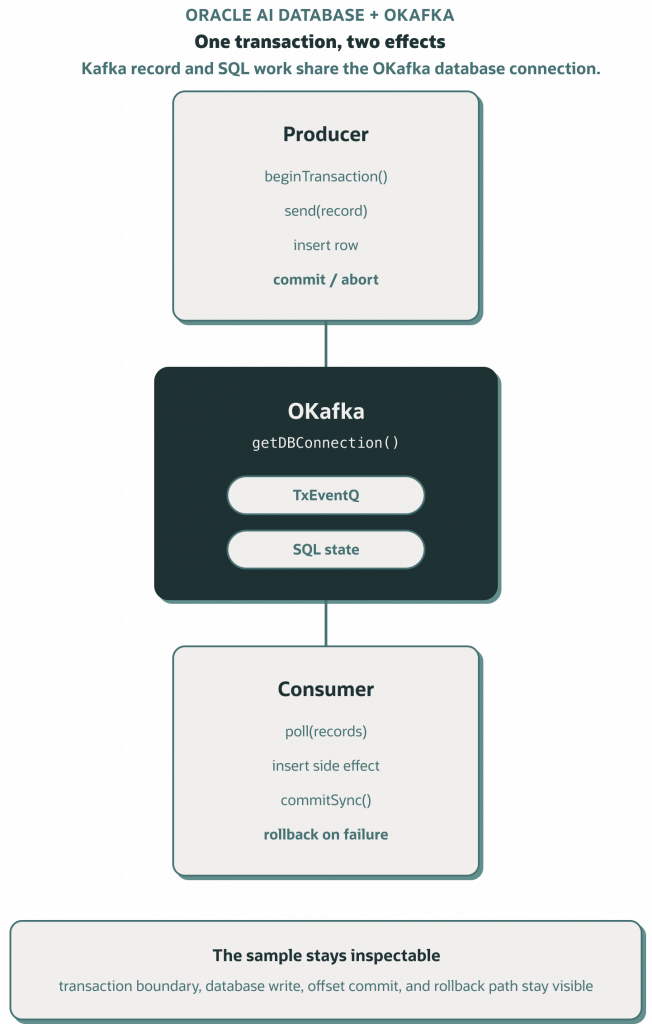
The consumer side follows the same idea:
private void persistAndCommit(ConsumerRecords<String, String> records, boolean failAfterDatabaseWrite)
        throws Exception {
    Connection connection = consumer.getDBConnection();
    try {
        for (ConsumerRecord<String, String> record : records) {
            insertConsumedEvent(connection, record);
        }
        if (failAfterDatabaseWrite) {
            throw new IllegalStateException("Simulated failure before consumer commit");
        }
        consumer.commitSync();
    } catch (Exception exception) {
        connection.rollback();
        throw exception;
    }
}
The generated code preserves the important bits: database work happens on the consumer’s OKafka connection, and the offset is committed only after that work succeeds.
Testing is part of the skill
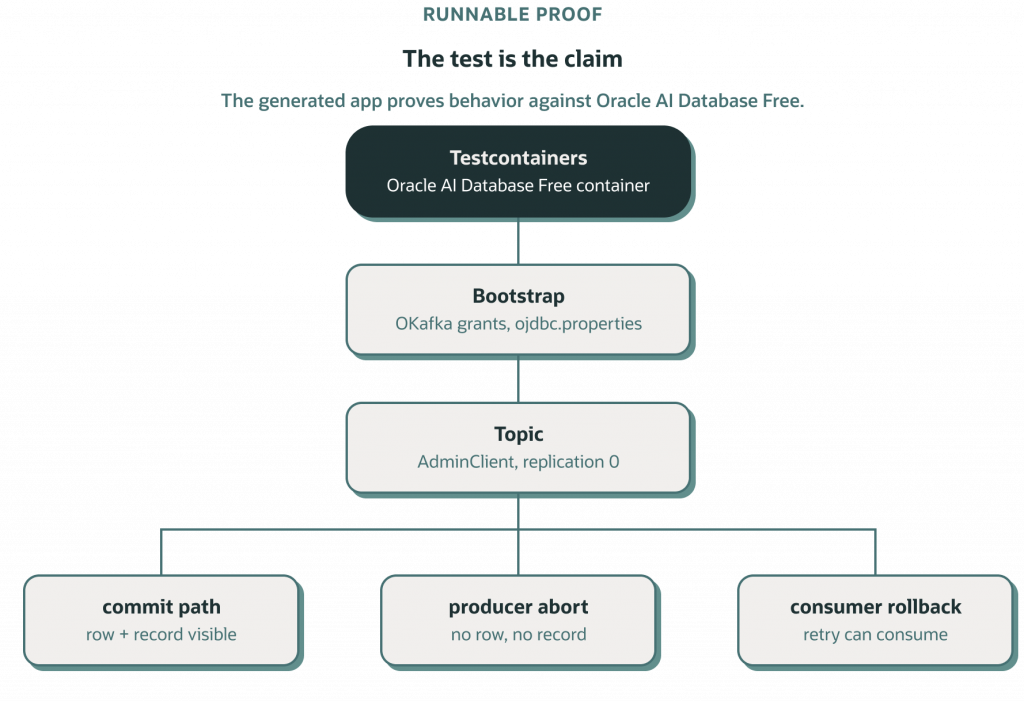
This skill includes guidance to validate with an integration test or smoke path that creates the topic, produces records, consumes records, and queries the TxEventQ backing table or related database side effect.
The generated app follows that direction. Its integration test starts gvenzl/oracle-free:23.26.2-slim-faststart, writes an ojdbc.properties file for local PLAINTEXT OKafka access, and then checks three paths:
- a committed producer transaction creates the database row and can be consumed;
- an aborted producer transaction leaves no produced row and no consumable record;
- a failed consumer batch rolls back the database write and leaves the record available for a later successful consume.
You can run the generated app tests with mvn verify
The test includes grants and setup for the local container:
alter session set container=freepdb1;

grant aq_user_role to TESTUSER;
grant execute on dbms_aq to TESTUSER;
grant execute on dbms_aqadm to TESTUSER;
grant select on gv_$session to TESTUSER;
grant select on v_$session to TESTUSER;
grant select on gv_$instance to TESTUSER;
grant select on gv_$listener_network to TESTUSER;
grant select on SYS.DBA_RSRC_PLAN_DIRECTIVES to TESTUSER;
grant select on gv_$pdbs to TESTUSER;
grant select on user_queue_partition_assignment_table to TESTUSER;
exec dbms_aqadm.GRANT_PRIV_FOR_RM_PLAN('TESTUSER');
commit;
This is loaded and run on the local container at test startup:
@Container
private static final OracleContainer ORACLE = new OracleContainer(ORACLE_IMAGE)
        .withStartupTimeout(Duration.ofMinutes(4))
        .withUsername(TEST_USER)
        .withPassword(TEST_PASSWORD);

private static OracleDataSource dataSource;
private static Path okafkaConfigDirectory;

@BeforeAll
static void configureDatabase() throws Exception {
    ORACLE.copyFileToContainer(MountableFile.forClasspathResource("okafka.sql"), "/tmp/okafka.sql");
    org.testcontainers.containers.Container.ExecResult result =
            ORACLE.execInContainer("sqlplus", "sys / as sysdba", "@/tmp/okafka.sql");
    if (result.getExitCode() != 0) {
        throw new IllegalStateException("Unable to apply OKafka grants: " + result.getStderr());
    }

    dataSource = new OracleDataSource();
    dataSource.setURL(ORACLE.getJdbcUrl());
    dataSource.setUser(TEST_USER);
    dataSource.setPassword(TEST_PASSWORD);

    okafkaConfigDirectory = Files.createTempDirectory("okafka-tns-admin-");
    Files.writeString(okafkaConfigDirectory.resolve("ojdbc.properties"), """
            user = testuser
            password = Welcome123#
            """);

    try (Connection connection = dataSource.getConnection()) {
        EventSchema.createTables(connection);
    }
}
Final Thoughts
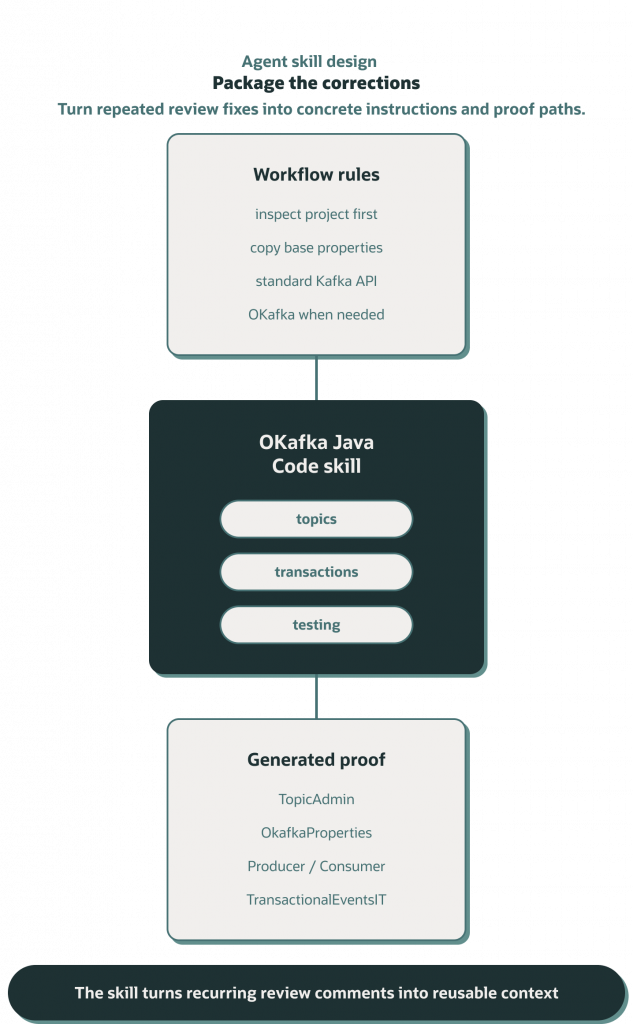
The real leverage here is developing and sharing agent skills that capture the Oracle AI Database patterns your team needs. Do you have common database workflows? Common development patterns? Encapsulate them in a skill, iterate on it, and share it.
Once details are packaged, agents can operate at a higher level. You spend less time correcting boilerplate and more time designing stronger examples, testing real behavior, and building more powerful Oracle AI Database applications from a better starting point.
To summarize
- Any Java developer working with Oracle AI Database can use this skill to write pub/sub code with Kafka APIs that target the database.
- OKafka adds database connection APIs to standard Kafka Java APIs; otherwise, the same interfaces are used.
- The
getDBConnection()method in OKafka KafkaProducer and KafkaConsumer classes allows developers to add database logic to produce and consume operations in a single transaction. - To validate generated code yourself, refer to concrete OKafka code examples.
- The skill leverages hand-written, tested OKafka code to generate new code specific to your application. You can find additional samples here.
References
- Using Agent Skills to develop with Oracle AI Database
- Authenticate to your Oracle AI Database like it’s a Kafka cluster
- Pub/Sub in your DB? Oracle AI Database TxEventQ
- Migrate Apache Kafka applications to Oracle AI Database: Part I
- Propagating Cross-Database Events with Oracle AI Database
- Easily test Oracle AI Database applications with Testcontainers
- Oracle AI Database for Free?