
Agent reasoning is the part of the workflow that selects a next action from the task, available context, tools, and observed results. An application still needs execution limits, error handling, and validation around that decision process.
Key Takeaways
- Agent Reasoning is an open-source reasoning layer that adds planning, deduction, and self-correction to any Ollama-served LLM (e.g., gemma3, llama3), via plug-and-play Python or a proxy server.
- Multiple proven reasoning strategies built-in (CoT, Self-Consistency, ToT, ReAct, Self-Reflection, Decomposition, Refinement) with a guided “start simple” path.
- Practical tooling for teams: interactive CLI/TUI, Python API, and an Ollama-compatible gateway so existing apps gain reasoning without code changes.
- Clear benchmark guidance: CoT delivers the best average accuracy; ToT shines for multi-step logic; ReAct leads when tools (search, calculator) matter.
Implementing Cognitive Problem-Solving in Open Source Models
From Nacho Martinez, Data Scientist Advocate at Oracle (and author of the A2A-based Multi-Agent RAG system) comes an open-source reasoning layer that can enable any open-source Large Language Model (LLM) such as gemma3 or llama3 to perform complex planning, logical deduction and self-correction. The layer wraps these models in a cognitive architecture built based on key research papers (CoT, ToT and ReAct).
We call this Agent Reasoning, and it is available open-source in this GitHub repository, alongside a Jupyter notebook.
Features of Agent Reasoning
- Plug & Play: Use via Python Class or as a Network Proxy.
- Model Agnostic: Works with any model served by Ollama.
- Advanced Architectures:
- Chain-of-Thought (CoT) & Self-Consistency: Implements Majority Voting (k samples) with temperature sampling.
- Tree of Thoughts (ToT): BFS strategy with robust heuristic scoring and pruning.
- ReAct (Reason + Act): Real-time tool usage (Web Search via scraping, Wikipedia API, Calculator) with fallback/mock capabilities. External grounding implemented.
- Self-Reflection: Dynamic multi-turn Refinement Loop (Draft -> Critique -> Improve).
- Decomposition & Least-to-Most: Planning and sub-task execution.
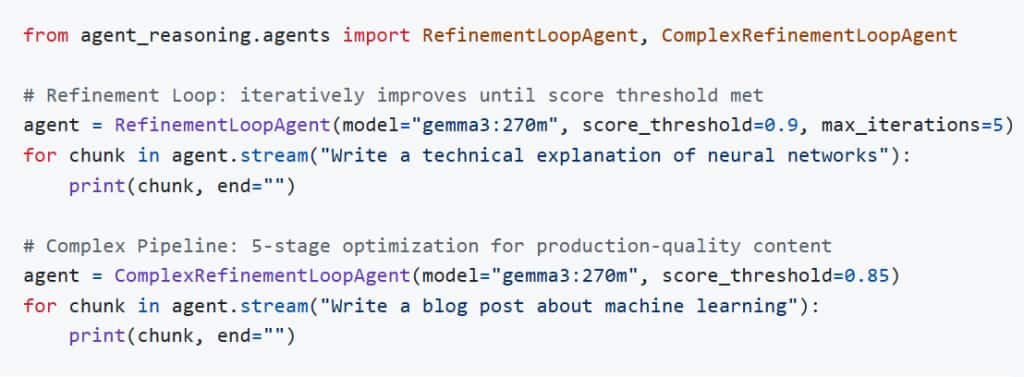
- Refinement Loop: Score-based iterative improvement (Generator → Critic → Refiner) until quality threshold met.
- Complex Refinement Pipeline: 5-stage optimization (Technical Accuracy → Structure → Depth → Examples → Polish).
Interactive Jupyter Notebook
We prepared an interactive Jupyter notebook to demonstrate the capabilities of agent reasoning.
This is a comprehensive demo covering all reasoning strategies (CoT, ToT, ReAct, Self-Reflection) with benchmarks and comparisons.
Architectures in Detail
For most users, start with Chain-of-Thought (CoT) — it has the best average accuracy and lowest latency cost. Use Self-Consistency when correctness is critical and you can afford 3–5× more inference time. Avoid ToT for knowledge-retrieval tasks (it underperforms baseline on MMLU) and reserve it for multi-step planning or logic puzzles.
| Architecture | Description | Best For | Papers |
| Chain-of-Thought | Step-by-step reasoning prompt injection. | Math, Logic, Explanations | Wei et al. (2022) |
| Self-Reflection | Draft -> Critique -> Refine loop. | Creative Writing, High Accuracy | Shinn et al. (2023) |
| ReAct | Interleaves Reasoning and Tool Usage. | Fact-checking, Calculations | Yao et al. (2022) |
| Tree of Thoughts | Explores multiple reasoning branches (BFS/DFS). | Complex Riddles, Strategy | Yao et al. (2023) |
| Decomposed | Breaks complex queries into sub-tasks. | Planning, Long-form answers | Khot et al. (2022) |
| Recursive (RLM) | Uses Python REPL to recursively process prompt variables. | Long-context processing | Author et al. (2025) |
| Refinement Loop | Generator → Critic (0.0-1.0 score) → Refiner iterative loop. | Technical Writing, Quality Content | Inspired by Madaan et al. (2023) |
| Complex Refinement | 5-stage pipeline: Accuracy → Clarity → Depth → Examples → Polish. | Long-form Articles, Documentation | Multi-stage refinement architecture |
Accuracy Benchmarks
You can evaluate reasoning strategies against standard NLP datasets to measure accuracy improvements. The benchmark system includes embedded question sets from 4 standard datasets.
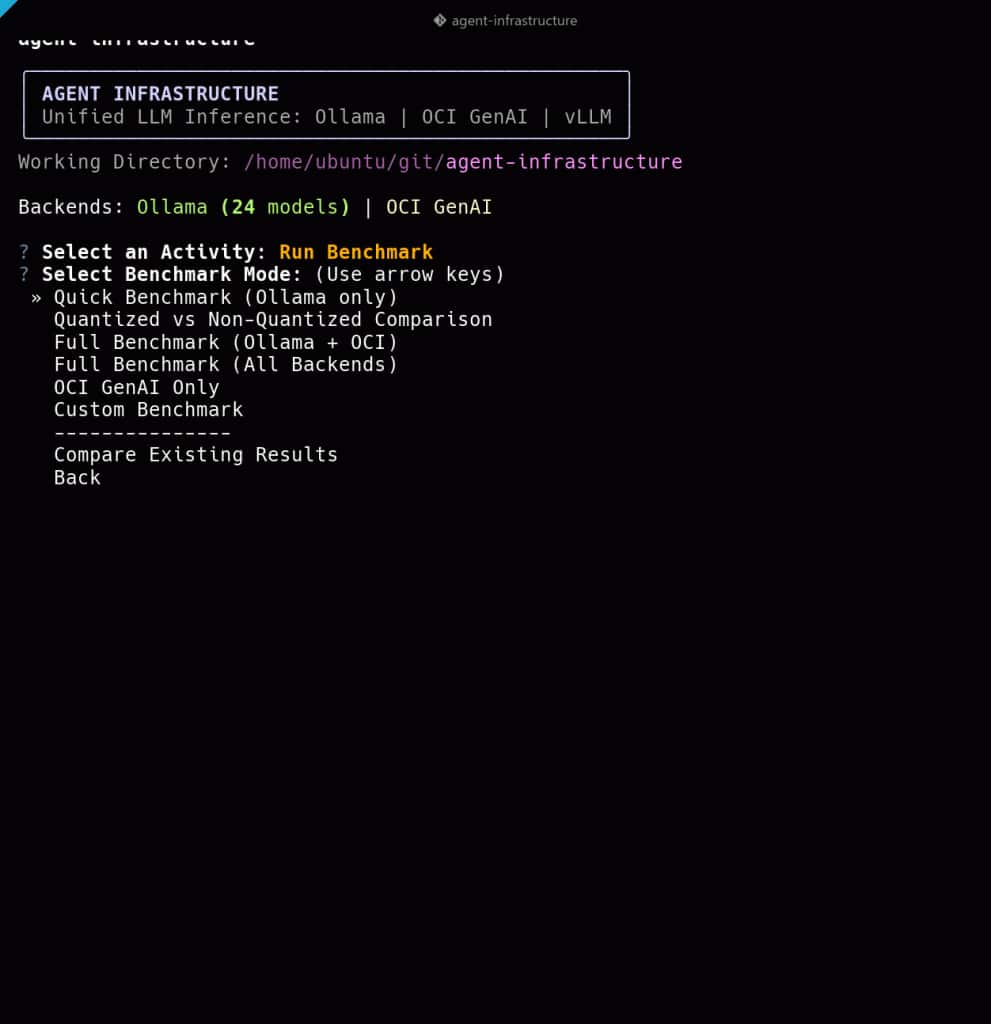
To run an accuracy benchmark:
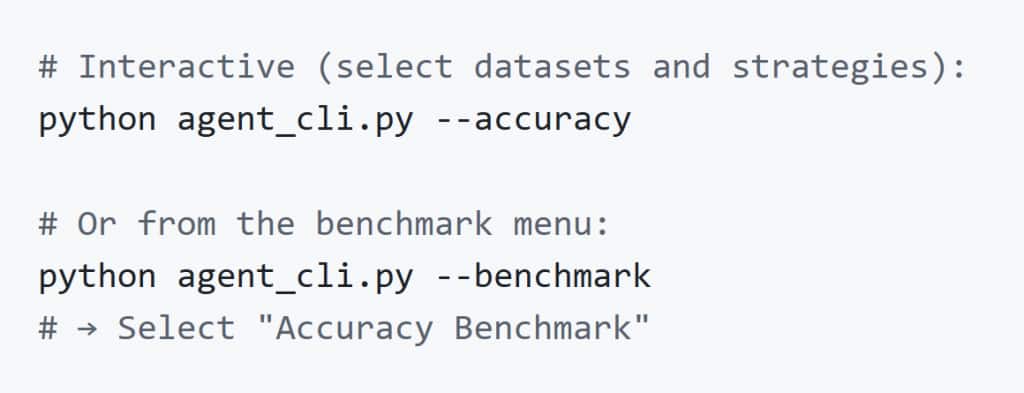
Or using the Python API:
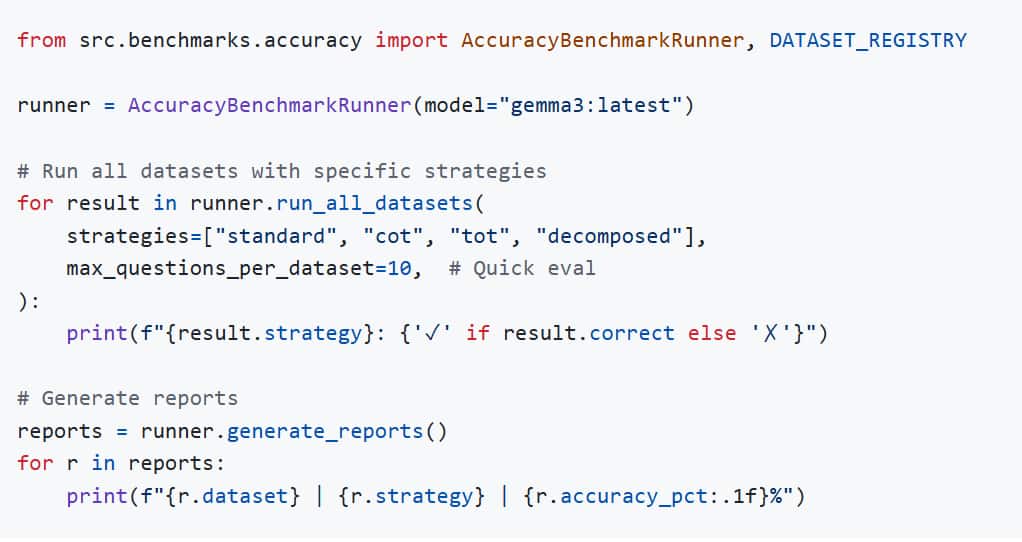
Charts are auto-generated after each run and save to benchmarks/charts/.
| Dataset | Category | Questions | Format | Reference |
| GSM8K | Math Reasoning | 30 | Open-ended number | Cobbe et al. (2021) |
| MMLU | Knowledge (57 subjects) | 30 | Multiple choice (A-D) | Hendrycks et al. (2021) |
| ARC-Challenge | Science Reasoning | 25 | Multiple choice (A-D) | Clark et al. (2018) |
| HellaSwag | Commonsense | 20 | Multiple choice (A-D) | Zellers et al. (2019) |
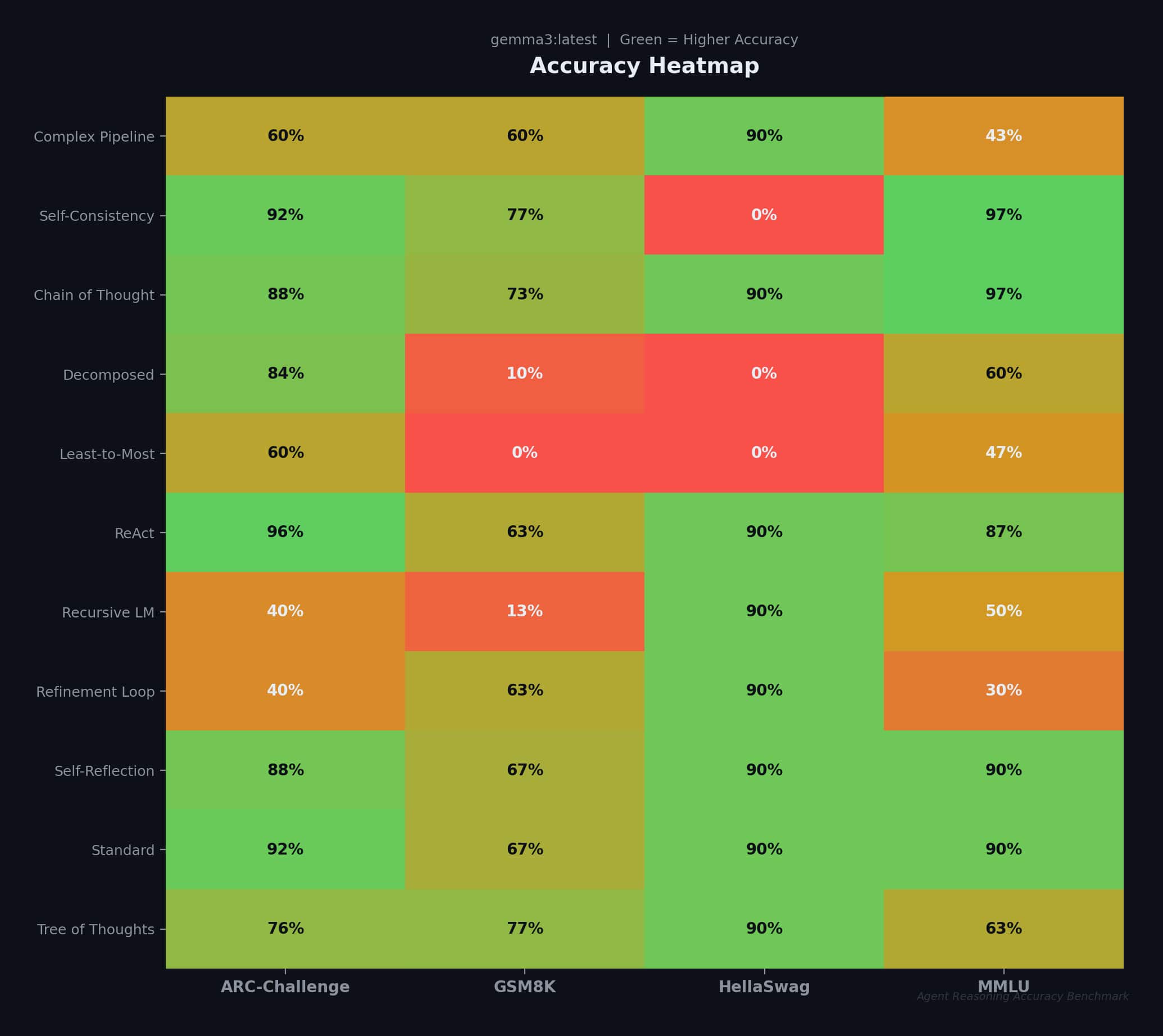
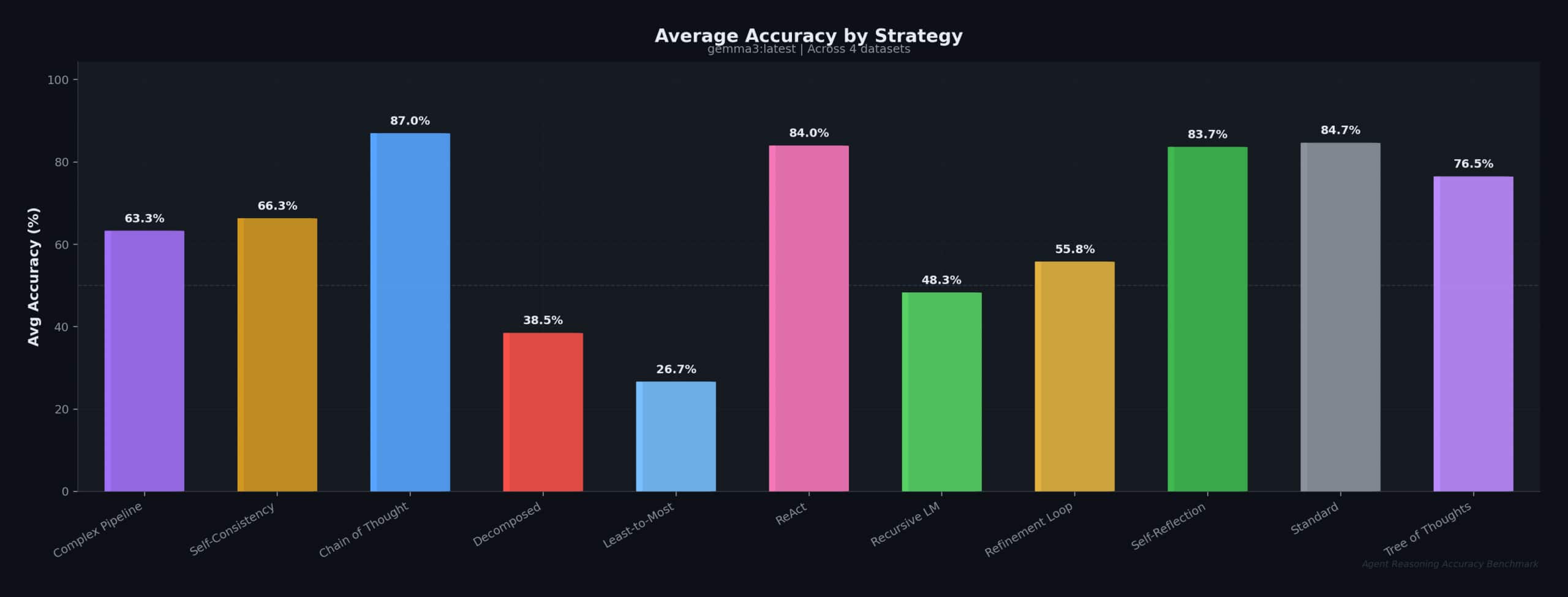
The following are the results of a full evaluation across all 11 strategies:
| Strategy | GSM8K | MMLU | ARC-C | HellaSwag | Avg |
| Standard (baseline) | 66.7% | 90.0% | 92.0% | 90.0% | 84.7% |
| Chain of Thought | 73.3% | 96.7% | 88.0% | 90.0% | 87.0% |
| Tree of Thoughts | 76.7% | 63.3% | 76.0% | 90.0% | 76.5% |
| ReAct | 63.3% | 86.7% | 96.0% | 90.0% | 84.0% |
| Self-Reflection | 66.7% | 90.0% | 88.0% | 90.0% | 83.7% |
| Self-Consistency | 76.7% | 96.7% | 92.0% | — | 66.3% |
| Decomposed | 10.0% | 60.0% | 84.0% | — | 38.5% |
Key findings:
- CoT achieves the highest average accuracy (87.0%), outperforming Standard on GSM8K (+6.6%) and MMLU (+6.7%)
- Self-Consistency ties CoT on MMLU (96.7%) and GSM8K (76.7%) through majority voting
- ToT excels on GSM8K math (76.7%, +10% over Standard) through branch exploration
- ReAct achieves the highest ARC-Challenge score (96.0%) via tool-augmented reasoning
Accuracy statistics
This is the accuracy heat map per-strategy:
This is the average accuracy by strategy:
Benchmarks
Benchmarks charts are auto-generated after every benchmark run.
For a complete listing of sample output benchmarks (response latency, throughput etc.) please refer to the Agent Reasoning GitHub repository.
Quick start (3 commands)
uv sync && ollama pull gemma3:270m && uv run agent-reasoningInstallation
One-command, single-step install
curl -fsSL https://raw.githubusercontent.com/jasperan/agent-reasoning/main/install.sh | bashYou can also install agent-reasoning using either PyPi or directly from source.
Using PyPi

From Source using uv

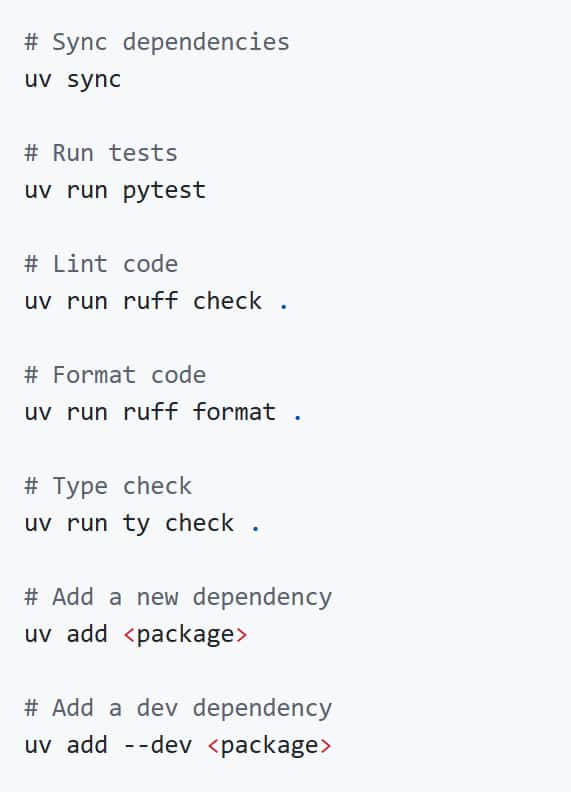
Development
Configuring the large language model (LLM)
We use Ollama as an example for this procedure.
Ollama must be running locally, or you can connect to a remote Ollama instance.
ollama pull gemma3:270m    # Tiny model for quick testing
ollama pull gemma3:latest  # Full model for quality results
Configuring the remote Ollama endpoint
If you don’t have Ollama installed locally, you can connect to a remote Ollama instance. Configuration is stored in config.yaml in the root directory of the repository.
Option 1: Interactive CLI configuration
agent-reasoning
# Select "Configure Endpoint" from the menu
Option 2: Server CLI Argument
agent-reasoning-server --ollama-host http://192.168.1.100:11434Option 3: Direct Config File
Copy the example config and edit it:
cp config.yaml.example config.yamlOr create config.yaml in the project root:
ollama:
  host: http://192.168.1.100:11434
Option 4: Python API
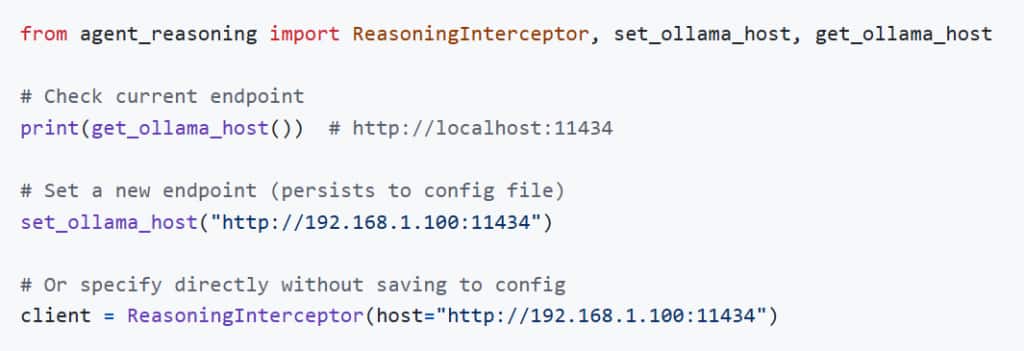
Usage
1. Interactive CLI
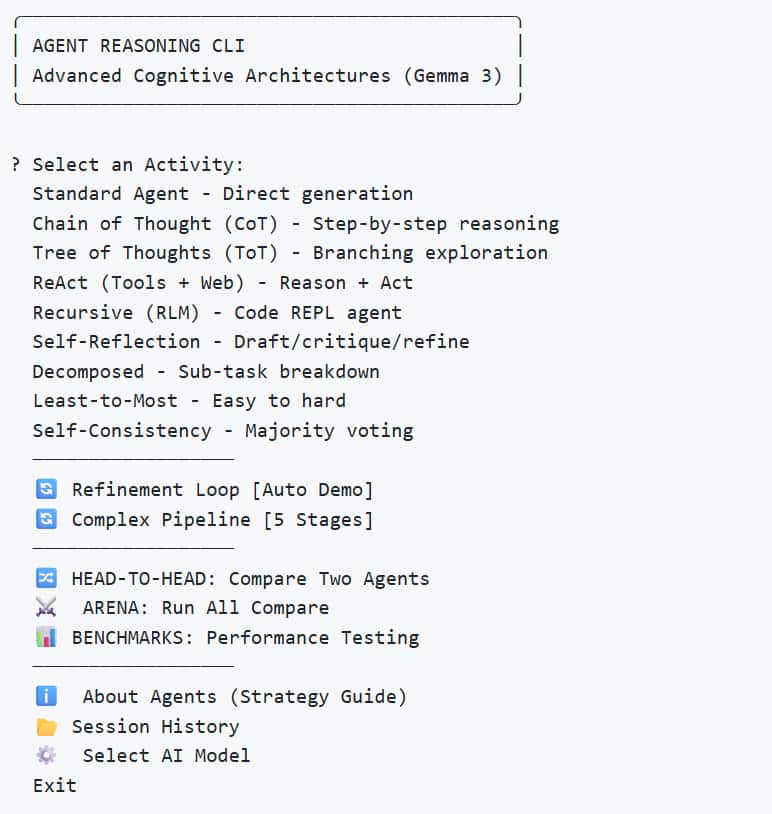
Use the rich CLI to access all agents, comparisons and benchmarks.
- Timing Metrics: Every response shows TTFT, total time, tokens/sec
- Session History: All chats auto-saved to data/sessions/ with export to markdown
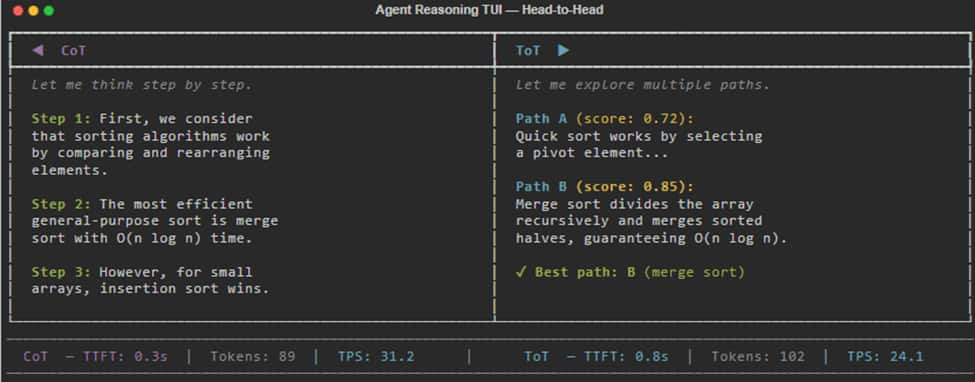
- Head-to-Head: Compare any two strategies side-by-side in parallel
- Agent Info: Built-in strategy guide with descriptions and use cases
- Benchmark Charts: Auto-generate PNG visualizations of benchmark results
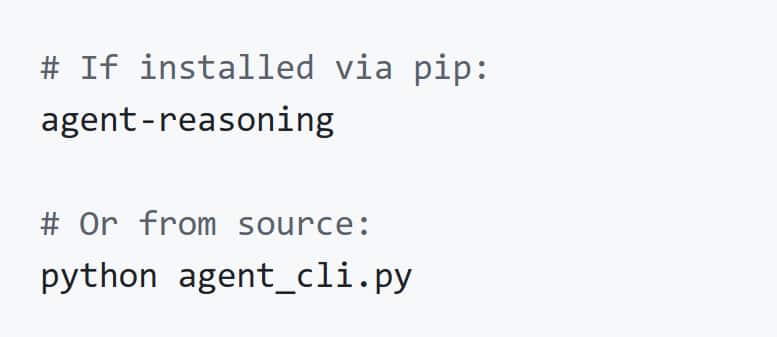
Setup
Shortcuts
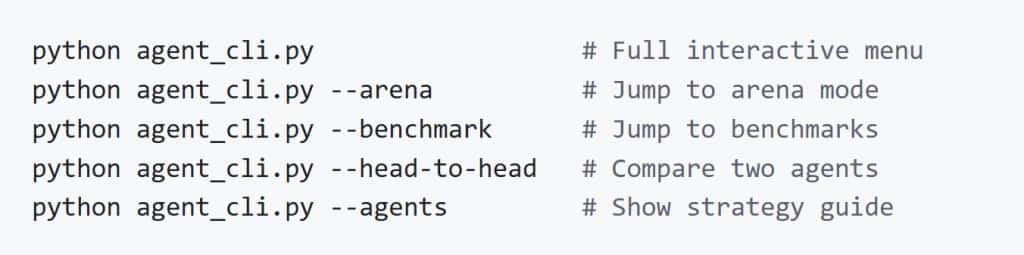
The CLI also provides useful shortcuts:
Interactive experience
2. Terminal UI
You can also use a Go-based terminal interface with a split-panel layout and arena grid view.
- Split layout: agent sidebar + chat panel
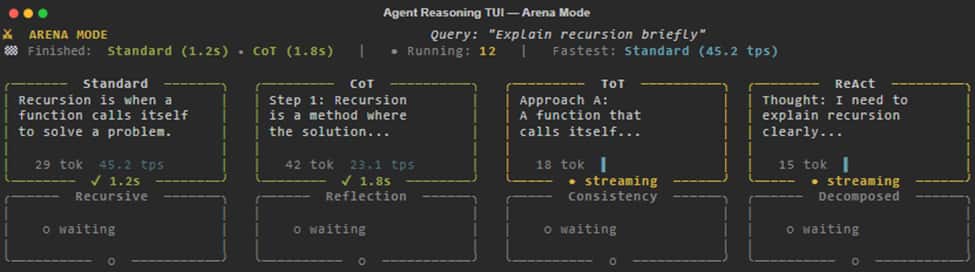
- Arena mode: 3×3 grid showing all agents running in parallel
- Real-time streaming with cancellation support
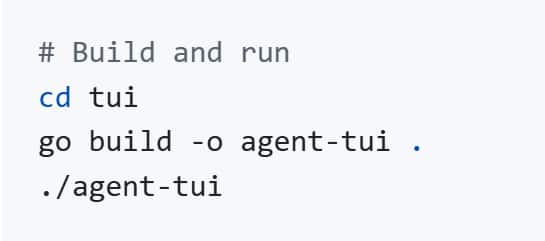
The TUI automatically starts the reasoning server on launch. Requires Go 1.18+.
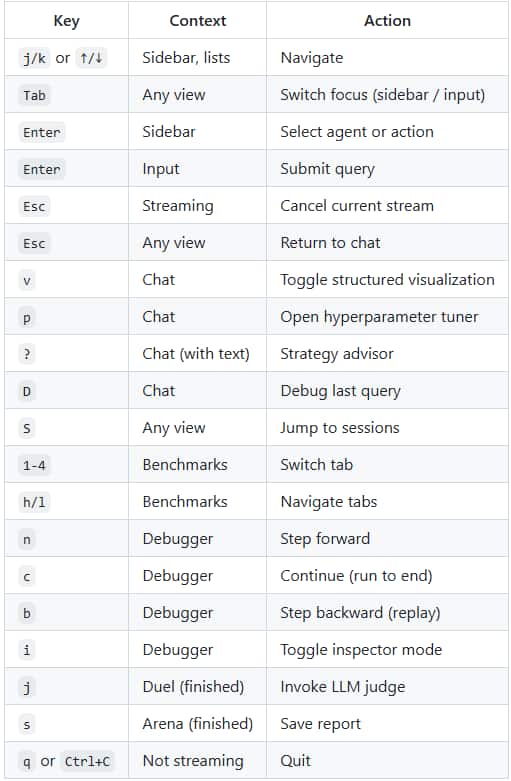
Keybindings for TUI
Chat View
The default chat view is a split-pane layout with a 16-agent sidebar, chat panel with live streaming, and a metrics bar showing TTFT, tokens/sec, and token count in real-time.

Press v to toggle structured visualization mode. Instead of raw text, you see the agent’s reasoning process rendered live: tree diagrams for ToT, swimlanes for ReAct, vote tallies for Consistency, score gauges for Refinement, and more.
Press p to open the hyperparameter tuner. Adjust ToT width/depth, Consistency samples, Refinement score thresholds, and other agent parameters before running a query.
Press ? to invoke the strategy advisor. The MetaReasoningAgent analyzes your query and recommends the best strategy.
Modes of interaction
Arena Mode prompts all 16 agents to race simultaneously on the same query displayed using a 4×4 grid; a leaderboard bar updates as each agents finish:
Head-to-Head Duel prompts two agents to compete 1-1 on the same query.
There are plenty of other features to try, such as:
- the Step-Through Debugger which enables pausing the agent between LLM calls and inspecting intermediate state
- the Benchmark Dashboard which reads existing JSON benchmark files
- the Session Browser which enables search and re-running of past conversations, with filtering options
- the Agent Guide, which contains reference cards for all 16 agents, covering best-for, parameters, trade-offs, and research reference. Pressing Enter on any card initiates a chat with the agent.
3. Python API (for developers)
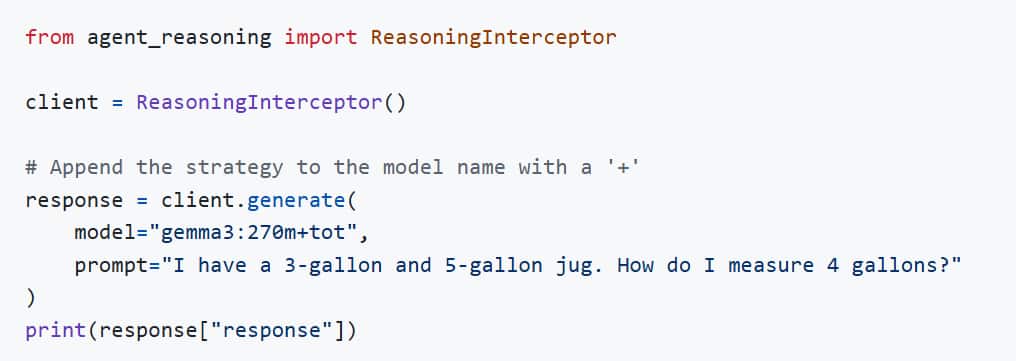
Use the ReasoningInterceptor as a drop-in replacement for your LLM client.
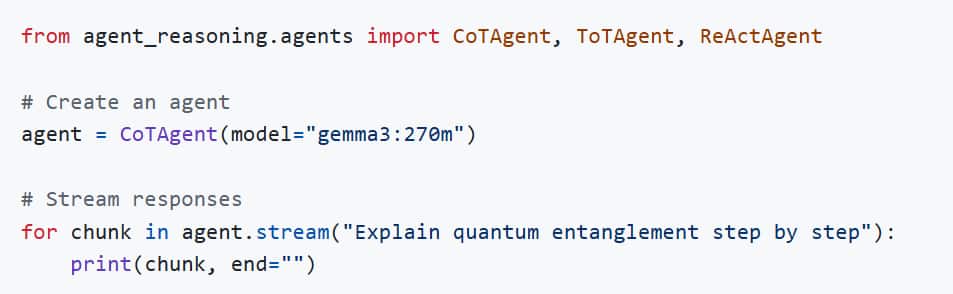
Using agents directly:
Using refinement agents for quality control:
4. Reasoning Gateway Server
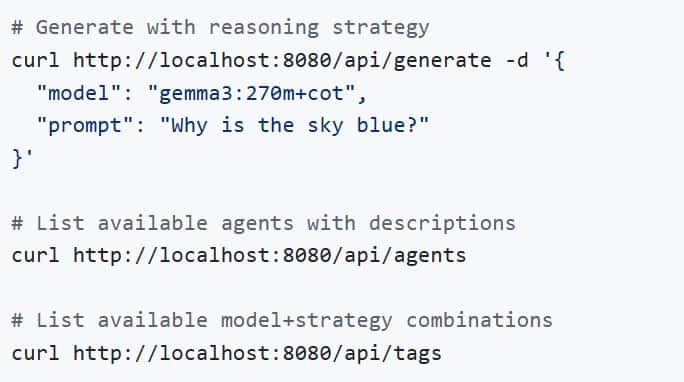
Run a proxy server that impersonates Ollama. This allows any Ollama-compatible app, such as LangChain or Web UIs, to gain reasoning capabilities without any code changes whatsoever.
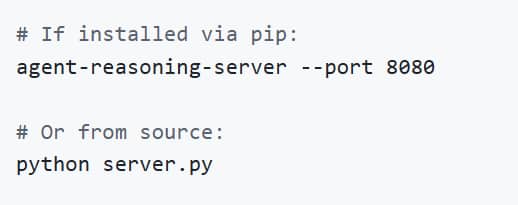
Then configure your app:
- Base URL:
http://localhost:8080 - Model:
gemma3:270m+cot(or+tot, +react,etc.)
API Endpoints
Troubleshooting
- Model Not Found: Ensure you have pulled the base model (ollama pull gemma3:270m).
- Timeout / Slow: ToT and Self-Reflection make multiple calls to the LLM. With larger models (Llama3 70b), this can take time.
- Hallucinations: The default demo uses gemma3:270m which is extremely small and prone to logic errors. Switch to gemma2:9b or llama3 for robust results.
Extending the system further
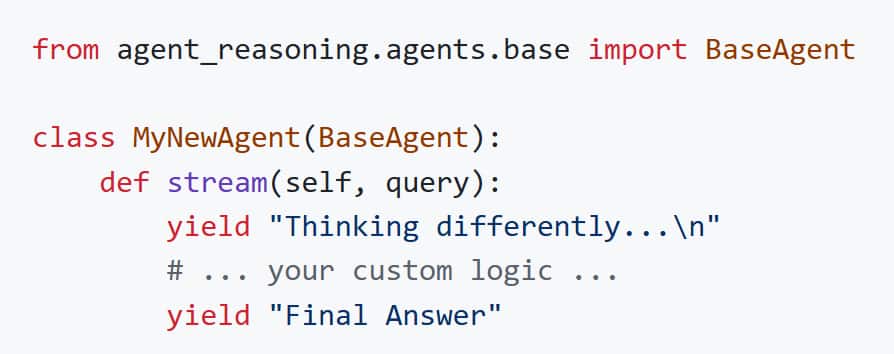
You can add additional reasoning strategies.
- Create a class in src/agent_reasoning/agents/ inheriting from BaseAgent.
- Implement the stream(self, query) method.
- Register it in AGENT_MAP in src/agent_reasoning/interceptor.py.
Conclusion
Thank you for reading, and we look forward to seeing what you build using Agent Reasoning!
Frequently Asked Questions (FAQs)
When should I use each strategy?
Start with Chain-of-Thought for best accuracy/latency trade-off; use Self-Consistency when correctness is critical; reserve Tree of Thoughts for complex multi-step reasoning; pick ReAct for fact-checks or calculations.
Do I need a specific model?
No. It’s model-agnostic for any model served by Ollama. Quality improves with larger models (e.g., gemma2:9b, llama3 vs tiny 270m).
How hard is setup?
Three-command quick start, one-line install script, and ready-to-run demos in a Jupyter notebook. A proxy lets existing Ollama apps adopt reasoning by just changing the base URL/model name.
How do I evaluate results?
Built-in benchmarks (GSM8K, MMLU, ARC-Challenge, HellaSwag) auto-generate charts, with side-by-side strategy comparisons and session histories for review.
How do I compare reasoning strategies fairly?
Use the same task set, tool permissions, and stopping budget for each strategy. Score verified task completion, invalid tool calls, recovery from errors, and latency. Do not treat a longer explanation as proof of better reasoning: check the observable result and the evidence used to reach it.
Continue the implementation: The Agent Loop Decoded: Three Levels Every Agent Engineer Must Know. Use the validation described above as the acceptance check for your next step.