
A controlled Codex MCP workflow connects an assistant to Oracle AI Database through approved tools and credentials. Treat database access, persistent memory, and the assistant’s working context as separate responsibilities with separate validation checks.
Connect Codex CLI to Oracle AI Database through SQLcl MCP, then Add Oracle AI agent memory and LangChain Retrieval.
Companion notebook: Codex MCP Oracle AI Database
Key Takeaways
- MCP turns AI-to-database access into an explicit tool contract instead of implicit system access.
- Oracle SQLcl in MCP mode (sql -mcp) is a direct, documented way to connect Codex CLI to Oracle AI Database through an MCP server.
- Oracle AI Database provides the persistent storage and vector search layer for memory workloads, while Oracle AI Agent Memory gives teams a Python API for threads, durable memory records, scoped retrieval, and context assembly on top of it.
- LangChain can provide application-side wrappers and orchestration after the Oracle-backed memory and retrieval path is in place.
- A strong default is hybrid: Codex CLI plus MCP for interactive database work, Oracle AI Database plus Oracle AI Agent Memory for durable memory, and LangChain only when the application needs reusable retrieval orchestration.
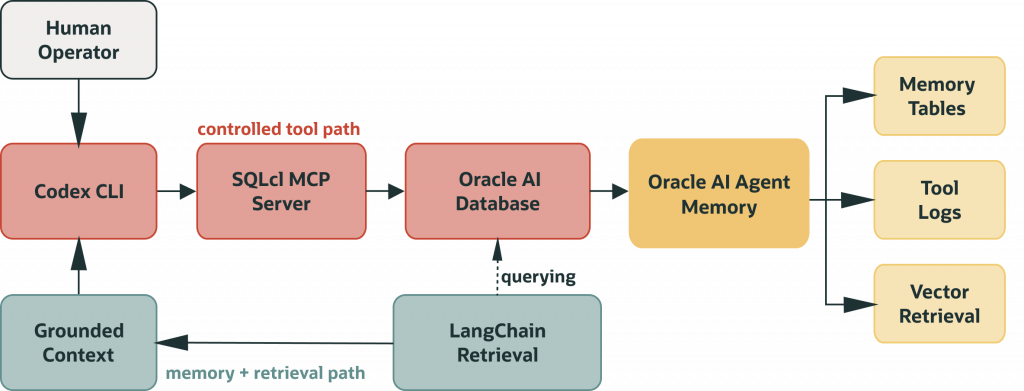
Here is how those components connect in this pattern. Codex works with Oracle through SQLcl MCP’s explicit tools. The saved SQLcl profile, database user, grants, and database policies remain the enforcement boundary. Oracle AI Agent Memory is the Python package your application uses to manage memory records on Oracle AI Database. LangChain is optional application-side orchestration after the database-backed memory and evidence path is in place; it is not the permission boundary or source of truth.
Production success depends less on clever prompting and more on boundaries, privileges, logging, scoped retrieval, and repeatable runbooks.
This guide is for developers who want Codex CLI to work with Oracle AI Database through explicit tools, durable memory, and reviewable retrieval evidence. It also shows an AI agent memory architecture where Codex handles the developer interaction, SQLcl MCP provides the tool boundary for database access; the saved SQLcl profile and database user permissions determine what Codex can actually do, and Oracle AI Database stores durable memory and retrieval evidence.
The developer path through this guide is simple:
- Start with one approved Oracle connection and a read-only validation query.
- Put SQLcl MCP in front of that connection so Codex sees tools, not raw database credentials.
- Check the audit and activity trail before adding more tool access.
- Add Oracle AI Agent Memory when the workflow needs durable thread context, scoped recall, or reusable context cards.
- Add LangChain only when you need application-side retrieval orchestration beyond the MCP interaction loop.
Why This Architecture Is Useful for Developers
Giving an AI assistant database access is easy. But making that access controlled, inspectable, and repeatable is the hard part.
Codex is useful because it sits close to the developer’s actual work: files, commands, notebooks, configuration, and implementation details. That closeness becomes more sensitive when the workflow touches a database.
The question is not whether Codex can produce SQL-shaped text. The question is whether the database path is approved, observable, and easy to debug later. A useful workflow needs to preserve the request, the tool call, the database identity, the retrieved context, and the reason a risky action was allowed or blocked.
By the end of this guide, you should know how to connect Codex CLI to Oracle AI Database through a controlled MCP boundary, when Codex context is enough and when Oracle-backed memory is needed, and how to build a retrieval path that can be queried, audited, and scaled.
The workflow has five layers. Codex CLI is the developer-facing agent interface. SQLcl MCP is the tool boundary. Oracle AI Database is the durable substrate for memory, traces, and retrieval. The notebook is the build-and-validation harness that proves the pieces are wired correctly before the workflow is handed to Codex.
That separation matters. Codex does not need raw credentials in its prompt. SQLcl MCP can be configured once using the saved alias. Oracle AI Database owns persistence and retrieval. The notebook shows the setup in a way that can be rerun, inspected, and debugged.
A simple way to divide the responsibilities:
| Layer | Responsibility |
| Codex CLI | Developer-facing agent interface. |
| SQLcl MCP | Exposes declared Oracle tools to Codex; it is the tool boundary. |
| Oracle AI Database | Stores durable data, retrieval evidence, vectors, metadata, traces, and enforces database privileges. |
| Oracle AI Agent Memory | Provides application APIs for users, agents, threads, durable memories, scoped retrieval, and context assembly. |
| LangChain | Wraps Oracle-backed retrieval results as Document objects and supports application-side orchestration. |
The Two Execution Loops
Building on the separation of responsibilities above, the system naturally forms two execution loops:
- Loop A is the operational interaction loop: Codex CLI works with MCP to discover tools, inspect data, run bounded read-only queries, and return results immediately.
- Loop B is the durable memory and retrieval loop: application code writes history, tool logs, memory records, chunks, and embeddings to Oracle AI Database, then retrieves context before a later answer or workflow step.
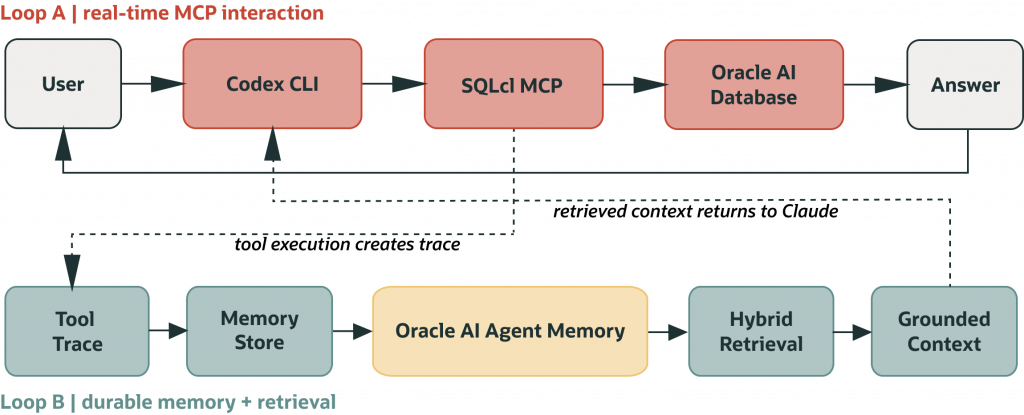
SQLcl MCP is for Codex operating interactively through declared tools. Oracle AI Agent Memory is for application code that stores turns, retrieves history, and assembles context before Codex or another assistant sees a prompt. You can drop either one for a narrower use case, but most production setups need both loops.
Reproducing the SQLcl MCP and Codex CLI Workflow
The setup should be reproducible. SQLcl runs in MCP mode with sql -mcp. Codex CLI launches it as an MCP server and talks to Oracle through declared tools, not through direct access. Connections come from saved SQLcl profiles that you create and test before Codex uses them.
Codex does not invent them at runtime; it reuses profiles you have already created and validated.
Prerequisites before you connect Codex CLI:
- Oracle SQLcl 25.2.0 or higher.
- Oracle JRE 17 or 21.
- Codex CLI or another MCP-capable client you are explicitly configuring and testing.
- At least one saved SQLcl connection profile under ~/.dbtools, created with password persistence for MCP use.
- A database user with the minimum permissions required for the workflow. Start with read-only access and a sanitized development or replica environment where possible.
The notebook deliberately treats the saved SQLcl connection alias as a first-class artifact. In local development, that alias is what lets SQLcl MCP connect without forcing the agent to assemble credentials dynamically.
The notebook then generates a sanitized Codex MCP config preview. The preview is intentionally safe: it shows the server command and arguments without exposing secrets.
For the saved connection itself, the important detail is -savepwd. MCP cannot stop and ask a human for the password every time Codex invokes a database tool. The saved alias becomes the repeatable local path Codex can use after you have reviewed it.
```toml
[mcp_servers.sqlcl]
command = "/absolute/path/to/sql"
args = ["-mcp"]
```
That small TOML block defines the connection between Codex and SQLcl MCP Server. Codex interacts with the database through the tools and permissions exposed by the MCP server, using the saved SQLcl connection profile you created and tested first. Save this configuration in ~/.codex/config.toml, restart Codex, then run codex mcp list to confirm that the SQLcl MCP server and its tools are discoverable.
Validation checklist before expanding access
- Run sql -mcp locally and confirm the server starts.
- Restart Codex CLI and confirm the SQLcl tools are discoverable.
- Run one read-only query against an approved schema.
- Check database-side MCP activity logs and session metadata.
- Document the connection alias, database user, grant scope, restrict level, and troubleshooting owner.
Good first proof looks like this:
- The MCP server starts without a Java or path error.
- Codex lists the SQLcl MCP tools after restart.
- A read-only query succeeds against the expected schema.
- The notebook audit trail records the expected tool interaction in
codex_tool_logs. - For live Codex CLI + SQLcl MCP validation, confirm the database/session activity through your normal Oracle monitoring path.
- A denied query fails because of the database role, not because a prompt asked nicely.
A useful MCP boundary is more than tool discovery. It is an operating contract. The notebook models that contract with risk levels, read-only defaults, confirmation requirements, scope checks, and controlled failure examples. Denied and warning states are useful because they prove the workflow can say no.
- Read-only default: start with inspection and diagnostics before allowing changes.
- Confirmation gate: require explicit approval for medium-risk, write-like, or destructive actions.
- Scope control: keep user, tenant, and schema filters close to the database query.
- Failure trace: store denied calls and warnings as evidence instead of hiding them.
Why put application memory records in Oracle AI Database, not just outputs
Once the first MCP tool calls work, the next challenge is continuity. This is where long-term memory for AI agents becomes different from short-lived chat context.
If memory lives only in chat context, the system is fragile. If memory is scattered across files without structure, retrieval and auditing become expensive over time.
A database-backed memory model is usually cleaner and more scalable. The companion notebook builds this memory layer from scratch so the mechanics are visible, then shows how Oracle AI Agent Memory sits on top of it once the substrate is working.
Memory Categories That Matter in Practice:
You do not need to start by memorizing table names or column names. The useful idea is simpler: different kinds of memory serve different jobs.
- Conversation memory: Keeps the important user and assistant turns that future sessions may need.
- Operational memory: Keeps tool calls, outcomes, warnings, and failures so a team can debug what happened.
- Semantic memory: Adds embeddings so the system can find relevant context even when the user asks in different words.
In practice, hybrid retrieval for agent memory usually combines exact operational terms, such as sql -mcp or codex_mcp, with semantic search over memory records.
The notebook shows the lower-level mechanics first so the storage and retrieval path is visible. This is also a context engineering problem: the application has to decide which memories, tool traces, and retrieval results should be assembled before Codex or another assistant answers. Oracle AI Agent Memory then gives application code a cleaner package API over that same database-backed idea.
Where Oracle AI Agent Memory Fits
Oracle AI Agent Memory sits between your application code and Oracle AI Database. The package manages conversation threads, durable memory records, scoped retrieval, and context assembly. Oracle AI Database remains the storage and enforcement layer underneath; the package does not replace that, it makes working with it faster and more consistent.
The notebook includes an abbreviated package-backed memory pattern. It initializes OracleAgentMemory with a database connection pool and a custom local deterministic embedder. LocalCodexEmbedder is notebook code, not a built-in Oracle AI Agent Memory embedder.
The local embedder is intentionally billing-free, which makes the notebook runnable for people who do not want to attach paid model usage to a tutorial.
Abbreviated setup pattern: define CONFIG, import and initialize oracledb, implement LocalCodexEmbedder, and set stable values for AGENT_MEMORY_USER_ID and AGENT_MEMORY_AGENT_ID before running this example.
```python
from oracleagentmemory.core.oracleagentmemory import OracleAgentMemory
from oracleagentmemory.apis.searchscope import SearchScope

db_pool = oracledb.SessionPool(
    user=CONFIG["ORACLE_USER"],
    password=CONFIG["ORACLE_PASSWORD"],
    dsn=CONFIG["ORACLE_DSN"],
    min=1,
    max=4,
    increment=1,
)

agent_memory = OracleAgentMemory(
    connection=db_pool,
    embedder=LocalCodexEmbedder(dimensions=32),
    llm=None,
    extract_memories=False,
    schema_policy="create_if_necessary",
)
```
Use oracleagentmemory from your application layer when you need package-managed users, agents, memories, threads, scoped retrieval, and context assembly. Keep systems of record separate from memory records: memory helps provide context, but application logic and authoritative data sources should still decide what is true, allowed, and final.
Implementation note: Use a schema whose default tablespace supports the JSON objects created by Agent Memory. If a local SYSTEM schema sits on a tablespace that rejects JSON object creation, the better production answer is a dedicated application schema. The notebook can still explain the issue clearly instead of hiding it.
Store and Search: What a Realistic Memory Looks Like
A realistic Codex memory is not generic trivia about a user. For this workflow, memory should capture how a developer actually works: the connection name they used, the SQLcl path that succeeded, the MCP config location, the failed privilege boundary, the retrieval query that helped, and the final fix that should be reused later.
```python
thread = agent_memory.create_thread(
    user_id=AGENT_MEMORY_USER_ID,
    agent_id=AGENT_MEMORY_AGENT_ID,
)

thread.add_memory(
    "Developer validated Codex CLI with SQLcl MCP alias codex_mcp "
    "against local Oracle AI Database service FREEPDB1."
)

results = agent_memory.search(
    query="Codex SQLcl MCP alias validation and Agent Memory setup",
    scope=SearchScope(user_id=AGENT_MEMORY_USER_ID),
)
```
That kind of memory pays off because it is operational. It can help Codex answer the next question with context from the previous debugging session, but it is still scoped and retrievable through a database-backed API.
Where LangChain Adds Value
LangChain should not be treated as the source of truth. Codex CLI does not call LangChain directly in this architecture.
LangChain runs in your application layer, where it can format context, wrap retrieval behavior, expose a familiar retriever shape, and plug Oracle-backed memory into chains or agents that already expect LangChain interfaces. In this notebook, LangChain is used as a compatibility layer: the notebook’s custom Oracle-backed hybrid_search() path performs hybrid retrieval, and its results are wrapped as LangChain Document objects so they can flow into applications that already expect LangChain interfaces.
- Use Oracle AI Database for persistence, retrieval, tenancy, validation evidence, and tool traces.
- Use Oracle AI Agent Memory for package-backed memory threads, durable memories, and scoped search.
- Use LangChain for retriever wrappers and orchestration compatibility when the application already expects that shape.
- Use Codex CLI for developer interaction, planning, and guided execution.
The notebook’s LangChain section is valuable because it comes late. By the time it appears, the database tables, package memory, retrieval scores, and validation snapshot already exist. LangChain becomes a wrapper around evidence, not a substitute for evidence.
Do not add LangChain just to make the workflow sound more agentic. If the application only needs direct SQL, package-backed Agent Memory search, or a simple evidence table, the extra abstraction can make debugging harder. LangChain is a good fit when the consuming application already expects retrievers, documents, chains, or tool orchestration. It is not the permission boundary, the memory store, or the audit layer.
Engineering Guidance
The difference between demo success and production success is disciplined operations. Most failures at this stage come from integration gaps, not model behavior. A local notebook can prove the wiring. A production workflow needs smaller database roles, managed secrets, clear MCP approval policy, repeatable environment setup, and monitoring around memory writes and tool calls.
Access and privilege model
- Use a dedicated application schema where possible, then tighten grants with least-privilege roles and quotas.
- Keep saved SQLcl aliases separate by role and environment instead of sharing one broad connection.
- Start read-only wherever possible and gate write operations with explicit confirmation workflows.
- Use schema allowlists and separate accounts for development, test, and production.
Observability model
- Log tool name, thread ID, timestamp, status, and sanitized inputs and outputs.
- Classify failures into runtime, discovery, connection, permission, query, and retrieval categories.
- Keep a troubleshooting playbook in the repo so setup issues do not become tribal knowledge.
- Check whether retrieval quality changes as more data and memory records are added.
Reliability model
- Prefer deterministic SQL patterns with bounded result sets.
- Use retrieval-first context assembly for memory-heavy tasks.
- Avoid giant context stuffing as a substitute for memory design.
- Review and prune tool surfaces periodically.
- Move from the local deterministic embedder to a supported embedding model after cost, latency, and privacy review.
Typical Failure Modes
Most teams hit a predictable set of issues.
Runtime failure: sql -mcp does not start
Check the absolute SQLcl path, confirm Java is available, and run sql -mcp outside Codex first. Resolve runtime issues before checking assistant behavior.
Discovery failure: Codex does not see tools
Check the Codex MCP configuration, confirm the configured command points to the SQLcl executable, and restart or reload Codex CLI after edits.
Connection failure: tools are present but queries fail immediately
Check the saved SQLcl connection alias, confirm the profile lives under the expected SQLcl connection store, and verify password persistence for the MCP workflow. Then test the same connection outside Codex.
Permission failure: queries execute selectively and fail on specific objects
Check the database role first. A selective failure can be the right outcome when least privilege is working. Add grants intentionally and keep read-write access separate from the initial validation path.
Retrieval quality failure: answers are fluent but weakly grounded
Inspect the retrieved records before blaming the model. Check chunk size, metadata filters, embedding choice, top-k settings, and whether the query is asking for exact history, semantic similarity, or operational logs.
Why the Hybrid Model Is Usually the Best Long-Term Design
No single layer handles both execution and memory well. Trying to force everything into Codex context gets messy fast: you either lose control over execution, or you stuff too much state into prompts just to keep things working. On the other side, if you only build backend memory systems, you lose the speed and usability that makes an assistant useful during development.
The hybrid approach works because it does not try to solve everything in one place. Execution stays controlled through MCP. Memory stays durable and queryable in Oracle AI Database. Oracle AI Agent Memory gives application code a cleaner memory API. LangChain adds orchestration only after evidence exists.
In real teams this usually evolves over time. Start with Codex CLI, SQLcl MCP, read-only access, and strong logging. Once people rely on the workflow, the gaps become visible: lost context, weak traceability, repeated setup work, or retrieval that is hard to explain. That is when database-backed memory and structured retrieval become worth adding.
Conclusion
A Codex and SQLcl MCP workflow becomes useful when it is treated as an engineering pattern, not just a setup trick. Codex keeps the developer moving. MCP makes tool access explicit. SQLcl connects those tools to reviewed Oracle profiles. Oracle AI Database stores durable memory records, traces, and retrieval evidence. Oracle AI Agent Memory gives applications a practical memory API. LangChain helps when retrieval needs to become reusable orchestration.
The result is a workflow a team can inspect. You can see what Codex asked for, which tool path ran, what the database allowed, which memory records were retrieved, and how the final answer was assembled.
That is the shift that matters: from assistant access that is implicit and hard to audit, to explicit boundaries, durable memory, and evidence a developer can actually debug.
Frequently Asked Questions
What is MCP in this context?
MCP is the protocol boundary that lets Codex call explicit tools exposed by a server instead of accessing systems implicitly.
What does MCP protect, and what does it not protect?
MCP makes the tool interface explicit and reviewable: Codex can call only the tools exposed by the server. It does not replace database security. The saved SQLcl connection profile, database user, grants, roles, network controls, and database policies determine what those tools can actually access or change.
Why use SQLcl for Oracle MCP?
SQLcl already understands Oracle workflows and can run as the Oracle SQLcl MCP server with sql –mcp, making the Oracle integration practical and direct.
Is this Codex CLI or Codex app?
The workflow should be described as Codex CLI/TUI oriented because the MCP configuration is written as a local Codex config preview and the SQLcl MCP server is launched as a command.
Why include Oracle AI Database if MCP already works?
MCP handles the execution boundary. Oracle AI Database handles durable memory, retrieval, vector search, concurrency, observability, and governance.
Do I need an OpenAI API key?
An external model-provider API key is only needed if you change the notebook to use a provider-backed embedding or LLM service. The default notebook path uses a local deterministic embedder so people can run the Agent Memory package section without adding billing details.
Why use SQLcl MCP instead of connecting directly from Codex?
MCP gives the workflow a defined tool boundary. Direct connections can be useful in notebooks, but Codex should call tools through a contract that can be logged, scoped, and reviewed.
Why include LangChain if Oracle already stores memory?
Because many teams already have LangChain-shaped retrievers and chains. The notebook shows how to expose Oracle-backed retrieval through that shape while keeping memory and enforcement in the database.
Is this RAG vs agent memory?
Not exactly. RAG retrieves external knowledge for a response, while agent memory preserves useful context, decisions, tool traces, and workflow state across sessions. In practice, production systems often use both.
What is the minimum viable setup?
SQLcl MCP configured in Codex CLI, one safe saved Oracle connection, and a read-only validation flow.
Should production start with read-write permissions?
Usually no. Start read-only, log everything important, and add write scopes gradually with explicit approvals.
What is the best rollout strategy?
Pilot in development with read-only access and strong logging, then expand capabilities in controlled phases as the team learns which memory and tool paths are actually useful.
Companion Troubleshooting Appendix
Minimum viable setup: SQLcl MCP configured in Codex CLI, one approved Oracle connection, read-only validation, and database-side activity logging.
First checks: confirm sql -mcp starts, Codex sees the tools after restart, and the saved SQLcl connection alias resolves.
Environment model: use separate credentials and policies for dev, test, and prod, with stricter controls as capability expands.
Logging model: capture tool name, timestamp, thread ID, status, sanitized input/output summaries, and relevant SQLcl MCP log records.
Retrieval quality: tune chunk size, enrich metadata, review embedding choice, and evaluate retrieval against representative queries.
Common anti-pattern: expanding tool surfaces before ownership, logging standards, and runbooks are in place.
Rollout path: pilot in dev with read-only access and strong logging, then expand capabilities in controlled phases.
Schema: Agent Memory package tables need a schema and tablespace that can create the package’s JSON-backed objects.
Model calls: an API key can be present but still fail if the model provider account has no quota.
Resources
- Oracle AI Agent Memory documentation
- Oracle Database 26ai documentation
- oracleagentmemory on PyPI
- SQLcl MCP Server
- End-to-end support notebook
What should a successful first run show?
Complete a bounded read-only task and verify its result independently. Then test that an out-of-scope request is rejected and that no credential is copied into the chat. If memory is added, validate it in a second session rather than assuming the MCP connection itself provides persistence.
Continue the implementation: The trust layer for enterprise AI on Oracle: prove identity, scope, policy, and evidence for every assistant action. Use the validation described above as the acceptance check for your next step.