
Key Takeaways
A healthy
SingleInstanceDatabaseis useful evidence, not production approval. It shows that Oracle Database Operator for Kubernetes reconciled declared intent far enough to report observed state.The custom resource is the operating contract for operator-managed intent, but storage, images, Secrets, access, networking, observability, cleanup, recovery, and support remain platform responsibilities.
Use read-only
kubectlinspection to build a readiness inventory. For each signal, document what the cluster shows, what that signal supports, and what remains unvalidated.Keep backup, restore, HA, patching, and upgrades as separate validation tracks. A successful first run does not prove recovery objectives, failover behavior, or maintenance safety.
A healthy custom resource is not a production decision
The first run worked. The freedb-lite-sample SingleInstanceDatabase reconciled. The database pod appeared, storage bound, and the workload had a Kubernetes Service.
That is the right starting point. It is not the finish line.
A successful first run shows that Oracle Database Operator for Kubernetes reconciled the selected supported custom resource far enough to report observed state in your cluster. It does not prove that the storage design, image policy, credential workflow, network path, observability model, cleanup behavior, or recovery plan is ready for production-like use.
This article turns that successful first run into a platform-readiness review. You will inspect the same environment from the earlier articles, identify what each Kubernetes signal tells you, and document the ownership boundaries that platform engineers, DBAs, security teams, networking teams, and application teams need before expanding the pattern.
The goal is not to certify the sample database for production. The goal is to build a practical readiness inventory.
Prerequisites and scope
This article assumes you have the non-production first-run environment from the earlier articles in this series:
- A Kubernetes cluster reachable from a Linux/Bash shell.
kubectlconfigured for the target cluster.- Oracle Database Operator for Kubernetes already installed.
- The sample
SingleInstanceDatabaseresource already applied and reconciled. - Read access to the database namespace.
- Read access, or help from a platform administrator, for cluster-scoped resources such as
StorageClass,PersistentVolume,CustomResourceDefinitionresources, RBAC, and webhook configurations.
The examples use these names from the walkthrough environment:
- Database namespace:
oracle-db-operator-demo - Operator namespace:
oracle-database-operator-system - Custom resource:
freedb-lite-sample - Kind:
SingleInstanceDatabase - Admin password Secret:
freedb-admin-secret
If your installation uses different namespaces, deployment names, or sample names, adjust the commands before running them.
The commands in this article are read-only inspection commands. They do not install, update, delete, patch, back up, restore, or fail over anything.
This article follows the same Oracle Database Operator for Kubernetes release basis and walkthrough environment used earlier in the series. If your cluster uses a different operator release, installation method, namespace, or sample manifest, verify the matching release tag, CRDs, sample fields, image references, and operator documentation before running the commands. The repository main branch can change independently of your cluster and earlier articles, so compare against the release basis you actually use.
Recap the baseline from the first two articles
Article 01 validated the control loop in a non-production cluster. You installed Oracle Database Operator for Kubernetes, applied a supported SingleInstanceDatabase sample, and inspected the resources the operator reconciled.
Article 02 showed how to read the custom resource as the operating contract. In Kubernetes API conventions, spec represents desired state and status represents observed state. That distinction is useful when reading a SingleInstanceDatabase: the spec says what you asked for, and the status helps explain what the operator reports back. Kubernetes documents these conventions in its API concepts.
Article 03 asks the next platform question: what must be validated around that contract before the team treats this as a supportable operating pattern?
Start by confirming that the resource still tells an explainable reconciliation story:
kubectl get singleinstancedatabase -n oracle-db-operator-demo
kubectl describe singleinstancedatabase freedb-lite-sample -n oracle-db-operator-demo
kubectl get events -n oracle-db-operator-demo --sort-by=.lastTimestamp
These commands confirm that the custom resource exists, that the operator has reported observed state, and that namespace events can provide context for recent reconciliation activity. They do not prove backup, HA, monitoring, application readiness, performance, compliance, or production support.
If your cluster does not sort events as expected with .lastTimestamp, use the timestamp fields shown by your Kubernetes version or sort by .metadata.creationTimestamp.
A representative kubectl get output might show a status such as Healthy, but exact columns depend on the operator release and CRD printer columns:
NAME                 EDITION   STATUS    AGE
freedb-lite-sample   free      Healthy   1h
For this resource, Healthy is one reconciliation signal. Treat it as a reason to continue validation, not as a signoff. If your output does not include an EDITION column or uses different status wording, use kubectl describe and the documentation for your selected release to interpret the resource.
If you need the first-run setup, or you want the deeper explanation of spec, status, events, and reconciliation, review the previous articles.
What platform readiness means after the first run
In this article, platform readiness means the team can support the dependencies and ownership boundaries around the operator. It does not mean the first-run database has been certified for production.
There are two different validations at this point.
Control-loop validation asks whether the operator observed a custom resource and reconciled related resources.
Platform-readiness validation asks whether the organization can operate the storage, image, credential, access, network, observability, cleanup, and recovery model around that resource.
That distinction matters because Oracle Database Operator for Kubernetes extends the Kubernetes API with custom resources and controllers for supported Oracle Database lifecycle operations. The Oracle Database Operator for Kubernetes project describes the operator model, and Kubernetes documentation explains the underlying custom resource and controller patterns.
The operator gives platform teams and DBAs a Kubernetes API surface for expressing supported Oracle Database lifecycle intent. It does not remove the need to validate the platform behind that API.
The custom resource is the operating contract, but storage, Secrets, images, networking, recovery, and support remain platform responsibilities.
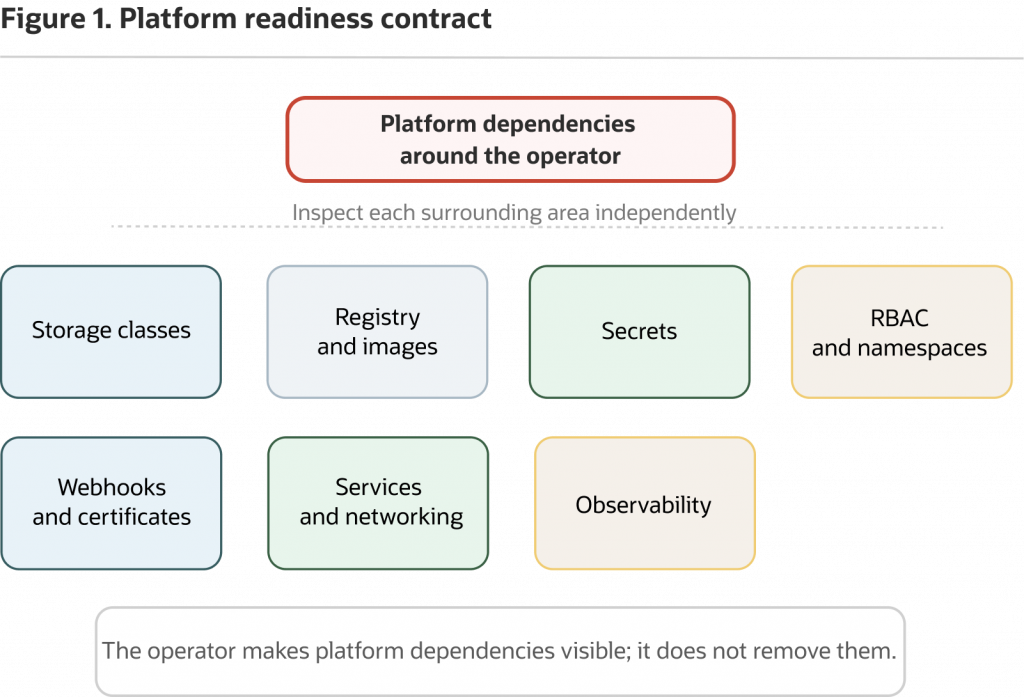
Figure 1: Treat a successful first run as control-loop evidence. Platform readiness still requires validating the dependencies and ownership boundaries around that loop.
The operator model is one possible operating model. A managed Oracle Database service may be the better production answer when the team wants less direct infrastructure ownership and the service meets workload, governance, latency, cost, and compliance requirements. Keep that as an operating-model decision, not as a conclusion from a successful first run.
Other database operators can be strong choices for applications that target those engines. Manual Kubernetes resources may be acceptable for experiments, unsupported patterns, or teams with existing tested automation, but they do not remove the need to validate storage, credentials, networking, backup, recovery, and support. Oracle Database Operator for Kubernetes is most relevant when the workload requires Oracle Database and the team wants supported database lifecycle intent represented through Kubernetes custom resources.
The rest of this article focuses on the readiness work that makes that model supportable.
Validate storage before trusting state
A bound PersistentVolumeClaim confirms that Kubernetes provisioned or matched storage. It does not prove that capacity, reclaim policy, expansion, backup, recovery, performance, or durability behavior is acceptable for a production-like Oracle Database workload.
Oracle Database is stateful, so storage is the first platform contract to inspect. Kubernetes separates storage requests from storage implementation through StorageClass, PersistentVolumeClaim, and PersistentVolume resources. Kubernetes documentation covers StorageClasses and PersistentVolumes and PersistentVolumeClaims in detail, including reclaim policy and volume expansion.
Start with the operating question: which storage resources back the database?
kubectl get storageclass
kubectl get pvc -n oracle-db-operator-demo
kubectl get pv
kubectl describe pvc <claim-name> -n oracle-db-operator-demo
kubectl get storageclass shows available storage classes and whether a default exists. kubectl get pvc shows the claim in the database namespace and whether it is bound. kubectl get pv shows backing volumes and reclaim policy. kubectl describe pvc shows the storage class, requested capacity, access mode, binding details, and events.
A representative PVC row might look structurally like this:
NAME           STATUS   VOLUME                                     CAPACITY   ACCESS MODES   STORAGECLASS   AGE
<claim-name>   Bound    pvc-00000000-0000-0000-0000-000000000000   50Gi       RWO            oci-bv         1h
In the walkthrough environment used for this series, the adapted Free Lite sample uses example persistence settings such as 50Gi, oci-bv, and ReadWriteOnce. Treat those as sample values from the selected release basis, not as portable defaults. If you use a different release, cluster, or storage provider, compare your manifest with the release-tagged sample and select a storage class that exists in your cluster.
In the Oracle sample context, oci-bv refers to OCI block volumes. Other clusters need their own approved storage class.
For the readiness inventory, capture the storage class, requested capacity, growth model, access mode, reclaim policy, and expansion behavior. Also document what happens if the custom resource, PVC, or namespace is deleted, and who approves deletion of data-bearing resources.
That turns “the PVC is bound” into a more useful storage-readiness decision: the team knows what storage backed the database, what Kubernetes can show, and what the storage platform still needs to prove.
Validate image and registry policy
A successful image pull shows that the cluster could access that image at that time. It does not prove that the image source, tag policy, license acceptance, vulnerability scanning, registry mirror, or egress path is ready for long-lived use.
Inspect the database pod:
kubectl get pods -n oracle-db-operator-demo
kubectl describe pod <database-pod-name> -n oracle-db-operator-demo
Inspect the operator deployment as well:
kubectl get deployment -n oracle-database-operator-system
kubectl describe deployment oracle-database-operator-controller-manager
  -n oracle-database-operator-system
If your operator deployment uses a different name or namespace, inspect the deployment where you installed the operator.
In the pod and deployment descriptions, look for the container image, image ID, pull policy, pull-secret references, and events. Image problems commonly show up as ErrImagePull, ImagePullBackOff, unauthorized, or manifest unknown.
In the release basis used for this series, the adapted Free Lite sample references an Oracle Database Free Lite image from Oracle Container Registry:
image:
  pullFrom: container-registry.oracle.com/database/free:latest-lite
Verify the image reference against the sample manifest for your selected operator release. Registry paths and tags are external dependencies and can change independently of your cluster.
That snippet explains why image governance belongs in the readiness review. A floating tag is convenient for a first run. Long-lived environments should follow platform image-governance policy, usually including approved registries, license and access review, vulnerability scanning, mirroring, and a tag or digest strategy.
If the database image requires registry login, license acceptance, auth tokens, pull Secrets, or egress allow rules, those are platform dependencies. Capture them with the same care you use for storage.
Treat the Oracle Database Free image used by the sample as an evaluation and development example unless your licensing, support, and platform-governance review says otherwise. Before using any Oracle Database image in a long-lived or production-like environment, verify image availability, terms, support status, and platform policy through Oracle Database Free, the Oracle Database Free FAQ, Oracle Container Registry, and your organization’s governance process.
Do not treat sample image tags or demo namespaces as long-lived platform policy.
Validate Secrets and namespace boundaries
The operator can reference a Kubernetes Secret, but a working demo Secret is not a complete credential-delivery pattern. Platform teams need an approved workflow for creating, storing, rotating, auditing, and restoring credentials.
Kubernetes documents Secrets as namespaced objects for sensitive information. For sensitive environments, use your organization’s approved secrets-management or vault-backed workflow.
For this readiness pass, inspect Secret metadata only:
kubectl get secret freedb-admin-secret -n oracle-db-operator-demo
kubectl describe secret freedb-admin-secret -n oracle-db-operator-demo
These commands confirm that the Secret exists in the database namespace and show metadata such as type, key names, key counts, and age. They do not print or decode the password.
That boundary is intentional. A Kubernetes Secret reference is a delivery mechanism, not a complete credential-management policy. Keep Secret values out of terminal output, screenshots, logs, tickets, and articles. Do not add -o yaml, -o json, or JSONPath output for Secret data in public demos, screenshots, or shared troubleshooting logs.
The readiness inventory should identify how the Secret is created, whether it is ever stored in Git, who can read or update it, how rotation works, and how credentials are restored during recovery. If rotation requires reconciliation or manual follow-up, capture that workflow before moving toward long-lived use.
Namespace placement helps, but it is not access control by itself. RBAC determines who can read and update Secrets. Network policy, service exposure, operator watch scope, and admission controls all affect the broader boundary around the database namespace.
Validate operator scope, RBAC, and webhook ownership
The operator installation is part of the platform support surface. CustomResourceDefinition resources, RBAC, watch scope, admission webhooks, and certificate resources need explicit platform ownership before the pattern becomes production-like.
Start by identifying the API extensions and operator workload:
kubectl get crds | grep -i 'database.oracle.com' || true
kubectl api-resources --api-group=database.oracle.com
kubectl get deployment -n oracle-database-operator-system
kubectl get pods -n oracle-database-operator-system
The || true suffix keeps a no-match grep from stopping a scripted inspection session. It is shell behavior, not a Kubernetes requirement.
CRDs and API resources show that the operator extends the Kubernetes API. The deployment and pods show that the controller workload is running. You need both: CRDs let the API server store custom resources, and the controller reconciles them.
Then inspect RBAC. Kubernetes RBAC authorization controls who can perform actions against Kubernetes resources, including custom resources and Secrets.
kubectl get clusterrole | grep -i 'oracle' || true
kubectl get clusterrolebinding | grep -i 'oracle' || true
kubectl get role -A | grep -i 'oracle' || true
kubectl get rolebinding -A | grep -i 'oracle' || true
This is a starting point, not a complete audit. RBAC resource names can vary by installation path. Use the output to identify cluster or namespace permissions that need review.
Validate which mode your installation uses, which namespaces the operator watches, and who approved the related permissions. If your deployment uses a namespace-scoped configuration, confirm the watch namespace configuration in the operator deployment and manifests.
If your selected operator installation path uses admission webhooks or cert-manager-managed certificates, include those resources in the platform contract. Kubernetes documents dynamic admission control through webhook configurations, and cert-manager is commonly used to manage certificate resources for Kubernetes workloads. Installation methods can differ, so use these commands as discovery checks, not as proof that every environment should contain the same webhook or certificate objects.
Inspect webhook and certificate-related resources:
kubectl get validatingwebhookconfiguration | grep -i 'oracle' || true
kubectl get mutatingwebhookconfiguration | grep -i 'oracle' || true
kubectl api-resources | grep -i 'cert-manager' || true
kubectl get certificates.cert-manager.io -n oracle-database-operator-system 2>/dev/null || true
kubectl get issuers.cert-manager.io -n oracle-database-operator-system 2>/dev/null || true
No matching rows mean you need to confirm the selected release, installation method, and naming conventions. They do not prove that webhook or certificate ownership is unnecessary. If the cert-manager CRDs are not installed, the fully qualified certificates.cert-manager.io and issuers.cert-manager.io commands produce no public output because errors are redirected. Remove 2>/dev/null in a private troubleshooting session if you need to see the exact API error.
The readiness point is stable: admission and certificate dependencies are part of the cluster control-plane path, not incidental sample resources.
For this part of the readiness inventory, document who can create and update SingleInstanceDatabase resources, who can read Secrets, who can view operator logs, who can delete custom resources or PVCs, who owns webhook availability, who owns certificate renewal, who approves operator RBAC changes, and who validates namespace watch scope.
Validate service exposure and network policy
A Kubernetes Service is an access point, not proof that application connectivity, firewall policy, TLS posture, listener configuration, credentials, DNS, or segmentation is complete.
Inspect Services, endpoint resources, and declared network policies in the database namespace:
kubectl get svc -n oracle-db-operator-demo
kubectl get endpoints -n oracle-db-operator-demo
kubectl get endpointslice -n oracle-db-operator-demo 2>/dev/null || true
kubectl get networkpolicy -n oracle-db-operator-demo
For more detail on a specific Service:
kubectl describe svc <service-name> -n oracle-db-operator-demoKubernetes Services provide stable access to a set of pods. Endpoints and EndpointSlice resources show the backend targets Kubernetes has associated with a Service. Kubernetes uses EndpointSlices for scalable service endpoint tracking, and Endpoints resources may still appear depending on cluster version and compatibility behavior. NetworkPolicy resources declare allowed traffic, but enforcement depends on the cluster CNI.
Treat a Service endpoint as a routing signal, not as application readiness. A Service might exist while firewall approval is missing, DNS is not agreed, TLS or TCPS posture is incomplete, database users are not ready, or application namespaces are not authorized to connect.
For the readiness inventory, capture which Services exist, which ports they expose, whether Endpoints or EndpointSlice resources point to the expected database pod, whether external access is possible, whether NetworkPolicies are declared and enforced, and which client namespaces are allowed. Also identify who owns listener configuration, TLS posture, database authentication, and application connection strings.
That last step often exposes ownership gaps. Platform teams may own Services and NetworkPolicy. Network teams may own firewall paths. DBAs may own listener and database authentication posture. Application teams may own connection pooling and retry behavior.
The operator does not remove those boundaries; it makes them easier to discuss around a concrete resource.
Validate observability and support handoff
A production-like operating model needs more than “the pod is running.” Platform teams and DBAs need an agreed support path across custom resource status, events, pod logs, operator logs, PVC state, service endpoints, and database-side checks.
Start with the custom resource and events. Kubernetes events can provide time-scoped context for recent changes and failures, subject to cluster event retention and configuration.
kubectl get singleinstancedatabase -n oracle-db-operator-demo
kubectl describe singleinstancedatabase freedb-lite-sample -n oracle-db-operator-demo
kubectl get events -n oracle-db-operator-demo --sort-by=.lastTimestamp
Then inspect the database pod:
kubectl get pods -n oracle-db-operator-demo
kubectl logs -n oracle-db-operator-demo <database-pod-name> --tail=200
Inspect the operator as part of the support path. Kubernetes documents the broader logging architecture and the kubectl logs command for retrieving container logs.
kubectl get deployment -n oracle-database-operator-system
kubectl get pods -n oracle-database-operator-system
kubectl logs -n oracle-database-operator-system
  deployment/oracle-database-operator-controller-manager
  --all-containers=true
  --tail=200
The deployment name is from the walkthrough environment. If your installation uses a different operator namespace or deployment name, use the names returned by kubectl get deployment instead.
Logs can include sensitive operational details. Before sharing logs in tickets, screenshots, demos, or articles, review them for credentials, internal hostnames, tokens, registry paths, and unrelated workload data. Avoid publishing raw operator or database logs unless they have been reviewed and redacted by the appropriate platform and database owners.
Round out the Kubernetes view with storage and networking:
kubectl get pvc -n oracle-db-operator-demo
kubectl get svc,endpoints -n oracle-db-operator-demo
kubectl get endpointslice -n oracle-db-operator-demo 2>/dev/null || true
These signals answer different questions. status and events explain reconciliation. Pod logs help diagnose database container behavior. Operator logs help platform teams understand controller behavior. PVC state shows storage attachment and binding. Services, Endpoints, and EndpointSlice resources show Kubernetes routing state.
None of those signals replaces database-level monitoring, backup validation, performance checks, security review, or DBA operations. Kubernetes gives platform signals. DBAs still need database-side checks.
For the readiness inventory, capture which status fields matter for the selected release, what Healthy means in this implementation, which events indicate storage or image problems, where database and operator logs are collected, who can view those logs, who is paged for database pod failures, who is paged for PVC or storage failures, and which database-side checks DBAs own.
If your roadmap includes Oracle Database Observability capabilities with the operator, validate that as its own observability workstream. A successful SingleInstanceDatabase first run does not prove the full monitoring and support model.
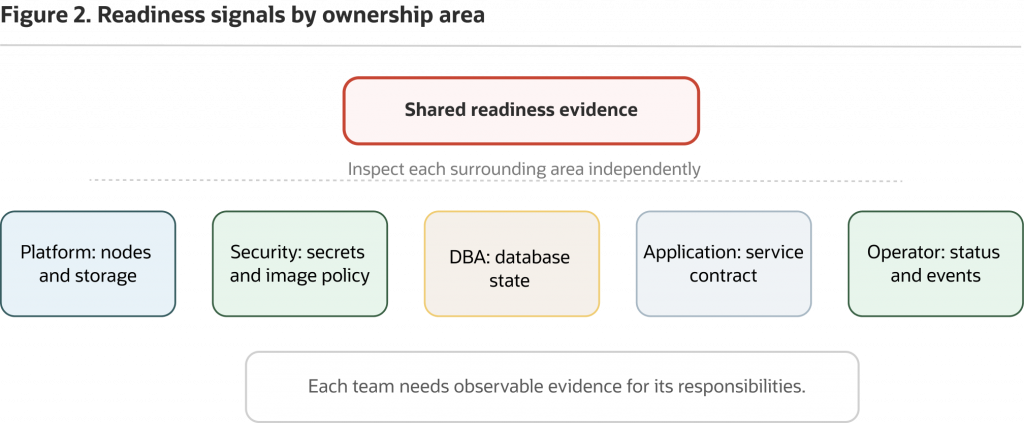
Figure 2: Use Kubernetes signals to guide the readiness conversation, then assign platform, DBA, security, and networking ownership for each area.
Validate cleanup and data-bearing resources
Cleanup is an operational readiness issue because deletion paths can affect data. Platform teams need to know what happens to finalizers, PVCs, PVs, namespaces, and retained storage before they rely on the pattern.
Start by inspecting whether the custom resource has finalizers:
kubectl get singleinstancedatabase freedb-lite-sample
  -n oracle-db-operator-demo
  -o jsonpath='{.metadata.finalizers}{"n"}'
Kubernetes finalizers can delay deletion until a controller performs required cleanup. That is useful, but it means deletion order matters.
Follow the cleanup guidance for your selected operator release and installation method, especially the order for custom resource instances, CRDs, API services, webhook resources, and the operator deployment. The uninstall guidance for the selected release may warn that deleting the operator before deleting custom resource instances can leave deletion paths blocked because the operator is no longer available to remove required cleanup properties.
Inspect storage and namespace state without deleting anything:
kubectl get pvc -n oracle-db-operator-demo
kubectl get pv
kubectl get pvc -A | grep -i 'oracle' || true
kubectl get pv | grep -i 'oracle' || true
kubectl get namespace oracle-db-operator-demo
PV reclaim policy affects whether backing storage is retained or deleted after a claim is released. Namespace deletion can be blocked by finalizers, and storage behavior depends on the storage class, dynamic or static provisioning, and reclaim policy. Treat namespace deletion as an administrative action that needs a data-retention decision, not as a general cleanup shortcut.
For the readiness inventory, document whether the SingleInstanceDatabase resource has finalizers, what cleanup order applies to the selected release, what happens if the operator is removed before custom resources are deleted, whether PVCs are deleted or retained, what the PV reclaim policy does, how retained storage is identified, and who approves deletion of retained storage.
Avoid manual finalizer removal unless you are following guidance for your selected release and the platform owner has approved the data-loss and consistency risks. In this readiness flow, inspection is enough.
Keep recovery, HA, patching, and upgrades as separate validation tracks
Backup, restore, failure handling, HA, patching, and upgrades are separate validation tracks. A healthy SingleInstanceDatabase first run does not prove recovery objectives, failover behavior, database patch compliance, upgrade safety, or application resilience.
Oracle Database Operator for Kubernetes lists lifecycle operations across multiple controllers, but each capability has its own prerequisites, scope, and validation path. Validate the exact controller documentation before claiming backup, restore, failover, patching, RAC, Data Guard, or upgrade behavior. Keep the first-run result separate from backup, restore, failover, patching, and upgrade readiness.
Kubernetes can reschedule workloads and maintain declared resources, but Oracle Database availability and recovery objectives depend on the database architecture, storage behavior, backup and restore design, failure domains, and validated operational runbooks. The Oracle Database Backup and Recovery User’s Guide is the right source for database recovery concepts; operator documentation is the right source for controller-specific lifecycle support.
Keep these as separate workstreams:
- Recovery: backup configuration, restore testing, RPO, RTO, and retained storage.
- Availability: failure modes, failover behavior, node placement, storage access, and application retry behavior.
- Maintenance: image updates, database patching, operator upgrades, rollback plans, and change control.
- Security and compliance: credential rotation, audit policy, network segmentation, image governance, and access review.
- Performance: workload testing, capacity planning, storage latency, and resource limits.
The next article turns backup, restore, and failure handling into a dedicated validation track. Keep that work out of a single “the resource is healthy” signoff.
Turn the first run into a readiness decision
If the first run worked, keep the momentum. The next step is not a larger YAML file or a more ambitious topology. The next step is a readiness inventory that names the platform contract: storage, images, Secrets, access, webhooks, networking, observability, cleanup, and recovery ownership.
For each area, capture three things:
- What the cluster shows.
- What that signal supports.
- What remains unvalidated.
A bound PVC shows that storage was provisioned or matched; it does not show that the storage contract is acceptable. A pulled image shows access at one moment; it does not show image governance. A Secret reference shows a delivery path; it does not show rotation or audit. A Service shows a Kubernetes access point; it does not show application readiness. Operator logs explain reconciliation; they do not replace database monitoring.
If any area has no owner or no validation evidence, pause expansion and test that area before treating the pattern as platform-ready.
That is the value of this stage. The first run gives platform engineers and DBAs a shared Kubernetes object and related resources to inspect. The readiness review turns those resources into an operating conversation. When storage, images, Secrets, access, networking, observability, cleanup, and recovery ownership are visible, the team can make a better decision about whether Oracle Database Operator for Kubernetes belongs in the platform pattern.
A first run is the beginning of evidence, not the end of evaluation. If the SingleInstanceDatabase reconciles and the status is healthy, you have shown that the selected control loop can work in your cluster. The next validation track is recovery: backup, restore, and failure handling.