
Key Takeaways
A
HealthySingleInstanceDatabaseis useful operator evidence, but it is not recovery evidence. It means the operator reports the database as open for connections; it does not prove that a backup exists or that restore works.Backup and restore capabilities in Oracle Database Operator for Kubernetes are resource-specific and release-specific. Before writing manifests, verify the installed CRDs, API resources, and documentation for the exact resource kind you are using.
For the Free Lite
SingleInstanceDatabasesample used in this series, the safe drill is recovery readiness, not a full operator-native backup and restore walkthrough. Inv2.1.0, the release-taggedSingleInstanceDatabaseCRD and SIDB documentation do not provide a first-class SIDB backup/restore custom resource for this Free Lite path.Recovery validation needs both Kubernetes evidence and database-level validation. Status, events, PVCs, Secret metadata, and logs help explain the operating state, while a marker row or equivalent DBA-approved check proves whether known data is present after a selected recovery path.
A healthy database is not the same as a recoverable database
After the first three articles, the sample database is no longer mysterious. You have seen Oracle Database Operator for Kubernetes reconcile a SingleInstanceDatabase, you have read the custom resource as an operating contract, and you have inspected the platform resources around it.
The next question is the one that matters when the database starts to matter:
If we lose something, can we get the database back?
A healthy SingleInstanceDatabase tells you the operator reports the database as ready according to the SIDB status model. It does not tell you whether a backup exists, whether a restore can complete, or whether the restored database contains the data your application needs.
That distinction is the point of this article. Oracle Database Operator for Kubernetes extends the Kubernetes API with Oracle Database custom resources and controllers for supported lifecycle operations. Kubernetes custom resources let a platform expose new API types, and controllers reconcile desired state toward observed state. Those are powerful operating primitives, but reconciliation is not recovery.
A controller can report a resource as healthy without proving that your backup destination is reachable, your restore target is safe, your retained data is usable, or your RPO and RTO are acceptable.
For SingleInstanceDatabase, the SIDB documentation defines Healthy as the state where the database is open for connections. That is useful. It is not enough. Recoverability needs a separate rehearsal with a separate evidence standard.
This article uses Oracle Database Operator for Kubernetes v2.1.0 as the release basis for CRDs, sample manifests, API fields, and documentation links. If your cluster uses a different release, verify the matching release tag before applying commands or manifests.
The working sample remains the same as the earlier articles:
Namespace: oracle-db-operator-demo
Operator namespace: oracle-database-operator-system
Custom resource: freedb-lite-sample
Kind: SingleInstanceDatabase
Admin password Secret: freedb-admin-secret
This article does not repeat the operator installation, the custom-resource literacy walkthrough, or the broader platform-readiness inventory. Instead, it asks a narrower Day-2 question: what evidence do platform engineers and DBAs need before they trust the recovery path?
Set the safety boundary before the drill
Run this drill only in a non-production environment. The goal is to collect recovery-readiness evidence without putting the only working sample database at risk.
You should already have Oracle Database Operator for Kubernetes installed and the Free Lite SingleInstanceDatabase sample running from the earlier articles. The Free Lite sample uses freedb-lite-sample and references the admin password Secret freedb-admin-secret; in this series, we adapt the sample from the upstream default namespace to oracle-db-operator-demo.
You also need kubectl configured for the target cluster and permission to inspect the resources that make recovery diagnosable: CRDs, custom resources, pods, PVCs, PVs, services, events, Secret metadata, and operator logs.
The command examples use a Bash-compatible shell with standard tools such as grep. If you run the drill from another environment, use an equivalent shell environment rather than mixing shell syntaxes in the same runbook.
If your organization separates platform and DBA access, keep that separation. The platform engineer can collect Kubernetes evidence while the DBA owns the SQL validation path.
Use a DBA-approved way to connect to the database for marker creation and validation. Confirm the intended service, PDB, and schema with the DBA before creating or querying the marker. This article includes SQL that creates a small marker table, but it does not assume that the database container has a usable client or that kubectl exec is the right access path in your environment.
Keep credentials out of the drill output. Work with Secret metadata, not Secret values. Avoid publishing passwords, wallets, registry credentials, object storage credentials, connection strings with embedded credentials, and unredacted logs. Kubernetes Secret data is base64-encoded, not safe to publish. The Kubernetes Secret documentation explains Secret behavior and related security controls in more detail.
Use a separate non-production restore target when the documented recovery path supports it. Avoid overwrite-style restore against the only working sample database unless the method explicitly requires it and the environment is isolated for that purpose.
Define what the recovery rehearsal must prove
A recovery-readiness rehearsal starts by defining the evidence you expect, not by writing a backup manifest.
For the Free Lite SingleInstanceDatabase sample, the first drill should prove that the installed operator API is discoverable, that the installed CRDs match the documentation you are using, and that the sample resource reports observed state. It should also prove that the supporting Kubernetes resources can be inspected.
That is the platform side of the evidence. The database side is just as important. The team needs a known data point, or recovery marker, that existed before the recovery test and can be checked after a supported restore, clone, logical import, RMAN-based recovery, managed-service restore, storage-snapshot workflow, or Kubernetes data-protection restore.
Without a database-level marker or equivalent validation object, a restored pod and bound PVC can look reassuring while the data question remains unanswered.
Treat volume-level protection separately from database-level recoverability. A PVC snapshot or restored volume is not automatically an Oracle-consistent backup. The selected workflow must define how database consistency, archived redo, recovery catalog or metadata, encryption, retention, and restore validation are handled.
The rehearsal also needs an explicit API decision:
Does the selected Oracle Database Operator for Kubernetes release expose a supported backup/restore mechanism for the selected resource kind?
If it does, test that documented path in a safe target. If it does not, document the gap and select another DBA or platform recovery mechanism.
That last step is where this article differs from a fake quickstart. In Oracle Database Operator for Kubernetes v2.1.0, the release-tagged SingleInstanceDatabase CRD and SIDB documentation do not provide a first-class SIDB backup/restore custom resource for the Free Lite sample. The operator README and release-tagged CRDs document backup and restore capabilities for specific resource families, including Oracle Autonomous Database and Oracle Base Database Service. Those APIs should not be assumed to apply to SingleInstanceDatabase.
A true backup and restore drill, whether operator-native or external, must prove more than resource health. It must show that a backup request or external job was accepted, progress was observable, a backup artifact was created where expected, restore produced a usable target, and the marker row or equivalent validation object is present after restore. That is the evidence standard you should carry into any selected mechanism.
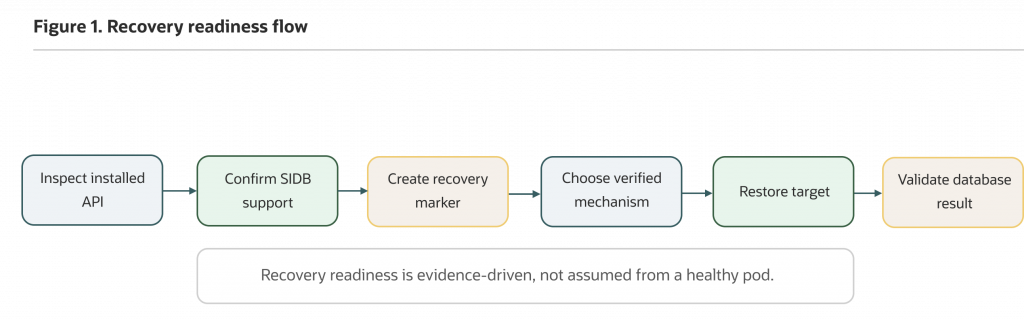
Figure 1. A recovery-readiness drill starts with API and documentation discovery, then moves to marker creation, recovery-path selection, and database validation.
Confirm the backup and restore API before writing manifests
Start with discovery. The cluster can tell you which Oracle Database Operator APIs are installed, and kubectl explain is useful for checking the schema your API server exposes for installed resources.
kubectl api-resources --api-group=database.oracle.comkubectl get crds | grep -i 'database.oracle.com'Confirm that singleinstancedatabases appears. In v2.1.0, SingleInstanceDatabase is a namespaced custom resource in the database.oracle.com API group. The CRD serves v1alpha1 and v4, with v4 as the storage version. You can inspect the SingleInstanceDatabase CRD directly.
Now inspect the resource schema exposed to your cluster:
kubectl explain singleinstancedatabase
  --api-version=database.oracle.com/v4
kubectl explain singleinstancedatabase.spec
--api-version=database.oracle.com/v4kubectl explain singleinstancedatabase.status
--api-version=database.oracle.com/v4Because this release serves more than one SingleInstanceDatabase API version, the examples pin kubectl explain to database.oracle.com/v4. Use the API version that matches the manifests and documentation you are validating.
These commands are not just documentation conveniences. They protect you from copying YAML from the wrong release, the wrong resource family, or a mutable branch. If a field is absent from kubectl explain and from the matching release documentation, treat that as a boundary.
Check whether backup or restore resources exist in the installed Oracle Database Operator API group:
kubectl api-resources --api-group=database.oracle.com | grep -Ei 'backup|restore' || trueNo output is a valid finding for this discovery command. It means no installed resource name in that API group matched backup or restore.
You may see backup or restore resources for other Oracle resource families, such as Autonomous Database. That output does not prove that SingleInstanceDatabase supports the same workflow. Backup and restore support is resource-specific. The v2.1.0 CRD directory includes resources such as autonomousdatabasebackups and autonomousdatabaserestores, while the SIDB CRD does not expose a generic SIDB backup or restore resource for the Free Lite path.
Next, confirm the starting sample:
kubectl get singleinstancedatabase -n oracle-db-operator-demokubectl describe singleinstancedatabase freedb-lite-sample
-n oracle-db-operator-demokubectl get pod,pvc,svc -n oracle-db-operator-demoCheck the operator-reported status:
kubectl get singleinstancedatabase freedb-lite-sample
-n oracle-db-operator-demo
-o jsonpath='{.status.status}{"n"}'If the sample is healthy, the output should be:
HealthyThat status is useful starting evidence. It means the database is open for connections in the SIDB status model. It does not prove that a backup exists, that restore works, or that the restored data will be usable.
You can also retrieve connection fields when it is safe for your environment:
kubectl get singleinstancedatabase freedb-lite-sample
-n oracle-db-operator-demo
-o jsonpath='connectString={.status.connectString}{"n"}pdbConnectString={.status.pdbConnectString}{"n"}'The documented SIDB status examples show host/service-style connection strings rather than passwords. Even so, treat connection strings as potentially sensitive because they can reveal internal service names, hostnames, ports, or topology. Review and redact them before sharing screenshots or logs.
Now collect platform evidence before changing anything:
kubectl get events -n oracle-db-operator-demo
--sort-by=.metadata.creationTimestampkubectl get pvc -n oracle-db-operator-demoAfter identifying the claim name, describe it:
kubectl describe pvc <claim-name> -n oracle-db-operator-demoConfirm the operator deployment name in your installation:
kubectl get deployments -n oracle-database-operator-systemFor the deployment name used in this series, check a short tail of recent operator logs:
kubectl logs -n oracle-database-operator-system
deployment/oracle-database-operator-controller-manager
--all-containers=true
--tail=200If your deployment name differs, replace oracle-database-operator-controller-manager with the deployment name from your cluster.
Treat each signal as one piece of evidence. Kubernetes events show recent cluster activity, but they are not durable backup records. PVC state shows storage provisioning and binding, but a bound PVC is not backup. Operator logs show what the controller attempted, but logs are diagnostics, not recovery proof. The Kubernetes documentation for PersistentVolumes and StorageClasses is useful background when you need to interpret storage behavior.
Verify the admin password Secret by metadata only:
kubectl get secret freedb-admin-secret -n oracle-db-operator-demokubectl describe secret freedb-admin-secret -n oracle-db-operator-demoThis confirms that the expected Secret exists in the expected namespace. It does not prove that the value is correct, rotated, vaulted, or production-approved. It also does not require you to print the Secret value.
Create a small recovery marker
Recovery evidence needs a database-level fact in the database, PDB, and schema that the team intends to recover. Use a DBA-approved SQL client path and confirm the target service, container, and schema before creating the marker. The account must either have permission to create a small test table or use a DBA-approved existing validation table. Do not publish passwords or connection strings with embedded credentials.
For marker creation and validation, prefer the same PDB/service path that the application or DBA recovery procedure will use, not an incidental administrative connection.
-- Confirm with the DBA that you are connected to the intended
-- database service, PDB, and schema before running this marker.
BEGIN
EXECUTE IMMEDIATE '
CREATE TABLE recovery_marker (
marker_id NUMBER GENERATED BY DEFAULT AS IDENTITY,
marker_text VARCHAR2(100),
created_at TIMESTAMP DEFAULT SYSTIMESTAMP
)';
EXCEPTION
WHEN OTHERS THEN
IF SQLCODE != -955 THEN
RAISE;
END IF;
END;
/
INSERT INTO recovery_marker (marker_text)
VALUES ('article-04-recovery-marker');
COMMIT;
SELECT marker_id, marker_text, created_at
FROM recovery_marker
WHERE marker_text = 'article-04-recovery-marker'
ORDER BY marker_id;The expected result is a row similar to this:
MARKER_ID MARKER_TEXT CREATED_AT
---------- ---------------------------- -------------------------------
1 article-04-recovery-marker ...On repeat drills, MARKER_ID may not be 1. The important validation is that the expected marker text exists in the intended recovered target after the selected recovery path completes.
The marker proves that known data existed before the recovery test. After a supported restore, clone, logical import, RMAN-based recovery, managed-service restore, storage-snapshot workflow, or Kubernetes data-protection restore, the same marker gives the team a concrete validation target.
Keep the scope honest. A marker row does not prove backup completeness, whole-database consistency, encryption, retention, immutability, RPO, RTO, application cutover, or security approval. It proves one useful thing: the data you expected to validate is present when you query for it in the right recovered target.
Decide whether the installed API supports your recovery path
For the Free Lite SingleInstanceDatabase sample, the correct first step is an API and documentation check, not an operator-native backup command.
Inspect fields that are relevant to lifecycle, copy-style workflows, configuration, and storage:
kubectl explain singleinstancedatabase.spec.createAs
--api-version=database.oracle.com/v4kubectl explain singleinstancedatabase.spec.archiveLog
--api-version=database.oracle.com/v4kubectl explain singleinstancedatabase.spec.persistence
--api-version=database.oracle.com/v4If kubectl explain cannot resolve one of these fields in your cluster, treat that as installed-API evidence. Do not add a field to a manifest unless it exists in the installed CRD and the matching documentation supports the behavior you want.
These fields matter, but they are not a generic SIDB backup/restore API. createAs is relevant to how a database is created, including documented clone workflows for supported editions. archiveLog is relevant to database configuration and clone prerequisites. persistence is relevant to storage behavior. None of those fields means the Free Lite sample has a first-class backup or restore custom resource.
The SIDB documentation covers provisioning, persistence, configuration changes such as archiving and flashback settings, cloning, patching, Data Guard workflows, ORDS integration, and deletion. It does not document a generic backup/restore custom resource for the Free Lite freedb-lite-sample path.
That is the important recovery-readiness result for this sample: the installed API group, release-tagged CRDs, and SIDB documentation do not provide a first-class SIDB backup/restore custom resource for the Free Lite path. The next step is to choose a documented DBA or platform recovery mechanism and test that mechanism directly.
SIDB clone deserves a brief note because it is easy to misread as backup or restore coverage for the Free Lite sample. The SIDB documentation describes clone as a way to create a block-for-block copy of a supported source database, with prerequisites such as archiveLog: true; it is supported for Enterprise and Standard editions, not the Free Lite sample. Clone can validate an operator-managed copy workflow for supported SIDB sources, but it is not a backup architecture. It does not prove off-cluster durability, retention, immutability, point-in-time recovery, cross-region recovery, or recovery after source-cluster loss.
For Oracle backup and recovery design, use the current Backup and Recovery documentation for your database release, including RMAN guidance where applicable. The operator provides a Kubernetes operating surface. It does not remove the need for a database recovery design.
Define restore safety constraints for the selected path
For the established Free Lite SingleInstanceDatabase sample, this article does not provide a restore manifest because the SIDB CRD and documentation do not provide a first-class SIDB backup/restore custom resource for that path.
That is not a dead end. It is the point where platform and DBA ownership meet.
A production-like recovery rehearsal might use a managed Oracle Database service restore, a DBA-approved RMAN workflow, a logical export/import process where appropriate, a Kubernetes data-protection platform with database-level validation, a storage snapshot workflow with database-level validation, or another operator resource family that documents backup and restore APIs for the selected resource.
Each option has a different evidence model. A managed Oracle Database service may be a better operating model when the team wants Oracle Database capabilities without owning the Kubernetes storage, node placement, database image access, operator upgrade, and backup-plumbing responsibilities behind a database pod. For example, the Oracle Autonomous AI Database documentation describes a managed service model in which provisioning, backup, patching, upgrading, and scaling are handled by the service. That does not make it automatically better for every workload; it changes the operational evidence and responsibility model.
Existing DBA-led RMAN or enterprise backup automation may already satisfy retention, encryption, audit, and recovery requirements. Kubernetes data-protection platforms and storage snapshots can be part of a recovery strategy, but for Oracle Database they still require database-level consistency planning and SQL validation after restore. Do not treat a PVC restore as a database recovery test unless the workflow also defines database consistency, redo/archive handling, credential recovery, and SQL validation.
The practical rule is simple: compare operating models by the evidence they can produce, not by labels such as “operator,” “managed,” or “cloud-native.”
When your selected path supports restore, prefer a separate non-production restore target. Confirm the target namespace, resource names, PVC behavior, Secret references, service names, operator watch scope, and RBAC before running anything destructive. If a method requires same-name restore, isolate the environment and document the risk before proceeding.
Also confirm how the operator will reconcile restored state. Restoring a custom resource, PVC, and Secret into a watched namespace can cause the operator to act. That may be exactly what you want, or it may conflict with a manual recovery step. Treat reconciliation as part of the restore design, not as background noise. For namespace-scoped deployments, the operator installation guidance describes the use of WATCH_NAMESPACE; verify the operator’s actual watch scope before depending on reconciliation in a restore namespace.
kubectl get deployment oracle-database-operator-controller-manager
-n oracle-database-operator-system
-o jsonpath='{range .spec.template.spec.containers[*].env[?(@.name=="WATCH_NAMESPACE")]}{.name}={.value}{"n"}{end}'If the deployment name differs in your installation, replace it with the name returned by this command:
kubectl get deployments -n oracle-database-operator-systemAn empty, absent, or differently configured watch namespace must be interpreted according to the operator installation mode used in your cluster.
Define database validation for the selected recovery path
When a selected recovery path is eventually tested, operator-reported status is useful after restore, but it is not sufficient. Kubernetes objects are useful, but they are not sufficient. A recovery drill must validate the database through an approved database client path.
After the selected restore, clone, import, snapshot recovery, RMAN workflow, or managed-service restore completes, query the marker on the restore target:
-- Run this on the intended recovered target, using the DBA-approved
-- service, PDB, and schema for the recovery validation.
SELECT marker_id, marker_text, created_at
FROM recovery_marker
WHERE marker_text = 'article-04-recovery-marker'
ORDER BY marker_id;A successful marker query proves that expected data is present in the restored target after the selected recovery path completed. It is only valid if it was run against the intended recovered target, not the original source database. It does not prove that every schema is consistent, every application workflow works, every retention policy is satisfied, or every RPO/RTO objective is met.
Capture enough evidence to show the sequence clearly: the recovery path completed, the database opened, the expected schema or object was accessible, the marker row was present, and the platform resources reached the expected state.
Pair the database evidence with platform evidence such as restored or recreated custom resources, pods, PVCs, PVs, services, events, logs, and backup artifact metadata if your selected mechanism produces an artifact.
If you do not perform an actual restore in the first rehearsal, document the validation standard anyway. Write down the SQL query, the target environment, the credential path, and the expected result. That prevents a future “restore test” from stopping at kubectl get pods.
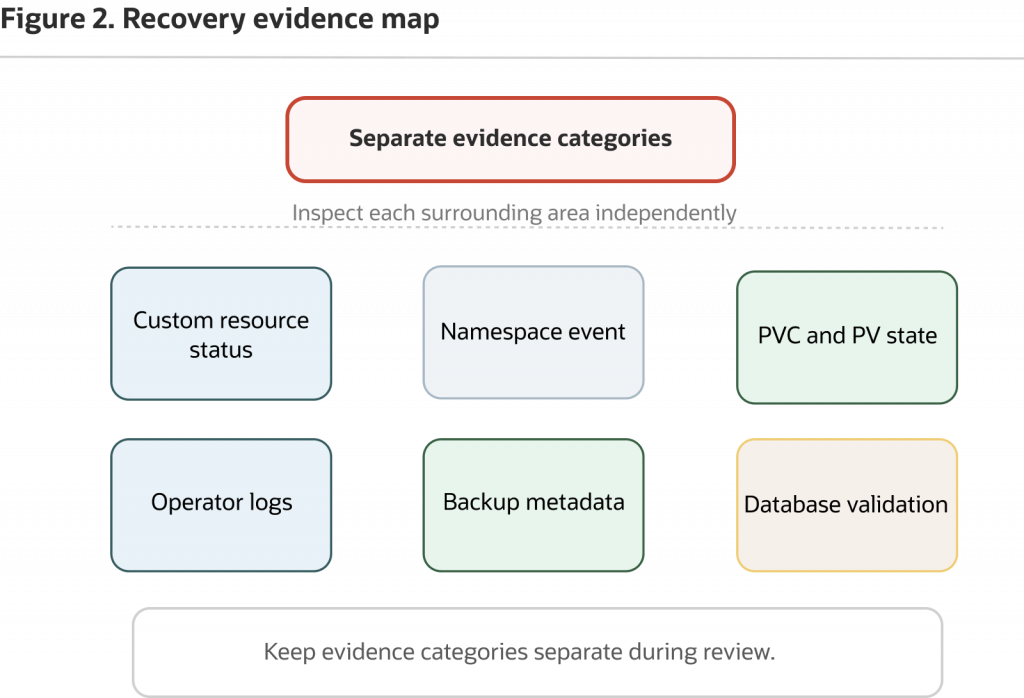
Figure 2. Recovery evidence comes from several signals. Kubernetes state helps explain what happened, but database validation answers whether expected data is present in the recovered target.
Troubleshoot recovery failures by category
Recovery failures are easier to diagnose when you separate API, storage, credential, operator, and database symptoms. Start with the first visible failure, then connect Kubernetes evidence with database evidence.
API mismatch or missing CRDs
If kubectl explain cannot find a kind or a field, or if kubectl apply rejects a manifest, verify the installed API resources and CRDs:
kubectl api-resources --api-group=database.oracle.com
kubectl get crds | grep -i 'database.oracle.com'
kubectl explain singleinstancedatabase.spec
--api-version=database.oracle.com/v4If your manifests use another served version, inspect that version explicitly and verify the matching release documentation before applying changes.
Common causes include an operator version mismatch, CRDs that were not installed or upgraded, a manifest copied from the wrong release, a backup/restore resource that belongs to another Oracle resource family, or a field copied from an unrelated example.
Schema validation is a guardrail. If a backup or restore field is not in the release-matched CRD, leave it out of the manifest and return to the documented recovery options for your resource kind. SingleInstanceDatabase has fields such as createAs, archiveLog, flashBack, forceLog, persistence, image settings, resources, and service options. Those fields do not become backup/restore fields because a recovery drill needs them.
Secret problems
For Secret problems, inspect metadata and custom resource references:
kubectl get secret -n oracle-db-operator-demokubectl describe singleinstancedatabase freedb-lite-sample
-n oracle-db-operator-demokubectl get singleinstancedatabase freedb-lite-sample
-n oracle-db-operator-demo
-o jsonpath='secretName={.spec.adminPassword.secretName}{"n"}secretKey={.spec.adminPassword.secretKey}{"n"}'Confirm that the Secret name, namespace, and key expected by the custom resource match the Secret that exists in the namespace. The release-tagged CRD defaults adminPassword.secretKey to oracle_pwd, and the SIDB examples use that key. If your manifest sets secretKey, verify that the Secret contains the matching key. Inspect key names and metadata only; do not decode or print values.
If .spec.adminPassword.secretKey is not shown because a default was applied server-side or omitted from the manifest, use the describe output and the release-matched CRD default as fallback evidence.
Storage or volume problems
For storage or volume problems, inspect PVCs, PVs, and the storage class:
kubectl get pvc -n oracle-db-operator-demo
kubectl describe pvc <claim-name> -n oracle-db-operator-demo
kubectl get pv
kubectl get storageclassA PVC stuck in Pending points toward storage class, quota, access mode, capacity, topology, or provisioner issues. A retained PV can help with investigation or manual recovery planning, but it is not the same as a tested backup. PVC/PV state can show what Kubernetes provisioned, bound, retained, or deleted. It does not prove that a database backup exists or that restore works.
If a recovery method depends on snapshots or restored PVCs, verify the storage provider’s snapshot semantics and the database consistency procedure. A successful PVC restore is not, by itself, proof of Oracle Database recovery.
Image pull or registry problems
For image pull or Oracle Container Registry issues, use events and pod descriptions:
kubectl get events -n oracle-db-operator-demo
--sort-by=.metadata.creationTimestampkubectl describe pod <pod-name> -n oracle-db-operator-demoImagePullBackOff usually points to registry access, image name, network egress, license acceptance, pull Secret, or platform policy. Keep registry credentials out of troubleshooting output.
Operator reconciliation errors
For operator reconciliation errors, compare status, events, and logs:
kubectl describe singleinstancedatabase freedb-lite-sample
  -n oracle-db-operator-demo
kubectl get events -n oracle-db-operator-demo
--sort-by=.metadata.creationTimestampkubectl get deployments -n oracle-database-operator-systemkubectl logs -n oracle-database-operator-system
deployment/oracle-database-operator-controller-manager
--all-containers=true
--tail=200If your operator deployment name differs, replace it with the deployment name from your cluster.
Status, events, and logs are complementary. They help explain what the operator and cluster attempted, but they do not replace database recovery validation.
Restore target conflicts
For restore target conflicts, check names before applying anything:
kubectl get singleinstancedatabase -n oracle-db-operator-demo
kubectl get pvc -n oracle-db-operator-demo
kubectl get svc -n oracle-db-operator-demoLook for name collisions, existing PVCs, service conflicts, namespace policy blocks, or operator watch-scope issues. Also confirm that validation queries are pointed at the restore target, not the original service name or source database.
Finalizers and cleanup problems
For finalizers and cleanup problems, slow down. A custom resource or namespace stuck in Terminating can involve finalizers, retained storage, or an operator that is no longer running. Kubernetes finalizers are designed to let controllers complete cleanup before deletion finishes; the Kubernetes finalizers documentation explains the pattern.
Treat manual finalizer removal as a recovery decision, not a casual cleanup shortcut. It can leave data-bearing resources, external artifacts, or controller-owned cleanup in an unknown state.
Clean up without losing track of data-bearing resources
Cleanup is part of the recovery rehearsal because it tells you whether the team understands what data-bearing resources remain.
If you only ran the Free Lite recovery-readiness drill in this article, you may not have created new Kubernetes resources beyond the marker table. Still, inspect the current state before deleting anything:
kubectl get singleinstancedatabase -n oracle-db-operator-demo
kubectl get pvc -n oracle-db-operator-demo
kubectl get pv
kubectl get events -n oracle-db-operator-demo
--sort-by=.metadata.creationTimestampIf the marker table was created only for this drill, keep it until restore validation is complete. After the evidence packet is approved, the DBA can decide whether to retain the marker, delete only the marker row, or drop the table.
If your selected recovery mechanism created a restore target, clone, export, snapshot, backup artifact, or retained volume, document ownership before cleanup. Decide who is allowed to delete it, how long it should be retained, whether it is encrypted or replicated, and whether it is subject to legal, compliance, or audit retention.
Do not delete backup artifacts, snapshots, retained volumes, restore namespaces, or marker data until the evidence packet has been reviewed and the owner of the recovery mechanism has approved cleanup.
PVC and PV behavior depends on the storage class and reclaim policy. Dynamic provisioning commonly deletes backing storage when the PVC is deleted if the reclaim policy is Delete; statically provisioned or retained volumes can behave differently. The safe practice is to inspect the actual PV, storage class, and backing provider behavior before deleting data-bearing resources.
Keep CRDs and the operator in place while custom resource instances still need cleanup, unless you are following cleanup guidance for the selected release. If the operator is removed before it can process custom resources with finalizers, deletion can become harder to complete cleanly.
Decide what the rehearsal proves
The Free Lite recovery-readiness drill should leave you with an evidence packet, not a fake backup success story.
For this sample, the rehearsal can prove that the Oracle Database Operator API surface is installed and discoverable, the SingleInstanceDatabase exists in the expected namespace, the operator reports observed state, platform resources are available for investigation, a database-level marker was created or identified through a DBA-approved path, and the team checked whether the selected release exposes a first-class backup/restore API for the selected resource.
It does not prove that a backup artifact exists, restore can rebuild the database, recovery works after storage loss, RPO or RTO objectives are met, retention and immutability requirements are satisfied, cross-zone or cross-region recovery works, application cutover works, or production approval has been granted.
Document the evidence packet in a form another platform engineer or DBA can review. Include the operator release basis, namespace and resource names, installed CRDs and API versions, storage class and PVC/PV state, Secret references checked without values, relevant status fields, reviewed events, redacted operator logs, recovery marker creation method, selected recovery mechanism or documented gap, restore validation method if performed, cleanup actions, and remaining gaps.
If no restore was performed, label the packet as recovery-readiness evidence, not restore evidence.
That packet is the artifact you need for the next operating-model conversation.
If the selected recovery mechanism is RMAN, the packet should say where backups land, how credentials are protected, how restore targets are created, how retention is enforced, and how DBAs validate the recovered database.
If the selected mechanism is a Kubernetes data-protection platform, the packet should say which Kubernetes objects and volumes are captured, how database consistency is handled, and how SQL validation proves the result.
If the selected mechanism is a managed Oracle Database service, the packet should show which responsibilities move out of the Kubernetes platform and which application cutover tasks remain.
The value of the drill is not that it makes every path equal. The value is that it forces each path to produce evidence.
Conclusion
A healthy custom resource is a good milestone. It means the operator, Kubernetes API, and cluster dependencies are working well enough for the database to reach the operator’s ready state. But a healthy SingleInstanceDatabase is not a recovery plan.
For the Free Lite sample used in this series, the important move is not to force a fake backup demo into the article. The important move is to verify what the selected Oracle Database Operator for Kubernetes release supports, inspect the Kubernetes and operator signals available to the platform team, create a small database-level marker with DBA involvement, and document the recovery mechanism that still needs to be selected and rehearsed.
That evidence is what makes the operating-model decision credible. After proving the control loop, reading the custom resource as an operating contract, reviewing platform readiness, and rehearsing recovery readiness, you can compare operating models by what they can actually prove: backup artifacts, restore targets, observable progress, database-level validation, measured recovery objectives, retention controls, cleanup behavior, and shared ownership between platform engineers and DBAs.
The next step is to take this evidence into the operating-model decision. If the database belongs on Kubernetes, the team should be able to show the selected recovery path, the owner of each step, the restore target strategy, and the database-level validation record. If another Oracle Database operating model produces stronger recovery evidence with less platform burden, the rehearsal has done its job.