
Key Takeaways
- A
SingleInstanceDatabasecustom resource is the working contract between Oracle Database intent and the Oracle Database Operator for Kubernetes reconciliation loop. specshows what your team asked for.status, conditions, events, related resources, and logs show what the operator and cluster reported back.- A good troubleshooting path starts with API discovery, then moves from declared intent to observed state before changing anything.
- For this
SingleInstanceDatabaseresource,Healthyindicates that the database is open for connections. It is not production approval for backup, restore, high availability, security, performance, monitoring, operating support, or application readiness.
A first run answers one narrow question: can the operator control loop work in your cluster?
If you followed the first article in this series, you installed Oracle Database Operator for Kubernetes, applied a SingleInstanceDatabase sample, and checked whether the operator created related resources and reported status. That is a useful start, but it is not enough.
The next question is more important: What did we declare, what did the operator report, and where should we inspect when reality does not match intent?
Oracle Database Operator for Kubernetes extends the Kubernetes API with custom resources and controllers for Oracle Database lifecycle automation. In practice, the custom resource becomes the operating contract: spec describes desired Oracle Database intent, the operator reconciles that intent into related Kubernetes resources, and status, events, and logs show what the operator and cluster report back.
In this article, we continue with the same SingleInstanceDatabase resource used in the first run: freedb-lite-sample in the oracle-db-operator-demo namespace, with the admin password Secret reference freedb-admin-secret.
If you kept the first-run environment, you can run the inspection commands directly. If you cleaned it up, recreate the non-production sample before running the commands here. This article does not repeat the installation walkthrough. Instead, it gives you a practical way to read the custom resource as an operating contract: spec captures database intent, status reports observed state, and related Kubernetes objects show what the platform still has to provide.
This article uses Oracle Database Operator for Kubernetes v2.1.0 so that CRDs, sample manifests, API fields, and commands refer to the same release.
Prerequisites for the commands
This article assumes you have the first article’s non-production environment available, or that you recreated an equivalent setup:
kubectlis configured for the cluster you want to inspect.- Oracle Database Operator for Kubernetes
v2.1.0CRDs are installed. - A
SingleInstanceDatabasenamedfreedb-lite-sampleexists in theoracle-db-operator-demonamespace. - The referenced admin password Secret,
freedb-admin-secret, exists in the same namespace. - The applied manifest uses a real storage class name, not the literal placeholder
<your-storage-class>. - Your Kubernetes permissions allow you to read the custom resource, pods, PVCs, services, Secret metadata, and namespace events. Operator logs may require additional platform-team access.
The commands are inspection commands for a non-production evaluation. They are not a production validation checklist.
The custom resource is the operator contract
A Kubernetes operator is useful only when teams understand the API contract it exposes. For Oracle Database Operator for Kubernetes, that contract is the custom resource: a Kubernetes object that records database intent and gives the operator something to watch, reconcile, and report on.
A CustomResourceDefinition, or CRD, registers a new resource type with the Kubernetes API. A custom resource is an instance of that type, such as a SingleInstanceDatabase. The spec is desired state: what the team wants the resource to be. The status is observed state: what the operator reports after trying to reconcile the resource. Reconciliation is the repeated controller process of comparing desired state with actual state and taking action to move them closer.
Kubernetes stores the object. Oracle Database Operator for Kubernetes watches it. The operator reconciles supported Kubernetes resources such as pods, PVCs, and services; reads referenced objects such as Secrets; records events; and reports status. When something does not line up, the custom resource is the best starting point because it connects database intent to the cluster behavior that follows.
The important shift is mental, not syntactic. A SingleInstanceDatabase manifest is not “just YAML.” It is a shared operating contract between platform engineers, DBAs, and the operator.
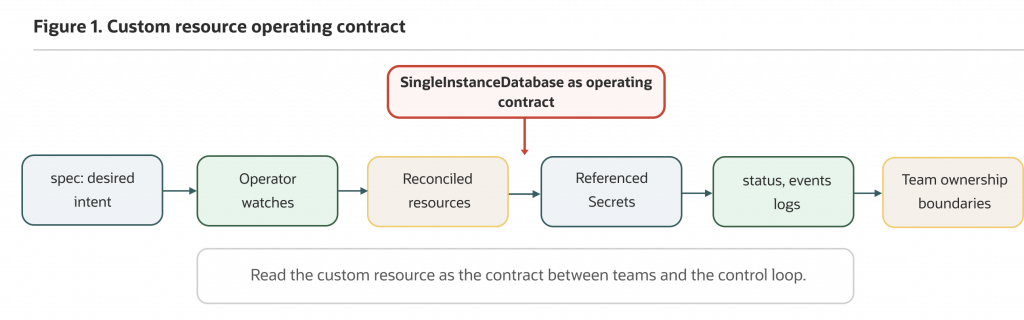
Figure 1: Use the SingleInstanceDatabase spec to declare database intent. Oracle Database Operator for Kubernetes reconciles related Kubernetes resources and reports progress through status, events, and logs.
This model follows core Kubernetes patterns for custom resources, controllers, and Kubernetes object spec and status. The operator makes those patterns concrete for Oracle Database lifecycle intent.
Use SingleInstanceDatabase as the concrete example
This article stays focused on SingleInstanceDatabase because it continues the first-run path. Oracle Database Operator for Kubernetes supports multiple custom resources, but a good evaluation does not begin by inventorying every CRD. It begins by learning how to read one resource well.
The upstream v2.1.0 Free Lite sample uses the default namespace and the oci-bv storage class. This series uses oracle-db-operator-demo to keep the evaluation isolated. The excerpt uses <your-storage-class> only as a placeholder because storage classes are cluster-specific; the applied resource must contain a real storage class name.
Here is the shortened manifest excerpt we will inspect throughout the article. Do not apply this excerpt as-is: replace <your-storage-class> with a valid storage class from your cluster, or use the already-applied resource from the first article.
apiVersion: database.oracle.com/v4
kind: SingleInstanceDatabase
metadata:
  name: freedb-lite-sample
  namespace: oracle-db-operator-demo
spec:
  edition: free
  adminPassword:
    secretName: freedb-admin-secret
  image:
    pullFrom: container-registry.oracle.com/database/free:latest-lite
  persistence:
    size: 50Gi
    storageClass: "<your-storage-class>"
    accessMode: "ReadWriteOnce"
  replicas: 1
This excerpt is only the part of the resource needed for the inspection path in this article. It is not a complete production manifest and does not cover backup, restore, monitoring, network policy, security policy, resource sizing, image governance, or operational runbooks.
A few lines carry most of the operating meaning.
apiVersion and kind identify the operator API contract. metadata.name and metadata.namespace locate this database resource. adminPassword.secretName is a Secret reference, not a password. In the v2.1.0 CRD, the admin password secretKey defaults to oracle_pwd if it is not set explicitly. image.pullFrom creates an image-access dependency. persistence.storageClass, size, and accessMode create storage dependencies. replicas: 1 fits this Free sample; do not treat it as an application-style scale-out knob.
The release-tagged Free Lite sample uses container-registry.oracle.com/database/free:latest-lite, which is convenient for a disposable evaluation. For retained or production-like environments, use approved pinned images, internal registry mirrors where required, and image scanning according to your platform policy. The sample is an inspection anchor, not a production manifest.
You can compare this excerpt with the release-specific v2.1.0 Free Lite sample, the SingleInstanceDatabase CRD, and the SingleInstanceDatabase documentation.
Inspect the API resources before reading the YAML
Before you read a manifest, ask the cluster what API contract it actually serves. This avoids troubleshooting a database pod when the real issue is a missing CRD, a release mismatch, or an incomplete installation.
Start with API discovery:
kubectl api-resources --api-group=database.oracle.comThe output should include Oracle Database Operator API resources. For this article, the important resource is singleinstancedatabases. The exact list may include other Oracle Database Operator resources, but this inspection path does not need a full CRD inventory.
Confirm that Oracle Database Operator CRDs are installed:
kubectl get crds | grep -i 'database.oracle.com'Then confirm the SingleInstanceDatabase CRD specifically:
kubectl get crd singleinstancedatabases.database.oracle.comA successful response confirms that the Kubernetes API server knows about the SingleInstanceDatabase CRD. It does not prove the operator controller is running or reconciling resources.
In the release used here, the CRD is named singleinstancedatabases.database.oracle.com, the API group is database.oracle.com, and the SingleInstanceDatabase resource is namespaced.
Now inspect the schema served by the cluster:
kubectl explain singleinstancedatabase
kubectl explain singleinstancedatabase.spec
kubectl explain singleinstancedatabase.status
kubectl explain is useful because it reads the installed API schema rather than relying on a copied snippet. The kubectl explain reference describes how it lists supported fields for Kubernetes resources.
If singleinstancedatabases is missing from API discovery, troubleshoot API registration or installation before troubleshooting database behavior. If kubectl explain fails, likely causes include missing CRDs, incomplete installation, API discovery issues, permission limits, or a release mismatch between your cluster and the examples you are using.
The practical rule is simple: validate the API contract first. A manifest cannot reconcile correctly if the cluster is not serving the resource type you think it is serving.
Read spec as desired database intent
The spec tells you what your team requested. It does not prove storage was provisioned, the image was pulled, the database initialized, or the service is ready.
Start by inspecting the full custom resource:
kubectl get singleinstancedatabase freedb-lite-sample
  -n oracle-db-operator-demo
  -o yaml
This shows metadata, spec, and, if the operator has reported it, status. It does not decode Secret values. For platform engineers, this is the quickest way to review image, namespace, storage, and Secret references together. For DBAs, it exposes database-facing choices such as edition, image, persistence size, and replica intent.
When you need targeted checks, use JSONPath. First, confirm the image source requested by the resource:
kubectl get singleinstancedatabase freedb-lite-sample
  -n oracle-db-operator-demo
  -o jsonpath="{.spec.image.pullFrom}{'n'}"
For the Free Lite sample, you should see:
container-registry.oracle.com/database/free:latest-liteThat value is more than a YAML field. It means the cluster must be able to reach the registry or approved mirror, satisfy image policy, and use any required image pull Secret. The release-specific SIDB documentation describes Oracle Container Registry login, database image license acceptance, and image pull Secret setup for new database images. If image pulls fail later, check registry access, network egress, image name and tag, image pull Secret configuration where required, license acceptance where applicable, and internal mirror policy.
Next, confirm the storage class the database resource requests:
kubectl get singleinstancedatabase freedb-lite-sample
  -n oracle-db-operator-demo
  -o jsonpath="{.spec.persistence.storageClass}{'n'}"
For an applied resource, this should be a valid storage class in your cluster, not the literal placeholder <your-storage-class>. If the value is unclear, list the storage classes your cluster exposes:
kubectl get storageclassStorage class selection is a platform decision with capacity, access mode, performance, reclaim policy, quota, and CSI driver implications. The upstream sample uses oci-bv for OCI block volumes; that class is not universal. Use a storage class approved for the cluster where the evaluation runs.
Finally, confirm the admin password Secret reference without printing the Secret value:
kubectl get singleinstancedatabase freedb-lite-sample
  -n oracle-db-operator-demo
  -o jsonpath="{.spec.adminPassword.secretName}{'n'}"
The expected value for this series is:
freedb-admin-secretThen confirm that the Secret object exists in the same namespace:
kubectl get secret freedb-admin-secret -n oracle-db-operator-demoIf the Secret exists but reconciliation still fails around credentials, confirm that it contains the expected key without printing the value. For this sample, the default key is oracle_pwd unless spec.adminPassword.secretKey is set explicitly.
kubectl describe secret freedb-admin-secret -n oracle-db-operator-demoReview the Data section for the expected key name, such as oracle_pwd. Do not use commands that print .data, decode base64 values, or paste Secret contents into tickets, screenshots, article output, or shared logs. The inspection goal is to confirm that the custom resource points to a Secret object and key that exist, not to expose credentials.
The spec gives each team something specific to review. Platform engineers see infrastructure dependencies. DBAs see database configuration intent. Developers see the shape of the environment they depend on, while still relying on approved connection details and ownership rules.
Read status as the operator’s reported state
Read status next. It is the operator’s reported view of reconciliation, and it helps you move from “what we asked for” to “what the operator observed.”
Start with the concise list view:
kubectl get singleinstancedatabase -n oracle-db-operator-demoThe SingleInstanceDatabase CRD defines printer columns backed by status fields, so this command can show useful values such as edition, SID, status, role, version, and connect strings when populated. Do not depend on every column being present at every moment. Early in reconciliation, status fields may be empty or incomplete.
Read the concise status value directly:
kubectl get singleinstancedatabase freedb-lite-sample
  -n oracle-db-operator-demo
  -o jsonpath="{.status.status}{'n'}"
For this SIDB resource, when the status returns Healthy, the database is open for connections. Treat that as a useful operator/database readiness signal for this resource, not as production approval.
If the operator reports connection strings, inspect them as status signals:
kubectl get singleinstancedatabase freedb-lite-sample
  -n oracle-db-operator-demo
  -o jsonpath="{.status.connectString}{'n'}"
kubectl get singleinstancedatabase freedb-lite-sample
-n oracle-db-operator-demo
-o jsonpath="{.status.pdbConnectString}{'n'}"When populated, .status.connectString and .status.pdbConnectString expose operator-reported connection strings for inspection. Treat them as values that still need DBA and platform review before an application depends on them. Network exposure, service behavior, credentials, environment boundaries, and application configuration are separate decisions.
If the concise status value is not enough, inspect conditions:
kubectl get singleinstancedatabase freedb-lite-sample
  -n oracle-db-operator-demo
  -o jsonpath='{range .status.conditions[*]}{.type}{"t"}{.status}{"t"}{.reason}{"t"}{.message}{"n"}{end}'
If this prints nothing, the operator may not have populated conditions yet, or the installed CRD/status shape may differ from the example. Use kubectl describe and kubectl explain singleinstancedatabase.status to compare against the API served by your cluster.
Conditions can include fields such as type, status, reason, message, last transition time, and observed generation. Exact condition names and messages are release- and state-sensitive, so use kubectl explain singleinstancedatabase.status and the installed CRD before writing runbooks around specific paths.
The main point is not that one field answers every question. It does not. The main point is that status begins the observed-state side of the contract. When status is sparse, stale, or surprising, the next step is to inspect related resources, events, and logs.
Trace the custom resource to pods, PVCs, services, events, and logs
The custom resource is the entry point, not the whole story. A useful reconciliation review follows the trail from SingleInstanceDatabase to related Kubernetes resources and controller signals.
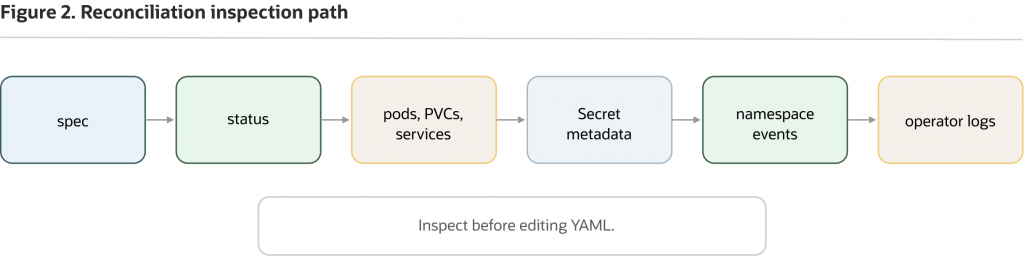
Figure 2: When status does not match expectations, move from the custom resource to related resources, events, and operator logs before changing the manifest.
Start with describe because it puts several views in one place:
kubectl describe singleinstancedatabase freedb-lite-sample
  -n oracle-db-operator-demo
Use this to read the Spec, Status, Conditions, and related events together. This command is often more useful than jumping straight to pod logs because it keeps the database custom resource at the center of the investigation.
Next, inspect related namespace resources:
kubectl get pod,pvc,svc,secret -n oracle-db-operator-demoPods show scheduling, startup, readiness, and image pull behavior. PVCs show whether storage provisioning has succeeded. Services show how the database may be exposed inside the namespace or cluster. Secret metadata confirms that referenced Secret objects exist without revealing their values.
Avoid relying on exact generated pod, PVC, or service names unless you have verified them in your own environment. Operators can change naming patterns across releases, configurations, or reconcile paths.
Events are often the fastest way to see what the cluster is waiting on:
kubectl get events -n oracle-db-operator-demo --sort-by=.metadata.creationTimestampThe Kubernetes events API records time-bound messages about resource activity. For this evaluation, namespace events may show scheduling decisions, PVC provisioning, image pull failures, admission problems, readiness transitions, or reconciliation-related messages.
When status and namespace events do not explain enough, inspect the operator logs if your permissions allow it. In the series setup, the operator runs in oracle-database-operator-system as the deployment oracle-database-operator-controller-manager. If your platform installed the operator with different manifests, an OperatorHub workflow, or a namespace-scoped deployment, adjust the namespace and deployment name before running the log command:
kubectl logs -n oracle-database-operator-system
  deployment/oracle-database-operator-controller-manager
  --all-containers=true
Some readers may not have permission to read operator logs; in that case, the platform team should make controller-side diagnostics available through the approved logging system.
This inspection path keeps troubleshooting disciplined. Start with what was declared. Read what the operator reported. Inspect the resources the cluster created or failed to create. Then use events and logs to classify the issue.
Use mismatches between spec and status to troubleshoot
Most first-run and early evaluation problems are mismatches between what the custom resource declares and what the cluster can actually satisfy. The goal is not to memorize every failure mode. The goal is to classify the mismatch before editing the manifest.
If API discovery fails, start there. When kubectl explain singleinstancedatabase fails, singleinstancedatabases does not appear in API discovery, or applying the manifest fails because the kind is unknown, the database pod is not the first thing to debug. Treat it as an API or schema problem.
kubectl get crds | grep -i 'database.oracle.com'
kubectl api-resources --api-group=database.oracle.com
kubectl get pods -n oracle-database-operator-system
No CRDs means an API registration or installation problem. CRDs present but no running operator pods means an operator runtime problem. If the installed API differs from the examples in this article, confirm the release and schema before changing the manifest.
If the SingleInstanceDatabase exists but no database pod, PVC, or service appears in the namespace, stay close to the custom resource and controller signals:
kubectl describe singleinstancedatabase freedb-lite-sample
  -n oracle-db-operator-demo
kubectl get events -n oracle-db-operator-demo --sort-by=.metadata.creationTimestampIf your permissions and installation layout allow it, inspect the controller-manager logs:
kubectl logs -n oracle-database-operator-system
  deployment/oracle-database-operator-controller-manager
  --all-containers=true
Likely categories include namespace mismatch, operator watch configuration, RBAC, webhook or admission behavior, invalid fields, or a blocked reconcile loop. The operator installation path includes webhooks and RBAC, so these are platform concerns as much as database-resource concerns.
Storage problems usually show up through PVCs and events. If a PVC exists but remains Pending, treat it first as a platform storage issue. The following describe command omits a PVC name intentionally so you can inspect all PVCs in the namespace without relying on generated names.
kubectl get pvc -n oracle-db-operator-demo
kubectl describe pvc -n oracle-db-operator-demo
kubectl get events -n oracle-db-operator-demo --sort-by=.metadata.creationTimestamp
Check whether the requested storage class exists, supports the requested access mode, can dynamically provision volumes, has enough capacity, and is not blocked by quota or CSI driver issues. Let the storage layer explain what it can and cannot satisfy before changing database fields.
Image pull problems usually show up through pod status and namespace events. The following describe command omits a pod name intentionally so you can inspect all pods in the namespace without relying on generated names.
kubectl get pods -n oracle-db-operator-demo
kubectl describe pod -n oracle-db-operator-demo
kubectl get events -n oracle-db-operator-demo --sort-by=.metadata.creationTimestamp
Common causes include registry access, network egress, image name and tag, image pull Secret configuration where required, license acceptance where applicable, and internal mirror policy. Floating tags such as latest-lite are appropriate only for disposable evaluation when platform policy allows them. Retained environments should use approved pinned images or approved internal mirrors.
Secret-reference problems are different: you need to confirm the reference, the object existence, and the expected key without printing values.
kubectl get singleinstancedatabase freedb-lite-sample
  -n oracle-db-operator-demo
  -o jsonpath="{.spec.adminPassword.secretName}{'n'}"
kubectl get secret freedb-admin-secret -n oracle-db-operator-demokubectl describe secret freedb-admin-secret -n oracle-db-operator-demoUse kubectl describe secret only to confirm key names and sizes. Do not print or decode Secret values.
The Secret must exist in the same namespace as the SingleInstanceDatabase, and it must contain the key expected by spec.adminPassword.secretKey. If secretKey is omitted for this v2.1.0 sample, the default key is oracle_pwd. If your platform uses a vault-backed workflow or external Secret controller, the Kubernetes Secret object and expected key still need to be present when the operator expects to read them.
Sometimes status is not enough by itself. If .status.status does not change or kubectl get singleinstancedatabase shows incomplete columns, compare multiple signals instead of diagnosing from one stale field.
kubectl get singleinstancedatabase freedb-lite-sample
  -n oracle-db-operator-demo
  -o jsonpath='generation={.metadata.generation}{"n"}'
kubectl get singleinstancedatabase freedb-lite-sample
-n oracle-db-operator-demo
-o jsonpath='{range .status.conditions[*]}{.type}{"t"}{.status}{"t"}{.observedGeneration}{"t"}{.reason}{"t"}{.message}{"n"}{end}'kubectl describe singleinstancedatabase freedb-lite-sample
-n oracle-db-operator-demokubectl get events -n oracle-db-operator-demo --sort-by=.metadata.creationTimestampIf your permissions and installation layout allow it, inspect the controller-manager logs:
kubectl logs -n oracle-database-operator-system
  deployment/oracle-database-operator-controller-manager
  --all-containers=true
Compare generation, status, conditions, events, related resources, and operator logs. If the installed CRD differs from your runbook, update the runbook to match the installed release instead of forcing the cluster to match stale assumptions.
Finally, remember that a running pod is not the same as a usable database dependency. If Kubernetes shows a running pod but the application or DBA cannot use the database as expected, return to the database custom resource and events:
kubectl get singleinstancedatabase freedb-lite-sample
  -n oracle-db-operator-demo
  -o jsonpath="{.status.status}{'n'}"
kubectl describe singleinstancedatabase freedb-lite-sample
-n oracle-db-operator-demokubectl get events -n oracle-db-operator-demo --sort-by=.metadata.creationTimestampUse operator status, events, and DBA-level validation before declaring the database usable for an application dependency. Kubernetes readiness is one signal. Database readiness, connection policy, credentials, service exposure, backup posture, and application behavior need their own review.
Decide what platform teams, DBAs, and developers each own
The custom resource model improves visibility only when teams agree on ownership. The operator can reconcile supported Kubernetes resources, but it does not remove platform ownership, DBA review, or application dependency management.
Platform engineers own the Kubernetes operating surface around the resource. That includes operator installation and upgrades, cert-manager and webhook readiness where applicable, namespace boundaries, RBAC, admission policy, storage classes, CSI drivers, reclaim policy, quota, capacity, registry access, image mirroring, image pinning, pull Secrets, logging, monitoring hooks, event access, alerting integration, and GitOps or policy controls for changing spec.
DBAs own the database interpretation of the resource. That includes database configuration review, edition and image review from a database perspective, recovery expectations, database-level validation after the operator reports readiness, operational procedures, backup and restore expectations, patching and maintenance practices, and decisions around Oracle Database features when used.
Developers need a clean contract from both groups. They need approved connection details, clear service behavior, environment boundaries, readiness signals they can safely depend on, and escalation paths when storage, image, Secret, or database initialization issues appear. They also need to know whether they are allowed to edit the custom resource directly or whether changes must flow through a platform workflow.
In most shared environments, direct developer edits to spec should be controlled. A spec change can alter image source, persistence settings, service behavior, or database lifecycle intent. That is a stronger action than changing an application ConfigMap. Use GitOps, admission controls, RBAC, and review workflows that match the risk of the environment.
A useful ownership review starts with the fields you inspected earlier. spec.image.pullFrom belongs in the image governance conversation. spec.persistence.storageClass belongs in the storage platform conversation. spec.adminPassword.secretName and spec.adminPassword.secretKey belong in the secret-management conversation. .status.status and connect strings belong in the readiness and application-dependency conversation. Events and logs belong in the observability and support conversation.
That is why reading the custom resource carefully matters. It turns abstract ownership questions into specific fields, resources, and signals.
What this model does not prove yet
Understanding the custom resource contract does not prove production readiness. It proves that you can inspect declared intent, operator-reported state, and reconciliation evidence in a non-production evaluation.
A healthy custom resource is useful evaluation evidence, not production approval. It does not prove backup readiness, restore readiness, high availability, disaster recovery, security compliance, performance, upgrade safety, monitoring completeness, alerting quality, support readiness, application behavior under failure, or policy compliance across namespaces and clusters.
That boundary matters because operators can make stateful systems appear deceptively simple. A custom resource exists. A pod is running. A PVC is bound. A status field says Healthy. Those are meaningful signals, but production operation depends on many layers outside this article: storage engineering, backup and recovery testing, network policy, access control, patch cadence, observability, incident response, and DBA runbooks.
This is also where alternatives remain relevant. If your team mainly wants to consume an Oracle Database endpoint without managing the Kubernetes operating surface described here, evaluate managed Oracle Database service options separately from this operator-based model. If your team needs Oracle Database lifecycle intent represented, reviewed, reconciled, and inspected through Kubernetes custom resources, the operator model is worth evaluating further.
Many database operators follow the same broad Kubernetes pattern: a custom resource declares desired database state, and a controller reconciles related resources. The important difference is the database contract. PostgreSQL and MySQL operators are worth evaluating when those engines fit the application. Oracle Database Operator for Kubernetes is most relevant when Oracle Database is the required engine and the team wants Oracle Database lifecycle intent represented through Kubernetes resources.
Continue to platform readiness
Once you can read the custom resource contract, the next question is whether your platform can standardize the dependencies behind it.
You have already seen those dependencies in the SingleInstanceDatabase object and the reconciliation trail: storage classes, image sources, Secret references and keys, namespace boundaries, RBAC, admission policy, events, logs, and team ownership. Those are not side details. They are the platform substrate that decides whether the operator model is repeatable.
The next step is to evaluate platform readiness for Oracle Database Operator for Kubernetes: storage, image governance, Secret handling, namespace design, RBAC, admission policy, logging, monitoring, and the review process around spec changes. Once those foundations are clear, the operator model becomes much easier to assess as a repeatable way to manage Oracle Database lifecycle intent in Kubernetes.