
Oracle Data Science Agent is now generally available for Oracle Autonomous AI Database Serverless 26ai, bringing a modern conversational experience to analytics and machine learning directly inside the database.
With Data Science Agent, you can profile data, prepare features, train models, evaluate results, and generate inference SQL through a guided chat experience in Oracle Machine Learning. Because the work runs in-database, you can build machine learning workflows where your data already lives, helping reduce data movement, simplify governance, and accelerate time to insight.
Whether you are a business analyst exploring data, a data scientist iterating on models, or an application developer adding predictive capabilities to an application, the Data Science Agent helps you move from business question to machine learning result with more guidance, transparency, and control.
In short, Data Science Agent gives you a conversational, governed, and high-performance way to profile data, engineer features, and build models—without moving data out of Oracle Autonomous AI Database.
What the Data Science Agent does
Oracle Data Science Agent is a conversational assistant embedded in Oracle Autonomous AI Database through Oracle Machine Learning. You interact with it using natural language in a chat-style interface, and the agent helps guide or perform data science tasks across the machine learning lifecycle.
You can ask Data Science Agent to:
- Discover and profile relevant datasets
- Assess completeness and distributions
- Wrangle data and prepare it for modeling
- Compute correlations and identify useful predictors
- Perform feature selection and feature engineering
- Train in-database classification and regression models
- Evaluate and compare model performance
- Explain metrics and results in context
- Generate SQL for scoring and inferencing
- Rank predictions, such as prospects most likely to respond to a campaign
The agent maintains conversational context across turns, so you can build naturally on previous work. For example, after profiling a table, you can ask the agent to filter that same dataset, engineer features, train a model, evaluate the results, and generate inference SQL using the training data you prepared earlier in the conversation.
Data Science Agent can use in-database classification, regression, anomaly detection, and clustering algorithms, including XGBoost in 26ai, Support Vector Machine, Generalized Linear Model, and others.
Why native in-database data science matters
Data science projects often slow down because teams switch between disconnected tools, export data to separate environments, repeat setup steps, and manually stitch together profiling, preparation, modeling, and deployment tasks. These handoffs can increase cost, create governance challenges, and make results harder to reproduce.
Data Science Agent helps address these challenges by bringing conversational data science directly into Oracle Autonomous AI Database. You can work with data in place, use Oracle Machine Learning’s in-database capabilities, and keep analytic workflows closer to governed enterprise data.
This matters because you can:
- Reduce unnecessary data movement by working where the data resides
- Shorten repetitive workflows such as profiling, feature engineering, model training, and evaluation
- Improve transparency with action logs, generated SQL, execution details, and persistent conversation history
- Support reproducibility by preserving the context and steps behind analytic decisions
- Help less-experienced users learn through guided explanations while allowing experts to delegate repeatable tasks
The agent can also work with remote sources exposed through views in your schema, including sources accessed through database links, subject to your privileges and configuration. This gives teams a way to analyze governed data across environments while still operating through controlled Oracle Autonomous AI Database access patterns.
How the conversational workflow works
Data Science Agent is designed to adapt to the way you want to work. You can interact step by step, ask questions, inspect intermediate outputs, and refine your approach as you go. You can also delegate more of the workflow when you are confident in the task you want performed.
For example, you may start interactively by asking the agent to identify relevant data, explain distributions, recommend preparation steps, or compare modeling options. After validating the approach, you can ask it to perform a larger sequence of steps, such as:
“Perform the necessary steps end to end and give me the final result.”
This flexibility lets you stay in control while still using the agent to automate repeatable work. A good practice is to begin with guided interaction for important steps such as data preparation, modeling, scoring, and interpretation, then delegate well-understood workflows for faster iteration.
If model training or other operation takes significant time, long-running jobs can be performed asynchronously so you can continue working while they complete.
Governance, traceability, and security
Data Science Agent is built for governed enterprise data science. It operates within your Oracle Autonomous AI Database privileges, so access to schemas, tables, views, and models is controlled by your role and permissions.
To keep activities focused and improve accuracy, you can scope the database objects available to the agent using the Conversation Objects catalog. Registering the relevant tables, views, and mining models helps the agent focus on the objects that matter for your task.
If you are not sure which objects to use, you can ask the agent to explore available data within your authorized scope. For example:
“What data do I have about bank marketing campaigns in my database?”
Traceability is built into the experience. Logs, generated SQL snippets, execution details, and persistent conversation history help you understand what the agent did, reproduce workflows, onboard teammates, and support audit requirements.
The agent is also designed with efficiency and cost awareness in mind, helping minimize unnecessary token usage and computation as it works through analytic tasks.
How it works under the hood
The Data Science Agent uses the Oracle Select AI Agent framework for orchestration. Modular tools perform specific tasks such as profiling, data preparation, and model training. A curated prompt library provides domain guidance, response schemas structure outputs for reliable rendering in the user interface, and SQL generation is powered by Oracle Select AI.
This architecture allows the agent to translate conversational requests into governed, executable in-database actions while preserving transparency through logs, generated SQL, and execution details.
As with Oracle Select AI, you can choose from a range of AI providers and large language models, including third-party AI providers, OCI Generative AI service, or models you host privately, depending on your configuration. The documentation recommends LLMs that are known to produce better results.
Example: finding prospects for a term deposit campaign
Suppose your team is preparing a term deposit marketing campaign. You want to understand what customer and campaign data is available, identify the most useful predictors, build a classification model, and score prospects based on their likelihood to subscribe.
First, access the Oracle Machine Learning user interface as shown in Figure 1 by clicking the Data Science Agent icon. This brings you to the conversation listing page, where you can open existing conversations or create new ones, as shown in Figure 2.
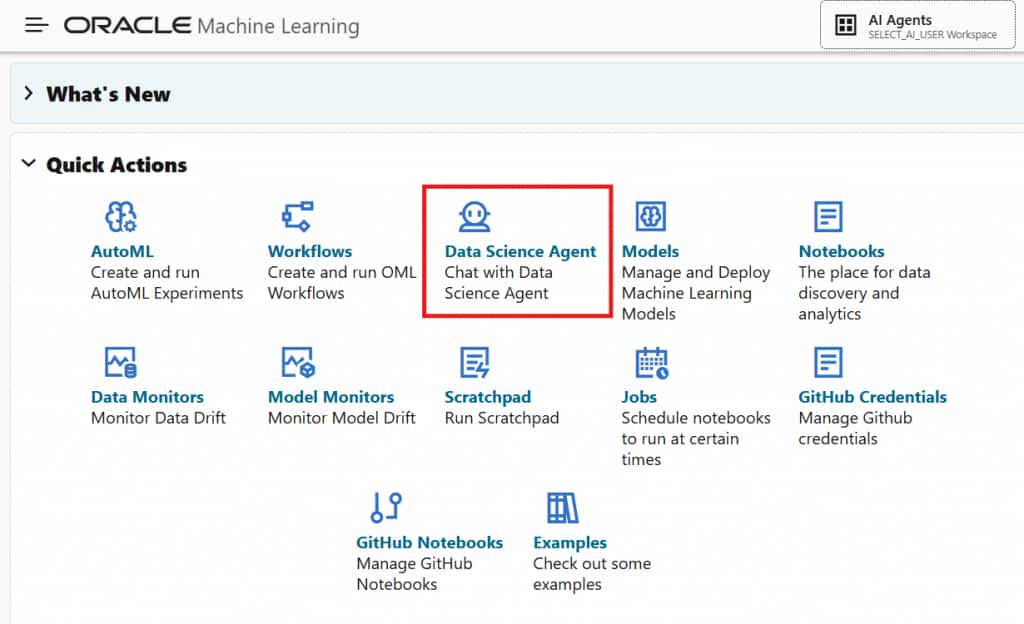
Figure 1: Access Data Science Agent in Oracle Machine Learning user interface
When creating a new conversation, you specify an AI profile, which includes your AI provider, the LLM to use, and other attributes that affect, for example, the behavior of your LLM. This AI profile may be created using the DBMS_CLOUD_AI package, Select AI for Python API, the latest Ask Oracle Select AI Chatbot, Autonomous AI Database Data Studio Settings, or the Oracle AI Database Private Agent Factory platform.
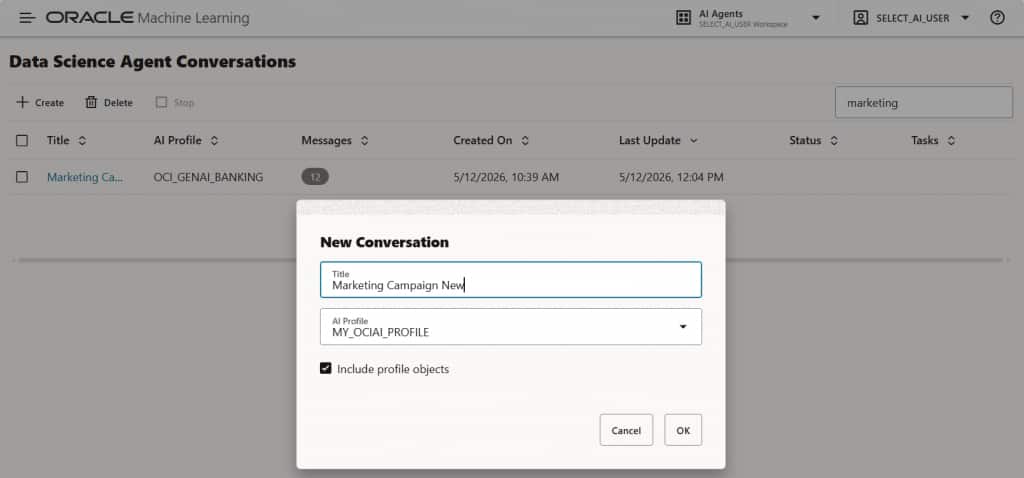
Figure 2: Create a new conversation from the listing page
Your new conversation provides you with some initial tips for getting started, as shown in Figure 3.
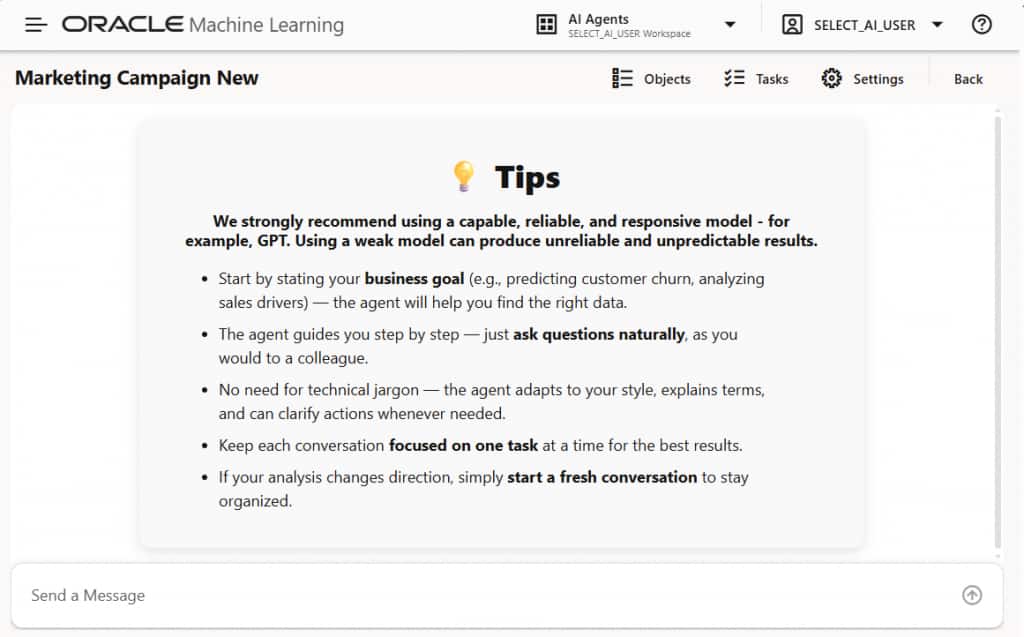
Figure 3: Your new conversation has some tips to help you get started
Then, you might begin with a prompt such as:
“We’re launching a term deposit campaign. Help me find relevant data about clients, previous marketing efforts, and potential prospects across my available catalogs.”
Data Science Agent can respond with available tables, relevant columns, and suggestions for how to use the data, as shown in Figure 4. It may identify customer attributes, past campaign outcomes, contact history, and other candidate predictors.
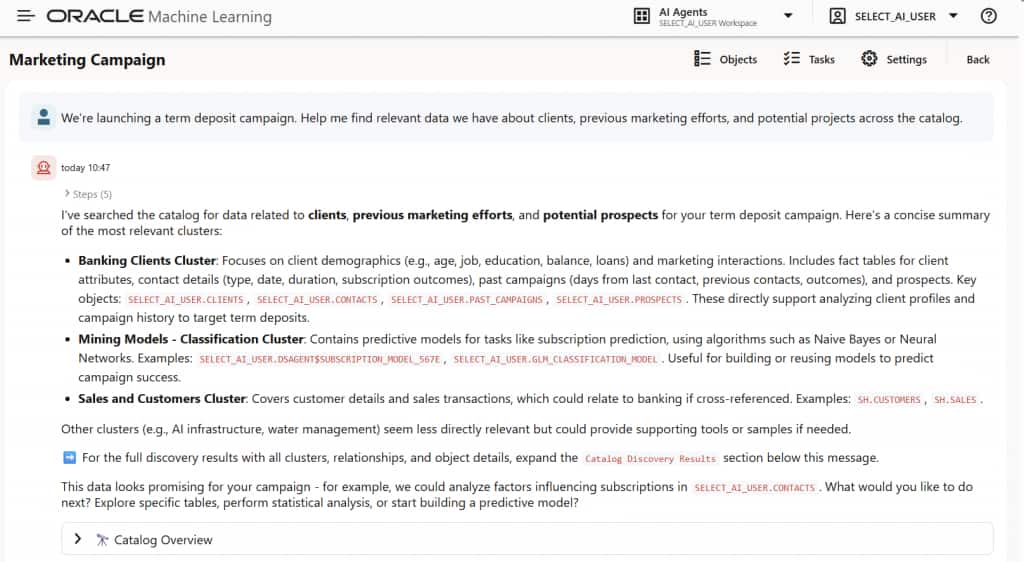
Figure 4: State your business problem to Oracle Data Science Agent
Next, you can ask the agent to profile the data and explain what it finds. Built-in visualizations can help you understand distributions, missing values, and relationships among variables, as shown in Figure 5.
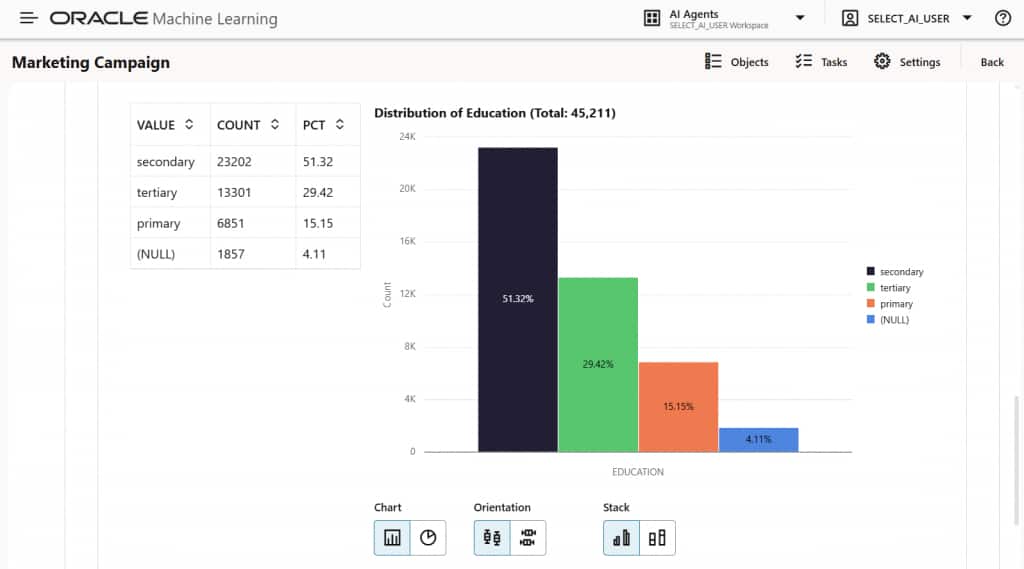
Figure 5: View data insights generated by Oracle Data Science Agent
You can then ask the agent to build a classification model, shown in Figure 6, and predict the top prospects most likely to subscribe, shown in Figure 7. Data Science Agent can train an in-database model, present evaluation metrics such as accuracy and a confusion matrix, explain the results, and provide SQL you can use for inferencing. It can also return prospect identifiers ranked by predicted probability.
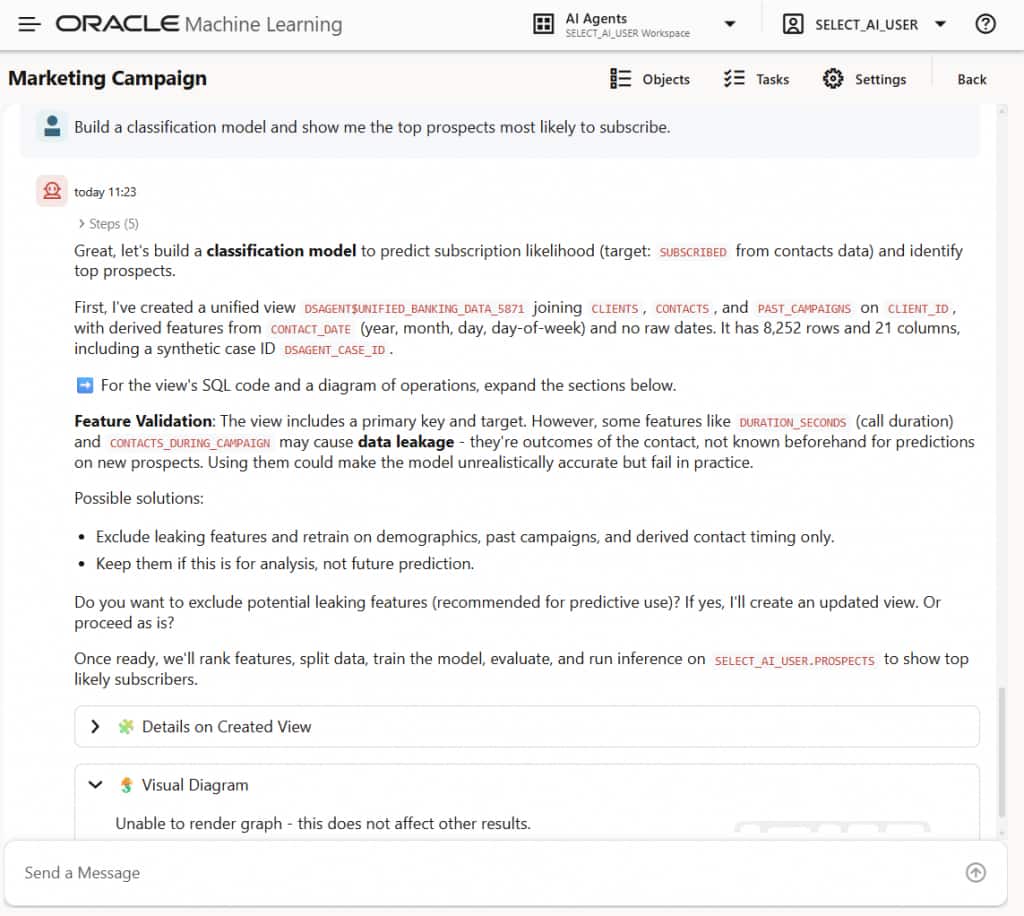
Figure 6: Ask Oracle Data Science Agent to build and use an in-database machine learning model
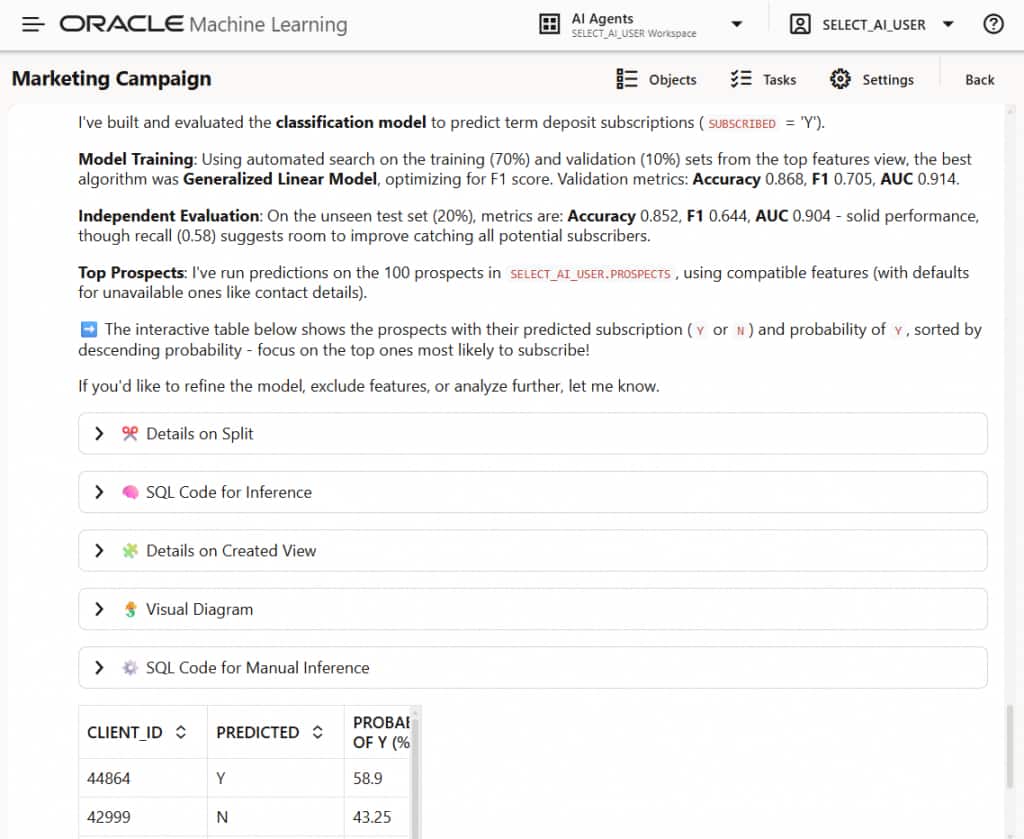
Figure 7: Review the performance of the classification model
SQL code for inferencing is also available, shown in Figure 8, to help application developers quickly incorporate machine learning results into applications.
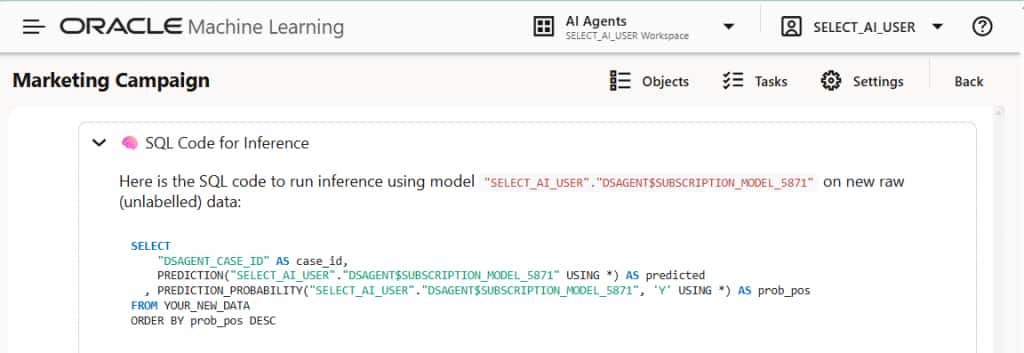
Figure 8: View the SQL query you can use for inferencing directly in the database
This flow shows how you can move from a business question to data discovery, profiling, modeling, evaluation, and scoring in a single conversational workflow inside Oracle Autonomous AI Database.
Getting started
To use the Data Science Agent, you need Oracle Autonomous AI Database Serverless 26ai with Oracle Machine Learning enabled. You also need access to the relevant schemas and objects based on your role and privileges.
Then,
- Configure your LLM credentials with
DBMS_CLOUD. - Define your LLM settings in an AI profile using Oracle Select AI. As noted above, you can create AI profiles using the DBMS_CLOUD_AI package from PL/SQL, the Select AI for Python SDK, the Ask Oracle Select AI Chatbot, Autonomous AI Database Data Studio Settings, or the Oracle Private Agent Factory no-code platform.
- Open the Oracle Machine Learning UI console.
- Launch Data Science Agent from the Data Science Agent button or menu option.
- Register relevant tables, views, and models in the Conversation Objects Catalog, or ask the agent to help identify relevant data within your authorized scope.
- Start a conversation and tell the agent your objective and how much guidance or autonomy you want.
As you adopt Oracle Data Science Agent, consider these best practices:
- Begin interactively to validate assumptions, review generated steps, and refine prompts.
- Delegate repeatable or well-understood tasks once you are confident in the workflow.
- Keep the Conversation Objects Catalog tightly scoped to improve accuracy and efficiency.
- Start a new conversation when you want to reset context and keep the agent focused.
- Review logs, generated SQL, and execution details to reinforce transparency and reproducibility.
- Use conversation history to resume projects, onboard teammates, and document analytic decisions.
Be empowered with Oracle Data Science Agent
Oracle Data Science Agent brings conversational analytics and machine learning to Oracle Autonomous AI Database Serverless, helping you explore data, prepare features, build models, evaluate results, and generate SQL for inference without moving data out of the database.
You can use the LLM of your choice, whether from a third-party AI provider, OCI Generative AI service, or one you host privately, while keeping the machine learning workflow governed by your Oracle Autonomous AI Database privileges and configuration. However, there are a few recommended models that have been shown to deliver a better experience and result.
Try Oracle Data Science Agent and start building conversational, in-database machine learning workflows in Oracle Autonomous AI Database 26ai.
Resources
- Data Science Agent User’s Guide
- Try Data Science Agent in Autonomous AI Database
- Oracle Machine Learning documentation
- Select AI documentation
- Select AI Agent documentation