
This is article 7 of 8 in my Oracle AI Database Skills series.
Key Takeaways
- The safety net is the process, not the model. Discovery before proposal, preview before apply, session-scoped verification before broad exposure, and a prepared rollback path — these steps protect against risk regardless of how confident the assistant sounds.
- Invisible indexes let you test the impact of a change in one session before committing it to all queries. A change that can be reversed with a single statement is the safest kind to ship.
- Liquibase
updateSQLand Flyway dry-run output play the same role asSHOWSQLfor migrations: they show exactly what SQL would execute before anything changes, giving a human an explicit approval moment. DBMS_REDEFINITIONand Edition-Based Redefinition reduce blast radius for structural and code changes by keeping the previous version available as a rollback window through the entire cutover period.
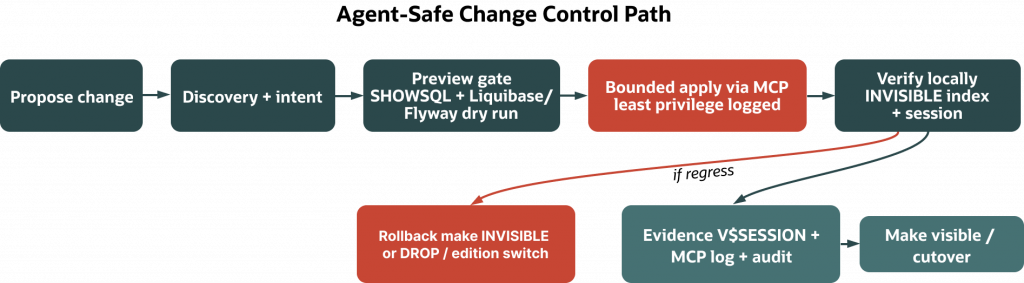
Change is where ambiguity turns into outages. If you let an assistant propose schema or index changes on Oracle Database, slow the work down just enough to make it safe. The pattern across this series is route → act → trust: route proposals through Oracle Database Skills so the assistant performs discovery and establishes intent; act only through a bounded, inspectable MCP surface (SQLcl MCP, where MCP is Model Context Protocol—locally, or a managed MCP in Autonomous AI Database when available); and deliver changes with Oracle‑native online and editioning mechanics, inside a migration workflow that’s idempotent on rerun and leaves a trail you can prove later.
This piece shows that posture in motion. We’ll take one additive change an assistant proposes, preview it, apply it safely, verify it helped, and capture the evidence—with a rollback ready if it didn’t.
Version scope and expectations
Most examples target Oracle Database 19c and later. We rely on invisible indexes and session testing via the OPTIMIZER_USE_INVISIBLE_INDEXES parameter (settable at the session or system level) as documented in the 19c Database Reference. For index maintenance, we use online index rebuilds where the 19c SQL Language Reference documents them for your index type and release (ALTER INDEX ... REBUILD ONLINE). For structural table changes under DML load, we point to DBMS_REDEFINITION (19c PL/SQL Reference). For view/package evolution, we use Edition‑Based Redefinition (EBR). Migration previews use Liquibase or Flyway state tables and dry‑run modes. Evidence and rollback rely on session tagging, SQLcl MCP logging, and (optionally) Unified Auditing.
If you’re on Oracle Database 26ai or Autonomous AI Database, you can also evolve vector indexes with a build‑new → validate → drop‑old pattern and measure recall/latency with DBMS_VECTOR. Always confirm exact syntax and capabilities for your Release Update (RU) and service tier.
- ALTER INDEX (ONLINE for REBUILD): 19c SQL Language Reference
- OPTIMIZER_USE_INVISIBLE_INDEXES: 19c Database Reference
- Managing invisible indexes: 19c Admin Guide
- DBMS_REDEFINITION: 19c PL/SQL Reference
- CREATE VECTOR INDEX, VECTOR_DISTANCE, DBMS_VECTOR: 26ai docs
- SQLcl MCP restrict levels, tools, monitoring: 25.x SQLcl docs
- Liquibase and Flyway: vendor docs
Why agent‑safe change matters most
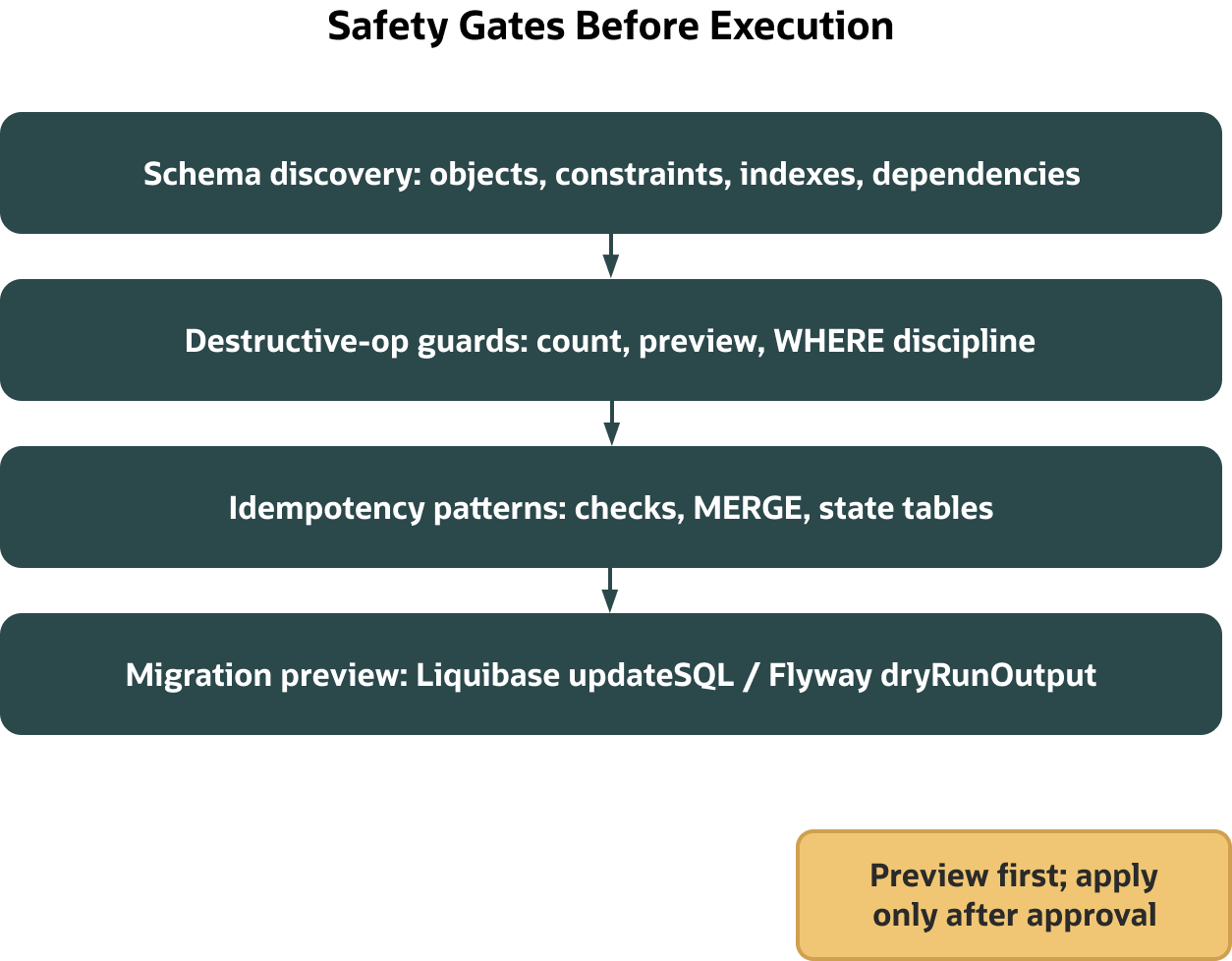
Assistants are good at pattern matching; they are bad at implicit context. Database change has a lot of implicit context: constraints you can’t see from one table, write paths you forgot exist, and optimizer behavior that swings when you add the “perfect” index. The way to make an assistant useful here is to force it to surface what it thinks it knows before it acts. That’s what Oracle Database Skills are for: schema discovery, intent disambiguation, destructive‑operation guards, and idempotency patterns live right next to delivery mechanics—migrations, online operations, EBR, and testing—so the work becomes a sequence you can reason about, not a free‑form prompt.
The assistant can still draft the change. Your job becomes review and control: you see the SQL (Article 5’s SHOWSQL discipline), you preview the migration (dry run), you apply through a constrained channel (MCP), and you verify impact before broad exposure (invisible index testing, or EBR for code). When that loop is the norm, teams stop arguing about whether to “let the model write DDL” and start shipping low‑risk improvements steadily.
Safety before execution: discovery, intent, and rerunnable SQL
Change work starts with a map. If the assistant suggests an index for DOCUMENTS, its first step isn’t to create it; it is to list what already exists and establish the blast radius.
Inventory what’s there (use USER_* views in‑schema; ALL_*/DBA_* if querying across schemas):
SELECT index_name, visibility, status
FROM   user_indexes
WHERE  table_name = 'DOCUMENTS';
Also list indexed columns so you don’t reinvent an existing index:
SELECT index_name, column_name, column_position
FROM   user_ind_columns
WHERE  table_name = 'DOCUMENTS'
ORDER  BY index_name, column_position;
If the assistant claims “add an index to speed source and published date filters,” make it specify the target predicates and expected plan effect. If it can’t state the WHERE clause and the rows accessed in plain terms, it doesn’t understand the workload yet. Article 6 showed why this matters: you don’t expose a new index broadly until you’ve seen it influence a plan the way you expect.
For DML, destructive‑operation guards are non‑negotiable. Updates and deletes happen only with a WHERE clause you can count. Preview the scope:
SELECT COUNT(*)
FROM   documents
WHERE  source = 'kb'
AND    published >= DATE '2025-01-01';
Oracle doesn’t enforce WHERE clauses on UPDATE/DELETE; enforce guardrails in tooling (preview gates) and code review.
Reruns should be safe by default. On the data side, MERGE turns brittle “insert then update” sequences into idempotent steps:
MERGE INTO config t
USING (SELECT 'max_connections' AS key, '100' AS value FROM dual) s
ON (t.key = s.key)
WHEN MATCHED THEN UPDATE SET t.value = s.value
WHEN NOT MATCHED THEN INSERT (key, value) VALUES (s.key, s.value);
On the DDL side, migration tools carry the idempotency for you with state tables and checksums. Liquibase tracks applied changeSets in DATABASECHANGELOG and coordinates with DATABASECHANGELOGLOCK, and Flyway uses flyway_schema_history. Crucially, both can emit exactly what they would execute. Liquibase’s updateSQL and Flyway’s dryRunOutput are the human gate that pairs well with Article 5’s SHOWSQL: you inspect the proposed SQL first, then approve the apply.
Preview‑gate example (Liquibase):
# Print the SQL that would run, without changing the database
liquibase --changelog-file=changelog.xml updateSQL

# Example output (truncated)
-- Changeset 20250108-idx-docs:1
CREATE INDEX docs_src_pub_idx ON documents(source, published) INVISIBLE;
-- Changeset 20250108-config-merge:2
MERGE INTO config ...
Liquibase prints the SQL it would execute against the current database state, based on DATABASECHANGELOG and checksums.
Alternatively, with Flyway (Teams/Enterprise for dry‑run variants):
# Generate a dry-run script of pending migrations
flyway -locations=filesystem:sql -dryRunOutput=preview.sql migrate
dryRunOutput is not available in Community; use Teams/Enterprise for dry‑run script generation.
From preview to apply: bounded MCP, not ad‑hoc credentials
Once you’ve reviewed a change, you still need a controlled way to act. That’s the MCP layer: the SQLcl MCP Server locally, or a managed MCP experience in Autonomous AI Database if your tier and RU expose one.
SQLcl MCP exposes a deliberately small tool surface—connect, disconnect, list saved connections, run SQL—over a stdio server. In the 25.3 docs, Level 4 is the most restrictive. Check your installed version’s “Restrict levels” page for the default, and keep the highest level practical in shared environments. The recommended posture is to use pre‑saved least‑privilege connections; restrict levels can be configured to disallow ad‑hoc credentials and keep the tool surface small. The server tags sessions (V$SESSION.MODULE and .ACTION) and writes activity to DBTOOLS$MCP_LOG once used, so DBAs can see who did what and when. This is what “bounded action” looks like: the assistant can only do the few things the server allows, with least privilege and a record behind it. See “Using the SQLcl MCP Server,” “Restrict levels,” and “Monitoring” in the SQLcl docs for the precise tools, defaults, and logs for your version.
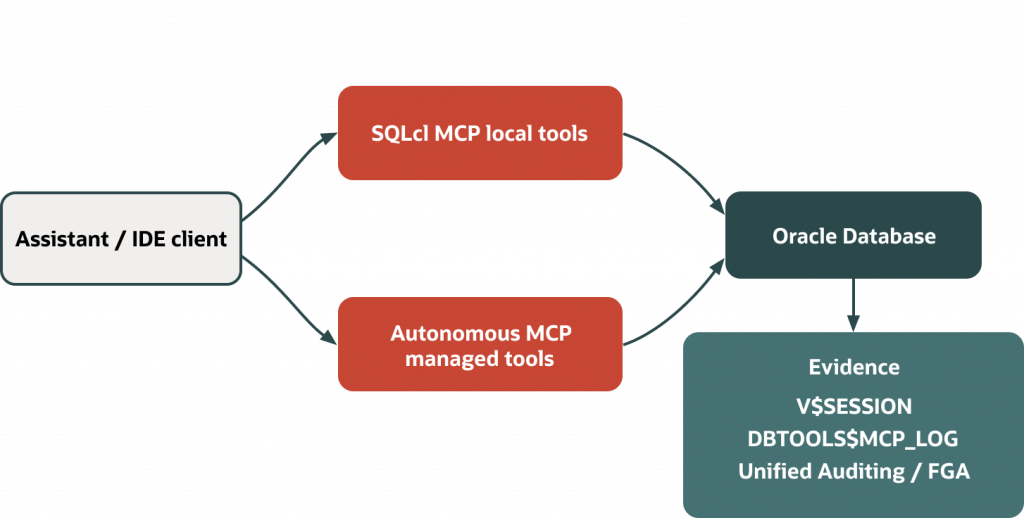
If your Autonomous AI Database service and RU expose a managed MCP endpoint (see your service’s Help Center “Use MCP Server” page), you can integrate assistant actions with database identity, network controls, and auditing. Capabilities and APIs vary by service tier and RU; verify availability and procedures in your tenancy documentation. If a managed MCP endpoint isn’t available for your tier/RU, use the SQLcl MCP Server approach above.
Reduce blast radius with Oracle’s online mechanics
Not every change needs a window. Oracle has first‑party features for evolving structures while the system stays available.
Structural changes under write load use DBMS_REDEFINITION. The flow is predictable—eligibility check, start, copy dependent objects and constraints, sync the interim table, finish, and clean up—and the documentation spells out object and LOB rules per release (19c PL/SQL Reference).
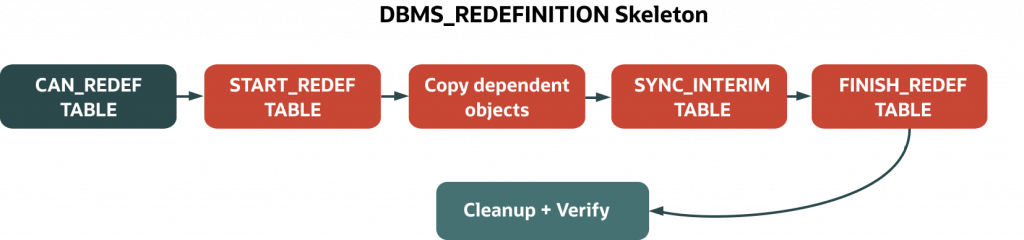
A compact, typical plan:
- Eligibility (choose key strategy; use
CONS_USE_PKwhen a primary key exists, orCONS_USE_ROWIDotherwise—confirm constraints and object types supported in your version):
BEGIN
  DBMS_REDEFINITION.CAN_REDEF_TABLE(
    uname        => 'APP_OWNER',
    tname        => 'ORDERS',
    options_flag => DBMS_REDEFINITION.CONS_USE_PK
  );
END;
/- Create interim table with desired structure (required unless supplying a column mapping to
START_REDEF_TABLE):
-- Example: like-for-like copy you will later adjust as needed
CREATE TABLE app_owner.orders_int
AS SELECT * FROM app_owner.orders WHERE 1=0;- Start:
BEGIN
  DBMS_REDEFINITION.START_REDEF_TABLE(
    uname     => 'APP_OWNER',
    tname     => 'ORDERS',
    int_table => 'ORDERS_INT'
    -- , col_mapping => '...'  -- use when structures differ
  );
END;
/- Copy dependents (constraints, triggers, indexes, grants) and track errors:
DECLARE
  v_errs PLS_INTEGER;
BEGIN
  DBMS_REDEFINITION.COPY_TABLE_DEPENDENTS(
    uname            => 'APP_OWNER',
    tname            => 'ORDERS',
    int_table        => 'ORDERS_INT',
    num_errors       => v_errs,
    copy_triggers    => TRUE,
    copy_constraints => TRUE,
    copy_indexes     => TRUE,
    copy_statistics  => TRUE
  );
END;
/- Sync:
BEGIN
  DBMS_REDEFINITION.SYNC_INTERIM_TABLE('APP_OWNER', 'ORDERS');
END;
/- Finish and swap:
BEGIN
  DBMS_REDEFINITION.FINISH_REDEF_TABLE('APP_OWNER', 'ORDERS');
END;
/- Cleanup: reconcile stats/grants, then drop interim artifacts as appropriate.
LOBs, materialized view logs, row movement, and editioning interactions have version‑specific rules – confirm them in your release documentation before use.
When your change is in editioned code rather than the table itself, Edition‑Based Redefinition lets you run two versions at once and cut over on your terms. Tables are not editioned, so the safe pattern is to shield them behind editioning views and synonyms, evolve the views or packages in a child edition, test in that edition, then switch references.
Prerequisites (typically applied by a DBA):
- System privileges:
CREATE ANY EDITION(to create editions),DROP ANY EDITION(to retire), and the ability toALTER USER ... ENABLE EDITIONS. - Object privileges in the target schema to create editioning views and editioned synonyms.
Build‑plan: EBR cutover (compact)

- Enable editions for your user:
ALTER USER app_owner ENABLE EDITIONS;- In ORA$BASE (or your current default edition), create an editioning view to shield the underlying table. The view name is editioned; the table is not:
CREATE EDITIONING VIEW ev_orders AS
SELECT order_id, customer_id, order_ts, status
FROM orders;- Create a child edition:
CREATE EDITION app_v2 AS CHILD OF ORA$BASE;- Test in the child edition and evolve the API surface:
ALTER SESSION SET EDITION = app_v2;

-- Evolve API in the child edition (example: add a computed projection)
CREATE OR REPLACE EDITIONING VIEW ev_orders AS
SELECT order_id,
       customer_id,
       order_ts,
       status,
       CASE WHEN status = 'CANCELLED' THEN 1 ELSE 0 END AS is_cancelled
FROM orders;- Cutover: change which edition clients use (via connection‑level edition, services, or app routing). Keep ORA$BASE as a rollback window.
- Rollback: switch sessions back to the previous edition while you investigate; retire the old edition once stable.
EBR timeline

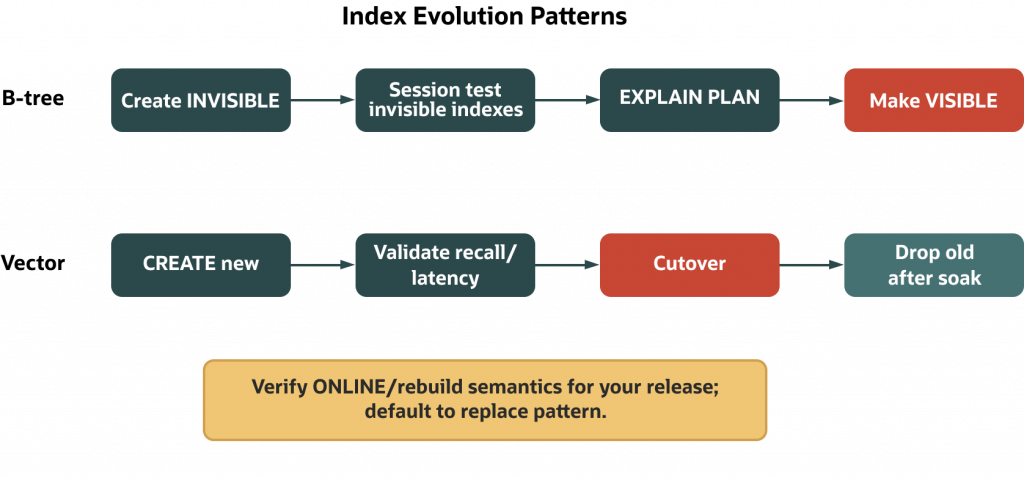
Indexes get two useful mechanics. First, invisible indexes let you test plan influence without affecting other sessions. You can create a new index INVISIBLE or set an existing index invisible, then in your session enable it:
ALTER SESSION SET optimizer_use_invisible_indexes = TRUE;If plans improve (verified via EXPLAIN PLAN and DBMS_XPLAN, and ideally timed execution), you can make the index visible for everyone. Second, ALTER INDEX ... REBUILD ONLINE is documented in 19c for supported index types, letting DML continue during maintenance with some restrictions. Note the careful wording: in 19c the ONLINE clause is documented for REBUILD; do not assume CREATE INDEX ONLINE for B‑tree indexes unless your exact release and index type say so.
The same mindset for vector and relational indexes
Oracle Database 26ai adds native vector indexes—HNSW (Hierarchical Navigable Small World) and IVF (Inverted File)—and vector distance operators. The safe evolution pattern is the same as for relational indexes: build a tuned index in parallel, validate it with representative queries, then drop the old one after a soak period.
-- Check your exact RU/service tier for required/optional clauses and defaults.
-- HNSW example (common defaults shown; tune per workload)
CREATE VECTOR INDEX docs_hnsw_new
ON documents(embedding)
ORGANIZATION HNSW
DISTANCE COSINE;

-- IVF example (parameter defaults vary by RU)
CREATE VECTOR INDEX docs_ivf_new
ON documents(embedding)
ORGANIZATION IVF
DISTANCE COSINE;
If your RU requires additional parameters (e.g., neighborhood or partition knobs), supply them as documented; prefer a build‑new → validate → drop‑old evolution unless your docs explicitly state online/rebuild semantics. Validate using workload queries or DBMS_VECTOR advisers/accuracy checks, watching both recall and latency.
Proving what happened—and preparing to undo it
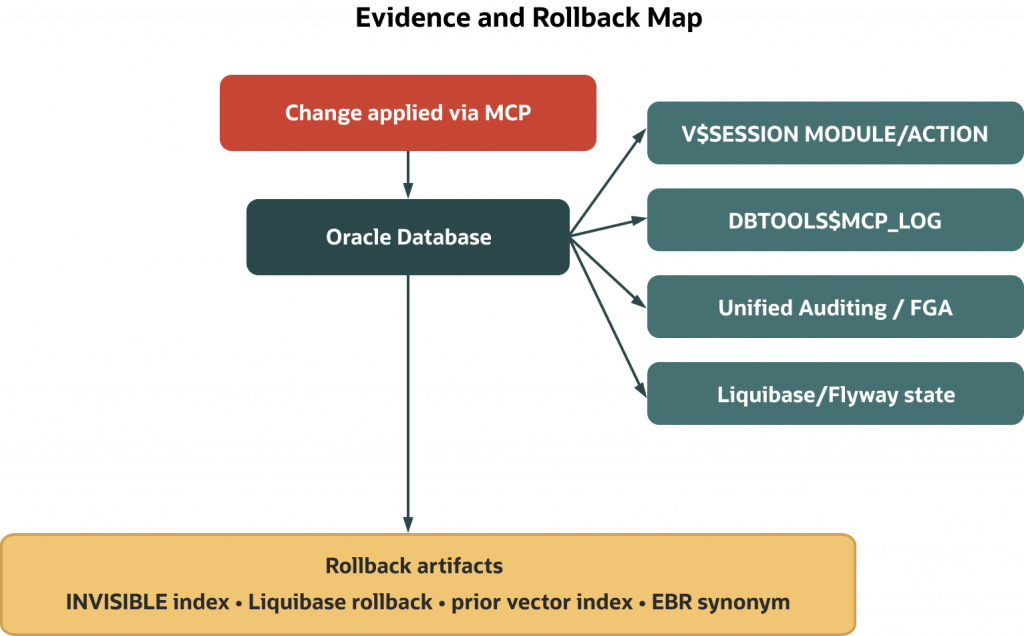
If an assistant participates in change, you need clean answers to who did what and how to reverse it. Start by tagging sessions at the application level:
BEGIN
  DBMS_APPLICATION_INFO.SET_MODULE('mcp-agent','index-additive-change');
END;
/
DBAs can then look in V$SESSION for that module/action pair, and SQLcl MCP adds its own evidence in DBTOOLS$MCP_LOG with each tool‑mediated request. With Unified Auditing enabled, you can go further: define policies for specific DDL or DML and query UNIFIED_AUDIT_TRAIL to show who executed which statement and when. Access to dynamic performance views or audit trails depends on privileges; if your role is narrower, MCP logs still give you a reliable record. If you lack access to V$SESSION, ask a DBA to expose a filtered view you can query.
Rollback should be proportional to the change. For an index, the fastest backout is to mark it invisible; the hard backout is to drop it. For redefinition or EBR, the rollback is to keep the original structure or edition until final cutover and switch back if something misbehaves. For migrations, Liquibase can roll back by tag/changeSet/date when you’ve authored rollbacks (for supported change types); Flyway supports undo with authored scripts (Teams/Enterprise editions). The operative word is “authored”: write the backout path when you write the forward path.
A quick Unified Auditing check (if enabled and you have privileges):
SELECT event_timestamp, dbusername, action_name, object_schema, object_name, sql_text
FROM   unified_audit_trail
WHERE  action_name IN ('CREATE INDEX','ALTER INDEX','DROP INDEX')
AND    object_schema = 'APP_OWNER'
ORDER  BY event_timestamp DESC
FETCH FIRST 10 ROWS ONLY;
Mini‑demo: propose, review, apply, verify, prove
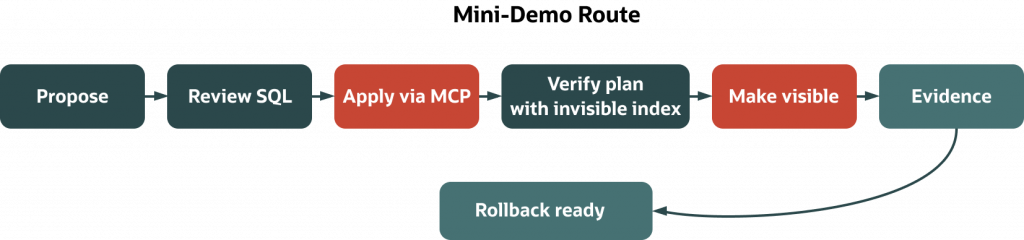
Let’s run one small, additive change that an assistant proposes. We’ll add a composite index to speed a common filter on DOCUMENTS. The mechanics are deliberately conservative: INVISIBLE first, session‑level test, then visible or back out.
Prerequisites for this demo:
- Oracle Database 19c or later.
- Privileges:
CREATE INDEXonDOCUMENTSowner;ALTER SESSION;EXPLAIN PLAN;EXECUTEonDBMS_XPLANandDBMS_APPLICATION_INFO. - Access to
V$SESSIONrequiresSELECT_CATALOG_ROLEor equivalent; if not available, rely onDBTOOLS$MCP_LOGfor evidence. - SQLcl MCP Server running with a pre‑saved least‑privilege connection to the target schema.
1) Preflight discovery. If an assistant suggests an index, ask it to verify there isn’t already one that covers the same columns:
SELECT index_name, visibility, status
FROM   user_indexes
WHERE  table_name = 'DOCUMENTS';

SELECT index_name, column_name, column_position
FROM   user_ind_columns
WHERE  table_name = 'DOCUMENTS'
ORDER  BY index_name, column_position;
(Outside the owner schema, use ALL_INDEXES/ALL_IND_COLUMNS.)
2) Proposal. The assistant drafts an index for source and published. Keep it INVISIBLE so only a session that opts in can use it:
CREATE INDEX docs_src_pub_idx
ON documents(source, published)
INVISIBLE;
3) Apply through a bounded surface. Approve the statement and run it via SQLcl MCP’s SQL tool using a least‑privilege, pre‑saved connection. Configure restrict levels to keep the tool surface small and auditable; MCP logs the call and tags the session automatically in V$SESSION (subject to your privileges).
4) Test before broad exposure. Enable invisible indexes only in your session and check plan shape and timing:
ALTER SESSION SET optimizer_use_invisible_indexes = TRUE;

EXPLAIN PLAN FOR
SELECT COUNT(*)
FROM   documents
WHERE  source='kb'
AND    published >= DATE '2025-01-01';

SELECT plan_table_output
FROM   TABLE(DBMS_XPLAN.DISPLAY());
For final validation, prefer executed plans via DBMS_XPLAN.DISPLAY_CURSOR with ALLSTATS LAST after running the query, as EXPLAIN PLAN can differ from runtime under binds or adaptive features. If PLAN_TABLE isn’t present in your schema, either create it (DBA task) or use DBMS_XPLAN.DISPLAY_CURSOR, which doesn’t rely on PLAN_TABLE.
Also capture actual timings on representative data:
-- Show the last executed statement's plan with runtime stats (if available)
SELECT *
FROM   TABLE(DBMS_XPLAN.DISPLAY_CURSOR(NULL, NULL, 'ALLSTATS LAST'));
If the plan and timings improve, make the index visible:
ALTER INDEX docs_src_pub_idx VISIBLE;5) Evidence. Tag the module/action explicitly and pull recent MCP entries:
BEGIN
  DBMS_APPLICATION_INFO.SET_MODULE('mcp-agent','index-additive-change');
END;
/

-- Evidence in V$SESSION (requires privileges)
SELECT module, action
FROM   v$session
WHERE  module = 'mcp-agent';

-- Evidence in MCP logs (column names can vary by version)
-- DESCRIBE DBTOOLS$MCP_LOG;
SELECT *
FROM   DBTOOLS$MCP_LOG
FETCH FIRST 5 ROWS ONLY;

-- If you need ordering, first identify a timestamp or sequence column via DESCRIBE/USER_TAB_COLUMNS,
-- then apply ORDER BY accordingly.
If logs appear empty, run a simple MCP run-sql request and retry—the log table populates after the first tool interactions. Querying V$SESSION requires SELECT_CATALOG_ROLE or equivalent; if you don’t have it, rely on MCP logs and application‑level evidence or ask a DBA to expose a filtered view.
6) Rollback if needed. If the index hurts a minority of queries or adds unacceptable write overhead, back it out quickly:
ALTER INDEX docs_src_pub_idx INVISIBLE; -- tactical backout
-- or
DROP INDEX docs_src_pub_idx;            -- hard revert
That’s the loop: propose through discovery, preview the SQL, act through MCP, verify locally via INVISIBLE, and record the proof.
Delivery mechanics that hold up in real pipelines
The same loop translates cleanly to CI/CD and change boards. Migration tools handle state and retries; MCP provides execution discipline; Oracle features reduce blast radius.
In practice, you keep DDL/DML changes in version control and insist on previews. Liquibase’s updateSQL prints exactly what would run for a given changelog; Flyway’s dryRunOutput does the same for pending migrations. Checksums and state tables prevent accidental reruns. Avoid hand‑run DDL outside the tool, which can desynchronize history tables from reality. For table changes that must happen while writes continue, DBMS_REDEFINITION is the predictable route; for code and view evolution, EBR gives you reversible cutovers. For online index maintenance, REBUILD ONLINE helps keep writes flowing, while INVISIBLE indexing keeps tests local until you’re ready.
Testing belongs inside this posture, not as an afterthought. For PL/SQL and schema‑anchored behavior, utPLSQL lets you write fast, repeatable tests and run them in CI. When you’re changing query paths, pair DBMS_XPLAN plan displays with simple timing harnesses and capture them in artifacts the same way you capture dry‑run SQL. This is how agents and humans occupy the same workflow: the agent proposes, the pipeline proves.
A short view for migration leads
If you’re modernizing a system or switching database platforms, treat “agent‑safe change” as the daily rhythm and migrations as a route through it. The sequence has four stages:
1 — Assess. Inventory every object by type and complexity before writing a single migration script. Oracle’s skills repo includes a migration-assessment.md skill that routes this step. In practice, complexity falls into three tiers: simple objects (tables with standard types, views, sequences) that translate with minimal manual effort; moderate objects (stored procedures, triggers, basic PL/SQL packages) that need construct-by-construct review; and complex objects (advanced types, Java stored procedures, database links, Oracle-specific partitioning strategies, or heavy use of DBMS_* packages) that require hands-on expert review. An assistant can draft the inventory query and score the tiers—your job is to sanity-check the classification before committing to a timeline.
A useful starting inventory:
SELECT object_type, COUNT(*) AS cnt
FROM   all_objects
WHERE  owner = UPPER(‘<SOURCE_SCHEMA>’)
GROUP  BY object_type
ORDER  BY cnt DESC;
2 — Translate with source-specific guidance. Each source platform has predictable problem areas. For PostgreSQL migrations, the most common friction points documented in migrate-postgres-to-oracle.md are: sequence syntax (SERIAL → GENERATED AS IDENTITY), BOOLEAN columns (Oracle has no native BOOLEAN in SQL prior to 23ai; the standard convention is NUMBER(1,0) with a CHECK (col IN (0,1)) constraint), RETURNING clauses (Oracle restricts RETURNING INTO to PL/SQL blocks, requiring application refactoring), ILIKE (rewrite as UPPER(column) LIKE UPPER(pattern) with a supporting function-based index), and DATE semantics (Oracle’s DATE stores time-of-day, so equality filters like WHERE created = DATE '2024-01-15' silently miss rows that have a non-midnight time component). An assistant loaded with migrate-postgres-to-oracle.md from the skills repo can flag these automatically when reviewing source DDL—but always verify the translation with a human before running it in staging.
3 — Pilot additive changes in staging. Before cutover, run a representative subset of translated objects through the full discovery → preview → bounded apply → verify loop described above. This is where invisible indexes, preview-gate SQL, and DBMS_REDEFINITION earn their keep. Focus on the moderate and complex tiers first; the simple tier can usually be scripted and batch-applied. Confirm that application queries return the same results on Oracle as they did on the source—row counts, join shapes, and date arithmetic are the usual suspects for silent semantic differences.
4 — Cutover and verify. Keep ORA$BASE or a pre-cutover schema snapshot available as a rollback window. Use Liquibase or Flyway changelogs so the migration state is recorded and reruns are safe. After cutover, run your standard smoke tests plus any Oracle-specific validation queries you assembled during assessment. Tag the migration session with DBMS_APPLICATION_INFO so post-cutover audit queries can isolate migration activity from normal application traffic.
By the time you’re scheduling the production cutover, the mechanics should be boring. The assistant can draft scripts and surface incompatibilities; your tooling and Oracle’s online features make the process predictable and reversible.
What to remember—and what’s next
Agent‑safe change is not a bet on model intelligence; it’s a bet on process. Force discovery before action. Require a previewed SQL artifact. Act only through a bounded server with least privilege. Use Oracle’s online and editioning features to keep availability high. Tag sessions, log activity, and keep a rollback path that matches the change. When you operate this way, you can accept more assistant help without accepting more risk.
In Article 8 we’ll close the loop with governance: identity and least privilege, policy, VPD, data redaction, and Unified Auditing as a procedural trust layer around the same route → act → trust loop.
Sources and further reading
- SQLcl MCP Server: tools, restrict levels, monitoring and logs
- Online operations and index behavior (19c)
ALTER INDEX (ONLINE for REBUILD)
OPTIMIZER_USE_INVISIBLE_INDEXES
Managing invisible indexes - DBMS_REDEFINITION (19c)
- EBR (editions and editioning views)
Start with the SQL Language Reference (CREATE EDITION; ALTER SESSION SET EDITION) and the Edition‑Based Redefinition Guide for your release (19c/23ai/26ai). - Vector indexing and functions (26ai)
CREATE VECTOR INDEX
VECTOR_DISTANCE
DBMS_VECTOR - Migrations tooling
Liquibase
Flyway - Evidence and auditing
DBMS_APPLICATION_INFO: PL/SQL Packages and Types Reference (match your version)
Unified Auditing and UNIFIED_AUDIT_TRAIL: Oracle Database Security Guide (match your version) - Series continuity
Article 5 (Select AI, AI Profiles, SHOWSQL) and Article 6 (index and vector evaluation) provide the inspection and evaluation habits used here.
Notes on differences across releases and editions
- Index ONLINE semantics: In Oracle 19c,
ONLINEis documented forALTER INDEX ... REBUILDfor supported index types with restrictions; check your exact RU and index type. Do not assumeCREATE INDEX ONLINEfor B‑tree indexes in 19c. - Invisible indexes: Controlled by
OPTIMIZER_USE_INVISIBLE_INDEXESat the session/system level. Validate on your target RU. - Vector indexes: 26ai introduces HNSW and IVF; confirm syntax and capabilities for your RU/tier. Prefer build‑new → validate → drop‑old unless your docs state otherwise.
- SQLcl MCP: Tools and restrict‑level defaults are versioned. Verify the tool list and defaults for your installed SQLcl version.