
Role-based data access in an AI application must be enforced before protected results reach the model. This article uses Oracle Deep Data Security and an explicit end-user identity contract; it is not a generic relabelling of VPD, data redaction, or encryption.
Key Takeaways
- AI assistants should not rely on prompts or application code to enforce sensitive data access rules.
- Oracle Deep Data Security keeps row, column, and document authorization in the database before data reaches the LLM.
- DEAL uses the same SQL and vector retrieval for Linda and Wendy, while Oracle Database returns different authorized results.
- The companion GitHub repository contains the runnable Python demo, including ADB-S setup scripts and an optional OCI GenAI chatbot loop.
AI-powered applications often use two kinds of retrieval at the same time: SQL for structured business records and vector search for contextual documents. A loan assistant might use SQL to list applications under review, then use vector search to retrieve policy guidance about income verification, debt-to-income exceptions, or credit risk. Both paths can reach sensitive data.
That retrieval power creates a security problem. If an assistant can call broad SQL tools or broad RAG retrievers, it might fetch data the current user should not see. Prompt injection, missing metadata filters, a malformed tool call, or a forgotten Python redaction step can turn a useful chatbot into a data exposure path.
The safest place to enforce access rules is the database, where the protected data already lives. Oracle Database security controls have been trusted for decades to enforce application access policies close to the rows and columns being protected. An LLM should not become the system of record for authorization decisions. It is probabilistic, prompt-influenced, and easy to steer into requesting more data than the user should receive.
That distinction matters because data exfiltration is expensive. A single overbroad answer can expose regulated customer data, trigger incident response and disclosure work, create audit findings, violate compliance requirements, and erode trust in the AI application. Database security policy is also more provable and auditable than LLM behavior: you can inspect grants, test queries under known identities, review database audit records, and show that enforcement happens before data leaves the database. The goal is not to make the prompt better at saying no; the goal is to make sure the database only returns data the active end user is allowed to see.
In this tutorial, we build DEAL — Deep Data Security Enabled Assistant for Lending. DEAL is a terminal-based Python loan assistant that connects to Oracle AI Database 26ai on Autonomous Database Serverless with a wallet. The demo uses direct logon as local Deep Sec end users: linda, a loan officer, and wendy, an underwriter.
The proof point is simple: DEAL runs the same broad SQL and the same vector retrieval pattern for both users. Oracle Database enforces the configured data access policies for the demo’s SQL and vector retrieval paths before data reaches Python, the tool layer, or the LLM. The Python code does not filter rows by user, redact restricted fields, or filter RAG results by audience.
What Is Oracle Deep Data Security?
Oracle Deep Data Security is a database-enforced data authorization framework in Oracle AI Database 26ai. It lets applications pass end-user security context to the database so that the database can enforce fine-grained access to protected data.
In DEAL, there are four important pieces:
- Database owner user: the database account Python uses for setup scripts, such as
DEEPSEC. - Application end user: the human using the app. DEAL uses
lindaandwendy. - Deep Sec end-user context: the database identity that is active while a user-scoped operation runs.
- Data roles and data grants: the Deep Data Security objects that define which rows, columns, and operations are available.
The teaching pattern throughout the demo is:
same query shape
same SQL
different Deep Sec end user
different authorized result
The no-token path uses direct logon as local Deep Sec end users. Deep Sec also supports service-user context patterns where the application connects as a service user and sets end-user context before each database operation. Some service-user patterns use external identity tokens, and some use prepared local Deep Sec end-user identities.
Use this table to choose the right identity path:
| Path | How the database knows the end user | External IAM or Entra token required? | When to use it |
|---|---|---|---|
| Local Deep Sec direct logon | Python connects directly as a local Deep Sec end user such as linda or wendy | No | Best for a compact tutorial, lab, or proof where each demo user can have a local Deep Sec password |
| Service user with local Deep Sec context | Python connects as the application/service schema, then sets context for a prepared local Deep Sec end user | No external IAM token, but requires local end-user setup and context-key handling | Useful when the app should keep a stable service connection while still avoiding an external identity provider for a demo |
| Service user with OCI IAM or Microsoft Entra | Python connects as the application/service schema, then sets context using a database access token issued by the identity provider | Yes | Best for production-style apps that already authenticate users through OCI IAM, Entra, or a federated identity flow |
The rest of the tutorial uses the first path: local Deep Sec direct logon. That keeps the security proof focused on database-enforced row, column, and vector retrieval behavior instead of identity-provider setup.
Deep Data Security requires Oracle Database 26ai and is supported only in python-oracledb Thin mode. Do not call oracledb.init_oracle_client() in this tutorial.
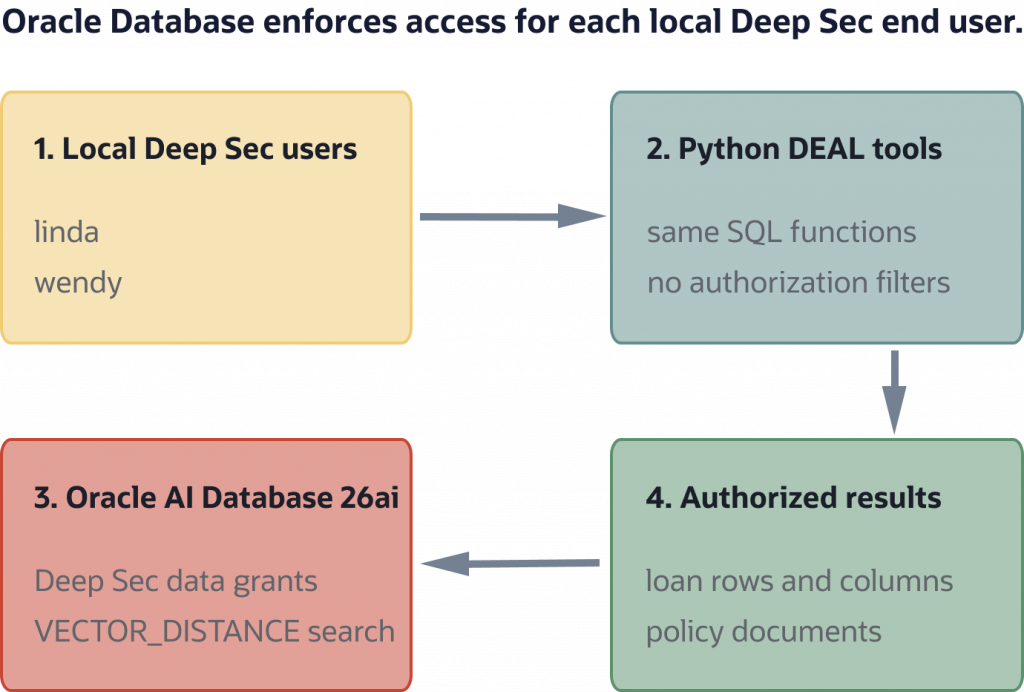
DEAL architecture: the Python assistant connects as local Deep Sec end users, and Oracle Database enforces the configured data access policies for the demo’s SQL and vector retrieval paths.
Key Features of Oracle Deep Data Security
DEAL uses a small lending scenario to demonstrate the Deep Data Security capabilities that matter most to AI application developers.
Data roles and end-user identity
Deep Sec data roles group data access permissions. DEAL uses two data roles:
LOAN_OFFICER_ROLEUNDERWRITER_ROLE
The prepared Deep Sec end users are:
linda, assigned toLOAN_OFFICER_ROLEwendy, assigned toUNDERWRITER_ROLE
In the no-token path, Linda and Wendy are local Deep Sec end users who can log on directly after an administrator grants a standard CREATE SESSION role through the Deep Sec data roles. That keeps the tutorial free of external IAM or Entra token setup.
Row-level security
Deep Sec data grants can include row predicates. DEAL uses row rules like these:
- Linda sees loan applications where
assigned_officermatches the active Deep Sec username. - Wendy sees loan applications where
in_underwriting_queue = 'Y'.
The application SQL does not add WHERE assigned_officer = :end_user.
Column-level security
Data grants can restrict column access. DEAL restricts sensitive financial and underwriting fields for Linda, including:
customer_ssncustomer_incomecustomer_credit_scoreunderwriting_decisionrisk_scoreunderwriting_notes
In the demo output, restricted values are displayed as NULL. The Python code does not replace values with None or hide fields.
Deep Sec-scoped vector retrieval
Role-scoped vector retrieval matters because RAG systems often search across policy, procedure, and knowledge-base documents that are not equally appropriate for every user. A loan officer might need intake and customer-document guidance, while an underwriter might need credit-risk escalation procedures. If the retriever ranks every nearby document first and asks the LLM to ignore unauthorized context later, sensitive guidance has already left the database. DEAL makes the authorization check happen before vector ranking returns results to the application.
DEAL stores policy documents in Oracle Database with a VECTOR(3, FLOAT32) column. The core demo uses deterministic 3-dimensional demo vectors so the tutorial stays self-contained.
The vector retrieval query runs under Linda’s or Wendy’s Deep Sec context. The application does not add a security filter such as:
WHERE audience = :role
Instead, Deep Sec data grants govern which loan_policies rows are visible to the query; the vector query ranks the rows visible under the active end-user context.
We use VECTOR_DISTANCE() in the SQL because it keeps the distance expression and metric explicit. Oracle AI Vector Search also provides shorthand vector distance operators, but this tutorial intentionally stays with VECTOR_DISTANCE() so the Deep Sec proof is easier to read. The demo uses a small data set and does not create a vector index. A vector index is not useful for proving performance or plans on eight rows; add indexing later when you move to a larger corpus and can verify index metadata and execution behavior for your workload.
Application trust boundary
The assistant is not the security boundary. DEAL’s Python code is responsible for:
- Connecting to Oracle AI Database 26ai.
- Binding values safely.
The database is responsible for enforcing the configured row, column, and policy-document access rules.
The demo avoids these application-side security patterns:
WHERE assigned_officer = :end_user
WHERE audience IN ('general', :role)
if end_user == "linda":
    row["customer_ssn"] = None
Those patterns can work in one carefully reviewed code path, but they are fragile as the application grows. Every new query, retriever, tool function, report, or chatbot action becomes another place where a developer has to remember the right row predicate, audience filter, and redaction rule. If one path forgets a filter, the database may return too much data before the mistake is noticed. Keeping the rules in Deep Sec data grants makes enforcement centralized, testable, and consistent across the application paths that reach the protected tables.
How to Get Started with Oracle Deep Data Security
This tutorial assumes an administrator-prepared Oracle AI Database 26ai on Autonomous Database Serverless environment where Oracle Deep Data Security is enabled and the required privileges have been granted. The demo targets ADB-S 26ai; it does not use Oracle Database Free or a local Oracle container.
Prerequisites
You need:
- Oracle AI Database 26ai on Autonomous Database Serverless.
- A downloaded and unzipped Autonomous Database wallet.
- A tutorial owner schema user, such as
DEEPSEC. - Database password for the tutorial owner schema.
- A TNS alias from the wallet, or a connect descriptor using host, port, and service name values from your Oracle AI Database 26ai environment.
- Wallet password.
- Prepared Deep Sec end users for
lindaandwendy. - Passwords for the local Deep Sec end users
lindaandwendy. - Privileges to create Deep Sec data roles and data grants for the tutorial objects, or an administrator who has prepared those objects.
- Optional: OCI Generative AI access for the chatbot extension.
- Python 3.10 or later.
Prepared Deep Sec identity contract
Before you run the demo, an administrator must create or provide the Deep Sec identity setup. This tutorial uses local Deep Sec users and direct logon, so the setup includes end users such as:
CREATE END USER linda IDENTIFIED BY <password>;
CREATE END USER wendy IDENTIFIED BY <password>;
Those end users are not ordinary database schema users. Because the SQL does not quote linda or wendy, Oracle stores the end-user names using the normal uppercase identifier form: LINDA and WENDY. The setup scripts connect as the tutorial owner schema, such as DEEPSEC, while the user-facing read and RAG scripts connect directly as LINDA or WENDY.
The tutorial owner needs the Deep Sec privileges required to create data roles, grant data roles, create data grants, create end users, and enable mandatory use of data grants for the demo tables. Ask an administrator to grant:
GRANT CREATE DATA ROLE TO deepsec;
GRANT CREATE DATA GRANT TO deepsec;
GRANT CREATE ANY DATA GRANT TO deepsec;
GRANT ADMINISTER ANY DATA GRANT TO deepsec;
GRANT GRANT ANY DATA ROLE TO deepsec;
GRANT CREATE END USER TO deepsec;
GRANT CREATE END USER SECURITY CONTEXT TO deepsec;
GRANT SET USE DATA GRANTS ONLY TO deepsec;
For direct logon without tokens, an administrator also creates a normal database role with CREATE SESSION, then grants that role to the Deep Sec data roles used by the tutorial:
CREATE ROLE deal_direct_logon_role;
GRANT CREATE SESSION TO deal_direct_logon_role;

GRANT deal_direct_logon_role TO loan_officer_role;
GRANT deal_direct_logon_role TO underwriter_role;
If loan_officer_role and underwriter_role do not exist yet, create deal_direct_logon_role first, run Step 5 to create the Deep Sec data roles, and then run the two GRANT deal_direct_logon_role ... statements.
After the tutorial tables exist, the owner enables mandatory data-grant enforcement on the protected tables:
SET USE DATA GRANTS ONLY ON loan_applications ENABLED;
SET USE DATA GRANTS ONLY ON loan_policies ENABLED;
For a service-user context setup that uses an external identity provider, the DEEPSEC_DATABASE_ACCESS_TOKEN value in .env is not a database password and not a convenient static tutorial secret. It is a database access token issued by the configured identity provider, such as OCI IAM or Microsoft Entra ID, and it can expire. Your administrator or identity setup must tell you how to obtain and refresh it.
For the no-token local-user setup, use the direct-logon pattern: Python connects directly as local Deep Sec end users such as LINDA and WENDY. In that mode, the database does not need DEEPSEC_DATABASE_ACCESS_TOKEN, but an administrator must grant a standard CREATE SESSION role to the Deep Sec data roles.
The end_user_identity value passed to oracledb.create_end_user_security_context() depends on the identity model:
- For IAM or Entra users, it is typically an identity token string.
- For local Deep Sec users in a service-user context pattern, it can be a tuple such as
("LINDA", key)where the key comes from the prepared local-user setup. - For direct logon, the helper does not call
create_end_user_security_context(); it opens the connection as the local Deep Sec end user.
The demo helper supports DEEPSEC_CONTEXT_MODE=direct_logon, external_token, or local_tuple. Use direct_logon for this tutorial.
Create the project
You can copy the files from this tutorial, or clone the companion GitHub repository that contains the same runnable demo project:
git clone https://github.com/markxnelson/deep-data-security.git deal-deepsec
cd deal-deepsec
If you are copying the code from the article instead of cloning the repository, create a project directory first:
mkdir deal-deepsec
cd deal-deepsec

python -m venv .venv
source .venv/bin/activate
On Windows PowerShell:
python -m venv .venv
.venv\Scripts\Activate.ps1
If you cloned the companion repository, create and activate the virtual environment inside that cloned directory before installing dependencies.
The companion repository already includes requirements.txt, .env.example, .gitignore, and the Python scripts. If you cloned it, use the file-creation sections below as reference and skip ahead to installing dependencies after your virtual environment is active.
Create requirements.txt:
oracledb
python-dotenv
oci
Install the dependencies:
pip install -r requirements.txt
Expected output:
Successfully installed oracledb ...
Successfully installed python-dotenv ...
Successfully installed oci ...
Add local environment variables
Create .env.example:
# Oracle AI Database 26ai on ADB-S connection.
ADB_USERNAME=DEEPSEC
ADB_PASSWORD=your-database-password

# Use an ADB wallet TNS alias such as yourdb_high,
# or a TCPS connect descriptor with host, port, and service_name values.
ADB_DSN=your-adb-tns-alias-or-connect-descriptor

# Directory containing the unzipped wallet files, including tnsnames.ora and ewallet.pem.
ADB_WALLET_LOCATION=/path/to/unzipped/adb-wallet

# Wallet password created when the wallet was downloaded.
# This is not the database user password.
ADB_WALLET_PASSPHRASE=your-wallet-password

# Deep Sec context mode must match your administrator-prepared identity setup.
# Use direct_logon for local Deep Sec users without IAM/Entra tokens.
# Use external_token for IAM/Entra-style identity strings.
# Use local_tuple when a service connection sets context for local end-user tuples.
DEEPSEC_CONTEXT_MODE=direct_logon

# Required only for service-user context modes.
# direct_logon does not use this value.
DEEPSEC_DATABASE_ACCESS_TOKEN=

# Direct-logon passwords for the local Deep Sec end users.
DEEPSEC_LINDA_KEY=your-linda-end-user-password
DEEPSEC_WENDY_KEY=your-wendy-end-user-password

# Protected object owner used when direct-logon users query the demo tables.
DEAL_OBJECT_OWNER=DEEPSEC

# OCI Generative AI settings for the final chatbot step.
OCI_CONFIG_FILE=~/.oci/config
OCI_PROFILE=DEFAULT
OCI_GENAI_ENDPOINT=https://inference.generativeai.us-chicago-1.oci.oraclecloud.com
OCI_GENAI_COMPARTMENT_ID=your-compartment-ocid
OCI_GENAI_MODEL_ID=your-generative-ai-model-id
Copy it to .env and edit the values:
cp .env.example .env
Never commit .env to source control. Add .gitignore:
.env
.venv/
__pycache__/
*.pyc
.pytest_cache/
.DS_Store
DEAL Demo Project
The demo uses small scripts that build on each other. Run them in order:
python 01_verify_deepsec.py
python 02_create_schema.py
python 03_load_data.py
python 04_configure_deepsec.py
python 05_context_read_demo.py
python 07_vector_basics.py
python 08_secure_rag_retrieval.py
python 08b_keyword_vs_vector_check.py  # optional
After Step 8, the Deep Sec security proof is complete. The remaining scripts wrap the proven operations as DEAL tool functions, print a final terminal session, and optionally connect those tools to OCI Generative AI:
python 09_deal_tools_demo.py
python 10_run_deal_sessions.py
python 11_oci_genai_chatbot.py  # optional, requires OCI GenAI configuration
Step 1: Verify the ADB-S connection and Deep Sec metadata visibility
Start with the smallest useful checkpoint: connect to Oracle AI Database 26ai using the wallet and confirm that python-oracledb is running in Thin mode.
Create 01_verify_deepsec.py:
import os
import sys
from pathlib import Path

import oracledb
from dotenv import load_dotenv


load_dotenv()


def required_env(name):
    value = os.getenv(name)
    if (
        not value
        or value.startswith("replace-")
        or value.startswith("your-")
        or value.startswith("/path/to/")
    ):
        raise RuntimeError(f"Set {name} in .env before running this script.")
    return value


def first_env(*names):
    for name in names:
        value = os.getenv(name)
        if value and not value.startswith("replace-") and not value.startswith("your-"):
            return value
    raise RuntimeError(f"Set {' or '.join(names)} in .env before running this script.")


def optional_env(*names):
    for name in names:
        value = os.getenv(name)
        if value and not value.startswith("replace-") and not value.startswith("your-"):
            return value
    return None


def wallet_dsn(wallet_dir):
    tnsnames = Path(wallet_dir) / "tnsnames.ora"
    if not tnsnames.exists():
        raise RuntimeError("Set ADB_DSN or provide a wallet with tnsnames.ora.")
    for line in tnsnames.read_text(encoding="utf-8").splitlines():
        stripped = line.strip()
        if "=" in stripped and not stripped.startswith("#"):
            return stripped.split("=", 1)[0].strip()
    raise RuntimeError("No TNS aliases found in wallet tnsnames.ora.")


def connect():
    wallet_dir = first_env("ADB_WALLET_LOCATION", "DB_WALLET_DIR")
    dsn = optional_env("ADB_DSN", "DB_DSN") or wallet_dsn(wallet_dir)
    return oracledb.connect(
        user=first_env("ADB_USERNAME", "DB_USER"),
        password=first_env("ADB_PASSWORD", "DB_PASSWORD"),
        dsn=dsn,
        config_dir=wallet_dir,
        wallet_location=wallet_dir,
        wallet_password=optional_env(
            "ADB_WALLET_PASSPHRASE", "ADB_WALLET_PASSWORD", "DB_WALLET_PASSWORD"
        ),
    )


print("DEAL environment check")

with connect() as conn:
    cur = conn.cursor()

    cur.execute("select sys_context('USERENV', 'CURRENT_SCHEMA') from dual")
    print(f"Connected as: {cur.fetchone()[0]}")

    try:
        cur.execute("select banner_full from v$version where rownum = 1")
        version_text = cur.fetchone()[0]
    except oracledb.DatabaseError:
        cur.execute(
            """
            select version_full
            from product_component_version
            where product like 'Oracle Database%'
            fetch first 1 row only
            """
        )
        version_text = cur.fetchone()[0]

    print(f"Database version: {version_text}")

    mode = "Thin" if oracledb.is_thin_mode() else "Thick"
    print(f"python-oracledb mode: {mode}")

    if mode != "Thin":
        print("Deep Data Security requires python-oracledb Thin mode for this demo.")
        sys.exit(1)

    cur.execute(
        """
        select view_name
        from all_views
        where view_name in (
            'DBA_DATA_ROLES',
            'DBA_DATA_ROLE_GRANTS',
            'DBA_DATA_GRANTS',
            'ALL_DATA_GRANTS',
            'USER_DATA_GRANTS'
        )
        order by view_name
        """
    )
    visible_views = [row[0] for row in cur.fetchall()]

    if visible_views:
        print("Deep Sec metadata visible to this schema: " + ", ".join(visible_views))
    else:
        print("Deep Sec metadata views are not visible to this schema.")
        print("Continue only with an administrator-prepared Deep Sec environment.")
Run it:
python 01_verify_deepsec.py
Expected output:
DEAL environment check
Connected as: DEEPSEC
Database version: Oracle AI Database 26ai Enterprise Edition Release 23.26.2.1.0
python-oracledb mode: Thin
Deep Sec metadata visible to this schema: ALL_DATA_GRANTS, USER_DATA_GRANTS
If your schema cannot see Deep Sec metadata views, you may see:
Deep Sec metadata views are not visible to this schema.
Continue only with an administrator-prepared Deep Sec environment.
If this fails:
- Confirm
ADB_DSN, or let the helper pick an alias from wallettnsnames.ora. - Confirm
ADB_WALLET_LOCATIONcontains the unzipped wallet files. - Confirm
ADB_WALLET_PASSPHRASEis the wallet password, not the database password. - Confirm the database is Oracle AI Database 26ai.
- Do not switch to Thick mode.
Step 2: Add a small connection helper
Now that we have seen the full connection code, move the connection boilerplate into a small helper. Do not add authorization logic yet.
Create deal_db.py:
import os
from pathlib import Path

import oracledb
from dotenv import load_dotenv


load_dotenv()


def required_env(name):
    value = os.getenv(name)
    if (
        not value
        or value.startswith("replace-")
        or value.startswith("your-")
        or value.startswith("/path/to/")
    ):
        raise RuntimeError(f"Set {name} in .env before running this script.")
    return value


def first_env(*names):
    for name in names:
        value = os.getenv(name)
        if value and not value.startswith("replace-") and not value.startswith("your-"):
            return value
    raise RuntimeError(f"Set {' or '.join(names)} in .env before running this script.")


def optional_env(*names):
    for name in names:
        value = os.getenv(name)
        if value and not value.startswith("replace-") and not value.startswith("your-"):
            return value
    return None


def wallet_dsn(wallet_dir):
    tnsnames = Path(wallet_dir) / "tnsnames.ora"
    if not tnsnames.exists():
        raise RuntimeError("Set ADB_DSN or provide a wallet with tnsnames.ora.")
    for line in tnsnames.read_text(encoding="utf-8").splitlines():
        stripped = line.strip()
        if "=" in stripped and not stripped.startswith("#"):
            return stripped.split("=", 1)[0].strip()
    raise RuntimeError("No TNS aliases found in wallet tnsnames.ora.")


def connect():
    wallet_dir = first_env("ADB_WALLET_LOCATION", "DB_WALLET_DIR")
    dsn = optional_env("ADB_DSN", "DB_DSN") or wallet_dsn(wallet_dir)
    return oracledb.connect(
        user=first_env("ADB_USERNAME", "DB_USER"),
        password=first_env("ADB_PASSWORD", "DB_PASSWORD"),
        dsn=dsn,
        config_dir=wallet_dir,
        wallet_location=wallet_dir,
        wallet_password=optional_env(
            "ADB_WALLET_PASSPHRASE", "ADB_WALLET_PASSWORD", "DB_WALLET_PASSWORD"
        ),
    )
There is no command to run for this helper. Later scripts import connect().
Before continuing, you should understand:
deal_db.pycentralizes only connection setup.- It does not filter data, redact columns, or set user context.
- It does not call
oracledb.init_oracle_client().
Step 3: Create loan and policy tables
Create two tables:
loan_applicationsfor structured loan data.loan_policiesfor policy documents and demo vectors.
Create 02_create_schema.py:
import oracledb

from deal_db import connect


DDL = [
    """
    create table loan_applications (
        id number primary key,
        customer_name varchar2(100) not null,
        loan_amount number(12,2) not null,
        purpose varchar2(100) not null,
        status varchar2(40) not null,
        officer_notes varchar2(4000),
        customer_ssn varchar2(20),
        customer_income number(12,2),
        customer_credit_score number(4),
        underwriting_decision varchar2(40),
        risk_score number(5,2),
        underwriting_notes varchar2(4000),
        assigned_officer varchar2(40) not null,
        in_underwriting_queue char(1) check (in_underwriting_queue in ('Y','N'))
    )
    """,
    """
    create table loan_policies (
        id number primary key,
        title varchar2(200) not null,
        body varchar2(4000) not null,
        audience varchar2(40) not null,
        embedding vector(3, float32)
    )
    """,
]


def drop_if_exists(cur, table_name):
    try:
        cur.execute(f"drop table {table_name} purge")
    except oracledb.DatabaseError as exc:
        error = exc.args[0]
        if error.code != 942:
            raise


with connect() as conn:
    cur = conn.cursor()

    drop_if_exists(cur, "loan_policies")
    drop_if_exists(cur, "loan_applications")
    print("Dropped existing DEAL demo tables if they existed.")

    for statement in DDL:
        cur.execute(statement)

    print("Created loan_applications.")
    print("Created loan_policies with VECTOR(3, FLOAT32) embedding column.")
    print("Schema setup complete.")
Run it:
python 02_create_schema.py
Expected output:
Dropped existing DEAL demo tables if they existed.
Created loan_applications.
Created loan_policies with VECTOR(3, FLOAT32) embedding column.
Schema setup complete.
Before continuing, you should understand:
- The policy corpus is stored in Oracle Database, not in a separate vector store.
- The vector column is intentionally small:
VECTOR(3, FLOAT32). - Security will be added with Deep Sec data grants, not views or Python filters.
Step 4: Load synthetic data and deterministic demo vectors
Load enough data to make security differences visible.
The row design is:
- Linda is assigned applications
101,102, and105. - Wendy can see underwriting queue applications
102,103,105, and106. - Policy documents are tagged as
general,loan_officer, orunderwriter, but the application will not filter on that column.
The three-audience policy model is intentional. A simpler all/underwriter model can work, but general, loan_officer, and underwriter makes the policy proof easier to inspect: both roles can receive general guidance, and each role can also receive role-specific documents without any Python-side audience filtering.
Create 03_load_data.py:
from array import array

from deal_db import connect


loans = [
    (101, "Avery Stone", 320000, "Home purchase", "RECEIVED",
     "Missing final pay stub.", "111-22-3333", 128000, 720,
     "PENDING_REVIEW", 41, "Not reviewed yet.", "LINDA", "N"),
    (102, "Noah Rivers", 485000, "Home purchase", "UNDER_REVIEW",
     "Customer uploaded tax documents.", "222-33-4444", 151000, 695,
     "PENDING_REVIEW", 72, "Watch revolving debt.", "LINDA", "Y"),
    (103, "Maya Chen", 210000, "Refinance", "UNDER_REVIEW",
     "Transferred from branch intake.", "333-44-5555", 98000, 681,
     "PENDING_REVIEW", 68, "Check income variability.", "raj", "Y"),
    (104, "Grace Hill", 150000, "Home equity", "NEEDS_DOCS",
     "Awaiting insurance statement.", "444-55-6666", 87000, 735,
     "NOT_STARTED", 35, "Not in queue.", "amir", "N"),
    (105, "Owen Park", 640000, "Jumbo mortgage", "UNDER_REVIEW",
     "Customer requested expedited review.", "555-66-7777", 220000, 705,
     "PENDING_REVIEW", 77, "Large loan amount.", "LINDA", "Y"),
    (106, "Sofia Reyes", 390000, "Investment property", "ESCALATED",
     "Escalated by branch manager.", "666-77-8888", 132000, 660,
     "PENDING_REVIEW", 83, "Exception review needed.", "raj", "Y"),
]

policies = [
    (1, "General lending eligibility",
     "Baseline eligibility requirements for consumer lending applications.",
     "general", array("f", [0.75, 0.20, 0.05])),
    (2, "Income verification basics",
     "Required documents for income verification and employment review.",
     "general", array("f", [0.65, 0.30, 0.05])),
    (3, "Document retention requirements",
     "Retention periods for lending documents and customer communications.",
     "general", array("f", [0.30, 0.20, 0.50])),
    (4, "Loan officer workflow checklist",
     "Loan officer workflow for intake, status updates, and customer follow-up.",
     "loan_officer", array("f", [0.85, 0.10, 0.05])),
    (5, "Officer notes standards",
     "Standards for writing clear customer-facing officer notes.",
     "loan_officer", array("f", [0.80, 0.05, 0.15])),
    (6, "Credit risk escalation policy",
     "When credit risk signals require underwriting escalation.",
     "underwriter", array("f", [0.05, 0.90, 0.05])),
    (7, "Debt-to-income exception review",
     "Underwriting guidance for debt-to-income ratio exceptions.",
     "underwriter", array("f", [0.10, 0.85, 0.05])),
    (8, "Collateral review guidance",
     "Collateral review requirements for underwriting decisions.",
     "underwriter", array("f", [0.05, 0.75, 0.20])),
]


with connect() as conn:
    cur = conn.cursor()

    cur.executemany(
        """
        insert into loan_applications (
            id, customer_name, loan_amount, purpose, status, officer_notes,
            customer_ssn, customer_income, customer_credit_score,
            underwriting_decision, risk_score, underwriting_notes,
            assigned_officer, in_underwriting_queue
        ) values (:1, :2, :3, :4, :5, :6, :7, :8, :9, :10, :11, :12, :13, :14)
        """,
        loans,
    )

    cur.executemany(
        """
        insert into loan_policies (id, title, body, audience, embedding)
        values (:1, :2, :3, :4, :5)
        """,
        policies,
    )

    conn.commit()

    print(f"Inserted {len(loans)} loan applications.")
    print(f"Inserted {len(policies)} loan policy documents.")
    print("Synthetic data load complete.")
Run it:
python 03_load_data.py
Expected output:
Inserted 6 loan applications.
Inserted 8 loan policy documents.
Synthetic data load complete.
Before continuing, you should understand:
- All data is synthetic.
- Sensitive columns are populated so column restrictions are visible.
- The vectors are deterministic demo vectors, not model-generated embeddings.
- The
audiencecolumn is a database policy anchor, not an application-side filter.
Step 5: Configure Oracle Deep Data Security data roles and data grants
Now create the Deep Sec authorization model.
This step assumes linda and wendy are prepared Deep Sec end users in your environment. The script creates data roles, grants those roles to the end users, and creates data grants on the two tutorial tables.
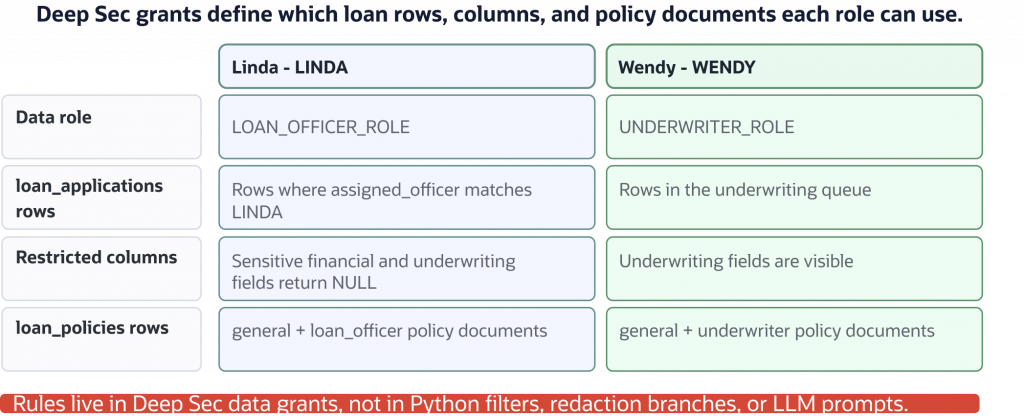
DEAL access rules: Deep Sec data roles and data grants define which loan rows, restricted columns, and policy documents Linda and Wendy can access.
Create 04_configure_deepsec.py:
from deal_db import connect


with connect() as conn:
    cur = conn.cursor()

    print("Using prepared Deep Sec end users: LINDA, WENDY")

    cur.execute("create data role loan_officer_role")
    print("Created data role: LOAN_OFFICER_ROLE")

    cur.execute("create data role underwriter_role")
    print("Created data role: UNDERWRITER_ROLE")

    cur.execute("grant data role loan_officer_role to linda")
    print("Granted LOAN_OFFICER_ROLE to LINDA.")

    cur.execute("grant data role underwriter_role to wendy")
    print("Granted UNDERWRITER_ROLE to WENDY.")

    grants = [
        """
        create or replace data grant deal_loan_officer_read as
        select (
            all columns except customer_ssn, customer_income,
            customer_credit_score, underwriting_decision,
            risk_score, underwriting_notes
        )
        on loan_applications
        where assigned_officer = ORA_END_USER_CONTEXT.username
        to loan_officer_role
        """,
        """
        create or replace data grant deal_underwriter_read as
        select on loan_applications
        where in_underwriting_queue = 'Y'
        to underwriter_role
        """,
        """
        create or replace data grant deal_policy_general_to_officer as
        select on loan_policies
        where audience = 'general'
        to loan_officer_role
        """,
        """
        create or replace data grant deal_policy_officer as
        select on loan_policies
        where audience = 'loan_officer'
        to loan_officer_role
        """,
        """
        create or replace data grant deal_policy_general_to_underwriter as
        select on loan_policies
        where audience = 'general'
        to underwriter_role
        """,
        """
        create or replace data grant deal_policy_underwriter as
        select on loan_policies
        where audience = 'underwriter'
        to underwriter_role
        """,
    ]

    for grant in grants:
        cur.execute(grant)

    conn.commit()

    print("Created loan application read grants.")
    print("Created loan policy read grants.")
    print("Configured Deep Data Security for DEAL.")
Run it once against a fresh demo schema:
python 04_configure_deepsec.py
Expected output:
Using prepared Deep Sec end users: LINDA, WENDY
Created data role: LOAN_OFFICER_ROLE
Created data role: UNDERWRITER_ROLE
Granted LOAN_OFFICER_ROLE to LINDA.
Granted UNDERWRITER_ROLE to WENDY.
Created loan application read grants.
Created loan policy read grants.
Configured Deep Data Security for DEAL.
If the direct-logon role grants were waiting on the Deep Sec data roles, have the administrator run them now. Then enable mandatory data-grant enforcement on the two demo tables:
GRANT deal_direct_logon_role TO loan_officer_role;
GRANT deal_direct_logon_role TO underwriter_role;

SET USE DATA GRANTS ONLY ON loan_applications ENABLED;
SET USE DATA GRANTS ONLY ON loan_policies ENABLED;
If this fails:
- Confirm the tutorial schema has the required Deep Sec privileges.
- Confirm
lindaandwendyexist as Deep Sec end users in your prepared environment. - Confirm your schema owns the demo tables or your administrator has prepared the object-owner model.
- Do not replace Deep Data Security with views, triggers, VPD, or Python filters for this tutorial.
Before continuing, you should understand:
- Data roles are part of the Deep Data Security authorization model.
- Data grants define row and column access in the database.
- The
loan_policies.audiencecolumn is used only inside database policy grants. - Application SQL still remains broad.
Step 6: Set end-user context and prove read and column enforcement
Now add Deep Sec context support to the helper and prove that the same SQL returns different authorized results. In direct_logon mode, the helper connects directly as LINDA or WENDY and qualifies protected objects through the owner schema.
Add this function to the bottom of deal_db.py:
def direct_logon_connect(end_user):
    passwords = {
        "linda": required_env("DEEPSEC_LINDA_KEY"),
        "wendy": required_env("DEEPSEC_WENDY_KEY"),
    }
    if end_user not in passwords:
        raise ValueError(f"Unknown DEAL end user: {end_user}")

    wallet_dir = first_env("ADB_WALLET_LOCATION", "DB_WALLET_DIR")
    dsn = optional_env("ADB_DSN") or optional_env("DB_DSN") or wallet_dsn(wallet_dir)
    return oracledb.connect(
        user=end_user.upper(),
        password=passwords[end_user],
        dsn=dsn,
        config_dir=wallet_dir,
        wallet_location=wallet_dir,
        wallet_password=optional_env(
            "ADB_WALLET_PASSPHRASE", "ADB_WALLET_PASSWORD", "DB_WALLET_PASSWORD"
        ),
    )


def run_for_user(end_user, work):
    if (optional_env("DEEPSEC_CONTEXT_MODE") or "direct_logon") == "direct_logon":
        with direct_logon_connect(end_user) as conn:
            return work(conn)
    raise RuntimeError("This tutorial validates DEEPSEC_CONTEXT_MODE=direct_logon.")


def object_name(name):
    owner = optional_env("DEAL_OBJECT_OWNER") or "DEEPSEC"
    return f"{owner}.{name}"
This helper uses the prepared local-user passwords from .env. The public Python functions still accept friendly names such as "linda" and "wendy", then the helper connects with the unquoted database identifiers LINDA and WENDY. No DEEPSEC_DATABASE_ACCESS_TOKEN is required in direct_logon mode. In a production app, your authentication layer must still establish the real user before choosing which local Deep Sec user or service-user context to use.
Create 05_context_read_demo.py:
from deal_db import object_name, run_for_user


SQL = """
select *
from {loan_applications}
order by id
""".format(loan_applications=object_name("loan_applications"))

FIELDS_TO_SHOW = [
    "customer_ssn",
    "customer_credit_score",
    "underwriting_decision",
    "risk_score",
]


def display_value(value):
    return "NULL" if value is None else value


def rows_for(end_user):
    def work(conn):
        cur = conn.cursor()
        cur.execute(SQL)
        columns = [col[0].lower() for col in cur.description]
        return [dict(zip(columns, row)) for row in cur.fetchall()]

    return run_for_user(end_user, work)


def show(end_user):
    rows = rows_for(end_user)
    ids = [str(row["id"]) for row in rows]

    print(f"\nAs {end_user}:")
    print(f"  Rows returned: {len(rows)}")
    print(f"  Visible application ids: {', '.join(ids)}")

    sample = rows[0] if rows else {}
    print("  Selected sensitive and underwriting fields:")
    for field in FIELDS_TO_SHOW:
        print(f"    {field}: {display_value(sample.get(field))}")


print("Read and column enforcement demo")
show("linda")
show("wendy")
Run it:
python 05_context_read_demo.py
Expected output:
Read and column enforcement demo

As linda:
  Rows returned: 3
  Visible application ids: 101, 102, 105
  Selected sensitive and underwriting fields:
    customer_ssn: NULL
    customer_credit_score: NULL
    underwriting_decision: NULL
    risk_score: NULL

As wendy:
  Rows returned: 4
  Visible application ids: 102, 103, 105, 106
  Selected sensitive and underwriting fields:
    customer_ssn: 222-33-4444
    customer_credit_score: 695
    underwriting_decision: PENDING_REVIEW
    risk_score: 72
The same SQL is used for Linda and Wendy:
SELECT *
FROM loan_applications
ORDER BY id
There is no WHERE assigned_officer = :end_user predicate in the application.
If this fails:
- Confirm
DEEPSEC_CONTEXT_MODE=direct_logon. - Confirm Linda and Wendy can log on as local Deep Sec end users.
- Confirm
DEAL_OBJECT_OWNERpoints to the owner of the demo tables. - Confirm data role grants and data grants exist.
Before continuing, you should understand:
- The application does not add a user-specific
WHEREclause. - The application does not redact restricted columns.
- The database returns the authorized row and column view for the active direct-logon Deep Sec end user.
Step 7: Demonstrate vector distance with manual vectors
Before using vector retrieval as a RAG building block, inspect a simple vector query.
A vector is a list of numbers. In AI applications, embedding models produce vectors that place related concepts near one another. In this tutorial, we use small deterministic vectors so you can see the mechanics directly.
The query vector [0.9, 0.1, 0.0] is closest to loan-officer workflow style documents in our demo data.
Create 07_vector_basics.py:
from array import array

from deal_db import object_name, run_for_user


query_vector = array("f", [0.9, 0.1, 0.0])

sql = """
select title,
       vector_distance(embedding, :query_vector, COSINE) as distance
from {loan_policies}
order by distance
fetch first 3 rows only
""".format(loan_policies=object_name("loan_policies"))

print("Vector warm-up with manual 3-dimensional vectors")
print("Vector warm-up user context: linda")
print(f"Query vector: {list(query_vector)}")

def work(conn):
    cur = conn.cursor()
    cur.execute(sql, query_vector=query_vector)

    print("\nNearest policy vectors:")
    for index, (title, distance) in enumerate(cur, start=1):
        print(f"{index}. {title:<35} distance: {distance:.6f}")


run_for_user("linda", work)
Run it:
python 07_vector_basics.py
Expected output:
Vector warm-up with manual 3-dimensional vectors
Vector warm-up user context: linda
Query vector: [0.8999999761581421, 0.10000000149011612, 0.0]

Nearest policy vectors:
1. Loan officer workflow checklist     distance: 0.001723
2. General lending eligibility         distance: 0.013266
3. Officer notes standards             distance: 0.018206
Your exact distances may vary slightly by database patch level or floating-point formatting; the important result is the role-scoped result set.
A quick metric mental model:
- Cosine distance compares vector direction and is common for embedding-style retrieval.
- Euclidean distance compares straight-line distance in vector space.
- Dot product is often used as a similarity score and is sensitive to vector magnitude.
Production embedding models may normalize vectors or document how they should be compared. Normalization can affect cosine, Euclidean, and dot-product rankings. DEAL uses one explicit VECTOR_DISTANCE() expression so the query shape stays clear.
Oracle AI Vector Search also supports vector indexes for larger corpora, including HNSW-style neighbor graph indexes and IVF/IVFFlat-style partitioned indexes. DEAL does not create an index because this security proof has eight policy rows; when you scale the corpus, validate a CREATE VECTOR INDEX statement for your metric and inspect index metadata such as USER_INDEXES before relying on performance claims.
Before continuing, you should understand:
VECTOR(3, FLOAT32)stores threeFLOAT32values.- Python binds the query vector with
array.array("f", [...]). - The primitive vector example comes before any embedding model or chatbot tooling.
Step 8: Run Deep Sec-scoped vector retrieval
Now run a vector query that represents a RAG-style policy search. The search intent is:
unstable cash flow or credit risk
The tutorial maps that intent to a fixed demo vector. In a real AI application, an embedding model such as OCI Generative AI would create the query vector and document vectors at the model’s actual dimension.
Create 08_secure_rag_retrieval.py:
from array import array

from deal_db import object_name, run_for_user


query_text = "unstable cash flow or credit risk"
query_vector = array("f", [0.05, 0.9, 0.05])

sql = """
select id, title, audience,
       vector_distance(embedding, :query_vector, COSINE) as distance
from {loan_policies}
order by distance
fetch first 3 rows only
""".format(loan_policies=object_name("loan_policies"))


def search_as(end_user):
    def work(conn):
        cur = conn.cursor()
        cur.execute(sql, query_vector=query_vector)
        return cur.fetchall()

    return run_for_user(end_user, work)


print("Deep Sec-scoped vector retrieval demo")
print(f"Policy search query: {query_text}")
print("Output below is scoped by the active Deep Sec end user.")

for end_user in ["linda", "wendy"]:
    print(f"\nAs {end_user}:")
    for index, row in enumerate(search_as(end_user), start=1):
        print(f"  {index}. {row[1]:<35} distance: {row[3]:.6f}")
Run it:
python 08_secure_rag_retrieval.py
Expected output:
Deep Sec-scoped vector retrieval demo
Policy search query: unstable cash flow or credit risk
Output below is scoped by the active Deep Sec end user.

As linda:
  1. Income verification basics          distance: 0.529221
  2. Document retention requirements     distance: 0.604677
  3. General lending eligibility         distance: 0.686696

As wendy:
  1. Credit risk escalation policy      distance: 0.000000
  2. Debt-to-income exception review    distance: 0.001895
  3. Collateral review guidance         distance: 0.020925
If this fails:
- Confirm Deep Sec grants exist on
loan_policies. - Confirm the active end-user context is set.
- Confirm the vector query runs against the protected table.
- Confirm no application-side
audiencefilter has been added.
Before continuing, you should understand:
- The same query vector is used for Linda and Wendy.
- The same SQL shape is used for Linda and Wendy.
- The SQL does not filter by
audience. - The Python code does not filter by
audience. - Deep Sec data grants govern which policy rows are available to the vector query.
Optional: Compare keyword and vector-style retrieval
Vector retrieval and keyword retrieval answer different relevance questions. Keyword search finds literal text matches. Vector retrieval can find nearby concepts represented by numbers.
Neither one should become the security boundary. Run both retrieval styles under the same Deep Sec contexts.
Create 08b_keyword_vs_vector_check.py:
from array import array

from deal_db import object_name, run_for_user


query_vector = array("f", [0.05, 0.9, 0.05])

vector_sql = """
select title
from {loan_policies}
order by vector_distance(embedding, :query_vector, COSINE)
fetch first 3 rows only
""".format(loan_policies=object_name("loan_policies"))

keyword_sql = """
select title
from {loan_policies}
where lower(body) like :term
order by id
fetch first 3 rows only
""".format(loan_policies=object_name("loan_policies"))


def run_as(end_user):
    def work(conn):
        cur = conn.cursor()

        cur.execute(vector_sql, query_vector=query_vector)
        vector_titles = [row[0] for row in cur.fetchall()]

        cur.execute(keyword_sql, term="%credit risk%")
        keyword_titles = [row[0] for row in cur.fetchall()]

        return vector_titles, keyword_titles

    return run_for_user(end_user, work)


print("Optional vector-style vs keyword retrieval check")

for end_user in ["linda", "wendy"]:
    vector_titles, keyword_titles = run_as(end_user)
    print(f"\nAs {end_user}:")
    print(f"  Vector-style titles: {', '.join(vector_titles)}")
    print(
        "  Keyword titles for 'credit risk': "
        + (", ".join(keyword_titles) if keyword_titles else "none")
    )
Run it if you want the extra comparison:
python 08b_keyword_vs_vector_check.py
Representative output:
Optional vector-style vs keyword retrieval check

As linda:
  Vector-style titles: Income verification basics, Document retention requirements, General lending eligibility
  Keyword titles for 'credit risk': none

As wendy:
  Vector-style titles: Credit risk escalation policy, Debt-to-income exception review, Collateral review guidance
  Keyword titles for 'credit risk': Credit risk escalation policy
Before continuing, you should understand:
- Keyword search and vector retrieval are relevance strategies.
- Deep Sec policy still scopes the rows available to the query.
- The app still does not use an
audiencesecurity filter.
Try this next: Wrap the proven operations as DEAL tool functions
Only after proving the database operations directly should we wrap them as assistant tools.
Create deal_tools.py:
from array import array

from deal_db import object_name, run_for_user


def _rows_as_dicts(cur):
    columns = [col[0].lower() for col in cur.description]
    return [dict(zip(columns, row)) for row in cur.fetchall()]


def _run_for_user(end_user, work):
    return run_for_user(end_user, work)


def _query_vector(query):
    text = query.lower()
    if "risk" in text or "credit" in text or "cash flow" in text:
        return array("f", [0.05, 0.9, 0.05])
    return array("f", [0.9, 0.1, 0.0])
The _query_vector() function is relevance logic for this deterministic demo. It is not authorization logic.
Append the read tools:
def get_loan_applications(end_user):
    def work(conn):
        cur = conn.cursor()
        cur.execute(
            f"""
            select *
            from {object_name("loan_applications")}
            order by id
            """
        )
        return _rows_as_dicts(cur)

    return _run_for_user(end_user, work)


def get_application_detail(end_user, app_id):
    def work(conn):
        cur = conn.cursor()
        cur.execute(
            f"""
            select *
            from {object_name("loan_applications")}
            where id = :id
            """,
            id=app_id,
        )
        rows = _rows_as_dicts(cur)
        return rows[0] if rows else None

    return _run_for_user(end_user, work)
The WHERE id = :id predicate is a business lookup. It is not a user-specific authorization filter.
Append the policy-search tool:
def search_policies(end_user, query):
    query_vector = _query_vector(query)

    def work(conn):
        cur = conn.cursor()
        cur.execute(
            f"""
            select id, title, body, audience,
                   vector_distance(embedding, :query_vector, COSINE) as distance
            from {object_name("loan_policies")}
            order by distance
            fetch first 3 rows only
            """,
            query_vector=query_vector,
        )
        return _rows_as_dicts(cur)

    return _run_for_user(end_user, work)
Create 09_deal_tools_demo.py:
from deal_tools import (
    get_loan_applications,
    search_policies,
)


print("Tool demo: linda")
linda_loans = get_loan_applications("linda")
linda_policies = search_policies("linda", "credit risk")
print(f"  get_loan_applications returned {len(linda_loans)} rows.")
print(f"  search_policies returned {len(linda_policies)} policy documents.")

print("\nTool demo: wendy")
wendy_loans = get_loan_applications("wendy")
wendy_policies = search_policies("wendy", "credit risk")
print(f"  get_loan_applications returned {len(wendy_loans)} rows.")
print(f"  search_policies returned {len(wendy_policies)} policy documents.")
Run it:
python 09_deal_tools_demo.py
Expected output:
Tool demo: linda
  get_loan_applications returned 3 rows.
  search_policies returned 3 policy documents.

Tool demo: wendy
  get_loan_applications returned 4 rows.
  search_policies returned 3 policy documents.
Before continuing, you should understand:
- Each tool runs database work under the requested Deep Sec end user.
- In direct-logon mode, each user-scoped operation opens its own connection as
LINDAorWENDY. - Tools do not filter rows by user.
- Tools do not redact restricted columns.
- Tools do not filter policy documents by
audience.
Try this next: Run DEAL sessions and bypass checks
Now run the final terminal assistant session. This script calls the tool functions and prints a short transcript for Linda, Wendy, and a bypass check.
Create 10_run_deal_sessions.py:
from deal_tools import (
    get_application_detail,
    get_loan_applications,
    search_policies,
)


def display_value(value):
    return "NULL" if value is None else value


def titles(rows):
    return ", ".join(row["title"] for row in rows)


def linda_session():
    print("========================")
    print("DEAL session: linda")
    print("========================")

    loans = get_loan_applications("linda")
    ids = [str(row["id"]) for row in loans]
    detail = get_application_detail("linda", 102)
    policies = search_policies("linda", "credit risk")

    print(f"Visible applications: {len(loans)}")
    print(f"Application ids: {', '.join(ids)}")
    print(f"Restricted risk_score: {display_value(detail.get('risk_score'))}")
    print(f"Policy results: {titles(policies)}")


def wendy_session():
    print("\n========================")
    print("DEAL session: wendy")
    print("========================")

    loans = get_loan_applications("wendy")
    ids = [str(row["id"]) for row in loans]
    detail = get_application_detail("wendy", 102)
    policies = search_policies("wendy", "credit risk")

    print(f"Visible applications: {len(loans)}")
    print(f"Application ids: {', '.join(ids)}")
    print(f"Underwriting risk_score: {display_value(detail.get('risk_score'))}")
    print(f"Policy results: {titles(policies)}")
Append the bypass check and runner:
def bypass_check():
    print("\n========================")
    print("Bypass check")
    print("========================")

    linda_rows = get_loan_applications("linda")
    wendy_rows = get_loan_applications("wendy")
    linda_docs = search_policies("linda", "credit risk")
    wendy_docs = search_policies("wendy", "credit risk")

    print(f"Broad loan query returned {len(linda_rows)} Linda-scoped rows for linda.")
    print(f"Broad loan query returned {len(wendy_rows)} Wendy-scoped rows for wendy.")
    print(f"Linda policy titles: {titles(linda_docs)}")
    print(f"Wendy policy titles: {titles(wendy_docs)}")
    print("No application-side row filter, redaction, or audience filter was used.")


linda_session()
wendy_session()
bypass_check()
Run it:
python 10_run_deal_sessions.py
Expected output:
========================
DEAL session: linda
========================
Visible applications: 3
Application ids: 101, 102, 105
Restricted risk_score: NULL
Policy results: Income verification basics, Document retention requirements, General lending eligibility

========================
DEAL session: wendy
========================
Visible applications: 4
Application ids: 102, 103, 105, 106
Underwriting risk_score: 72
Policy results: Credit risk escalation policy, Debt-to-income exception review, Collateral review guidance

========================
Bypass check
========================
Broad loan query returned 3 Linda-scoped rows for linda.
Broad loan query returned 4 Wendy-scoped rows for wendy.
Linda policy titles: Income verification basics, Document retention requirements, General lending eligibility
Wendy policy titles: Credit risk escalation policy, Debt-to-income exception review, Collateral review guidance
No application-side row filter, redaction, or audience filter was used.
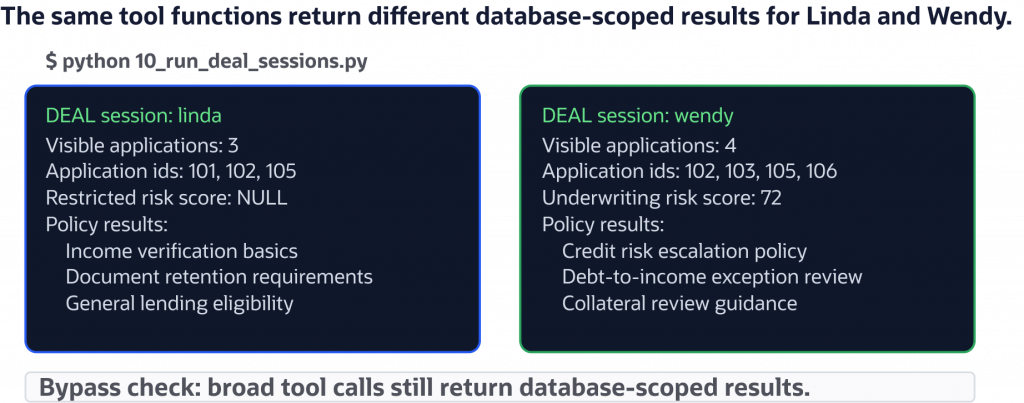
Final DEAL session: the same tool functions run under Linda and Wendy’s Deep Sec context, and the database returns user-scoped loan and policy retrieval results.
Before finishing, you should understand the full trust boundary:
- DEAL establishes the correct Deep Sec end user for each operation.
- The same broad read function returns different rows and restricted values.
- The same vector retrieval function returns different policy documents.
- The assistant is not trusted to filter or redact protected data.
Optional: Add an OCI GenAI chatbot loop
The terminal session proves the secured tool functions directly. As an optional extension, add a small LLM loop that lets OCI Generative AI choose which DEAL tool to call. The OCI GenAI code path is an integration pattern; the Deep Sec read and vector security proof does not depend on it. Validate the OCI SDK request and response shape in your tenancy before relying on a captured chatbot transcript.
The model is not trusted for authorization; it only selects an action. Every tool call still runs under the chosen Deep Sec end user and lets Oracle Database enforce the policy.
Create 11_oci_genai_chatbot.py:
import json
import os
import re
from pathlib import Path

import oci
from dotenv import load_dotenv
from oci.generative_ai_inference import GenerativeAiInferenceClient
from oci.generative_ai_inference.models import (
    ChatDetails,
    GenericChatRequest,
    Message,
    OnDemandServingMode,
    UserMessage,
)

from deal_tools import (
    get_application_detail,
    get_loan_applications,
    search_policies,
)


load_dotenv()


TOOLS = {
    "get_loan_applications": get_loan_applications,
    "get_application_detail": get_application_detail,
    "search_policies": search_policies,
}


def required_env(name):
    value = os.getenv(name)
    if value:
        value = value.strip().strip('"').strip("'")
    if not value or value.startswith("your-"):
        raise RuntimeError(f"Set {name} in .env before running this script.")
    return value


def oci_client():
    config_file = Path(os.getenv("OCI_CONFIG_FILE", "~/.oci/config")).expanduser()
    profile = os.getenv("OCI_PROFILE", "DEFAULT")
    config = oci.config.from_file(str(config_file), profile)
    return GenerativeAiInferenceClient(
        config=config,
        service_endpoint=required_env("OCI_GENAI_ENDPOINT"),
    )


def message_text(chat_response):
    data = chat_response.data
    if hasattr(data, "chat_response") and hasattr(data.chat_response, "choices"):
        choice = data.chat_response.choices[0]
        return choice.message.content[0].text
    return json.dumps(oci.util.to_dict(data))


def chat_once(client, prompt):
    request = GenericChatRequest(
        api_format=GenericChatRequest.API_FORMAT_GENERIC,
        messages=[
            UserMessage(
                role=Message.ROLE_USER,
                content=[{"type": "TEXT", "text": prompt}],
            )
        ],
        max_tokens=500,
        temperature=0,
    )
    details = ChatDetails(
        compartment_id=required_env("OCI_GENAI_COMPARTMENT_ID"),
        serving_mode=OnDemandServingMode(model_id=required_env("OCI_GENAI_MODEL_ID")),
        chat_request=request,
    )
    return message_text(client.chat(details))


def choose_action(client, end_user, question):
    prompt = f"""
You are DEAL, a lending assistant running as end user {end_user}.
Choose exactly one tool call for the user's request.
Return only JSON with keys tool and arguments.

Available tools:
- get_loan_applications: {{}}
- get_application_detail: {{"app_id": number}}
- search_policies: {{"query": string}}

User request: {question}
"""
    raw = chat_once(client, prompt).strip()
    try:
        return json.loads(raw)
    except json.JSONDecodeError:
        fenced = re.search(r"```(?:json)?\s*(\{.*?\})\s*```", raw, re.DOTALL)
        if fenced:
            return json.loads(fenced.group(1))
        start = raw.find("{")
        end = raw.rfind("}")
        if start >= 0 and end > start:
            return json.loads(raw[start : end + 1])
        raise


def run_tool(end_user, action):
    tool_name = action["tool"]
    arguments = action.get("arguments", {})
    if tool_name not in TOOLS:
        raise ValueError(f"Unknown tool requested by model: {tool_name}")
    return TOOLS[tool_name](end_user, **arguments)


def answer_with_result(client, end_user, question, action, result):
    prompt = f"""
You are DEAL, a lending assistant running as end user {end_user}.
The database has already enforced Oracle Deep Data Security.
Answer the user briefly from the tool result only.
If the tool result is a list of loan applications, count the list and list the id values exactly.
If the tool result is a list of policies, list only the returned policy titles.
Do not say that no rows or policies were found unless the tool result is an empty list.

User request: {question}
Tool action: {json.dumps(action)}
Tool result: {json.dumps(result, default=str)}
"""
    return chat_once(client, prompt)


def run_session(client, end_user, questions):
    print(f"\n========================")
    print(f"OCI GenAI DEAL session: {end_user}")
    print(f"========================")
    for question in questions:
        action = choose_action(client, end_user, question)
        result = run_tool(end_user, action)
        answer = answer_with_result(client, end_user, question, action, result)
        print(f"\nUser: {question}")
        print(f"Tool: {action['tool']} {action.get('arguments', {})}")
        print(f"DEAL: {answer}")


client = oci_client()

run_session(
    client,
    "linda",
    [
        "Which loan applications can I see?",
        "Find policy guidance about credit risk.",
    ],
)

run_session(
    client,
    "wendy",
    [
        "Which applications are in my underwriting queue?",
        "Find policy guidance about credit risk.",
    ],
)
Run it after the direct tool demo succeeds:
python 11_oci_genai_chatbot.py
Expected output:
========================
OCI GenAI DEAL session: linda
========================

User: Which loan applications can I see?
Tool: get_loan_applications {}
DEAL: You can see 3 loan applications: 101, 102, 105.

User: Find policy guidance about credit risk.
Tool: search_policies {'query': 'credit risk'}
DEAL: Income verification basics, Document retention requirements, General lending eligibility

========================
OCI GenAI DEAL session: wendy
========================

User: Which applications are in my underwriting queue?
Tool: get_loan_applications {}
DEAL: There are 4 applications in your underwriting queue: 102, 103, 105, 106.

User: Find policy guidance about credit risk.
Tool: search_policies {'query': 'credit risk'}
DEAL: Credit risk escalation policy
Debt-to-income exception review
Collateral review guidance
The important part is the tool transcript, not the wording of the generated answer. If the model asks for a broad loan query, broad application detail, or broad policy search, Oracle Database still scopes the result to the active Deep Sec end user.
Troubleshooting
The connection fails
Check:
ADB_DSNmatches your ADB-S wallet alias or connect descriptor, or the wallet contains a usabletnsnames.oraalias.ADB_WALLET_LOCATIONpoints to the unzipped wallet directory.- The directory includes wallet files used by Thin mode, such as
tnsnames.oraandewallet.pem. ADB_WALLET_PASSPHRASEis the wallet password, not the database password.
Do not call oracledb.init_oracle_client() for this tutorial.
The driver is in Thick mode
Deep Data Security in this Python tutorial uses python-oracledb Thin mode. Remove any call to:
oracledb.init_oracle_client()
Then rerun 01_verify_deepsec.py.
Linda and Wendy see the same loan rows
Check:
DEEPSEC_CONTEXT_MODE=direct_logon.DEEPSEC_LINDA_KEYandDEEPSEC_WENDY_KEYcontain the local Deep Sec end-user passwords.DEAL_OBJECT_OWNERpoints to the schema that ownsloan_applicationsandloan_policies.- Data roles were granted to the correct Deep Sec end users.
- Data grants reference the expected Deep Sec username.
Vector inserts or queries fail
Check:
- The table uses
VECTOR(3, FLOAT32). - Every vector bind uses exactly three values.
- Python binds vectors with
array.array("f", [...]). - The vector query uses the same metric expression consistently.
You plan to use connection pools
The tutorial uses simple standalone connections so the request boundary is obvious. If you later switch to the service-user context path with a pool, set the Deep Sec context after acquiring a connection and clear it before releasing the connection. Keep this pattern:
conn = pool.acquire()
try:
    context = context_for(end_user)
    conn.set_end_user_security_context(context)
    # Run user-scoped database work.
finally:
    conn.clear_end_user_security_context()
    conn.close()
You plan to replace demo vectors with real embeddings
The core tutorial uses deterministic demo vectors so the security proof is self-contained. When you switch to a real embedding API:
- Use the model’s actual vector dimension in the table definition.
- Batch embedding requests where the provider supports batching.
- Track API cost and rate limits.
- Store enough metadata to regenerate embeddings when the model changes.
- Keep authorization in Deep Sec data grants, not in embedding metadata filters.
Related Resources
- Companion DEAL demo code repository — Clone the runnable Python project used in this tutorial.
- Oracle Deep Data Security Guide for Oracle AI Database 26ai — Learn the Deep Data Security concepts, objects, and administration model behind the tutorial.
- Create Data Grants in Oracle Deep Data Security — Review how data grants define row, column, and operation access for protected tables.
- Configure Data Roles in Oracle Deep Data Security — See how Deep Sec data roles are created and assigned to end users.
- python-oracledb Deep Data Security — Use the Python driver APIs for creating, setting, and clearing end-user security context.
- Paul Parkinson’s Deep Data Security Java article — Compare the same Deep Sec application model in a Java application.
- Oracle LiveLabs: Getting Started with Oracle Deep Data Security — Try a guided Deep Data Security workshop.
- Oracle AI Vector Search User’s Guide — Review Oracle AI Vector Search concepts and SQL reference material.
- python-oracledb Vector Data Type — Learn how Python applications bind and fetch Oracle Database
VECTORvalues.
Conclusion
You built DEAL, a Python loan assistant that demonstrates database-enforced access control for structured SQL, vector retrieval, and LLM-driven tool calls. Linda and Wendy use the same broad tool functions, but Oracle Database applies the active Deep Sec end-user identity before returning loan rows, restricted columns, or policy documents.
That matters because AI applications widen the blast radius of small authorization mistakes. A chatbot can call a broad query, a tool can forget a role predicate, and a prompt can ask for data the user should not receive. With Deep Data Security, the tutorial’s security boundary sits in Oracle Database instead of in prompts, redaction branches, or application-side filters.
For production, replace the deterministic demo vectors with embeddings from your chosen model, test the workflow in your own ADB-S environment, and add auditing around high-risk read and retrieval paths. Keep the same rule as you evolve the assistant: the model and application can request data, but the database decides what the end user is allowed to see.
What is the critical security acceptance test?
Run the same relational and vector retrieval under two authorized identities with different grants. Verify both allowed results and denied data, then repeat after pooled-connection reuse. Keep the authentication-to-database identity mapping explicit and fail closed when the required context cannot be established.
Continue the implementation: How to Use Oracle Deep Data Security with Spring Boot and Spring AI. Use the validation described above as the acceptance check for your next step.