




Introduction
Part 1 showed the fastest way to connect Gemini Enterprise to live Oracle data without building a custom natural-language-to-SQL stack. This post is for developers who want to extend that foundation. Here, the Oracle AI Database Agent remains the governed Oracle data plane and SQL execution engine, while a custom ADK orchestrator running on Cloud Run adds composition: parallel data gathering, web enrichment, chart generation, and document delivery.
That distinction matters. You are not replacing the Oracle AI Database Agent from Part 1, and you are not copying Oracle data into a separate middleware layer just to make AI work. You are using the Oracle agent as one specialized agent inside a broader workflow, which allows you to give the model reliable, governed access to the system of record without building and maintaining custom data plumbing.
By the end of this post, you will have a deployable reference architecture on Cloud Run that demonstrates how A2A lets multiple agents decompose a task, run in parallel, and synthesize a result that would be cumbersome to build inside a single agent.
Target audience:
- Google Cloud developers building agentic applications with ADK
- Developers who want to use the Oracle AI Database Agent as a governed Oracle data-access component inside broader workflows
- Engineers evaluating A2A as an integration pattern for production systems
What we are building
The Oracle Sales Intelligence Hub is a developer reference application that can answer complex business questions about Oracle sales data by orchestrating five specialized agents. The Oracle AI Database Agent from Part 1 handles Oracle data access; the other agents add external context, visualization, synthesis, and delivery
oracle_analystQueries Oracle AI Database (Sales History schema) via the A2A remote agentweb_analystSearches the web for external market context using Gemini web search groundingcharts_agentGenerates a revenue bar chart and geographic map as PNG imagessynthesis_agentCombines all inputs into a structured executive briefingdocs_writer_agentUploads the full briefing to Cloud Storage and returns a signed URL
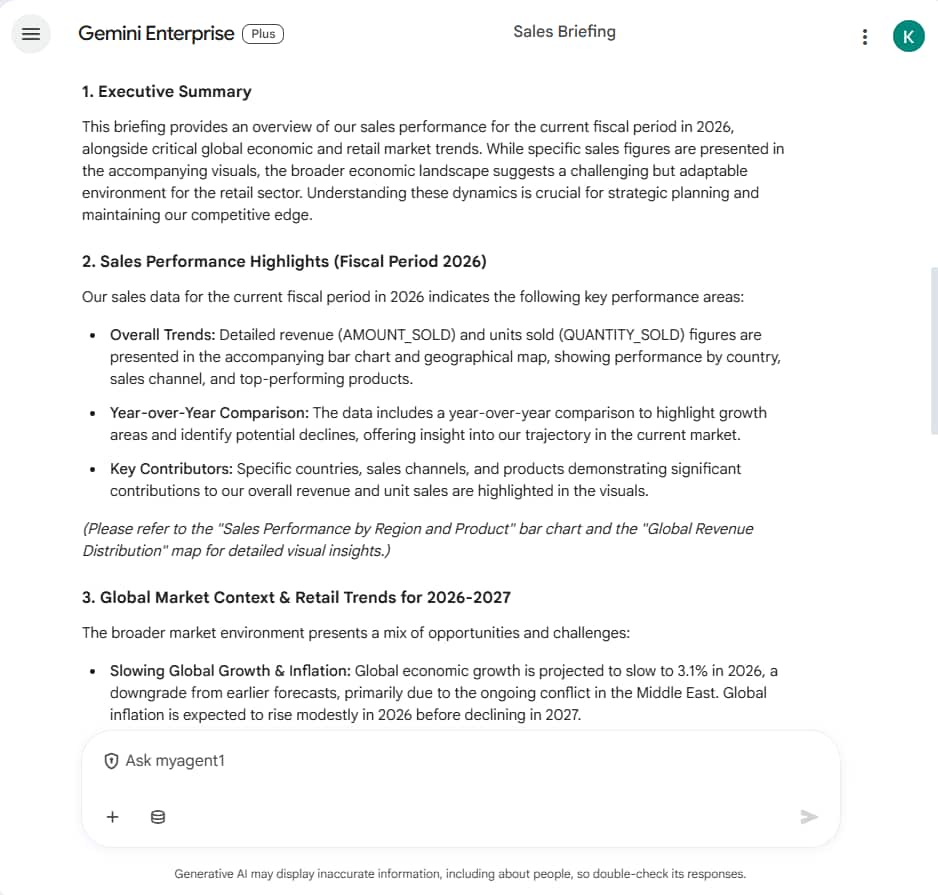
A user types a single question such as, “Give me a Q3 FY2025 briefing for the UK market” and receives a briefing document with charts, market context, and a shareable link, all within a single Gemini Enterprise chat response.
Agent topology
The agents are arranged in a SequentialAgent pipeline with a ParallelAgent at the data gathering stage:
root_agent (LlmAgent is the entry point)
└── briefing_pipeline (SequentialAgent)
├── data_gathering_team (ParallelAgent)
│ ├── oracle_analyst this refers to Oracle Database AI
Agent[RemoteA2aAgent]
│ └── web_analyst for Gemini web search grounding
├── charts_agent for bar chart png
├── synthesis_agent to combine Oracle + web + charts
└── docs_writer_agent to store in Cloud Storage
The ParallelAgent runs oracle_analyst and web_analyst simultaneously. This is one of the key values of multi-agent: neither agent waits for the other, cutting total latency roughly in half compared to sequential execution.
Prerequisites
From Part 1 of this blog post
- Oracle agent URL: base URL of the Oracle NL2SQL A2A agent
- Oracle token URL: OAuth token endpoint for your database
- Oracle client ID and client secret : from the OAuth registration step
- Select AI profile: configured with the Sales History (SH) schema
GCP setup requirements
- GCP project with the following APIs enabled:
- Vertex AI API
- Cloud Run API
- Cloud Build API
- Secret Manager API
- Cloud Storage API
- Maps Static API
- Service account with roles: Vertex AI User, Secret Manager Secret Accessor, Storage Object Admin, Logs Writer, Service Account Token Creator
- Cloud Storage bucket: multi-region recommended for signed URL delivery
- Google Maps API key: restricted to Maps Static API (GCP Console → APIs & Services → Credentials)
gcloudCLI installed and authenticated
Project structure
oracle-sales-hub/
├── orchestrator/
│ ├── demo_sales_hub/ ADK agent package
│ │ ├── __init__.py
│ │ └── agent.py all agent definitions
│ ├── oracle_auth.py Oracle OAuth client factory
│ ├── gcs_tool.py Cloud Storage upload
│ ├── charts_tool.py Bar chart + Maps API map
│ ├── main.py ADK FastAPI entry point
│ ├── requirements.txt
│ └── Dockerfile
└── infra/
└── deploy.sh Cloud Run deployment script
Authentication note: Part 1 described the managed user-facing flow, where queries run under each user’s Oracle Database identity. This reference architecture introduces a developer-owned orchestrator on Cloud Run and uses service-to-service authentication between that orchestrator and the Oracle remote agent.
Step 1: Oracle OAuth authentication
The Oracle Database AI Agent uses OAuth 2.0 with the password grant (resource owner password credentials). This grant allows the orchestrator to obtain a token using a database username and password. The oracle_auth.py module implements an httpx.Auth class that fetches a Bearer token, caches it, and refreshes it 60 seconds before expiry. This is wired into ADK’s RemoteA2aAgent via the a2a_client_factory parameter.
# oracle_auth.py (key excerpt)
class OracleOAuthAuth(httpx.Auth):
def __init__(self, token_url, client_id, client_secret, username,
password):
self.token_url = token_url
self.client_id = client_id
self.client_secret = client_secret
self.username = username
self.password = password
def _get_token(self) -> str:
resp = client.post(self.token_url, data={
"grant_type": "password",
"username": self.username,
"password": self.password,
"client_id": self.client_id,
"client_secret": self.client_secret,
})
return resp.json()["access_token"]
def auth_flow(self, request):
request.headers["Authorization"] = f"Bearer {self._get_token()}"
yield request
def get_oracle_client_factory(token_url, client_id, client_secret,
username, password):
auth = OracleOAuthAuth(token_url, client_id, client_secret, username,
password)
async_client = httpx.AsyncClient(
timeout=httpx.Timeout(timeout=60.0),
auth=auth,
headers={"Content-Type": "application/json"},
)
return
ClientFactory(ClientConfig(httpx_client=async_client))
This pattern is reusable for any A2A remote agent that requires non-Google OAuth. If you are integrating other third-party A2A agents, implement the same httpx. Auth subclass pattern with your own token endpoint and grant type.
Step 2: Connecting to the Oracle NL2SQL A2A agent
The Oracle Database AI Agent exposes an A2A endpoint at a path specific to Oracle’s implementation. Oracle uses:
ORACLE_AGENT_URL/agents/{agent-name}We pass a pre-built AgentCard object directly to RemoteA2aAgent instead of a URL. This bypasses the HTTP fetch entirely
from a2a.types import AgentCard, AgentSkill,
AgentCapabilities
def _make_oracle_remote_agent(name: str) -> RemoteA2aAgent:
agent_card = AgentCard(
name="Oracle AI Database Agent",
description="Queries Oracle Autonomous AI Database using natural
language.",
url=ORACLE_AGENT_URL + AGENT_CARD_PATH,
version="1.0.0",
default_input_modes=["text/plain"],
default_output_modes=["text/plain"],
capabilities=AgentCapabilities(streaming=False),
skills=[AgentSkill(
id="nl2sql",
name="NL2SQL Query",
description="Converts natural language to SQL and queries
Oracle.",
tags=["oracle", "sql", "database"],
examples=["Show revenue by channel for Q3 FY2025"],
)],
)
return RemoteA2aAgent(
name=name,
description="Queries Oracle Autonomous AI Database using natural
language.",
a2a_client_factory=get_oracle_client_factory(
token_url=ORACLE_TOKEN_URL,
client_id=ORACLE_CLIENT_ID,
client_secret=ORACLE_CLIENT_SECRET,
username=ORACLE_USERNAME,
password=ORACLE_PASSWORD,
),
agent_card=agent_card, # pre-built object, no HTTP fetch
use_legacy=True,
)
It is important to note that NL2SQL and Oracle query execution still happen on the Oracle side. Your Cloud Run orchestrator does not translate natural language to SQL itself; it delegates Oracle data retrieval to the Oracle AI Database Agent through A2A.
Step 3: Running Oracle and web search in parallel
ADK’s ParallelAgent runs all sub-agents simultaneously and collects their outputs into the shared conversation context. The data_gathering_team runs the Oracle query and the web search at the same time:
data_gathering_team = ParallelAgent(
name="data_gathering_team",
sub_agents=[oracle_analyst, web_analyst],
)
Each sub-agent prefixes its output with a clear header, so the downstream synthesis agent can reliably locate each data source.
Step 4: Generating visual charts
Gemini Enterprise renders PNG images inline in chat when the agent declares image/png as an output mode in its agent card. The charts_tool.py module generates two images:
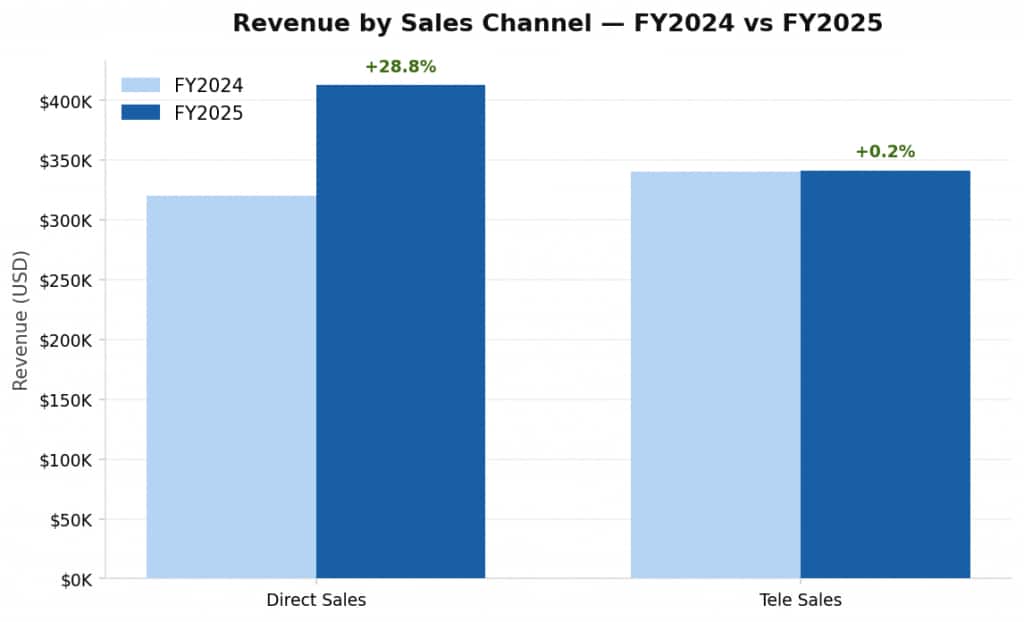
Bar chart
Generated with Matplotlib. Shows FY2024 vs FY2025 side-by-side bars per sales channel (Direct Sales, Tele Sales, etc.) with YoY percentage.
# charts_tool.py (bar chart excerpt)
bars_2024 = ax.bar(x - bar_width/2, fy2024_vals, bar_width,
label="FY2024", color="#B5D4F4")
bars_2025 = ax.bar(x + bar_width/2, fy2025_vals, bar_width,
label="FY2025", color="#185FA5")
# YoY % label above each FY2025 bar
for i, (v24, v25) in enumerate(zip(fy2024_vals, fy2025_vals)):
yoy = ((v25 - v24) / v24) * 100
color = "#3B6D11" if yoy >= 0 else "#A32D2D"
ax.text(x[i] + bar_width/2, v25, f"+{yoy:.1f}%",
ha="center", color=color, fontweight="bold")
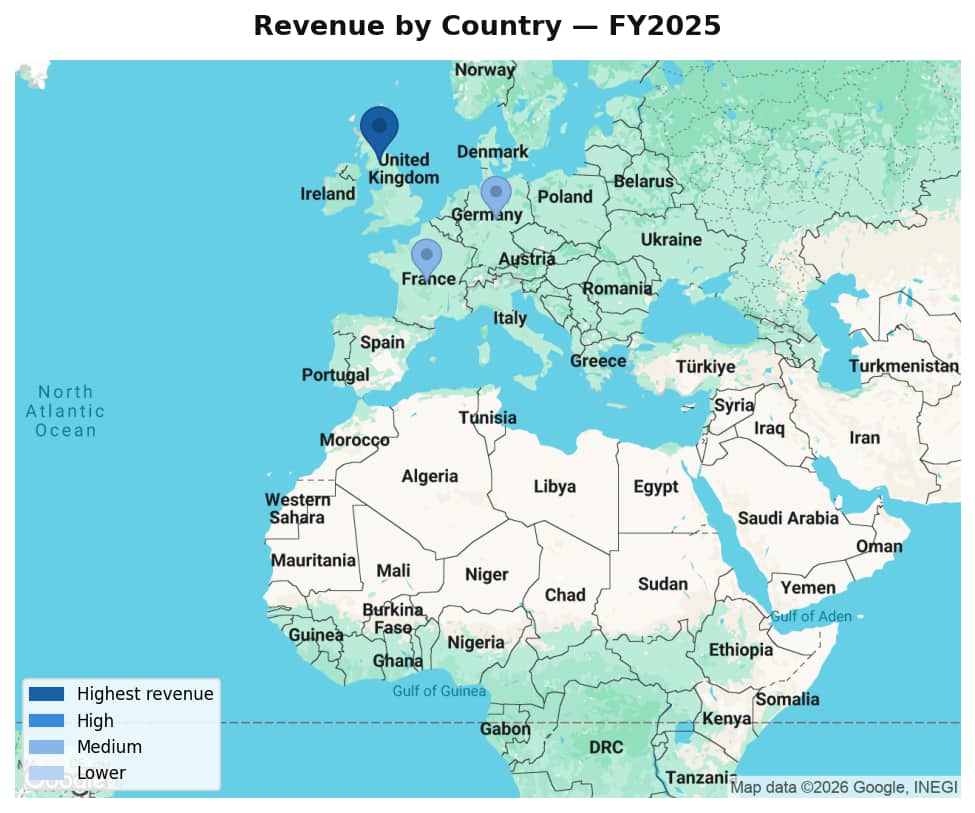
Revenue map for geographic distribution
Generated using the Google Maps Static API. Country centroids are overlaid with circle markers sized and colored by revenue intensity. The map auto-centers and zooms based on which countries appear in the Oracle results.
# charts_tool.py (map excerpt)
params = {
"size": "800x500",
"scale": "2", # retina quality
"maptype": "roadmap",
"center": f"{center_lat},{center_lon}",
"zoom": str(zoom),
"key": MAPS_API_KEY,
}
# Add a circle marker per country, colored by revenue intensity
for country, revenue in mapped.items():
lat, lon = COUNTRY_COORDS[country]
markers.append(f"color:{color}|size:{size}|{lat},{lon}")
Both images are uploaded to Cloud Storage and returned as signed URLs. The charts_agent runs after data_gathering_team completes, so it has access to the Oracle data it needs to parse revenue figures. The URLs appear in the Gemini Enterprise chat response as clickable links, users click to open the full-resolution chart in a new tab.
Step 5: Synthesizing the briefing
The synthesis agent receives three upstream inputs via the shared conversation context and combines them into a structured Markdown briefing. The output briefing follows a fixed structure with sections such as sales performance, geo distribution, market context, and recommendation
Step 6: Delivering the briefing via Cloud Storage
The docs_writer_agent calls upload_briefing_to_gcs() which converts the briefing to a HTML page and uploads it to your Cloud Storage bucket. For simplicity, we push the file to publicly readable storage. The final response in Gemini Enterprise chat includes the structured briefing text in Markdown, image links with bar chart and revenue map and a clickable URL to the full HTML report on Cloud Storage
Step 7: Declaring image output in the agent card
Declare image/png as a supported output mode in the agent card JSON so Gemini Enterprise knows this agent can return image content. In practice, Gemini Enterprise renders images sent as binary blob attachments in the A2A response. Images referenced only as GCS URLs appear as clickable links rather than inline renders. For this demo, charts appear as clickable links that open in a new tab, and the full HTML briefing report includes the charts embedded inline.
The agent card JSON you paste into Gemini Enterprise must include these fields:
{
"protocolVersion": "0.1",
"name": "Oracle Sales Intelligence Hub",
"description": "Answers business questions about Oracle sales
data...",
"url": "https://YOUR_CLOUD_RUN_URL",
"version": "1.0.0",
"defaultInputModes": ["text/plain"],
"defaultOutputModes": ["text/plain", "image/png"],
"capabilities": { "streaming": false },
"skills": [{
"id": "sales_briefing",
"name": "Sales Briefing",
"description": "Generates an executive sales briefing...",
"tags": ["sales", "oracle", "analytics", "briefing"],
"examples": ["Give me a Q3 FY2025 briefing for the UK market",
"demo"]
}]
}
Step 8: Serving the agent with to_a2a()
ADK’s get_fast_api_app() serves agents via ADK’s own API format, not the A2A JSON-RPC standard that Gemini Enterprise expects. To expose a proper A2A-compliant endpoint, use ADK’s to_a2a() function instead. Pass a Runner configured with session and artifact services:
# main.py
import os
import uvicorn
from google.adk.a2a.utils.agent_to_a2a import to_a2a
from google.adk.artifacts import InMemoryArtifactService
from google.adk.runners import Runner
from google.adk.sessions import InMemorySessionService
from demo_sales_hub.agent import root_agent
port = int(os.environ.get("PORT", "8080"))
cloud_run_url = os.environ.get("CLOUD_RUN_URL", "")
host = cloud_run_url.replace("https://", "").replace("http://",
"").rstrip("/")
runner = Runner(
agent=root_agent,
app_name=root_agent.name,
session_service=InMemorySessionService(),
artifact_service=InMemoryArtifactService(),
)
app = to_a2a(
agent=root_agent,
host=host,
port=443,
protocol="https",
runner=runner,
)
if __name__ == "__main__":
uvicorn.run(app, host="0.0.0.0", port=port)
Step 9: Deploying to Cloud Run
The deployment script handles all setup steps automatically. Fill in the placeholders at the top of the script and run it from your project root.
Environment variables
| Variable | Description |
|---|---|
| PROJECT_ID | Your GCP project ID |
| REGION | Cloud Run region e.g. us-east4 |
| ORACLE_AGENT_URL | Base URL of the Oracle AI Database Agent |
| ORACLE_TOKEN_URL | Oracle OAuth token endpoint |
| ORACLE_CLIENT_ID | OAuth client ID from Oracle registration |
| ORACLE_CLIENT_SECRET | OAuth client secret (stored in Secret Manager) |
| ORACLE_USERNAME | Oracle database username for password grant authentication |
| ORACLE_PASSWORD | Oracle database password (stored in Secret Manager) |
| GCS_BUCKET_NAME | Cloud Storage bucket for briefing output |
| MAPS_API_KEY | Google Maps Static API key (stored in Secret Manager) |
| CLOUD_RUN_URL | Your Cloud Run service public URL (used to build agent card) |
| SERVICE_ACCOUNT_EMAIL | Service account email for GCS signed URL generation |
| GOOGLE_GENAI_USE_VERTEXAI | Set to true to use Vertex AI instead of Gemini API key |
| GOOGLE_CLOUD_PROJECT | GCP project ID passed to Vertex AI SDK |
| GOOGLE_CLOUD_LOCATION | Set to global for broadest Gemini model availability |
| GEMINI_MODEL | Set to gemini-2.5-flash |
Run the deployment
chmod +x infra/deploy.sh
./infra/deploy.sh
The script performs these steps:
- Sets the active GCP project
- Enables all required GCP APIs
- Grants Cloud Build service account deployment permissions
- Stores secrets in Secret Manager (Oracle client secret, Maps API key)
- Builds and pushes the Docker image via Cloud Build (no Docker required locally)
- Deploys the Cloud Run service with Zero Trust authentication (–no-allow-unauthenticated)
- Grants the current user Cloud Run invoker access for testing
Step 10: Connecting to Gemini Enterprise
Once deployed, a Gemini Enterprise App Admin registers with your Cloud Run orchestrator as a custom A2A agent. Think of this as a second layer above the Oracle AI Database Agent from Part 1: Gemini Enterprise talks to your orchestrator, and your orchestrator in turn talks to the Oracle agent.
There are two separate connections in this architecture. The Oracle OAuth credentials from Part 1 are used by the orchestrator when it calls the Oracle AI Database Agent. Access from Gemini Enterprise to your Cloud Run service should match however you expose the custom agent endpoint. In the demo deployment in this post, the service is made reachable, so Gemini Enterprise can invoke it.
- Open the Gemini Enterprise Admin Console: go to Apps → Google Workspace → Gemini Enterprise
- Navigate to Agents then Add Agent then Custom agent via A2A
- Paste the agent card JSON: replace
YOUR_CLOUD_RUN_URLwith your actual service URL. Theurlfield must point to your Cloud Run service base URL. - Enter OAuth credentials: Gemini Enterprise prompts for Client ID, Client Secret, Authorization URL, and Token URL. Use the same Oracle OAuth credentials from Part 1.
- Grant access: in the agent’s Permissions panel, add the users, groups, or OUs that should have access
- Open Cloud Run to allUsers: Gemini Enterprise must be able to reach your service. Run:
gcloud run services add-iam-policy-binding oracle-sales-hub \
--region=YOUR_REGION \
--member="allUsers" \
--role="roles/run.invoker"
Note: this is reset on each redeployment. Add –allow-unauthenticated to the gcloud run deploy command in deploy.sh to make it permanent.
Demo output
Chat
Charts (opens in new tab)
Troubleshooting
| Issue | Resolution |
|---|---|
| Container fails to start on Cloud Run | Check logs: gcloud logging read with resource.type=cloud_run_revision. Most common cause is a missing environment variable causing a crash at import time. |
| ModuleNotFoundError: google.adk.a2a | The A2A extras are not installed. Change google-adk>=0.4.0 to google-adk[a2a]>=0.4.0 in requirements.txt and redeploy. |
| Agent card returns 404 from curl | ADK’s get_fast_api_app() does not expose A2A endpoints. Switch to to_a2a() in main.py as described in Step 8. |
| Cloud Run returns 403 to Gemini Enterprise | Gemini Enterprise cannot reach the service. Run: gcloud run services add-iam-policy-binding oracle-sales-hub –member=allUsers –role=roles/run.invoker |
| Gemini model 404 / publisher model not found | gemini-2.0-flash is not available for new projects. Use gemini-2.5-flash and set GOOGLE_CLOUD_LOCATION=global in deploy.sh. |
| Signed URL error: credentials just contain a token | Compute Engine credentials cannot sign URLs directly. Add SERVICE_ACCOUNT_EMAIL env var, update gcs_tool.py to use access_token parameter, and grant roles/iam.serviceAccountTokenCreator to the service account. |
| Oracle A2A returns ADB-00015 Invalid credential | The client_id or client_secret is incorrect or expired. Re-run the Oracle OAuth registration curl to generate fresh credentials. |
| Gemini Enterprise OAuth error unauthorized | Gemini Enterprise sends authorization code flow without PKCE. If your Oracle OAuth client is registered with PKCE, register a new client without using token_endpoint_auth_method: client_secret_post. |
Links
- Unlocking Data Insights with the Oracle AI Database Agent in Gemini Enterprise – Part 1
- Google Agent Development Kit (ADK) documentation
- Agent2Agent (A2A) protocol specification
- Implementing Zero Trust A2A with ADK in Cloud Run
- Oracle Autonomous AI Database Select AI documentation
- Google Maps Static API documentation
- Cloud Run deployment documentation