
Oracle GoldenGate provides real-time, reliable replication of transactional changes into open lakehouse architectures. In this post, you’ll configure Oracle GoldenGate for Distributed Applications and Analytics (GoldenGate for DAA) Apache Iceberg handler to deliver change data into Apache Iceberg tables on Google Cloud Storage (GCS) and register those tables using Google BigLake Metastore via the Iceberg REST catalog endpoint.
Google BigLake metastore is a unified, managed, serverless, and scalable metastore that connects lakehouse data stored in Google Cloud to multiple runtimes, including open source engines (like Apache Spark) and BigQuery. In this blog, we will use the The BigLake API (provides access to BigLake Metastore) v1beta for replicat configuration. For the most recent BigLake API references, please refer to Google BigLake REST API reference document.
The heterogeneous nature of Oracle GoldenGate allows any certified source to send data to Google BigLake metastore. This guide focuses on the target (delivery) configuration—Replicat, catalog connectivity, dependencies, and operational considerations. Source-side capture configuration varies by database and is intentionally out of scope; refer to GoldenGate documentation and source-specific setup guides for Oracle GoldenGate Extract configuration.
Benefits of using Oracle GoldenGate with Google BigLake Metastore
Oracle GoldenGate provides reliable, real-time delivery of transactional change data into Apache Iceberg tables on Google Cloud Storage. By centrally registering these tables via Google BigLake Metastore, organizations gain a unified governance and metadata layer. This integration ensures that “analytics-ready” Iceberg datasets are immediately discoverable and accessible across the Google Cloud ecosystem, including BigQuery, Dataproc, and Spark.
- AI‑Ready Data Delivery
GoldenGate continuously replicates and transforms database changes into Iceberg format. By automating the enrichment process during delivery, it produces curated datasets that are instantly available for AI/ML workflows through BigLake-managed metadata. - Lowered Operational Costs
Using BigLake Metastore as the centralized catalog reduces duplicated table definitions and streamlines lakehouse operations for Iceberg—standardizing table registration, schema conventions, and governance across engines accessing the same data on Cloud Storage. - Resilient, Uninterrupted Data Pipelines
GoldenGate real-time replication plus Iceberg’s schema and snapshot capabilities helps teams adopt controlled schema evolution and incremental updates, minimizing downstream breakage as source schemas change while maintaining consistent table definitions through the metastore.
Before you begin
Please make sure that the following prerequisites are met before configuring the replication for Google BigLake metastore.
For Google BigLake metastore:
- Enable BigLake API and grant required roles.
- Configure a Cloud Storage bucket to be used as the warehouse for Apache Iceberg tables.
- Set up the BigLake Iceberg REST Catalog.
- Configure Google Cloud Platform Service Account Key.
For Oracle GoldenGate:
- Install Oracle GoldenGate 26ai and create a deployment. Alternatively, you can use an existing Oracle GoldenGate 19c or 21c environment.
- Create an Oracle GoldenGate Extract. While adding the Extract;
- It is recommended to use uncompressed operations which can be configured by LOGALLSUPCOLS. LOGALLSUPCOLS causes Extract to automatically include the before image for UPDATE operations in the trail record.
- If a source table does not have a primary key (PK), users can define a substitute key by including a KEYCOLS clause in the Extract. If the source table does not have a PK and KEYCOLS is not specified in the Extract, Oracle GoldenGate Google BigLake metastore replication fails.
- Install Oracle GoldenGate for DAA 26ai and create a deployment.
- Start the Service Manager and connect to Oracle GoldenGate for DAA Web Interface, alternatively you can use Admin Client Command Line Interface.
- Create a Distribution Path from source Oracle GoldenGate deployment to target Oracle GoldenGate for DAA deployment.
- Create an application configuration properties file for Google BigLake metastore within the Oracle GoldenGate for DAA instance. Sample REST Catalog properties file, (biglake.properties):
type=rest
uri=https://biglake.googleapis.com/iceberg/v1/restcatalog
warehouse=gs://<warehouse_gcs_bucket_name>
header.Authorization=Bearer $TOKEN
header.x-goog-user-project=<gcp_project_id>
When Oracle GoldenGate connects to the BigLake Metastore Iceberg REST Catalog, the REST catalog properties file (biglake.properties) typically includes an OAuth 2.0 Bearer access token. Because Google Cloud access tokens are short-lived (commonly ~1 hour), Replicat may fail with the below error once the token expires unless the token is refreshed proactively.
NotAuthorizedException: Not authorized: Request had invalid authentication credentials. Expected OAuth 2 access token, login cookie or other valid authentication credential.
One practical workaround is to automate token refresh and update biglake.properties before expiration. A common pattern is:
– Authenticate as a Google Cloud service account (for example, via gcloud auth activate-service-account).
– Generate a new access token with gcloud auth print-access-token.
– Rewrite the REST catalog properties file (biglake.properties) with the fresh token.
– Schedule the refresh with cron (for example, every 45 minutes) to stay comfortably inside the token lifetime.
Security considerations: this approach stores an access token in plaintext on disk. Mitigate risk by applying least privilege to the service account, restricting file permissions (for example, chmod 600 biglake.properties), and limiting host/user access. Where supported, consider using GoldenGate for DAA Iceberg REST catalog property encryption to protect the catalog properties at rest. Ensure the approach aligns with your organization’s security and compliance requirements before using it in production.
Preferred (when running on Google Cloud): use a platform-native identity approach such as Workload Identity Federation / Workload Identity so the GoldenGate for DAA runtime can obtain credentials dynamically, reducing or eliminating the need to manage tokens in files. - Download iceberg-common and gcs-java-sdk dependencies using dependency downloader utility shipped with GoldenGate for DAA. Please note the full path to dependency libraries downloaded.
Creating the Oracle GoldenGate Apache Iceberg Replication for Google BigLake Metastore
- In Home, click “Add Replicat”.

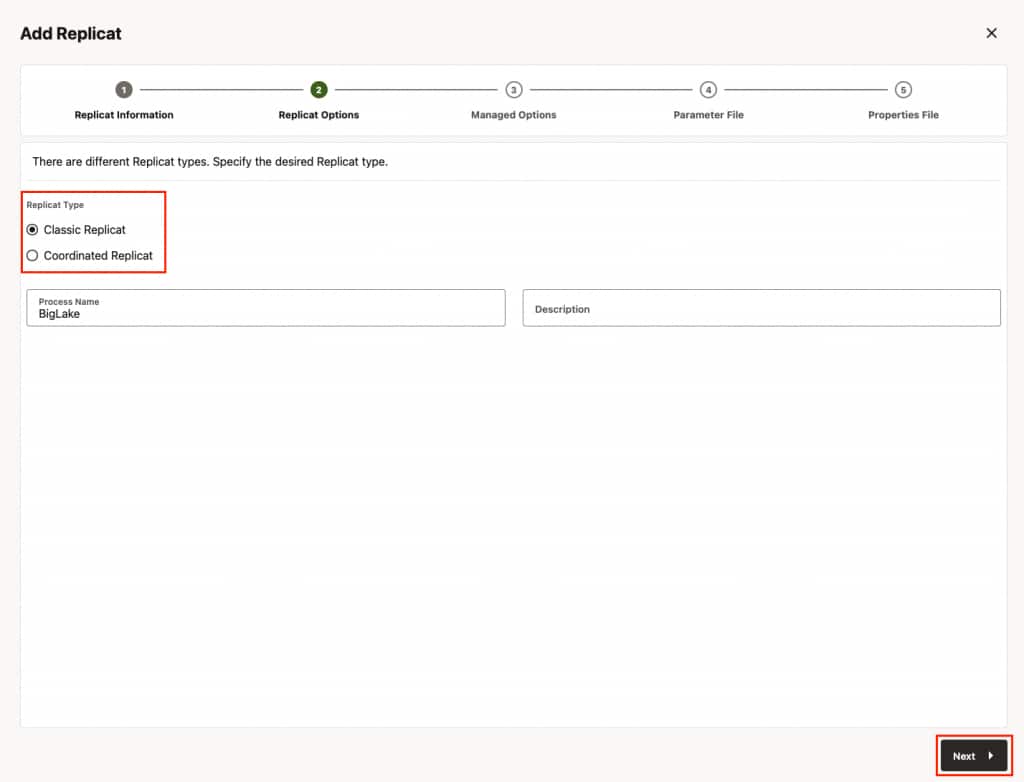
- In Replicat Information, select the type of the replicat and provide a name for the replicat and click Next.
Classic Replicat: Classic Replicat is a single-threaded apply process.
Coordinated Replicat: Coordinated Replicat is a multi-threaded apply process. Coordinated Replicat allows for user-defined partitioning of the workload to apply high volume transactions concurrently.
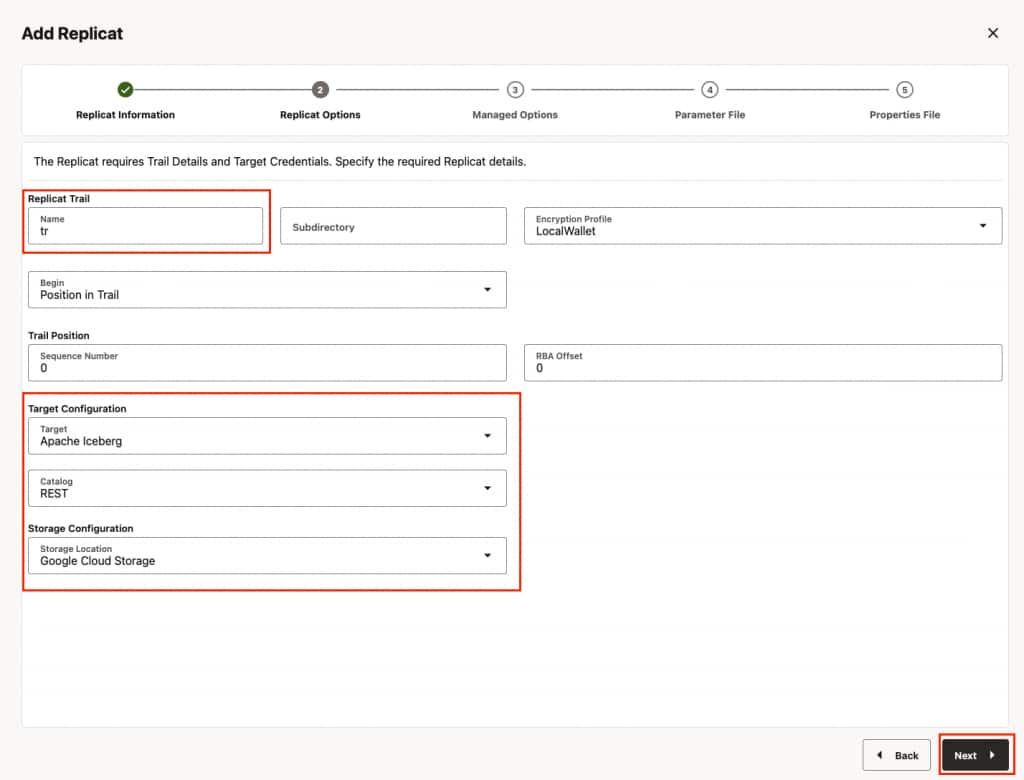
- In Replicat Options, provide the trail file name, select target configuration and click Next.
- Replicat trail: The name of the source trail file
- Target: Apache Iceberg
- Catalog: REST
- Storage Configuration: Google Cloud Storage
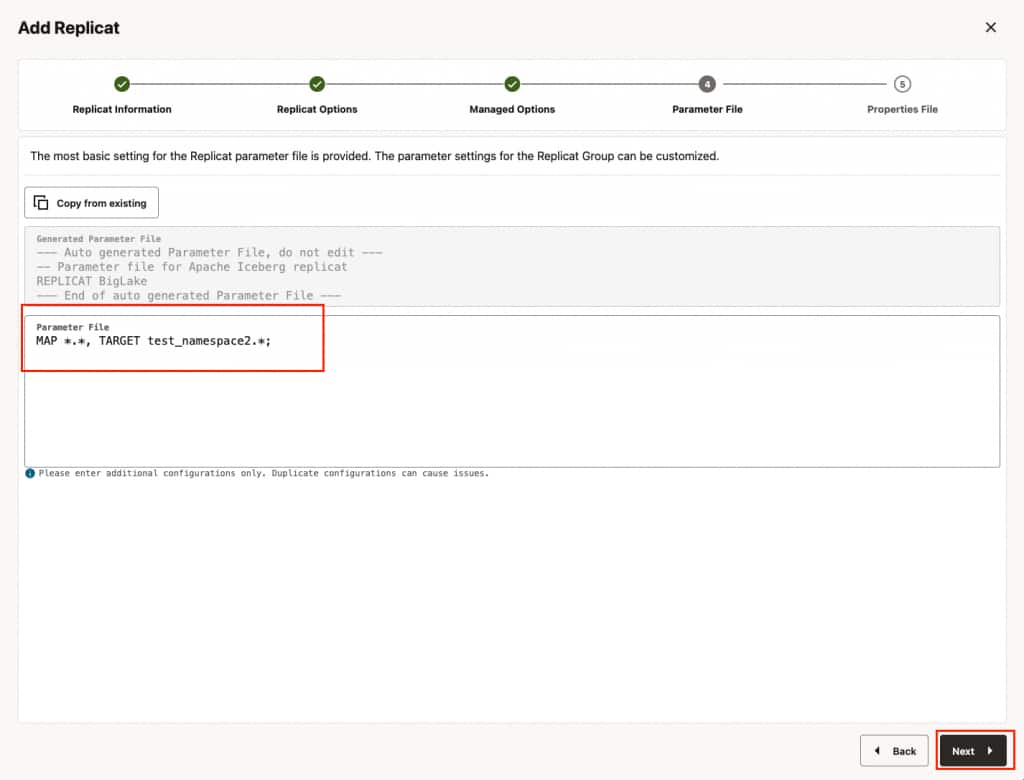
- In Parameters File, you can define source to target (Google BigLake metastore) mapping. Define the target side of the mapping as <biglake_namespace>.* which maps the source database names to target Google BigLake table namespace and creates the Apache Iceberg tables with the same source table names. And click Next.
Ensure to specify the path to the properties file in the parameter file only when using Coordinated Replicat. Add the following line to the parameter file:TARGETDB LIBFILE libggjava.so SET property=<parameter file directory>/<properties file name>
- In Properties File, update the properties marked as #TODO and click Create and Run. Please note that these are the bare minimum properties that needs to be updated for starting the replicat. For additional properties, please refer to GoldenGate for DAA document.
gg.target=iceberg
gg.eventhandler.iceberg.fileFormat=parquet
gg.eventhandler.iceberg.catalogType=rest
#TODO: Edit the REST Catalog endpoint URI.
gg.eventhandler.iceberg.restCatalogUri=https://biglake.googleapis.com/iceberg/v1beta/restcatalog/
#TODO: Edit the Properties file with that additional configuration for the REST catalog.
gg.eventhandler.iceberg.restCatalogProperties=/path/to/biglake.properties
#TODO: Optional configuration for authentication to the object storage.
gg.eventhandler.iceberg.fileSystemScheme=gs://
gg.eventhandler.iceberg.gcpStorageBucket=<warehouse_gcs_bucket_name>
gg.eventhandler.iceberg.gcpProjectId=<gcp_project_id>
gg.eventhandler.iceberg.gcpServiceAccountJsonKeyFile=/path/to/gcp_service_account_key_file.json
#TODO: Edit the classpath for catalog using GCS
gg.classpath=/path/to/dependencies/iceberg-gcs-java-sdk/*:/path/to/dependencies/iceberg-common/*
Keep the remaining defaults unless you have specific requirements (encryption, roll intervals, throughput tuning, etc.). For other optional properties, please refer to GoldenGate for DAA document.
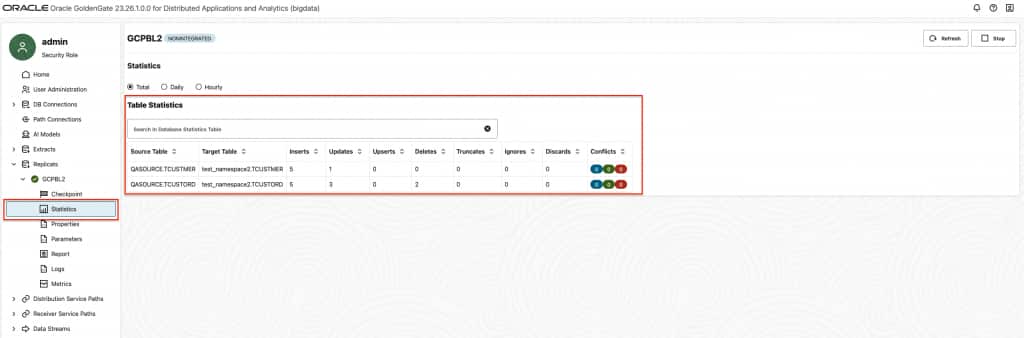
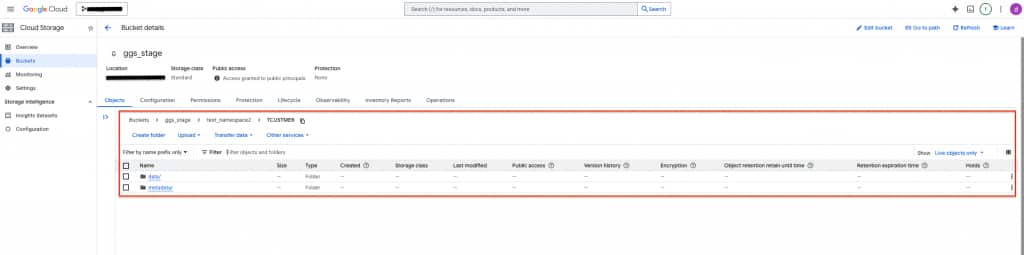
gg.handler.iceberg.inactivityRollInterval is not active by default and it is configurable. When configured, it starts a timer for tracking the inactivity period. Here, inactivity means there are no operations coming from the source system. In other words, there are no CDC data being written to the file. When set, it starts the count down when the last operation is written to a file. At the end of the count down, if there are no incoming operations, file is closed and moved to Google BigLake. Especially for dev-test scenarios, it can be very useful. For example, you can add gg.handler.iceberg.inactivityRollInterval=5s to replicat properties to set it to 5 seconds. - To confirm that Replicat is running successfully, you can check the Replicat Statistics and confirm Iceberg tables exist in warehouse path.
Performance Considerations
- The Oracle GoldenGate Google BigLake replication supports merge-on-read. To improve merge-on-read performance, GoldenGate Iceberg replication performs internal aggregation. The default aggregation window is 15 minutes and is configurable (shorter or longer). The longer the aggregation period, the more operations Oracle GoldenGate can aggregate, which is especially beneficial for long-running transactions. You can configure this by adding gg.eventhandler.iceberg.fileRollInterval to Replicat properties file. For example: gg.eventhandler.iceberg.fileRollInterval=30m
- Oracle GoldenGate Extract writes update operations in two modes: compressed or uncompressed. Compressed mode is the default and includes values for the key columns and the modified columns. An uncompressed update record includes values for all columns. Compressed update records will fail Apache Iceberg replication. Oracle recommends uncompressed updates; you can enable them by adding LOGALLSUPCOLS to the Extract parameters. If Extract must use compressed mode, you can add gg.eventhandler.iceberg.abendOnMissingColumns=false to the replicat properties file. When it is set to false, Replicat will handle compressed updates by querying the previous values of the missing columns from the Iceberg table. Note that this will have a negative impact on performance.
- Primary key updates with missing column values may result in small data files and delete files for the primary key update operations. For workloads or tables with frequent primary key updates, Oracle recommends generating trail files with uncompressed update records by adding LOGALLSUPCOLS to the Extract parameters. It is recommended setting gg.validate.keyupdate=true if the source is Oracle Database.
Limitations
- Oracle GoldenGate does not support configuration of partition columns during automatic table creation. If partitioned tables are required, the Iceberg table should be created manually with the required partition columns.
- Altering the partitioning schema of a table is not supported after starting the Replication process. If the partitioning schema of a table needs to be changed, the table should be dropped and recreated manually in the target database.
- Pre-existing Iceberg target tables must have identifier columns (key columns) in the schema.
- The following Iceberg data types cannot be used as a key column (Iceberg identifier field):
- Binary
- UUID
- Fixed
- Current Oracle GoldenGate version supports auto table creation in Apache Iceberg. If target Iceberg Table does not exist, Oracle GoldenGate Apache Iceberg replicat creates it automatically based on source table definition. Other DDL operations are not supported currently.
Conclusion
In this blog, we walked through the end-to-end configuration of Oracle GoldenGate replication into Google BigLake Metastore using the Apache Iceberg REST Catalog. By leveraging Oracle GoldenGate’s heterogeneous replication capabilities alongside Google BigLake Metastore’s unified, serverless metadata layer, organizations can build robust, real-time open lakehouse pipelines on Google Cloud. The integration enables analytics-ready Iceberg datasets to be immediately accessible across the Google Cloud ecosystem — including BigQuery, Dataproc, and Spark — without duplicating data or managing complex custom connectors. While there are current limitations such as token expiry and lack of native support for partition column configuration during automatic table creation, the workarounds described in this blog provide a practical path forward. As both Oracle GoldenGate and Google BigLake Metastore continue to evolve, we can expect tighter integration, improved security options, and broader feature support. We hope this blog serves as a useful starting point for teams looking to modernize their data pipelines and unlock the full potential of an open lakehouse architecture on Google Cloud.