Start with an empty Oracle schema, automatically create and reload the target tables, then switch to continuous replication from MySQL.
Before replicating data between different database engines, someone usually has to build the target tables: translate the source definitions, choose compatible datatypes, and prepare the destination.
The target must also receive the changes captured during the initial load. With Oracle GoldenGate 26ai, DDL AUTOSCHEMA makes target-table creation part of that workflow. Replicat generates the target database DDL from source metadata in the trail. See Using Automatic Schema Evolution.
Shrinidhi Kulkarni’s Introducing Automatic Schema Evolution in Oracle GoldenGate 26ai provides an overview of the feature and its use cases.
In this lab, we used a small public-sector application to load MySQL data into an initially empty Oracle schema. We then deliberately recreated the tables with a chosen datatype mapping and applied the captured changes while the application continued writing.
We verified the result using MySQL 8.4, Oracle Database 19.32, and self-managed GoldenGate Microservices deployments running build 23.26.3.0.6.
The business scenario
A municipal services application records citizens, service requests, administrative events, and payments. MySQL runs the source application. Oracle is the destination for downstream integration and reporting.
The model is small:
| Source table | Business purpose | Initial rows |
|---|---|---|
| CITIZENS | Citizens using municipal services | 100 |
| SERVICES | Catalog of available services and fees | 5 |
| APPLICATIONS | Requests submitted by citizens | 100 |
| APPLICATION_EVENTS | Events in each request’s lifecycle | 200 |
| PAYMENTS | Payments associated with requests | 50 |
| Total | 455 |
All records are synthetic. Each table has an explicit primary key on the ID column. The data includes decimal amounts, Unicode text, NULL values, and timestamps with microseconds. Business relationships are checked during reconciliation. Foreign-key migration is outside the scope of this example.
The MySQL database is app_demo. The Oracle target is APP_DEMO in the PDB OGGPDB1. The Oracle schema exists before the test, but it contains zero objects. No target business tables are pre-created.
The replication architecture
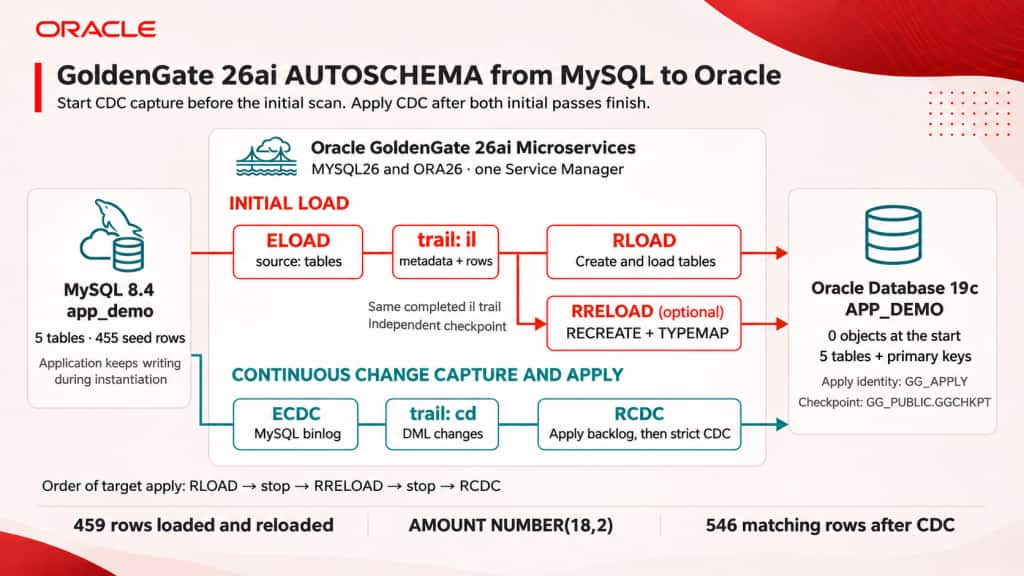
Two complementary flows handle the initial load and CDC. A temporary RRELOAD process demonstrates table recreation before CDC apply begins.
The lab uses a MySQL deployment, MYSQL26, and an Oracle deployment, ORA26, under one Service Manager. Each flow pairs a source Extract with a target Replicat:
- Initial load:
ELOADscans the MySQL tables and writes theiltrail.RLOADreads it, creates the Oracle tables, and loads their rows. - CDC:
ECDCcaptures MySQL changes in thecdtrail while the load runs.RCDCapplies those changes after the initial load is complete.
For the controlled reload, we add RRELOAD to replace the tables created by RLOAD. It reads the same completed il trail with its own checkpoint. ECDC continues capturing, but RCDC does not apply until both initial-load passes have finished.
How AUTOSCHEMA creates heterogeneous tables
The trail carries source table definitions in Table Definition Records, or TDRs. If a mapped target table is missing, AUTOSCHEMA uses those definitions and the target database’s datatype mappings to generate a CREATE TABLE statement in Oracle syntax. See Propagating Table Evolution Changes.
The target schema and a dedicated apply account are prepared in advance. The credential alias gg_apply, in the OracleGoldenGate domain of ORA26, connects as the local user GG_APPLY to the OGGPDB1 PDB, not as the application owner. This user needs the documented apply privileges and the cross-schema DDL/DML privileges required to create, alter, drop and populate the mapped tables. The lab does not use DBA or SYSDBA for Replicat. Account preparation is covered in Oracle database user privileges.
The checkpoint table GG_PUBLIC.GGCHKPT is prepared separately in that PDB and accessible to the apply user. Keeping it outside APP_DEMO lets the application schema start empty. On the source, the demo_mysql credential alias must already exist in MYSQL26 and connect to an account with the documented MySQL capture and initial-load privileges. These database aliases are distinct from the GoldenGate REST Administrator account used below.
First capture changes, then perform the initial load
We start ECDC at a freshly recorded MySQL binlog position before starting the application workload or scanning the tables. Changes made during instantiation then accumulate in the CDC trail.
The tested MySQL logging configuration uses ROW, binlog_row_image=FULL, and binlog_row_metadata=FULL. The Extract also includes NOCOMPRESSUPDATES and NOCOMPRESSDELETES for the complete row images used by this instantiation flow.
This lab starts its controlled writer after capture begins. For an application that is already active, check transactions opened before the capture boundary and let them commit or roll back before starting the initial scan. Retain the required binlogs and trails until capture and apply have consumed them. Starting CDC first is necessary for this method, but is not by itself a guarantee for arbitrary in-flight transactions. See Oracle’s MySQL-to-Oracle instantiation walkthrough.
We then start a five-minute synthetic application workload and run ELOAD. In the Microservices REST API, the initial Extract uses "source": "tables"; its output is the separate initial-load il file.
The first Oracle Replicat uses DDL AUTOSCHEMA INCLUDE ALL to generate the missing table definitions. AUTOSCHEMA enables metadata-driven DDL generation; INCLUDE ALL adds no separate object filter in this example. The five MAP statements identify the source and target tables. See Enable Automatic Schema Evolution.
REPLICAT RLOAD
USERIDALIAS gg_apply DOMAIN OracleGoldenGate
DDL AUTOSCHEMA INCLUDE ALL
MAP app_demo.CITIZENS, TARGET APP_DEMO.CITIZENS;
MAP app_demo.SERVICES, TARGET APP_DEMO.SERVICES;
MAP app_demo.APPLICATIONS, TARGET APP_DEMO.APPLICATIONS;
MAP app_demo.APPLICATION_EVENTS, TARGET APP_DEMO.APPLICATION_EVENTS;
MAP app_demo.PAYMENTS, TARGET APP_DEMO.PAYMENTS;
Replicat created all five Oracle tables and their enabled primary keys, then loaded 459 rows. The MySQL application was already writing, so the scan returned more than the original 455 rows. We compared both databases after CDC applied the changes captured during the load.
We added a two-second pause during initial apply to make concurrent activity easier to observe. Twelve application transactions committed during the measured initial AUTOSCHEMA activity window. The parameter block above contains the core replication configuration without that optional SQLEXEC pause. AUTOSCHEMA does not require the pause.
Recreate existing tables during initial load
For the second pass, OPTYPE RECREATE selects the initial-load behavior that replaces an existing target table using the incoming source metadata before loading its rows. We stopped RLOAD, retained the completed initial trail, and created a separate Replicat with its own checkpoint:
REPLICAT RRELOAD
USERIDALIAS gg_apply DOMAIN OracleGoldenGate
DDL AUTOSCHEMA INCLUDE ALL OPTYPE RECREATE
AUTOSCHEMAOPTIONS TYPEMAP app_demo.PAYMENTS.AMOUNT = 'NUMBER(18,2)'
MAP app_demo.CITIZENS, TARGET APP_DEMO.CITIZENS;
MAP app_demo.SERVICES, TARGET APP_DEMO.SERVICES;
MAP app_demo.APPLICATIONS, TARGET APP_DEMO.APPLICATIONS;
MAP app_demo.APPLICATION_EVENTS, TARGET APP_DEMO.APPLICATION_EVENTS;
MAP app_demo.PAYMENTS, TARGET APP_DEMO.PAYMENTS;
RECREATE is destructive: it drops the existing mapped tables and their data before recreating and reloading them. Use it only for an intentional reload, after reviewing dependencies and preserving any data that must be retained. Other Replicats must not be applying to those tables during recreation.
RRELOAD read the verified initial trail from its beginning using an independent checkpoint. RLOAD‘s checkpoint was left unchanged. RCDC had not yet been created, while ECDC continued capturing source changes.
The native report recorded one OGG-30640 drop message for each table, for example:
INFO OGG-30640 Table APP_DEMO.PAYMENTS is dropped successfully.The changed Oracle object IDs show that the tables were recreated:
| Table | Object ID before RECREATE | Object ID after RECREATE |
|---|---|---|
| CITIZENS | 74669 | 74679 |
| SERVICES | 74671 | 74681 |
| APPLICATIONS | 74673 | 74683 |
| APPLICATION_EVENTS | 74675 | 74685 |
| PAYMENTS | 74677 | 74687 |
We checked the generated Oracle definitions and all five enabled primary keys, then compared the reloaded values with the first initial-load result. All 459 rows matched, with zero discards. RRELOAD was stopped at the end of the initial trail.
This recreation pass is an initial-load operation. The CDC configuration used later does not include the OPTYPE RECREATE filter.
Choose the Oracle datatype with TYPEMAP
AUTOSCHEMAOPTIONS TYPEMAP controls the target datatype used when AUTOSCHEMA generates a table definition. Here, the fully qualified source column name limits the override to app_demo.PAYMENTS.AMOUNT:
AUTOSCHEMAOPTIONS TYPEMAP app_demo.PAYMENTS.AMOUNT = 'NUMBER(18,2)'The source column remains DECIMAL(10,2) in MySQL. The first Oracle load generated NUMBER(10,2). During recreation, TYPEMAP selected NUMBER(18,2), preserving the values while giving that Oracle column wider numeric precision. The other columns retain their default mappings.
| Column | MySQL source | Oracle after first load | Oracle after RECREATE |
|---|---|---|---|
| PAYMENTS.AMOUNT | DECIMAL(10,2) | NUMBER(10,2) | NUMBER(18,2) |
The recreated Oracle tables also show how GoldenGate mapped other MySQL datatypes:
| Source column | MySQL datatype | Observed Oracle datatype |
|---|---|---|
| CITIZENS.ID | INT | NUMBER(10,0) |
| CITIZENS.NAME | VARCHAR(80) | VARCHAR2(106 CHAR) |
| CITIZENS.CREATED_AT | DATETIME(6) | TIMESTAMP(6) |
| APPLICATIONS.STATUS | VARCHAR(20) | VARCHAR2(26 CHAR) |
| APPLICATION_EVENTS.DESCRIPTION | VARCHAR(120) | VARCHAR2(160 CHAR) |
GoldenGate mapped the source columns to Oracle-compatible types, with wider character definitions in this lab. TYPEMAP changed AMOUNT’s numeric precision without changing the other mappings. For qualified column overrides, see Custom Mapping by Source Column Name.
Create and run the replication processes
Once the database prerequisites and credential aliases are in place, create and run the processes in this order:
ECDC: Create and position the MySQL CDC Extract at a freshly recorded binlog position, then start it before the application workload or initial scan. It writes thecdtrail and keeps capturing during both initial-load passes.ELOAD: Create and run the initial-load Extract to scan the MySQL tables into theilfile. Verify normal completion and preserve the completed file for the initial-load Replicats.RLOAD: Create the initial-load Replicat withDDL AUTOSCHEMA INCLUDE ALLto generate the tables in the empty Oracle schema and load their rows. Verify the generated definitions, load result and end of the initial trail, then stop RLOAD.RRELOAD(optional, destructive): With RLOAD stopped and RCDC not yet created, use an independent checkpoint to read the same completediltrail from its beginning. This pass demonstratesOPTYPE RECREATEandAUTOSCHEMAOPTIONS TYPEMAP. Verify the recreated tables and reloaded data, then stop RRELOAD.RCDC: After the initial-load Replicats have stopped, create and start the CDC Replicat against thecdtrail to apply the accumulated changes. Reconcile all values at the recorded capture/apply boundary before removing temporary collision handling.
Oracle documents the REST process-creation operations in Create Extract and Create Replicat. The parameter blocks in this article show the settings used in the lab.
Complete the instantiation with CDC
ECDC captured the changes made during the initial-load passes. After both initial Replicats had stopped, we created RCDC against the cd trail to apply that backlog. It used DDL AUTOSCHEMA INCLUDE ALL and the same PAYMENTS.AMOUNT TYPEMAP, without the RECREATE-only filter.
For this instantiation method, temporary HANDLECOLLISIONS handled overlap between the initial scan and the captured changes. Once the writer finished, CDC reached the recorded binlog/trail boundary, and all values matched, we removed collision handling from both runtime and persistent configuration. Only RCDC was restarted, without moving its checkpoint.
The lab used the AdminClient NOHANDLECOLLISIONS command to disable runtime collision handling. The persistent configuration was updated without setting a new begin, recreating the group or resetting its checkpoint. Neither RUNNING nor zero lag alone replaces the recorded boundary and full-value reconciliation.
We then verified strict CDC with a fresh INSERT, UPDATE, and DELETE while collision handling was disabled. The target was instantiated and ready for ongoing replication.
The verified result
The application workload ran for five minutes and committed 64 transactions. After the backlog and the subsequent strict CDC test, the databases contained:
| Table | MySQL rows | Oracle rows | All values |
|---|---|---|---|
| CITIZENS | 100 | 100 | Match |
| SERVICES | 5 | 5 | Match |
| APPLICATIONS | 123 | 123 | Match |
| APPLICATION_EVENTS | 267 | 267 | Match |
| PAYMENTS | 51 | 51 | Match |
| Total | 546 | 546 | Match |
The comparison covered all 23 columns, including exact decimal values, NULLs, Unicode, and timestamp microseconds. We also checked business relationships, enabled primary keys, and the source-to-target checkpoint boundary. Initial-load, recreation, and CDC reports recorded zero discards.
At the end of the test, ECDC and RCDC were running; ELOAD, RLOAD, and RRELOAD were stopped.
Schema evolution during CDC
AUTOSCHEMA also has a documented column-evolution workflow: Replicat compares incoming TDR metadata with the target definition and generates a target ALTER TABLE ADD COLUMN when a source column is missing and the configured filters allow it. See Propagating Column Evolution.
A natural follow-up for this application is:
ALTER TABLE app_demo.APPLICATIONS ADD COLUMN CHANNEL VARCHAR(20);This is an illustrative follow-up; the ADD COLUMN operation was not executed as part of this lab. The results above cover initial creation, recreation with TYPEMAP, and CDC on the original 23 columns.
Where AUTOSCHEMA adds value
The principal uses are automatic target-table creation during instantiation, controlled initial-load replacement where explicitly configured, and supported column evolution during CDC. Default datatype conversion can be refined with TYPEMAP by source datatype or qualified column name. Primary-key or unique-key generation depends on the key metadata carried in the trail. See AUTOSCHEMAOPTIONS and Automatic Primary Key and KEYCOLS.
Plan separately for application code and objects outside the table-evolution operations supported by AUTOSCHEMA. Before deploying, review the supported operations and datatype mappings for your source, target, and GoldenGate build in the Automatic Schema Evolution documentation.
Conclusion
GoldenGate 26ai AUTOSCHEMA made target-table creation part of the MySQL-to-Oracle instantiation. We started with an empty Oracle schema, loaded the tables, demonstrated a controlled recreation with a custom datatype mapping, and completed the handoff to CDC.
Replicat generated the target table definitions from source metadata, simplifying preparation. Initial load populated the tables; CDC applied the captured changes and continued replication.
Many thanks to Julien Testut for his review and helpful suggestions.