
With the continuation of the previous article (part 1), i’ll share how Oracle Autonomous AI Database (ADB) — through its AI Lakehouse capability — connects to Snowflake Horizon Catalog, resolves the latest Iceberg snapshot dynamically via REST, and queries data directly from AWS S3, all without a hardcoded metadata path.
Note: In this article, for simplicity and ease of reference, Oracle Autonomous AI Database is abbreviated as Oracle ADB.
Architecture
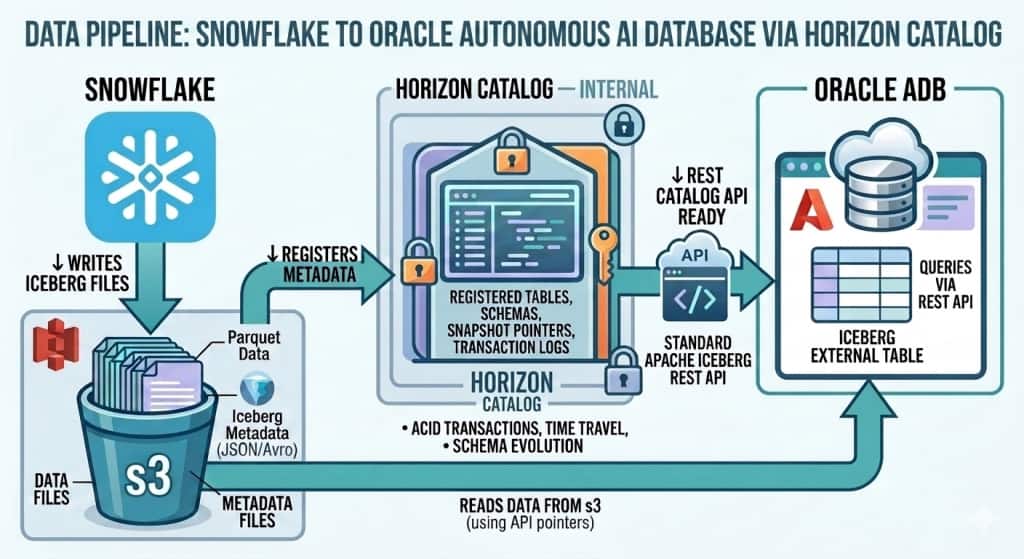
Data Pipeline
End-to-End Data Flow
The following pipeline describes how data flows from Snowflake Iceberg tables to Oracle ADB query results:
Step-by-Step Pipeline:
| Step 1 — Snowflake | Snowflake-managed Iceberg table created with CATALOG = ‘SNOWFLAKE’. Data stored as Parquet files in AWS S3 via External Volume. |
| Step 2 — Horizon Catalog | Snowflake’s built-in Horizon Catalog exposes the Iceberg REST API endpoint at /polaris/api/catalog. Apache Polaris is integrated into Horizon to power this API. |
| Step 3 — Authentication | Oracle ADB uses a PAT-based OAuth token to authenticate with the Horizon REST endpoint. The PAT (Programmatic Access Token) is issued for a dedicated Snowflake role (ADB_HZN_ROLE). |
| Step 4 — Metadata Resolution | Oracle ADB calls the Iceberg REST API to resolve the current snapshot metadata — getting the S3 paths for the latest Parquet data and manifest files. |
| Step 5 — S3 Data Read | Oracle ADB uses its own AWS credentials to directly read the Parquet data files from S3. No Snowflake compute is involved in the actual data read. |
| Step 6 — Oracle Query | Data is returned to the Oracle ADB query engine via the External Table definition. Standard SQL including JOINs and aggregations are supported. |
Note: Key Pipeline Insight
Oracle ADB never moves or copies the data. It reads the same Parquet files in S3 that Snowflake wrote — using Iceberg metadata to find the right files. This is true zero-copy multi-engine access.
Technology Stack
| Layer | Technology | Role |
| Table Format | Apache Iceberg | Open table format — metadata + Parquet data files |
| Catalog | Snowflake Horizon Catalog | REST API for snapshot resolution |
| API Protocol | Iceberg REST Catalog API | Industry-standard open protocol |
| Authentication | Snowflake PAT + OAuth | Short-lived token for REST access |
| Object Storage | AWS S3 | Parquet data and metadata files |
| External Engine | Autonomous AI Database | reads S3 files directly |
| Credential (Catalog) | Bearer token credential | ADB authenticates to Horizon REST |
Step-by-Step Integration
Prerequisites
• Snowflake account with ACCOUNTADMIN access
• Oracle Autonomous AI Database (ADB) instance
• AWS S3 bucket with Snowflake External Volume configured
• AWS IAM role trusted by Snowflake with S3 read/write permissions
• Linux/OCI VM or windows with curl and python3 for OAuth token generation
Section A: AWS
Create S3 bucket and appropriate access level rights in policies and IAM ROLE at AWS.
Section B : Snowflake
B1: Create External Volume
Create external volume mapping to S3 bucket with appropriate ARN details of your snowflake role. Refer snowflake documentation for detailed information.
My Example:
USE DATABASE crskdb;
USE SCHEMA crsk_ns;

CREATE OR REPLACE EXTERNAL VOLUME crsk_s3ext_vol
STORAGE_LOCATIONS = (
(NAME = 'crsk_s3_west'
STORAGE_PROVIDER = 'S3'
STORAGE_BASE_URL = 's3://your-bucket/'
STORAGE_AWS_ROLE_ARN = 'arn:aws:iam::<account>:role/<your_snowflake_role>'
STORAGE_AWS_EXTERNAL_ID = 'iceberg_table_external_id')
);
Note: Please provide appropriate details of yours STORAGE_BASE_URL, STORAGE_AWS_ROLE_ARN, STORAGE_AWS_EXTERNAL_ID
B2: Create Snowflake-Horizon-managed Iceberg tables.
CREATE OR REPLACE ICEBERG TABLE CRSK_CUSTOMERS (
  CUSTOMER_ID   INT,
  FULL_NAME     STRING,
  EMAIL         STRING,
  PHONE         STRING,
  CARD_NUMBER   STRING,
  CARD_EXPIRY   STRING,
  CARD_TYPE     STRING,
  CITY          STRING,
  COUNTRY       STRING
)
CATALOG = 'SNOWFLAKE'
EXTERNAL_VOLUME = 'crsk_s3ext_vol'
BASE_LOCATION = 'crsk_ns/customers';


INSERT INTO CRSK_CUSTOMERS VALUES
(1001, 'James Anderson', 'james.anderson@email.com', '+1-415-555-0101', '4111111111111111', '12/26', 'VISA', 'San Francisco', 'USA'),
(1002, 'Priya Sharma', 'priya.sharma@email.com', '+91-98765-43210', '5500005555555559', '08/25', 'MASTERCARD', 'Mumbai', 'India');

select * fROM CRSK_CUSTOMERS;
Note: Since i need to perform some analytical operations, I created two additional tables. Refer to the GitHub repository for the complete create table and insert statements.
CREATE OR REPLACE ICEBERG TABLE CRSK_SALES (…)
CATALOG = 'SNOWFLAKE'
EXTERNAL_VOLUME = 'crsk_s3ext_vol'
BASE_LOCATION = 'crsk_ns/sales';
CREATE OR REPLACE ICEBERG TABLE CRSK_ORDERS (…)
CATALOG = 'SNOWFLAKE'
EXTERNAL_VOLUME = 'crsk_s3ext_vol'
BASE_LOCATION = 'crsk_ns/orders';SHOW ICEBERG TABLES IN SCHEMA CRSKDB.CRSK_NS; — to verify the external volume and base location details
Note: By this step,
- The table is administered by Snowflake’s built-in catalog (Horizon).
- The location of the files is determined by the combination of your External Volume and Base Location.
B3: Create Role, User and Grant Access
Note: This role and access are required for Oracle to access as a client. Oracle ADB reads metadata and S3 files directly without Snowflake compute.
CREATE OR REPLACE ROLE ADB_HZN_ROLE;                # HORIZON_ROLE

CREATE OR REPLACE USER ADB_HZN_USER
    PASSWORD = '<your_password>'
    DEFAULT_ROLE = ADB_HZN_ROLE
   MUST_CHANGE_PASSWORD = FALSE;

GRANT ROLE ADB_HZN_ROLE TO USER ADB_HZN_USER;
GRANT USAGE ON DATABASE CRSKDB TO ROLE ADB_HZN_ROLE;
GRANT USAGE ON SCHEMA CRSKDB.CRSK_NS TO ROLE ADB_HZN_ROLE;

GRANT SELECT ON ICEBERG TABLE CRSKDB.CRSK_NS.CRSK_SALES TO ROLE ADB_HZN_ROLE;
GRANT SELECT ON ICEBERG TABLE CRSKDB.CRSK_NS.CRSK_ORDERS TO ROLE ADB_HZN_ROLE;
GRANT SELECT ON ICEBERG TABLE CRSKDB.CRSK_NS.CRSK_CUSTOMERS TO ROLE ADB_HZN_ROLE;
B4: Create Programmatic Access Token (PAT)
The PAT acts as the client_secret in the OAuth flow.
ALTER USER ADB_HZN_USER
ADD PROGRAMMATIC ACCESS TOKEN ADB_HORIZON_PAT
DAYS_TO_EXPIRY = 7;
Important: The PAT token will be returned upon execution of the aforementioned statement. Please ensure to save the token securely, as it is returned only once at creation.
It can be verified with below queries in Snowflake
SHOW USER PROGRAMMATIC ACCESS TOKENS FOR USER ADB_HZN_USER;
DESCRIBE VIEW SNOWFLAKE.ACCOUNT_USAGE.CREDENTIALS
B5: Exchange PAT for OAuth Token
Generate OAuth Token using PAT token using curl command.
With reference to the previous blog ( part-1), the key differences from Polaris OAuth flow :
| Parameter | Polaris Internal Catalog | Horizon Catalog |
| client_id | Required | Not Needed |
| Client_secret | Polaris client secret | PAT token |
| scope | PRINCIPAL_ROLE:ALL | session:role:ADB_HZN_ROLE |
Example:
export SNOW_OAUTH_TOKEN=$(curl -s -X POST \
"https://<yourorg_name>-<youraccount_name>.snowflakecomputing.com/polaris/api/catalog/v1/oauth/tokens" \
-H "Content-Type: application/x-www-form-urlencoded" \
--data-urlencode "grant_type=client_credentials" \
--data-urlencode "scope=session:role:ADB_HZN_ROLE" \
--data-urlencode "client_secret=<PAT_TOKEN>" \
| python3 -c "import sys,json; print(json.load(sys.stdin)['access_token'])")

echo $SNOW_OAUTH_TOKEN
Note: OAuth token is SHORT-LIVED (~1 hour). PAT remain valid for days. However , it must be refreshed by re-running curl and recreating SNOW_HZN_OAUTH credentials in Oracle ADB once they expire.
Section C : Autonomous AI Database
C1: Add ACL for Horizon Snowflake endpoint
Example:
BEGIN
DBMS_NETWORK_ACL_ADMIN.APPEND_HOST_ACE(
host => '<yourorg_name>-<youraccount_num>.snowflakecomputing.com',
lower_port => 443,
upper_port => 443,
ace => XS$ACE_TYPE(
privilege_list => XS$NAME_LIST('http', 'http_proxy'),
principal_name => 'ADMIN',
principal_type => XS_ACL.PTYPE_DB));
END;
/
Ref dbms_network_acl_admin documentation for reference
Note : Snowflake Query to find the hostname of snowflake
SELECT
    CURRENT_ORGANIZATION_NAME() AS yourorg_name,
    CURRENT_ACCOUNT_NAME() AS youraccount_name;
C2: Create AWS S3 Storage Credentials
Autonomous AI Database needs a STATIC AWS Access Key cloud credential to read the Iceberg data + metadata files from S3.
BEGIN
DBMS_CLOUD.DROP_CREDENTIAL('AWS_S3_WEST_CONN');
END;

BEGIN
DBMS_CLOUD.CREATE_CREDENTIAL(
credential_name => 'AWS_S3_WEST_CONN',
username => '<aws_access_key_id>',
password => '<aws_secret_access_key>');
END;
C3: Create OAuth Credential
BEGIN
DBMS_CLOUD.DROP_CREDENTIAL('SNOW_HZN_OAUTH');
END;

BEGIN
DBMS_CLOUD.CREATE_CREDENTIAL(
credential_name => 'SNOW_HZN_OAUTH',
username => 'bearer',
password => '<SNOW_OAUTH_TOKEN>');
END;
/

Verify:
SELECT CREDENTIAL_NAME, USERNAME FROM ALL_CREDENTIALS WHERE CREDENTIAL_NAME = 'SNOW_HZN_OAUTH';
C5: Create External Table
BEGIN
DBMS_CLOUD.CREATE_EXTERNAL_TABLE(
table_name => 'CRSK_CUSTOMERS_HZ_EXT',
credential_name => 'AWS_S3_WEST_CONN',
format => q'[
{"access_protocol":
  {"protocol_type": "iceberg",
   "protocol_config": {
    "iceberg_catalog_type": "polaris",
    "rest_catalog_endpoint": "https://<yourorg_name>-<youraccount_num>.snowflakecomputing.com/polaris/api/catalog",
    "rest_catalog_prefix": "CRSKDB",
    "rest_authentication": {"rest_auth_cred": "SNOW_HZN_OAUTH"},
    "table_path": ["CRSK_NS", "CRSK_CUSTOMERS"]}
    }
  }]');
END;
/
Note: Each Iceberg table in Snowflake maps to one External Table in Autonomous AI Database. Since Snowflake integrates Apache Polaris open catalog into Horizon catalog, we need to specify iceberg_catalog_type = ‘polaris’ even for Horizon.
Note: Create other two external tables as CRSK_ORDERS_HZ_EXT and CRSK_SALES_HZ_EXT by repeating same steps as above . Refer to the GitHub repository for the complete external create table statements.
C6: Validation with Aggregation Query
Now, let’s execute advanced aggregation query using all three tables for Business Summary Validation (Sales summary by country/region/status wise and order by sale amount )
SELECT
  c.COUNTRY,
  s.REGION,
  o.STATUS AS ORDER_STATUS,
  COUNT(DISTINCT c.CUSTOMER_ID) AS TOTAL_CUSTOMERS,
  COUNT(s.SALE_ID) AS TOTAL_SALES,
  SUM(s.AMOUNT) AS TOTAL_SALE_AMOUNT,
  ROUND(AVG(s.AMOUNT), 2) AS AVG_SALE_AMOUNT,
  MIN(s.SALE_DATE) AS FIRST_SALE_DATE,
  MAX(s.SALE_DATE) AS LAST_SALE_DATE
FROM
  CRSK_CUSTOMERS_HZ_EXT c
  JOIN CRSK_SALES_HZ_EXT s ON c.CUSTOMER_ID = s.CUSTOMER_ID
  JOIN CRSK_ORDERS_HZ_EXT o ON s.SALE_ID = o.SALE_ID
GROUP BY
  c.COUNTRY,
  s.REGION,
  o.STATUS
ORDER BY
  TOTAL_SALE_AMOUNT DESC;
Here is the output from SQL Developer from Autonomous AI Database
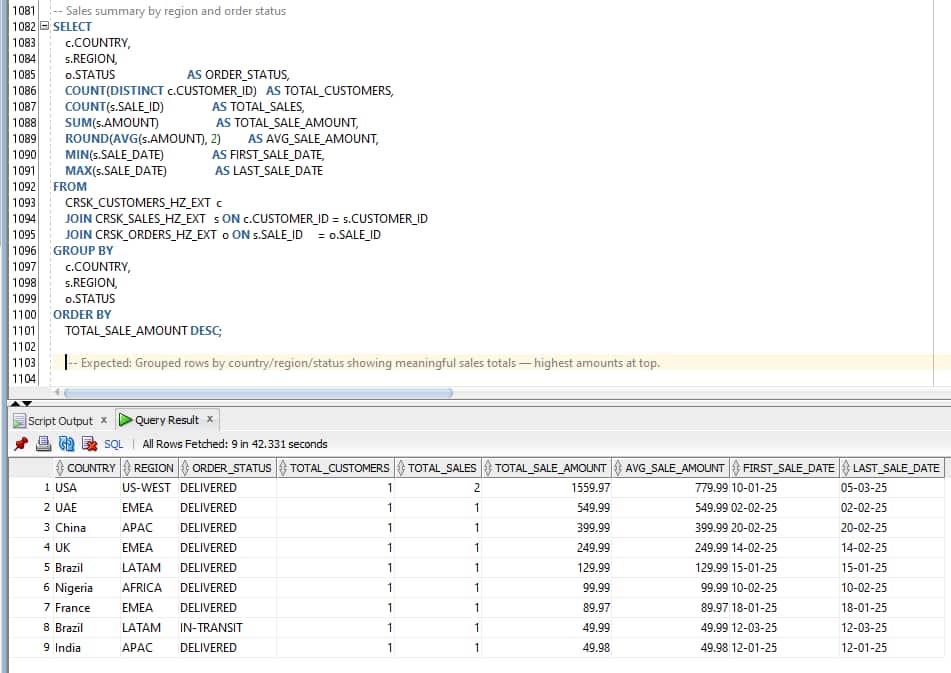
Result: Multi-region aggregated data returned correctly — confirms cross-table analytics from Autonomous AI Database over Horizon Iceberg tables residing in S3.
Oracle ADB reads the current Iceberg snapshot every time a query runs. Any new data inserted in Snowflake is immediately visible in Oracle without any refresh step.
Validation with Data Masking Governance
Let us perform a small validation to check whether Snowflake Dynamic Data Masking policies are enforced or bypassed when the Oracle ADB reads CRSK_CUSTOMERS via the Horizon Catalog REST API.
Apply masking policy for CARD_NUMBER, i.e., show last 4 digits only — e.g. –-****-1111 ONLY for CRSK_CUSTOMERS table.
At snowflake
CREATE OR REPLACE MASKING POLICY mask_card_number
AS (val STRING) RETURNS STRING ->
CASE
WHEN CURRENT_ROLE() IN ('ACCOUNTADMIN', 'SYSADMIN')
THEN val
ELSE '--****-' || RIGHT(val, 4)
END;

ALTER ICEBERG TABLE CRSK_CUSTOMERS MODIFY COLUMN CARD_NUMBER SET MASKING POLICY mask_card_number;

-- Verify policies are applied:
SELECT
    REF_ENTITY_NAME AS TABLE_NAME,
    REF_COLUMN_NAME AS COLUMN_NAME,
    POLICY_NAME,
    POLICY_KIND
FROM
    TABLE(INFORMATION_SCHEMA.POLICY_REFERENCES(
        POLICY_NAME => 'CRSKDB.CRSK_NS.MASK_CARD_NUMBER'
    ));

Verify:
Masking works INSIDE Snowflake As ACCOUNTADMIN (Note: Data is unmasked):
USE ROLE ACCOUNTADMIN;
SELECT CUSTOMER_ID, FULL_NAME, EMAIL, PHONE, CARD_NUMBER, CARD_EXPIRY
FROM CRSKDB.CRSK_NS.CRSK_CUSTOMERS;

USE ROLE ADB_HORIZON_ROLE;  (Note: Data is masked)
USE WAREHOUSE SYSTEM$STREAMLIT_NOTEBOOK_WH
SELECT CUSTOMER_ID, FULL_NAME, EMAIL, PHONE, CARD_NUMBER, CARD_EXPIRY FROM CRSKDB.CRSK_NS.CRSK_CUSTOMERS;
Refer to the Github repositary for complete masking code details.
Test Result:
| Use-case | Result | HTTP Status | Finding |
| Snowflake query as ACCOUNTADMIN | Unmasked data visible | Expected—privileged role | |
| Snowflake query as ADB_HZN_ROLE | Masked data returned | Masking enforced inside Snowflake | |
| Query from Oracle client – CRSK_CUSTOMERS_HZ_EXT | Access blocked | HTTP 403 ForbiddenException | Snowflake blocks external engine when masking policy present |
| Query from Oracle client – CRSK_ORDERS_HZ_EXT CRSK_SALES_HZ_EXT (no masking) | Full data returned | HTTP 200 | access allowed , due to NO masking policy |
While trying to access `SELECT * FROM CRSK_CUSTOMERS_HZ_EXT` after masking policy enablement, query returned HTTP 403 ForbiddenException — BLOCKED. Refer Snowflake documentation for more details
Complete Error:
ORA-29913: error while processing ODCIEXTTABLEOPEN routine ORA-29400: data cartridge error KUP-13057: Iceberg listing failed: ORA-20403: Request failed with status HTTP 403 – https://xxx-xxxx.snowflakecomputing.com/polaris/api/catalog/v1/CRSKDB/namespaces/CRSK_NS/tables/CRSK_CUSTOMERS Error response – {“error”:{“message”:”Authorization failed”,”type”:”ForbiddenException”,”code”:403}} ORA-06512: at “SYS.KUBSBD$ICEBERG”, line 2861
Advantage:
Zero Data Movement: Iceberg data files stay in S3. Autonomous AI Database resolves metadata from Snowflake – Horizon Catalog and reads Parquet files directly. There is no copy, no replication pipeline, and no sync job to maintain.
Real-Time Reads: Oracle Autonomous AI Lakehouse + Snowflake Horizon is a viable architecture for organizations running Oracle and Snowflake in parallel, wanting shared data access without ETL pipelines. Autonomous AI Database reads the current Iceberg snapshot every time a query runs. Any new data inserted in Snowflake is immediately visible in Oracle without any refresh step.
Snowflake Horizon Catalog remains the single point of truth.
Conclusion:
By leveraging the standard Apache Iceberg REST protocol, Oracle AI Lakehouse connects to Snowflake’s built-in catalog without requiring Snowflake Open Catalog, data replication, or ETL pipelines. The same Parquet files written by Snowflake are read directly by Oracle ADB from S3, with Horizon Catalog providing dynamic snapshot resolution.
The governance finding — that Snowflake blocks REST access entirely for tables with masking policies. This is not a flaw; this restriction can be lifted using enhancements in connectors in the future.
Together, Oracle Autonomous AI Database and Snowflake Horizon represent a compelling open lakehouse architecture: Snowflake as the authoritative data platform and catalog, Oracle ADB as the enterprise SQL and analytics engine, and Apache Iceberg as the open format that binds them — without lock-in, without duplication, and without compromise on data integrity.
Reference:
Oracle Autonomous AI Database — Query Apache Iceberg Tables:
Snowflake Horizon Catalog — External Engine Access Snowflake PAT Authentication
Apache Iceberg REST Catalog Specifications