
Introduction
The Private AI Services Container now includes a new Vector Index creation service in addition to its existing capabilities.
What problem does the Vector Index Service Address?
Creating vector indexes is resource intensive and time consuming. The algorithm to create In-Memory Neighbor Graph Vector indexes (eg Hierarchical Navigable Small World, or HNSW) requires a lot of vector distance calculations. The larger the vector index, the more vector distance calculations that are needed. The more vector distance calculations, the longer that it takes. Even though an In-Memory Neighbor Graph Vector Index can be created in parallel using many CPU cores, it can still take hours to create a large In-Memory Neighbor Graph Vector Index.
What is the Vector Index Service?
The Vector Index Service of the Private AI Services Container uses a GPU to accelerate the creation of In-Memory Neighbor Graph Vector Indexes. The Private AI Services Container runs on a separate machine than the Oracle AI Database 26ai. This container runs Oracle x86-64 Linux and requires a modern NVIDIA GPU with sufficient VRAM, CPU cores and memory to create the In-Memory Neighbor Graph Vector Index.
How does it work?
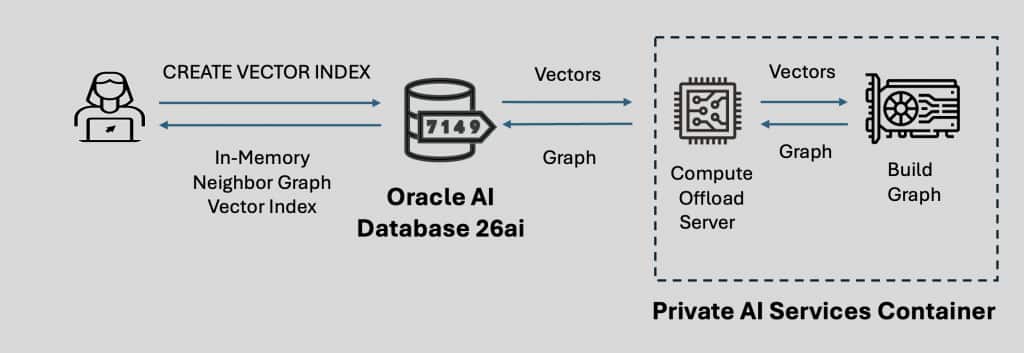
The vectors are sent to the Private AI Services Container where the Compute Offload Server uses the GPU to create a graph for those vectors. The graph is then sent back to Oracle AI Database 26ai where the graph is converted into an Oracle In-Memory Neighbor Graph Vector Index. Once created, the In-Memory Neighbor Graph Vector Index resides and runs on Oracle AI Database 26ai and no longer uses the GPU.
What does the SQL look like?
The parameters section of the Oracle SQL to create an In-Memory Neighbor Graph Vector Index has been extended to enable offload to a GPU powered instance of the Oracle Private AI Services Container.
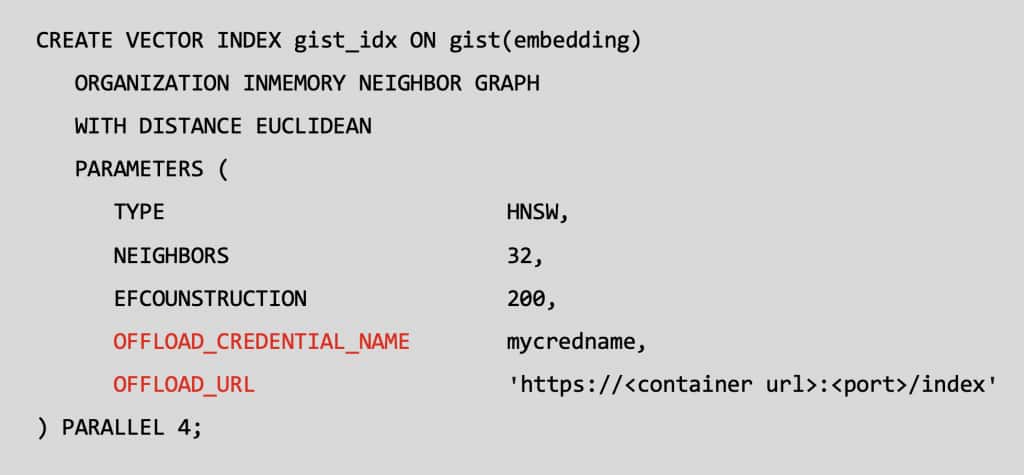
The OFFLOAD_CREDENTIAL_NAME is the API Key for the Private AI Services Container. The OFFLOAD_URL is the network endpoint for the GPU powered Private AI Services Container. The vectors are securely transferred to the container using HTTP2/SSL (TLS 1.3).
The installation and configuration for the Private AI Services Container has not changed from version 25.1.3.0.0.
Supported NVIDIA GPUs
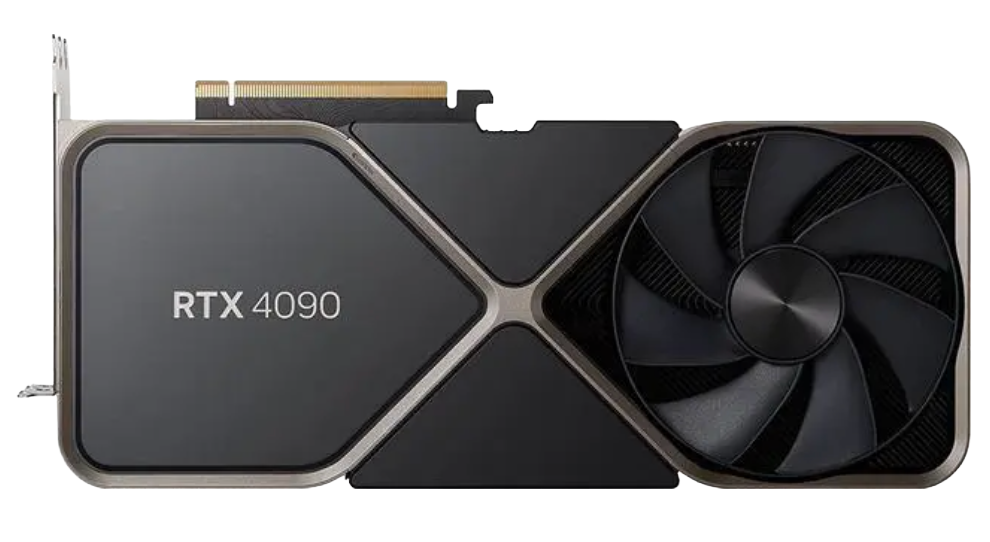
Image courtesy of NVIDIA.
The container can use popular and modern NVIDIA GPUs. These range from low end gaming GPUs, up to large enterprise GPUs, for example:
- GeForce RTX 30×0, 40×0 and 50×0
- RTX Pro 2000, 4000, 6000
- NVIDIA A10 GPU
- NVIDIA L40s GPU
- A100 Tensor Core GPU
- H100 Tensor Core GPU
- NVIDIA H200 GPU
- NVIDIA Blackwell GPU
Vector Index Creation Performance
Creating an In-Memory Neighbor Graph Vector Index is computationally expensive and time consuming.
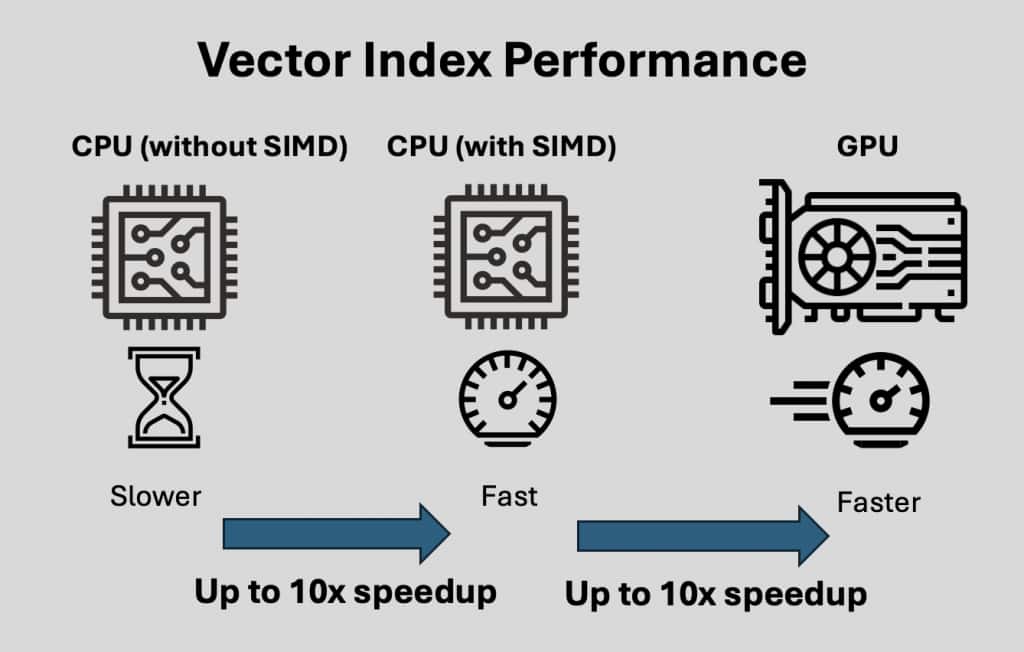
Using a CPU without SIMD is the slowest option for creating In-Memory Neighbor Graph Vector Indexes.
Using SIMD (Single Instruction Multiple Data) techniques on x86-64 CPUs with avx512 can enable up to a 10x speedup in In-Memory Neighbor Graph Vector Index creation.
An NVIDIA GPU with the NVIDIA cuVS library using high bandwidth VRAM with Tensor and CUDA cores can enable up to a 10x speedup over SIMD for In-Memory Neighbor Graph Vector Index creation.
Get Started
The bottom line: The Oracle Private AI Services Container gives you a great balance, secure, offline vector embeddings, or vector index creation acceleration without overloading your database while meeting your organization’s compliance requirements.
You can download the Oracle Private AI Services Container directly from the Oracle Container Registry and get all of the setup details in the Private AI Services Container User’s Guide.
Try it today!