
An Oracle Java Virtual Machine (OJVM) patch in Oracle Real Application Clusters (Oracle RAC) is more than a rolling binary update. OJVM has both Oracle Home binaries and Java System classes stored in the database. Database Java can run only when those two components are compatible.
Oracle Database 18c introduced orchestrated rolling OJVM patching for RAC. Oracle RAC manages eligible OJVM service placement while instances move to a patched out-of-place Oracle Home, then rebuilds the Java System when the final old-home instance stops. This article visualizes that transition with a three-instance RAC database.
To make the visualizes easier to follow, the article is organized into the following sections:
Before starting: Is OJVM installed and used?
First, confirm whether OJVM is installed:
SELECT version, status FROM dba_registry WHERE comp_id = 'JAVAVM';If JAVAVM is not installed, an OJVM patch does not apply to that database. If OJVM is installed, determine whether it is in use. Run the following query on each RAC instance:
SELECT count(*) FROM x$kglob WHERE kglobtyp IN (29, 56);Use the result together with active-session analysis to identify the services, application users, and programs associated with database Java. This matters because an OJVM-related service must be able to run on a suitable instance while another instance is restarted.
For the 18c orchestrated rolling procedure, confirm the following:
- The database is Oracle Database 18.4 or later, or Oracle Database 19c.
- At least two RAC instances, or a RAC One Node configuration, are available.
- A patched out-of-place Oracle Home is ready for use.
- OJVM-related services can run on the remaining eligible instance or instances.
- The remaining RAC instances have the capacity to carry the OJVM workload during the rolling restart.
Overall process
- Update the CRS database resource ORACLE_HOME attribute to point to the newly patched out-of-place Oracle Home.
- Relocate the required OJVM services away from the first instance.
- Stop the first instance.
- Restart the first instance from the newly patched Oracle Home. From this point onward, every restarted instance must use the patched Oracle Home until the Java System rebuild completes.
- Restart 2nd – (n-1) instance, one at a time or in coordinated groups, according to the service-placement and capacity plan.
- Stop the final old-home instance.
- Allow Oracle to rebuild the Java System automatically.
- Run datapatch against the database.
The example environment
This example uses a three-instance RAC database with two OJVM-related services. OJVM_S1 initially runs on Instance 2, OJVM_S2 initially runs on Instance 3, and Instance 1 does not host an OJVM-related service.
The rolling sequence begins with Instance 3. Before it restarts from the patched Oracle Home, OJVM_S2 is relocated to Instance 1. Instance 2 is restarted next, and OJVM_S1 is also relocated to Instance 1. Instance 1 remains on the old Oracle Home until the final restart, allowing it to host both OJVM-related services during the transition.
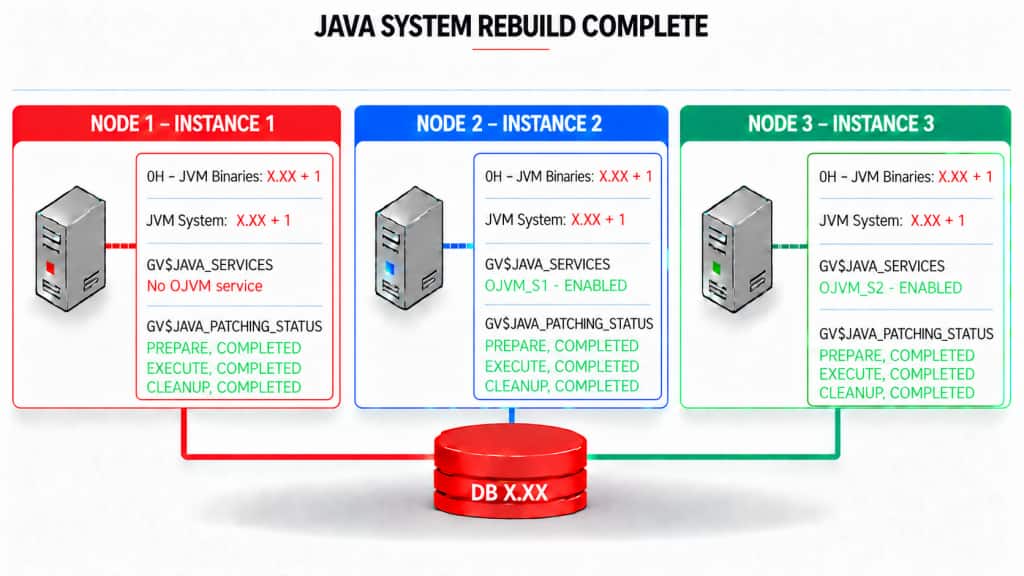
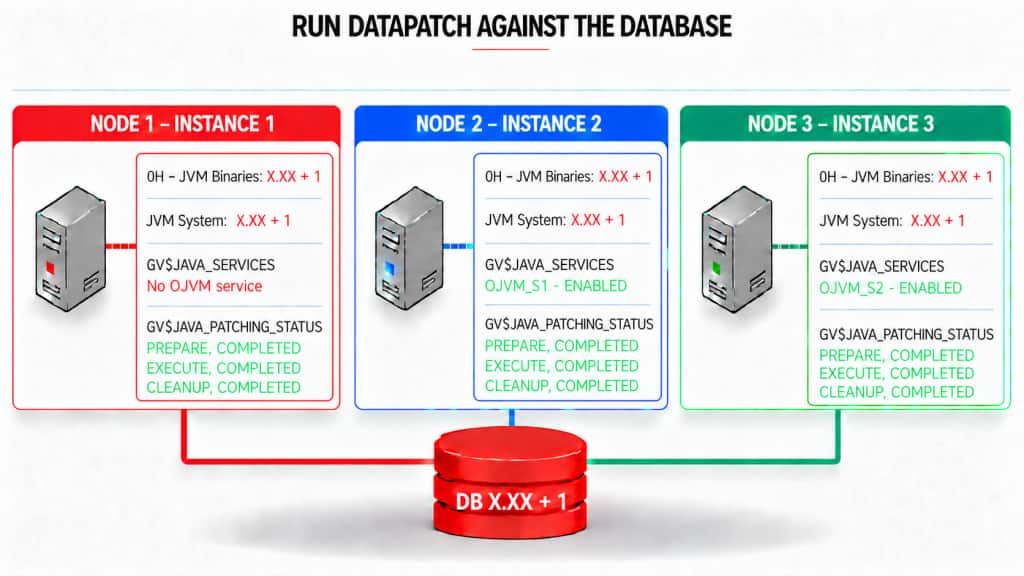
Each figure tracks the Oracle Home binary level, Java System level, OJVM service placement, and Java patching phase.
Before patching
All three instances use the original Oracle Home and the original Java System. OJVM_S1 is active on Instance 2 and OJVM_S2 is active on Instance 3.
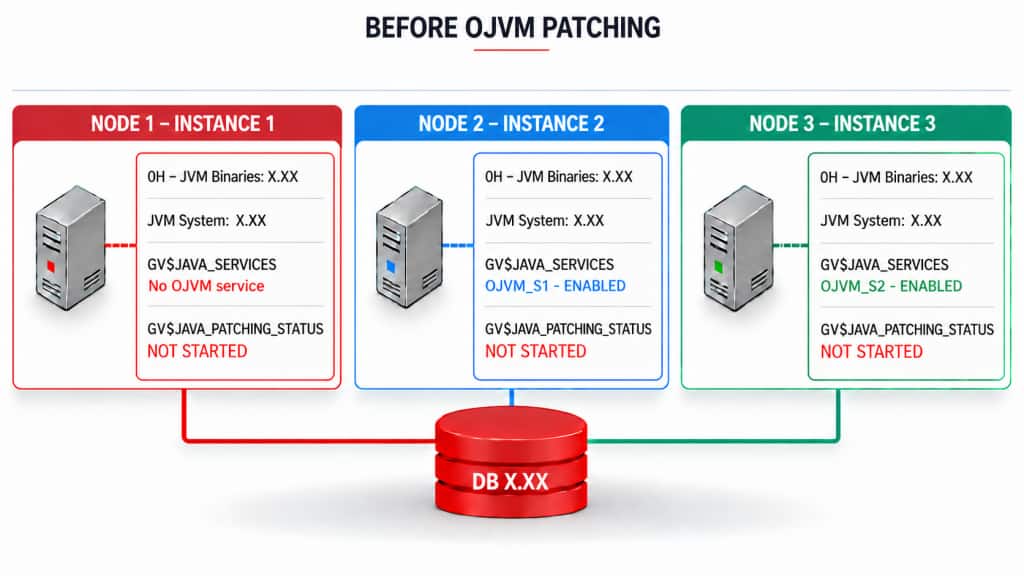
Point the database resource to the patched Oracle Home
In this example we will start from Instance 3. After preparing the patched Oracle Home, modify the CRS database resource. This command does not restart the database; it defines the Oracle Home from which RAC starts an instance during maintenance.
srvctl modify database -db <database_name> -oraclehome <new_oracle_home>Relocate services from the first instance
As we start from the Instance 3, OJVM_S2 will be relocated to Instance 1. After updating the database resource, drain services and stop the first instance using either of the following approaches.
Option A: Stop the instance and allow services to drain.
srvctl stop instance -db <database_name> -i <instance_name> \
  -drain_timeout <time_in_seconds> -stopoption immediate
Option B: Stop or relocate services before stopping the instance.
srvctl stop service -d <database_name> -s <service_name> -i <instance_name># Or relocate the service
srvctl relocate service -db <database_name> -service <service_name> \
  -oldinst <current_instance_name> -newinst <target_instance_name>
Allow sessions and transactions to drain. For remaining sessions, disconnect them after the active transaction completes:
EXEC dbms_service.disconnect_session(
  '<your_service>',
  DBMS_SERVICE.POST_TRANSACTION
);
Then stop the instance using the preferred operational tool:
srvctl stop instance -db <database_name> -i <instance_name>.
Restart the first instance from the patched Oracle Home
Once you have restarted the FIRST instance against the newly patched ORACLE_HOME you are in the situation where there are now patched instances and unpatched instances. Patched instances have had the on-disk files changed (ORACLE_HOME has been updated), while unpatched instances have not had the on-disk files changed.
The Java system library (classes.bin) is still running against the original version and will not be updated until the Java system is rebuilt via create or replace java system. The database tracks applications that use Java in the database. Applications that use Java in the database will appear under the service they operate under in the view GV$JAVA_SERVICES.
SQL> select * from gv$java_services;

   INST_ID     NAME    CON_ID
  -------- -------- ---------
         2  OJVM_S1        3
         3  OJVM_S2        3
The services these applications are running under are monitored and treated differently during the patching process. Services that use Java will be relocated, if possible, to instances that have not had the on-disk java files updated. As instances are restarted under the newly patched home, services that have been recorded as having run Java in the database (prior to these instances shutting down) will be disabled on the patched instances.
- Any attempt to run Java in the database on a patched instance, prior to the completion of the create or replace java system operation will result in the application hanging until the java system is rebuilt.
- Services that use Java in the database will be disabled on instances started under the newly patched home (and before the last instance has shutdown).
- As instances restart they enter the PREPARE phase. During this phase, classes are pre-loaded and a list of PDBs that support services using Java in the database is constructed. The list of PDBs actively using Java in the database will be those initially patched during the patching process.
- While there is still an instance running under the old (unpatched) home, the Java patching process will not proceed past the PREPARE phase.
So here in this case when the instance 3 restarts, it uses the patched Oracle Home binaries. The Java System remains at the original level until the later rebuild. But the JAVA Patching status changes to PREPARE,COMPLETED on Instance 3.
OJVM-related services are DISABLED on instance 3 which is restarted from the patched Oracle Home while the other instances remain on the old Oracle Home. So OJVM_S2 will be disabled on instance 3.
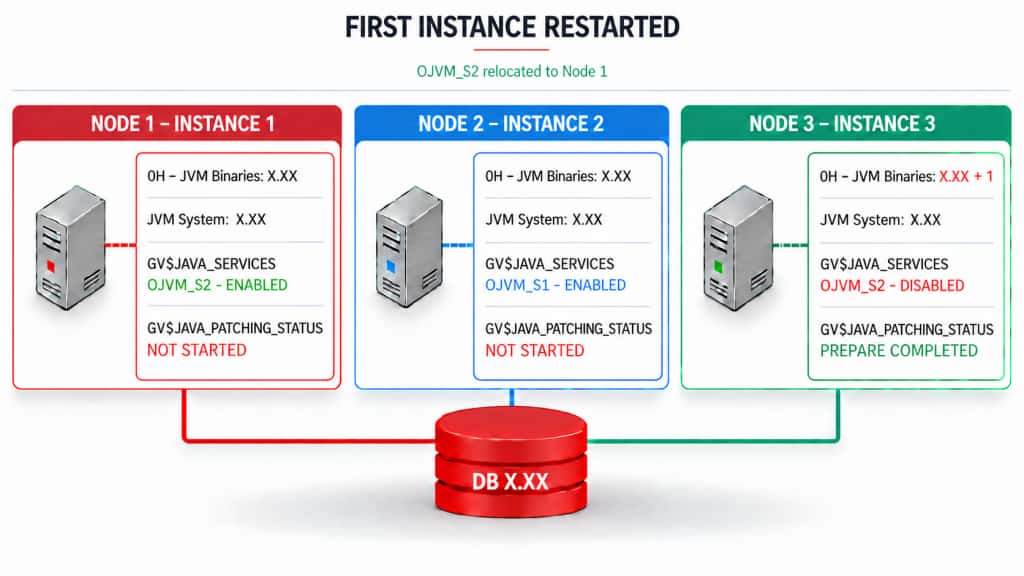
Restart the 2nd – (n-1) instances
Restart the remaining non-final instances one at a time, or in planned groups if one surviving instance cannot carry the full OJVM workload. Each restarted instance’s JAVA_PATCHING_STATUS will change to PREPARE, COMPLETED and its OJVM-related database services remain unavailable on that patched instance until the Java System rebuild completes. Do not manually re-enable a service that the rolling OJVM procedure has disabled. Do not move an OJVM-related service to a patched instance before the Java System rebuild completes.
So OJVM_S1 service will be relocated to Instance 1 and will be DISABLED on Instance 2. OJVM_S1 and OJVM_S2 will be running on Instance 1 at this point.
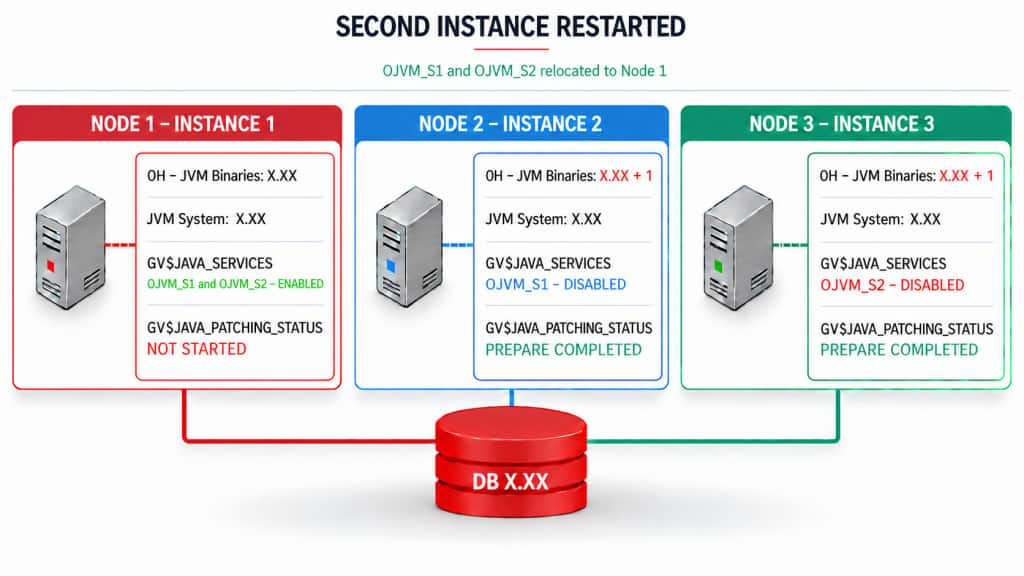
Two instances now use the patched Oracle Home, but the Java System remains at the original level. Both instances have completed PREPARE, while the remaining old-home instance carries the OJVM workload that can safely be served during this stage. OJVM patching cannot progress beyond PREPARE while an instance remains on the old Oracle Home.
Restart the final unpatched Instance
Once the final instance running from the unpatched Oracle Home stops, the patching process enters the EXECUTE phase. Oracle automatically rebuilds the Java System through CREATE OR REPLACE JAVA SYSTEM, first in CDB$ROOT and then in the relevant PDBs in parallel. After the rebuild completes, Oracle progresses to the CLEANUP phase to complete post-update processing.
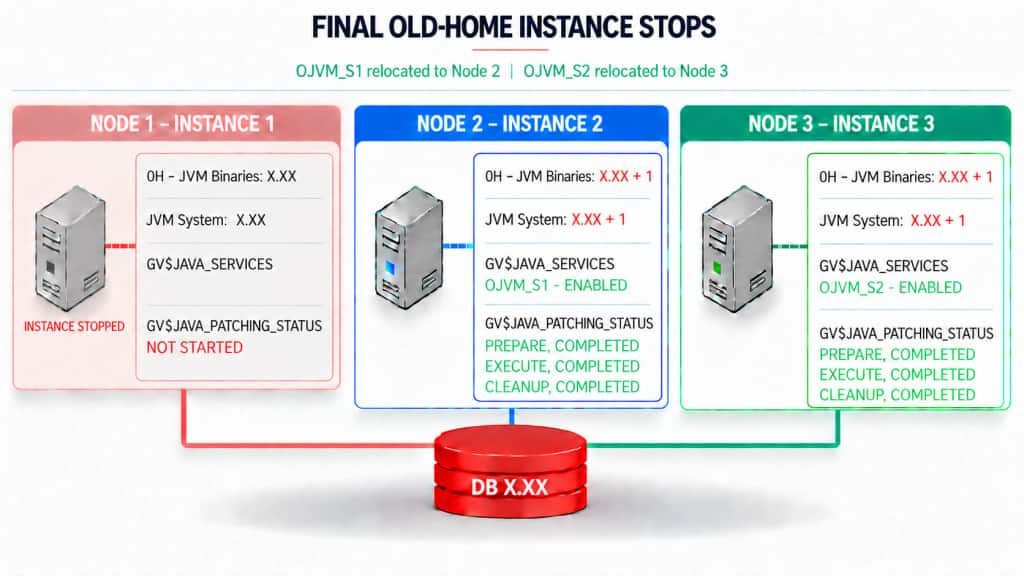
This is the brief, time-critical OJVM-specific brownout window. Once the last instance, running under the unpatched home, is shutdown, the patching process enters the EXECUTE phase. Applications that do not use OJVM are not affected. Applications that actively invoke OJVM can wait or receive an error, depending on the instance state and patching phase. Once the EXECUTE phase completes the system immediately transitions into a CLEANUP phase where post-update cleanup is performed.
The last instance rejoins the cluster and all RAC instances now use the patched Oracle Home binaries and the rebuilt Java System. The PREPARE, EXECUTE, and CLEANUP phases are complete, and OJVM-related services can again run according to their configured placement.
Post Install : Running datapatch
Run datapatch to apply SQL changes for the database and all open PDBs:
### Replacing the Java system classes while database is up
### Do not use –force flag for datapatch
cd $ORACLE_HOME/OPatch
./datapatch -verbose
IMPORTANT : DO NOT use the -force flag for datapatch. Doing so restarts instances in UPGRADE mode which defeats rolling upgrade on RAC.
Use GV$ACTIVE_SERVICES to confirm service placement during the operation:
SELECT inst_id,
       name,
       network_name,
       con_id
FROM   gv$active_services
ORDER BY inst_id, name;
Use the Java patching status view to observe patching phases:
SQL> select * from gv$java_patching_status;

   INST_ID    OPERATION         STATUS    CON_ID
__________ ____________ ______________ _________
         3 PREPARE      COMPLETED            0
         3 EXECUTE      COMPLETED            0
         3 CLEANUP      COMPLETED            0
         1 PREPARE      COMPLETED            0
         1 EXECUTE      COMPLETED            0
         1 CLEANUP      COMPLETED            0
         2 PREPARE      COMPLETED            0
         2 EXECUTE      COMPLETED            0
         2 CLEANUP      COMPLETED            0

9 rows selected.
How later releases simplify the patching model
The orchestration described here is the OJVM patching model for Oracle Database 18c and 19c. From Oracle Database 21c/26ai onwards, OJVM is included in the standard Release Update rather than delivered as a separate OJVM patch download. In these later releases, OJVM patching is fully RAC rolling, with no interruption during datapatch.
| Database Release | RAC Rolling | Datapatch |
| Oracle Database 26ai | Fully | No datapatch/OJVM downtime. |
| Oracle Database 21c | Fully | No datapatch/OJVM downtime. |
| Oracle Database 19c and 18c | Partial | No datapatch downtime. When JAVA SYSTEM is patched, it requires ~10 second outage. |
| Oracle Database 12.2 and 12.1 | No | Datapatch must execute in upgrade mode. |
| Oracle Database 11.2.0.4 | No | Similar to 12.2 and 12.1 except you don’t use Datapatch. |
Closing thoughts
The important point is not only that OJVM patching can be performed in a rolling RAC workflow, but that it has a distinct Java System transition that must be planned around. The figures show where service placement changes, why patched and unpatched instances temporarily coexist, and when database Java becomes available again.
Use the views and service plan shown in this article to validate the state at each stage, rather than treating the operation as a standard binary rolling restart. That preparation makes the OJVM-specific transition predictable and easier to manage.
A note on using this visual guide
This visualization is intended to make the rolling OJVM patching sequence easier to understand by showing the relationship between instance restarts, service placement, Oracle Home binaries, and the Java System phases.
Every environment has its own operational requirements. Additional preparation, validation, and application-service planning may be needed before applying an OJVM patch. Use this article as a conceptual guide, and refer to “RAC Rolling Install Process for the Oracle JavaVM Component Database PSU/RU (OJVM PSU/RU) Patches” (KB 137197) for the complete supported procedure and prerequisites.
