
Introduction
Oracle Database has long supported opening a database or pluggable database (PDB) in read-only mode. But operational requirements are not always as simple as making an entire database read-only.
An application may need to remain available for queries while administrators perform maintenance. In another situation, the PDB should remain read-write while a particular application account is temporarily prevented from making changes. During troubleshooting, a DBA may need something even more granular: retain the privileges of the account while protecting only the investigation session from accidental writes.
These scenarios have the same general objective—allow reads while controlling writes—but they require that control at different boundaries.
Oracle Database 26ai provides the flexibility to apply read-only behavior at different scopes. Depending on the requirement, the boundary can be the entire PDB, the type of user connecting to the PDB, an individual local user, or a single session.
What exactly do you need to make read-only?
What is the question this article explores.
We will start with the broadest boundary—the PDB—and progressively narrow the scope to a user and finally an individual session. Along the way, we will look at how each control behaves, when the change takes effect, what happens to existing sessions, and why choosing the right scope matters.
The goal is not simply to make Oracle Database read-only. It is to make the right part of it read-only. The article is organized into the following sections:
- PDB – READ ONLY
- PDB – HYBRID READ ONLY
- User – READ ONLY
- Session – READ ONLY
- Where These Controls Fit ?
- Choosing The Right Scope
PDB – READ ONLY
At the PDB level, the traditional choice is straightforward: a PDB can be opened READ WRITE or READ ONLY.
- In
READ WRITEmode, users can modify data according to their privileges. - In
READ ONLYmode, the PDB remains available for queries, but normal user changes are prevented.
This is the broadest read-only boundary because the state belongs to the PDB itself.
If the requirement is: Nobody using this PDB should be making normal changes. Then PDB READ ONLY provides exactly that boundary.
But consider a slightly different requirement. An administrator needs to patch or maintain an application while the PDB remains available. Application users should continue querying the PDB, but they should not be able to make changes that could interfere with the maintenance operation.
At the same time, the administrator performing that maintenance must still be able to write. Opening the entire PDB READ ONLY is now too restrictive. This is where Hybrid Read-Only Mode fits.
PDB – HYBRID READ ONLY
When a PDB is opened in Hybrid Read-Only Mode, its effective open mode depends on the type of user connected to it.
- A common user sees the PDB as read-write and can perform permitted writes.
- A local user sees the same PDB as read-only.
The resulting behavior can be summarized as follows:
| PDB Open Mode | Common User | Local User |
| READ WRITE | Read Write | Read Write |
| READ ONLY | Read Only | Read Only |
| HYBRID READ ONLY | Read Write | Read Only |
Hybrid Read-Only therefore creates an operational boundary based on who is connected to the PDB.
Common users can continue performing permitted maintenance operations while local and application users continue to access the PDB in read-only mode.
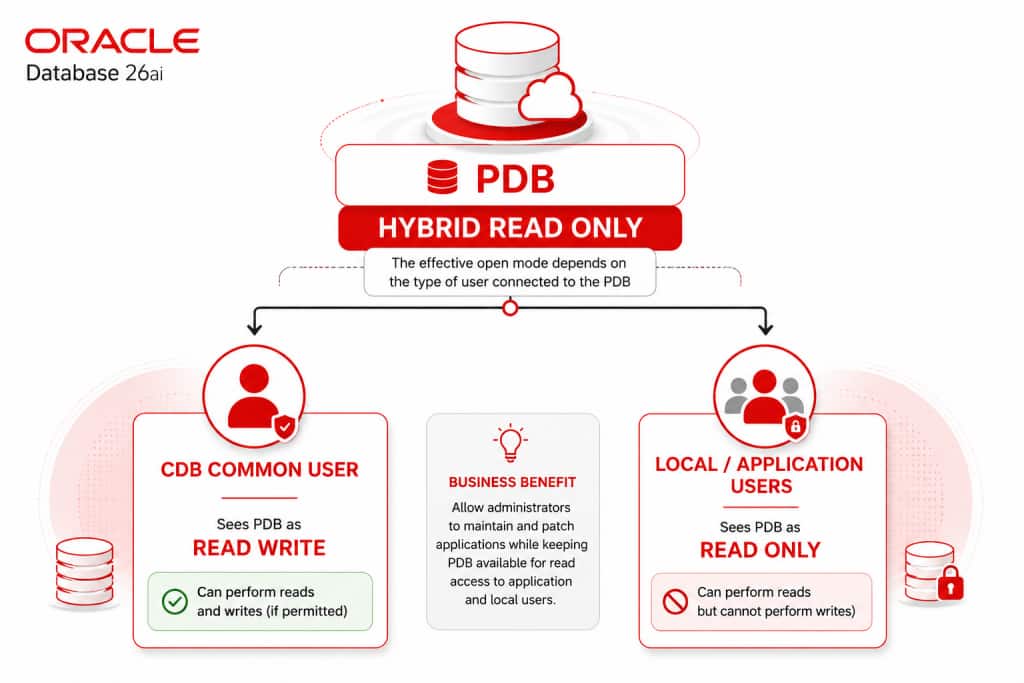
This is particularly useful during maintenance and patching because the PDB can remain available for queries without allowing local application activity to interfere with the work being performed by the administrator.
Seeing Hybrid Read-Only in Action
A PDB can be opened in Hybrid Read-Only Mode with:
ALTER PLUGGABLE DATABASE ORCLPDB1 OPEN HYBRID READ ONLY;One of the more interesting characteristics of this mode is what different users observe.
Connected through a common user, query the PDB open mode:
SELECT name, open_mode FROM v$pdbs WHERE name = 'ORCLPDB1';

NAME       OPEN_MODE
---------- ----------
ORCLPDB1   READ WRITE
The common user effectively sees the PDB as read-write.
The Hybrid Read-Only state itself can also be observed through V$CONTAINER_TOPOLOGY:
SELECT is_hybrid_read_only, con_name FROM v$container_topology;

IS_HYBRID_READ_ONLY   CON_NAME
--------------------  ---------
YES                   ORCLPDB1
And a permitted write from the common user succeeds:
CREATE TABLE hybrid_table (id NUMBER PRIMARY KEY);

Table HYBRID_TABLE created.
Now connect to the same PDB using a local user and query the open mode again:
SELECT name, open_mode FROM v$pdbs WHERE name = 'ORCLPDB1';

NAME       OPEN_MODE
---------- ----------
ORCLPDB1   READ ONLY
The same PDB is effectively read-write to the common user and read-only to the local user. Attempting the same type of write from the local user’s connection fails:
CREATE TABLE hybrid_table (id NUMBER PRIMARY KEY);

Error starting at line : 1 in command -
CREATE TABLE hybrid_table (id NUMBER PRIMARY KEY)
Error report -
ORA-16000: Attempting to modify database or pluggable database that is open
for read-only access.
Help: https://docs.oracle.com/error-help/db/ora-16000/
That difference is the essence of Hybrid Read-Only. The PDB has not simply been made read-only for everyone. Instead, the effective mode depends on the type of user connected to it. For maintenance, this gives administrators an important separation:
Administrative writes can continue while local and application users remain read-only.
What If Only One User Should Be Read-Only?
Suppose ORCLPDB1 should remain fully read-write. Several application users are connected:
- APP_USER_1 – > READ WRITE
- APP_USER_2 -> READ WRITE
- APP_USER_3 -> READ WRITE
Now suppose only APP_USER_2 should temporarily stop writing. Changing the PDB open mode would affect considerably more than required.
Traditionally, if the requirement was to prevent a particular application account from modifying data temporarily, an administrator could control that behavior through privileges and roles. For example, INSERT, UPDATE, and DELETE privileges could be revoked directly from the account. Alternatively, a role providing those privileges could be revoked or disabled. When write access was required again, the appropriate privileges or roles would need to be restored. That approach works, but it changes the user’s authorization configuration to satisfy what may only be a temporary operational requirement.
For a real application account, that configuration can be more complicated than a few grants. Access may span many objects and may be provided through a combination of direct grants and roles. Temporarily removing write capability can therefore also mean recording exactly what was changed so that the original configuration can later be reconstructed correctly.
Another option is a separate account or role specifically designed for read-only access. That can make sense when read-only access represents a permanent security model. It is less convenient when the same user or application needs to move temporarily between normal read-write operation and read-only operation.
Oracle Database 26ai provides a more targeted option for this situation:
User – READ ONLY
A local PDB user can be changed to read-only with a single statement:
ALTER USER rd_only_test READ ONLY;When write access is required again:
ALTER USER rd_only_test READ WRITE;A local user can also be created as read-only from the start:
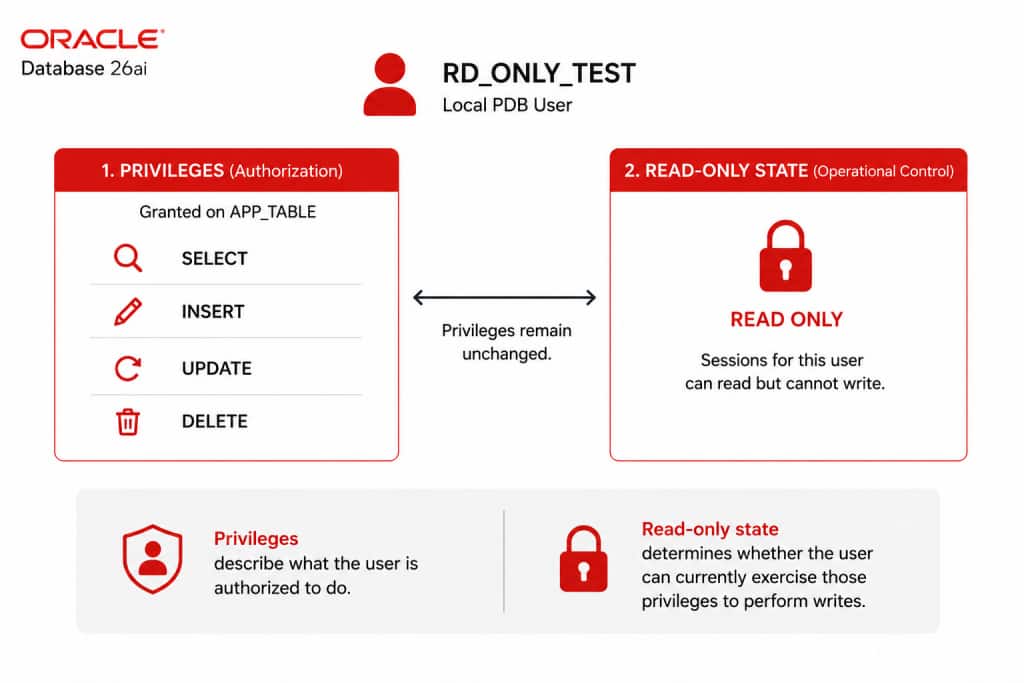
CREATE USER rd_only_test IDENTIFIED BY <password> READ ONLY;The syntax is simple, but the capability behind it is significant. Making a user read-only does not require changing the user’s privileges.
Suppose RD_ONLY_TEST has been granted SELECT,INSERT,UPDATE, DELETE on an application table:
Traditionally, temporarily preventing this account from modifying data could mean revoking its write privileges, changing its roles, or using another privilege configuration—and later restoring that configuration correctly.
With a read-only user, those privileges can remain in place.
When RD_ONLY_TEST is changed to READ ONLY, its INSERT, UPDATE, and DELETE privileges remain granted. Oracle Database instead prevents sessions established under the user’s read-only state from using those privileges to perform writes. This creates an important separation between authorization and operational state:
Privileges define what the user is authorized to do.
READ ONLY determines whether the user can currently exercise those privileges to perform writes.
That distinction is what makes this capability particularly useful. The account can retain the privilege configuration required for normal operation while its ability to modify the database is temporarily switched off.
When the restriction is no longer required:
ALTER USER rd_only_test READ WRITE;There is no collection of DML privileges to reconstruct and no temporary role configuration to unwind.
You change the user’s write state, not its underlying authorization model.
Checking the User’s Read-Only State
Oracle Database 26ai adds a READ_ONLY column to the DBA_USERS, making the user-level state easy to check:
SELECT username, account_status, read_only FROM dba_users WHERE username =
'RD_ONLY_TEST';

USERNAME       ACCOUNT_STATUS   READ_ONLY
-------------- ---------------- ---------
RD_ONLY_TEST   OPEN             YES
The account remains OPEN; READ_ONLY independently shows whether the user is configured as read-only.
An Important Detail: What Happens to Existing Sessions?
There is an important behavior that is easy to miss when looking only at READ ONLY session.
Suppose RD_ONLY_TEST already has a session connected.
From another administrative session, execute:
ALTER USER rd_only_test READ ONLY;You might expect the existing connection to immediately become read-only. It does not. The user-level change applies when new sessions are established. Existing sessions retain the state under which they were established. That means immediately after changing the user we can have:
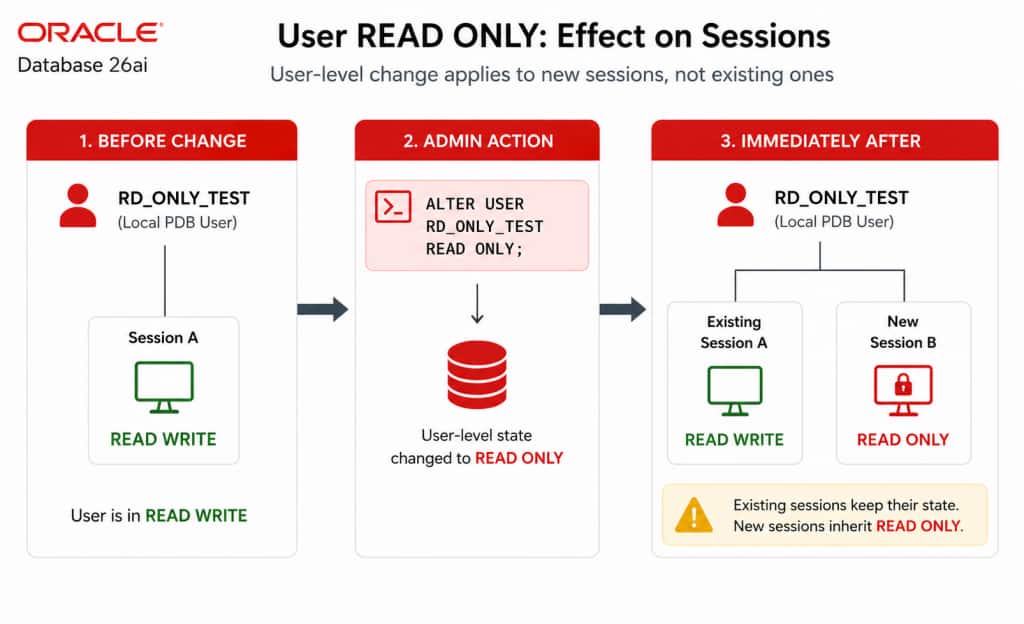
This is an important operational distinction. If the administrator needs the user-level restriction to apply to connections that already exist, those sessions must reconnect or be terminated so that replacement sessions are established under the new user state.
Let’s demonstrate it.
Before changing the user:
SELECT username, read_only FROM dba_users WHERE username = 'RD_ONLY_TEST';

USERNAME       READ_ONLY
-------------- ---------
RD_ONLY_TEST   NO
From the administrative session:
ALTER USER rd_only_test READ ONLY;The dictionary now shows:
SELECT username, read_only FROM dba_users WHERE username = 'RD_ONLY_TEST';

USERNAME       READ_ONLY
-------------- ---------
RD_ONLY_TEST   YES
But return to the RD_ONLY_TEST session that was already connected before the change. A write can still succeed because that existing session has retained its previous stat
SQL> CREATE TABLE hybrid_table (id NUMBER PRIMARY KEY);

Table HYBRID_TABLE created.

SQL> exit
Now disconnect and establish a new connection as RD_ONLY_TEST.
Attempting the write again results in:
SQL> CREATE TABLE hybrid_table (id NUMBER PRIMARY KEY);

Error starting at line : 1 in command -
CREATE TABLE hybrid_table (id NUMBER PRIMARY KEY)
Error report -
ORA-28194: Can perform read operations only
Help: https://docs.oracle.com/error-help/db/ora-28194/

28194. 00000 -  "Can perform read operations only"
*Cause:    User is marked read only
*Action:   Please contact your database administrator
The difference is not the user’s privileges—they have not been rebuilt between those connections. The difference is when the session was established relative to the user’s read-only state. This tells us something important about the scope of the feature:
ALTER USER … READ ONLY is an account-level control for sessions established by that user. It is not an immediate switch retrospectively applied to every existing connection.
But sometimes immediate behavior is exactly what we need.
What If Only This Session Should Be Read-Only?
Consider a database administrator investigating an issue in production. The administrator may legitimately have powerful privileges. Those privileges are necessary for normal administrative work, but during this particular investigation the DBA may only need to query the database.
Changing the entire PDB to read-only would clearly be excessive. Changing the administrator’s database user to read-only would also be too broad. The requirement is simply:
Protect this session from writes.
Session – READ ONLY
Oracle Database 26ai provides session-level READ_ONLY control for this purpose. A session can make itself read-only with:
ALTER SESSION SET READ_ONLY = TRUE;Normal read-write behavior can be restored with:
ALTER SESSION SET READ_ONLY = FALSE;Unlike the user-level setting, this change applies directly to the current session.
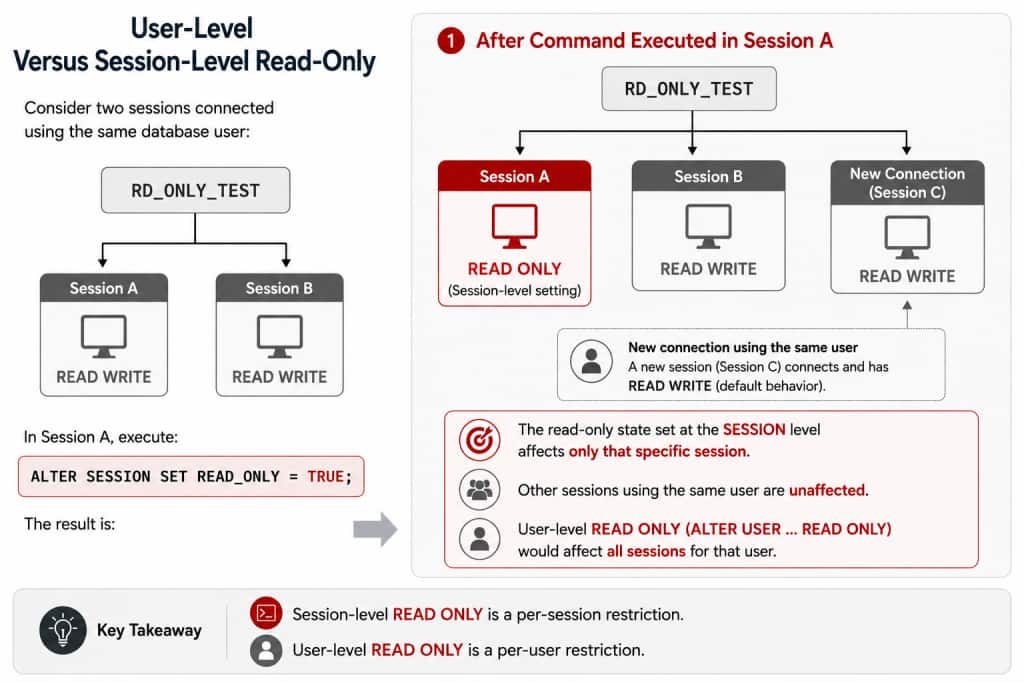
Important characteristics are :-
The change is immediate –
ALTER SESSION SET READ_ONLY = TRUE;changes the current session without requiring a reconnect.
Other Sessions Are Unaffected – Session B belongs to exactly the same database user but remains read-write. A subsequently established Session C also remains read-write unless another control makes it read-only. This makes session-level READ_ONLY considerably more granular than user-level READ ONLY.
The difference can be summarized as follows:
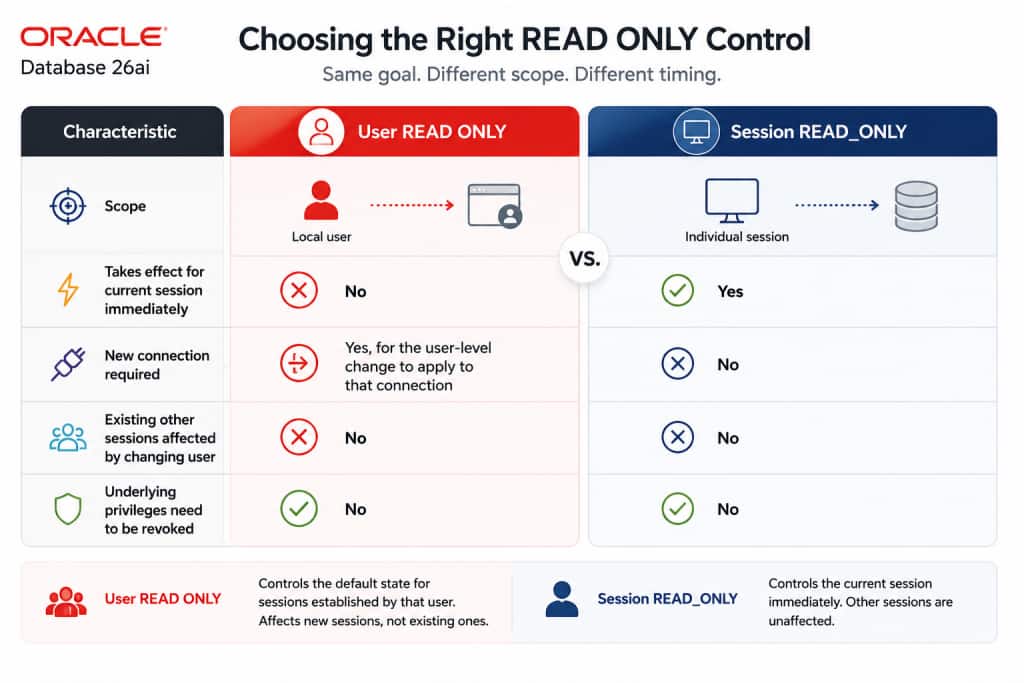
Both mechanisms prevent writes without requiring the underlying privilege configuration to be dismantled. But they operate at different scopes and have different timing semantics.
- User READ ONLY controls the state inherited by new sessions for that local user.
- Session READ_ONLY controls one existing session immediately.
That difference determines where each capability is most useful.
Where These Controls Fit ?
Once the scope differences are clear, there are several ways these controls can be applied. For example
Temporarily Freeze an Application Account
An application account may have a complex collection of roles, object privileges, and system privileges.If the requirement is simply to prevent that account from performing writes temporarily, dismantling that privilege configuration may be unnecessary.
Instead:
ALTER USER app_user READ ONLY;The application’s privileges remain configured. When normal operation should resume:
ALTER USER app_user READ WRITE;This separates the temporary operational state of the application from its permanent authorization configuration.
Protect an Administrative or Investigation Session
Sometimes an account must remain powerful while one particular connection should not be.
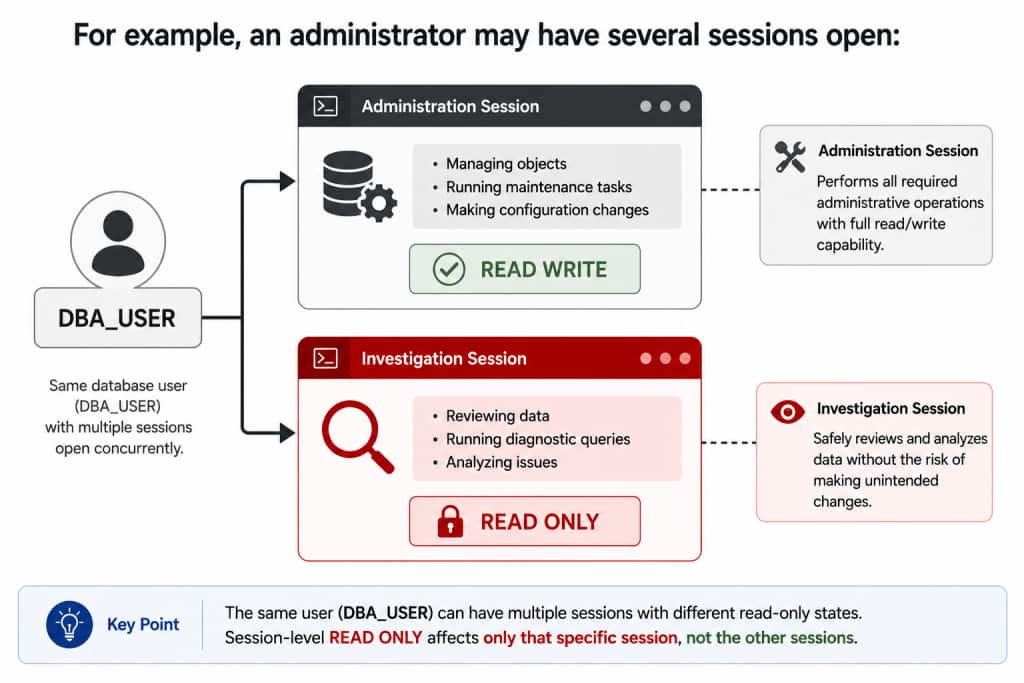
The investigative session can be protected without changing the database account or affecting other administrative sessions. The administrative session can continue performing the operations for which it is authorized. The investigation session can be protected with:
ALTER SESSION SET READ_ONLY = TRUE;This can be useful during production troubleshooting where broad visibility is required but the diagnostic session itself does not need to modify data.
The account remains powerful. The investigation session does not have to be.
Temporarily Put an Application into Read-Only Behavior
There may be periods when an application should continue serving queries but should temporarily stop making changes. If that requirement applies to a particular local database account rather than all users of the PDB, user-level read-only control provides a narrower alternative to changing the PDB’s open mode.
Development, Testing, Integration, and Migration
Consider integrating a new application with an existing database.
The application’s account may already have the privileges it will eventually require SELECT, INSERT, UPDATE and DELETE. During initial connectivity or validation testing, however, the objective may simply be to prove that the application can connect and access the expected objects. An unexpected application operation should not modify data during that phase.
Making the account read-only allows testing to use the intended database identity and existing privilege configuration while temporarily preventing writes. The same principle can be useful during development, testing, and migration validation.
Different Behavior for Sessions Using the Same Database User
Applications frequently establish multiple database sessions, sometimes through connection pools. There may be situations where selected application activity should be read-only while other sessions using the same database identity continue performing writes. User-level READ ONLY cannot distinguish between those new sessions because its scope is the database user. Session-level READ_ONLY can establish a different state for an individual connection. Whether this approach is appropriate for a particular connection-pool architecture depends on how the application initializes, resets, and reuses sessions. But the important capability is the scope:
Different sessions using the same database identity can have different read-only states.
Choosing the Right Scope
We can now return to the question from the beginning:
What exactly needs to be read-only?
Read-only access is not always a database-wide decision. The important differences are scope and timing.
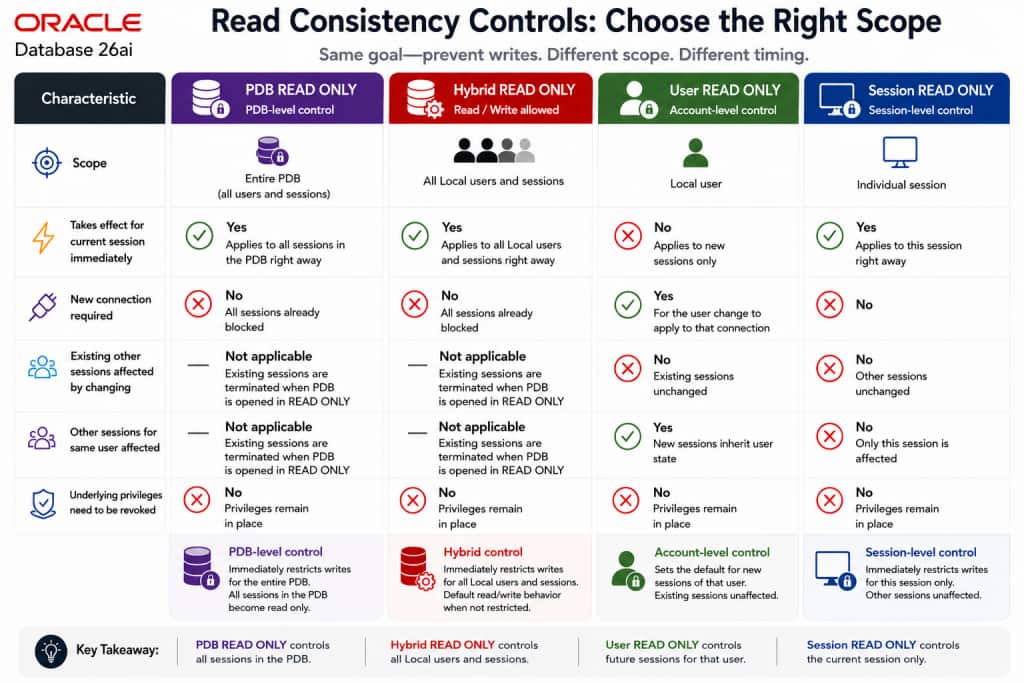
So rather than starting with:
How do I make Oracle Database read-only?
start with three operational questions:
What needs protection?
Who still needs to write?
When must the restriction take effect?
Once those questions are answered, Oracle Database 26ai provides a read-only control at the appropriate scope
