

In Oracle Fusion Cloud Applications, scheduled processes support critical supply chain planning, manufacturing and procurement activities, including planning data collection, supply plan execution, item imports and purchase requisition processing. When these processes run longer than expected, planners, production teams and buyers may have to wait for updated demand, supply and inventory information before assessing material availability, finalizing production schedules or creating purchase orders. This can affect work order processing, manufacturing execution, supplier deliveries and downstream order fulfilment. During period close or peak processing windows, the impact can extend across dependent business activities: an item import may hold up order processing, while a delayed extract may leave a reporting cycle waiting. By the time a business user raises a concern, the underlying Oracle Fusion ESS request may already have been running for several hours. For operations teams, the next useful question is whether a request has been running longer than expected for that job.
In our implementation, A two-pass statistical baseline helps identify running requests that have exceeded their usual execution time using a rolling 30-day baseline. A custom Oracle BI Publisher report calculates execution statistics for each ESS job definition using a two-pass approach. Oracle Integration (OIC) ingests the report output into OCI Log Analytics. Separately, the OCI Management Agent collects current ESS request information through the Fusion Scheduler REST API. Log Analytics brings the two datasets together and highlights running requests that exceed their job-specific upper bound.
Extending the existing ESS observability solution
The A-Team article on collecting ESS logs through REST API ingestion establishes the Management Agent collection path for request-level monitoring. The article on ESS performance analysis with BI Publisher SOAP and Log Analytics adds historical performance and risk context, including a direct Management Agent collection option for BI Publisher.
This extension adds a focused method for detecting unusually long execution times. We retain OIC to ingest the BI Publisher statistics, alongside the separate Management Agent path for current requests. The historical calculation runs in the BI Publisher data model. Log Analytics uses the resulting baseline when evaluating running jobs.
A single duration limit is difficult to apply across ESS. A report that normally takes a few seconds and an import that normally takes twenty minutes need different thresholds. Even sorting by the longest elapsed time can be misleading: a request with the largest duration may still be within its usual range. Comparing each job with its own history gives the operations team a more useful starting point.
Reference architecture
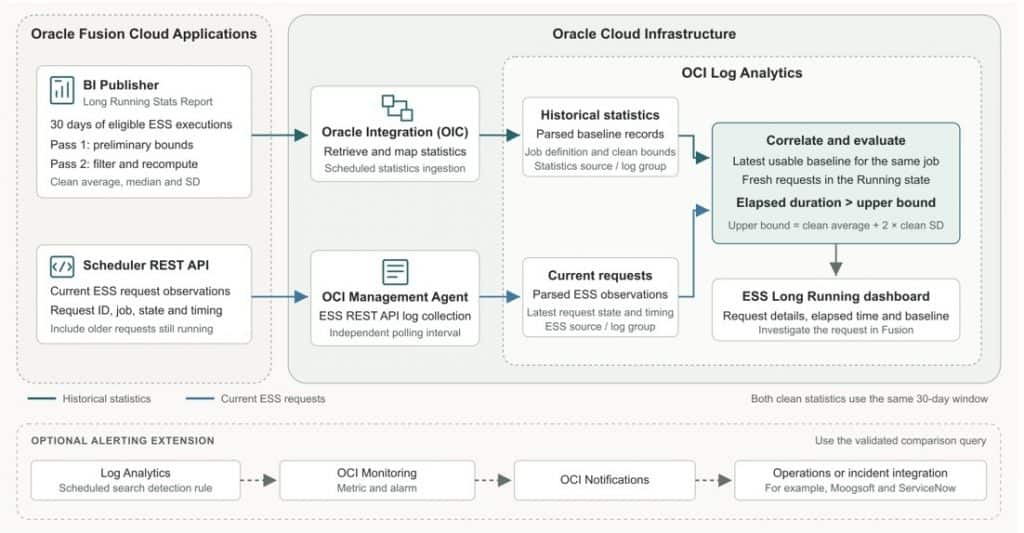

Figure 1. Historical statistics and current ESS requests arrive through independent ingestion paths and meet in OCI Log Analytics. Arrows show the direction of the collected data.
The historical statistics path starts in Fusion. BI Publisher reads the selected execution history, removes outliers from the baseline calculation, and produces the clean average, median, standard deviation and bounds. OIC retrieves this report output and sends the statistics to the configured Log Analytics log group, using a source and parser that match the payload.
The current request path uses the Fusion Scheduler REST API. The Management Agent collects request observations and sends them to Log Analytics through the ESS log source. This path supplies the request identity, job definition, state and timing information needed to evaluate active requests.
Within Log Analytics, each current request is matched to the appropriate job baseline. The dashboard then presents the request’s elapsed duration beside its expected runtime and upper bound. Since collection happens at configured intervals, the result reflects the latest collected state.
As an alternative to OIC ingestion, we can collect the BI Publisher statistics report directly through the OCI Management Agent, following the SOAP collection approach described in the A-Team article. In this setup, a Log Analytics REST API source sends a SOAP request to BI Publisher Report Service. Log Analytics extracts reportBytes from the response, decodes the Base64 content and parses the report XML into baseline records. The parser would need to match the fields in our Long Running Stats Report. BI Publisher would continue to calculate the two-pass, 30-day statistics, while current ESS requests would arrive through the separate Scheduler REST API collection. This provides a direct collection path when Log Analytics is the only consumer of the report output, removing the need for OIC integration solely to transfer these statistics.
Calculating the baseline in two passes
Averages can be pulled upwards by a small number of unusually slow runs. Standard deviation can also increase sharply. If both values rise, the upper bound may become so generous that a delayed job looks normal. The second pass reduces the influence of historical extremes before we calculate the threshold used for detection.
Select the historical execution set
For each job definition, select eligible executions from the rolling 30-day window and calculate their durations on a consistent basis. The baseline should represent successful processing with valid start and end timestamps. Keep failed, cancelled and incomplete requests out of a baseline intended to describe successful execution.
Check the status mapping in the data model. A report may use a normalised label such as COMPLETED for its historical dataset. In Fusion’s native status model, however, Completed can mean that postprocessing is still in progress; Succeeded is a successful final state. Confirm which outcome the report includes. Oracle’s scheduled process status definitions describe this distinction.
Pass one establishes preliminary bounds
Calculate the average, median and standard deviation for the selected executions of each job. Using a multiplier of 2, calculate the preliminary bounds:

Retain durations that fall within these bounds. Exclude values outside the bounds from the second calculation. In SQL, this can be expressed by assigning NULL to the duration used by the second-pass aggregates. The historical request records themselves remain available for investigation.
Pass two calculates the clean statistics
Recalculate the average, median and standard deviation using only the retained durations from the same 30-day window. These are the clean statistics. Calculate the bounds again:

Selecting the standard deviation multiplier
Use α as a configurable standard deviation multiplier to determine how far the bounds extend from the average runtime. The value of α = 2 provides a reasonable starting point for initial validation. The final value should be selected through preliminary analysis of ESS execution history in the Oracle Fusion pod and agreed with the customer’s IT team, considering normal runtime variation and the requests that need investigation. Use the agreed value consistently in both passes. It is a tuning parameter and varies from customer to customer.
Running long = Current state is Running AND elapsed duration > upper bound
Both clean statistics use the retained observations from the 30-day window. The median helps explain typical behaviour and whether the duration distribution is skewed. The detection formula in this implementation uses the clean average and clean standard deviation. The lower bound supports the historical filtering and report context; a currently running request is flagged against the upper bound.
Use the same duration units throughout. If the report exports milliseconds and the ESS request source supplies seconds, convert one dataset before comparing the values. Convert to labels such as minutes or hours only for display.
A simple example
Consider an Item Import request with an elapsed duration of 14 minutes. The following rounded example from the solution presentation shows how a slow historical run can affect the decision.
Comparison using the presentation’s rounded runtime statistics
| Metric | Single pass | Two passes |
| Average duration | 14.4 minutes | 9.3 minutes |
| Standard deviation | 15.3 minutes | 0.9 minutes |
| Upper bound | 45.0 minutes | 11.1 minutes |
| Lower bound | 0 minutes | 7.5 minutes |
| Current elapsed duration | 14 minutes | 14 minutes |
| Detection result | Within upper bound | Flagged for investigation |
With the clean statistics, the upper bound is 9.3 + (2 × 0.9) = 11.1 minutes. The request has crossed that bound by 2.9 minutes. This gives the support team an earlier reason to investigate. It does not, by itself, establish why the request is slow or whether it is stuck.
Implementing the data flow
Generate the BI Publisher statistics report
Create the data model and report in the Fusion BI Publisher catalog. Group the eligible historical executions by the full ESS job definition, apply the two passes, and return one baseline row per job. Confirm the results with representative requests in the Scheduled Processes work area before using the baseline in the dashboard.
The report used in this implementation returns these fields:
| Report field | Purpose |
| Job_Definition | Identifies the job whose historical executions form the baseline. |
| Avg_Time_30d | Clean average execution duration. |
| Median_Time_30d | Clean median execution duration. |
| Std_Dev_30d | Clean standard deviation of execution duration. |
| Upper_Bound | Clean average plus twice the clean standard deviation. |
| Lower_Bound | Clean average minus twice the clean standard deviation, limited to zero. |
BI Publisher Statistics Report
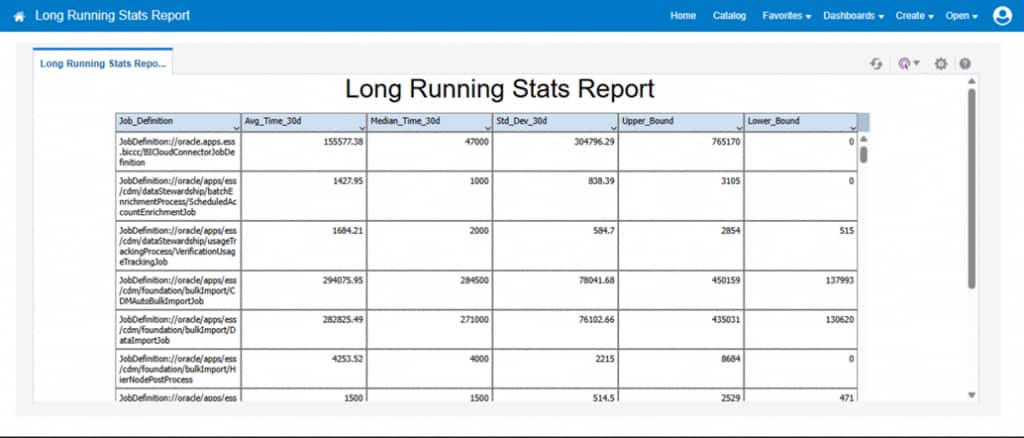
For easier operation, also retain the Fusion environment identifier, baseline generation time, window start and end, and the number of executions before and after filtering. These additional fields help the support team check whether a baseline is current and has enough history behind it.
Ingest the statistics through OIC
Use a scheduled OIC integration to invoke the BI Publisher report, retrieve its output and map the returned records to the Log Analytics ingestion payload. If the report invocation returns Base64-encoded reportBytes, decode the content before processing its records. The precise parsing step depends on the report output format.
Send the records to the intended Log Analytics log group and associate them with the statistics source. Ensure that the parser treats the duration fields as numbers. Check that a generated report row is visible with the same job definition and metric values in Log Explorer. Oracle documents the upload options and required source and log group metadata in Upload Logs on Demand.
Choose the baseline refresh schedule independently of the request collection interval. For example, a daily baseline refresh may suit a stable workload, while active requests need more frequent observation. The appropriate intervals depend on workload changes, report execution cost and the response time expected by the operations team.
Collect current ESS requests through the Management Agent
Continue the ESS REST collection flow described in the earlier A-Team article. The Management Agent needs access to the Fusion Scheduler REST endpoint and a collection identity with the required permissions. Associate the ESS source with the Fusion Applications entity and the intended log group.
Validate collection with a request that has been running since before the latest polling window. A filter that only retrieves requests that started recently can miss an older request that is still running. Likewise, a filter that requires a populated end time can exclude active requests. Check pagination and compare a sample of collected request IDs with Fusion.
Correlate the latest request with its baseline
In Log Analytics, reduce repeated request observations to the latest state for each Fusion environment and request ID. Do this before filtering for Running, so an older running observation cannot override a newer successful completion.
Match the remaining running requests to the latest applicable baseline using a consistent job identity. The full job definition, together with the Fusion environment and application where needed, is safer than a display name alone. Normalise any differences between BI Publisher’s Job_Definition and the REST source’s job definition field.
Calculate elapsed execution time using the same start point as the historical durations. For a runtime baseline, use the process start time. Submission time can include waiting or queue time and needs a separate baseline if end-to-end request latency is the measure being monitored. Evaluate the elapsed time only while the latest observation is sufficiently fresh to support a running-state decision.
The comparison sequence is:
- Select the latest observed state for each request.
- Keep requests whose latest state is Running and whose observations are fresh.
- Match each request to its latest usable job baseline.
- Compare elapsed duration with the clean upper bound in the same units.
- Display requests that exceed the bound, with their request and baseline context.
These are the logical steps for the saved search. Map them to the actual parsed fields and correlation mechanism used in your Log Analytics configuration. A missing or stale baseline should be shown as baseline unavailable, so a request is not silently treated as normal.
Reading the long running dashboard
The ESS Long Running tab in the Oracle Fusion ESS Job Analysis dashboard brings the current workload and the statistical comparison into one view.
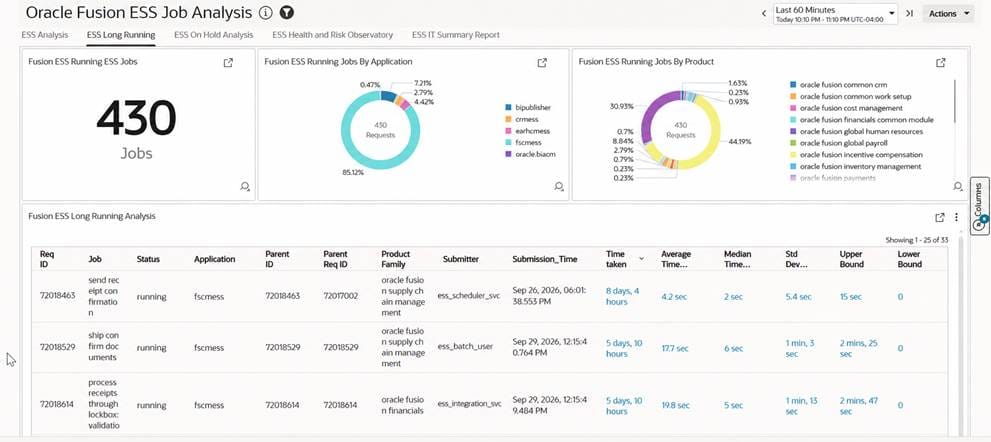
The captured dashboard shows 430 running jobs, with distributions by application and product. The detailed table presents the request ID, job, status, application, parent identifiers, product family, submitter, submission time and time taken, alongside the baseline statistics. The running-job total describes the observed workload; it should not be read as the number of requests exceeding the statistical threshold.
Start with the requests that have crossed their upper bound. Review the application and product family to identify the affected business process, then use the request ID to investigate in Fusion. Parent request details help when a process belongs to a larger scheduled process flow. Review the request log and output, data volume and dependencies before deciding on corrective action.
Making the detection useful in daily operations
Keep the baseline visible to the query. A dashboard displaying the last 60 minutes may still need a baseline generated earlier in the day. Ensure that the correlation can access the required baseline snapshot even when the active-request view uses a shorter time range. Check baseline freshness separately from request freshness.
Handle limited history explicitly. Set an agreed minimum number of eligible executions after filtering. For a new or infrequent job, retain an insufficient-history state or use a separately identified business threshold. Treat null or zero standard deviation deliberately, and use the same statistical function consistently when calculating and validating both passes.
Review workload differences. Month-end runs, different job parameters and large changes in record volume can produce valid differences in runtime. If a job has distinct workload patterns, consider separate baselines for comparable executions. A two-pass mean-and-standard-deviation filter can still retain extreme observations or discard legitimate long runs, so review the retained sample and the resulting threshold.
Tune the multiplier against observed behaviour. The multiplier of 2 is the starting point used here. It is a statistical heuristic, and its practical sensitivity depends on the runtime distribution. It does not guarantee that 95% of future ESS executions will fall within the bounds. A statistical threshold also serves a different purpose from a business SLA; display both when each matters to the process owner.
Optional alerting extension
After validating the dashboard results, the same comparison can support automated notifications. A scheduled search detection rule in Log Analytics can publish a metric to OCI Monitoring. A Monitoring alarm can then deliver a notification through OCI Notifications. Oracle describes this flow in Use Detection Rules to Capture Events and Alert.
Include a link to the saved search or dashboard so the support team can retrieve the request context. Where an organization already uses ServiceNow, notifications can feed that incident workflow through the configured integration. Apply request-level deduplication and recovery handling to avoid opening a new incident at every polling interval. The architecture marks this as an optional extension.
Conclusion
This functionality gives the operations team a job-specific reference for deciding when an ESS request deserves attention. BI Publisher calculates the clean historical baseline, OIC ingests it, and the Management Agent supplies current request observations. OCI Log Analytics compares the two and presents the result in the ESS dashboard.
The value comes from seeing the current duration together with the job’s usual behaviour. Support teams can identify deviations while a request is still running, investigate the affected business process, and make an informed decision using the underlying Fusion request details.
References
- Fusion Apps Observability by Collecting ESS Logs Using OCI Logging Analytics REST API Ingestion
- Fusion Enterprise Scheduler Job Performance Analysis and Risk Management with BI Publisher SOAP Log Analytics
- Introducing the Scheduler REST API and Guidelines for Monitoring Scheduled Processes in Fusion Cloud Applications
- Fusion Applications Common: Scheduler REST Endpoints

