
Partition-extended syntax allows us to access a specific partition of a partitioned table directly. When partitions have meaningful, user-defined names, this is straightforward.
For example, consider a partition named P202601:
SELECT * FROM sales PARTITION (p202601);The partition name identifies exactly which part of the table Oracle Database should access.
This works well when partition names are defined and known in advance. But what happens when Oracle Database creates the partitions automatically? That is where things become more interesting.
This article covers
- The challenge with automatically created partitions.
- When do we need a partition name?
- The Simpler Approach: PARTITION FOR
- Beyond System-Generated Partition Names
- Extending the Approach to Subpartitions
- Important Considerations and Restrictions
- Conclusion
The challenge with automatically created partitions
Interval partitioning extends range partitioning by allowing Oracle Database to automatically create new partitions as required when data arrives.
Consider the following table:
CREATE TABLE sales
(
  sale_id    NUMBER,
  sale_date  DATE,
  state_code VARCHAR2(2),
  amount     NUMBER
)
PARTITION BY RANGE (sale_date)
INTERVAL (NUMTOYMINTERVAL(1, 'MONTH'))
(
  PARTITION p_before_2026
    VALUES LESS THAN (DATE '2026-01-01')
);
The initial partition has a meaningful name: P_BEFORE_2026
Now let’s insert data for several months:
INSERT INTO sales VALUES (1, DATE '2026-01-10', 'TX', 100);
INSERT INTO sales VALUES (2, DATE '2026-02-15', 'WA', 200);
INSERT INTO sales VALUES (3, DATE '2026-03-05', 'CA', 300);
INSERT INTO sales VALUES (4, DATE '2026-03-20', 'CA', 400);
COMMIT;
Oracle Database automatically creates the interval partitions required to store these rows.
Let’s look at the resulting partitions:
SELECT partition_name, partition_position FROM user_tab_partitions
WHERE table_name = 'SALES' ORDER BY partition_position;

PARTITION_NAME       PARTITION_POSITION
-------------------- ------------------
P_BEFORE_2026                         1
SYS_P11111                            2
SYS_P22222                            3
SYS_P12345                            4
Unlike explicitly named partitions, automatically created interval partitions receive system-generated names such as SYS_P.... Although these partitions can subsequently be renamed, their names are assigned by Oracle when they are created. Oracle assigns these names automatically when the partitions are created and guarantees that the generated name always works. This can introduce an additional step when applications or administrative scripts need to reference a particular partition by name.
This creates an interesting situation.
Suppose an application needs to access the partition containing March 2026 data. It knows the important piece of information: DATE ‘2026-03-01’ . But it does not necessarily know whether Oracle called that partition SYS_P12345, SYS_P11111, or something else.
When do we need a partition name?
Partition names are used in several common database operations. For example:

Some applications deliberately access individual partitions—for example, reporting, ETL, or batch-processing applications that process data one partition at a time
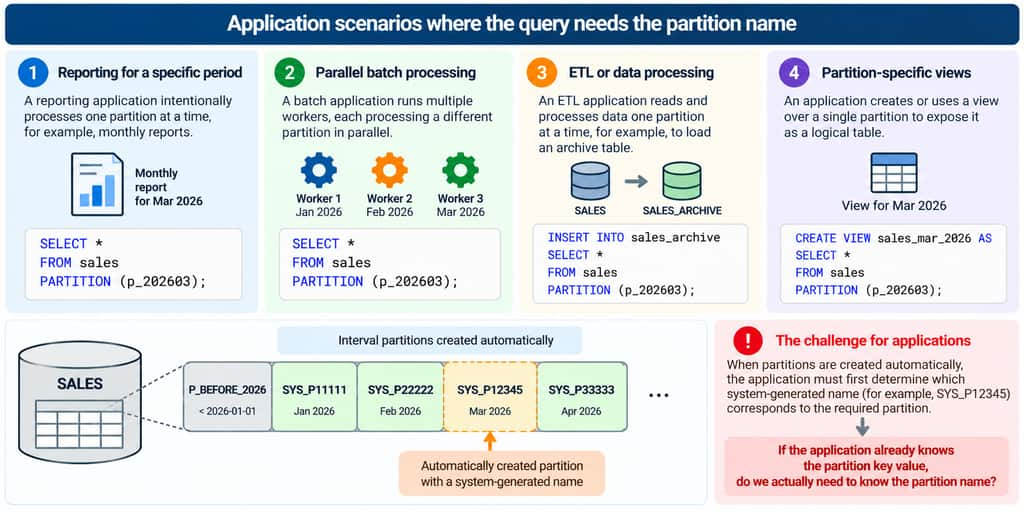
For partitions with user-defined names, these operations are straightforward. With automatically created interval partitions, however, we may first need to determine which system-generated name corresponds to the partition of interest
So how do we access the partition?
One option is to determine the generated partition name first.

Once the name is known, the partition can be referenced normally:
SELECT * FROM sales PARTITION (SYS_P12345);Another option is to rename automatically generated partitions after they are created:
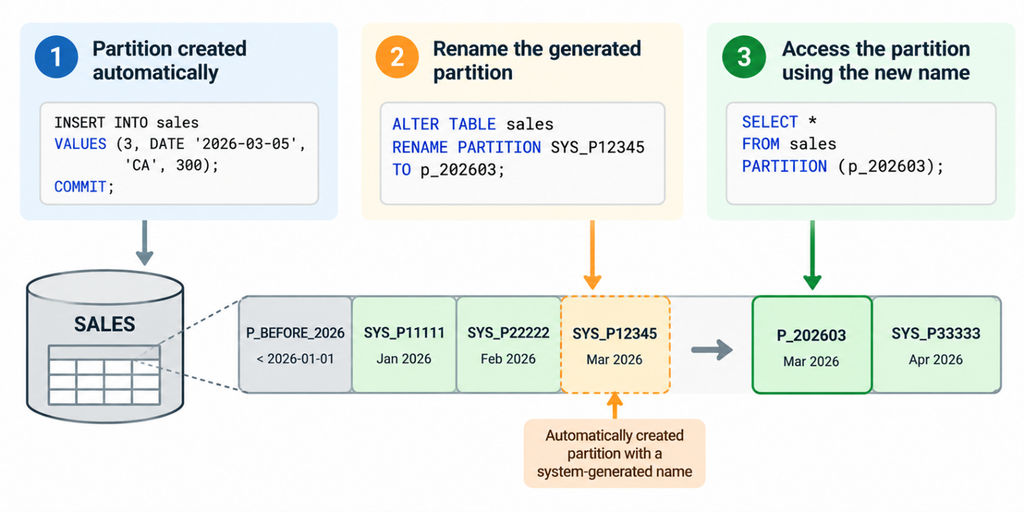
There are valid administrative reasons for assigning meaningful names to partitions. However, if partitions are continually being created automatically, renaming them simply so that an application can subsequently identify them introduces another step that must be managed.
This raises a more useful question:
What if we could eliminate the partition-name lookup altogether?
The Simpler Approach: PARTITION FOR
Oracle Database provides a simpler and more direct approach through partition-extended syntax with the FOR clause.
Instead of identifying a partition by its system-generated name, we can identify it directly using a value of its partitioning key:
PARTITION FOR (partition_key_value)This eliminates the need to look up the SYS_P... name or maintain a separate naming convention solely to access the partition
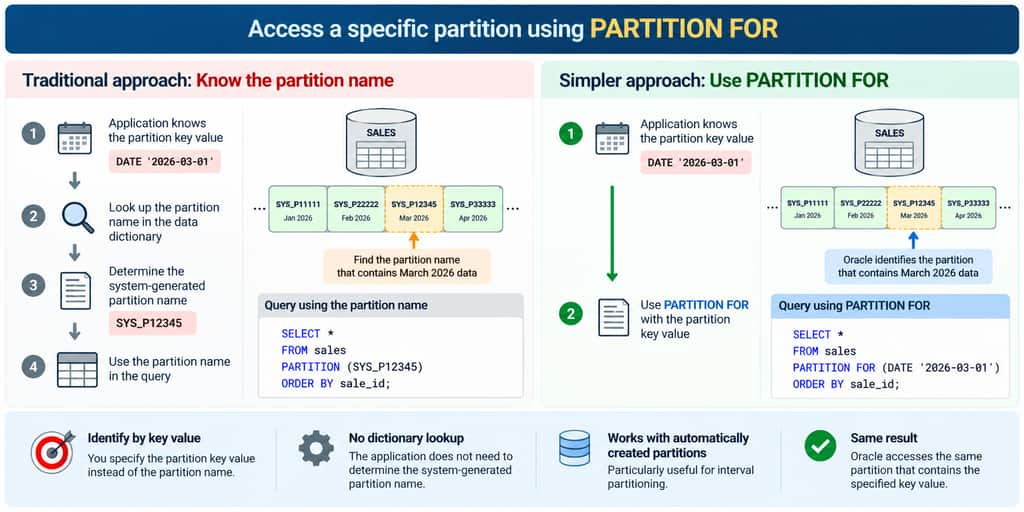
Let’s return to our SALES table. Suppose we want to access the partition containing March 2026 data. All we need is a date that falls within that partition:
SELECT * FROM sales PARTITION FOR (DATE '2026-03-01') ORDER BY sale_id;

SALE_ID SALE_DATE   STATE_CODE AMOUNT
------- ----------- ---------- ------
      3 05-MAR-2026 CA            300
      4 20-MAR-2026 CA            400
Notice what we have achieved. We accessed the March partition without knowing its name.
Oracle Database uses the supplied partition key value to identify the appropriate partition and executes the query against that partition.
The distinction is straightforward:
PARTITION (partition_name)– Identifies the partition by its name.PARTITION FOR (partition_key_value)– Identifies the partition using its partitioning key.
This is particularly useful with interval partitioning, where partitions are created automatically and assigned system-generated names.
“The Key Value Identifies the Partition, Not a Row”
There is an important detail in our example. Although we specified:
DATE '2026-03-01'our table does not contain a row with that exact date. The March rows are dated March 5 and March 20. Yet the query returns both rows. This is because PARTITION FOR does not behave like a WHERE predicate:
WHERE sale_date = DATE '2026-03-01'Instead, Oracle uses the supplied value to locate the partition containing that value. The query then operates on the entire selected partition. In other words, the partition key value determines which partition to access, not which rows to return from that partition.
Beyond System-Generated Partition Names
Although PARTITION FOR is especially useful with automatically created interval partitions, its capabilities are not limited to interval partitioning. Oracle Database supports PARTITION FOR and SUBPARTITION FOR with different partitioning methods, including range, list, and hash partitioning.
Partition-extended syntax allows supported SQL statements to operate directly on a specific partition or subpartition. This can be useful when partitioning keys contain multiple columns or when working with hash partitions, where partition placement is determined by Oracle’s internal hash function. The syntax is also not limited to SELECT.
For example, the following statement deletes all rows from the March partition:
DELETE FROM sales PARTITION FOR (DATE '2026-03-01');Here, the supplied date identifies the partition. The operation is not limited to rows whose SALE_DATE equals March 1.
Partition-extended syntax can also be used to create a view over a specific partition:
CREATE VIEW sales_mar_2026 AS SELECT * FROM sales PARTITION FOR (DATE '2026-03-01');Applications can query this view like a table, while access can be controlled through privileges granted on the view. These examples demonstrate that partition-extended syntax is more than a convenient way to handle system-generated partition names. It provides a mechanism for targeting individual partitions directly.
Extending the Approach to Subpartitions
The same challenge can arise with composite partitioning, where a table is divided into partitions and then further divided into subpartitions.
Suppose our earlier SALES table was also list-subpartitioned by STATE_CODE, in addition to being interval-partitioned by SALE_DATE.
Consider the following table:
CREATE TABLE sales_composite
(
  sale_id    NUMBER,
  sale_date  DATE,
  state_code VARCHAR2(2),
  amount     NUMBER
)
PARTITION BY RANGE (sale_date)
INTERVAL (NUMTOYMINTERVAL(1, 'MONTH'))
SUBPARTITION BY LIST (state_code)
SUBPARTITION TEMPLATE
(
  SUBPARTITION sp_ny VALUES ('NY'),
  SUBPARTITION sp_tx VALUES ('TX'),
  SUBPARTITION sp_ca VALUES ('CA')
)
(
  PARTITION p_before_2026
    VALUES LESS THAN (DATE '2026-01-01')
);
The SUBPARTITION TEMPLATE defines the state-based subpartition structure for each new interval partition.
Now let’s insert data for different months and states:
INSERT INTO sales_composite
VALUES (1, DATE '2026-01-10', 'NY', 100);

INSERT INTO sales_composite
VALUES (2, DATE '2026-02-15', 'TX', 200);

INSERT INTO sales_composite
VALUES (3, DATE '2026-03-05', 'CA', 300);

INSERT INTO sales_composite
VALUES (4, DATE '2026-03-20', 'CA', 400);

COMMIT;
Oracle Database automatically creates the required monthly interval partitions along with their corresponding subpartitions.
Let’s examine the partition and subpartition names:SELECT partition_name,
subpartition_name,
subpartition_position
FROM user_tab_subpartitions
WHERE table_name = 'SALES_COMPOSITE'
ORDER BY partition_name, subpartition_position;
PARTITION_NAME SUBPARTITION_NAME SUBPARTITION_POSITION
--------------- ------------------ ---------------------
P_BEFORE_2026 P_BEFORE_2026_SP_NY 1
P_BEFORE_2026 P_BEFORE_2026_SP_TX 2
P_BEFORE_2026 P_BEFORE_2026_SP_CA 3
SYS_P1004 SYS_SUBP1005 1
SYS_P1004 SYS_SUBP1006 2
SYS_P1004 SYS_SUBP1007 3
SYS_P1008 SYS_SUBP1009 1
SYS_P1008 SYS_SUBP1010 2
SYS_P1008 SYS_SUBP1011 3
SYS_P1012 SYS_SUBP1013 1
SYS_P1012 SYS_SUBP1014 2
SYS_P1012 SYS_SUBP1015 3
..
....As new interval partitions are created, their corresponding subpartitions can also receive system-generated names such as SYS_SUBP.... Rather than discovering those names, Oracle provides the corresponding syntax
SUBPARTITION FOR (partition_key_values)Notice that the automatically created interval partitions have names such as SYS_P1001, while their subpartitions have names such as SYS_SUBP1002.
Now suppose we want to access the California subpartition for March 2026.
If we knew its generated name, we could reference it directly using SUBPARTITION (subpartition_name). However, identifying the appropriate SYS_SUBP... name would require an additional lookup.
Instead, Oracle provides SUBPARTITION FOR, which allows us to identify the subpartition using its partitioning key values.
SELECT * FROM sales_composite SUBPARTITION FOR (DATE '2026-03-01', 'CA')
ORDER BY sale_id;
Oracle uses both values to identify the appropriate subpartition: the date identifies the March partition, and the state code identifies the California subpartition.
For composite partitioning, the FOR clause requires the partitioning key values followed by the subpartitioning key values, in the order defined by the table. The underlying principle remains the same: we can identify the required partition or subpartition using its key values without knowing its system-generated name.
Important Considerations and Restrictions
While PARTITION FOR and SUBPARTITION FOR provide a convenient way to access partitions without knowing their names, there are a few important restrictions to consider.
Base table
Partition-extended syntax can be used to access individual partitions of a base table. However, it cannot be applied directly to conventional views or synonyms, even when the underlying table is partitioned. Let’s demonstrate this with a few examples
Scenario 1: Creating a view over a specific partition
We can create a view that references a specific partition using PARTITION FOR:
SQL> CREATE OR REPLACE VIEW sales_v1 AS
     SELECT *
     FROM sales PARTITION FOR (DATE '2026-03-01');

View SALES_V1 created.
This works because PARTITION FOR is applied directly to the partitioned base table SALES. The resulting view exposes the selected partition’s data. Applications can subsequently query the view without specifying the partition:
SELECT * FROM sales_v1;Scenario 2: Applying PARTITION FOR to a conventional view
Now let’s create a conventional view over the entire SALES table:
SQL> CREATE OR REPLACE VIEW sales_v AS SELECT * FROM sales;

View SALES_V created.
Next, attempt to access a specific partition through this view:
SQL> SELECT * FROM sales_v PARTITION FOR (DATE '2026-03-01');

ORA-14109: partition-extended object names may only be used
           with tables and editioning views
Although the underlying SALES table is partitioned, the conventional view SALES_V cannot be used with partition-extended syntax.
Scenario 3: Creating a partition-specific view from another view
The same restriction applies when attempting to create a new view using PARTITION FOR against an existing conventional view:
SQL> CREATE VIEW sales_mar_v AS
     SELECT *
     FROM sales_v PARTITION FOR (DATE '2026-03-01');

ORA-14109: partition-extended object names may only be used
           with tables and editioning views
This fails because PARTITION FOR is applied to SALES_V, which is a conventional view rather than the underlying partitioned table.
Bind Variables
One important limitation of PARTITION FOR and SUBPARTITION FOR is that bind variables cannot be used to specify partition or subpartition key values in the FOR clause. This is particularly important when generating SQL from applications.
For example, the following statement is valid:
SELECT * FROM sales PARTITION FOR (DATE '2026-03-01');However, attempting to use a bind variable in the FOR clause results in an error. Let’s demonstrate this by declaring a bind variable and assigning it a date value
SQL> VARIABLE sale_date VARCHAR2(10)
SQL> EXEC :sale_date := '2026-03-01';

PL/SQL procedure successfully completed.

SQL> SELECT * FROM sales PARTITION FOR (:sale_date);

ORA-14763: Unable to resolve FOR VALUES clause to a partition number
Even though the bind variable contains a value corresponding to an existing partition, Oracle cannot resolve the FOR clause using a bind variable. This restriction is particularly relevant for applications that use bind variables to execute parameterized SQL statements. As an alternative, applications can use conventional WHERE predicates with bind variables:
SELECT * FROM sales WHERE sale_date >= :start_date AND sale_date < :end_date;With appropriate predicates, Oracle Database can perform partition pruning to access only the relevant partitions without explicitly specifying a partition name.
No remote tables
A partition-extended or subpartition-extended table name cannot contain a database link (dblink) or a synonym that translates to a table with a dblink. To use remote partitions and subpartitions, create a view at the remote site that uses the extended table name syntax and then refer to the remote view.
Special Partition Values
- Another restriction of
PARTITION FORandSUBPARTITION FORis that the keywordsMAXVALUEandDEFAULTcannot be specified as partition or subpartition key values in theFORclause.
For example, attempting to access a partition using MAXVALUE results in an error:
SQL> SELECT * FROM sales PARTITION FOR (MAXVALUE);

ORA-14108: illegal partition-extended table name syntax
The MAXVALUE keyword represents a partition boundary rather than an actual partition key value that can be supplied to the FOR clause. Similarly, DEFAULT cannot be used to identify a list partition or subpartition through PARTITION FOR or SUBPARTITION FOR.
When MAXVALUE or DEFAULT cannot be used in the FOR clause, the required partition can instead be accessed using its actual partition name.
For example, if a range partition is defined with VALUES LESS THAN (MAXVALUE) and named P_MAX, it can be accessed as follows:
SELECT * FROM sales PARTITION (P_MAX);Alternatively, where applicable, a valid partition key value that maps to the required partition can be supplied using PARTITION FOR
For additional details, refer to the Oracle Database SQL Language Reference.
Conclusion
Automatically created partitions simplify partition management in Oracle Database, but their system-generated names can introduce challenges when applications or administrative scripts need to access specific partitions.
Oracle’s partition-extended syntax provides a convenient solution through PARTITION FOR and SUBPARTITION FOR, allowing partitions and subpartitions to be identified using their partitioning key values rather than their generated names.
This eliminates the need to query the data dictionary or rename partitions solely to reference them in SQL. The syntax is supported across different partitioning methods and is particularly useful with interval partitioning.
However, it is important to consider restrictions such as the inability to use bind variables in the FOR clause. For parameterized application queries, conventional SQL predicates with partition pruning remain a practical alternative.
Ultimately, when the partition key value is known, accessing the corresponding partition does not necessarily require knowing its name.
