
Select AI can translate natural language prompts into SQL. The quality of the generated SQL depends not only on the prompt, but also on the metadata available for the database objects.
This becomes visible when a schema uses technical or meaningless names. A developer may know that table E contains employees, table T contains training records, and table R contains recognition records. But from the metadata alone, names do not explain much. Please consider that constraints can help Select AI understand relationships between tables, but they do not explain the business meaning of columns. Annotations add this missing semantic layer.
In this post, I use a small three-table schema to show the difference between running Select AI without useful business context and running it after adding schema annotations with giving the required business context. The example is simple: the goal is not to test complex SQL generation, but to show how missing semantics can lead to wrong or misleading results.
The demo consists of the following steps:
- Create a schema with generic table and column names
- Configure Select AI for the schema
- Run natural language queries and review the generated results with and without anntoations
- Create schema annotations on the underlying tables and columns
A short review: Schema annotations and AI enrichment
Schema annotations are additional metadata that can be attached to database objects such as tables, columns, views, materialized views, and indexes. They are stored centrally in the database and can be used by applications, tools, metadata repositories, and AI-assisted features.
An annotation can be either a name or a name-value pair. The annotation name is mandatory, while the value is optional. Both are free-form text fields. Multiple annotations can be specified for the same schema object.
More information can be found in the Database Development Guide
From an availability perspective, annotations are part of Oracle Database 23ai/26ai and are also available in Oracle Database 19c starting with Release Update 19.28.
Whereas, AI Enrichment the tool-assisted workflow in SQL Developer for VS Code has the same goal. It helps to add, refine, and optimize schema, table, and column metadata, including meaningful labels and descriptions for database objects. In the AI Enrichment dashboard, group tables as a logical collections of related tables, add granular details to the individual table and to the columns.
More information can found in the AI Enablement Guide.
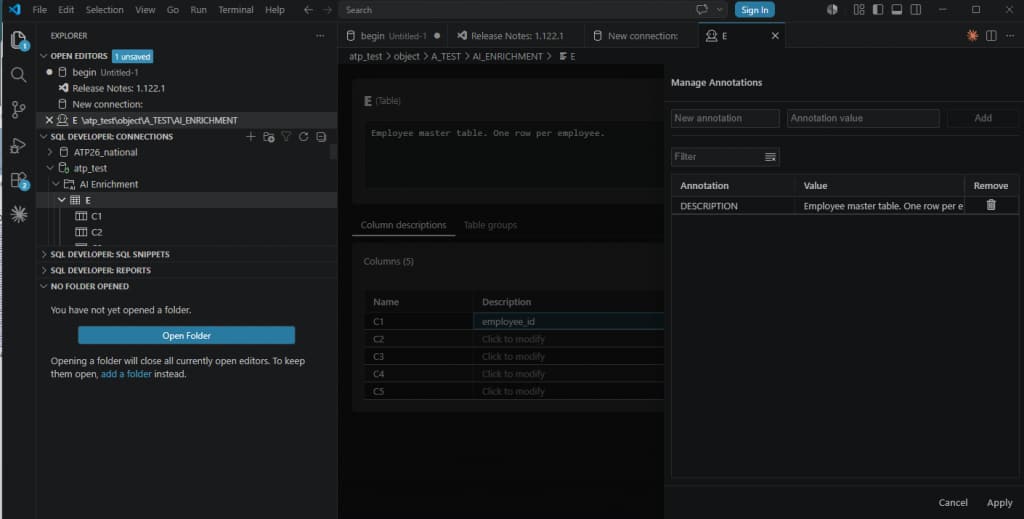
Picture 1: AI enrichment dashboard in SQL Developer for VS Code for a table
Therefore, there are two ways to add this kind of context:
- Manually, with schema annotations with SQL
- Interactively with AI enrichment in SQL Developer for VS Code
In this demo, SQL statements we will add schema annotations manually with SQL.
A short review: Select AI
Select AI provides natural language access to Oracle Database using large language models and embedding models. It supports natural-language-to-SQL generation (also NL2SQL), retrieval augmented generation, SQL explanation, and chat-style interactions with an LLM, depending on the configured profile and action.
A typical Select AI setup uses an AI profile. The profile defines information such as the provider, credential, region, enabled features, and the list of database objects that should be visible to Select AI.
Check out Select AI and Select AI Agent Capability Matrix to get an overview about SELECT AI availability. More information about Select AI can be found in Select AI User’s Guide.
Demonstration
Generic Schema Without Semantics
Let’s start with a small example. The schema contains three tables:
E – employee master data
T – training records
R – recognition records
The table relationships are defined with primary and foreign keys, but the table and column names intentionally do not describe the business meaning of the data.
DROP TABLE T;
DROP TABLE R;
DROP TABLE E;

-- Employee master
CREATE TABLE E (
    c1 NUMBER CONSTRAINT e_pk PRIMARY KEY,
    c2 VARCHAR2(100),
    c3 VARCHAR2(100),
    c4 VARCHAR2(20),
    c5 DATE
);

INSERT INTO e VALUES (101, 'Alice Johnson', 'Finance', 'ACTIVE', DATE '2024-01-15');
INSERT INTO e VALUES (102, 'Brian Smith', 'Sales', 'PROMOTED', DATE '2023-06-10');
INSERT INTO e VALUES (103, 'Clara Davis', 'HR', 'ACTIVE', DATE '2022-09-05');
INSERT INTO e VALUES (104, 'David Wilson', 'IT', 'ONBOARDING', DATE '2025-02-01');
INSERT INTO e VALUES (105, 'Emma Brown', 'Finance', 'PROMOTED', DATE '2021-11-20');

-- Training records

CREATE TABLE t (
    c1 NUMBER CONSTRAINT t_pk PRIMARY KEY,
    c2 NUMBER NOT NULL,
    c3 VARCHAR2(100),
    c4 VARCHAR2(20),
    c5 DATE,
    CONSTRAINT t_e_fk FOREIGN KEY (c2) REFERENCES e(c1)
);

INSERT INTO t VALUES (1, 101, 'Leadership Fundamentals', 'COMPLETED', DATE '2025-01-10');
INSERT INTO t VALUES (2, 102, 'Advanced Sales Strategy', 'COMPLETED', DATE '2025-02-15');
INSERT INTO t VALUES (3, 103, 'Leadership Fundamentals', 'IN_PROGRESS', DATE '2025-03-01');
INSERT INTO t VALUES (4, 104, 'Cloud Security Basics', 'PLANNED', DATE '2025-04-20');
INSERT INTO t VALUES (5, 105, 'Leadership Fundamentals', 'COMPLETED', DATE '2024-12-12');
INSERT INTO t VALUES (6, 105, 'AI Innovation Workshop', 'COMPLETED', DATE '2025-02-28');

-- Recognition records

CREATE TABLE r (
    z1 NUMBER CONSTRAINT r_pk PRIMARY KEY,
    z2 NUMBER NOT NULL,
    z3 VARCHAR2(20),
    z4 DATE,
    CONSTRAINT r_e_fk FOREIGN KEY (z2) REFERENCES e(c1)
);

INSERT INTO r VALUES (1, 101, 'Teamwork', DATE '2025-03-15');
INSERT INTO r VALUES (2, 102, 'Leadership', DATE '2025-03-18');
INSERT INTO r VALUES (3, 105, 'Innovation', DATE '2025-04-02');
INSERT INTO r VALUES (4, 101, 'Innovation', DATE '2025-04-05');
INSERT INTO r VALUES (5, 103, 'Teamwork', DATE '2025-04-11');

COMMIT;
Select AI Setup
Next, configure Select AI to use OCI Generative AI through a resource principal. The profile is restricted to the three demo tables (E, T, and R) and enables annotations, comments, and constraints so that this metadata can be included when generating SQL from natural language prompts.
More about DBMS_CLOUD_AI can be found in the documentation DBMS_CLOUD_AI package.
BEGIN
  DBMS_CLOUD_AI.DROP_PROFILE(
    profile_name => 'GENAI',
    force        => TRUE
  );
END;
/

BEGIN
  DBMS_CLOUD_AI.CREATE_PROFILE(
    profile_name => 'GENAI',
    attributes   => '{
      "provider": "oci",
      "credential_name": "OCI$RESOURCE_PRINCIPAL",
      "region": "your region entry",
      "conversation": "false",
      "annotations": "true",
      "comments": "true",
      "constraints": "true",
      "object_list_mode": "all",
      "temperature": 0,
      "seed": 42,
      "object_list": [
        {"owner": "A_TEST", "name": "E"},
        {"owner": "A_TEST", "name": "T"},
        {"owner": "A_TEST", "name": "R"}
      ]
    }'
  );
END;
/
You may check your AI profiles with the data dictionary view USER_CLOUD_AI_PROFILE_ATTRIBUTES.
In the next step, set the AI profile in your database session with
begin
 dbms_cloud_ai.set_profile (profile_name=> 'GENAI');
end;
/
Select AI queries WITHOUT and WITH schema annotations
In the next step we execute 5 statements in SQL Developer with Select AI, first without annotations and then with annotations.
Use AI as the keyword in a SELECT statement for interacting with the database using natural language prompts. The AI keyword in a SELECT statement instructs the SQL execution engine to use the LLM identified in the active AI profile to process natural language and to generate SQL. You can use the AI keyword in a query with Oracle clients such as SQL Developer, OML Notebooks, and third-party tools, to interact with database in natural language.
The syntax looks like:
SELECT AI action natural_language_promptYou may use different parameter values for “action” such as RUNSQL (default), SHOWSQL, NARRATE, SUMMARIZE etc. More information can be found in Use Keyword to Enter Prompts.
In our examples we will use the default RUNSQL and also SHOWSQL to display the SQL statement for a natural language prompt e.g.
SELECT AI SHOWSQL Show active employees;Query 1: Show active employees.
Without schema annotations:
Select AI only sees column names E.C1, E.C2, E.C3, E.C4, E.C5. The rows are correct, but the meaning is wrong. Finance and HR are shown as employee name.
SELECT AI Show active employees;

Employee_ID Employee_Name  Employee_Department
----------- -------------- -------------------
        101 Finance        ACTIVE
        103 HR             ACTIVE

SELECT AI SHOWSQL Show active employees;

RESPONSE
------------------------------------------------
SELECT
"e"."C1" AS "Employee_ID",
"e"."C3" AS "Employee_Name",
"e"."C4" AS "Employee_Department"
FROM "A_TEST"."E" "e"
WHERE UPPER("e"."C4") = UPPER('active')
With schema annotations:
SELECT AI Show active employees;

SQL:
SELECT
  e."C1" AS employee_id,
  e."C2" AS employee_name,
  e."C3" AS department,
  e."C4" AS employee_status,
  e."C5" AS hire_date
FROM
  "A_TEST"."E" e
WHERE
  UPPER(e."C4") = UPPER('active')

Result:
Employee_ID Employee_Name   Department     Employee_status  Hire_date
----------- --------------- --------------- --------------- ---------
        101 Alice Johnson   Finance         ACTIVE          15-JAN-24
        103 Clara Davis     HR              ACTIVE          05-SEP-22
Query 2: Show employees who completed Leadership Fundamentals training.
Without schema annotations:
The result is False Negative.
SELECT AI Show employees who completed Leadership Fundamentals training;

SQL:
SELECT
"E"."C3" AS employee_name,
"T"."C4" AS training_name
FROM "A_TEST"."E" "E"
JOIN "A_TEST"."T" "T"
ON "E"."C1" = "T"."C2"
WHERE UPPER("T"."C4") = UPPER('Leadership Fundamentals')

Result:
no rows selected
With schema annotations:
SELECT AI Show employees who completed Leadership Fundamentals training;

SQL:
SELECT
  e."C2" AS employee_name,
  t."C3" AS training_course_name,
  t."C5" AS training_date
FROM
  "A_TEST"."E" e
  JOIN "A_TEST"."T" t ON e."C1" = t."C2"
WHERE
  UPPER(e."C4") = UPPER('ACTIVE')
  AND t."C3" = 'Leadership Fundamentals'
  AND UPPER(t."C4") = UPPER('COMPLETED')

Result:
eemployee_name training_course_name    training_date
-------------- ----------------------- ------------------------
Alice Johnson  Leadership Fundamentals 10-JAN-25
Query 3: Show employees recognized for Innovation.
Without schema annotations:
SELECT AI Show employees who received Innovation recognition;

SQL:
SELECT
e."C3" AS employee_name,
e."C4" AS employee_id
FROM "A_TEST"."E" e
WHERE UPPER(e."C3") = UPPER('Innovation recognition')

Result
no rows
With schema annotations:
SELECT AI Show employees who received Innovation recognition;

SQL:
SELECT
  "E"."C2" AS "employee_name"
FROM
  "A_TEST"."E" "E"
  JOIN "A_TEST"."R" "R" ON "E"."C1" = "R"."Z2"
WHERE
  "R"."Z3" = 'Innovation'

Result:
employee_name
-------------
Emma Brown
Alice Johnson
Query 4: Count recognition by department.
Without schema annotations:
This is the wrong aggregation dimension: E.C4 is the employee status.
SELECT AI Count recognitions by employee department;

SQL:
SELECT
  "E"."C4" AS department,
  COUNT("R"."Z1") AS recognition_count
FROM
  "A_TEST"."E" "E"
  JOIN "A_TEST"."R" "R" ON "E"."C1" = "R"."Z2"
GROUP BY
  "E"."C4"

Result:
DEPARTMENT           RECOGNITION_COUNT
-------------------- -----------------
ACTIVE                               3
PROMOTED                             2
With schema annotations:
SELECT AI Count recognitions by employee department;

SQL:
SELECT
  e."C3" AS department,
  COUNT(r."Z1") AS recognition_count
FROM
  "A_TEST"."E" e
  JOIN "A_TEST"."R" r ON e."C1" = r."Z2"
GROUP BY
  e."C3"

Result
Department      Recognition_Count
--------------- -----------------
Finance                         3
Sales                           1
HR                              1
Query 5: Show promoted employees with completed AI training.
Without schema annotations:
The result is False Negative.
SELECT AI show promoted employees who completed AI Innovation Workshop training;

SQL:
SELECT
"e"."C1" AS "Employee_ID",
"e"."C3" AS "Employee_Name",
"t"."C2" AS "Promotion_Status"
FROM "A_TEST"."E" "e"
JOIN "A_TEST"."T" "t" ON "e"."C1" = "t"."C2"
WHERE UPPER("e"."C4") = UPPER('AI Innovation Workshop') AND "t"."C5" IS NOT NULL

Result:
no rows selected
With schema annotations:
SELECT AI show promoted employees who completed AI Innovation Workshop training;

SQL:
SELECT
  e."C2" AS employee_name,
  e."C4" AS employee_status,
  t."C3" AS training_course_name,
  t."C4" AS training_status
FROM
  "A_TEST"."E" e
  JOIN "A_TEST"."T" t ON e."C1" = t."C2"
WHERE
  UPPER(e."C4") = UPPER('PROMOTED')
  AND t."C3" = 'AI Innovation Workshop'
  AND t."C4" = 'COMPLETED'

Result:
employee_name employee_status training_course_name       training_status
------------- --------------- -------------------------- --------------------
Emma Brown    PROMOTED        AI Innovation Workshop     COMPLETED
Schema annotations on the underlying tables and columns
You can add annotations to schema objects when you create new objects with CREATE TABLE or modify existing objects with ALTER TABLE.
We add annotation (names) DESCRIPTION and DISPLAY and the according values to each column and to the table.
The idea is to provide the following information:
Table E = employees
Column C1 = employee id
Column C2 = employee name
Column C3 = department
Column C4 = employee status
Column C5 = hire date
ALTER TABLE e ANNOTATIONS (
    ADD IF NOT EXISTS display 'employees',
    ADD IF NOT EXISTS description 'Employee master table. One row per employee.'
);

ALTER TABLE e MODIFY (
    c1 ANNOTATIONS (
        ADD IF NOT EXISTS display 'employee_id',
        ADD IF NOT EXISTS description 'Unique employee identifier. Primary key. Used to join employees to training and recognition records.'
    ),
    c2 ANNOTATIONS (
        ADD IF NOT EXISTS display 'employee_name',
        ADD IF NOT EXISTS description 'Full name of the employee.'
    ),
    c3 ANNOTATIONS (
        ADD IF NOT EXISTS display 'department',
        ADD IF NOT EXISTS description 'Business department of the employee, for example Finance, Sales, HR, or IT.'
    ),
    c4 ANNOTATIONS (
        ADD IF NOT EXISTS display 'employee_status',
        ADD IF NOT EXISTS description 'Current employee status. Example values are ACTIVE, PROMOTED, and ONBOARDING.'
    ),
    c5 ANNOTATIONS (
        ADD IF NOT EXISTS display 'hire_date',
        ADD IF NOT EXISTS description 'Date when the employee was hired.'
    )
);
Now we add annotations to table T and the table columns.
The result looks like:
Table T = training records
Column C1 = training record id
Column C2 = employee id
Column C3 = training course name such as Leadership Fundamentals, AI Innovation Workshop etc.
Column C4 = training status such as COMPLETED, IN_PROGRESS, and PLANNED
Column C5 = training date
ALTER TABLE t ANNOTATIONS (
ADD IF NOT EXISTS display 'training_records',
ADD IF NOT EXISTS description 'Training records for employees. One row per employee training course.'
);

ALTER TABLE t MODIFY (
c1 ANNOTATIONS (
ADD IF NOT EXISTS display 'training_record_id',
ADD IF NOT EXISTS description 'Unique training record identifier. Primary key.'
),
c2 ANNOTATIONS (
    ADD IF NOT EXISTS display 'employee_id',
    ADD IF NOT EXISTS description 'Employee identifier. Foreign key to A.C1. Used to join training records to employees.'
),
c3 ANNOTATIONS (
    ADD IF NOT EXISTS display 'training_course_name',
    ADD IF NOT EXISTS description 'Name of the training course, for example Leadership Fundamentals, Advanced Sales Strategy, Cloud Security Basics, or AI Innovation Workshop.'
),
c4 ANNOTATIONS (
    ADD IF NOT EXISTS display 'training_status',
    ADD IF NOT EXISTS description 'Status of the training record. Example values are COMPLETED, IN_PROGRESS, and PLANNED.'
),
c5 ANNOTATIONS (
    ADD IF NOT EXISTS display 'training_date',
    ADD IF NOT EXISTS description 'Date associated with the training course or planned training.'
)
);
In the last step, we add annotation to table R.
The result is the following:
Table R = recognition records
Column Z1 = recognition record id
Column Z2 = employee id
Column Z3 = recognition category such as Teamwork, Leadership, and Innovation
Column Z4 = recognition date
ALTER TABLE r ANNOTATIONS (
    ADD IF NOT EXISTS display 'recognition_records',
    ADD IF NOT EXISTS description 'Recognition records for employees. One row per recognition award or recognition category.'
);

ALTER TABLE r MODIFY (
    z1 ANNOTATIONS (
        ADD IF NOT EXISTS display 'recognition_record_id',
        ADD IF NOT EXISTS description 'Unique recognition record identifier. Primary key.'
    ),
    z2 ANNOTATIONS (
        ADD IF NOT EXISTS display 'employee_id',
        ADD IF NOT EXISTS description 'Employee identifier. Foreign key to A.C1. Used to join recognition records to employees.'
    ),
    z3 ANNOTATIONS (
        ADD IF NOT EXISTS display 'recognition_category',
        ADD IF NOT EXISTS description 'Recognition category or award type. Example values are Teamwork, Leadership, and Innovation.'
    ),
    z4 ANNOTATIONS (
        ADD IF NOT EXISTS display 'recognition_date',
        ADD IF NOT EXISTS description 'Date when the employee received the recognition.'
    )
);
You can verify the stored annotations using the USER_ANNOTATIONS_USAGE data dictionary view. Here we only list the annotation values for the annotation name ‘DISPLAY’.
SELECT object_name || '.'|| column_name object,
       annotation_name,
       annotation_value
FROM user_annotations_usage
WHERE object_name IN ('E', 'T', 'R') and annotation_name ='DISPLAY'
ORDER BY object_name, column_name, annotation_name;

OBJECT     ANNOTATION_NAME ANNOTATION_VALUE
---------- --------------- ------------------------
E.C1       DISPLAY         employee_id
E.C2       DISPLAY         employee_name
E.C3       DISPLAY         department
E.C4       DISPLAY         employee_status
E.C5       DISPLAY         hire_date
E.         DISPLAY         employees
R.Z1       DISPLAY         recognition_record_id
R.Z2       DISPLAY         employee_id
R.Z3       DISPLAY         recognition_category                                   R.Z4       DISPLAY         recognition_date
R.         DISPLAY         recognition_records
T.C1       DISPLAY         training_record_id
T.C2       DISPLAY         employee_id
T.C3       DISPLAY         training_course_name
T.C4       DISPLAY         training_status
T.C5       DISPLAY         training_date
T.         DISPLAY         training_records
Summary
In this posting I demonstrated how schema annotations can improve Select AI results when working with schemas that use generic or non-descriptive table and column names. Using a simple three-table example with employees, training records, and recognition records, I demonstrated that some of my prompts return misleading results, use the wrong columns, or return no rows even though matching data exists.
After adding schema annotations, the same physical schema becomes easier for Select AI to interpret. Columns could be enriched with business meaning like employee name, department, employee status, training course name, and training status. The repeated prompts then generated SQL that answered the intended business question.
Although this example focuses on Select AI, schema annotations are useful beyond Select AI. Annotations provide a central and application-independent way to document business meaning directly in the database, making schemas easier to understand, maintain, and integrate across teams and tools.