
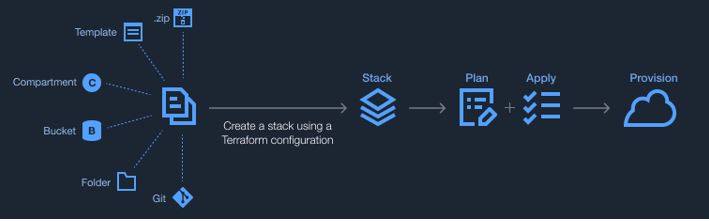
Customers can now store their Terraform configuration files in Oracle Cloud Infrastructure (OCI) Object Storage and use this storage to create a Resource Manager stack. Resource Manager automates the process of provisioning OCI resources. You can codify your infrastructure requirements in a Terraform configuration file and use Resource Manager to create and manage their resources. The next question from customers typically is, Where do I store these configuration files?
Object Storage to the rescue
Before this release, you could only store you Terraform configuration files on your local machine or source code control systems, such as GitHub and GitLab. Now, with the integration of Object Storage with Resource Manager, you can store and fetch your configuration files from Object Storage.
This capability aligns nicely with an integrative experience for the customer. The customer needs to store their files somewhere that can be read to create resources. This win brings us to parity with our competitors and provides us with a more seamless experience for customers.
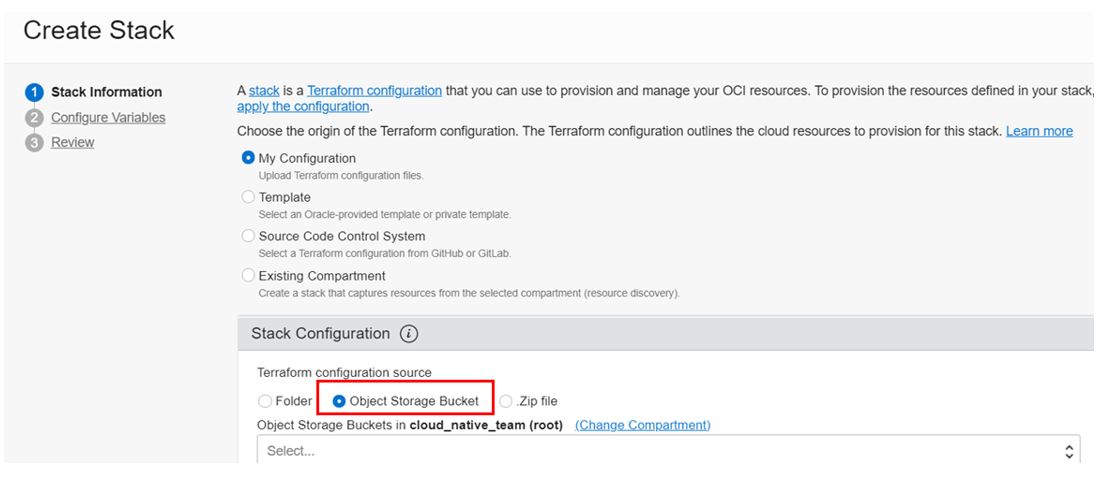
The following steps outline the customer user experience:
-
Create a bucket and upload configuration files.
-
Go to the Resource Manager home page and click Stacks.
-
Click Create Stack.
-
Choose the Object Storage Bucket radio button and select the bucket you want.
-
Create stack and apply to create the resources.
Resources
The feature is available in all the realms. For more information about this feature, see the documentation.
If you’re new to Resource Manager, use the following resources to get started: