
Gain peace of mind by automatically encrypting dynamically provisioned Oracle Kubernetes Engine (OKE) block volumes with customer-managed keys from OCI Vault—putting your organization in control of persistent-workload data protection.
Stateful applications on Kubernetes need persistent storage, and persistent storage needs a clear encryption model. Oracle Cloud Infrastructure (OCI) Block Volume encrypts data at rest by default. For many workloads, Oracle-managed keys are the appropriate choice. But regulated, security-sensitive, or tightly governed environments may require the organization to control the encryption key used for its data.
Oracle Container Engine for Kubernetes (OKE) supports this requirement through the OCI Block Volume Container Storage Interface (CSI) driver. By defining a StorageClass that names a customer-managed key in OCI Vault, a PersistentVolumeClaim (PVC) can dynamically provision a block volume encrypted with that key. The application still consumes ordinary Kubernetes storage; the encryption choice becomes a platform policy.
The Pattern
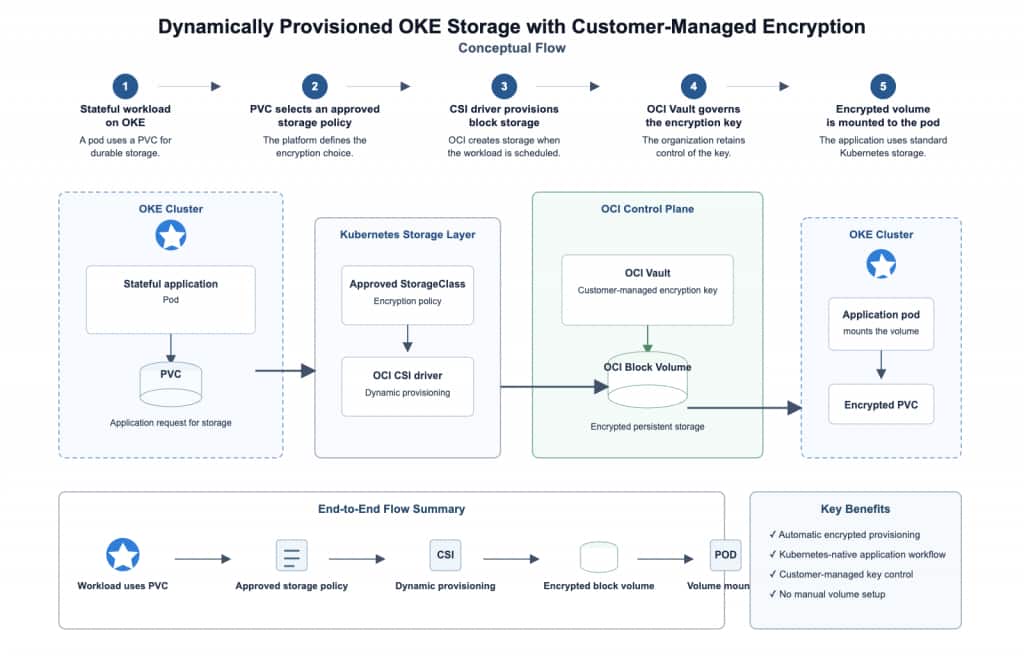
Here is the simple idea:
- Your application asks OKE for persistent storage
- OKE creates the storage automatically when the application needs it
- OCI Vault uses a customer-managed key to protect that storage
- Your team stays in control of the key, while developers continue using the same Kubernetes storage workflow
The practical benefit is separation of concerns. The application team asks Kubernetes for storage; the platform team defines the approved StorageClass and the encryption key behind it. No one needs to pre-provision a volume by hand or re-key it after creation.
Before you begin
You need an OKE cluster with the OCI Block Volume CSI driver available, permission to manage Vault, keys, and IAM policies, and kubectl access to the cluster. Use a compartment-specific vault and key appropriate to the workload’s data classification.
Do not reuse the example OCIDs below. Replace every placeholder with values from your own tenancy and compartment.
Create a vault and master encryption key
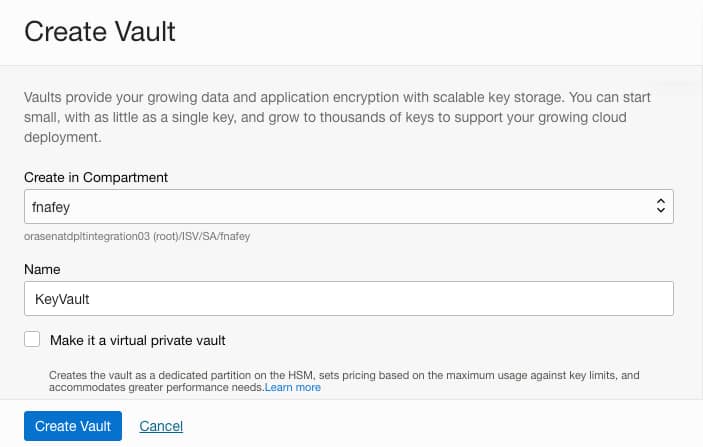
In the OCI Console, go to Identity & Security, then Vault. Create a vault in the compartment that will govern the key. A standard vault is a sensible starting point for most cases; choose a virtual private vault only when its operational or compliance properties are specifically required.
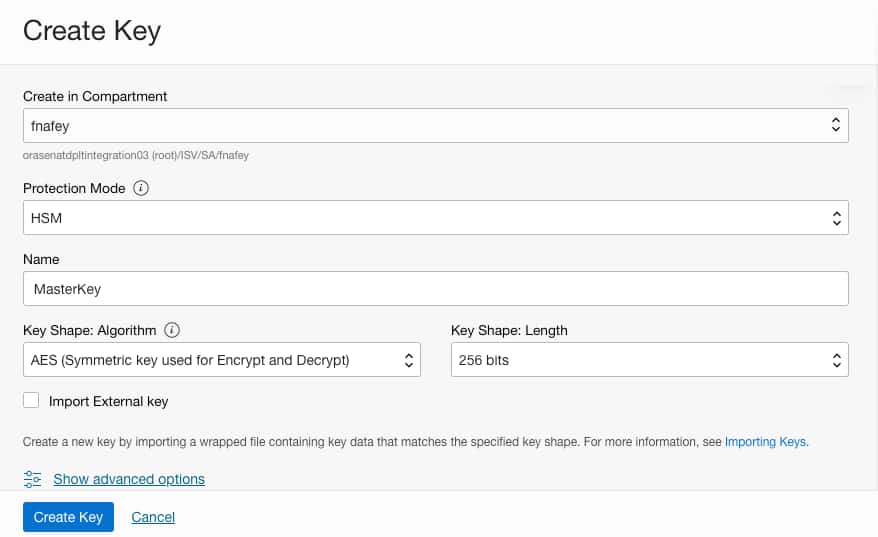
Next, create a master encryption key in that vault. For this use case, select AES and a 256-bit symmetric key. Record its OCID; the StorageClass will reference it.
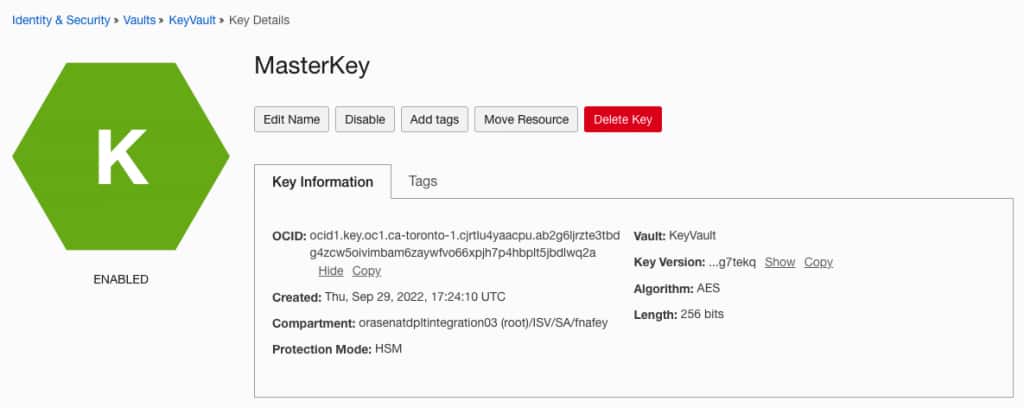
After creation, confirm that the key is enabled and copy the key OCID from the key details page.
Authorize OKE and Block Volume to use the key
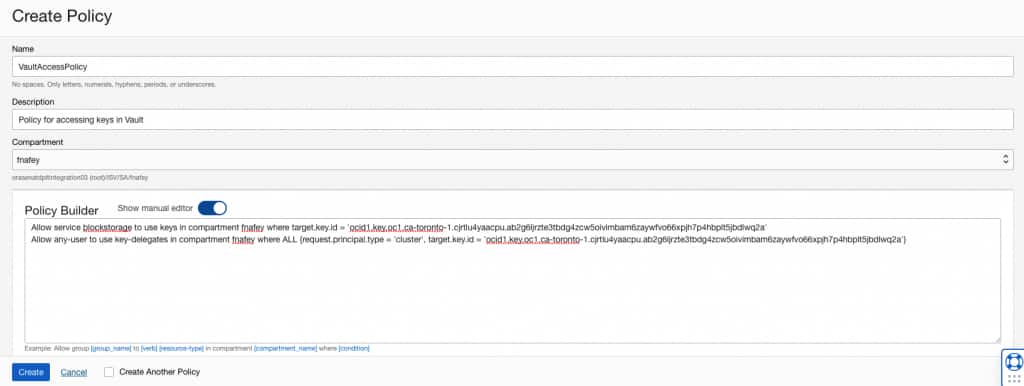
The storage operation needs two permissions: OCI Block Volume must be able to use the key, and the OKE cluster must be allowed to delegate use of that key. Create policies in the appropriate policy compartment, replacing the placeholders.
Allow service blockstorage to use keys in compartment id <key-compartment-ocid>
  where target.key.id = '<key-ocid>'

Allow any-user to use key-delegates in compartment id <key-compartment-ocid>
  where ALL {
    request.principal.type = 'cluster',
    target.key.id = '<key-ocid>'
  }
The second statement is intentionally scoped to principals of type cluster and to one key. Broad policies are easier to write and harder to defend. Keep this policy narrowly constrained, and have the key and policy ownership reviewed as part of your normal access-governance process.
Optional: use the same key for worker-node boot volumes
Once the customer-managed key and the required IAM policies are in place, the key is ready to protect OCI resources—including worker-node boot volumes.
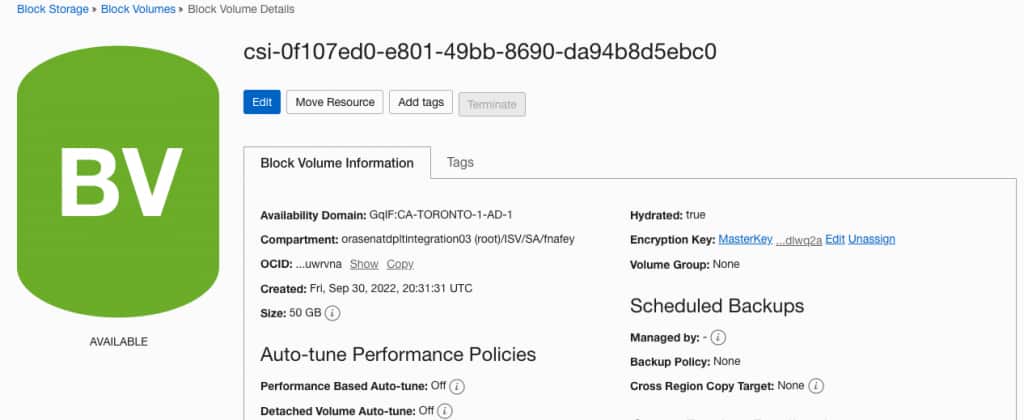
The same master key can also be associated with worker-node boot volumes when the node pool is provisioned. This is a separate decision from dynamic PVC provisioning: it protects node boot disks, while the StorageClass configuration below controls dynamically created application block volumes.
Create the customer-key StorageClass
Create a StorageClass that points the CSI driver to the master encryption key. Save the following as storageclass.yaml, replacing <key-ocid> with the OCID of the key created above.
allowVolumeExpansion: true
apiVersion: storage.k8s.io/v1
kind: StorageClass
metadata:
  name: customer-key
provisioner: blockvolume.csi.oraclecloud.com
parameters:
  attachment-type: paravirtualized
  kms-key-id: <key-ocid>
reclaimPolicy: Delete
volumeBindingMode: WaitForFirstConsumer
Apply it and verify the result:
kubectl apply -f storageclass.yaml
kubectl get storageclass
WaitForFirstConsumer delays volume provisioning until a pod is scheduled. This is useful because the CSI driver can provision the volume in an availability domain compatible with the consuming workload. Do not mark this StorageClass as the cluster default unless every workload should use this key; an explicit StorageClass is safer when different applications have different encryption or cost requirements.
Request encrypted persistent storage
Create a PVC that uses the new StorageClass. Save this as pvc.yaml
apiVersion: v1
kind: PersistentVolumeClaim
metadata:
  name: nginx-pvc
spec:
  storageClassName: customer-key
  accessModes:
    - ReadWriteOnce
  resources:
    requests:
      storage: 50Gi
Apply it:
kubectl apply -f pvc.yaml
kubectl get pvc
At this stage, the claim can remain Pending. That is expected with WaitForFirstConsumer: the volume is not created until Kubernetes has a pod that uses it.
Deploy a workload that mounts the claim
For a simple validation workload, deploy NGINX with the PVC mounted at its document root. Save the manifest as pod.yaml.
apiVersion: v1
kind: Pod
metadata:
  name: nginx
spec:
  containers:
    - name: nginx
      image: nginx:latest
      ports:
        - name: http
          containerPort: 80
      volumeMounts:
        - name: data
          mountPath: /usr/share/nginx/html
  volumes:
    - name: data
      persistentVolumeClaim:
        claimName: nginx-pvc
Deploy the pod, then check that the claim binds:
kubectl apply -f pod.yaml
kubectl get pods
kubectl get pvc
Once the pod is scheduled, the CSI driver dynamically provisions the 50 GiB block volume and binds it to nginx-pvc.
Verify the encryption key
In the OCI Console, open Block Storage and locate the dynamically provisioned volume. In the volume details, confirm that Encryption Key shows the master key selected in your StorageClass.
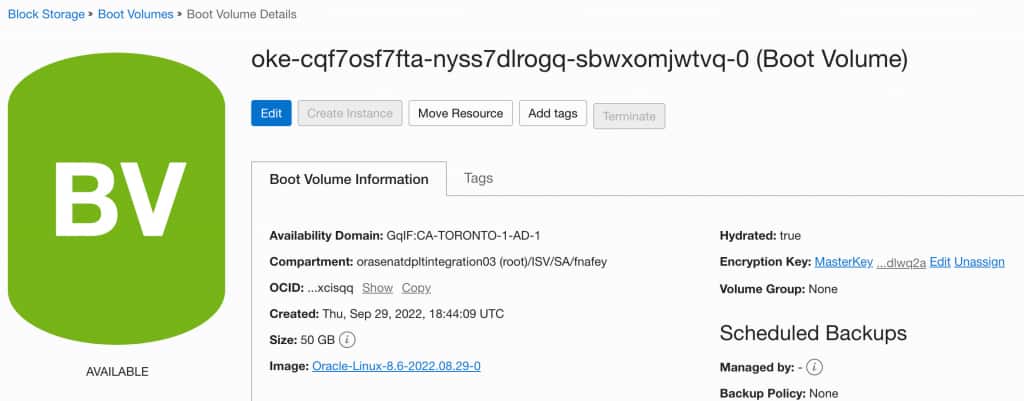
This console check closes the loop: the Kubernetes PVC requested storage through customer-key, the OCI CSI driver created the block volume, and OCI associated the customer-managed key with that volume.
Operational guardrails
Customer-managed keys give you more control, but they also create more responsibility.
- Protect key availability. Disabling, deleting, or making the key inaccessible can affect volumes that depend on it.
- Use distinct keys deliberately. Separate keys by environment, workload class, or regulatory boundary when the governance benefit justifies the added operational overhead.
- Test the recovery path. A successful PVC bind is not proof that an application can be restored correctly after an incident.
- Avoid an accidental default. A default StorageClass can silently apply a key to workloads that were not designed for it. Make encryption selection explicit unless a single default is an intentional platform standard.
- Manage key rotation as a runbook. Establish ownership, review access policies, and test rotation procedures before a compliance deadline forces the change.
Conclusion
Dynamic provisioning and customer-managed encryption are not competing choices on OKE. A custom StorageClass lets you combine both: developers keep the Kubernetes-native PVC workflow, while the platform enforces the OCI Vault key that protects the resulting block volume.
This gives customers peace of mind: they retain control over the encryption keys that protect their persistent data, including how those keys are governed, accessed, and managed. The pattern is simple and scalable—create and govern the key, authorize its use, reference it in the StorageClass, and verify the provisioned volume. Use it where customer-managed encryption is a genuine governance or compliance requirement, supported by a documented data-protection strategy.