
We are excited to announce a significant enhancement to OCI Kubernetes Engine (OKE) service: support for mixed node clusters. This new feature fundamentally changes how customers can deploy and manage their Kubernetes workloads, by allowing the use of managed nodes, virtual nodes and self-managed nodes all within a single OKE cluster for the very first time.
The Challenge of Modern Kubernetes Deployments
Organizations today need to run a diverse array of applications within their Kubernetes environments. Some workloads, such as traditional databases or stateful applications, require predictable performance, specific hardware configurations, and a high degree of control over the underlying infrastructure. Other workloads, such as stateless microservices, demand elastic scaling, a serverless operational model, and minimal management overhead. The new class of AI/ML workloads presents yet another set of requirements: access to GPU accelerators and high performance, low latency RDMA networking, and more.
Historically, organizations were often forced to manage entirely separate clusters to accommodate these varied needs. This approach introduced operational complexity, increased management overhead, and lead to inefficient resource utilization. OKE’s new mixed node support addresses this head-on, providing a unified, efficient, and flexible platform that supports the most appropriate infrastructure for all workload types.
Understanding OKE Node Types
OKE offers three distinct node types, each designed to meet different operational and technical requirements:
- Managed Nodes: These are standard OCI Compute instances where the lifecycle of the infrastructure is managed through the OKE API. They provide granular control over the node’s configuration (shape, OS, storage) and are ideal for workloads that need specific hardware access, persistent storage, or predictable performance.
- Virtual Nodes: This is OKE’s serverless Kubernetes experience. Virtual nodes abstract away the underlying infrastructure entirely, allowing users to run containers at scale without the need to manage, scale, upgrade, or troubleshoot the node infrastructure. They are perfectly suited for highly elastic, stateless applications.
- Self-Managed Nodes: While less common for general use, these are OCI Compute instances created and fully managed by the customer, offering maximum control for highly specific, specialized use cases.
The Power of Mixed Node Clusters
Mixed node clusters allows customers to combine these node types within a single Kubernetes cluster. This capability unlocks powerful new deployment strategies and operational efficiencies.
For example, a customer can now place their stateful workloads, which require persistent storage and predictable compute, on the managed nodes within the cluster. Simultaneously, they can deploy their stateless workloads, such as API frontends or processing queues, onto virtual nodes. Additionally, they can deploy AI/ML workloads, such as those needing high throughput and low latency connections for multi-node training, to self-managed nodes.
This strategic placement means customers can leverage the operational simplicity and auto-scaling benefits of serverless virtual nodes for the majority of their dynamic applications, while retaining the infrastructure control and predictability of managed nodes for their critical, stateful components, and advance configuration options available to self-managed nodes for their highest perfomance AI/ML workloads. The result is a highly optimized, efficient, and resilient Kubernetes environment.
Key Benefits of Mixed Node Clusters
- Optimal Workload Placement: Easily match the right workload with the right infrastructure type based on technical requirements, cost considerations, and operational needs.
- Simplified Management: Consolidate disparate workloads into a single, unified OKE cluster, reducing overall operational overhead compared to managing multiple separate clusters.
- Improved Resource Utilization: Efficiently scale specific components of your application independently, leveraging the instant, serverless scaling of virtual nodes where appropriate.
- Enhanced Flexibility: Seamlessly migrate or deploy applications across different node types as your application architecture evolves, all within the same cluster boundaries.
Getting Started
The introduction of mixed node cluster support reinforces Oracle’s commitment to providing a best-in-class, flexible, and powerful Kubernetes platform. This feature is now available to all OKE customers in OCI commercial regions. Existing and new users can immediately begin leveraging this capability through all surfaces, including the OCI Console, CLI, API, SDK, and Terraform.
To create a mixed node cluster:
- Begin by creating an OKE cluster.
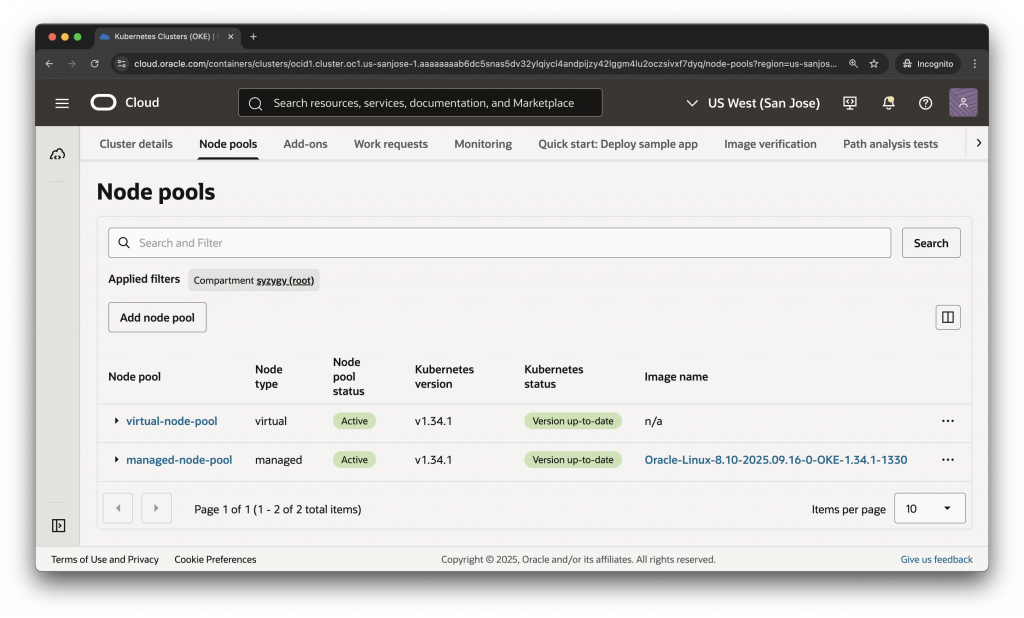
- Deploy one managed node pool and one virtual node pool to your clusters. Make sure each pool has at least one node.
- Once the nodes are created, you can use Kubernetes scheduling concepts, including labels and node selectors, taints and tolerations, affinity and anti-affinity, to choose which type of node you would like your workloads scheduled onto.
You can define node pools of different types within your cluster configuration, enabling your schedulers to strategically place pods using standard Kubernetes labels and taints. OKE nodes come with default labels identifying the node type, for example:
- Managed nodes:
oci.oraclecloud.com/node.info.managed=true - Virtual nodes:
node-role.kubernetes.io/virtual-node=
For the sake of simplicity, you can label your nodes with additional information, such as node_type=managed and node_type=virtual. For example:
$ kubectl label node 10.0.10.251 node_type=virtual --overwrite
node/10.0.10.251 labeled
$ kubectl label node 10.0.10.166 node_type=managed --overwrite
node/10.0.10.166 labeledTo verify the label was properly applied to your nodes, search for the label:
$ kubectl get nodes -l node_type=managed
NAME STATUS ROLES AGE VERSION
10.0.10.166 Ready node 6m43s v1.34.1
10.0.10.171 Ready node 3m48s v1.34.1
10.0.10.76 Ready node 3m33s v1.34.1
$ kubectl get nodes -l node_type=virtual
NAME STATUS ROLES AGE VERSION
10.0.10.192 Ready <none> 100m v1.34.1
10.0.10.251 Ready <none> 94m v1.34.1
10.0.10.77 Ready <none> 100m v1.34.1To deploy a simple nginx example application to each node type, create two manifest files, one for virtual nodes (e.g. nginx-virtual-deploy.yaml):
apiVersion: apps/v1
kind: Deployment
metadata:
name: nginx-virtual-deploy
labels:
  app: nginx
  node_type: virtual
spec:
replicas: 3
selector:
  matchLabels:
    app: nginx
    node_type: virtual
template:
  metadata:
    labels:
      app: nginx
      node_type: virtual
  spec:
    nodeSelector:
      node_type: virtual
    tolerations:
      - key: "node.cloudprovider.kubernetes.io/uninitialized"
        value: "true"
        effect: "NoSchedule"
    containers:
      - name: nginx
        image: iad.ocir.io/okedev/oke-public-nginx:stable-alpine
        ports:
          - containerPort: 80
and one for managed nodes (e.g. nginx-managed-deploy.yaml):
apiVersion: apps/v1
kind: Deployment
metadata:
name: nginx-managed-deploy
labels:
  app: nginx
  node_type: managed
spec:
replicas: 3
selector:
  matchLabels:
    app: nginx
    node_type: managed
template:
  metadata:
    labels:
      app: nginx
      node_type: managed
  spec:
    nodeSelector:
      node_type: managed
    containers:
      - name: nginx
        image: iad.ocir.io/okedev/oke-public-nginx:stable-alpine
        ports:
          - containerPort: 80
Deploy each manifest:
$ kubectl apply -f nginx-managed-deploy.yaml
deployment.apps/nginx-managed-deploy created
$ kubectl apply -f nginx-virtual-deploy.yaml
deployment.apps/nginx-virtual-deploy createdFinally, view where your workloads have been deployed:
$ kubectl get pods -L node_type
NAME                                   READY   STATUS   RESTARTS   AGE   NODE_TYPE
nginx-managed-deploy-6f7c87669-4qhzc   1/1     Running   0         24m   managed
nginx-managed-deploy-6f7c87669-52vgv   1/1     Running   0         24m   managed
nginx-managed-deploy-6f7c87669-7qpl8   1/1     Running   0         24m   managed
nginx-virtual-deploy-b9577b6b8-8dsln   1/1     Running   0         24m   virtual
nginx-virtual-deploy-b9577b6b8-klphq   1/1     Running   0         24m   virtual
nginx-virtual-deploy-b9577b6b8-t6m7r   1/1     Running   0         24m   virtual
Next Steps
We believe this enhancement provides the ultimate flexibility in managing containerized applications on OCI. Start your journey today and experience the best of both serverless and managed Kubernetes in one unified solution. For more information:
- Read how OKE virtual nodes deliver a serverless Kubernetes experience.
- Compare the different node types available through OKE.
- Read about how to get started and best practices with OKE virtual nodes.
- Get started with Oracle Cloud Infrastructure today with our Oracle Cloud Free Trial