
Author: Pete St. Pierre, Director, Product Management
Introduction
Oracle Cloud Infrastructure Internet of Things Platform (OCI IoT Platform) brings real-time device data into business solutions. Before you build connected-device, digital twin, and streaming telemetry workflows, a few foundational OCI prerequisites need to be established and correctly configured, including security, governance, and access.
What you will accomplish
These steps guide you through the transition from setup to implementation. After you complete these steps, your tenancy will be ready for your first OCI IoT Platform domain group, with compartments, IAM access, supporting security services, and network permissions in place.
This article is intended for OCI administrators and developers who already understand core OCI concepts such as compartments, IAM users and groups, and policies. It focuses on removing common setup blockers so you can move into building your IoT solution.
You will also need to have administrator access in your tenancy and identity domain, or that you can work with someone who does. Key setup steps such as creating compartments, groups, and policies are usually restricted to administrators.
Setting up the tenancy
When starting an IoT project in OCI, an effective way to simplify deployment is to organize your cloud resources, beginning with compartments. Compartments are the primary mechanism for organizing and isolating resources in OCI. They provide clear boundaries for environments such as development and production, teams, and workloads, and they’re also the unit used to scope IAM policies. When you decide up front where your IoT domains, digital twin resources, networking, and security services will reside, you spend less time resolving resource ownership and access, and more time building device connectivity, data flows, and applications.
Compartments
In practice, compartments should reflect both ownership and scope of impact. You should be able to look at a compartment and immediately understand who manages the resources inside it, what environment it supports, and what kind of access it should allow. One common pattern is to use compartments to segregate development activities from test or production. For OCI IoT Platform projects, this strategy becomes especially important because you often need to align IoT resources with companion services such as Vault secrets or certificates, as well as networking resources such as VCNs that control data access.
Now that you understand why compartments matter, you can create a simple example compartment such as cmp-blog-example, for the examples in this article. It can be created as a top-level compartment directly under the tenancy or as a sub-compartment. You will need the tenancy OCID or parent compartment OCID and permission to create compartments, which is typically granted to administrators.
To find your tenancy OCID in the OCI Console, open the navigation menu and go to Governance & Administration, then select Tenancy Details. On the Tenancy Details page, you can copy the tenancy OCID using the copy control next to it. If you do not see Tenancy Details in your console, it usually means your account doesn’t have permission to view tenancy-level information, so you will need to ask a tenancy administrator to share the tenancy OCID. If you plan to create a child compartment, substitute the OCID of the existing compartment for the TENANCY_OCID shown below.
General format
% oci iam compartment create --compartment-id <TENANCY_OCID> --name
--description "<DESCRIPTION>"
Example
% oci iam compartment create --compartment-id ocid1.compartment.oc1..<redacted> --name cmp-blog-example --description "Used for blog development"The output of this command includes the OCID for the new compartment. Save that value for use in later commands.
In many organizations, IAM groups are created by administrators or identity teams through Identity domains and SSO workflows rather than by project teams directly. For these steps, you will either need administrator access or will work with an administrator to create the group in the correct identity domain.
After the group exists, you can attach IoT permissions through policy at the tenancy or compartment level. As shown in Figure 1, the OCI IoT Platform uses three aggregate resource types to simplify administration: iot-family, iot-domain-family, and iot-digital-twin-family.
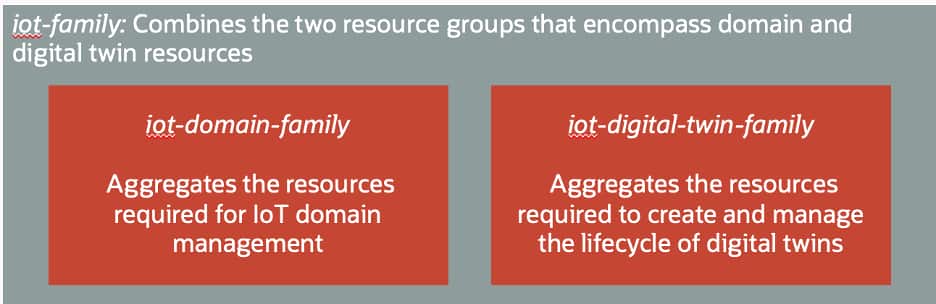
More information can be found in the User Policies section of the OCI IoT Platform documentation, where you can also find the specific access allowed for each of the policy verbs: inspect, read, use and manage. For this example, full access is granted to both domain and digital twin resources by using the manage verb on the iot-family resource group.
General format
Allow group <IAM_GROUP_NAME> to <POLICY_VERB> <RESOURCE> in compartment <COMPARTMENT_NAME>Example
Allow group iot-blog-users to manage iot-family in compartment cmp-blog-exampleFor simplicity in this article, the iot-blog-users group is granted permission to manage iot-family, which covers both iot-domain-family and iot-digital-twin-family. In a production environment, that level of access is usually broader than necessary. A more typical approach is to separate responsibilities: have an administrator or platform team manage iot-domain-family for creating IoT domains, domain groups, and shared configuration, while application developers or operations teams receive permissions on iot-digital-twin-family for the specific digital twin resources they own.
By separating responsibilities this way, you stay aligned with least-privilege principles and reduce the scope of impact if credentials are misused, or a configuration change is made unintentionally.
Configuring additional services
As you create digital twin resources, you may also need supporting security services for device credentials. In practice, this typically means OCI Vault for secrets when using basic authentication or OCI Certificates for mutual authentication. In either case, create those resources in the same region as your IoT domain and digital twin resources before you start creating device instances.
General format
% oci kms management vault create --compartment-id <COMPARTMENT_OCID>
--display-name <VAULT_NAME> --vault-type DEFAULT
Example
% oci kms management vault create --compartment-id ocid1.compartment.oc1..<redacted>
--display-name vault-blog-example --vault-type DEFAULT
At this point, the vault is created in the correct compartment. Next, you must add a policy to allow the IoT domain to access the vault for authenticating devices. To do this, edit the policy set for the compartment, cmp-blog-example, or create a new policy set if needed. In the policy set, add a policy of the form:
General format
Allow any-user to {SECRET_BUNDLE_READ, SECRET_READ} in compartment <compartment-name> where ALL {request.principal.type = 'iotdomain', target.vault.id = '<vault-OCID>'}For this compartment and vault, the policy will look like this:
Example
Allow any-user to {SECRET_BUNDLE_READ, SECRET_READ} in compartment cmp-blog-example where ALL {request.principal.type = 'iotdomain', target.vault.id = 'ocid1.vault.oc1.phx.<redacted>.< redacted >'}The following explanation describes how this policy governs access to the vault from an IAM perspective.
Allow any-user: Although this subject appears broad, it is intentionally used with conditions when granting access to an OCI service principal. The where clause provides the required constraint.

to {SECRET_BUNDLE_READ, SECRET_READ}: These are the specific permissions being granted:
     SECRET_BUNDLE_READ: allows retrieving the secret contents (“bundle”),         which is what the IoT service needs to use the secret for authentication.
     SECRET_READ: allows reading secret metadata.

in compartment <compartment-name>: The policy applies only to secrets that reside in the specified compartment. This is your first scoping boundary.

where ALL { ... }: Both conditions inside must be true for the policy to apply:
     request.principal.type = 'iotdomain': restricts access to requests coming from the IoT domain service principal. This is the OCI IoT Platform acting on your behalf. Regular users don’t get these permissions from this statement.
     target.vault.id = '<vault-OCID>': further restricts access to secrets in a specific vault, identified by its OCID. This prevents the service from reading secrets in other vaults, even within the same compartment.
Certificate service
Certificates are a common foundation for securing IoT solutions because they establish strong, verifiable identities for devices and support patterns like mutual TLS. The exact details—such as which certificate authority issues device certificates, how certificate requests are approved, what validity periods are allowed, and how rotation and revocation are handled—are typically defined by your organization’s security and PKI policies.
For the remainder of this article, you’ll work with your administrator or PKI/security team to create or issue the required device certificates, and that you follow an approved process to load those certificates into the OCI Certificates service in the same region and compartment as your IoT resources.
After you load approved device certificates into OCI Certificates, confirm that the OCI IoT Platform can retrieve them at runtime. Certificates are compartment-scoped and governed by IAM, so the IoT service still needs explicit read access even if you can manage the IoT resources yourself.
Grant that access with a conditional IAM policy scoped to the compartment that holds your certificates and certificate authorities, using the request.principal.type value set to ‘iotdomain’. As with vault secrets, this keeps the policy limited to the IoT service rather than regular users. To enable certificate-based authentication for digital twin instances, an administrator adds policies like the following to the compartment that contains your certificates. These policies allow the service to read the certificate bundle and the associated CA materials it needs to validate trust chains:
General format
Allow any-user to {CERTIFICATE_BUNDLE_READ, CERTIFICATE_READ} in compartment <compartment-name> where request.principal.type = 'iotdomain'
Allow any-user to {CERTIFICATE_AUTHORITY_BUNDLE_READ, CERTIFICATE_AUTHORITY_READ} in compartment <compartment-name> where request.principal.type = 'iotdomain'
Allow any-user to {CABUNDLE_READ} in compartment <compartment-name> where request.principal.type = 'iotdomain'
For this example, the policies look like this:
Allow any-user to {CERTIFICATE_BUNDLE_READ, CERTIFICATE_READ} in compartment cmp-blog-example where request.principal.type = 'iotdomain'
Allow any-user to {CERTIFICATE_AUTHORITY_BUNDLE_READ, CERTIFICATE_AUTHORITY_READ} in compartment cmp-blog-example where request.principal.type = 'iotdomain'
Allow any-user to {CABUNDLE_READ} in compartment cmp-blog-example where request.principal.type = 'iotdomain'
Once these policies are in place, you can configure your IoT digital twin instances to reference certificates stored in OCI Certificates, and the OCI IoT Platform can retrieve the required certificate and CA chain materials securely. As always, keep access aligned with least-privilege principles by scoping policies only to the compartments that store IoT-related certificates, and by keeping the configuration aligned with your organization’s security standards.
Data access policies
After device telemetry is flowing, there are many ways you can access and use IoT data including integrating with downstream OCI services, or by connecting it to your own applications and pipelines. One common pattern is to use direct data access, where you configure an IoT domain group to allow access from data endpoints that live inside defined network boundaries, called virtual cloud networks (VCNs). This approach is useful when IoT data must flow to private resources or be consumed by applications without exposing those endpoints to the public internet.
A key prerequisite for direct data access is an explicit IAM policy that allows the relevant principals to read the required VCNs. Without it, you can encounter permission issues when you try to configure data access on the IoT domain group, even if you already have IoT permissions, because the workflow must discover and reference the VCN.
OCI IoT Platform prerequisites documentation describes a policy pattern that uses request.principal.type to allow the appropriate principals to read VCNs in a compartment. Use the request.principal.type value ‘iotdomain’, exactly as specified in the OCI IoT Platform documentation for this policy:
General format
Allow any-user to {VCN_READ} in compartment <compartment-name> where request.principal.type = 'iotdomain'The following explanation breaks down the statement and its security implications.
Allow any-user: This is a generic subject used in OCI policies when the caller isn’t a human IAM group. By itself it would be overly broad, but it’s constrained by the where clause.

to {VCN_READ}: This grants the ability to read details about VCNs. In practice, this supports discovery and validation so the service can look up the VCN metadata needed during configuration, for example when you configure direct data access and select or validate which VCNs are allowed.

in compartment <compartment-name>: The access is scoped to VCN resources in that compartment only. If your VCNs live in a shared networking compartment, this is the compartment you’d reference.

where request.principal.type = 'iotdomain': This is the key guardrail. It restricts the policy so only requests made by the IoT domain service principal get this VCN read permission. It does not give all users VCN read access.
The final effect of this policy is to allow the service to read the VCNs it needs to support the IoT domain group data access configuration, while keeping permissions limited to the relevant compartment and only to the IoT service principal.
Example
Allow any-user to {VCN_READ} in compartment cmp-blog-example where request.principal.type = 'iotdomain'If your networking resources live in a separate compartment, such as a shared network compartment, scope the policy to that compartment instead of cmp-blog-example. In keeping with least-privilege principles, keep this permission narrowly scoped to only the compartments and VCNs required for IoT domain group data access.
Access platform metrics
Once devices are sending telemetry, metrics help you confirm that the service is operating correctly and help you troubleshoot issues quickly. OCI IoT Platform publishes metrics to OCI Monitoring, where you can build dashboards, alarms, and basic health checks.
You access IoT metrics the same way you access other OCI service metrics, through the Monitoring service in the Console or through APIs and CLI. The key prerequisite is IAM, even if you can manage IoT resources, you still need explicit permission to read metrics.
General format
Allow group <group_name> to read metrics in compartment <compartment_name>Or if done at the tenancy level:
Allow group <group_name> to read metrics in tenancyFor this example, if the policy is applied at the compartment level, add the following allow statement to the cmp-blog-example compartment policies.
Example
Allow group iot-blog-users to read metrics in compartment cmp-blog-exampleScripting examples
Oracle provides an IoT samples GitHub repository, a public repository that contains reference implementations and helper scripts you can use as examples when setting up an OCI environment for IoT development. These samples do not replace the need to understand OCI fundamentals such as compartments, IAM policies, and security services, but they can help streamline initial setup and provide a repeatable starting point.
Recapping prerequisites
With these prerequisites complete, your tenancy is ready for OCI IoT Platform work: resources are organized, access is scoped, supporting services are configured, and the required networking and monitoring permissions are in place.
You can move from setup to implementation by creating domain groups and an IoT domain, connecting devices, and working with real-time telemetry. To begin, sign in to the OCI Console and create your first IoT domain group. The Scenarios section of the OCI IoT Platform documentation can help you explore digital twin types and related data workflows.
Resources
OCI Internet of Things Platform