


Transitioning a candidate from an external applicant to a full-time employee should be straightforward. But before a corporate identity is available, pending workers may still need temporary access to complete preboarding tasks; creating a distinct identity and access challenge. Without clear boundaries between pending worker and employee access, temporary accounts could expose resources intended only for employees, increasing compliance risk and exposure to security threats.
Updated August 2026: Standard model after the Fusion Identity Upgrade
This guide reflects the standard model after the Fusion Identity Upgrade. Use it when employees authenticate to Oracle Fusion Cloud Applications through a corporate identity provider (IdP), such as Microsoft Entra ID, Okta, or Ping, while pending workers need access to preboarding tasks before their corporate identity is available.
After the Fusion Identity Upgrade, a separate external OCI IAM identity domain is not required solely to give pending workers a different sign-in and MFA experience. Employees can continue to use corporate single sign-on, or SSO, and corporate MFA. Pending workers who aren’t in the corporate IdP can sign in directly through the Fusion Applications identity domain and use native Fusion MFA on Oracle Cloud Infrastructure Identity and Access Management, or OCI IAM.
Use HCM role provisioning to control what pending workers can access. Use a customer-defined Fusion User Category to control the MFA factors, password settings, and account notifications that apply to pending workers who sign in locally. Include category reassignment as a separate lifecycle step when the pending worker converts to an employee or contingent worker.
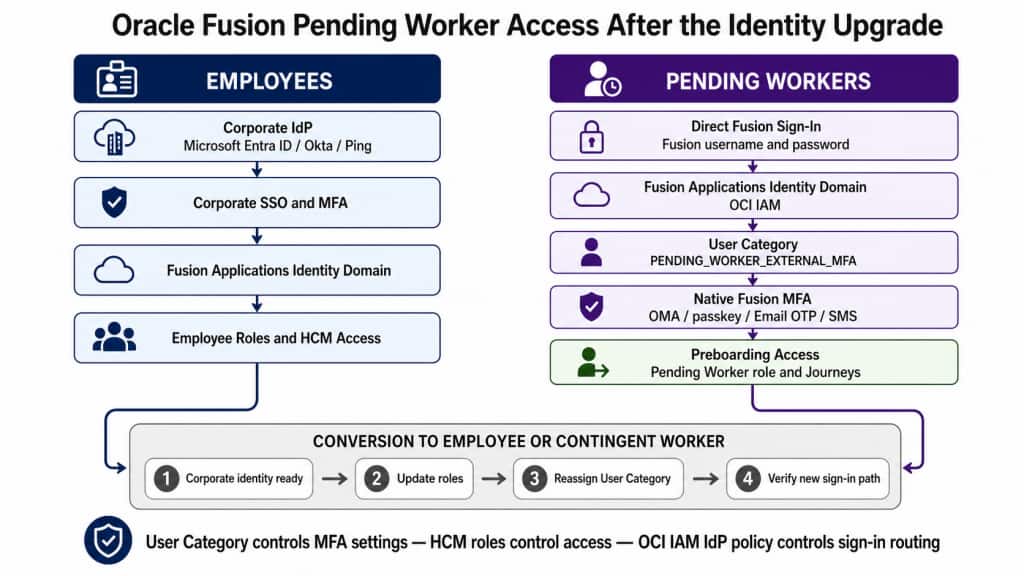
Recommended model
Employees use corporate SSO. The Fusion Applications identity domain in OCI IAM acts as the service provider, and the corporate IdP acts as the external identity provider. Employee MFA remains in the corporate IdP, where the organization manages conditional access, trusted devices, and employee authentication policy. For the federation model, see Managing Identity Providers.
External pending workers use direct Fusion sign-in. Pending workers who don’t yet have a corporate identity remain Fusion application users. They sign in through the Fusion Applications identity domain, enroll in native Fusion MFA, and use their assigned preboarding access.
HCM roles grant application access. The delivered ORA_PER_PENDING_WORKER_ABSTRACT role, or an approved custom preboarding role, determines what the pending worker can do. A User Category doesn’t grant HCM access. See the Pending Worker abstract role.
A User Category segments native MFA and related settings. Oracle doesn’t deliver a pending-worker-specific category. New HCM users are assigned to DEFAULT unless the category is changed. Create a category such as PENDING_WORKER_EXTERNAL_MFA when pending workers require a policy that should be managed separately from employees and other external users.
Do pending workers require a separate User Category?
Use a separate category when pending workers sign in locally and require distinct MFA factors, password settings, account notifications, or support procedures. This is the recommended pattern because it creates a clear policy boundary and makes the conversion lifecycle easier to govern.
It isn’t mandatory to create a category only for the Pending Worker person type. If another external population follows exactly the same local sign-in, MFA, notification, and password policy, the populations can share an appropriately named external-user category. Avoid placing pending workers in a mixed DEFAULT population and then changing settings that would unintentionally affect employees, service accounts, or other users.
Each user can belong to only one category. Category membership doesn’t follow HCM roles automatically and doesn’t send the user to the corporate IdP. Identity-provider routing remains an OCI IAM IdP-policy and external-IdP assignment decision.
When a separate identity domain is still appropriate
The approach in this article is the recommended model for most organizations after the Fusion Identity Upgrade. A separate OCI IAM identity domain can still be appropriate when the requirement is broader than giving pending workers a different Fusion MFA policy.
- Legal, regulatory, or security-standard isolation: A documented requirement may call for identities, administrators, or security configurations to be isolated. Oracle cites standards that require production and development identities to be separated as an example. Confirm the exact control with the organization’s legal, risk, and compliance teams; a regulation doesn’t automatically require a separate identity domain unless the control design supports that conclusion.
- Separate administrative boundaries: Different teams may need to manage their own users, groups, applications, federation, MFA, and security settings without administrative authority over another population. Oracle documents multiple domains as a way to isolate administrative control and assign different domain administrators.
- Partner, supplier, customer, or contractor populations spanning multiple applications: A dedicated external-user domain may be justified when a nonemployee population needs its own application estate, self-registration, consent, social sign-in, profile management, or independent password and account-recovery services. A Supplier Portal or pending-worker population that only needs differentiated Fusion MFA doesn’t, by itself, require another domain.
- Mergers and acquisitions: A separate domain can provide a transitional boundary when an acquired or divested organization must retain its own IdP, administrators, applications, and account lifecycle while directories and operating models are being integrated. This is an architecture inference from Oracle’s documented support for distinct user populations and administrative boundaries, not a product requirement for every merger or acquisition.
- Independent identity lifecycle management: A separate domain may be appropriate when accounts, provisioning and deprovisioning, credentials, application assignments, security policy, or delegated administration must operate independently of the employee identity lifecycle.
For Oracle Fusion Cloud Applications, a specialized secondary domain doesn’t replace the Fusion Applications identity domain or the Fusion user and role lifecycle. Fusion application users remain managed through supported Fusion interfaces and synchronized with the Fusion Applications identity domain. Treat the additional domain as an upstream identity, federation, or lifecycle component, and don’t edit Fusion-synchronized user attributes directly in the OCI IAM console. See Manage Users in the Fusion Applications Identity Domain.
Use a separate domain only when the isolation or lifecycle requirement can’t be met adequately with Fusion User Categories, HCM roles, and OCI IAM identity-provider policies. Additional domains introduce their own federation, provisioning, administration, monitoring, support, licensing, object-limit, and deprovisioning considerations. Select the domain type only after reviewing its supported features, limits, and meters. See Using Multiple Identity Domains, IAM Security Structure, and IAM Identity Domain Types.
Important guardrails
A User Category affects more than MFA. Review its username format, password policy, account notification templates, and Next URL after password reset. Do not treat it as only an MFA label.
Keep integrations, service accounts, and automation accounts out of the pending-worker category unless their authentication design has been explicitly reviewed. MFA is for interactive sign-in and doesn’t replace the controls required for noninteractive integrations.
Configure category-based MFA through Fusion Security Console. Fusion creates corresponding rules in the OCI IAM User Category Based Sign-on Policy. Don’t edit those generated rules directly unless Oracle Support or product guidance instructs you to do so.
MFA strengthens authentication. It doesn’t correct excessive pending-worker roles, journey configuration, HCM data security, or a failure to remove preboarding access after conversion.
Step 1 – Confirm the sign-in path for each population
- Employees: Fusion redirects to the corporate IdP, and MFA is performed there.
- External pending workers: Users sign in directly to Fusion with their Fusion credentials and complete native Fusion MFA.
- Pending workers who already have a corporate identity: Decide whether they should use corporate SSO from the start or remain on the external pending-worker path until conversion.
- Converted workers: Move to the employee or contingent-worker sign-in and category model defined by the organization.
If a pending worker is redirected to the employee IdP but has no corporate account, check the OCI IAM IdP policy, the sign-in chooser configuration, and the external IdP application assignment. A User Category doesn’t repair incorrect IdP routing. See About Identity Provider Policies.
Step 2 – Review pending-worker access and account lifecycle
Before changing authentication, confirm how the pending-worker user account is created and which role mappings grant preboarding access. Review the delivered Pending Worker abstract role and any custom onboarding role. Remove privileges that aren’t required for preboarding, confirm journey and document access, and verify the criteria that remove the role when the person no longer qualifies.
When the hire or placement is confirmed, the pending worker is converted to the proposed employee or contingent-worker type. Role autoprovisioning can add and remove roles based on the updated person and assignment attributes. For the HCM transaction, see How You Convert Pending Workers.
Step 3 – Create the pending-worker category
Go to Navigator > Tools > Security Console > User Categories. Create a category for pending workers who use direct Fusion sign-in, for example PENDING_WORKER_EXTERNAL_MFA. This is a customer-created example, not an Oracle-delivered category.
Choose the category name carefully because a User Category can’t be renamed. Each user can belong to only one category. Review the complete category configuration, including password policy, username format, account notifications, and the post-password-reset Next URL.
For a small population, assign users in Security Console. For a larger or frequently changing population, use the documented SCIM operation or HCM Data Loader. New users remain in DEFAULT until an explicit category is supplied or the account is reassigned. See Add Users to a User Category and Guidelines for Preparing to Load Workers.
Step 4 – Validate contact data and account notifications
Pending workers often have a home email address but no corporate work email or work mobile. This matters because Fusion’s Email and Phone Number MFA methods use the work email and work mobile stored in Fusion Applications.
HCM account and journey notifications have separate controls. Set ORA_PER_USER_ACCOUNT_NOTIFY_HOME_EMAIL to route supported account and password-lifecycle notifications to the pending worker’s home email. Set ORA_PER_CHECKLIST_NOTIFY_HOME_EMAIL when journey and task notifications must also be sent to the home email. Enable and test the required notification templates for the pending-worker User Category.
These profile options affect notification delivery; don’t assume that they make the home email or home phone available to Email or SMS MFA. Successful delivery of a new-account message or journey notification doesn’t prove that Email OTP is ready. See Journey Notifications for Pending and Terminated Workers.
Step 5 – Configure pending-worker MFA
Open the pending-worker category, select Two-Factor Authentication, and select the factors that this population can enroll in. If the enforcement control is editable, require MFA enrollment. If it is locked, confirm that Oracle-managed environment enforcement is active and continue with factor selection.
Oracle Mobile Authenticator passcode or push notification is a practical starting point for pending workers who don’t yet have corporate contact details. A FIDO passkey is also suitable where the population and support process can accommodate it. Offer Email OTP only when an accessible work email is present in Fusion, and offer SMS only when a reliable work mobile is present and SMS is accepted by the organization’s security policy. Keep a documented bypass-code and lost-device recovery process.
Oracle starts enforcing MFA from Release 26B for eligible Fusion Applications environments. This applies to users who authenticate locally with a username and password. Federated employees continue to follow the corporate IdP flow and aren’t prompted for an additional native Fusion MFA factor during SSO. See MFA Enforcement, Set Up Multifactor Authentication Methods, and Configuring MFA across User Segments using Fusion Cloud User Categories.
Step 6 – Pilot the pending-worker journey
Start with a small nonproduction pilot. Include a new external pending worker, a pending worker who has already enrolled in another factor, and a pending worker approaching conversion. Test account creation, credential notification, direct sign-in, MFA enrollment, later sign-in, password recovery, journey access, document access, and help-desk recovery.
Test the corporate and pending-worker paths in separate browser sessions. Confirm that employees still reach the corporate IdP and that pending workers can reach local authentication without being redirected to an IdP in which they have no account.
Step 7 – Control the conversion to employee or contingent worker
Converting the HCM work relationship and changing the User Category are separate controls. Role-provisioning rules can adjust application roles after conversion, but the account remains in its current User Category until it is reassigned.
Include the following checks in the mover process:
- Confirm that the employee or contingent-worker identity is ready and is assigned to the Fusion application in the corporate IdP where applicable.
- Align the Fusion username and work email with the organization’s SSO matching design where required.
- Recompute or verify roles and remove pending-worker-only access.
- Move the account from
PENDING_WORKER_EXTERNAL_MFAto the appropriate employee, contingent-worker, or other User Category. - Reset native MFA factors only if required for the new category or the support policy.
- Test the new sign-in path and verify the worker’s application and data access.
Use Security Console for controlled low-volume changes. For scale, automate category reassignment with the supported SCIM User resource or HCM Data Loader. Treat failed or delayed category movement as a joiner-mover control exception and monitor it.
Sample pending-worker message
Welcome to our Oracle Fusion preboarding experience. Use the sign-in link in this message and your Fusion username to access your assigned onboarding tasks. The first time you sign in, you will be asked to register an approved multifactor authentication method. Keep your registered device available for later sign-ins. Contact the onboarding support team if you can’t complete enrollment, don’t receive your account notification, or replace your device.
Troubleshooting quick signals
- Pending worker is sent to the corporate IdP: Check the OCI IAM IdP policy, sign-in chooser, and external IdP application assignment.
- Pending worker signs in but isn’t prompted for MFA: Verify local rather than federated sign-in, then check User Category assignment, factor configuration, and environment enforcement status.
- Email or SMS isn’t offered: Confirm that the factor is enabled for the category and that an accessible work email or work mobile is present in Fusion.
- Account notification arrives but Email OTP fails: Check the work email used by MFA. Home-email notification routing is a separate HCM control.
- User moved between categories and the factor experience looks stale: Reset MFA factors if required and retest.
- MFA succeeds but preboarding access is missing or excessive: Review pending-worker roles, role mappings, journeys, and HCM data security.
- Converted employee still receives the pending-worker experience: Verify category reassignment, corporate IdP readiness, username matching, and role autoprovisioning.
Summary
After the Fusion Identity Upgrade, employees can continue to use corporate SSO and corporate MFA, while external pending workers use direct Fusion sign-in and native Fusion MFA. A separate external identity domain isn’t required solely for this authentication split. Use HCM roles to control preboarding access and a customer-defined User Category to manage the pending workers’ MFA and related security settings.
The critical lifecycle control is conversion: update roles, corporate IdP readiness, identity attributes, and User Category as coordinated but distinct steps. This produces a simpler architecture without weakening the boundary between preboarding and employee access.
A separate identity domain remains a valid specialized architecture when an organization has a substantiated isolation, administration, external-user, transitional M&A, or independent-lifecycle requirement. It should be the result of that broader requirement rather than the default mechanism for pending-worker MFA.
Further reading
Oracle Cloud Infrastructure Blog, Managing Pending Worker Accounts in Oracle Fusion IAM
Oracle, Identity Upgrade Overview
Oracle OCI IAM, Managing Identity Providers
Oracle OCI IAM, About Identity Provider Policies
Oracle OCI IAM, Managing Identity Domains
Oracle OCI IAM, Using Multiple Identity Domains
Oracle Cloud Adoption Framework, IAM Security Structure
Oracle OCI IAM, IAM Identity Domain Types
Oracle, Manage Users in the Fusion Applications Identity Domain
Oracle Fusion Applications REST API, Add Users to a User Category
Oracle HCM, Guidelines for Preparing to Load Workers
Oracle Fusion Applications, Enable Multifactor Authentication
Oracle Fusion Applications 26C, Set Up Multifactor Authentication Methods
Oracle Fusion Applications, Multifactor Authentication Enforcement
Oracle HCM, Pending Worker Abstract Role
Oracle HCM, How You Convert Pending Workers
Oracle HCM, Journey Notifications for Pending and Terminated Workers
Oracle A-Team, Configuring MFA across User Segments using Fusion Cloud User Categories
Oracle A-Team, Securing Oracle Fusion Cloud Supplier Portal with IAM Domains and MFA