
Introduction
Many enterprise Kubernetes applications require shared ReadWriteMany (RWX) storage. While Oracle Cloud Infrastructure (OCI) provides a managed POSIX-compliant shared file system through OCI File Storage, some environments continue to rely on GlusterFS because of existing operational processes, application compatibility, or a requirement for features or deployment models not provided by managed service.
This article demonstrates how a GlusterFS-backed RWX volume can be integrated with Oracle Kubernetes Engine (OKE) using NFS-Ganesha. Instead of relying on the legacy Kubernetes in-tree GlusterFS volume plugin, which is no longer the recommended integration approach for modern Kubernetes releases, the solution exposes the replicated GlusterFS volume through NFSv4.1. Kubernetes then consumes the storage using a standard NFS PersistentVolume, making the implementation simple, portable, and compatible with current OKE releases.
The goal is to validate that OKE workloads can successfully consume shared storage backed by GlusterFS while preserving the existing storage architecture.
Solution Overview
The implementation consists of three layers:
- Oracle Kubernetes Engine, where application pods consume shared storage through a Kubernetes PersistentVolumeClaim.
- NFS-Ganesha, which exports the GlusterFS volume over NFSv4.1.
- GlusterFS, which provides replicated shared storage using OCI Block Volumes as storage bricks.
The resulting architecture allows Kubernetes to use standard NFS while GlusterFS continues to manage data replication and storage.
Architecture
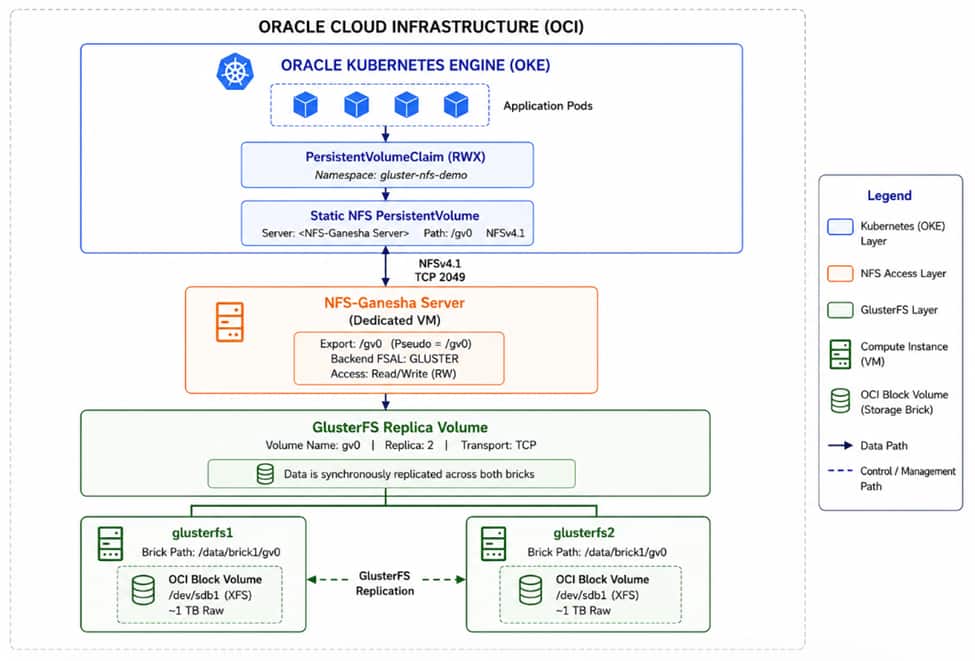
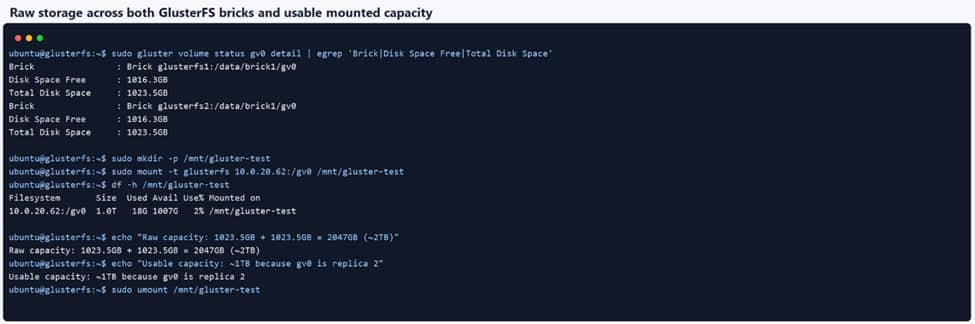
Each virtual machine was attached to a dedicated 1 TB OCI Block Volume formatted with XFS and configured as a GlusterFS brick; the Gluster volume was created as replica 2, providing synchronous replication across both nodes and resulting in approximately 1 TB of usable capacity from 2 TB of raw storage.
Networking Configuration
GlusterFS requires communication between storage nodes, while Kubernetes only needs access to the NFS export provided by NFS-Ganesha.
The following ports were opened between the GlusterFS servers:
| Service | Ports |
| Gluster Management | TCP 24007 – 24008 |
| Gluster Bricks | TCP 49152 – 49251 |
The OKE worker subnet was granted access to the NFS server on TCP port 2049.
Building the GlusterFS Cluster
Each storage node was provisioned as an Ubuntu virtual machine in the same VCN as the OKE cluster. After attaching a dedicated OCI Block Volume, the disk was partitioned, formatted with XFS, and mounted under /data/brick1.
# Run on both GlusterFS servers.
# Confirm /dev/sdb is the empty attached OCI Block Volume. Do not use /dev/sda.

sudo parted -s /dev/sdb mklabel gpt
sudo parted -s /dev/sdb mkpart primary xfs 1MiB 100%
sudo partprobe /dev/sdb
sudo udevadm settle

sudo mkfs.xfs -f -i size=512 /dev/sdb1

sudo mkdir -p /data/brick1
echo '/dev/sdb1 /data/brick1 xfs defaults 1 2' | sudo tee -a /etc/fstab
sudo mount -a
df -h /data/brick1
GlusterFS Server and Client packages were then installed on both nodes.
# Run on both GlusterFS servers.

sudo apt-get update
sudo apt-get install -y glusterfs-server glusterfs-client xfsprogs
sudo systemctl enable --now glusterd
sudo systemctl status glusterd --no-pager
To avoid inconsistent OCI-generated hostnames being stored inside the cluster configuration, static host entries were added to /etc/hosts on both servers.
# Run on both GlusterFS servers.
# Replace these with your actual GlusterFS private IPs.

echo '<glusterfs1-private-ip> glusterfs1' | sudo tee -a /etc/hosts
echo '<glusterfs2-private-ip> glusterfs2' | sudo tee -a /etc/hosts
During implementation, additional host firewall rules were required to allow GlusterFS and NFS traffic. Because these runtime iptables rules were not persistent, they had to be reapplied after instance restarts. For production environments these runtime rules should be replaced with persistent operating system firewall configuration together with OCI Network Security Groups.
# Run on both GlusterFS servers.
# Replace the CIDRs with your actual Gluster subnet and OKE worker subnet.

sudo iptables -I INPUT 1 -s <GLUSTER_SUBNET_CIDR> -p tcp --dport 24007:24008 -j ACCEPT
sudo iptables -I INPUT 1 -s <GLUSTER_SUBNET_CIDR> -p tcp --dport 49152:49251 -j ACCEPT
sudo iptables -I INPUT 1 -s <OKE_WORKER_SUBNET_CIDR> -p tcp --dport 2049 -j ACCEPT
sudo iptables -I INPUT 1 -m conntrack --ctstate ESTABLISHED,RELATED -j ACCEPT
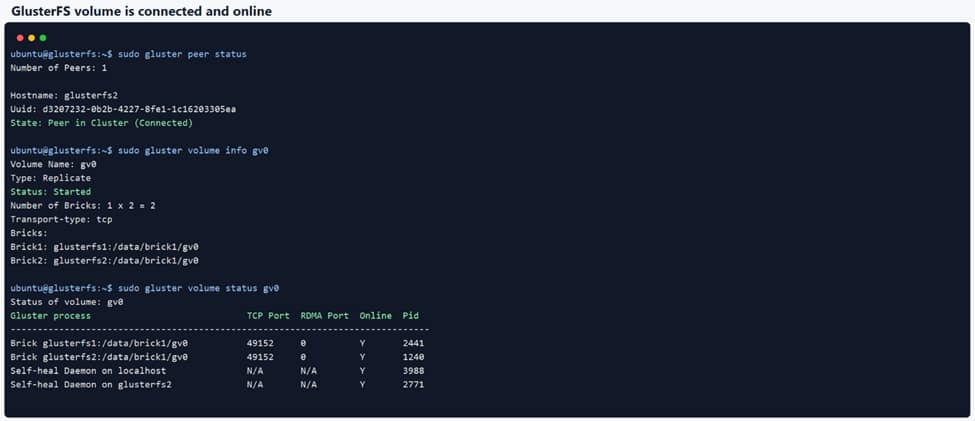
After verifying connectivity, the two servers were joined into a trusted storage pool by probing the peer from the first node.
# Run on glusterfs1 only.

sudo gluster peer probe glusterfs2
sudo gluster peer status
The expected state was:
State: Peer in Cluster (Connected)A replicated volume named gv0 was then created and started.
# Run on both GlusterFS servers.

sudo mkdir -p /data/brick1/gv0

# Run on glusterfs1 only.

sudo gluster volume create gv0 replica 2 transport tcp \
  glusterfs1:/data/brick1/gv0 \
  glusterfs2:/data/brick1/gv0 \
  force

sudo gluster volume start gv0
sudo gluster volume info gv0
sudo gluster volume status
At this point the GlusterFS cluster was operational and ready to expose storage to Kubernetes.
Exposing GlusterFS Through NFS-Ganesha
Instead of exposing GlusterFS directly to Kubernetes, the replicated volume was exported using NFS-Ganesha.
NFS-Ganesha was installed only on glusterfs1.
# Run on glusterfs1 only.

sudo apt-get -o Acquire::ForceIPv4=true install -y \
  nfs-ganesha \
  nfs-ganesha-gluster \
  nfs-common
The following configuration exported the GlusterFS volume gv0 as /gv0.
# Run on glusterfs1 only.

sudo tee /etc/ganesha/ganesha.conf >/dev/null <<'EOF'
NFS_Core_Param {
  Protocols = 4;
}

EXPORT {
  Export_Id = 1;
  Path = "/";
  Pseudo = "/gv0";
  Access_Type = RW;
  Squash = No_Root_Squash;
  SecType = sys;
  Protocols = 4;
  Transports = TCP;

  FSAL {
    Name = GLUSTER;
    Hostname = "127.0.0.1";
    Volume = "gv0";
  }
}
EOF

sudo systemctl enable --now nfs-ganesha
sudo systemctl status nfs-ganesha --no-pager
sudo ss -lntp | grep 2049
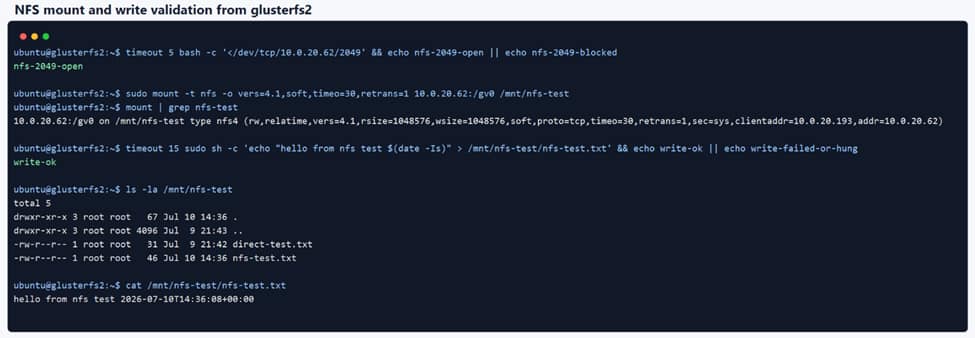
# Run from a client VM, for example glusterfs2.
# Use the validated NFS-Ganesha pseudo path. In the blog this was /gv0.

sudo apt-get install -y nfs-common
sudo mkdir -p /mnt/nfs-test
sudo mount -t nfs -o vers=4.1 glusterfs1:/gv0 /mnt/nfs-test
echo "hello from nfs test" | sudo tee /mnt/nfs-test/nfs-test.txt
ls -la /mnt/nfs-test
sudo umount /mnt/nfs-test
In this configuration, the GlusterFS volume root (Path="/") is exported through NFS-Ganesha as the pseudo path (Pseudo="/gv0"), which was validated using a client mount test. Kubernetes mounts this export as a standard NFS share, while data storage and replication continue to be handled by GlusterFS.
Kubernetes Integration
On the Kubernetes side, the storage was exposed through a static NFS PersistentVolume pointing to the NFS-Ganesha export.
# Kubernetes PersistentVolume example.

apiVersion: v1
kind: PersistentVolume
metadata:
  name: gluster-nfs-gv0
spec:
  capacity:
    storage: 10Gi
  accessModes:
    - ReadWriteMany
  persistentVolumeReclaimPolicy: Retain
  storageClassName: ""
  mountOptions:
    - nfsvers=4.1
    - hard
    - timeo=600
    - retrans=2
  nfs:
    server: <NFS_GANESHA_PRIVATE_IP>
    path: /gv0
    readOnly: false
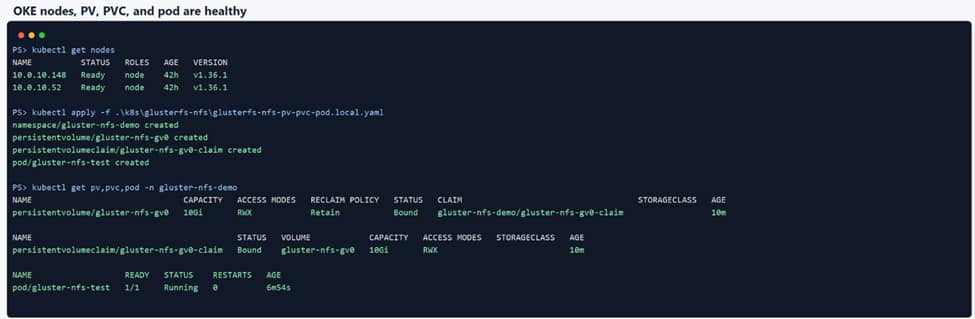
The PersistentVolume was bound to a PersistentVolumeClaim within the application namespace, and a validation pod mounted the volume under /mnt/gluster.
This configuration requires no GlusterFS-specific Kubernetes plugins because Kubernetes interacts only with the NFS export.
Validation
After deployment, the PersistentVolume, PersistentVolumeClaim, and validation pod all reached the expected state.
persistentvolume/gluster-nfs-gv0              Bound
persistentvolumeclaim/gluster-nfs-gv0-claim   Bound
pod/gluster-nfs-test                          Running
The pod successfully created a test file inside the shared volume.
hello-from-oke-nfs.txt
Fri Jul 10 16:33:24 UTC 2026
To verify end-to-end storage integrity, the same GlusterFS volume was mounted directly on the storage server.
# Native GlusterFS validation from glusterfs1.
# This is not an NFS mount.

sudo mkdir -p /mnt/gluster-test
sudo mount -t glusterfs glusterfs1:/gv0 /mnt/gluster-test
cat /mnt/gluster-test/hello-from-oke-nfs.txt
sudo umount /mnt/gluster-test
The file written by Kubernetes was immediately visible through the native GlusterFS mount, confirming the complete storage path.
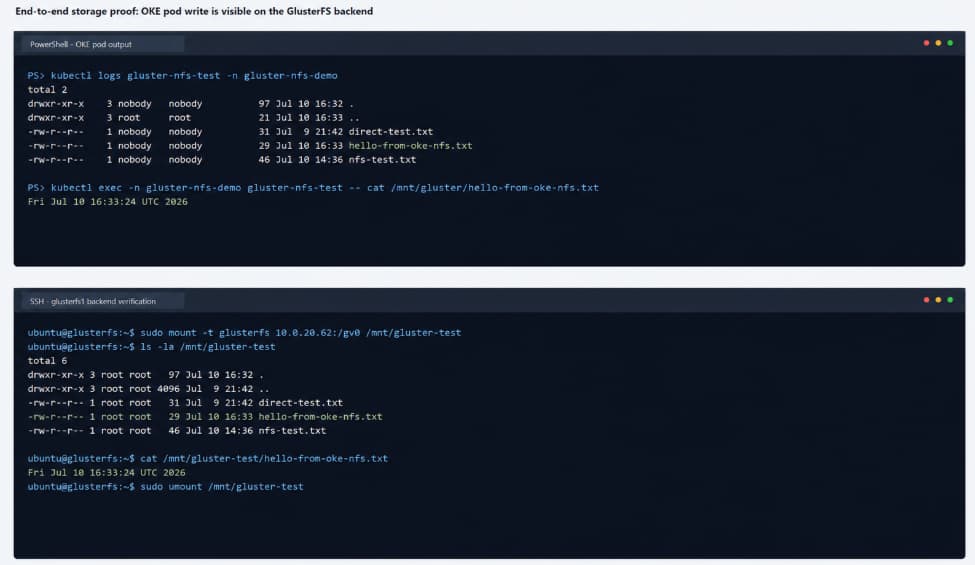
This validated that applications running on OKE can successfully consume shared RWX storage backed by GlusterFS.
Lessons Learned
Several practical observations were made during the implementation:
- OCI Block Volumes must be attached correctly before they can be used as GlusterFS bricks.
- Static hostnames simplify GlusterFS cluster management and prevent inconsistent peer names.
- Runtime firewall rules are lost after VM restarts and should be replaced with persistent operating system firewall configuration.
- NFS access from the OKE worker subnet must be explicitly allowed before Kubernetes can mount the shared volume.
- A replica 2 GlusterFS configuration provides basic redundancy but introduces split-brain risk under certain failure scenarios. Production environments should evaluate replica 3 or arbiter configurations based on their availability requirements.
Conclusion
This implementation demonstrates that Oracle Kubernetes Engine can successfully consume shared ReadWriteMany (RWX) storage backed by a replicated GlusterFS deployment using NFS-Ganesha.
OCI Block Volumes provide the underlying storage, GlusterFS manages data replication, and Kubernetes consumes the storage through a standard NFS PersistentVolume without relying on the legacy GlusterFS volume plugin.
This implementation establishes a practical reference architecture for integrating GlusterFS environments with Oracle Kubernetes Engine and provides a foundation for future scalability and operational validation.