
The rise of multi-cloud and distributed systems is exposing the limitations of traditional disaster recovery processes. It is no longer safe for enterprises to rely solely on reactive responses data from Uptime Institute’s latest outage analysis shows that outages remain frequent across the industry, with the majority of organizations reporting at least one significant incident in recent years. More than two-thirds of outages now cost over $100,000 per hour, and the most severe events exceed $1 million per hour in business impact.
To handle such risks, modern systems require a proactive approach that includes automated backups, continuous failure testing, and real-time monitoring to minimize downtime and ensure smooth operations. This is where Chaos Engineering becomes important.
This article explores how chaos engineering can be applied within cloud infrastructure, especially Oracle Cloud (OCI), to enhance disaster recovery planning. It also covers the core principles of chaos engineering, modern testing practices, and strategies for simulating failures in OCI’s cloud environment.
What is Chaos Engineering?
Chaos engineering focuses on undertaking activities to prove that a system can function well in unpredictable environments. It is a testing method where the problems/failures are intentionally introduced within a system to observe its response and find any issues.
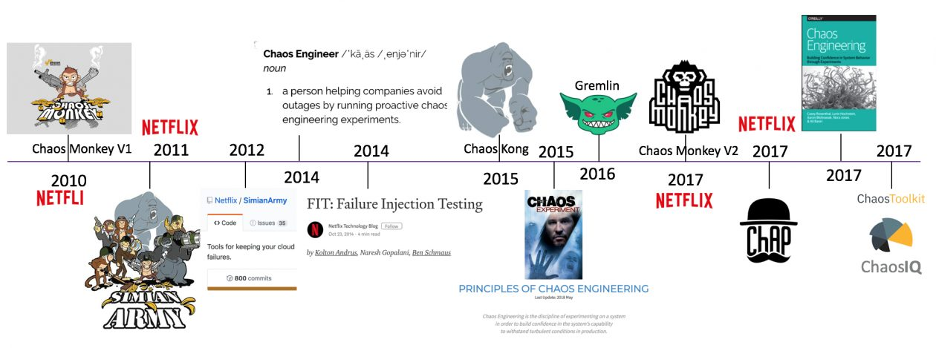
The concept was first popularized by Netflix through a tool called Chaos Monkey, and since then, chaos engineering has evolved into a more advanced and systematic discipline. These days, it makes heavy use of latency injection, disabling dependencies, fake DNS errors, and blacking out certain regions, all in line with what disaster recovery planning requires.
How Does it Help With Disaster Recovery?
The disaster recovery process involves more than just implementing backups, it focuses on making sure services can fail gradually and recover instantly. According to a recent report by Forbes, chaos engineering can reduce costly downtime and speed up incident reporting time for companies significantly.
It does this by doing the following:
- Testing and verifying the scripts used for DR automation.
- Simulating how your system responds to an outage.
- Discovering areas where the system could fail completely.
- Lowering the time required to recover from an incident.
- Improving the ability to monitor systems and send alerts.
Chaos Engineering in OCI: Advanced Approaches to Implement
Some of the advanced approaches of Chaos Engineering that you can implement in OCI to thoroughly test your system’s disaster readiness include the following:
Zonal and Regional Failure Testing
With OCI’s tagged resources, you can end the creation of resources in a specific availability domain using the CLI or SDK. Disable routing and failover on all DNS records to see how this affects your service. Then, with Oracle , test recovering backups that are available across regions and in the Autonomous Data Guard.
You can use OCI’s Disaster Recovery to confirm that automatic failover functions as expected (only available in a few areas).
Blooming, Latency, and Split Brain
With this method, you can use either iptables or tc functions within your compute instances to add latency, drop some packets, or separate subnets. You can simulate route black holes by faultily setting up VNICs or by making mistakes with subnet security lists.
Moreover, the OCI allows you to see how your traffic flow is operating, and VCN Flow Logs make it easy to trace and identify unusual traffic.
Chaos with Dependency (Database, DNS, and External APIs)
You can simulate connection failures or intentionally alter the endpoint configuration of Autonomous Database. Then, edit the DNS zones on OCI to either block or postpone the resolution of domains. You can use either OCI Functions or other mocking services to test external APIs that might fail.
If using libraries such as Hystrix or Resilience4j, be sure to watch the responses during chaos events.
Stateful Application Failure Setting
Implementing this method helps you keep your valuable data safer and recoverable if needed. To implement it correctly, in the mid-course of a transaction, close down OCI Compute instances. Create Oracle Block Volumes to test what happens when I/O is unavailable or too slow.
Also, try simulating pod, node, and control-plane failures on Oracle Kubernetes Engine (OKE). With this method, reliable recovery is possible with regular volume group backups.
Runbook and Observability Review
With OCI (APM), you can easily simulate users and their activities. Set up alerts in OCI Monitoring and review the action taken using OCI events and notifications. In addition, you can review how incident management is managed through ServiceNow or PagerDuty.
Compatible Tools for Chaos Engineering with OCI
Using the proper tools is very important when carrying out chaos engineering on Oracle Cloud Infrastructure (OCI) to ensure both testing and observing systems work properly. Here is a list of tools that are compatible with OCI and manage to simulate real situations:
| Tool | Use Case | Integration with OCI |
| Gremlin | Fault injection (latency, shutdowns, DNS, CPU stress) | Agent installation on OCI Compute |
| LitmusChaos | Kubernetes chaos workflows | Runs in OKE with OCI-native observability |
| Chaos Mesh | Fine-grained control over K8s experiments | OCI container services are supported |
Effective Tips for Regular Cloud DR Testing on OCI
Decide on your SLAs and SLOs ahead of the chaos testing process. Start by testing small cases in the staging area and gradually move to major cases following simulations in production:
- Leave Actions for Outages: Let OCI Resource Manager manage the process of recovering your environment in case of trouble.
- Establish a Benchmark: Use the OMI tool in OCI to check the baselines before the first and after the second tests.
- Have Postmortems and Record Learnings: Bring the feedback received into new work on system design and DR.
- Regular Testing: Integrate chaos testing into your CI/CD processes using either Terraform or OCI DevOps scripts to keep safeguarding the system.
- Check Region or AD Failovers Regularly: Ensure data in the Autonomous Database, new Object Storage buckets, and Load Balancers are safe and come back up automatically with just a few manual steps.
- Configure Synthetic Monitoring: You can use OCI Application Performance Monitoring (APM) to create scripts that let you know user experience is down when you test a disaster recovery scenario.
- Include Non-OCI Software: Verify that your apps can function properly even if certain external services, databases, or hybrid software fail.
Sketch the plan
Begin by identifying the different types of outages that could affect your system. For each type, ask yourself the following questions: “How can the outage be detected?”, “What steps are needed to recover from it?”, and “How can it be simulated?”. This approach will help you design the necessary tools for practicing chaos engineering and enhancing your system’s resilience.
| Outage | How to detect? | How to recover? | How to simulate? |
| Block volume not accessible | We can set up a cron job on the VM to regularly list the contents of a folder mounted via the block volume. If the folder or files become inaccessible, the job can trigger an OCI Function in response. | The OCI Function can do two things. Try to attach the block volume again (using OCI CLI or python SDK)Or else create a new block volume from a backup (using OCI CLI or python SDK) | We can simulate this outage by detaching the block volume (using OCI CLI or python/java SDK) For example (using CLI): Get the volume attachment id oci compute volume-attachment list –instance-id <instance_OCID>Detach the attachment oci compute volume-attachment detach –volume-attachment-id <volume_attachment_OCID> –force |
| VM not in Running state | We can setup a ping-check/ssh-check monitoring from control plane. If the VM is not reachable, we can trigger an OCI Function. | The OCI Function can do two things. Try to start the VM (using OCI CLI or python SDK)If VM is not coming after couple of retries, it can spin up a new VM and attach the previous block volume. | We can simulate this outage using cli command by shutting down the VM. oci compute instance action –instance-id <instance_OCID> –action STOP |
| Database not accessible | We can have a cron job in control plane to monitor the database connectivity by attempting to create the database connection. If this fails, we can trigger an OCI Function. | The OCI Function can do two things. Try to start the ATP (using OCI CLI or python SDK)If ATP is not coming to Available state after couple of retries, then create a new ATP instance using the backup. | We can simulate this outage using cli command by stopping ATP instance. oci db autonomous-database stop –autonomous-database-id <ATP_OCID> |
| DNS resolution error | We can have a cron job in the control plane to perform nslookup against the customer facing URL and if it fails with an error code the we can trigger an OCI Function. | The OCI Function has to make sure the DNS record is present in the zone. And further check if the record is mapped to a working load balancer or notif the load balancer backend set is pointing to the right VM or not. | We can simulate this outage using cli command by deleting the DNS record from the zone. oci dns record rrset delete –zone-name-or-id <zone_name_or_OCID> \ –domain <fully_qualified_domain_name> \ –rtype <resource_record_type> |
Final Thoughts
Oracle Cloud Infrastructure makes it possible to conduct chaos engineering with tools that verify how your disaster recovery strategy will deal with issues. With advanced testing, your organization can tackle any problems that arise, protect data, reduce internet outages, and ensure customers remain satisfied.
Going from restoring after a disaster to being prepared is both important and effective. By practicing chaos engineering, you can prepare for the future!
Getting Started
Ready to move from reactive recovery to proactive resilience? Start by running your first controlled chaos experiment in your OCI environment. If you want expert guidance on designing chaos scenarios, automating DR validation, or building enterprise-grade resilience frameworks on OCI, connect with our cloud engineering team today. Follow us for hands-on tutorials, real-world failure simulations, and advanced DR architecture insights, and take the first step toward building systems that are truly disaster-proof.