


One AI request. Multiple access decisions.
A sales analyst preparing for an account review asks an AI assistant: “Which accounts have declining orders? Create follow-up tasks for their owners.”
The request spans order data, customer history, and a sales application. For the analyst, it is one conversation. For the enterprise, it is a sequence of access decisions.
Oracle Cloud Infrastructure Identity and Access Management (OCI IAM) is introducing new capabilities for Model Context Protocol (MCP) integrations. They simplify onboarding for approved AI clients, limit access to specific resources, and authorize work across applications. Developers gain a consistent identity model while administrators retain control over access.
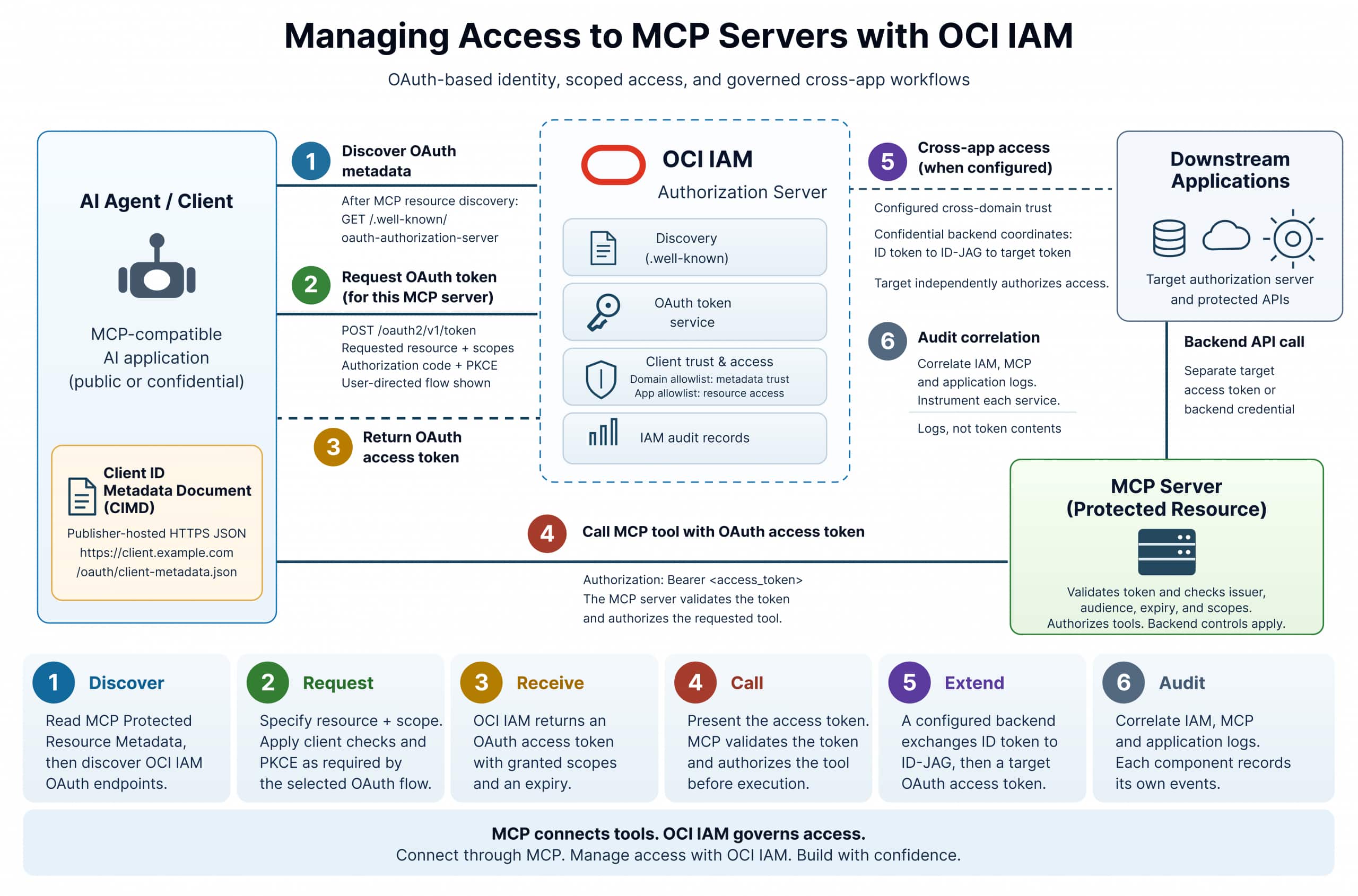
Figure 1. An MCP client discovers OCI IAM and obtains a scoped OAuth access token. The MCP server validates the token and authorizes the requested tool. Downstream API calls use separate credentials.
An enterprise access model for MCP
MCP gives AI applications a shared way to discover and call tools across databases, APIs, and business applications. Teams can expose a report or an operation through an MCP server and make it available to compatible clients, reducing custom integration work.
That connection must preserve the controls protecting the underlying systems. Reading account data and creating a follow-up task require different permissions. A natural-language request expresses the user’s goal. The identity and application controls determine which actions can proceed.
OCI IAM brings a consistent authorization model to those connections. The client reads the MCP server’s Protected Resource Metadata to identify its authorization server, then discovers IAM’s authorization and token endpoints. This reduces hard-coded configuration and gives developers a repeatable way to connect clients to protected MCP servers.
From client trust to authorized data access
Before the sales assistant retrieves a report, the enterprise approves the application that will request access. Client ID Metadata Documents (CIMD) simplify that setup. An application publishes its OAuth configuration in an HTTPS-hosted document and uses the document’s URL as its client identifier. OCI IAM retrieves and validates the metadata, reducing repeated manual client registration across identity domains.
Administrators make two distinct decisions. The identity-domain allowlist determines which metadata locations IAM trusts. The resource-application allowlist determines which CIMD clients can access a particular customer-defined application. A team can approve a client’s metadata source and permit access to sales reporting while leaving other applications unavailable to that client.
Example 1. Publish the client metadata
Host this JSON at the client_id URL. Approve that metadata location in the identity domain and the client in the target resource application. This example uses a desktop client with a local callback.
{
  "client_id": "https://client.example.com/oauth/client-metadata.json",
  "client_name": "Example MCP Client",
  "redirect_uris": ["http://localhost:8000/callback"],
  "grant_types": ["authorization_code", "refresh_token"],
  "response_types": ["code"],
  "token_endpoint_auth_method": "none"
}
For the analyst’s interactive session, a public CIMD client uses the authorization-code flow with Proof Key for Code Exchange (PKCE). PKCE requires a client-generated verifier when redeeming the code, protecting against authorization-code interception. The user’s authentication establishes identity. Authorization determines what access the application receives.
The client then identifies the target MCP server using an OAuth resource indicator and requests the permissions needed for the report. OCI IAM evaluates the request against the configured resource application and returns an OAuth access token. The client presents that token to the MCP server, which validates it and authorizes the requested tool.
The token’s audience identifies the resource server that should accept it. Its scopes convey the permitted access. The MCP server checks the token’s validity, audience, and permissions before executing the tool, keeping report access separate from permission to change data. The expected audience comes from the resource application configuration and can differ from the resource URI.
Example 2. Exchange the authorization code for MCP access
First complete browser authorization with the target resource, required scopes, and an S256 PKCE challenge. TOKEN_ENDPOINT comes from validated IAM discovery metadata. CIMD_CLIENT_ID is the metadata URL above. Use the returned authorization code and its original PKCE verifier.
curl --fail-with-body --silent --show-error "$TOKEN_ENDPOINT" \
  --header 'Content-Type: application/x-www-form-urlencoded' \
  --data-urlencode 'grant_type=authorization_code' \
  --data-urlencode "client_id=$CIMD_CLIENT_ID" \
  --data-urlencode "code=$AUTHORIZATION_CODE" \
  --data-urlencode 'redirect_uri=http://localhost:8000/callback' \
  --data-urlencode "code_verifier=$PKCE_VERIFIER" \
  --data-urlencode "resource=$MCP_RESOURCE"
Set MCP_RESOURCE to the configured MCP resource URI. The callback must match the authorization request and client metadata. The client presents the returned access token to the MCP server with Authorization: Bearer <access_token>.
OCI Database Tools MCP shows how this applies to enterprise data. Administrators can expose named, parameterized SQL reports and control report access through group membership. Broader SQL tools are available to authorized users, while the database connection’s permissions continue to govern data access. In our example, the analyst’s assistant can retrieve an approved account report without receiving unrestricted SQL access.
From data access to business action
The report identifies the accounts that need attention. The analyst now wants the assistant to create follow-up tasks. The workflow has reached a new application, with its own users, permissions, and access decisions.
OCI IAM cross-app access supports this transition across configured trust domains. An application backend coordinates two exchanges using confidential clients. First, the source identity domain exchanges its own user ID token for a signed Identity Assertion JWT Authorization Grant (ID-JAG). The backend then redeems that grant at the target identity domain.
The target validates the grant and client relationship, maps the subject to an active target-domain user, and applies its own authorization rules. It returns a separate OAuth access token for the target API. The application uses that access token to make the call.
OCI IAM also accepts compatible ID-JAGs issued by trusted external identity providers, such as Okta, when inbound trust, client bindings, and user mapping are configured. This extends cross-app access beyond exchanges between OCI IAM domains.
Once administrators configure the participating clients, trusts, and user mapping, the workflow can continue without another interactive user-approval step at the target authorization server. The sales application still controls which tasks the user and application are allowed to create.
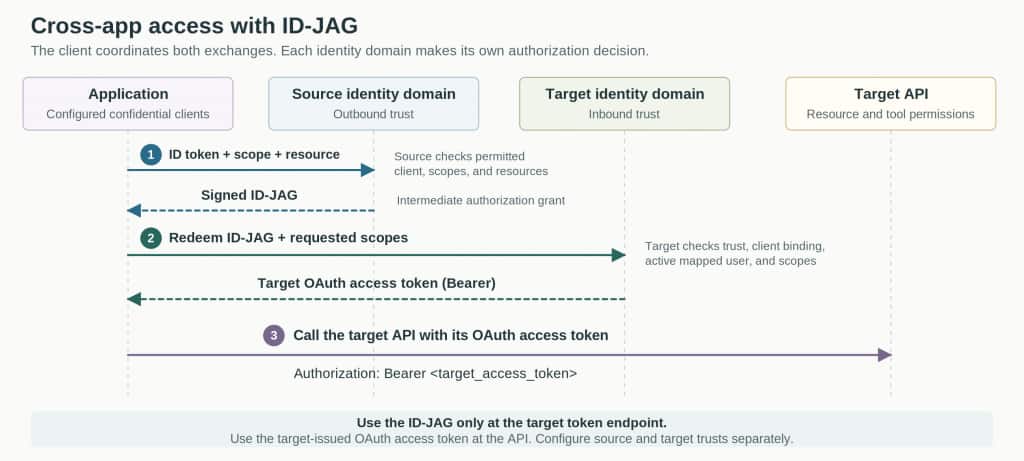
Figure 2. The application obtains a signed ID-JAG from the source identity domain, then redeems it at the target identity domain for an OAuth access token. Each domain applies its own authorization checks, and the application uses the target token to call the API.
Example 3. Obtain access to the next application
Configure confidential clients in the source and target domains, matching outbound and inbound trusts, and an active mapped target user. SOURCE_ID_TOKEN must come from the source identity domain. TARGET_SCOPE is a permitted fully qualified scope. TARGET_RESOURCE must be allowed by the outbound trust.
First, exchange the source ID token for a signed ID-JAG.
curl --fail-with-body --silent --show-error "$SOURCE_TOKEN_ENDPOINT" \
  --user "$SOURCE_CLIENT_ID:$SOURCE_CLIENT_SECRET" \
  --data-urlencode 'grant_type=urn:ietf:params:oauth:grant-type:token-exchange' \
  --data-urlencode 'requested_token_type=urn:ietf:params:oauth:token-type:id-jag' \
  --data-urlencode 'subject_token_type=urn:ietf:params:oauth:token-type:id_token' \
  --data-urlencode "subject_token=$SOURCE_ID_TOKEN" \
  --data-urlencode "scope=$TARGET_SCOPE" \
  --data-urlencode "resource=$TARGET_RESOURCE"
Set ID_JAG to the first response’s access_token value. That field contains the signed intermediate grant, with token_type set to N_A. Redeem the grant at the target token endpoint:
curl --fail-with-body --silent --show-error "$TARGET_TOKEN_ENDPOINT" \
  --user "$TARGET_CLIENT_ID:$TARGET_CLIENT_SECRET" \
  --data-urlencode 'grant_type=urn:ietf:params:oauth:grant-type:jwt-bearer' \
  --data-urlencode "assertion=$ID_JAG" \
  --data-urlencode "scope=$TARGET_SCOPE"
The second response contains the OAuth Bearer access token for the target API. Keep client credentials and tokens in the application backend. The public client in Example 1 and the confidential exchange clients use separate configurations.
The analyst can now use one assistant to retrieve an approved report and create permitted follow-up tasks. Each system retains control of its data and operations. Teams should correlate IAM records with MCP and application logs to connect access decisions with executed actions. These identity controls work alongside database permissions, safe tool design, and runtime security.
Start with a workflow your users need to complete. Define its tools and permissions, approve the participating clients, and configure the cross-app trust it requires. Your users get a simpler way to complete the job. Your teams keep control of the applications and data that make it possible.