


When preparing for multifactor authentication (MFA) enforcement, service account and integration owners may have a practical concern: How will MFA enforcement affect integrations, automation, and other accounts that support business processes?
The answer depends primarily on how the account authenticates. Oracle is enforcing MFA for eligible Oracle Fusion Applications environments to help strengthen account protection and reduce credential-related risk. For service account and integration owners, understanding the authentication method can help determine whether an account is affected and what preparation may be needed.
Oracle MFA enforcement applies to local, non-federated users who sign in with a username and password. Authentication for REST and SOAP APIs does not require MFA. Users who sign in through federated single sign-on (SSO) are not impacted by Oracle MFA enforcement and continue to follow the MFA experience defined by their corporate identity provider.
Eligibility and enforcement timing vary by environment. Oracle will notify customers in advance when MFA enforcement is scheduled. Once scheduled, you can view the upcoming MFA enforcement in the Oracle Cloud Console as part of your environment’s maintenance details.
Start with how the account signs in
That means preparation does not start simply by asking whether an account is a service account or an integration account. It starts by understanding the authentication path the account uses. The following four patterns can help teams quickly determine how MFA enforcement applies:
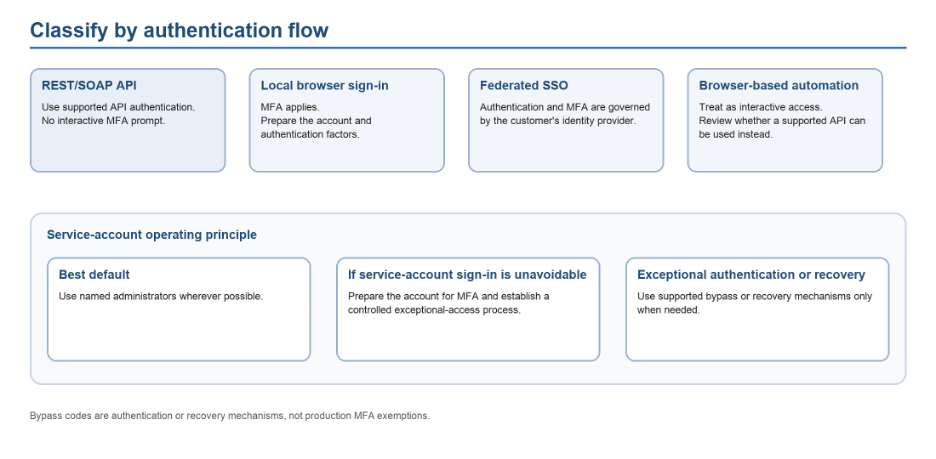
- Local interactive account: A local, non-federated account that signs in with a username and password is subject to Oracle MFA enforcement.
- REST or SOAP API integration: Authentication for REST and SOAP APIs does not require MFA.
- Federated SSO user: Oracle MFA enforcement does not impact users who sign in through SSO. Those users continue to follow the MFA experience configured by their corporate identity provider.
- Automation account in non-production: For user accounts created for automation in non-production environments only, you can optionally configure them to skip MFA enforcement.
- These four patterns provide a useful starting point. From there, service and integration owners can look more closely at how API-based integrations, interactive service accounts, and automation users are handled.
REST and SOAP integrations
For integrations that connect to Fusion Applications through REST or SOAP APIs, the MFA impact is relatively straightforward. A REST or SOAP integration is a system-to-system connection to Fusion Applications through an API. Authentication for REST and SOAP APIs does not require MFA, so these API integrations are not subject to an interactive MFA prompt.
The important distinction is what happens if the same account is also used outside the API workflow. If an automation signs in interactively using a local, non-federated account, MFA enforcement applies to that interactive sign-in.
For other automation or integration scenarios, open an Oracle Service Request (SR) to discuss available options and recommended approaches.
Local accounts that need interactive access in production
API integrations may not require an MFA prompt, but service accounts that still need to sign in interactively require a different approach.
MFA opt-out is not available for production environments. If a local, non-federated account signs in with a username and password, Oracle MFA enforcement applies to that sign-in.
Where possible, avoid using service accounts for interactive access. Instead, assign named administrators the appropriate roles and privileges so they can perform required activities directly from their own accounts. For example, where supported, a named administrator may be able to manage activities such as ESS jobs associated with the service account without signing in as that account.
If interactive access to a service account is unavoidable, establish a controlled process for that exceptional access. A bypass code can be used as an alternative authentication factor when the user’s default MFA method is unavailable, but it does not exempt the account from MFA.
Federation may be appropriate where no better operational model is available. It should not be used primarily as a way to avoid Oracle MFA enforcement.
Non-production automation accounts
For user accounts created for automation in non-production environments only, Oracle provides an option to configure them to skip MFA enforcement.
This option is limited to non-production automation accounts and is not a production MFA opt-out. If an automation or integration scenario does not fit this documented pattern, open an Oracle Service Request (SR) to discuss the appropriate approach.
Once teams understand which accounts are subject to interactive MFA, the next consideration is which authentication factors should be made available to affected users.
MFA factors and bypass codes
When MFA is enforced, the following factors can be made available to Fusion Applications users:
- SMS
- Oracle Mobile Authenticator Passcode
- Oracle Mobile Authenticator Notification
- Fast ID Online (FIDO) Passkey Authenticator
- Bypass code
Security administrators can choose which supported authentication factors are available to users in Security Console. Where possible, prioritize phishing-resistant factors such as Oracle Mobile Authenticator Passcode, Oracle Mobile Authenticator Notification, and FIDO Passkey Authenticator.
A bypass code is an alternative authentication factor that can be used when a user’s default MFA method is unavailable, including account recovery. A bypass code does not disable MFA and should not be treated as a general production MFA exemption.
What to do before enforcement
- Identify local accounts that sign in with a username and password.
- Review service and automation accounts and determine whether they use interactive sign-in or REST/SOAP API authentication.
- Identify integrations that authenticate through REST or SOAP APIs.
- Minimize interactive use of service accounts wherever possible.
- Where supported, use named administrator accounts with the appropriate permissions to perform required administrative activities instead of signing in as the service account.
- For cases where interactive service-account access is unavoidable, establish a controlled process for exceptional access.
- For non-production automation accounts, determine whether the documented MFA exclusion is needed.
- Review the MFA factors available in Security Console and prioritize phishing-resistant factors where possible.
- Use the Oracle Cloud Console and Oracle notifications to confirm the enforcement schedule for your environment.
Support and temporary opt-out requests
MFA is mandatory across both production and non-production environments. Once Oracle enforces MFA, it cannot be disabled through self-service.
Temporary MFA opt-out exemptions may be considered only for non-production environments. and require a Service Request (SR), Oracle leadership approval, and a clear business justification. The justification must include the specific business impact, affected environment or environments, requested exemption period, and why MFA enforcement cannot be accommodated during that time
MFA opt-out is not available for production environments, and blanket exemptions across all environments are not supported.
If your environment or automation pattern does not fit the scenarios above, open an Oracle Service Request and reference the MFA enforcement documentation to determine the appropriate approach.
Conclusion
Preparing for MFA enforcement becomes easier when teams start with one question: How does this account authenticate?
Local interactive accounts, API integrations, federated users, and non-production automation accounts follow different authentication paths. Reviewing those paths before enforcement can help service account and integration owners identify which accounts require MFA preparation, which integrations are unaffected by interactive MFA prompts, and where additional configuration or Support guidance may be needed.
Learn more