
OCI IAM policies tend to grow the way useful things do: one project, one environment, and one exception at a time. Over years, a tenancy can accumulate a large collection of statements across hundreds of compartments. Often administrators are left with statements at many levels of the hierarchy, with the bulk of statements in the tenancy root. One place this can bite comes from newer limits on policy statements in a compartment hierarchy. This among other relics of ad-hoc policy change can lead to a situation that is difficult to fully understand, and even harder to rectify in production tenancies.
This 4th post in the OCI Policy Analysis series introduces the Consolidation Workbench: a guided, review-first way to plan policy reorganization. It is designed to help an administrator reduce unnecessary statement density and place policy statements nearer to the resources they apply to. There are many reasons to move a set of policy statements from one compartment to another, and guided consolidation is a step in the right direction. Let’s cover a practical example. After that, the workflow will be shown and explained.
Example: Limits
OCI now evaluates a policy-statement limit along every root-to-leaf compartment hierarchy. The relevant total is not simply the number of statements attached to one compartment: it is the accumulated count from the root through the target compartment. OCI documents a maximum of 500 statements per compartment hierarchy. When a hierarchy is over the limit, policy and compartment operations can fail even though existing access enforcement continues to work.
The OCI policy-limit reference and hierarchy-management guidance explain the model and the reason root placement matters. OCI Policy Analysis already reads the tenancy’s stated policy-count and policy-statements-per-compartment-chain-count values and provides insights as to how close the current counts are to the limits.
Below is a simplified but realistic large tenancy example. Years of root-level additions have left 340 statements attached to the root. A separate Shared-Services > Team-A branch has 80 and 90 more statements respectively. Its cumulative count is 510, so it is over a 500-statement hierarchy limit. Yet 150 of the root statements are only relevant to a Finance > Payments subtree. Moving those 150 statements just one level down will serve to reduce the number of statements for all hierarchies outside of Finance. This is best shown with a picture – before the move, we can see that the limit has been hit within Shared-Services > Team-A compartment, with 150 statements that have nothing to do with Team-A. After the move, the limits are not in jeopardy.
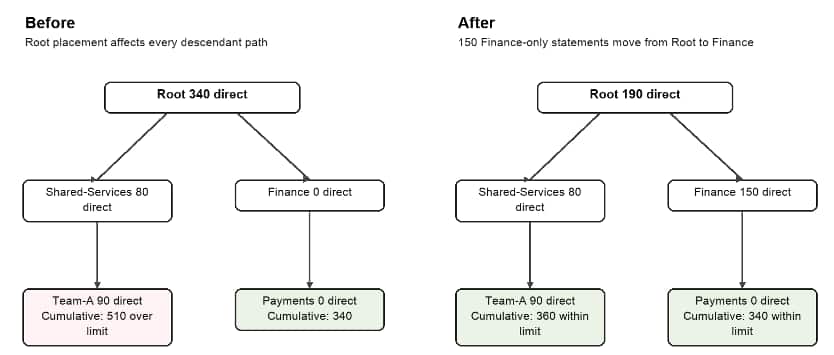
In order to facilitate the move of these statements manually, we’d need to collect all statements that look like this in the root compartment:
allow group FinanceAdmins to manage buckets in compartment Finance:Payments
And change them to statements like this within the Finance compartment:
allow group FinanceAdmins to manage buckets in compartment Payments
This is especially cumbersome, as these statements most likely live in multiple policies, are organized in a bespoke manner, and may have a larger hierarchy of compartments that are involved.
Consolidation Workflow
Within the OCI Policy Analysis tool, the goal is both to identify and plan for changes to policy statements. Because the movement of policies is extremely error prone and can completely break a workload or disable an entire swath of users from accessing OCI Resources, it must be done carefully. Here is the workflow that the tool facilitates:
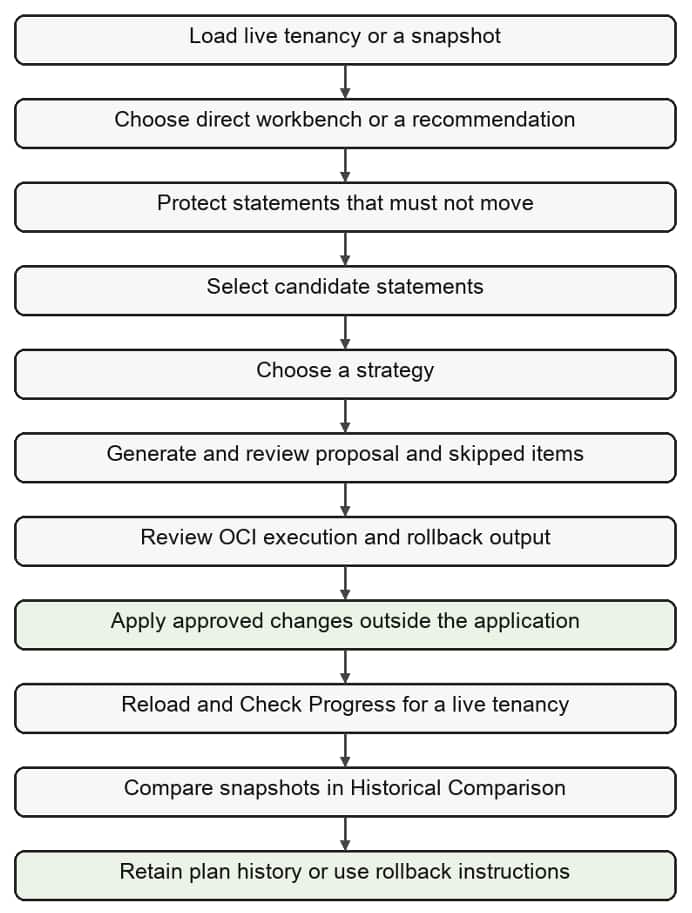
While this seems complex (it is), the tool does most of the work in a couple of critical areas. First, it attempts to identify consolidation opportunities and grouping – this is found on the Recommendations -> Consolidation tab in the UI or web version. These are generated just like other recommendations – after loading the entire set of policies, the tool looks for places where improvements can be made. One such example are policy statements that are located 2 or more levels above the effective path for that statement. In our example, statements that refer to compartment Finance:Payments but are located in the root of the tenancy would be identified as candidates and grouped as such.
Consolidation also introduces a (growing) set of “strategies” – essentially one size does not fit all. In this case the strategy could be “Move Down One Level” or “Move Closer to Target” – both would have the effect of planning to create new policies in Finance with re-written statements, then modifying or removing the original statements so that they are no longer in the root compartment.
Once the set of statements are chosen, either via recommendation or manually, and once a strategy has been selected, the tool will generate a consolidation plan for review.
Execution, Progress, Rollback
If you were still wondering about the workflow above, generating a valid plan was only part of the equation. As we’ve stated many times, the OCI Policy Analysis tool is designed to be read-only, with limited tenancy access in support of reading IAM data only. So, how does the change occur? The tool’s workflow attempts to support change by generating instructions for both execution and rollback of a generated plan. These instructions can be executed via CLI or within the OCI Console, but should go through a change control, and be executed by a qualified administrator after careful review.
Progress can be checked because OCI tags are applied to the new or modified policies, which then get re-read by the tool when the progress check is executed – essentially it reads all policies again from the tenancy, sees the tags, and marks steps as executed.
Lastly, as with many concepts introduced, we can take advantage of other areas of the tool here too. Historical comparison takes a snapshot of all data each time the tenancy is loaded live. What this means is that a comparison before and after a set of changes should show all that differs. It then is possible both to verify the changes, and then also verify a rollback if necessary. Given the complexity, the more tools the better.
Where to go next
This is just a starting example; the repository documentation contains more guidance and the complete strategy table.
- Policy consolidation guide
- Recommendations and Limits guide
- Usage guide: Policy Browser, Recommendations, Historical Comparison, and Consolidation
- OCI Policy Analysis repository
Hopefully this example is helpful in understanding how an issue and the resulting fix can be facilitated through a purpose-built tool. As this feature expands, comments and issues are welcome.