

Oracle Cloud Infrastructure Kubernetes Engine (OKE) now offers the AMD GPU Operator as an optional cluster add-on for enhanced clusters. This add-on helps platform teams deploy and manage the AMD GPU software components required to run GPU-accelerated Kubernetes workloads through OKE.
For artificial intelligence (AI), machine learning (ML), inference, and high-performance computing (HPC) workloads, provisioning GPU worker nodes is only the beginning. Teams also need the software that makes GPUs available to containers, visible to Kubernetes, observable by operators, and ready for specialized configurations such as GPU partitioning.
The AMD GPU Operator brings these capabilities together in an OKE-managed add-on experience.
Why GPU software management matters
A production-ready Kubernetes environment for workloads backed by AMD Instinct GPU powered infrastructure requires multiple components before GPU accelerated workloads can be deployed. Depending on the workload and environment, this can include AMD GPU drivers, node discovery and labeling, the Kubernetes device plugins or Dynamic Resource Allocation, GPU metrics, health monitoring, validation tools, and device configuration.
These components must align with the Kubernetes version, worker node host OS image, GPU hardware, driver version, in use by your workloads. Installing and maintaining this large number of variables independently can increase operational complexity for platform teams and make updates more difficult to plan and validate.
The AMD GPU Operator helps reduce that complexity by managing key AMD GPU software components through a unified operator model.
Managed cluster add-ons in OKE
OKE cluster add-ons extend Kubernetes clusters with optional capabilities that administrators can enable and configure. On enhanced clusters, administrators can:
- Enable or disable supported add-ons.
- Select a supported add-on version.
- Choose automatic updates or manage the deployed version.
- Apply supported configuration arguments.
With the AMD GPU Operator deployed as an OKE add-on, teams can manage its lifecycle through OKE rather than separately installing and operating the operator in each cluster.
The AMD GPU Operator
OKE previously supported AMD Instinct GPUs through the AMD GPU Plugin add-on, which managed the AMD Device Plugin for Kubernetes. The AMD GPU Operator add-on expands on that foundation with broader lifecycle management capabilities.
The operator coordinates components that support the complete lifecycle of AMD Instinct GPU workloads, including driver management, GPU discovery, scheduling, monitoring, validation, and configuration.
Discover and prepare AMD Instinct GPU nodes
The operator uses Node Feature Discovery (NFD) to detect AMD Instinct GPU hardware and advertise node capabilities through Kubernetes labels. These labels help the operator identify the appropriate nodes and enable platform teams to target GPU workloads based on hardware characteristics. Node Feature Discovery is another add-on supported by OKE.
Kernel Module Management (KMM) manages the lifecycle of GPU driver kernel modules. Together with the Controller Manager, it supports driver installation, upgrades, and removal according to the desired configuration.
This coordinated approach helps ensure that worker nodes are prepared before GPU workloads are scheduled.
Make GPUs schedulable for Kubernetes workloads
The AMD GPU Device Plugin integrates AMD Instinct GPUs with the Kubernetes device-plugin framework. It registers AMD Instinct GPUs as allocatable resources—such as amd.com/gpu—so application teams can request them in pod specifications.
Kubernetes can then schedule workloads to nodes with the required available GPU capacity. Platform teams can use node selectors, taints, and tolerations to help reserve GPU nodes for workloads that explicitly request accelerated resources.
The operator’s node labeler can also apply detailed GPU-specific labels, allowing more targeted workload placement when applications require specific GPU capabilities.
Monitor GPU health and utilization
GPU operations require visibility beyond standard CPU and memory metrics. The Device Metrics Exporter provides GPU metrics in Prometheus format, including data that can help teams monitor GPU utilization, temperature, and health.
These metrics can support monitoring and alerting workflows while helping teams identify unhealthy devices. The operator can also use health information alongside the device plugin so unhealthy GPUs are not presented as schedulable capacity.
For larger clusters, teams should size the resources allocated to operator-managed components appropriately. The number of GPU nodes, GPUs per node, monitoring frequency, and workload intensity can all affect operational resource requirements.
Validate GPU readiness
The AMD GPU Operator includes a test runner for hardware validation, diagnostics, and benchmarking. Teams can use it to run configurable tests on GPU worker nodes, schedule or manually trigger validation workflows, and report test outcomes as Kubernetes events.
The test runner can also run pre-start tests as init containers for GPU workload pods. This can be useful for long-running jobs where validating GPU health and stability before execution is important.
Depending on the selected test tooling, validation scenarios can include GPU stress tests, PCIe bandwidth benchmarks, memory tests, and burn-in tests.
Configure GPU partitioning
For supported AMD Instinct GPU environments, the Device Config Manager (DCM) provides a Kubernetes-native way to manage GPU partitioning. DCM runs on GPU worker nodes and uses configuration profiles stored in Kubernetes ConfigMaps.
Platform teams can define partitioning profiles and apply them to nodes using labels. DCM monitors the selected profiles and node labels, then applies the appropriate configuration to the targeted GPUs.
This approach can help teams support different workload profiles across a GPU fleet while maintaining a consistent configuration process. For example, environments can use separate compute and memory partitioning profiles for workloads with different resource requirements.
Getting started
The AMD GPU Operator is available as an optional OKE cluster add-on for enhanced clusters. Before enabling it, review the supported OKE Kubernetes versions, AMD GPU worker node images, GPU hardware, drivers, and add-on versions.
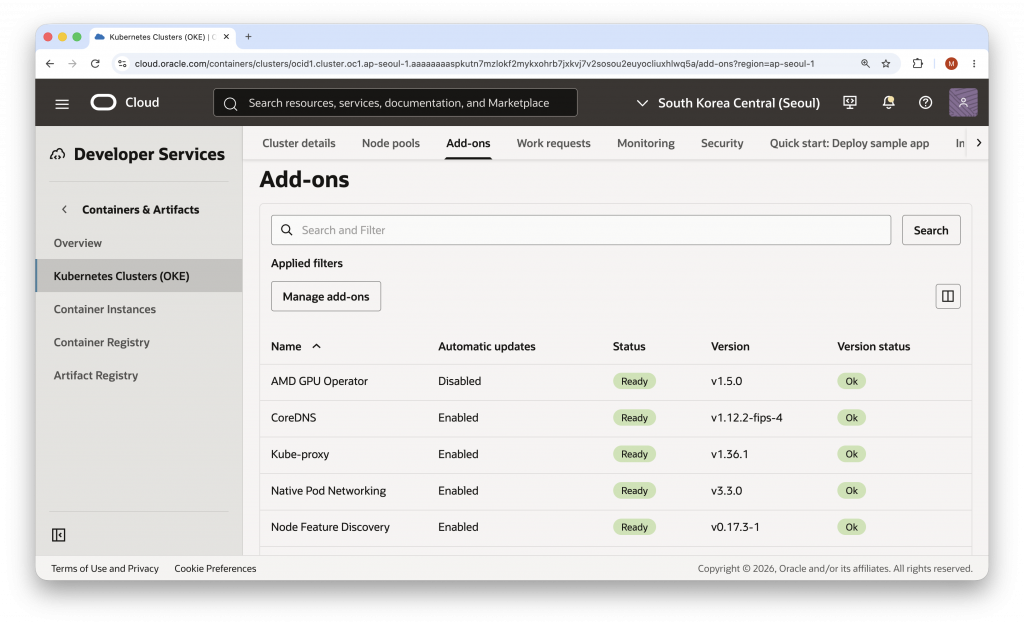
Then select the add-on version and supported configuration arguments that fit your environment. Consider node labels, taints and tolerations, monitoring integration, driver-management requirements, and whether your workloads require validation or GPU partitioning capabilities.
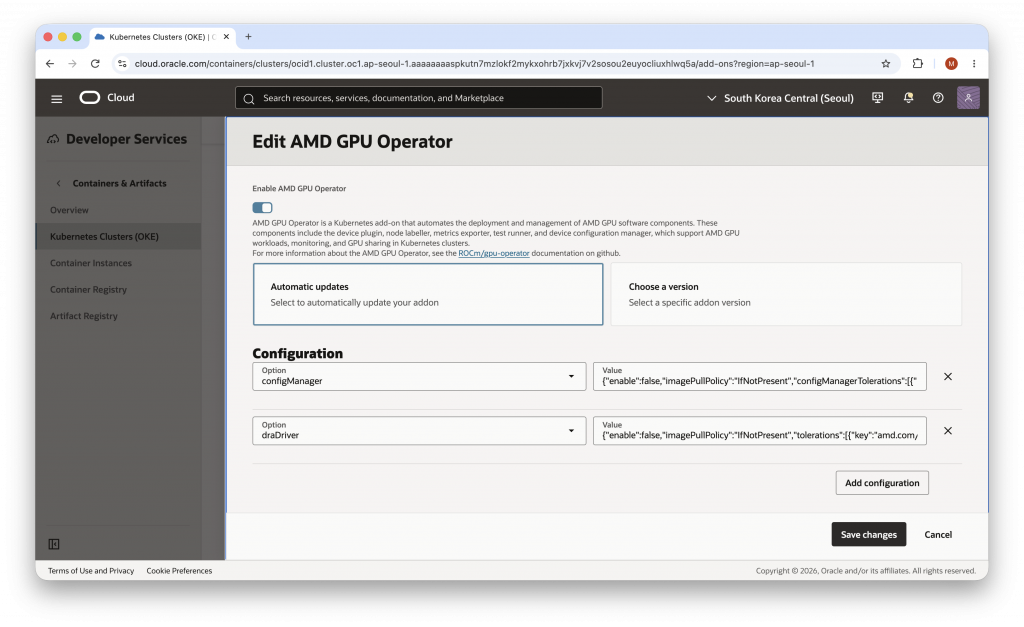
With the AMD GPU Operator on OKE, platform teams can simplify the work required to prepare and maintain Kubernetes environments for AMD GPU workloads. This lets AI, ML, and HPC teams focus more on building and running accelerated applications.
Learn more
- Overview of OKE cluster add-ons
- AMD GPU Operator configuration arguments for OKE
- AMD GPU Operator documentation
- AMD GPU Operator project