
A host-side cutover example for non-boot, iSCSI-attached volumes configured for the Ultra High Performance level
Database and enterprise applications can outgrow the throughput, IOPS, or latency available from their Database and enterprise applications can outgrow the throughput, IOPS, or latency available from their current Block Volume performance level. Oracle Cloud Infrastructure (OCI) Block Volumes can be configured at the Ultra High Performance level for supported workloads that require higher storage performance.
For a supported iSCSI attachment, multipath can present multiple I/O paths to the same volume. Device-Mapper Multipath (DM-Multipath) consolidates those paths into one logical device and can support connection redundancy, path failover, load distribution, and higher available aggregate performance. Learn more about configuring multipath attachments.
Changing the performance level does not, by itself, complete the host-side cutover. The procedure described here does not call for a host-side data copy or filesystem reformat, but it changes how Linux discovers and consumes the volume. A volume that previously appeared through one raw device path can appear through several transport paths and one DM-Multipath map.
Configuration tied to a transient raw device name such as /dev/sdc1, or to a dynamic Device-Mapper Multipath (DM-Multipath) number such as dm-3, can become invalid after reattachment or reboot. Applications and services should instead use persistent volume identifiers, WWID-pinned multipath aliases, mapped partitions, and filesystem UUIDs.
This article covers the host-side reconfiguration for existing non-boot volumes moved to the Ultra High Performance level and for new applications built on multipath-enabled UHP storage. It focuses on:
- Oracle Automatic Storage Management (Oracle ASM) disks discovered through custom
udevlinks. - A separately attached ordinary XFS filesystem mounted at
/u01. - An Oracle Linux reference host using multipath-enabled iSCSI attachments.
- Standalone Oracle Restart for the example High Availability Services commands.
Scope and caution
This example does not cover boot-volume conversion, paravirtualized attachments, Windows, Oracle Autonomous Linux, Oracle ASM Filter Driver, ASMLib, or Oracle Real Application Clusters (Oracle RAC) operating procedures. Commands, service dependencies, user and group names, and device properties can vary by operating system and software release. Test the complete procedure in a nonproduction environment, maintain a current backup and rollback plan, and obtain approval from the database, Linux, storage, and OCI owners before using it on a production host.
Important
Configuring a volume for the Ultra High Performance level and obtaining a multipath-enabled attachment are related but distinct steps. Verify that the OCI attachment reports Multipath: Yes, and then validate the paths and map on the host. If an existing block volume is changed to the Ultra High Performance level, current OCI documentation requires detaching and reattaching it. A consistent device path is required for multipath-enabled iSCSI attachments. Learn more about changing volume performance.
The problem to solve
On the reference host, pre-cutover udev rules identify the raw Oracle ASM partitions and create persistent discovery links. The example below uses placeholders; replace them with values collected from the target host.
# /etc/udev/rules.d/99-oracle-asmdevices.rules

OWNER="grid", GROUP="asmadmin", MODE="0660", \
  KERNEL=="sd?1", SUBSYSTEM=="block", \
  PROGRAM=="/usr/lib/udev/scsi_id -g -u -d /dev/%k", \
  RESULT=="<ASM_DISK1_WWID>", \
  SYMLINK+="asm-disk1"

OWNER="grid", GROUP="asmadmin", MODE="0660", \
  KERNEL=="sd?1", SUBSYSTEM=="block", \
  PROGRAM=="/usr/lib/udev/scsi_id -g -u -d /dev/%k", \
  RESULT=="<ASM_DISK2_WWID>", \
  SYMLINK+="asm-disk2"
Every Oracle ASM disk expected to be discovered in this UDEV-based configuration should have an explicit, verified rule before the cutover. Stop and correct any inventory or rule-coverage gap before changing the attachment.
After multipath is enabled, multiple raw sdX paths can identify the same storage device. DM-Multipath consolidates those paths into one map, such as /dev/mapper/asm_disk1, and exposes its mapped partition. Oracle ASM should consume the multipath representation rather than separate raw paths to the same disk. Oracle documentation notes that duplicate representations of the same disk can cause Oracle ASM errors. Learn more about using Oracle ASM with multipath disks.
Linux block-device names are discovery-order labels rather than permanent volume identities. After a reboot, iSCSI reconnection, or change in path-discovery order, the same volume can appear as /dev/sdd rather than /dev/sdc, and a Device-Mapper Multipath (DM-Multipath) number can change from dm-3 to dm-5. This can be expected behavior and does not by itself indicate a volume failure.
This is an identity and path-management change, not a host-side data-migration procedure.
OCI UHP multipath cutover workflow
Persistent identities replace transient raw device paths
- Inventory
Map each volume’s role, WWID, filesystem UUID, current device path, mount point, and UDEV rule. - Stop consumers and reattach
Stop databases, Oracle ASM, Oracle Grid Infrastructure, and filesystem consumers. Detach and reattach each target volume using the validated consistent device path. - Verify OCI and host discovery
Confirm Multipath: Yes in the OCI Console. Confirm that the host discovers the expected transport paths and one map for each WWID. - Create persistent maps
Bind each target WWID to a meaningful alias. Apply a boot-volume exclusion only after validating that design for the host. - Replace consumption paths
Point Oracle ASM UDEV rules to mapped partitions. Keep ordinary filesystem mounts UUID-based. - Reboot and validate
Validate the complete dependency chain: iSCSI sessions, multipath maps, mapped partitions, UDEV links,/u01, High Availability Services, Oracle ASM, and required disk groups.
Keep High Availability Services disabled until the mapped paths and ordinary filesystems have been validated manually.
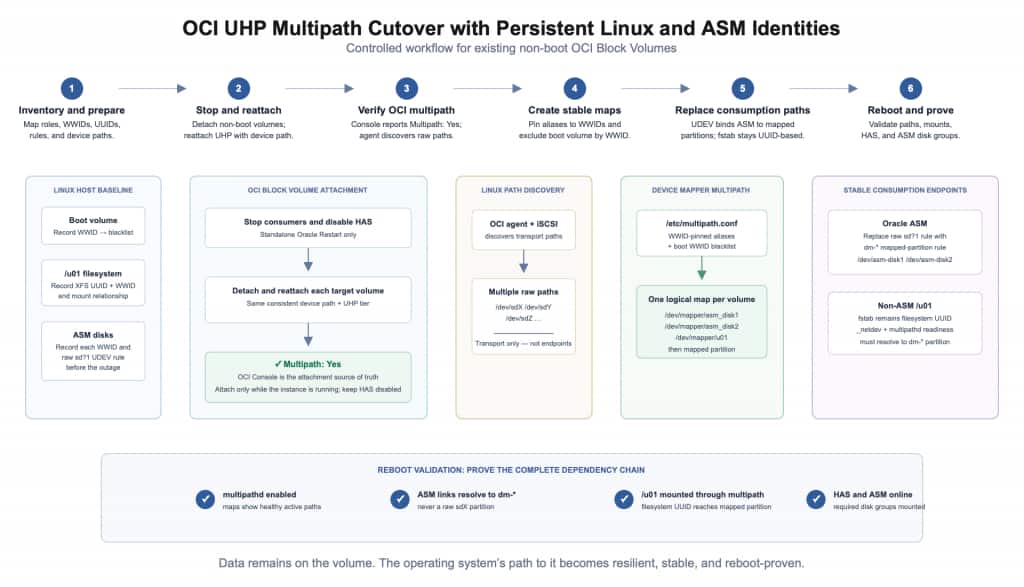
Figure 1: OCI UHP multipath cutover workflow. Raw sdX devices are transport paths. WWID-pinned aliases, mapped partitions, UDEV links, and filesystem UUIDs are the persistent consumption endpoints.
Volume type: what changes and what to do
| Workload | Before multipath | After multipath | Required action |
|---|---|---|---|
| Boot volume on the reference host | OS boot path, for example /dev/sda and LVM partitions | Remains the OS boot path | Keep it outside this non-boot cutover. Apply any multipath exclusion only by a validated persistent identifier, not by an sdX name. |
| Oracle ASM disk | One raw partition, for example /dev/sdc1 | A partition on a DM-Multipath map | Replace the raw-path UDEV rule with a rule bound to the mapped partition. |
| Ordinary filesystem that remains single-path | A raw partition mounted at /u01 | No topology change | Keep it outside the Oracle ASM configuration and mount it by a persistent filesystem identifier. |
| Ordinary filesystem converted to UHP multipath | One raw partition | A partition on a DM-Multipath map | Keep /etc/fstab UUID-based, create a WWID-pinned map, and verify the mounted source after reboot. |
The dm-N value is dynamic and should not be used as a persistent configuration identifier. A custom multipath alias, such as asm_disk1, and a UDEV link, such as /dev/asm-disk1, provide more durable consumption endpoints.
Before you begin
Current OCI prerequisites to verify
Verify all requirements against the current OCI documentation:
- Use a supported Linux image and supported Compute shape.
- Current VM shapes configured for 16 cores or more can support multipath-enabled attachments when the shape table reports UHP support.
- All current bare metal shapes support multipath-enabled iSCSI attachments; bare metal multipath does not use the paravirtualized attachment type.
- For multiple UHP volumes, use Oracle Cloud Agent version 1.39 or later.
- Enable the Block Volume Management plugin.
- Provide a public IP address or service gateway so the plugin can reach Oracle services.
- Configure the required dynamic-group and IAM policy permissions.
- Select a consistent device path for every target non-boot attachment.
- Use either
oci-utilsoroci-iscsi-configfor a volume. Do not alternate between the two tools for the same volume. Review the current attachment requirements.
Record the tested Oracle Linux, UEK, Oracle Cloud Agent, device-mapper-multipath, Oracle Grid Infrastructure, and Oracle Database versions in the change record for each target environment.
Host cutover readiness
This procedure applies only to non-boot volumes.
Before starting:
- Identify the boot volume, Oracle ASM disks, and ordinary filesystems separately.
- Record a consistent OCI device path for every target attachment.
- Schedule an approved outage for Oracle ASM-backed volumes.
- Stop databases and Oracle ASM before replacing discovery rules.
- Record a rollback baseline that includes the OCI attachment state,
multipath -ll, current UDEV rules,/etc/fstab, the Oracle ASM discovery string,findmnt, andlsblk. - Confirm that current backups and recovery procedures have been tested.
- Confirm the actual Grid home, Oracle ASM SID, operating-system owner, and groups.
1. Inventory every target volume before changing OCI storage
Do not infer a volume’s identity from sdb, sdc, or another disk letter.
# Show mounted filesystems and their sources.
findmnt -rno SOURCE,TARGET

# Show devices, partitions, filesystems, UUIDs, WWNs, and mounts.
sudo lsblk -e7 \
  -o NAME,KNAME,TYPE,SIZE,FSTYPE,UUID,PARTUUID,WWN,SERIAL,MOUNTPOINTS

# Capture the SCSI WWID for each whole disk, including the boot disk.
lsblk -dn -o PATH,TYPE |
  awk '$2 == "disk" { print $1 }' |
  while read -r dev; do
    printf '%s: ' "$dev"
    sudo /usr/lib/udev/scsi_id -g -u -d "$dev"
  done

# Record current consistent paths, UDEV rules, and mount definitions.
ls -l /dev/oracleoci/
sudo grep -R --line-number 'asm\|scsi_id' /etc/udev/rules.d
sudo cat /etc/fstab
Create and review an inventory similar to the following:
| Role | Current observed path | Stable identifier | Target state |
|---|---|---|---|
| Boot volume | /dev/sda | <BOOT_WWID> | Outside this cutover; exclude from local multipath discovery only if the host design requires and validates it |
/u01 filesystem | /dev/sdb1 | Filesystem UUID <U01_FILESYSTEM_UUID> and SCSI WWID <U01_WWID> | u01 multipath alias; mount by filesystem UUID |
| Oracle ASM disk 1 | /dev/sdc1 | <ASM_DISK1_WWID> | asm_disk1 multipath alias |
| Oracle ASM disk 2 | /dev/sdd1 | <ASM_DISK2_WWID> | asm_disk2 multipath alias |
The filesystem UUID and SCSI WWID serve different purposes. The filesystem UUID identifies the filesystem used for mounting. The SCSI WWID identifies the underlying storage device used in the multipath configuration. Do not substitute one for the other.
2. Perform a controlled detach, reattach, and validation
Treat an existing UHP conversion as a controlled storage cutover.
Stop every consumer of the target volumes before detaching anything. This includes databases, Oracle ASM, Oracle Grid Infrastructure, and applications using ordinary filesystems. Unmount /u01 before detaching its volume.
Do not detach a mounted filesystem, active Oracle ASM disk, or active database volume.
Standalone Oracle Restart only
For a standalone Oracle Restart host, prevent High Availability Services from starting automatically before the new mapped paths have been validated.
Replace /path/to/grid/home with the actual Oracle Grid Infrastructure home:
# Stop application and database consumers using their approved procedures first.

sudo /path/to/grid/home/bin/crsctl disable has
sudo /path/to/grid/home/bin/crsctl stop has -f
Do not use these commands as an Oracle RAC procedure. Oracle RAC shutdown, Cluster Ready Services autostart control, and restart sequencing must follow the cluster’s approved operating procedure.
After the workloads are stopped and the target storage is no longer in use:
- Detach each target non-boot volume.
- Reattach it using the same consistent device path captured in the inventory.
- Allow the Block Volume Management plugin to complete discovery.
- Verify Multipath: Yes for each target attachment in the OCI Console.
- Validate the host maps and paths.
On the reference host, attach attempts issued while the instance was stopped failed. The sequence validated for that environment was to stop the applications, disable HAS, detach the non-boot volumes, start the instance with HAS still disabled, and then reattach the volumes. Confirm with the OCI product owner whether that observation applies to the exact target environment before presenting it as a general requirement.
sudo systemctl is-active multipathd
sudo multipath -ll
Each target WWID should appear in one map containing the paths OCI established for that attachment. Usable paths should report the expected healthy state, such as active ready running.
Do not configure to a fixed path count. Path counts can vary by attachment and platform configuration.
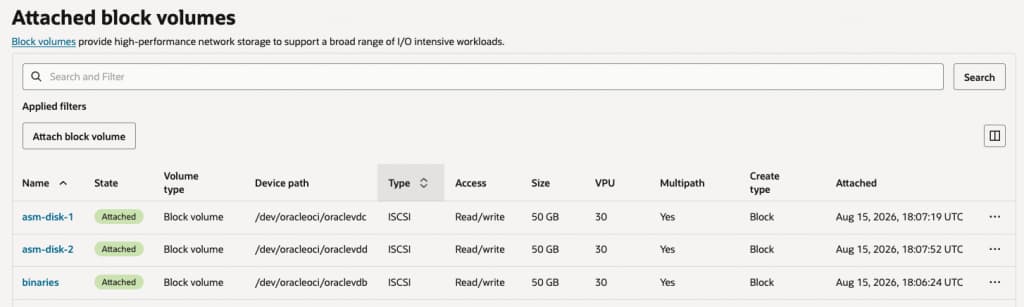
Figure 2: OCI Console validation after reattachment. Each target UHP volume is attached through iSCSI with Multipath set to Yes.
Raw sdX paths are transport paths. Oracle ASM and mounted filesystems should consume the mapped device or its mapped partition.
3. Configure persistent multipath and Oracle ASM identities
Merge aliases into the validated multipath configuration
The Block Volume Management plugin can install the DM-Multipath package and create /etc/multipath.conf. Preserve required existing or plugin-generated settings. Merge only the locally validated aliases and exclusions rather than replacing the file wholesale. Learn more about enabling the Block Volume Management plugin.
The following is an illustrative configuration:
# /etc/multipath.conf
# Merge these entries into the host's validated configuration.

defaults {
    user_friendly_names yes
    find_multipaths yes
}

blacklist {
    # Include only if the host design has validated exclusion of the
    # boot volume by its persistent WWID.
    wwid "<BOOT_WWID>"
}

multipaths {
    multipath {
        wwid  <ASM_DISK1_WWID>
        alias asm_disk1
    }

    multipath {
        wwid  <ASM_DISK2_WWID>
        alias asm_disk2
    }

    multipath {
        wwid  <U01_WWID>
        alias u01
    }
}
Validate the configuration before reloading it:
sudo multipath -t
sudo systemctl enable --now multipathd

# Run during the approved outage after confirming no consumers are active.
sudo systemctl restart multipathd

sudo multipath -ll
ls -l \
  /dev/mapper/asm_disk1 \
  /dev/mapper/asm_disk2 \
  /dev/mapper/u01
Confirm that each alias resolves to the intended WWID.
A boot-volume exclusion is a host-specific guardrail. Do not use a discovery-order name such as /dev/sda as the persistent identity.
Identify the mapped partitions
Do not assume the mapped partition name. The generated name can differ depending on the alias and operating-system behavior.
ls -l /dev/mapper/asm_disk1* /dev/mapper/asm_disk2*

# Replace dm-N with the actual mapped partition, not the parent map.
sudo udevadm info --query=property --name=/dev/dm-N |
  grep -E '^(DM_UUID|DM_MPATH|DM_PART|DEVNAME)='
A mapped Oracle ASM partition should have properties similar to:
DM_UUID=part1-mpath-<ASM_DISK1_WWID>
DM_MPATH=asm_disk1
DM_PART=1
If the mapped partition does not exist, stop the cutover and resolve the partition mapping. Do not point Oracle ASM to a parent map when the Oracle ASM header is on partition 1.
Replace raw-path UDEV rules
Remove or disable the old raw sd?1 rules for converted disks. Keep a dated rollback copy, but do not leave both raw-path and multipath rules active for the same Oracle ASM disks.
Using the exact observed DM_UUID provides tighter binding than a broad wildcard:
# /etc/udev/rules.d/99-oracle-asm-multipath.rules

OWNER="grid", GROUP="asmadmin", MODE="0660", \
  ACTION=="add|change", SUBSYSTEM=="block", KERNEL=="dm-*", \
  ENV{DM_UUID}=="part1-mpath-<ASM_DISK1_WWID>", \
  ENV{DM_MPATH}=="asm_disk1", ENV{DM_PART}=="1", \
  SYMLINK+="asm-disk1"

OWNER="grid", GROUP="asmadmin", MODE="0660", \
  ACTION=="add|change", SUBSYSTEM=="block", KERNEL=="dm-*", \
  ENV{DM_UUID}=="part1-mpath-<ASM_DISK2_WWID>", \
  ENV{DM_MPATH}=="asm_disk2", ENV{DM_PART}=="1", \
  SYMLINK+="asm-disk2"
Replace the owner, group, aliases, partition number, and WWIDs with the values validated for the target host.
Reload and apply the rules only during the approved outage:
sudo udevadm control --reload-rules
sudo udevadm trigger --subsystem-match=block --action=change
sudo udevadm settle

ls -l /dev/asm-disk1 /dev/asm-disk2
readlink -f /dev/asm-disk1
readlink -f /dev/asm-disk2
Both Oracle ASM links should resolve to mapped dm-* partitions. If either resolves to a raw sdX1 path, the cutover is incomplete.
Confirm that the Oracle ASM discovery string includes the intended persistent links.
4. Mount ordinary filesystems through the multipath topology
A normal filesystem does not need Grid ownership or an Oracle ASM discovery link.
Use the filesystem UUID as the persistent mount identity. The UUID does not change merely because Linux remaps the underlying block device.
For a single-path iSCSI attachment:
UUID=<U01_FILESYSTEM_UUID> /u01 xfs defaults,_netdev 0 0
For the reference host after the UHP multipath cutover:
UUID=<U01_FILESYSTEM_UUID> /u01 xfs defaults,_netdev,x-systemd.requires=multipathd.service 0 0
Current OCI documentation recommends UUID-based mounts and _netdev for network-backed block-volume filesystems. The additional multipathd.service dependency shown here was validated on the reference host and should be reviewed for the target Oracle Linux and systemd releases. Learn more about connecting to UHP volumes.
In this example:
/u01is the mount point.xfsis the filesystem type._netdevtells systemd to treat the filesystem as network-backed storage.x-systemd.requires=multipathd.servicemakes the generated mount unit depend onmultipathdin the tested environment.- The final
0 0values disable dump processing and boot-timefsckpasses for this XFS filesystem.
Validate the entry:
sudo systemctl daemon-reload
sudo findmnt --verify --fstab
sudo mount /u01
findmnt -no SOURCE,TARGET /u01
sudo systemctl cat u01.mount
The final findmnt result should resolve to the mapped multipath partition, such as /dev/mapper/u01p1, rather than to a raw sdX1 device.
The filesystem UUID identifies the filesystem but does not independently prove that the host is reaching it through multipath. The WWID-pinned u01 map, active multipathd, and final source validation establish the topology.
On the reference Oracle Linux host, adding a direct x-systemd.requires=iscsi.service dependency created a systemd ordering cycle. Treat that result as host-specific unless Oracle Linux engineering confirms it for the supported target releases.
Avoid nofail for /u01 when it contains required Oracle Grid Infrastructure or database binaries. A host that continues startup without those required binaries can enter an unusable application state.
Do not apply Oracle ASM ownership or discovery rules to /u01 merely because it is a non-boot volume.
5. Re-enable HAS, reboot, and validate the complete chain
Keep High Availability Services disabled until the multipath maps, mapped partitions, UDEV links, and /u01 mount have been validated manually.
sudo systemctl is-active multipathd
sudo systemctl is-enabled multipathd
sudo multipath -ll

ls -l /dev/asm-disk1 /dev/asm-disk2
findmnt -no SOURCE,TARGET /u01
For a standalone Oracle Restart host only:
sudo /path/to/grid/home/bin/crsctl enable has
sudo reboot
Do not use this sequence as an Oracle RAC operating procedure.
After reboot, validate the complete storage-to-application chain:
# Linux storage layer
sudo systemctl is-active multipathd
sudo systemctl is-enabled multipathd
sudo multipath -ll

ls -l /dev/asm-disk1 /dev/asm-disk2
readlink -f /dev/asm-disk1
readlink -f /dev/asm-disk2

findmnt -no SOURCE,TARGET /u01

# Oracle Grid Infrastructure and Oracle ASM
sudo /path/to/grid/home/bin/crsctl check has
sudo /path/to/grid/home/bin/crsctl stat res -t

# Replace the example Oracle home with the tested Grid home.
sudo -iu grid bash -lc \
  'export ORACLE_HOME=/u01/app/grid; export ORACLE_SID=+ASM; "$ORACLE_HOME/bin/asmcmd" lsdg'
The validation is successful when:
- Every target map has the intended WWID and the expected healthy paths.
- Oracle ASM links resolve only to mapped partitions.
/u01is mounted through theu01multipath partition.- High Availability Services is online.
- Oracle ASM is online.
- Every required Oracle ASM disk group is mounted.
One successful reboot helps validate the tested dependency chain, but it does not replace ongoing monitoring, backups, or documented recovery procedures.
If the host does not meet all checks, do not close the change. Keep the workload stopped, restore the last known-good UDEV and mount configuration, and investigate the map, alias, partition, ownership, or startup-order issue.
Avoid these common mistakes
- Blacklisting
/dev/sdarather than using a validated persistent identifier. - Leaving raw-path and multipath Oracle ASM rules active for the same disk.
- Using
dm-3,mpatha, or another discovery-order name in persistent configuration. - Using
/dev/sdX1in/etc/fstab. - Assuming the mapped partition name without inspecting
DM_UUID,DM_MPATH, andDM_PART. - Pointing Oracle ASM to the parent map when its header is on a partition.
- Applying Oracle ASM rules to
/u01. - Running a broad multipath flush on a live Oracle ASM host.
- Hardcoding a path count from one demonstration host.
- Treating a successful runtime test as complete validation without testing reboot behavior.
- Reusing WWIDs, UUIDs, aliases, user names, groups, Grid homes, or device paths from another host.
- Applying standalone Oracle Restart commands to Oracle RAC.
Conclusion
Multipath changes how Linux identifies and consumes an OCI Block Volume. In the reference configuration, the durable pattern is to use persistent identities throughout the stack:
- A WWID for each underlying volume.
- A meaningful, WWID-pinned DM-Multipath alias.
- A mapped partition for Oracle ASM.
- A constrained UDEV link for Oracle ASM discovery.
- A filesystem UUID for an ordinary filesystem mount.
The host-side procedure does not require copying application data or reformatting the existing filesystem. It changes the operating system’s path to that data. Transient device letters and dm-N numbers can change; WWIDs, aliases, mapped-partition properties, UDEV links, and filesystem UUIDs provide the persistent identity needed for a durable configuration.
Complete the change only after an approved reboot window confirms the intended paths, ordinary filesystem mounts, High Availability Services, Oracle ASM, and required disk groups.
Appendix: representative final state
The following output is illustrative. Replace every placeholder with values collected from the target host.
Persistent mappings
| Role | SCSI WWID | Persistent map and partition | Consumption endpoint |
|---|---|---|---|
| Boot volume | <BOOT_WWID> | Outside the target multipath maps; host-specific exclusion if validated | OS boot volume |
/u01 filesystem | <U01_WWID> | /dev/mapper/u01 and /dev/mapper/u01p1 | /u01, mounted by filesystem UUID |
| Oracle ASM disk 1 | <ASM_DISK1_WWID> | /dev/mapper/asm_disk1 and /dev/mapper/asm_disk1p1 | /dev/asm-disk1 |
| Oracle ASM disk 2 | <ASM_DISK2_WWID> | /dev/mapper/asm_disk2 and /dev/mapper/asm_disk2p1 | /dev/asm-disk2 |
Representative path-health output
$ sudo multipath -ll

u01 (<U01_WWID>) dm-N ...
  |- ... active ready running
  |- ... active ready running
  `- ... active ready running

asm_disk1 (<ASM_DISK1_WWID>) dm-N ...
  |- ... active ready running
  `- ... active ready running

asm_disk2 (<ASM_DISK2_WWID>) dm-N ...
  |- ... active ready running
  `- ... active ready running
The number of paths shown is illustrative. Validate the paths OCI actually established for each attachment.
Representative final mount
$ findmnt -no SOURCE,TARGET /u01
/dev/mapper/u01p1 /u01
Representative Oracle ASM links
$ ls -l /dev/asm-disk1 /dev/asm-disk2
/dev/asm-disk1 -> mapper/asm_disk1p1
/dev/asm-disk2 -> mapper/asm_disk2p1
Default names such as mpatha and dynamic values such as dm-3 can be useful for observing current discovery, but they are not the intended persistent configuration endpoints when custom aliases are used.
References
- Configuring Attachments to Ultra High Performance Volumes
- Changing the Performance of a Volume
- Working with Multipath-Enabled iSCSI-Attached Volumes
- Enabling the Block Volume Management Plugin
- Troubleshooting Ultra High Performance Volume Attachments
- Using Multipathing for Efficient Storage on Oracle Linux
- Working With the Multipathing Configuration File
- Using Oracle ASM with Multipath Disks