

OCI Block Storage now supports immutable backups, helping protect backups from premature deletion and retention-period changes for the duration of the retention policy. These capabilities can help organizations strengthen ransomware resilience and support compliance efforts.
Cyberattacks are a critical business risk that can disrupt operations, compromise sensitive data, erode customer trust, and create legal or financial consequences. Protecting recovery data is just as important as protecting production workloads, especially during security incidents, accidental deletion, regulatory inquiries, and other situations where backups must remain securely preserved.
At a glance:
OCI Block Storage now offers flexible backup protection options that support operational recovery, governance, and regulatory compliance. Whether you need long-term retention, protection against accidental deletion, immutable backups, or indefinite preservation for legal matters, you can choose the protection level that best fits your requirements.
- Endurance: Long-term backup retention from one day to 200 years.
- Governance: Delete prevention with administrative flexibility.
- Compliance: Retention Lock with enforceable backup immutability.
- Legal Hold: Indefinite retention of backups for investigations and litigation.
Endurance: long-term retention
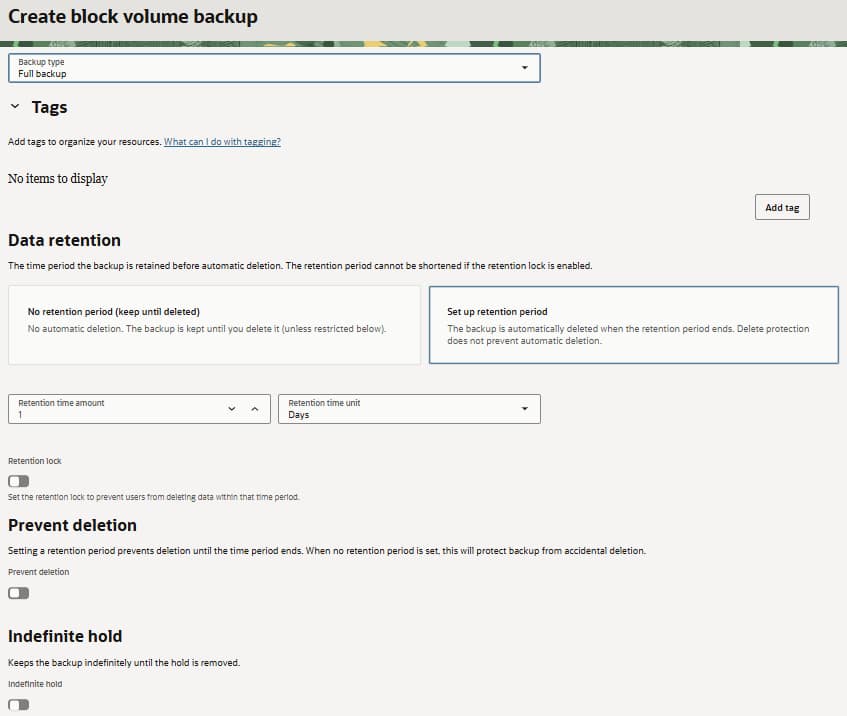
Long-term retention lets you preserve backups for a defined period ranging from one day to 200 years. You can configure the retention period and update the backup’s encryption key while preserving data until the configured expiration date. This flexibility helps organizations align backup retention with operational requirements.
Use long-term retention when a backup must remain available for an extended but known period and administrative flexibility is still required.
Governance: delete prevention
Delete prevention helps protect backups from accidental or intentional manual deletion while allowing authorized administrators with the appropriate IAM permissions to enable or disable the protection when operationally necessary.
While enabled, delete prevention prevents manual deletion until the retention period expires, helping reduce the risk of data loss from human error or malicious activity. If a backup has a defined retention period, it remains protected from manual deletion but is automatically deleted when that period expires. Delete prevention does not stop scheduled expiration.
Compliance: Retention Lock
Retention Lock provides immutable backup protection for organizations with strict retention, governance, or regulatory requirements. Once enabled, Retention Lock cannot be disabled, the backup cannot be deleted before the retention period expires, and its encryption key cannot be changed. The retention period can be extended but not shortened.
For example, a backup locked for 90 days cannot later be changed to 30 days to make it eligible for earlier deletion, but the retention period can be extended beyond 90 days.
Use Retention Lock for backup immutability, compliance efforts, audits, or business continuity requirements. Important: enabling Retention Lock is irreversible. Validate the retention period and encryption-key strategy before enabling it.
Legal hold: indefinite protection
Indefinite hold preserves an existing backup until an authorized user removes the hold. It overrides any existing retention period and prevents the backup from being deleted or updated, making it appropriate for litigation, security investigations, regulatory inquiries, audits, and other situations without a known end date.
Get started
Open Block Storage in the OCI Console and go to Block Volume Backups or Boot Volume Backups. Select the backup you want to protect, then configure the retention and protection settings that match your recovery, governance, or compliance needs. You can also manage these capabilities using the OCI command line interface (CLI), API, or software development kits (SDKs).
For more details, review the OCI Block Storage documentation and share your feedback as we continue to improve backup protection capabilities.
Learn More
- OCI Block Volume overview
- Block Volume Backups
- Policy-Based Backups
- Creating a User-defined Backup Policy
- Ransomware Protection / Retention Lock documentation: