
Modern applications increasingly depend on event-driven architectures. Kafka is often at the center of that design, carrying business-critical events between services, analytics systems, databases, and operational workflows.
That also means Kafka needs a disaster recovery plan. Disaster recovery is more than replication. A production-ready DR plan must cover data replication, topic configuration, consumer offset handling, application cutover, primary-region fencing, validation, and failback. OCI Streaming with Apache Kafka provides the managed Kafka foundation. Customers should design the cross-cluster DR operating model around that foundation using open Kafka tooling such as MirrorMaker 2. (See OCI Streaming with Apache Kafka documentation and Kafka MirrorMaker 2 documentation.)
When a regional outage, network issue, or major application incident occurs, teams need confidence that event processing can continue in another location with a predictable recovery process. For many customers using OCI Streaming with Apache Kafka, the best starting point is an Active/Standby disaster recovery architecture. (See OCI Streaming with Apache Kafka documentation.)
In this post, I’ll walk through how I recommend approaching Active/Standby DR for OCI Streaming with Apache Kafka, what components are involved, how MirrorMaker 2 handles offsets, and what operational decisions you should make before calling the design production-ready.
The sections that follow cover the recommended DR architecture, OCI-focused business continuity practices, MirrorMaker 2 implementation, architectural and recovery considerations, consumer offset synchronization, and mechanisms that minimize message reprocessing or data loss during consumer failover.
Why Active/Standby is the right first pattern
There are two common ways to think about multi-region Kafka: Active/Active and Active/Standby.
Active/Active can be powerful, but it comes with real design complexity. You need to think carefully about multi-region writes, topic ownership, ordering, duplicate handling, conflict resolution, and operational guardrails that prevent replication loops or split-brain behavior.
For most customers, Active/Standby is the recommended DR starting point. Active/Active can be considered later for applications explicitly designed for multi-region writes, but Active/Standby gives most teams a simpler and safer resilience model.
In an Active/Standby model:
- One OCI region is the active Kafka region.
- A second OCI region runs a warm standby Kafka cluster.
- Data is continuously replicated from active to standby. (See Oracle FAQ on intercluster replication with MirrorMaker 2.)
- Consumer group progress is translated and checkpointed for failover. (See Kafka MirrorMaker 2 geo-replication guide.)
- Applications are redirected to the standby cluster during a failover event.
This model is easier to reason about, easier to test, and easier to operate. It gives teams a practical path to regional resilience without forcing every application team to solve multi-region write semantics on day one.
Reference architecture
At a high level, the design uses a primary OCI region, a warm standby OCI region, and a customer-managed MirrorMaker 2 replication layer. (See Kafka MirrorMaker 2 geo-replication guide.)
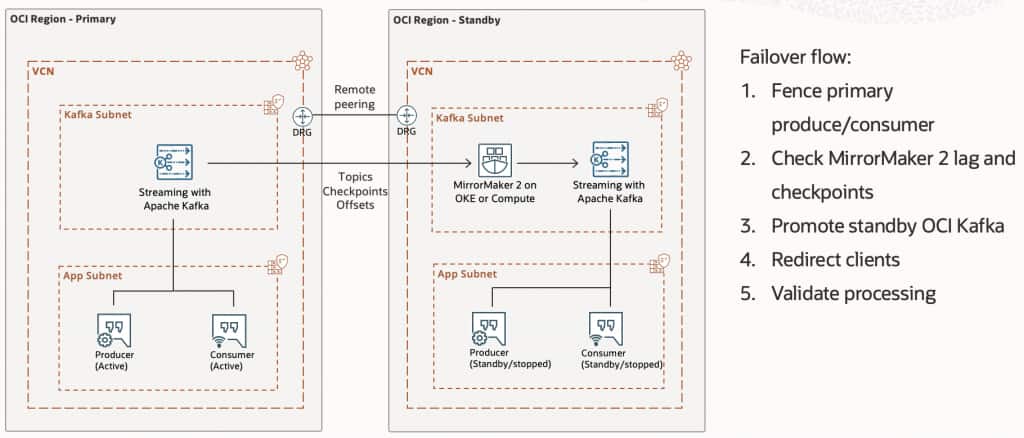
Figure 1. Active/Standby DR reference architecture for OCI Streaming with Apache Kafka.
The major components are:
- Primary OCI Streaming with Apache Kafka cluster: the active cluster used by producers and consumers during normal operations.
- Standby OCI Streaming with Apache Kafka cluster: a warm cluster in another OCI region, sized and configured to take production traffic during a DR event.
- MirrorMaker 2 replication layer: replicates topics, topic data, and selected consumer group offset information from the primary cluster to the standby cluster.
- Private network connectivity: Kafka clients and replication workers connect through private OCI networking.
- Operational runbook: a documented and tested failover and failback process.
What OCI manages, and what you manage
OCI Streaming with Apache Kafka manages the Kafka cluster infrastructure and broker lifecycle. For cross-region disaster recovery, customers design and operate the replication layer, typically using Apache Kafka MirrorMaker 2 on OCI Compute or Oracle Kubernetes Engine. (See OCI Streaming with Apache Kafka documentation.)
That ownership boundary is important. OCI reduces the operational burden of running Kafka clusters, while customers retain control over replication policy, topic selection, failover criteria, offset synchronization, and application cutover. (See Oracle FAQ on Kafka Connect and MirrorMaker 2 and Kafka MirrorMaker 2 documentation.)
| OCI manages | You manage |
| Kafka cluster infrastructure; broker lifecycle; managed Kafka service operations | DR topology; MirrorMaker 2 workers; replication configuration; topic selection; consumer group offset strategy; failover and failback process; application cutover behavior |
This is a healthy boundary for enterprise DR. The managed service provides the Kafka foundation, while the customer-owned operating model defines how replication, monitoring, failover, and failback should work for each application tier.
Step 1: Define your DR objectives
Before creating infrastructure, define your recovery targets. The two most important questions are:
How much data can the application tolerate losing?
How quickly must the application resume processing?
| Objective | Meaning |
| RPO | Recovery Point Objective: how much data loss is acceptable |
| RTO | Recovery Time Objective: how quickly service must resume |
With MirrorMaker 2, replication is asynchronous. That means you can typically achieve an RPO measured in seconds or minutes, depending on throughput, network conditions, and replication lag. But asynchronous replication does not guarantee zero data loss. (See Kafka MirrorMaker 2 geo-replication guide.)
If your requirement is RPO = 0, you need to design beyond standard asynchronous replication. That may mean application-level dual writes, an upstream durable source of truth, or a replayable system of record.
| Target | Practical expectation |
| RPO | Seconds to a few minutes |
| RTO | 15-60 minutes, depending on automation |
| Data loss | Possible for records not yet replicated |
| Zero downtime | Not assumed |
The exact numbers should be validated through DR testing, not estimated from a diagram.
Step 2: Create the primary Kafka cluster
Start with the production cluster in your primary OCI region. For production workloads, use a highly available cluster configuration. Design the cluster around expected throughput, partition count, retention period, storage requirements, and replay behavior. (See OCI Kafka cluster creation guide.)
Key design choices include Kafka version, broker count, broker shape, storage per broker, authentication model, topic replication factor, topic retention, partition count, network placement, access control model
For most production Kafka deployments, I recommend creating at least three brokers and designing topics with an appropriate replication factor and min.insync.replicas setting. Also avoid underestimating storage. In a DR scenario, consumers may need to replay data after recovery. Retention should reflect both normal operations and recovery needs.
Step 3: Create the standby Kafka cluster
Next, create a second OCI Streaming with Apache Kafka cluster in the standby region. This cluster should be treated as production infrastructure, not as a placeholder. During an outage, it becomes the active cluster. (See OCI Kafka cluster creation guide.)
| Area | Recommendation |
| Kafka version | Match primary |
| Authentication | Match primary |
| Network posture | Match primary |
| ACL model | Match primary |
| Critical topic configs | Match or intentionally override |
| Monitoring | Enable from day one |
| Capacity | Size for DR workload |
Some customers choose to run the standby cluster at full production size. Others run it slightly smaller and scale it during a DR event. Both models can work, but the trade-off is clear: a smaller standby cluster may reduce steady-state cost, but it can increase RTO and operational risk.
My recommendation: for Tier 1 workloads, keep the standby cluster warm and sized to handle the expected DR load without emergency resizing.
Step 4: Establish private connectivity
OCI Streaming with Apache Kafka is designed for private connectivity. Plan the network path carefully. Your MirrorMaker 2 workers need to reach both clusters: (See Oracle FAQ on private connectivity and OCI Kafka networking prerequisites.)
MM2 workers -> primary Kafka bootstrap endpoint
MM2 workers -> standby Kafka bootstrap endpoint
Your standby applications also need a tested path to the standby Kafka cluster. Typical network considerations include:
- VCN and subnet design in both regions
- Network security groups or security lists
- DRG or remote peering design
- DNS and service discovery
- FastConnect or VPN for on-premises clients
- Firewall and route table updates
- Certificate and truststore distribution, if using mTLS
Do not leave networking validation until the first DR test. Connectivity problems are one of the most common causes of failed disaster recovery exercises.
Step 5: Configure authentication and authorization
Use the same security posture in both regions. OCI Streaming with Apache Kafka supports secure client authentication patterns such as SASL/SCRAM and mTLS. Choose the model that fits your enterprise security standards and apply it consistently across primary, standby, and MirrorMaker 2. (See OCI SASL/SCRAM configuration and OCI Kafka ACL configuration.)
Use least privilege for the MirrorMaker 2 principal. It typically needs permissions to:
- Read source topics
- Describe source topics
- Read source consumer groups, if offset checkpointing is used
- Write replicated records to standby topics
- Create or alter target topics, if you allow topic/config sync
- Write MirrorMaker 2 internal topics such as heartbeats, checkpoints, and offset-syncs
Your application principals should also exist in the standby cluster before an incident. DR is not the moment to discover missing ACLs.
Step 6: Deploy MirrorMaker 2
MirrorMaker 2 is the replication engine between the primary and standby clusters. You can run it on OCI Compute, Oracle Kubernetes Engine, or another approved runtime that has private network access to both Kafka clusters. For production, avoid a single worker. Run multiple workers and distribute them across fault domains or availability domains where possible. (See Kafka MirrorMaker 2 documentation.)
A simplified MirrorMaker 2 configuration looks like this:
clusters = primary, standby

primary.bootstrap.servers = <primary-bootstrap-server>:9092
standby.bootstrap.servers = <standby-bootstrap-server>:9092

primary->standby.enabled = true

topics = orders.*, payments.*, inventory.*
groups = order-service.*, payment-service.*, inventory-service.*

topics.exclude = __.*, connect-.*, .*\.internal
groups.exclude = console-consumer-.*, connect-.*

emit.heartbeats.enabled = true
emit.checkpoints.enabled = true
sync.group.offsets.enabled = true

tasks.max = 8
Treat this file as production code. Version it, review it, and promote it through environments just like application configuration.
Step 7: Understand how MirrorMaker 2 handles offsets
Replicating Kafka records is only part of DR. Consumers also need to know where to resume when they start reading from the standby cluster. This is where MirrorMaker 2 offset handling becomes important.
Kafka offsets are not globally portable. An offset in the primary cluster does not automatically mean the same thing in the standby cluster. For example: (See KIP-545 offset sync design.)
Primary cluster:
orders-0 offset 1000

Standby cluster:
primary.orders-0 offset 742
Those two offsets may refer to the same logical record, but the numeric offset values can differ because the records exist in different Kafka logs.
MirrorMaker 2 handles this by maintaining offset mappings between the source and target clusters. It records how source offsets map to target offsets, then uses those mappings to create translated consumer group checkpoints. (See Kafka MirrorMaker 2 offset translation documentation and KIP-545.)
source topic-partition: orders-0@1000
target topic-partition: primary.orders-0@742
That allows a consumer group such as order-service to resume in the standby cluster near the equivalent position:
Primary:
order-service committed orders-0@1000

Standby:
order-service resumes primary.orders-0@742
| Component | Role |
| MirrorSourceConnector | Replicates topic data from source to target |
| Offset syncs | Maintain mappings between source offsets and target offsets |
| MirrorCheckpointConnector | Emits translated consumer group checkpoints |
| Group offset sync | Optionally writes translated offsets into the target cluster consumer offset store |
For Active/Standby DR, enable checkpoint emission and group offset synchronization for the primary-to-standby flow: (See KIP-545 automated consumer offset sync.)
primary->standby.emit.checkpoints.enabled = true
primary->standby.sync.group.offsets.enabled = true
You should also scope the consumer groups you want to synchronize:
primary->standby.groups = order-service.*, payment-service.*, inventory-service.*
This is especially useful during failover because standby consumers can start from the latest translated offsets instead of starting from the beginning or relying entirely on manual offset reset.
However, there is an important operational caveat: do not actively run the same consumer groups in both regions during normal Active/Standby operation.
Normal state:
- Producers write to primary
- Consumers read from primary
- Standby consumers are stopped
- MM2 replicates data and syncs translated offsets to standby
- Primary producers and consumers are stopped or fenced
- MM2 state is checked
- Standby consumers are started
- Consumers resume from translated offsets
This matters because if the same consumer group is already active in the standby cluster, its offsets are live and moving. You do not want MM2 overwriting active standby consumer progress with checkpointed offsets from the primary cluster.
Offset translation should be treated as a failover accelerator, not as an exactly-once recovery guarantee.
Because replication and checkpointing are asynchronous, the translated standby offset may be slightly behind the exact point where the primary consumer stopped. During failover, this usually means consumers may re-read some records. This is generally safer than skipping records, but it requires application-level idempotency.
For critical applications, validate offset behavior with realistic consumer groups, realistic processing delays, and realistic failover timing.
Mechanisms for seamless consumer failover
For consumer failover, the goal is to let applications resume processing in the standby region as close as possible to their last processed position in the primary region, while avoiding skipped messages and minimizing duplicate processing.
Several mechanisms work together to support this outcome:
- MirrorMaker 2 checkpointing and offset translation: MirrorMaker 2 tracks how source topic-partition offsets map to replicated target topic-partition offsets. Because Kafka offsets are local to a specific cluster log, consumers cannot simply reuse the numeric offset from the primary cluster in the standby cluster. MM2 uses offset-sync records and checkpoint records to translate consumer group progress so standby consumers can resume from translated offsets rather than starting from the beginning.
- Group offset synchronization: Enable checkpoint emission and group offset synchronization for the primary-to-standby flow, and scope the consumer groups that should be synchronized. For example:
primary->standby.emit.checkpoints.enabled=true, primary->standby.sync.group.offsets.enabled=true, and primary->standby.groups=order-service.*, payment-service.*, inventory-service.*. - Inactive standby consumers during normal operations: For Active/Standby DR, standby consumers should normally remain stopped. This allows MM2 to synchronize translated offsets into the standby cluster without competing with active consumers. During failover, start standby consumers after confirming replication and checkpoint health.
- Consistent consumer group IDs: Consumers in the standby region should use the same consumer group IDs used in the primary region. Changing the group ID during failover causes Kafka to treat the application as a new consumer group, which can result in starting from earliest, latest, or another configured reset position instead of the translated checkpoint.
- Topic naming aligned to the failover model: Default MM2 topic naming may create standby topics such as primary.orders.created, which is safe but may require topic remapping during failover. Same-name topics can simplify application cutover because clients may only need to change bootstrap endpoints, but they require stronger controls to prevent split-brain writes and replication loops.
- Replication lag and checkpoint monitoring: Minimal data loss depends on replication health. Before failover, operators should check replication lag, MM2 task status, checkpoint freshness, offset-sync health, target topic availability, and standby consumer group offsets.
- Idempotent, replay-safe consumers: Offset translation should be treated as a failover accelerator, not as an exactly-once recovery guarantee. Because replication and checkpointing are asynchronous, consumers may re-read some records after failover. Applications should use event IDs, message keys, processed-event tracking, upserts, transactional downstream writes where possible, and safe retry logic.
- Realistic DR testing: Validate failover with real application consumers, representative message sizes, realistic throughput, realistic processing delays, and realistic failover timing. Measure duplicate records, skipped records, recovery time, and whether the standby consumers resume near the expected position.
Step 8: Decide your topic naming strategy
One of the most important MirrorMaker 2 decisions is topic naming. By default, MirrorMaker 2 often writes replicated topics with the source cluster alias as a prefix. For example: (See Kafka MirrorMaker 2 remote topic naming guidance.)
orders.created

becomes

primary.orders.created
That is safe because it avoids naming collisions, but it means applications may need to switch topic names during failover. Another option is to use an identity replication policy, where topic names remain the same in the standby cluster.
Topic naming also affects offset handling. If you use default prefixed topics, consumers must fail over to the replicated topic name, such as primary.orders.created. If you use same-name topics, consumer configuration may be simpler, but operational safeguards become more important.
My recommendation is to choose topic naming based on your failover operating model.
| Operating model | Recommended topic strategy |
| First DR implementation, lowest operational risk | Default MM2 prefixed topic names |
| Applications can support topic remapping during failover | Default MM2 prefixed topic names |
| You want bootstrap-endpoint-only cutover | Same-name topics with an identity replication policy |
| You are preparing for bidirectional or Active/Active replication | Same-name topics only with strict loop prevention and ownership rules |
Same-name topics can simplify application cutover because clients may only need to change bootstrap endpoints. However, they require strong controls to prevent split-brain writes and accidental replication loops.
There is no universal answer. Choose the policy that makes your failover process easiest to test and safest to operate.
Step 9: Validate replication and offset sync end to end
Once MirrorMaker 2 is running, test it with real operational scenarios. Validation should include:
| Validation list | Sample validation flow |
| – Creating a test topic in primary – Producing test messages – Confirming messages arrive in standby – Verifying partition count – Verifying topic configuration – Verifying consumer group checkpoints – Confirming standby application credentials work – Testing producer and consumer connectivity from the standby application environment – Measuring replication lag under load – Confirming translated offsets are usable after failover | 1. Start a consumer group in primary 2. Produce messages to the primary topic 3. Confirm the consumer processes and commits offsets in primary 4. Stop the primary consumer 5. Wait for MM2 checkpoint sync 6. Start the same consumer group in standby 7. Confirm it resumes near the expected position 8. Check for duplicates or skipped records |
Do not validate only with an empty topic. Test with representative message size, throughput, partitions, consumer group behavior, and failover timing. For business-critical workloads, perform this test with realistic processing logic, not just console producers and consumers.
Step 10: Monitor DR continuously
A DR environment that is not monitored is not a DR environment. At minimum, monitor: (See Oracle FAQ on OCI Kafka monitoring metrics.)
| Metrics to monitor | Alarms on conditions that threaten RPO or RTO |
| 1. MirrorMaker 2 connector status 2. MirrorMaker 2 task status 3. Replication latency 4. Source consumer lag for MM2 5. Records replicated per second 6. Bytes replicated per second 7. Checkpoint freshness 8. Offset sync health 9. Standby broker health 10. Standby storage usage 11. Authentication failures 12. Authorization failures 13 Application consumer lag after failover | 1. Replication lag exceeds threshold 2. MM2 task failed 3. No records replicated for active topic 4. Checkpoint age exceeds threshold 5. Offset sync is stale 6. Standby cluster unavailable 7. Standby storage nearing limit 8. Authentication failures spike |
A good operational test is simple: could your on-call engineer tell, right now, whether the standby Kafka cluster is healthy enough to promote? If the answer is no, improve the dashboards and alarms before calling the design complete.
Step 11: Write the failover runbook
Failover should be boring. That only happens when the process is documented and practiced.
It is important to distinguish replication from failover. MirrorMaker 2 can replicate records and help translate consumer group progress, but it does not automatically decide when to promote the standby region, redirect application traffic, fence the old primary, or validate business processing. Those steps should be handled through a tested runbook or customer-owned automation.
A production DR design should therefore include both a replication mechanism and a failover orchestration process. A typical Active/Standby failover runbook includes:
1. Confirm the incident – Determine whether the issue is isolated to an application, network path, Kafka cluster, availability domain, or full region.
2. Freeze writes to primary – If possible, stop producers from writing to the primary cluster. This prevents split-brain and reduces the chance of records being written after replication has stopped.
3. Stop or fence primary consumers – Make sure the active consumer groups are no longer processing from the primary cluster.
4. Check replication and offset state – Review MirrorMaker 2 lag, checkpoint freshness, offset sync status, and the latest replicated offsets. This helps estimate potential data loss or duplicate processing.
5. Promote standby – Declare the standby cluster as the active Kafka cluster.
6. Redirect producers – Update producer bootstrap configuration, DNS, service discovery, deployment variables, or secrets to point to the standby cluster.
7. Redirect consumers – Update consumers to read from the standby cluster. If you use prefixed replicated topics, update topic mapping as part of this step. Consumers should resume from the translated offsets synchronized by MirrorMaker 2, assuming offset sync was enabled and the consumer groups were not active in standby.
8. Validate application processing – Confirm that producers can write, consumers can read, offsets are moving, and downstream systems are healthy.
9. Fence the old primary – When the original primary region returns, do not let it automatically resume as the write cluster. Keep it fenced until failback is planned.
The most important operational principle is this: avoid two active write clusters unless you intentionally designed for Active/Active.
Step 12: Plan failback before you need it
Failback is often harder than failover. After operating from the standby region, the original primary may be behind. You need to decide how to reconcile or rebuild.
Do not assume that a failover-ready design is automatically failback-ready. In a one-way Active/Standby design, replication and offset translation are optimized for movement from primary to standby. If the standby region becomes active and starts accepting new writes, the original primary is now behind. Returning to the original primary requires an explicit failback strategy.
Before enabling failback, decide whether you will keep the DR region as the new primary, reverse replication from the DR region back to the original primary, or rebuild the original primary from the active DR region.
Option 1: Stay in the DR region – The former standby becomes the new primary. You rebuild the original primary as the new standby. This is often the simplest and safest immediate decision.
Option 2: Reverse replication – You configure replication from the DR region back to the original primary, wait for it to catch up, then cut applications back. This requires careful validation to avoid data loss or duplication. You should also consider how consumer group offsets will be translated in the reverse direction before moving consumers back.
Option 3: Rebuild the original primary – For severe incidents or unclear divergence, recreate the original primary cluster state from the current active cluster.
standby -> primary
The right failback strategy depends on how long you ran in DR mode, whether producers continued writing, and how much divergence exists.
Common mistakes to avoid
Mistake 1: Treating standby as cold infrastructure – A cold Kafka cluster is rarely enough for production DR. Topics, ACLs, credentials, networking, and application configuration all need to be ready before an incident.
Mistake 2: Replicating everything – Not every topic needs DR. Replicating internal, temporary, test, or high-volume noncritical topics can increase cost and lag. Be intentional.
Mistake 3: Forgetting consumer offsets – Replicating messages is not the same as resuming business processing. Consumers need correct topic names, credentials, translated offsets, and downstream connectivity.
Mistake 4: Running standby consumers too early – For clean Active/Standby, avoid running the same consumer groups in standby while MM2 is trying to synchronize offsets. Start standby consumers during failover, not during normal operation.
Mistake 5: Ignoring duplicate processing – After failover, some messages may be reprocessed. Consumers should be idempotent where possible.
Mistake 6: Not testing failback – Many teams test failover but never test returning to the original region. That leaves a major operational gap.
Production readiness checklist
For business continuity and resilience, keep the standby environment warm, automate repeatable configuration, monitor replication and checkpoint health continuously, test failover regularly, and make ownership clear across platform, application, and operations teams.
| Category | Check |
| Primary cluster | Production-sized and monitored |
| Standby cluster | Warm, reachable, and monitored |
| Network | Private connectivity tested both ways as needed |
| Security | Credentials, certs, and ACLs exist in both regions |
| Replication | MM2 running with tested topic and group filters |
| Offset handling | Checkpoints and group offset sync configured |
| Topic naming | Failover behavior documented |
| Observability | Lag, task health, checkpoint age, and standby health alarms configured |
| Applications | Producers and consumers can switch to standby |
| Consumer behavior | Consumers are idempotent and replay-safe |
| Runbook | Failover and failback steps documented |
| Testing | DR exercise completed with measured RPO/RTO |
| Ownership | On-call and escalation paths defined |
A good way to evaluate readiness is to ask: if the primary region became unavailable today, could the on-call team identify the latest replicated point, promote the standby cluster, redirect applications, and validate business processing using a documented process?
If the answer is no, the next investment should be monitoring, automation, or runbook testing before adding more complexity.
Final recommendation
For most customers, I recommend starting with this pattern:
OCI Streaming with Apache Kafka - Primary Region
        |
        | MirrorMaker 2, customer-managed
        | Replicate topics, data, checkpoints, and translated offsets
        v
OCI Streaming with Apache Kafka - Standby Region
Use one-way replication, keep the standby cluster warm, monitor replication and checkpoint health continuously, and test the failover process on a schedule. (See Oracle FAQ on Active/Standby replication and Kafka MirrorMaker 2 documentation.)
The key point is that DR is not only about getting records into another Kafka cluster. It is also about enabling applications to resume processing safely. MirrorMaker 2 helps by translating and checkpointing consumer group offsets, but applications should still be prepared for duplicate processing and replay.
Active/Standby gives you a strong foundation for regional resilience without introducing the full complexity of Active/Active from the beginning. Once your applications, operations, and business requirements mature, you can evaluate more advanced patterns. But for most production Kafka DR use cases, a well-tested Active/Standby design is the right place to start.
For seamless consumer failover, combine MirrorMaker 2 topic replication, checkpoint emission, group offset synchronization, inactive standby consumer groups, consistent consumer group IDs, monitored replication lag, and idempotent consumer logic. This combination minimizes message reprocessing and data loss, but it does not eliminate them completely because Active/Standby replication is asynchronous.