


Summary
Nextflow RNA sequencing pipeline are good for HPC scheduling since they combine parallel processing, various CPU activity and memory usage of each component. In this study, the NF-Core/RNASeq workflow was run on both OCI E5 and E6 Flex VM shapes across single-node and dual-node setups.
The benchmark results show that E6 Flex consistently outperforms E5, while additional memory beyond the 4 GB/core range does not provide proportional benefit. On the cost side, the faster execution on E6 translates directly into lower cost per job.
Main conclusion: For this RNA-seq workload, the best reference configuration is 64 cores with 64 GB memory. It delivered the fastest runtime in the benchmark and should be the default recommendation for production use on clusters with OCI E6 Flex shape (VM.Standard.E6.Flex).
Introduction
RNA-Seq pipeline transforms raw sequencing reads into gene expression insights through a sequence of steps that stress both compute and storage subsystems. They are sensitive to CPU counts, memory sizes, job scheduling efficiency, parallelism and execution configurations.
The workflow used here follows the standard NF-Core RNA-Seq pattern: quantify FASTQ files, perform quality control, trim adapters, align or pseudo align reads, quantify expression, and generate reporting outputs for downstream interpretation.
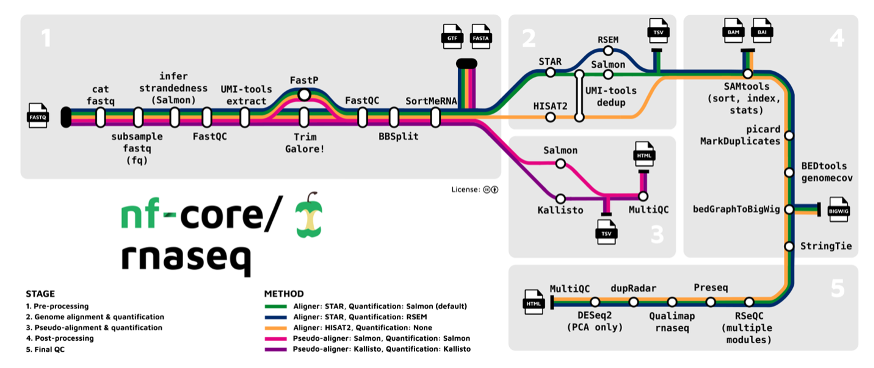
We used nf-core/rnaseq v3.14.0 (https://nf-co.re/rnaseq/3.14.0/) with Nextflow because it offers reproducibility, portability, and scalable execution on OCI HPC. The pipeline integrates QC, trimming, alignment or pseudoalignment, post-processing, and reporting into a single automated workflow.
- Containerized execution through Singularity
- Parallel execution through Nextflow and Slurm
- Standardized best-practice genomics tools
- MultiQC-based consolidated reporting
Benchmark Methodology
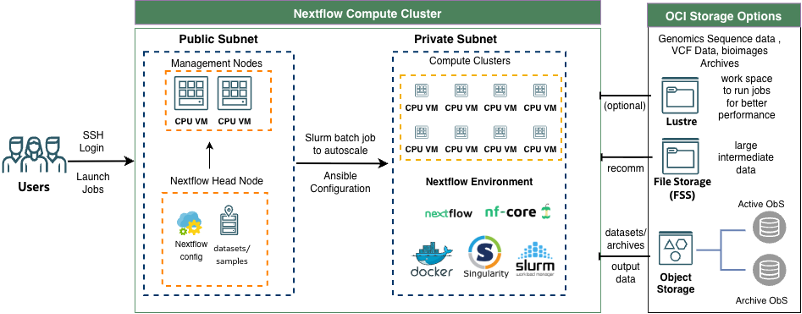
The environment was deployed on OCI HPC Stack v3.0 nextflow branch using Terraform and Ansible (see Nextflow cluster deployment diagram below). Job is scheduled through optimal Slurm configuration for Nextflow, along with Singularity for test runs.
System configuration
- Compute shapes: E5 Flex and E6 Flex
- Core counts tested: 16, 32, and 64
- Memory settings: 1, 2, 4, and 8 GB per core as 1:1, 1:2, 1:4 and 1:8 memory per core ratio
- Deployment modes: single-node and dual-node
Dataset and execution
- Dataset: GSE55190 from NCBI GEO which has 24 Samples in the dataset
- Approximate input size: 2.5 GB
- Pipeline command: nf-core/rnaseq with kallisto pseudoalignment
- Dataset is downloaded from NCBI using sratoolkit.3.4.1 with command fastq-dump -O . –split-files –gzip GSE55190, which is exome sequence of gene expression in Liver of Control and JNK deficient mice fed a control or a high fat diet. The dataset contains 24 samples (https://www.ncbi.nlm.nih.gov/geo/query/acc.cgi?acc=GSE55190). The reference files are downloaded from https://web.dolphinnext.com/umw_biocore/dnext_data/genome_data/mouse/mm39/gencode_m36/main/genome.fa and https://web.dolphinnext.com/umw_biocore/dnext_data/genome_data/mouse/mm39/gencode_m36/genes/genes.gtf.
- Execution command
export NXF_SINGULARITY_CACHEDIR=/home/ubuntu/.cache/singularity
nextflow run nf-core/rnaseq -r 3.14.0 -with-report \
    -w ./work \
--input /work/GSE55190/GSE55190-benchmark.csv \
--fasta /work/GSE55190/reference/genome.fa \
--gtf /work/reference/genes.gtf \
-c nextflow.config \
--outdir ./results \
--pseudo_aligner kallisto \
-profile singularity - The reference files are downloaded from https://web.dolphinnext.com/umw_biocore/dnext_data/genome_data/mouse/mm39/gencode_m36/main/genome.fa and https://web.dolphinnext.com/umw_biocore/dnext_data/genome_data/mouse/mm39/gencode_m36/genes/genes.gtf.
Benchmark Results
The benchmark results show that E6 is faster than E5 across all tested shapes and dual-node execution improves runtime further. The fastest run in the study came from the 64-core, 64 GB configuration, making it the strongest reference point for future deployments.
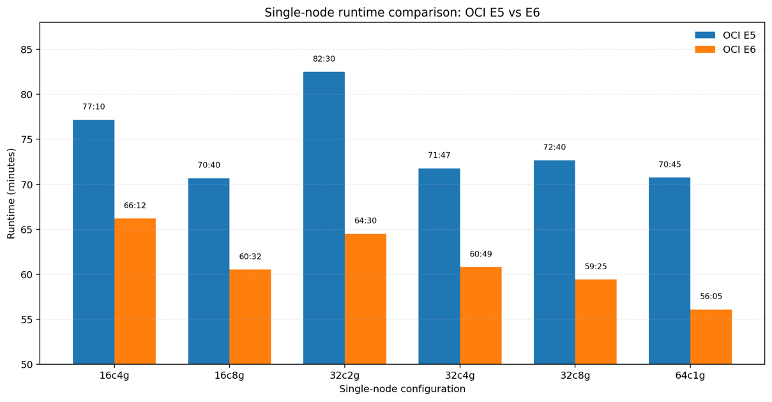
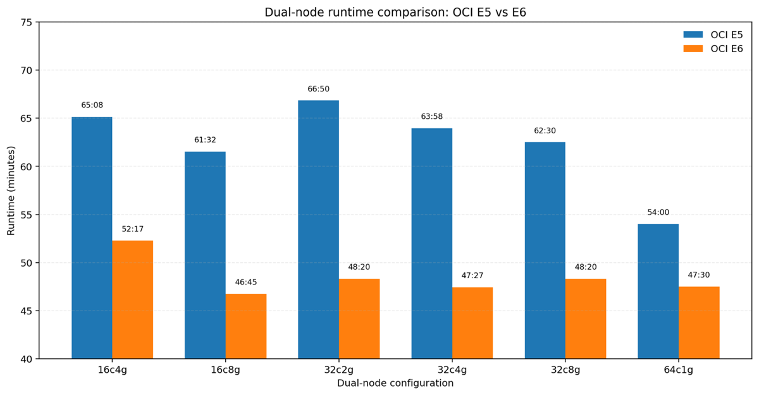
When running jobs on compute instances with less than 64 GB total memory, the job fails due to insufficient memory for sequence alignment, but when memory requirement is met, increasing memory doesn’t translate significant performance boost. With increasing CPU cores, the job run faster with more threads are used. In practice, the benchmark suggests that optimal value comes from balanced CPU and memory settings rather than maximum provisioning.
Interpretation: The E6 platform completes the workflow faster on every tested configuration, with the largest gains appearing where the workload benefits most from improved CPU efficiency.
Cost Comparison
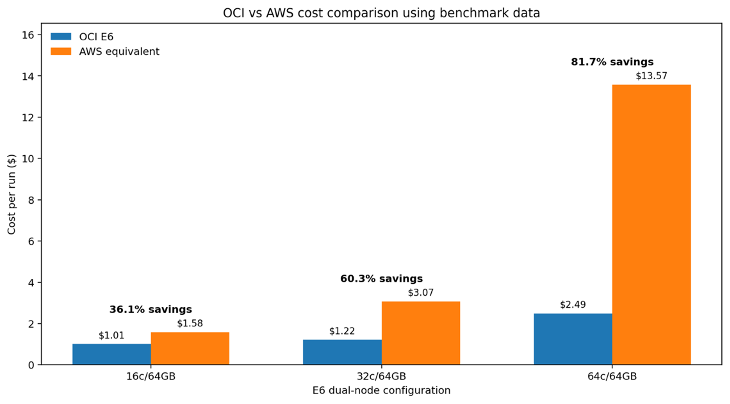
The same pattern holds across the main E6 configurations. OCI remains lower cost in every case, and the advantage becomes especially pronounced at higher core counts. This happens because faster completion reduces the total time the pipeline spends consuming compute resources.
| Configuration | OCI New Cost per Job | AWS Cost per Job | OCI Savings vs AWS |
| 16 cores / 64 GB | $1.01 | $1.58 | 36.1% |
| 32 cores / 64 GB | $1.22 | $3.07 | 60.3% |
| 64 cores / 64 GB | $2.49 | $13.57 | 81.6% |
These numbers make the recommendation straightforward: for production RNA-seq pipelines, the 64-core, 64 GB E6 configuration is the strongest reference point because it delivers the fastest runtime and the largest cost advantage.
Headline result: In the 64-core dual-node benchmark, OCI E6 completed the workflow at $2.49 per run versus $13.57 per run on the AWS reference instance, which is approximately 81.6% lower cost on OCI.
Conclusion
This benchmark demonstrates that OCI E6 Flex shape provides the best overall performance and cost efficiency for RNA-seq workloads using Nextflow. Across all configurations tested, higher core counts consistently reduced total runtime, with the most efficient configuration emerging at the high end of the spectrum.
The optimal configuration observed in this study is 64 cores with 64 GB memory (1 GB per core). This setup delivered the fastest overall execution while maintaining efficient memory utilization, indicating that CPU parallelism—not memory capacity—is the dominant factor for this workload.
Lower core configurations such as 16- and 32-core shapes still provide useful performance, but they do not match the throughput of the 64-core deployment. Likewise, increasing memory beyond what the workload needs does not materially improve runtime, so the strongest recommendation is to prioritize CPU parallelism first and size memory conservatively.
Recommendation: For production RNA-seq pipelines, use 64-core configurations with 64 GB memory as the reference baseline. This provides the best runtime performance and the strongest practical recommendation from the benchmark.
In summary, this benchmark highlights a key principle for genomics workloads: maximize parallelism with sufficient memory, then validate the cost tradeoff against the runtime gained. On OCI E6 Flex, the 64-core, 64 GB configuration is the clearest reference point for teams looking to optimize RNA-seq throughput.
Note: The AWS comparison above is an estimate based on the assumption that equivalent results can be achieved on AWS with broadly similar utilization. For a strict apples-to-apples comparison, the AWS workload would need to be benchmarked directly under the same pipeline settings.